AWS Marketplace
Enhance Agreement Notifications in AWS Marketplace with Amazon EventBridge
AWS Marketplace is updating how independent software vendors (ISVs) and Channel Partners (CPs) handle purchase agreement notifications by transitioning from Amazon Simple Notification Service (Amazon SNS) to Amazon EventBridge. This notification system expands beyond existing Amazon SNS capabilities, delivering complete agreement lifecycle events and enhanced integration options that enable automated workflows.
The shift to Amazon EventBridge notifications enables more sophisticated event processing for third-party software as a service (SaaS) and professional services product types. This approach streamlines the complete lifecycle management of agreements, enabling efficient event handling and integration processes for companies managing multiple products or high-volume AWS Marketplace transactions. In this post, we explore how you can use EventBridge to create specific rules based on event data and define targeted actions to automate your workflows.
Benefits of Amazon EventBridge
Amazon EventBridge delivers events reliably and enables automation through platforms including email, mobile apps, and chat-based services. It offers several key benefits for handling agreement notifications, giving your team ample time to plan. It simplifies event processing by eliminating the need for Amazon SNS subscription management. The service provides flexible integration capabilities, allowing you to manage software deployments through AWS Lambda, orchestrating workflows with AWS Step Functions, or monitoring events using Amazon CloudWatch. EventBridge features fine-grained event filtering, enabling you to filter events using JSON patterns for specific agreement types, pricing tiers, or customer segments in the event rule. Furthermore, it offers expanded event support that includes lifecycle events for SaaS and professional services, making it a comprehensive solution for managing agreement notifications.
Prerequisites
To follow along with the samples in this post, you must complete the following prerequisites:
- Register in AWS Marketplace as a seller.
- Create a private offer for a SaaS or professional services product to receive notifications. If you don’t have an existing product, create products in AWS Marketplace Management Portal.
- Have a beginner level understanding of JSON.
Solution overview
To start using Amazon EventBridge notifications for agreements, set up EventBridge rules in your AWS account. For more information, refer to the Amazon EventBridge User Guide.
Amazon EventBridge configuration
Amazon EventBridge uses event buses to receive events from a variety of sources and matches them to rules in your account and routes them to your specified targets associated with the rules.
- Event bus – Acts as a central hub where events from different sources can be processed and routed to multiple targets.
- Event patterns – Use event patterns to select the event types delivered to your default event bus by AWS Marketplace.
- Event rules – Use event rules to define rules that can react to an event. These rules can react immediately or on a set schedule.
- Event routing – EventBridge routes events between AWS services, integrated SaaS applications, and your own applications.
- Targets – Resources or endpoints that Amazon EventBridge sends events to when the events match the event pattern defined for a rule. Many AWS services have convenient integration with Amazon EventBridge, so you can set their resources as targets. These include AWS Lambda functions, AWS Step Functions workflows, and Amazon API Gateway.
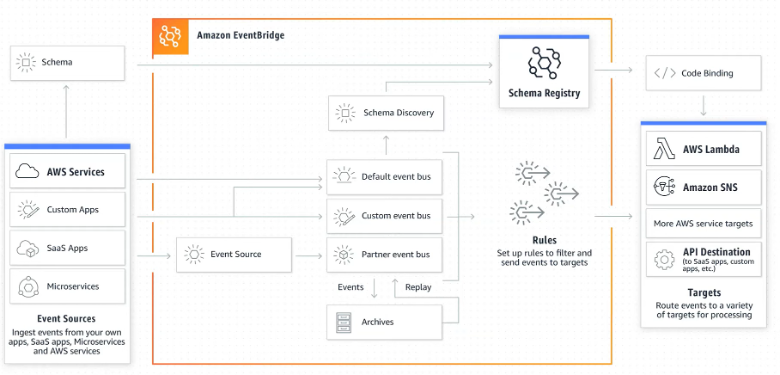
Figure 1: Amazon EventBridge architecture
To start using Amazon EventBridge notifications today, visit the Amazon EventBridge console, enable the ‘aws.agreement-marketplace’ event source, and create event rules.
Event recipients involved in EventBridge notifications
AWS Marketplace supports two primary sales models: direct sales from ISVs to buyers and sales through Channel Partners. In the direct sales model, ISVs act as proposers, offering their products straight to buyers. The Channel Partner model introduces an additional layer, where ISVs (as manufacturers) create resale authorizations, enabling Channel Partners to modify and resell offers to end buyers. The following diagram illustrates both sales models.
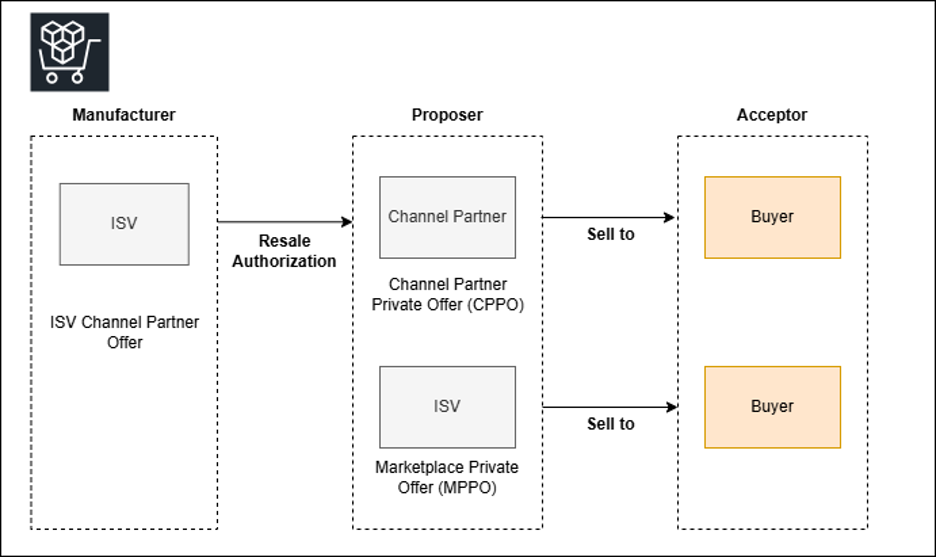
Figure 2: Personas involved in AWS Marketplace agreement events lifecycle
When a purchase agreement is created, the system sends distinct notifications to all relevant parties. In an AWS Marketplace Channel Partner Private Offer (CPPO) scenario, this results in three separate event types:
Purchase Agreement Created – Manufacturerfor the ISVPurchase Agreement Created – Proposerfor the Channel PartnerPurchase Agreement Created – Acceptorfor the buyer
This granular approach means that each party receives information relevant to their role in the transaction, enabling more efficient and targeted event processing.
Seller event notifications
Amazon EventBridge notifications manage AWS Marketplace purchase agreements by providing updates about your agreements. These updates include new purchases, renewals, amendments, cancellations, upcoming expirations, and entitlement changes, enabling better visibility and planning of your cloud services and subscriptions. For more information, refer to Managing SaaS subscription events with Amazon EventBridge.
We will explore the following 3 events in detail.
1. Purchase Agreement Created - Proposer
Amazon EventBridge notifies CPPO and AWS Marketplace Private Offer (MPPO) sellers when purchase agreements are created in AWS Marketplace, so they can close deals and track customer purchases.
A Purchase Agreement Created - Proposer event occurs in three distinct scenarios. First, in the NEW scenario, it represents the initial creation of an agreement. Second, as an example in the REPLACE scenario, it’s a seller-initiated event for agreement-based offers that require buyer acceptance of a new private offer. The process cancels the existing agreement and creates a replacement. Finally, in the RENEW scenario, it’s a buyer-initiated event that creates a new agreement at expiration when auto-renewal is enabled, maintaining all entitlements and supporting seller flexible terms opt-in functionality.
The following is an example EventBridge event schema for the event Purchase Agreement Created - Proposer:
{
"version": "0",
"id": "12345678-1234-1234-1234-123456789012",
"detail-type": "Purchase Agreement Created - Proposer",
"source": "aws.agreement-marketplace",
"account": "<ISV's or CP's account id depending on MPPO or CPPO>",
"time": "2024-08-30T21:36:03Z",
"region": "us-east-1",
"resources": [
"arn:aws:aws-marketplace::aws:agreement:agmt-4mwg1nevbokzw95eca5797ixs"
],
"detail": {
"requestId": "3d4c9f9b-b809-4f5e-9fac-a9ae98b05cbb",
"catalog": "AWSMarketplace",
"agreement": {
"id": "agmt-4mwg1nevbokzw95eca5797ixs",
"intent": "NEW|REPLACE||RENEW",
"status": "ACTIVE",
"acceptanceTime": "2024-06-26T21:36:03Z",
"startTime": "2024-08-30T21:36:03Z",
"endTime": "2025-05-30T21:36:03Z"
},
"resaleAuthorization": {
"id": "EXAMPLE-0aa6s-sMPLE95 for CPPO or NULL for MPPO"
},
"acceptor": {
"accountId": "845735284135"
},
"proposer":{
"accountId": "123456512334"
},
"offer": {
"id": "offer-1234567890123"
}
}
}
Difference between Agreement Created and License Updated events
Agreement and License events serve different purposes in the subscription workflow. When a buyer accepts an offer, you’ll receive an Agreement Created event – this can happen well before the agreement’s start date for future-dated agreements.
The License Updated event signals when you should check for changes to a buyer’s entitlements, such as when new entitlements are provisioned at agreement start time. Upon receiving any License Updated event, you should call the GetEntitlements API to retrieve the current entitlement details. You must wait for the License Update event and use the GetEntitlements API to check entitlements before starting services for a buyer.
Usage-based pricing: Using the License Updated – Manufacturer event
For usage-only listings (without contract components), the GetEntitlements API is not available. Use the License Updated - Manufacturer event to detect license creation for these products.
2. Purchase Agreement Amended - Proposer
Amazon EventBridge notifies ISVs and Channel Partners when buyers modify agreement terms or make other amendments to the purchase agreement. This notification means that ISVs and Channel Partners can track specific changes to agreement terms.
The following is an example EventBridge event schema for the event Purchase Agreement Amended - Proposer:
{
"version": "0",
"id": "12345678-1234-1234-1234-123456789012",
"detail-type": "Purchase Agreement Amended - Proposer",
"source": "aws.agreement-marketplace",
"account": "<ISV's or CP's account id depending on MPPO or CPPO>,
"time": "2024-08-30T21:36:03Z",
"region": "us-east-1",
"resources": [
"arn:aws:aws-marketplace::aws:agreement:agmt-4mwg1nevbokzw95eca5797ixs"
],
"detail": {
"requestId": "3d4c9f9b-b809-4f5e-9fac-a9ae98b05cbb",
"catalog": "AWSMarketplace",
"agreement": {
"id": "agmt-4mwg1nevbokzw95eca5797ixs",
"intent": "AMEND",
"status": "ACTIVE",
"acceptanceTime": "2024-06-26T21:36:03Z",
"startTime": "2024-08-30T21:36:03Z",
"endTime": "2025-05-30T21:36:03Z"
},
"resaleAuthorization": {
"id": "EXAMPLE-0aa6s-sMPLE95 for CPPO or NULL for MPPO"
},
"acceptor": {
"accountId": "845735284135"
},
"proposer":{
"accountId": "123456512334"
},
"offer": {
"id": "offer-1234567890123"
}
}
}
3. Purchase Agreement Ended - Proposer
Amazon EventBridge notifies ISVs and Channel Partners when purchase agreements end. A Purchase Agreement Ended - Proposer event occurs when a purchase agreement reaches cancelled, expired, renewed, replaced, or terminated state.
The following is an example EventBridge event schema for the event Purchase Agreement Ended - Proposer:
{
"version": "0",
"id": "12345678-1234-1234-1234-123456789012",
"detail-type": "Purchase Agreement Ended - Proposer",
"source": "aws.agreement-marketplace",
"account": "<ISV's or CP's account id depending on MPPO or CPPO>",
"time": "2024-08-30T21:36:03Z",
"region": "us-east-1",
"resources": [
"arn:aws:aws-marketplace::aws:agreement:agmt-4mwg1nevbokzw95eca5797ixs"
],
"detail": {
"requestId": "3d4c9f9b-b809-4f5e-9fac-a9ae98b05cbb",
"catalog": "AWSMarketplace",
"agreement": {
"id": "agmt-4mwg1nevbokzw95eca5797ixs",
"status": "CANCELLED | EXPIRED | RENEWED | REPLACED | TERMINATED",
},
"resaleAuthorization": {
"id": "EXAMPLE-0aa6s-sMPLE95 for CPPO or NULL for MPPO"
},
"acceptor": {
"accountId": "845735284135"
},
"proposer":{
"accountId": "123456512334"
},
"offer": {
"id": "offer-1234567890123"
}
}
}
}
Buyer event notifications
Amazon EventBridge notifications provide buyers with real-time updates throughout their agreement lifecycle, including creation, amendments, renewals, and ended agreements. All events are sent to their default EventBridge event bus in the us-east-1 region with the event source aws.agreement-marketplace. For more information, refer to AWS Marketplace Agreement EventBridge Events.
We will explore the following events.
1.Purchase Agreement Created - Acceptor
Amazon EventBridge sends notifications to buyers when purchase agreements are created, which means they can track their purchase agreements. This event occurs in three distinct scenarios. First, in the NEW scenario, it represents the initial creation of a purchase agreement. Second, as an example in the REPLACE scenario, it involves the creation of a replacement agreement for agreement-based offers requiring buyer acceptance. Finally, in the RENEW scenario, it occurs when a new agreement is created through automatic renewal at expiration when enabled.
The following is an example EventBridge event schema for the event Purchase Agreement Created - Acceptor:
{
"version": "0",
"id": "abcd1234-5678-90ef-ghij-klmnopqrstuv",
"detail-type": "Purchase Agreement Created - Acceptor",
"source": "aws.agreement-marketplace",
"account": "987654321098",
"time": "2024-08-30T21:36:03Z",
"region": "us-east-1",
"resources": [
"arn:aws:aws-marketplace::aws:agreement:agmt-9xyz8wmklp67rt32nb1qv45ds"
],
"detail": {
"requestId": "7f3e2d1c-a9b8-4f5e-6d7c-1234567890ab",
"catalog": "AWSMarketplace",
"agreement": {
"id": "agmt-9xyz8wmklp67rt32nb1qv45ds",
"intent": "NEW|RENEW|REPLACE",
"status": "ACTIVE",
"acceptanceTime": "2024-06-26T21:36:03Z",
"startTime": "2024-08-30T21:36:03Z",
"endTime": "2025-05-30T21:36:03Z"
},
"acceptor": {
"accountId": "987654321098"
},
"proposer": {
"accountId": "123456789012"
},
"offer": {
"id": "offer-abcdef123456"
}
}
}
2. Purchase Agreement Amended - Acceptor
Amazon EventBridge notifies buyers when their purchase agreements are amended, which occurs when modifications are made to agreement parameters, including terms and pricing.
The following is an example EventBridge event schema for the event Purchase Agreement Amended - Acceptor:
{
"version": "0",
"id": "12345678-1234-1234-1234-123456789012",
"detail-type": "Purchase Agreement Amended - Acceptor",
"source": "aws.agreement-marketplace",
"account": "<Buyer Account ID>",
"time": "2024-08-30T21:36:03Z",
"region": "us-east-1",
"resources": [
"arn:aws:aws-marketplace::aws:agreement:agmt-4mwg1nevbokzw95eca5797ixs"
],
"detail": {
"requestId": "3d4c9f9b-b809-4f5e-9fac-a9ae98b05cbb",
"catalog": "AWSMarketplace",
"agreement": {
"id": "agmt-4mwg1nevbokzw95eca5797ixs",
"intent": "AMEND",
"status": "ACTIVE",
"acceptanceTime": "2024-06-26T21:36:03Z",
"startTime": "2024-08-30T21:36:03Z",
"endTime": "2025-05-30T21:36:03Z"
},
"acceptor": {
"accountId": "845735284135"
},
"proposer":{
"accountId": "123456512334"
},
"offer": {
"id": "offer-1234567890123"
}
}
}
3.Purchase Agreement Ended - Acceptor
Amazon EventBridge notifies buyers when their purchase agreements end, so they can take appropriate actions such as initiating renewals for expired agreements or updating payment information. This event occurs when a purchase agreement reaches canceled, expired, renewed, replaced, or terminated state.
The following is an example EventBridge event schema for the event Purchase Agreement Ended - Acceptor:
{
"version": "0",
"id": "abcd1234-5678-90ef-ghij-klmnopqrstuv",
"detail-type": "Purchase Agreement Ended - Acceptor",
"source": "aws.agreement-marketplace",
"account": "987654321098",
"time": "2024-08-30T21:36:03Z",
"region": "us-east-1",
"resources": [
"arn:aws:aws-marketplace::aws:agreement:agmt-9xyz8wmklp67rt32nb1qv45ds"
],
"detail": {
"requestId": "7f3e2d1c-a9b8-4f5e-6d7c-1234567890ab",
"catalog": "AWSMarketplace",
"agreement": {
"id": "agmt-9xyz8wmklp67rt32nb1qv45ds",
"status": "CANCELLED | EXPIRED | RENEWED | REPLACED | TERMINATED"
},
"acceptor": {
"accountId": "987654321098"
},
"proposer": {
"accountId": "123456789012"
},
"offer": {
"id": "offer-abcdef123456"
}
}
}
Conclusion
As organizations transition in AWS Marketplace from Amazon SNS to Amazon EventBridge for purchase agreement event delivery, they have a clear path forward to modernizing their integration strategies. By embracing the advanced filtering capabilities of Amazon EventBridge, workflow automation, and enhanced monitoring features, ISVs and Channel Partners can create more resilient and efficient systems for handling purchase agreement events. To learn more about the launch, visit Announcing agreement EventBridge notifications for AWS Marketplace.
About the authors

Tasrin Amin
Tasrin Amin is a Senior Technical Business Developer with AWS Marketplace Center of Excellence. She helps AWS Marketplace sellers and buyers integrating with AWS services and bringing in more adoption to businesses. In her free time, she likes to explore US national and state parks, binge watch TV shows, and travel with her friends and family.

Tanvi Upadhyay
Tanvi is a Technical Account Manager working with automotive and manufacturing industry customers. She works closely with enterprise customers to help them optimize their AWS deployments and achieve their business goals. Outside of work, Tanvi pursues her passions for traveling and sketching.