AWS Big Data Blog
Access Snowflake Horizon Catalog data using catalog federation in the AWS Glue Data Catalog
This is a guest post by Andries Engelbrecht, Principal Partner Solutions Engineer at Snowflake, in partnership with AWS.
AWS announced a new catalog federation feature that allows you to directly access data from Snowflake Horizon Catalog through the AWS Glue Data Catalog. This integration enables you to discover and query Horizon Catalog data in Iceberg format through REST endpoints while applying fine-grained access controls using AWS Lake Formation. The new catalog federation combined with Snowflake’s catalog-linked database feature means users can access data stored across AWS and Snowflake from a single point of entry, reducing data movement and associated costs by eliminating the need to duplicate data across platforms.
In this post, we show you how to connect the AWS Glue Data Catalog to Snowflake Horizon Catalog and query the data using AWS analytics services. We cover how to set up catalogs in Horizon Catalog and configure required permissions, create and configure the federation connection in AWS Glue, implement fine-grained access controls using AWS Lake Formation, and finally, query federated tables using Amazon Athena. This step-by-step approach guides you through the complete process of establishing a integration between your Snowflake and AWS data environments.
Business examples and key benefits
Catalog federation enables several critical business scenarios while delivering key operational and strategic benefits.
Common examples
This federation capability addresses several key business scenarios:
- Governed, cross-platform analytics: Query data across AWS and Snowflake environments to improve data-driven decision making without data movement or duplication
- Data mesh implementation: Enable secure and federated data discovery while maintaining domain-oriented ownership
- Compliance management: Implement consistent access controls and auditing across platforms
Key benefits
- Operational efficiency: Eliminate data duplication and reduce Extract Transform Load (ETL) workloads
- Enhanced security: Centralize access control through AWS Lake Formation with fine-grained permissions
- Cost optimization: Minimize data transfer and storage costs across platforms
- Improved agility: Enable faster time to insights with direct query access
- Simplified governance: Maintain unified compliance and audit framework
Solution overview
The solution uses catalog federation in the AWS Glue Data Catalog to integrate with Snowflake Horizon Catalog. This integration supports both Snowflake Horizon, where the catalog is internal to Snowflake, and external catalogs such as Apache Polaris, Snowflake Open Catalog (a managed service that hosts Apache Polaris), and others.
The following diagram illustrates how AWS Glue Data Catalog federates with Snowflake Horizon Catalog, enabling customers to directly access Iceberg-format data managed by Snowflake Horizon Catalog through the Glue Data Catalog.
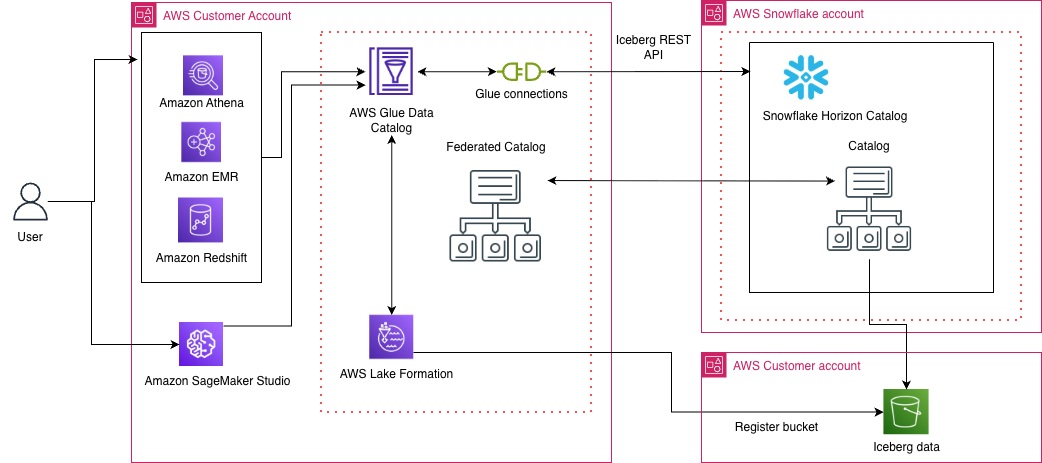
The integration works through three main components:
- Authentication: Uses OAuth2 credentials of Snowflake principal
- Access Control: AWS Lake Formation manages fine-grained permissions
- Query Access: AWS Analytics services like Amazon Athena can directly query the federated tables
Now, we walk through the step-by-step process of setting up this integration.
Prerequisites
Before you begin, confirm you have the following:
- A Snowflake account.
- (Optional) A Snowflake Open Catalog account.
- An AWS Identity and Access Management (IAM) role that is a Lake Formation data lake administrator in your AWS account. A data lake administrator is an IAM principal that can register Amazon S3 locations, access the Data Catalog, grant Lake Formation permissions to other users, and view AWS CloudTrail. See Create a data lake administrator for more information. This IAM role needs access to:
- Install or update the latest AWS Command Line Interface (CLI) version to run the AWS CLI commands. For instructions, refer to Installing or updating the latest version of the AWS CLI.
Configure Snowflake Horizon Catalog for Iceberg external access
Snowflake Horizon Catalog already supports managing Iceberg tables. For this walkthrough, you need to create Snowflake-managed Iceberg tables with data stored in Amazon S3.
Follow these steps in order:
- Create an external volume for S3: First, create an external volume that points to your S3 bucket where Iceberg table data is stored. Follow the instructions in Create External Volume(s) for the Iceberg Tables on S3.
- Create a database: Create a database to organize your tables. Refer to the Snowflake database creation documentation.
- Create a schema: Create a schema within your database following the Snowflake schema creation guide.
- Create an Iceberg table: Create your Iceberg table using the external volume. Follow the instructions to Create Iceberg Table.
After completing these steps, your Snowflake-managed Iceberg tables are ready to federate with AWS Glue Data Catalog.
Configure access control and authentication
To enable AWS Glue to access your Snowflake-managed Iceberg tables, you need to configure access control and obtain authentication credentials.
Step 1: Configure access control
Create a dedicated Snowflake role for external engine access to establish clear governance boundaries. Follow the instructions in Configure Access Control for external engines and set up the appropriate permissions for your Iceberg tables.
Step 2: Obtain an access token
Generate an access token for authenticating AWS Glue to Snowflake Horizon Catalog. Snowflake supports three authentication mechanisms:
- External OAuth
- Key-pair authentication
- Programmatic Access Token (PAT)
Choose the authentication method that best fits your security requirements and follow the corresponding Snowflake documentation to generate your credentials.
Catalog Federation supports OAuth or custom authentication. For details on using OAuth refer to Federate to Snowflake Iceberg Catalog.
For this post, we use custom authentication and generate access token using PAT. Replace role_name with the principal role and token_value with the principal’s Programmatic Access Token.
Note down the access token that is generated.
Step 3: Enable catalog federation
With access control configured and authentication credentials in hand, AWS Glue Catalog Federation can now connect to and access Snowflake’s Horizon Catalog.
Optional: Snowflake Open Catalog configuration
If you prefer to use Snowflake Open Catalog for Iceberg external access instead, refer to Sync a Snowflake-managed table with Snowflake Open Catalog for alternative setup instructions.
Setup Glue Catalog federation with Snowflake Horizon Catalog
Create a secret on AWS Secrets Manager
Log in to AWS console using the IAM role that has access to AWS Secrets Manager. Open Secrets Manager:
- Choose Store a new secret and select Other type of secret for the secret type.
- Set the key-value pair:
- Key:
BEARER_TOKEN - Value: The access token noted earlier
- Key:
- Choose Next and provide the secret name as horizon-secret.
- Complete the setup by choosing Store.
Alternatively, you can use the CLI to create the secret by running the following command.
Replace your-access-token and your-region with your actual values:
Create IAM role for catalog federation
As the catalog owner of a federated catalog in AWS Glue Data Catalog, you can use Lake Formation to implement comprehensive access controls for your data teams:
Access control options
You can implement access controls at different granularity levels depending on your governance needs:
- Coarse-grained: Table-level permissions
- Fine-grained: Column-level, row-level, and cell-level filtering
- Tag-based: Dynamic access based on data classification tags
Lake Formation requires an IAM role with permissions to access the underlying S3 locations of your external catalog.
Create an IAM role that enables the Glue Connection to access AWS Secrets Manager, VPC configurations (optional) and Lake formation to manage credential vending for S3 bucket/prefix.
Required permissions
- Secrets Manager access: The Glue connection requires permissions to retrieve secret values from Secrets Manager for OAuth tokens stored for your Snowflake service connection.
- Amazon Virtual Private Cloud (VPC) Access (optional): When using VPC endpoints to restrict connectivity to your Snowflake Open Catalog account, the Glue connection needs permissions to describe and use VPC network interfaces. This configuration ensures secure, controlled access to both your stored credentials and network resources while maintaining proper isolation through VPC endpoints.
- S3 bucket and AWS Key Management Service (KMS) key permission: The Glue connection requires S3 permissions to read certificates if used in the connection setup. Additionally, Lake Formation requires read permissions on the bucket/prefix where the remote catalog table data resides. If the data is encrypted using a KMS key, additional KMS permissions are required.
Setup steps:
Run the following command using AWS CLI by replacing the placeholder with your setup information:
Create a JSON file (e.g., trust-policy.json) with the following structure:
Use the aws iam create-role command, referencing the trust policy file:
First, create a JSON file (such as, permissions-policy.json) for the permissions:
Then, attach it to the role:
Create federated catalog in Glue Data Catalog
AWS Glue supports the SNOWFLAKEICEBERGRESTCATALOG connection type for connecting Glue Data Catalog with Snowflake Horizon Catalog and Snowflake Open Catalog. This Glue connector supports OAuth2 authentication and includes additional configuration parameters like CASING_TYPE to customize how AWS Glue Data Catalog discovers metadata in the Snowflake Horizon Catalog accounts.
Log in to your AWS console as a data lake admin and open the AWS Lake Formation console.
- Choose Catalog in the left navigation pane and select Create catalog.
- Choose the data source as Snowflake Horizon Catalog.

- Provide the following information:
- Name: Name of the federated catalog in Glue Catalog. For this post, we use federated_lakehousedb
- Catalog name in Snowflake: Catalog name existing in Snowflake Horizon Catalog, this should match exact name in Horizon catalog. For this post, we use LAKEHOUSEDB
- For Connection details, choose New connection configurations:
- Connection name: Name for the glue connection. For this post, we use federatedconnection1.
- Workspace URL: Horizon IRC url (format: https://<account_identifier>.snowflakecomputing.com)
- Casing type: choose Uppercase only
- Authentication:
- Authentication type: choose Custom. Alternatively, you can select OAuth2 authentication. For Custom authentication, an access token is created, refreshed, and managed by the customer’s application or system and stored using AWS Secrets Manager.
- OAuth Secret: Provide the secret manager ARN that was created in the previous step.
- If you have AWS PrivateLink setup and/or a proxy setup, you can provide network details under Settings for network configurations (optional).
- For Register Glue connection with Lake Formation:
- Choose the IAM role created earlier(LFDataAccessRole) to manage data access using Lake Formation.
To test the connection, choose Run test. After the connection information is validated, it shows as successful.

You can now create the catalog by selecting Create catalog.
Alternatively, you can use AWS CLI to create connection and catalog using example commands:
After the catalog is created, the Horizon databases and tables are listed under the federated catalog.
You can implement fine grained access control on the tables by applying row/column filter using Lake Formation.
Query the data using Athena query editor:
Open the Amazon Athena console and run the following query to access the federated Horizon table:
Clean up
To clean up your resources, complete the following steps:
- Drop the Snowflake Database with Cascade.
- Drop External Volume created for Iceberg Tables on S3.
- Drop the resources in Glue Data Catalog and Lake Formation created for this post.
- Delete the IAM roles and S3 buckets used for this post.
- Delete any VPC, KMS keys if used for this post setup.
Conclusion
In this post, we demonstrated how to establish a secure connection between AWS Analytics services and Snowflake Horizon Catalog, enabling you to access your data from a single connected and governed view. You learned how to:
- Configure catalog federation between AWS Glue Data Catalog and Snowflake Horizon Catalog
- Set up OAuth2 authentication for secure access
- Grant access to Iceberg table in Snowflake Horizon Catalog using AWS Lake Formation
- Query federated tables using Amazon Athena
You can follow the same steps to establish a secure connection with open-source catalog options such as Snowflake Open Catalog, a managed service for Apache Iceberg. Remember to clean up any resources you created while following this tutorial to avoid ongoing charges.
To further explore this solution in your environment, consider the following resources:
- AWS Glue announces catalog federation for remote Apache Iceberg catalogs
- Federate to Snowflake Iceberg Catalog
- Introducing catalog federation for Apache Iceberg tables in the AWS Glue Data Catalog
These resources can help you to implement and optimize this integration pattern for your specific use case. As you begin this journey, remember to start small, validate your architecture with test data, and gradually scale your implementation based on your organization’s needs. Stay tuned for future workshops and resources.
About the authors