AWS Big Data Blog
Store and process large strings in Amazon Redshift SUPER columns
Storing large semi-structured data such as JSON and arrays in a data warehouse often means splitting or truncating your data. Amazon Redshift removes this with the SUPER data type and PartiQL language so you can ingest, store, transform, and analyze semi-structured data such as weblogs and sensor data at scale. When you turn on large string support, SUPER supports individual strings up to 16 million bytes and processes strings beyond the 65,535 bytes VARCHAR limit in memory. SUPER also works in case-insensitive databases.
In this post, we walk you through three key SUPER data type enhancements that simplify semi-structured data workflows and reduce common migration challenges.
- Handling large SUPER objects with extended string support: Learn how the 16 million bytes improvement helps you work with large JSON documents that previously exceeded size limits
- In-memory string function processing without truncation for improved efficiency
- Migration from your data warehouse with case insensitivity support: Explore how case-insensitive database compatibility simplifies migrations from legacy databases
Prerequisites
To implement this solution, you need the following prerequisites:
- An AWS account.
- An Amazon Redshift provisioned cluster or an Amazon Redshift Serverless endpoint.
- An Amazon Redshift data warehouse on patch 206 or later (current maintenance track).
- A parameter group with enable_large_strings_opt_in set to
Yesattached to your Amazon Redshift data warehouse. For Amazon Redshift Serverless, set the same parameter in your workgroup configuration. For details, see Behavior changes in Amazon Redshift. - An AWS Identity and Access Management (IAM) role used to perform the COPY command to load the file from Amazon Simple Storage Service (Amazon S3), attached to the Amazon Redshift cluster. For details on authorizing Amazon Redshift to access other AWS services, refer to Authorizing Amazon Redshift to access other AWS services on your behalf.
- Download the sample orders.json data file to test Use Cases one and two.
Use case overview
The SUPER data type helps you process and query semi-structured or nested data. This includes web logs, industrial Internet of Things (IoT) data from machines and equipment, sensor data, genomics data, and more.
The following diagram illustrates the data flow. It shows how data is generated, collected, and stored in Amazon Redshift as the SUPER data type:
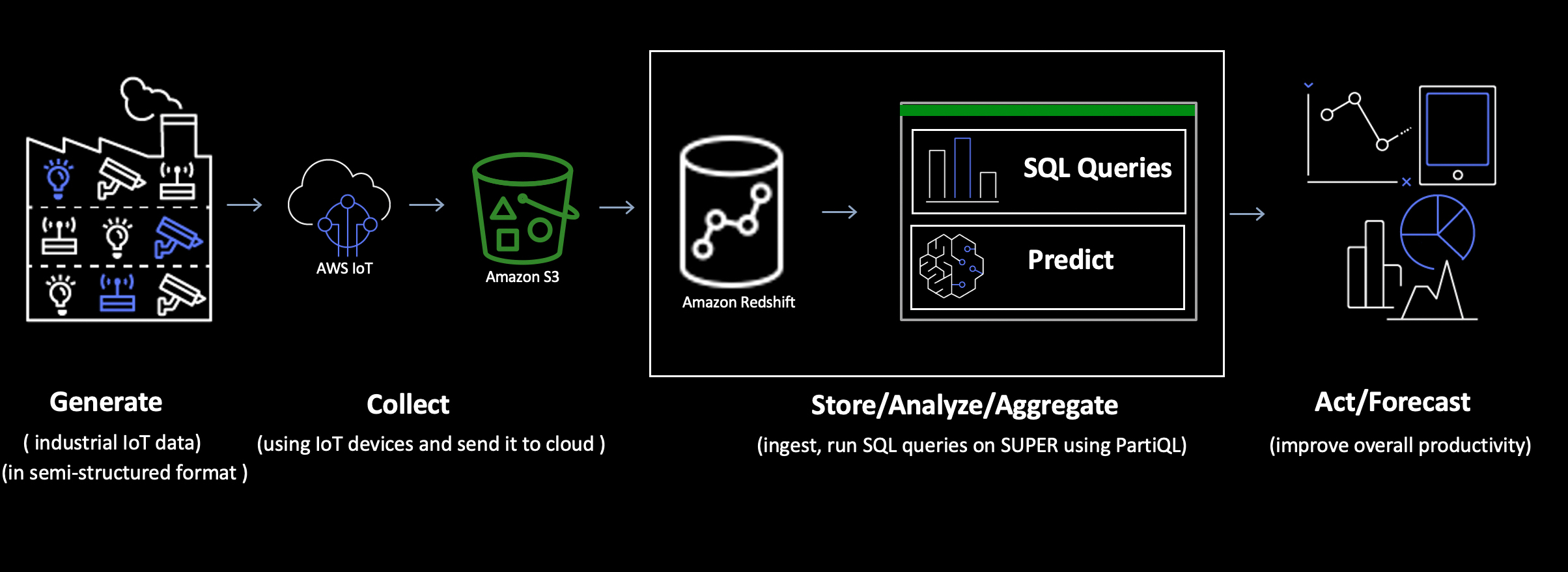 Figure 1: Use case overview flow
Use case one: Handling large JSON documents with extended string support
The challenge
Today, organizations need to store and analyze large semi-structured documents such as detailed customer profiles, comprehensive transaction records, IoT sensor data, and complex event logs.
The solution
Amazon Redshift now supports storing objects up to 16 million bytes in SUPER data type columns. When you turn on large string support, individual strings within SUPER columns now support up to 16 million bytes. You can store complete legal documents, detailed product catalogs with formatting intact, full application logs, extensive customer interaction histories, and entire articles, with no splitting or truncating your data.
To follow along with this solution, complete the following:
Turn on large string support. Create a parameter group (or edit an existing one), set enable_large_strings_opt_in to Yes, and attach the parameter group to your data warehouse. For a provisioned cluster, reboot the cluster to apply the change. For Amazon Redshift Serverless, set the enable_large_strings_opt_in configuration parameter on your workgroup instead, because Serverless doesn’t use parameter groups.
Confirm the setting:
Create the orders table:
Load large JSON documents (up to 16 million bytes) with strings > 65535 bytes into orders table using COPY:
Select data from orders table:

Figure 2: Orders result set
The following query extracts specific fields from nested JSON documents stored in the data SUPER column of the orders table. Before querying, you set enable_case_sensitive_super_attribute to true, so you can reference camelCase attribute names such as orderId and shippingAddress without double quotation marks. The SELECT clause retrieves order and customer identifiers, shipping address details, and a description field that supports up to 16 million bytes of text, along with its character length. The WHERE clause returns only orders with a status of ‘processing‘.

Figure 3: Large string result set
Use case two: In-memory string function operations without truncation
The challenge
Running string operations on large semi-structured data has trade-offs such as either truncating at 65,535 bytes and losing critical information, or disk spills impacting query performance. Standard SQL string functions like substring extraction, pattern matching, and text transformations become impractical when your data exceeds these limits. This leaves you with incomplete analysis or unacceptable latency.
The solution
When you set enable_large_strings_opt_in to Yes, Amazon Redshift supports in-memory string function operations on SUPER data that exceed the 65,535 bytes VARCHAR limit. By casting SUPER values to VARCHAR within string functions, Amazon Redshift processes the full string in memory without truncation to upper limit of 16 million bytes. Table columns defined as VARCHAR(MAX) stay at 65,535 bytes. The larger limit applies to in-memory operations such as CAST expressions, views, UDFs, and stored procedures.
How it works:
- Without CAST: String functions directly on SUPER columns can cause errors
- With CAST: Cast SUPER values to VARCHAR first, then apply string functions without truncation or errors
Problem scenario (causes error):
Run the following query to retrieve customer IDs from the orders table and convert them to lowercase; you will get an error.

Figure 4: Output without using CAST
Solution (works without truncation):
Run the following query to retrieve customer IDs from the orders table, cast them to VARCHAR and convert them to lowercase, query executes successfully.
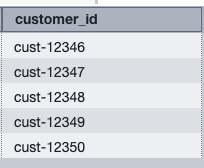
Figure 5: Query result showing customer IDs
Next, let’s see how the SUPER data type accommodates string values larger than 65,535 bytes. We use the LISTAGG and LEN functions to test this enhancement. The LISTAGG window function orders rows for each group according to the ORDER BY expression, then concatenates the values into a single string. The LEN function returns the length of the specified string as the number of characters. This operation wasn’t possible with the previous 65,535 bytes limit.
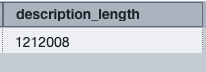
Figure 6: Query result showing description length
The output shows a string length of 1,212,008 characters. This demonstrates that SUPER can now handle strings beyond the previous 65,535-byte limit. If the output of LISTAGG exceeds the 65,535-byte limit of a VARCHAR column, you can store the result in a SUPER column, which supports up to 16 million bytes.
With large string support turned on, VARCHAR(MAX) in a view resolves to VARCHAR(16000000), so the view can return full-length strings. Because views keep the case settings from their creation, run SET first, then create the view after you turn on the setting:
Views that you created before you turned on the setting stay capped at 65,535 bytes until you recreate them. For more information, see Behavior changes in Amazon Redshift.
Use case three: Migration from your data warehouse with case insensitivity support
The challenge
Organizations migrating from legacy data warehouses to Amazon Redshift face a critical decision regarding database collation. Your data warehouse operates with case-insensitive string comparisons by default, and maintaining this behavior is essential for application compatibility. However, until recently, SUPER data types were only supported in Amazon Redshift databases with case-sensitive collation, creating a migration barrier. If you created Amazon Redshift case-insensitive databases to ease your migration process (avoiding the extensive testing required for case-sensitive conversion), you couldn’t use the SUPER data type for ingesting and querying semi-structured data such as JSON and arrays in Amazon Redshift native and data lake tables.
The solution
Amazon Redshift announced support for SUPER data types in databases with case-insensitive collation, which has the following benefits:
- Maintain case-insensitive behavior for legacy applications
- Use SUPER columns for semi-structured data in the same database
- Use the COLLATE function to specify case sensitivity preferences for SUPER columns
Amazon Redshift native table with SUPER data type
- Log in to Amazon Redshift Query Editor V2. Create database with case insensitive collation.
- Create the customer_data table with SUPER data type columns and insert sample records.
- Query customer_data table to analyze super data type columns.
SET enable_case_sensitive_super_attribute TO true;

          SELECT * FROM customer_data;

Figure 7: Result set of customer_data
- Use the following two queries to unnest the
order_historyarray column using PartiQL.
 Figure 8: Result set of customer_data using partiql
 Figure 9: Result set of customer_data and order_history using partiql
- Run a query that depends on the case-insensitive collation of the database. The filter uses lowercase “new york” and still matches “New York”.
In this example, the order_history column uses COLLATE case_sensitive, which overrides the case-insensitive default of the database for that column. To compare both behaviors, you can also use the COLLATE function in a WHERE clause.
Query nested data type on data lake
- The following is the sample input data for the customer profile. Place this data into a file and upload it to Amazon S3, name the S3 prefix “customer_profile”.
- Create the AWS Glue database
datalake_withsuper_datatype. For instructions on how to create the AWS Glue database, see Creating databases. - Create the AWS Glue crawler to crawl customer_profile prefix, use AWS Glue database
datalake_withsuper_datatypein crawler. For instructions on how to create a crawler, see Tutorial: Adding an AWS Glue crawler. - Create external schema on Amazon Redshift in database
custdb_case_insensitive.
- Select the external table customer_profile to view the column profile, which is the struct column in the AWS Glue table.

Figure 10: Result set of customer_profile using glue data catlog
Best practices
In this section, we discuss the best practices that you can follow while using SUPER data type in Amazon Redshift.
- Configure case sensitivity settings
Set the following session setting before you query SUPER columns for accurate field name matching. With this setting on, reference field names without double quotation marks:
Without this setting, Amazon Redshift converts unquoted field names to lowercase. When your JSON contains orderId but Amazon Redshift searches for orderid, queries return NULL values instead of your data.
Example: Impact of enabling case sensitivity
The following example shows the difference in query results with and without case sensitivity enabled:
- Cast SUPER values to specific data types
Always cast SUPER values to appropriate data types for better performance and accuracy:
Explicit casting eliminates ambiguity and improves query performance by helping Amazon Redshift optimize execution plans.
- Optimize performance for production workloads
Promote frequently queried fields
Extract commonly accessed SUPER attributes to regular columns for faster queries:
Create materialized views for complex queries
Turn on enable_case_sensitive_super_attribute, then build materialized views for queries you run repeatedly:
- Migrate from legacy databases
Use AWS Schema Conversion Tool (AWS SCT) to convert your schema automatically, then configure case sensitivity for SUPER columns.
Set user-level configuration
Enable case sensitivity for all of a single user’s sessions:
Test both column types
Verify that regular columns maintain case-insensitive behavior:
Confirm that SUPER columns enforce case sensitivity:
Update application queries:
Modify your application code to use correct case and explicit casting for all SUPER column attributes. This ensures consistent results and prevents NULL values from case mismatches.
- Align the large string setting
Keep the enable_large_strings_opt_in setting the same on data sharing producer and consumer data warehouses.
Recreate existing views, UDFs, and stored procedures after you turn on the setting. They stay capped at 65,535 bytes until you recreate them.
After you set the parameter to Yes or No, you can’t reset it to the default value.
For more information about best practices for working with semi-structured data types, see documentation.
Conclusion
The enhanced SUPER data type of Amazon Redshift solves the previously mentioned critical challenges that you face when working with semi-structured data. This post showed you how to turn on large string support, store individual strings in JSON documents up to 16 million bytes, perform string operations without truncation errors, and maintain case-insensitive compatibility during database migrations.
With SUPER, you can handle comprehensive data objects including legal contracts, product catalogs, customer profiles, and IoT sensor readings without breaking them into smaller pieces.
You can also cast SUPER values to VARCHAR and run pattern matching, text manipulation, and data cleansing operations directly on SUPER columns, and remove the truncation errors that previously blocked your analysis workflows.
Start implementing these capabilities in your environment with the following steps:
- Turn on large string support
- Configure case sensitivity settings for your specific use case
- Cast data types explicitly during data extraction
- Create materialized views for complex queries
- Test thoroughly to optimize query performance
Learn more
- Amazon Redshift SUPER data types documentation
- Amazon Redshift best practices guide
- Amazon Redshift introduces new array functions for semi-structured data processing
- Array functions in the Amazon Redshift Database Developer Guide
- Amazon Redshift SUPER data type in databases with case-insensitive collation
- Using dynamic data masking with SUPER data type paths