AWS Database Blog
Automate PostgreSQL audit log extraction and analysis with Amazon S3
You can automate the extraction and analysis of Amazon Relational Database Service (Amazon RDS) for PostgreSQL or Amazon Aurora PostgreSQL-Compatible Edition audit logs into Amazon Simple Storage Service (Amazon S3) to eliminate a common operational bottleneck for database teams. If you use Amazon RDS for PostgreSQL or Aurora PostgreSQL, you often need to extract, structure, and retain these logs for analysis and security review purposes. However, PostgreSQL audit logs arrive as unstructured text in Amazon CloudWatch Logs, making manual review time-consuming.
In this post, we show you how to deploy an automated pipeline that extracts PostgreSQL audit logs from CloudWatch Logs, converts them into structured comma-separated values (CSV) format, and stores them in Amazon S3 for long-term analysis. The solution processes log entries in near real time after generation. We provide an AWS CloudFormation template so you can quickly get started. The solution is designed to be cost-effective for most workloads. See the Cost considerations section for detailed pricing information.
Solution overview
The solution uses an event-driven architecture where audit log entries flow automatically from your database through a processing pipeline to structured storage.
Your Amazon RDS for PostgreSQL or Aurora PostgreSQL database generates audit log entries using the pgAudit extension. Every SQL statement (SELECT, INSERT, UPDATE, DELETE, data definition language (DDL) operations) is captured with the running user, target database, object name, and full query text (The solution stores full SQL statement text in S3, which can contain sensitive data such as personally identifiable information (PII) in query parameters. Please refer to the security considerations noted in the Limitations and considerations section). To learn how to enable pgAudit, see Using pgAudit to log database activity in the Amazon RDS User Guide. Amazon CloudWatch Logs receives these entries automatically when you enable PostgreSQL log export. A subscription filter watches for entries containing “AUDIT” and forwards matching events to the processing function in near real time.
AWS Lambda receives batches of compressed log events, decompresses them, and parses each entry to extract the timestamp, user, database, action type, object, and query. It writes the structured data as CSV rows to Amazon S3, appending to a daily file. The S3 bucket stores the final CSV output in a date-partitioned structure (audit_logs/YYYY/MM/DD/audit_logs_daily.csv). Lifecycle policies transition previous logs to S3 Standard-IA after 90 days and Amazon S3 Glacier after one year for cost optimization.
Optionally, Amazon Athena enables ad-hoc SQL queries directly on the structured audit logs in S3 without additional infrastructure.
Architecture
The following diagram illustrates the solution architecture.
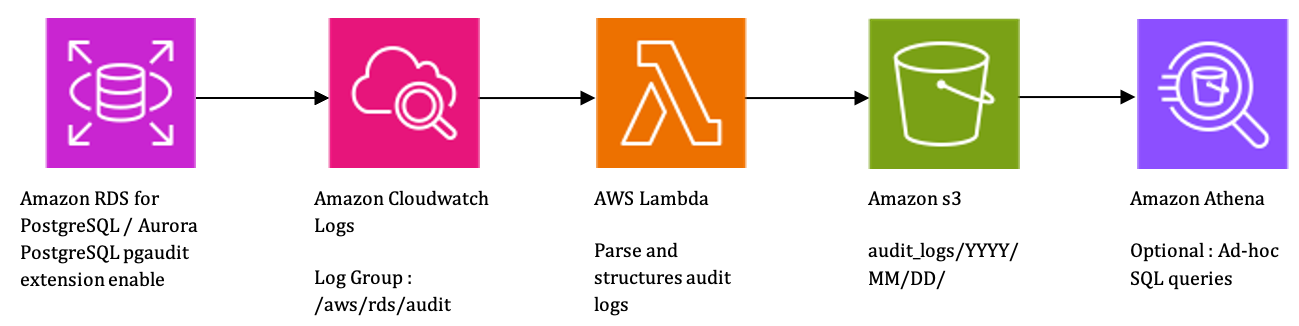
The flow starts with your Amazon RDS for PostgreSQL database generating audit log entries using the pgAudit extension. CloudWatch Logs receives these entries, and a subscription filter triggers a Lambda function for any log line containing “AUDIT”. The Lambda function parses the unstructured log text, extracts structured fields (timestamp, user, database, action, object, query), and writes the results as CSV to an S3 bucket organized by date. Optionally, you can query the accumulated data using Amazon Athena for audit analysis or security investigations.
CloudFormation template
The following CloudFormation template takes minimum input parameters from you and provisions the complete pipeline. The template creates an S3 bucket with versioning, encryption (server-side encryption with Amazon S3 managed keys (SSE-S3)), and lifecycle policies for cost optimization, along with an AWS Identity and Access Management (IAM) role scoped to least-privilege permissions for the Lambda function. It deploys a Python 3.12 Lambda function that parses PostgreSQL audit log entries and converts them to structured CSV, creates a CloudWatch Logs subscription filter that triggers the function on audit log entries, and configures the necessary Lambda invoke permissions.
Prerequisites
Before you deploy this solution, you need an AWS account with IAM permissions to create and manage Lambda functions, S3 buckets, IAM roles, and CloudWatch Logs resources. You also need an Amazon Relational Database Service (Amazon RDS) for PostgreSQL or Aurora PostgreSQL cluster with the pgAudit extension enabled and CloudWatch Logs export turned on for your database instance or cluster.
Enable pgAudit on your database
If you have not already enabled audit logging, you must create a custom parameter group and associate it with your Amazon RDS database instance or Aurora PostgreSQL cluster and create pgaudit extension in database. The default parameter group cannot be modified. For instructions on creating a custom parameter group, see Creating a DB parameter group in the Amazon RDS User Guide.
Update your custom parameter group with the following settings:
SQL query to create extension in database:
SQL query to verify pgaudit extension in database:
Important: The shared_preload_libraries parameter is a static parameter, which means changing it requires a database instance reboot. Plan this change during a maintenance window to minimize impact to your application. For more information, see Rebooting a DB instance in the Amazon RDS User Guide.
Note: Enabling comprehensive audit logging increases CloudWatch Logs volume proportionally to your query throughput. The IncomingBytes metric in CloudWatch measures the volume of log data ingested. Monitor it after enabling pgAudit to understand the additional log volume. Also monitor your database’s FreeStorageSpace metric, as increased logging can consume additional local storage for log file generation before export to CloudWatch. The primary impact to watch for is increased I/O and storage consumption on the database instance, which could affect query latency under high-throughput workloads. Assess the impact in your environment before enabling in production.
Enable CloudWatch Logs export
Run the following AWS Command Line Interface (AWS CLI) command to enable log export on your Aurora cluster:
If you are using an Amazon RDS for PostgreSQL instance, use the following AWS CLI command to enable log export on your instance:
Deploy the solution
To deploy the solution in your account, complete the following steps.
Step 1: Download and review the template
- Download the template — Download the CloudFormation template from this repository.
- Review the template — Review the resources it creates: an S3 bucket, Lambda function, IAM role, and CloudWatch subscription filter.
- Customize parameters — Adjust the template parameters as needed for your environment.
Step 2: Deploy using the AWS CLI
Run the following command to deploy the stack:
Note:
- EngineType allowed values are cluster for Amazon Aurora PostgreSQL and instance for Amazon RDS.
- If your bucket name already exists in AWS, you receive an error on validation with [AWS::EarlyValidation::ResourceExistenceCheck]. To avoid this error, use a unique bucket name.
Step 3: Verify the deployment
When the deployment is complete, the following resources appear on the AWS CloudFormation console:
• S3 bucket – An encrypted bucket with versioning and lifecycle policies for storing structured audit logs.
• IAM role – A least-privilege role allowing the Lambda function to read logs and write to S3.
• Lambda function – PostgreSQLAuditLogProcessor (Python 3.12, 256 MB memory, 60-second timeout).
• Subscription filter – Triggers the Lambda function on CloudWatch log entries containing “AUDIT”.
Deployment takes approximately 2–3 minutes. After deployment, any new audit log entries from your PostgreSQL cluster are automatically parsed and stored as structured CSVs in S3.
Step 4: Verify the output
After generating some database activity, confirm audit log processing:
- Generate database activity: Run some SQL queries against your database to generate audit log entries.
- Verify the output: Confirm audit log processing.
The output CSV contains the following columns:
| Column | Description | Example |
| timestamp | ISO 8601 timestamp | 2026-05-22T10:55:03 |
| log_level | Severity level | INFO |
| user | Database user | app_user |
| database | Target database | production_db |
| action | SQL operation type | INSERT |
| object_type | Database object type | TABLE |
| object_name | Object Name | public.customers |
| query | SQL statement text (can contain sensitive data — see Limitations) | INSERT INTO customers… |
Limitations and considerations
Security
The solution stores full SQL statement text in S3, which can contain sensitive data such as personally identifiable information (PII) in query parameters. Verify that your S3 bucket policy restricts access to authorized personnel only. Consider enabling Amazon Macie to scan for sensitive data in the stored CSV files, and evaluate whether you need to mask or redact query parameters before storage based on your organization’s data handling requirements. You can extend the Lambda function to mask or redact sensitive data in query text before writing to S3 — for example, replacing parameter values with placeholders using regex pattern matching.
Note : Macie incurs additional costs based on the volume of data inspected, see Amazon Macie pricing for details.
Technical limitations
This solution is designed for a single database cluster in a single AWS account and Region. To support multiple source databases, deploy separate CloudFormation stacks with different stack names and bucket names for each cluster. Cross-account and cross-Region deployments require additional configuration — such as CloudWatch Logs cross-account subscriptions or S3 replication rules — which are not covered in this post.
Storage growth
The S3 bucket includes lifecycle rules that transition objects to S3 Standard-IA after 90 days and S3 Glacier after one year. However, objects are not automatically deleted. If your retention policy requires expiration, add an expiration rule to the lifecycle configuration in the CloudFormation template (for example, expire objects after 7 years).
Cost considerations
This solution is designed to be cost-effective for most workloads. The following table provides a breakdown of the cost components involved in this solution (pricing for US East – N. Virginia):
| Component | Unit pricing | Pricing basis |
| Amazon CloudWatch Logs (storage) | $0.03 per GB per month | Archived log storage. |
| CloudWatch Logs subscription filter delivery | No additional charge | Delivery to Lambda via subscription filter is free. |
| AWS Lambda (requests) | $0.20 per 1 million requests | Per invocation of the log processor function. |
| AWS Lambda (compute) | $0.0000166667 per GB-second | Based on 256 MB memory, 60-second max timeout. |
| Amazon S3 Standard (storage) | $0.023 per GB per month | For current month’s structured CSV audit logs. |
| Amazon S3 Standard-IA (after 90 days) | $0.0125 per GB per month | Lifecycle transition for older logs. |
| Amazon S3 Glacier (after 1 year) | $0.004 per GB per month | Long-term archival. |
| Amazon S3 (PUT requests) | $0.005 per 1,000 requests | One PUT per Lambda invocation (appends to daily CSV). |
Note: If you are enabling pgAudit specifically for this solution, CloudWatch Logs ingestion ($0.50/GB) is likely your most significant cost component, as it scales directly with query throughput. Consider using selective audit logging (pgaudit.log = ‘ddl, role’ instead of ‘all’) if full statement logging is not required. The first 5 GB of log data ingested per month is included in the AWS Free Tier.
As your audit log volume grows, CloudWatch Logs ingestion costs scale proportionally with data volume. Lambda and S3 request costs benefit from CloudWatch Logs subscription filter batching, which groups multiple log events per invocation — making these components more cost-efficient at higher volumes. Use the AWS Pricing Calculator to estimate costs for your specific workload and monitor AWS Cost Explorer to track actual costs after deployment.
Cleaning up
To avoid ongoing costs, clean up the resources you no longer need. You can use the AWS CloudFormation console or AWS CLI to delete the stack:
If you want to preserve the audit data while removing the automation infrastructure, modify the S3 bucket’s DeletionPolicy to Retain in the template before deploying.
Conclusion
In this post, we showed you how to deploy an automated PostgreSQL audit log processing pipeline using AWS CloudFormation. The result is structured, queryable audit data in Amazon S3 with organized storage, date-partitioned organization, and lifecycle management.
If you need intelligent analysis capabilities on top of this structured data, consider extending this pipeline with AWS machine learning and analytics services. For more information about PostgreSQL audit logging on AWS, see the Amazon Aurora PostgreSQL User Guide. The CloudFormation template used in this post is available in the accompanying GitHub repository.