AWS Database Blog
Enhance the visibility of Amazon RDS instances and configuration with AWS Config and Amazon Quick Suite
Amazon Relational Database Service (Amazon RDS) is a managed service you can use to set up, operate, and scale a relational database in the cloud. As organizations deploy more database instances across AWS accounts and AWS Regions, maintaining visibility of their expanding Amazon RDS fleet becomes increasingly complex. Understanding configurations, security settings, backup strategies, and compliance requirements across a distributed environment requires access to multiple accounts.
In this post, we show you how to build a centralized dashboard for monitoring Amazon RDS configurations across your organization by using AWS Config and Amazon Quick Suite. This solution delivers detailed insights across different areas, such as summary metrics, backup configurations, security posture, engine and support information, extended configurations, and resource tagging.
Solution overview
With a consolidated view, you can view various aspects of your Amazon RDS fleet, from high-level metrics such as total instance counts and engine distributions to detailed configuration elements such as encryption status, backup retention periods, and maintenance windows. The following screenshot shows example metrics in a Quick Suite dashboard.
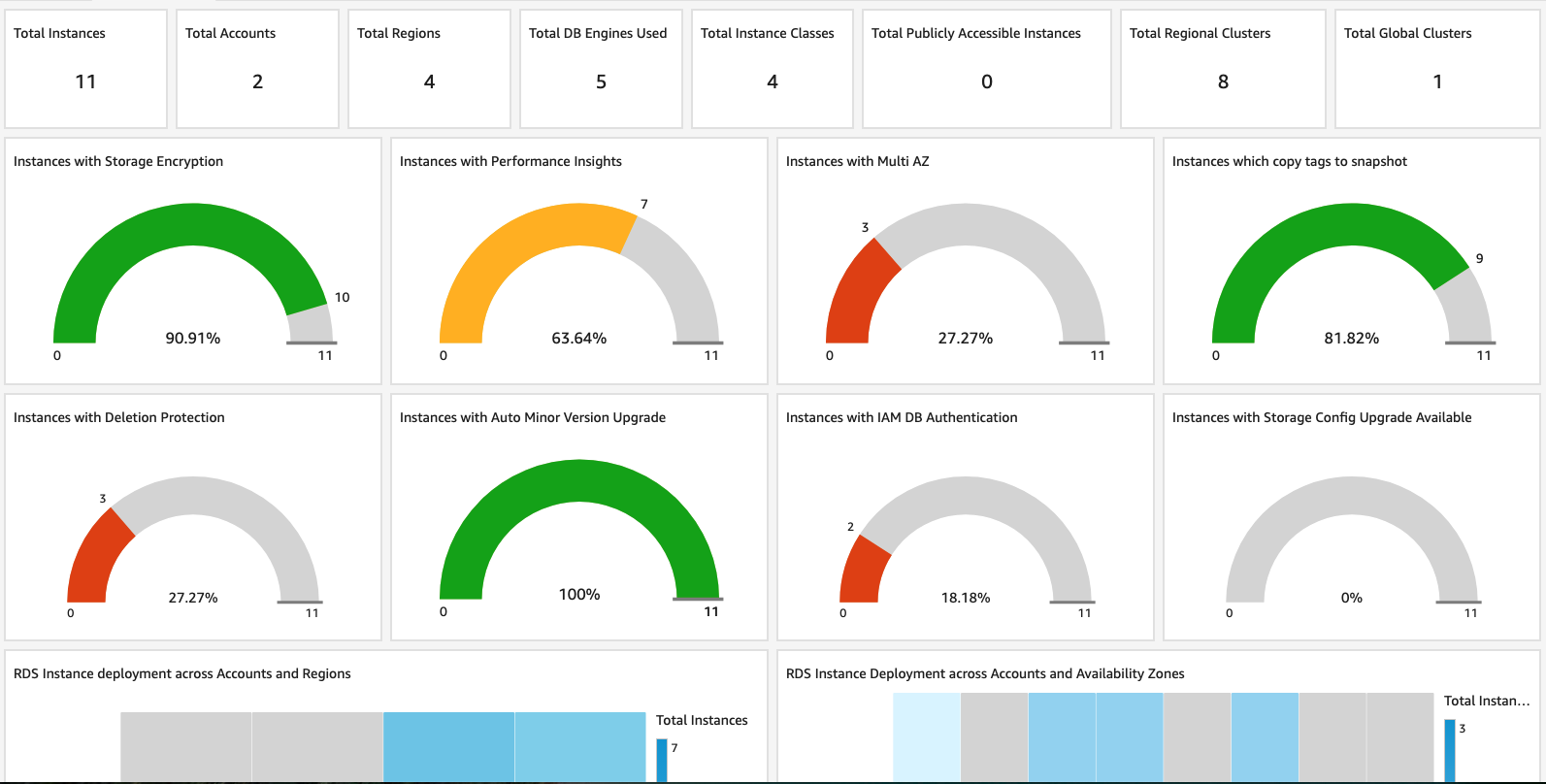
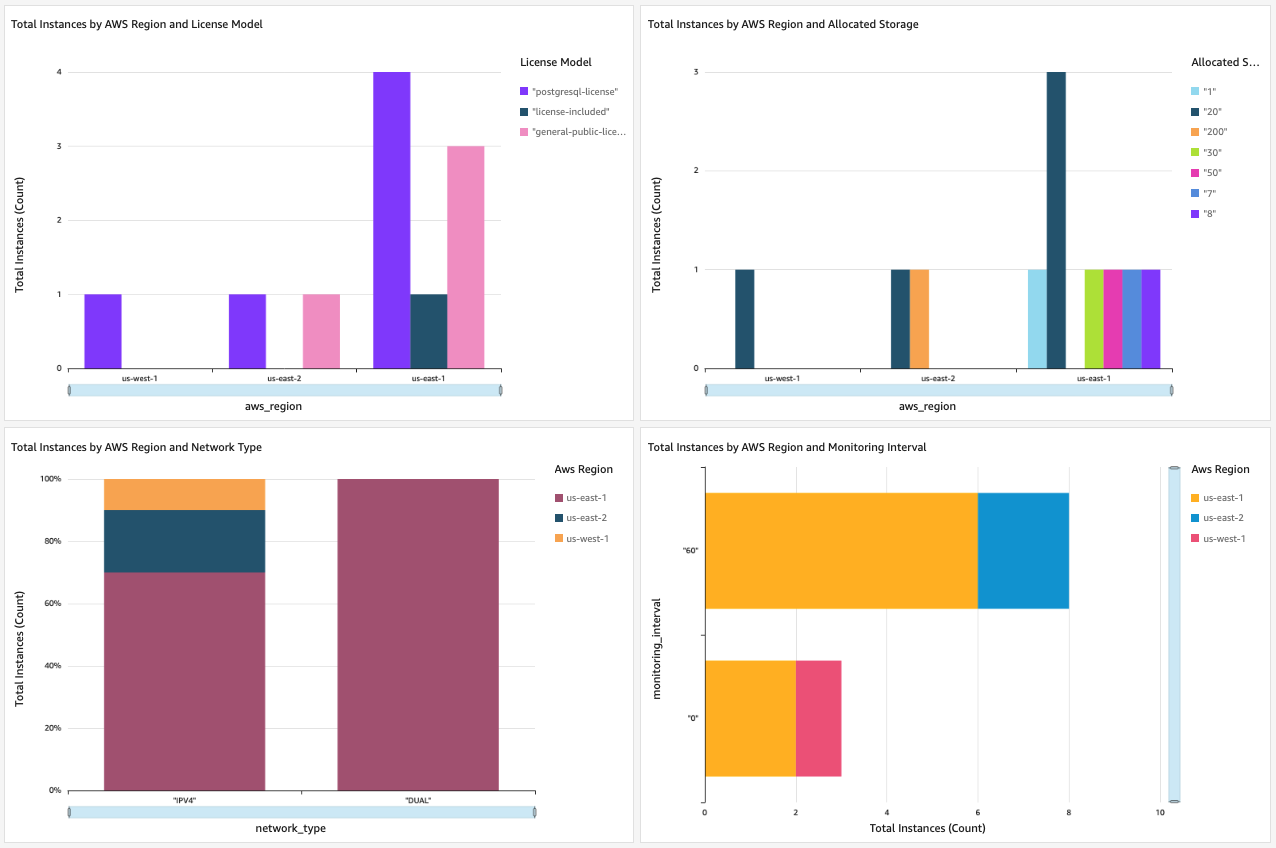
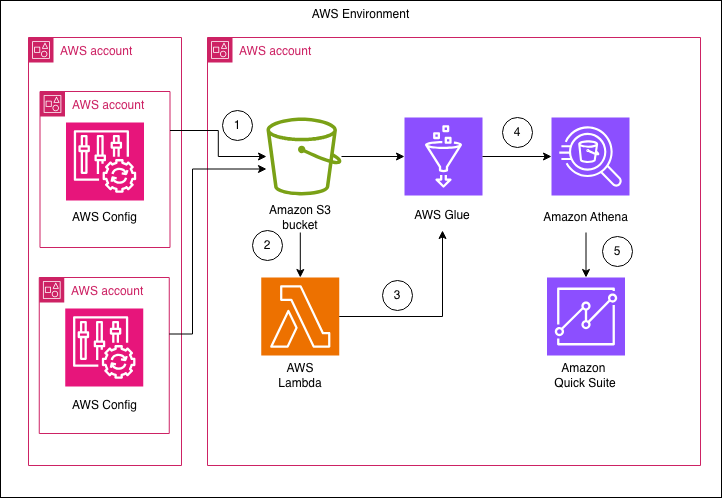
To deliver comprehensive visibility across your distributed database fleet, this blog post’s centralized Amazon RDS monitoring solution uses AWS Config as the primary data collection engine, working in conjunction with Amazon Simple Storage Service (Amazon S3), Amazon Athena, and AWS Glue. AWS Config captures detailed configuration snapshots of your Amazon RDS resources continuously across multiple accounts and Regions, storing this data in a centralized Amazon S3 bucket that you manage. Athena, powered by the AWS Glue Data Catalog, supports efficient SQL-based querying of this configuration data through a custom-built dashboard interface. The entire solution is deployed through a streamlined AWS CloudFormation template and gives you immediate, actionable insights into your global Amazon RDS deployments without requiring complex integration work.
AWS Config records changes to supported AWS resources as configuration items in JSON format and delivers them to an Amazon S3 bucket within each respective AWS account. For this solution to work, you must designate an Amazon S3 bucket to collect the aggregated configuration. You need all your AWS Config recorder setups that are in different accounts and Regions to point to this designated Amazon S3 bucket. With this architecture, AWS Config can continuously monitor Amazon RDS configurations across your entire AWS environment while maintaining a single, consolidated repository of configuration data. The AWS Config snapshot collection account becomes the central hub where snapshots from connected accounts and Regions converge, providing the foundation for AWS environment-wide visibility without requiring direct access to individual account resources. The associated steps are detailed in this post’s “Prerequisites” section.
Athena provides a serverless query service that enables direct SQL-based analysis of the AWS Config snapshots stored in the central Amazon S3 bucket. By using the Data Catalog, Athena interprets the structure of these configuration files without requiring complex extract, transform, and load (ETL) processes. Note that the prepackaged launch stack implements these steps.
Partitioning in Athena improves querying efficiency by reducing the amount of data scanned. It uses partition keys to target specific data subsets to boost performance. When a new configuration snapshot is added to the designated Amazon S3 bucket, an AWS Lambda function partitions the data by Region and date so that queries access only the latest data. Note that the prepackaged launch stack also implements these steps.
The following diagram illustrates this blog post’s solution architecture.
Prerequisites
This post creates a Quick Sight dashboard for Amazon RDS by using AWS Config data. The post doesn’t cover the setup of the AWS Config environment. You must make sure all the following AWS Config prerequisites are met before you proceed to implement the solution:
- Set up AWS Config across accounts and Regions in your AWS environment where you have Amazon RDS instances. For more information, see Getting Started with AWS Config in the AWS Config Developer Guide. If you use AWS Organizations, you can enable AWS Config centrally for all your accounts and Regions by using AWS Systems Manager Quick Setup.
Note: For this solution to work, you need a designated Amazon S3 bucket to collect the aggregated configuration. All your AWS Config recorder setups in different accounts and Regions must point to this designated Amazon S3 bucket. - Set up Athena. For more information, see Set up, administrative, and programmatic access.
- Sign up for an Amazon Quick Suite subscription in the same AWS account in which you set up Athena.
For detailed instructions about setting up the environment for AWS Config data, see How to query your AWS resource configuration states using AWS Config and Amazon Athena and Visualizing AWS Config data using Athena and Quick Suite.
Deploy the CloudFormation template
The CloudFormation template we are providing for this solution creates the necessary AWS resources, including an AWS Glue database and table, Lambda functions for partition management, and Quick Suite resources for visualization. For this step, use the account and region where you have your centralized S3 bucket. Complete the following steps to deploy the CloudFormation template:
- Navigate to the AWS CloudFormation console.
- Choose Create Stack
- Download the quicksight_deployment_template.yaml template.
- For Specify template, choose Upload a template file and upload the quicksight_deployment_template.yaml
- Choose Next.
- Provide the following required parameters:
- For ConfigAggregatorBucket, enter the designated Amazon S3 bucket name where AWS Config data from all accounts and Regions is aggregated.
- For AthenaResultBucket, enter the Amazon S3 bucket name where Athena query results will be stored.
- For QuickSightAnalysisAuthor, enter the Quick Suite username of the person who will manage the analyses and dashboards.
- For DataCollectionDB, enter the name for the Athena database (the default is
datacollectiondb). - For ResourcePrefix, enter the prefix for created resources (the default is
rdsinventory-).
- (Optional) If your Amazon S3 buckets are encrypted with AWS Key Management Service (AWS KMS), provide the following parameters:
- For ConfigAggregatorBucketKmsArn, enter the AWS KMS key Amazon Resource Name (ARN) for the AWS Config bucket.
- For AthenaBucketKmsArn, enter the AWS KMS key ARN for the Athena results bucket.
- Choose Next.
- On the Review page, select I acknowledge that AWS CloudFormation might create IAM resources with custom names and choose Create stack.
The template creates:
- An AWS Glue database and table for storing Amazon RDS configuration data.
- A Lambda function to manage AWS Glue partitions.
- An Amazon EventBridge rule to trigger the Lambda function.
- A Quick Suite data source and dataset configurations.
- The necessary AWS Identity and Access Management (IAM) roles and permissions.
- A Quick Suite dashboard.
The stack creation typically takes 5–10 minutes.
Verify the solution
You should verify that the solution is in place by creating an AWS Config snapshot through the AWS CloudShell (AWS CloudShell). This will trigger the data partition workflow and make the snapshot data available as a dataset in Quick Suite for further analysis. You can perform this test in an account or Region that has AWS Config snapshot delivery enabled to the centralized bucket.
Follow these steps to create an AWS Config snapshot:
- Use AWS CloudShell to create the AWS Config snapshot on one of the linked accounts that hosts Amazon RDS instances:
- If you are unsure of the delivery channel name for your given account and Region, run the following command to list your delivery channels:
This will return the following output listing your delivery channel name:
- From the output,
s3BucketNameis the same as your centralized Amazon S3 bucket that stores AWS Config snapshots. Note the value forname, which is your delivery channel—s3BucketNameis not your delivery channel. The complete query to create an AWS Config snapshot will look like the following code: - Sign in to the data collection account where you have your centralized S3 bucket and navigate to the Quick Suite console.
- In the Quick Suite console, choose Datasets in the navigation pane.
- Choose rdsinventory-<AccountID>–<Region>.
- On the Refresh tab, choose REFRESH NOW.
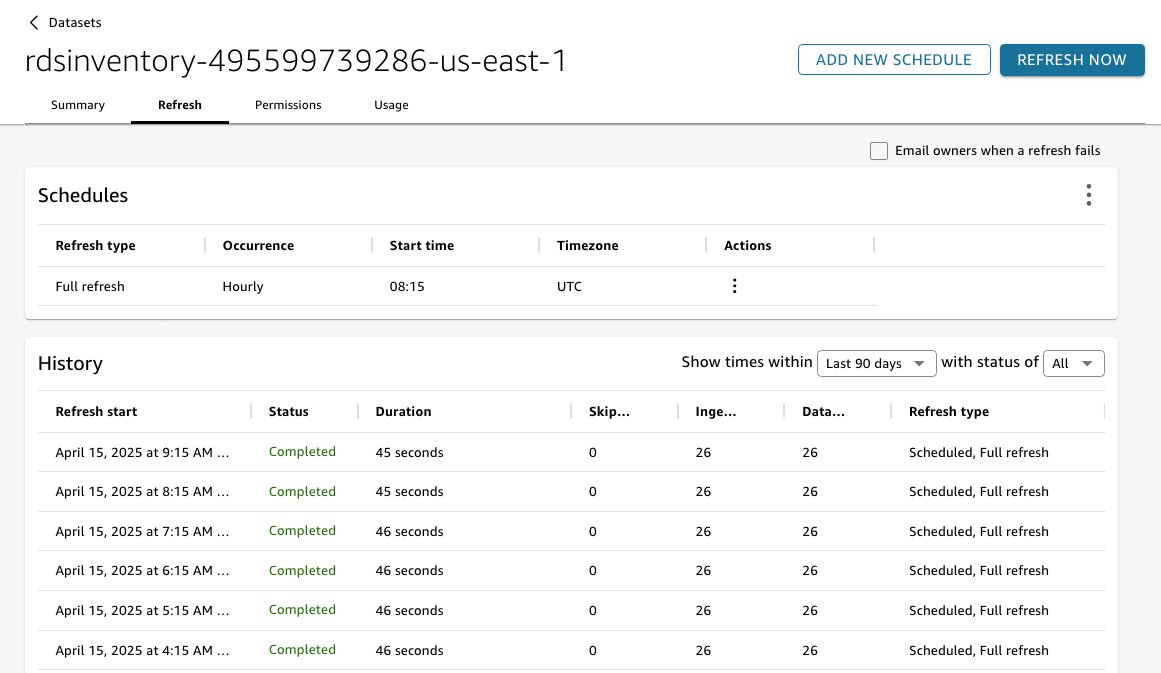
- Choose Full refresh, and then choose Continue.
- For Confirm refresh, choose Refresh.
- Go back to the Quick Suite console home page and navigate to the Analyses page.
- Open the analysis named rdsinventory-<AccountID>–<Region>. This will show you the dashboard giving visual information about your RDS instances across different accounts and regions.
Cleanup
To avoid incurring future charges, delete the CloudFormation stack you used to deploy the solution resources. For instructions, see Delete a stack from the CloudFormation console.
Conclusion
In this post, we showed how to build a centralized dashboard for monitoring your Amazon RDS fleet across multiple AWS accounts and Regions by using AWS Config, Amazon S3, Athena, and Quick Suite. By using AWS Config to capture detailed configuration snapshots from distributed accounts, storing those snapshots in a central Amazon S3 bucket, and using Athena with AWS Glue to query this data efficiently, you can create comprehensive visualizations in Quick Suite that provide immediate insights into your entire database landscape. This solution alleviates the need to access multiple accounts individually, giving you a single dashboard to understand configurations, security settings, backup strategies, and compliance requirements across your AWS environment’s complete Amazon RDS deployment.
This solution avoids manual tracking, reduces operational overhead, and helps you proactively manage your Amazon RDS instances. You can now track critical configurations, enforce compliance with security standards, and make data-driven decisions about your database infrastructure. The automated nature of this post’s solution gives you access to current, accurate information about your Amazon RDS deployments so that you can maintain operational excellence while scaling your database infrastructure.