AWS Database Blog
Getting started with Change Data Capture in Amazon Aurora DSQL
Today, Amazon Aurora DSQL introduces Change Data Capture (CDC) in public preview, allowing you to stream database changes in near real time to Amazon Kinesis Data Streams. Amazon Aurora DSQL is a serverless distributed SQL database for always available applications. With its innovative active-active distributed architecture, Aurora DSQL is designed for 99.99% availability in single-Region configuration and 99.999% in multi-Region configuration, so it’s recommended for building highly available applications.
Modern applications increasingly rely on real-time data pipelines to support analytics, automation, and event-driven architectures. Traditionally, moving data from operational databases to downstream systems required scheduled exports, polling queries, or custom replication solutions. These approaches introduce latency, increase operational overhead, and make it difficult to maintain consistency across systems.
With the introduction of CDC, Aurora DSQL now supports native streaming of database changes to downstream services. CDC captures row-level modifications and delivers them to external systems in near real time.
In this post, we demonstrate how to configure Aurora DSQL Change Data Capture and stream database changes into Kinesis Data Streams. You will learn how CDC works, how to configure a streaming pipeline, and how to consume change events.
By the end of this post, you will have a working CDC pipeline that streams database changes into a durable event stream that downstream applications can process.
What is Change Data Capture?
Change Data Capture identifies and records modifications made to a database and makes those changes available to external systems. Instead of repeatedly copying entire datasets, CDC focuses only on rows that have changed. Whenever an application executes INSERT, UPDATE, or DELETE statements, CDC captures the modifications and produces corresponding events. These events typically include information about the operation type, the affected table, and the data before and after the change. This approach reduces resource consumption and allows data pipelines to operate with low latency.
For example, an INSERT operation generates an event containing the new row values. An UPDATE operation generates an event containing the full updated row. A DELETE operation generates an event containing the primary key values of the removed row. By capturing incremental changes, CDC lets downstream systems maintain synchronized data without repeatedly scanning large tables.
Understanding Aurora DSQL Change Data Capture
With today’s release, Aurora DSQL CDC can stream change events into Amazon Kinesis Data Streams. Kinesis Data Streams is a fully managed, serverless streaming service that integrates with other AWS services such as AWS Lambda, and can integrate with external streaming systems such as Apache Kafka.
Aurora DSQL CDC is a native capability that continuously records database modifications and publishes them to a streaming destination. When applications modify data using SQL statements, Aurora DSQL captures the resulting row-level changes and converts them into structured events.
Each change event contains metadata that describes the database operation and the affected data. This metadata allows downstream consumers to reconstruct the sequence of database changes accurately. CDC in Aurora DSQL operates independently from your application’s database transactions. Aurora DSQL captures and delivers change events in the background without impacting the performance of your operational workload. With the current release, CDC operates at the cluster level and captures changes across all tables. Selective table-level filtering isn’t supported, so downstream consumers should apply filtering logic if only a subset of tables is required. With a basic understanding of CDC concepts, we can explore how this capability is used in real-world architectures.
Use cases for Aurora DSQL CDC
Aurora DSQL CDC supports a wide range of modern data architectures. Because CDC provides a nearly continuous stream of database changes, it enables systems to react quickly to new data. One common use case is real-time analytics. Organizations often need analytical systems to reflect operational data with minimal delay. CDC streams can be consumed by data warehouses or analytics platforms to maintain continuously updated datasets. This allows dashboards and reports to reflect the most recent business activity.
Another important use case is event-driven architectures. Many modern applications are composed of loosely coupled services that communicate through events. CDC allows database changes to become application events. For example, inserting a new order record can trigger downstream workflows such as payment processing or inventory updates.
CDC is also useful for data replication scenarios. Organizations frequently maintain multiple data stores for different purposes, such as operational databases, search indexes, and analytical systems. CDC supports incremental synchronization across systems without requiring full data copies.
Finally, CDC provides a comprehensive audit trail of database activity. Because each change is recorded as an event, CDC streams can be archived and analyzed for compliance and troubleshooting purposes.
Architecture overview
The following architecture illustrates how Aurora DSQL CDC streams database changes to downstream consumers.
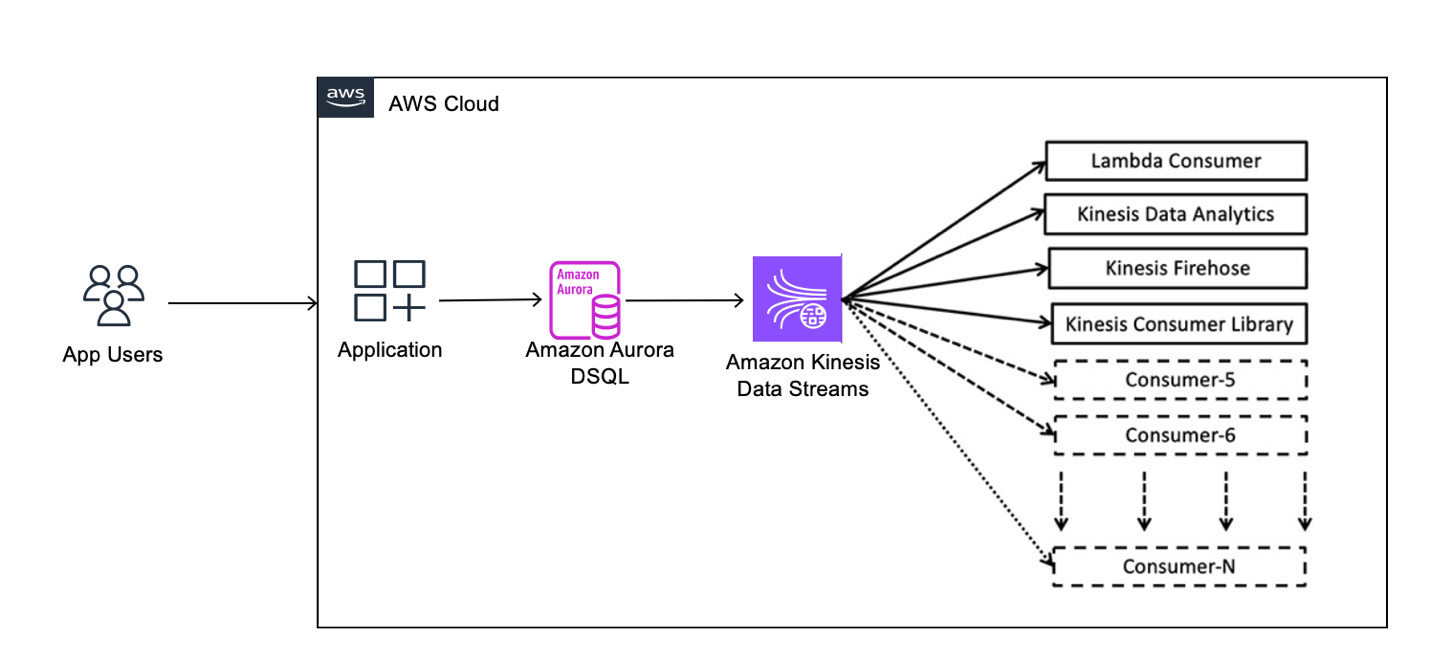
Applications interact with Aurora DSQL using standard SQL statements. These operations modify rows in the database and represent the primary source of change events. Aurora DSQL monitors table modifications and generates CDC events that describe the changes. Each event includes information such as the operation type, timestamps, transaction identifier, and row values.
Aurora DSQL publishes CDC events into a Kinesis Data Stream. The stream serves as a durable and scalable buffer that decouples database workloads from downstream processing. Consumer applications read events from the stream and process them according to application requirements. Consumers might update analytics systems, trigger workflows, or synchronize external databases.
This architecture allows Aurora DSQL to serve as a reliable source of truth while downstream systems consume data asynchronously. Before building this architecture, you must prepare your environment.
Prerequisites
This section describes the tools and permissions required to configure Aurora DSQL Change Data Capture. For more information, see Prerequisites.
- You need the AWS Command Line Interface (AWS CLI) version 2 installed and configured with credentials that allow access to your AWS account. The AWS CLI is used to create Aurora DSQL clusters, configure CDC streams, and manage supporting resources.
- An Aurora DSQL cluster in a single AWS Region.
- You also need the PostgreSQL client utility
psqlinstalled on your client machine. Aurora DSQL provides PostgreSQL-compatible connectivity, andpsqlis used to connect, create tables, and generate test data. - The
jqutility is optional but recommended because it streamlines viewing JSON output. - Your AWS identity must have permissions to create Aurora DSQL clusters, manage CDC streams, create Kinesis streams, and configure IAM roles. The following policy provides the required permissions. Here are the IAM permissions to create Aurora DSQL clusters, manage CDC streams, create Kinesis streams, and configure IAM roles.
With the environment prepared, the next step is enabling Aurora DSQL CDC using AWS CLI.
For multi-Region Aurora DSQL clusters, a CDC stream captures committed writes from all Regions, regardless of which Region the stream is created in. All resources including the Aurora DSQL cluster, streaming target, IAM role, and calling principal must reside in the same AWS account and Region. To deliver CDC records across multiple Regions, create a separate stream in each Region because each stream independently delivers the same set of committed changes.
Note: Throughout this post, be sure to replace the <placeholder values> with your own information.
Step 1: Create a Kinesis Data Stream
Aurora DSQL CDC publishes events into a streaming destination. In this post, the destination is an Amazon Kinesis data stream. Create a new Kinesis stream with a single shard. The shard determines the throughput capacity available for CDC events. When configuring the stream, consider the maximum record size supported by your streaming setup. Aurora DSQL supports row sizes up to 2 MiB, and CDC events can approach this limit depending on your schema and workload. If the configured record size is lower than the size of emitted events, delivery failures can occur, potentially impairing the CDC pipeline.
Before creating the new Kinesis steam, let’s first set the environment variables that we will be using through this demonstration:
After creating the stream, wait until the stream status becomes “ACTIVE”. Aurora DSQL can’t publish events until the stream is fully available.
Next, retrieve the Amazon Resource Name (ARN) of the stream.
The ARN uniquely identifies the stream and is required when configuring CDC. Note down the Stream ARN in your notes because you might need it later. With the streaming destination ready, Aurora DSQL needs permission to publish events.
Step 2: Create an IAM Role for CDC
Aurora DSQL publishes CDC events by assuming an IAM role that has permission to write to the Kinesis stream. The IAM role requires a trust policy that allows Aurora DSQL to assume the role. The trust policy restricts access to the specific Aurora DSQL cluster. The role also requires a permissions policy that grants write access to the Kinesis stream.
First, let’s generate the trust policy and permissions policy as shown in the following section:
Now, let’s create the role and attach the policy.
After creating the role and attaching the permissions policy, retrieve the role ARN.
Now, note down the role ARN in your notes. The role ARN is required when creating the CDC stream. After permissions are configured, you can create the CDC stream.
Step 3: Create the CDC Stream
The CDC stream connects the Aurora DSQL cluster to the Kinesis stream. Creating the CDC stream instructs Aurora DSQL to begin publishing database changes into the Kinesis stream. Stream creation typically takes several minutes. During this time, Aurora DSQL provisions the internal infrastructure required for CDC processing.
Wait for the steam to be “ACTIVE”.
After the stream becomes “ACTIVE”, Aurora DSQL is ready to capture database changes. The next step is generating database activity.
Step 4: Generate database changes
After enabling CDC, you can verify the configuration by generating database changes. Connect to Aurora DSQL using the PostgreSQL client and create a test table. Tables participating in CDC aren’t strictly required to have a primary key, but defining one is recommended. This allows Aurora DSQL to uniquely identify rows and produce more meaningful change events. Without a primary key, INSERT and UPDATE operations will still include full row data, but DELETE events might lack sufficient information to identify the removed row.
After creating the table, insert, update, and delete several records. These operations produce CDC events that Aurora DSQL publishes into the Kinesis stream. Use the following commands to establish a connection to your Aurora DSQL cluster:
After the connection is established, use the following code to create a table with a primary key.
Use the following code to insert a few rows:
Now, let’s generate some change records. After generating test data, disconnect from the database.
The next step is reading CDC events from the stream.
Step 5: Read CDC events
CDC events are stored in the Kinesis stream and can be read using the AWS CLI or consumer applications. First, list the shards in the stream.
Each shard represents a sequence of records. This example uses a single shard for simplicity, but in production workloads, streams can contain multiple shards, requiring consumers to iterate across shards to read all records. Next, obtain a shard iterator that specifies where the reading should begin. For example, TRIM_HORIZON starts reading from the earliest available record. Use the shard iterator to retrieve records from the stream. The CDC event payload is Base64-encoded. After decoding the payload, the event becomes readable JSON. Each event describes a database change and includes metadata such as timestamps, transaction identifiers, schema name, and table name.
Now, let’s decode the data.
Understanding CDC event structure and semantics
After retrieving records from Amazon Kinesis Data Streams, the next step is understanding how to interpret the CDC event payload. Each event emitted by Amazon Aurora DSQL follows a consistent JSON structure that describes both the data change and its associated metadata. At a high level, every CDC event contains an operation type, the state of the row before and after the change, and metadata about the source, and timing of the event.
The op field indicates the type of operation. During the public preview, Aurora DSQL represents both INSERT and UPDATE operations using c (create), because updates are modeled as new versions of a row. DELETE operations are represented using d. Distinguishing between an INSERT and an UPDATE requires tracking whether a given primary key has been observed previously.
u operation type for updates, so consumers should avoid assuming that all future row modifications will continue using only c events and should design event processing logic accordingly.
The op field indicates the type of operation. Aurora DSQL represents both INSERT and UPDATE operations using c (create), because updates are modeled as new versions of a row. DELETE operations are represented using d. As a result, distinguishing between an INSERT and an UPDATE requires tracking whether a given primary key has been observed previously.
The before and after fields describe the state of the row. For INSERT and UPDATE operations, the event contains the full row after the change, while the before field is null. For DELETE operations, the after field is null, and the before field contains only the primary key of the removed row. This design minimizes payload size while still allowing downstream systems to identify deleted records.
Each event also includes two sets of timestamps. The root-level ts_ms and ts_ns fields represent the time at which the change was committed to the database. The source.ts_ms and source.ts_ns fields represent when the CDC pipeline processed and emitted the event to the stream. The difference between these timestamps indicates the propagation latency from the database to the streaming system. The source object provides additional metadata, including the transaction ID, schema name, table name, database name, and cluster identifier. This metadata is useful for auditing, debugging, and building downstream processing logic.
For more information, see CDC record format.
The following examples illustrate how different database operations are represented as CDC events.
The following example shows an INSERT operation. A new row for “Alice” was inserted. The op field is “c”, before is null, and after contains the full row. The commit timestamp (ts_ms) precedes the CDC emission timestamp (source.ts_ms), indicating the time taken for the change to propagate through the CDC pipeline.
The following example illustrates an UPDATE operation. The Alice’s email was updated. The op field is c, and the event contains the full updated row. Because Aurora DSQL represents updates as new versions of a row, this event is structurally identical to an INSERT. Distinguishing an UPDATE from an INSERT requires tracking whether the same primary key has appeared in a previous event.
The following example represents a DELETE operation. A row was deleted. The op field is d, the after field is null, and the before field contains only the primary key of the deleted row. This allows downstream systems to identify which record was removed without including the full row data.
These events can be consumed by applications to build real-time data pipelines.
Understanding event ordering in Aurora DSQL CDC
When building applications on top of CDC, one of the most important considerations is how change events are ordered when delivered to downstream systems. The order in which events are processed can directly impact how consumers interpret and apply those changes.
Aurora DSQL CDC introduces an explicit ordering configuration when creating a CDC stream. This configuration defines the ordering guarantees for events delivered to the streaming destination and can evolve over time as additional ordering modes and integrations are introduced. Because Aurora DSQL CDC is currently in public preview, downstream consumers should also avoid hardcoding assumptions about operation type semantics and should be designed to tolerate future event format enhancements.
During writing, Aurora DSQL CDC streams provide unordered event delivery, meaning that events are delivered without strict ordering guarantees across rows or transactions. For more information, see Ordering and delivery semantics. This approach supports high scalability and throughput, making it well suited for workloads that require efficient, large-scale change streaming. While each event is complete and consistent, downstream consumers should be designed to correctly process events that might arrive out of order, using patterns such as idempotent processing and state reconciliation. Making ordering explicit at stream creation time means that applications are designed with a clear understanding of delivery semantics from the beginning. For more information about designing consumers that handle unordered streams, including techniques such as polling and batching, see Using Lambda to process records from Amazon Kinesis Data Streams and Ordering and deduplication strategies.
Best practices
When using Amazon Kinesis Data Streams, you can create a data stream and select the appropriate capacity mode based on your workload. To streamline stream management, choose on-demand capacity mode. In this mode, Kinesis automatically scales throughput to match incoming CDC traffic, removing the need to manually provision and manage shards. For more information, see Choose the right mode to steam in.
When streaming CDC events from Amazon Aurora DSQL into Amazon Kinesis Data Streams, it’s important to consider the maximum record size supported by the stream. Kinesis enforces a limit on the size of individual records. If a CDC event exceeds this limit, the event can’t be delivered to the stream. In such cases, the CDC pipeline might become impaired until the size constraint is resolved. To avoid this, you should consider the size characteristics of your data model and configure your streaming pipeline and consumers to handle the expected payload sizes. Designing with these limits in mind helps maintain nearly continuous and reliable CDC event delivery without interruptions.
Downstream systems should be designed to handle duplicate and out-of-order events. Because CDC delivery is asynchronous and doesn’t guarantee strict ordering, consumers might receive the same event more than once or observe events arriving out of sequence. To maintain correctness, applications should implement idempotent processing logic so that repeated events don’t produce inconsistent results. This is commonly achieved by using primary keys and transaction metadata (such as timestamps or transaction IDs) to detect and reconcile changes. Where ordering is important, consumers can use batching behavior, timestamps to reorder events, or apply last-write-wins semantics based on commit time. If your use case requires processing a subset of tables, apply filtering logic in downstream consumers, as CDC streams include changes from all tables. Designing consumers with these patterns helps achieve reliable and consistent data processing even under high-throughput streaming conditions.
Cleanup
After confirming that your CDC pipeline is working correctly and you have successfully validated the streaming of database changes into Amazon Kinesis Data Streams, you can clean up the resources created during this walkthrough.
When you delete a CDC stream in Amazon Aurora DSQL, the existing data in your database remains intact. Deleting the stream only stops the delivery of new change events to the Kinesis data stream. Similarly, removing the Kinesis stream doesn’t affect your source database, but it permanently deletes unconsumed CDC records stored in the stream.
This section guides you through removing the resources created in this post, helping you avoid unnecessary costs and maintain a clean AWS environment.
After completing these steps, the resources created for this CDC pipeline are removed, and your AWS environment is returned to its original state.
Conclusion
Aurora DSQL Change Data Capture provides a native mechanism for streaming database changes into external systems. In this post, you configured a CDC pipeline that captures database changes and publishes them into a Kinesis stream. You generated database activity and verified the resulting events. Aurora DSQL CDC streamlines the process of building real-time architectures by removing the need for custom replication solutions. By integrating Aurora DSQL with streaming systems, developers can build responsive applications that react to data changes in near real time. Aurora DSQL Change Data Capture provides a foundation for building scalable event-driven systems and real-time analytics pipelines.