AWS Database Blog
How U.S. Bank migrated 119 TB from Oracle Exadata to Amazon RDS for Oracle
Migrating very large Oracle Exadata databases to the cloud is one of the hardest problems in enterprise data platform engineering. When databases are measured in tens or hundreds of terabytes, traditional approaches like logical export/import, row-based replication, or offline device shipping can stretch timelines from days into weeks or months. Unpredictable downtime and risk compound the challenge.
U.S. Bank faced exactly this challenge. The bank had a requirement to move four Oracle Exadata databases totaling approximately 119 TB to Amazon Relational Database Service (Amazon RDS) for Oracle over a shared AWS Direct Connect link. It needed a strategy that was fast, reliable, and caused minimal disruption. Under a strict deadline to exit its on-premises data centers, U.S. Bank chose Amazon RDS for Oracle because its managed infrastructure freed the team from routine maintenance to focus on higher-value strategic work, and native Oracle compatibility let them migrate without re-architecting existing applications.
In this post, we walk through how U.S. Bank designed and executed a fully automated migration pipeline using Oracle Cross-Platform Transportable Tablespaces (XTTS), AWS DataSync, and Amazon Elastic File System (Amazon EFS). The pipeline completed the initial baseline data copy in only 7 days with zero data loss.
About U.S. Bank
U.S. Bank provides banking and payment services to millions of customers. Within Management Reporting Operations (MRO), the organization operates large Oracle estates that underpin regulatory reporting, risk analytics, and financial data warehousing. The databases support workloads including Basel compliance, CECL, FDIC 370, liquidity coverage ratio (LCR), fund transfer pricing, cost allocations, and management analytics.
“Our focus was accuracy, control, and performance at scale, under a fixed data-center-exit deadline. Using Oracle Transportable Tablespaces and a config-driven automation pipeline, our team moved 119 TB in about a week with zero data loss and production cutovers averaging roughly four hours per database.”
— Benjamin Wessling, Vice President, Finance Technology, U.S. Bank
The challenge
As part of a broader cloud modernization initiative, U.S. Bank is exiting its on-premises data centers by a fixed deadline. The Finance Technology Management Reporting Operations group needed to migrate its four Oracle 19c databases, running on Exadata, to Amazon RDS for Oracle. These databases power some of the bank’s most critical functions:
- Regulatory reporting
- Financial data warehousing
- Risk analytics
- Management reporting
But moving 119 TB isn’t only a bandwidth problem. It’s a coordination challenge that touches network capacity, storage planning, data change velocity, and regulatory timelines. The team identified four constraints that would shape the migration strategy:
Bandwidth limitations. The AWS Direct Connect link was shared with other production workloads. U.S. Bank’s network engineering group capped migration consumption at 500 Mbps during business hours and 1 Gbps after hours. That is far less than what a bulk transfer of 119 TB would require.
Database compression. Exadata’s Hybrid Columnar Compression (HCC) achieves ratios up to 50:1 using specialized storage cells and is not available on Amazon RDS. Data compressed with HCC could expand 3–5x when recompressed with Oracle Advanced Compression, significantly increasing the volume to transfer and making bandwidth a critical constraint.
High change rate. The databases generated up to 4 TB of changes per day across all tablespaces, driven by daily extract, transform, and load (ETL) jobs for general ledger, instrument tables, and regulatory processing. This meant incremental synchronization cycles needed to run frequently. If they fell more than a day behind, the delta would grow large enough to threaten the cutover window.
RDS tablespace size limit. Amazon RDS for Oracle uses the ext4 filesystem, which imposes a maximum single-file size of 16 TB for bigfile tablespaces (one datafile per tablespace). Smallfile tablespaces can exceed 16 TB by using multiple datafiles, though with added management overhead. Several of U.S. Bank’s tablespaces exceeded this limit under their bigfile configuration, requiring reorganization before migration.
Why XTTS, AWS DataSync, and Amazon EFS
U.S. Bank selected Oracle Cross-Platform Transportable Tablespaces (XTTS), paired with AWS DataSync for network-optimized transfer and Amazon EFS as a shared staging layer. XTTS is purpose-built for physical, block-level migrations: rather than logically exporting and reimporting data, it transports the actual datafiles. After an initial full backup, each subsequent cycle captures only changed blocks, keeping source and target aligned while the source database remains fully operational through the bulk of the migration.
The deciding factor was downtime tolerance: roughly 4 hours per database at cutover was acceptable. A sub-hour requirement would have forced additional machinery, such as Oracle GoldenGate replication back to on-premises for a real-time fallback path. XTTS offered the fastest path to cutover within U.S. Bank’s governance and bandwidth constraints.
Architecture overview
XTTS is Oracle’s native method for physically transporting tablespaces between databases. Through its Recovery Manager (RMAN)-based cross-system extension it also supports migrations between environments with different endian formats, such as AIX or Solaris to Linux-based Amazon RDS. For U.S. Bank, both Exadata and RDS run on Linux x86-64, making this a same-system transport: the more direct and faster path.
The migration pipeline consists of three layers: a source-side orchestrator, a transfer layer, and a target-side import process, all coordinated through queue tables in a shared control database.
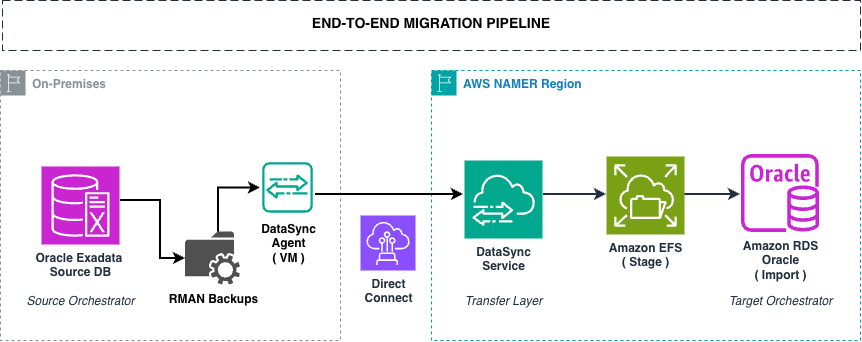
Figure 1: End-to-end migration pipeline architecture
Source-side orchestration
The source-side pipeline runs on the Exadata database servers using a Primary → Worker → Runner architecture:
- Primary process polls a configuration table (
XTTS_SOURCE_CONFIG) for enabled tablespaces, ordered by priority. - Workers are spawned in parallel, one per tablespace, up to 18 concurrent.
- Each Worker invokes Oracle’s
xttdriver.plto perform either a Level-0 (full) or incremental RMAN backup. - Converted backup files are written to shared Network File System (NFS) storage.
- On success, a
STAGEDrow is inserted into the migration queue.
The entire pipeline is config-driven. A single Oracle table controls what gets migrated, in what order, and whether it’s paused:
Adding a new tablespace is a single INSERT. Pausing one is an UPDATE to ENABLED='N'. This config-driven approach helps minimize the need for code changes during operational adjustments.
The primary process runs on a 5-minute cron cycle and is fully idempotent. If a tablespace’s files are still transferring, or the last job didn’t fully complete, it skips that tablespace and moves on. This self-healing design helped keep the pipeline running continuously with reduced need for manual intervention.
Transfer layer: AWS DataSync
AWS DataSync handles movement of converted datafiles from on-premises NFS to Amazon EFS. DataSync was chosen over alternatives for several critical reasons:
In-flight compression. DataSync achieved approximately 80 percent compression during transfer. In U.S. Bank’s environment, this meant effectively transferring 1.16 Gbps of data while consuming only approximately 0.25 Gbps of actual Direct Connect bandwidth, a 4x effective bandwidth multiplier for a bandwidth-constrained migration. These figures represent U.S. Bank’s observed results. For more information about DataSync transfer performance, see How AWS DataSync works in the AWS DataSync User Guide.
Bandwidth throttling. DataSync supports configurable bytes-per-second limits with scheduling. U.S. Bank configured aggressive throttling during business hours and opened the throttle overnight and on weekends, keeping production network traffic unaffected.
Integrity verification. DataSync verifies data integrity at the end of each transfer task. For financial data subject to regulatory audit, the verification logs provided evidence of data integrity throughout the migration.
Task-based API. Each tablespace transfer is a discrete DataSync task. The orchestrator launches the task, records the ARN, and polls for completion. If a transfer fails because of a transient network issue, the tablespace stays in its current state and the next orchestration cycle retries automatically.
Storage layer: Amazon EFS
EFS sits at the center of the pipeline. It’s where DataSync lands datafiles and where RDS reads during import. Two configuration choices matter most:
Use Elastic throughput, not Provisioned. Elastic permits higher aggregate read throughput and scales automatically, better suited for a spiky, transient migration workload.
Use a Regional file system, not One Zone. One Zone caps throughput at a fraction of Regional, extending your import window for minimal storage savings on a transient staging tier.
Where U.S. Bank controlled the mount, the team followed AWS-recommended NFS options (NFSv4.1, 1 MB read/write sizes, hard mounts). The most straightforward path is the amazon-efs-utils mount helper, which applies these by default.
For the full performance breakdown, see Amazon EFS performance specifications.
Target-side: RDS import
Amazon EFS was chosen over Amazon Simple Storage Service (Amazon S3) because it has no object or file size limit and integrates directly with RDS XTTS imports, allowing RDS to ingest data directly without extra staging steps.
The final import step uses the RDS-native stored procedure:
For more details on integrating Amazon RDS for Oracle with EFS, see Integrate Amazon RDS for Oracle with Amazon EFS. For a walkthrough of transportable tablespaces using RMAN, see Amazon RDS for Oracle transportable tablespaces using RMAN.
The XTTS migration process
The XTTS workflow proceeds through clearly defined steps:
| Step | Action | Source DB Status |
| 1 | Full incremental backup (Level-0) | Read-Write (online) |
| 2 | Incremental backup 1 | Read-Write (online) |
| 2.N | Incremental backups 2…N (as needed) | Read-Write (online) |
| 3 | Set tablespace read-only | Read-Only |
| 4 | Final incremental backup | Read-Only |
| 5 | Tablespace metadata export | Read-Only |
| 6 | Transfer + import on target | Read-Only |
| 7 | Validate tablespace import | Read-Only |
| 8 | Source tablespace set back to read-write (or decommissioned) | Complete |
The key insight is that Steps 1 through 2.N happen while the source database remains fully operational. Production workloads continue uninterrupted. Downtime is limited to Steps 3–7: the final incremental apply, metadata export, transfer, and import.
Rollback strategy: Each cutover maintained the source Exadata database in read-only mode until post-migration validation was complete. If validation failed, the team could revert the source to read-write and restore application connectivity within minutes, with no reverse data migration required.
For a detailed walkthrough of minimizing downtime with XTTS, see Minimize downtime when migrating your Oracle database to Amazon RDS for Oracle with transportable tablespaces and AWS DMS.
Cost efficiency
Beyond speed, this pattern is economical, and the savings come from the architecture itself, not from negotiation. Three things drive it:
- Inbound data transfer to AWS has no charge. Moving 119 TB into AWS incurred zero ingress charges. The only transfer cost was the DataSync flat per-GB fee (Basic mode), a rounding error against the scale of the data moved.
- EFS staging is transient. The staging file system exists only long enough for datafiles to land and import into RDS, after which the space is reclaimed. Because it’s short-lived, its contribution to total cost stays modest despite EFS being premium file storage.
- No third-party replication licenses. The entire pipeline uses native Oracle utilities (RMAN, XTTS) and AWS managed services.
Results
The automated pipeline delivered the following results:
| System | Data Migrated (TB) | Duration (hrs) | Throughput (MBps) |
| Regulatory | 8 | 12 | 204 |
| Finance Data Warehouse | 51 | 90 | 162 |
| Central Data Warehouse | 22 | 39 | 160 |
| Risk | 38 | 32 | 339 |
| Total | 119 | 173 | 216 (avg) |
The Risk database (38 TB) completed the fastest overall transfer rate despite not being the smallest database. Its tablespaces were more evenly distributed in size, which kept all DataSync agents working throughout the transfer, minimizing idle time between tasks. In contrast, databases with a few very large tablespaces and many small ones created uneven parallelism, leaving some agents idle while others finished.
Key metrics:
- Total data migrated: approximately 119 TB across 4 databases.
- Initial baseline copy: approximately 7 calendar days.
- Average cutover downtime: approximately 4 hours per database (ranging from 2–6 hours).
- Average throughput: 216 MBps (0.75 TB per hour).
- Data loss: Zero.
- Max parallel tablespaces: 18 concurrent workers.
It’s important to note that the 7-day figure represents the initial Level-0 baseline copy. The overall migration spanned several weeks, as U.S. Bank staggered database cutovers to align with appropriate production change windows. After the initial baseline, the team ran incremental syncs to keep source and target in near-real-time alignment until each database’s scheduled cutover.
Production cutover downtime varied by database size and improved as the team gained experience. The final incremental data sync was actually the fastest part, typically completing in minutes, because frequent incremental cycles leading up to cutover minimized the delta. The bulk of each cutover window was spent on post-migration operational tasks: gathering optimizer statistics, running data validations, and compiling database objects.
Challenges and lessons learned
The migration surfaced several challenges worth sharing, along with the guidance U.S. Bank would offer other teams planning a similar move.
1. The 16 TB bigfile tablespace size limit
Amazon RDS for Oracle uses the ext4 filesystem, which imposes a maximum file size of 16 TB per tablespace. Several of U.S. Bank’s tablespaces on Exadata exceeded this limit.
The team resolved this by reorganizing tablespaces along business domain boundaries:
- Monthly and daily instrument tables were separated into their own dedicated tablespaces.
- The largest datasets (direct deposit data and credit card data) were each moved into their own tablespaces.
This categorization approach brought every tablespace under the 16 TB limit while also making the migration more manageable and operationally cleaner on the target side. Each tablespace now represented a coherent business domain rather than a monolithic container.
Guidance for other customers: Before beginning an XTTS migration to RDS, inventory your tablespace sizes and identify any that exceeds 16 TB. Plan for tablespace reorganization as a pre-migration activity: categorize by business domain, rebuild or coalesce indexes, and purge unnecessary data. This pre-work also provides an opportunity to improve your data architecture before landing in the cloud. See the Amazon RDS for Oracle storage documentation for current limits.
2. HCC decompression and data expansion
Exadata’s Hybrid Columnar Compression (HCC) provides high compression ratios that aren’t available on Amazon RDS. When migrating HCC-compressed data, the tablespaces expand to their uncompressed size during the XTTS process.
U.S. Bank addressed this by:
- Using Oracle Advanced Compression and Basic Compression on the RDS target to reduce the expansion.
- Sizing EFS staging storage and RDS storage for the uncompressed footprint, not the source size.
- Identifying HCC-compressed tables early using Automatic Workload Repository (AWR) reports and Active Session History to assess impact.
The key insight: by decompressing HCC and recompressing with Advanced Compression before migration, the team verified the source database footprint matched what the target would look like, eliminating any sizing surprises during transport.
Guidance for other customers: Run the following query on your source to identify HCC-compressed segments and estimate expansion:
3. DataSync as a bandwidth multiplier
With a shared Direct Connect link capped at 500 Mbps during business hours, a native transfer of 119 TB would have taken approximately 3–4 weeks at this rate. AWS DataSync in-flight compression changed the equation entirely:
- Actual bandwidth consumed: approximately 0.25 Gbps.
- Effective data throughput: approximately 1.16 Gbps.
- Compression ratio: approximately 80 percent.
- Effective bandwidth multiplier: approximately 4–5x (based on U.S. Bank’s observed transfer metrics. For details on DataSync performance, see How AWS DataSync works in the AWS DataSync User Guide). U.S. Bank configured aggressive throttling during business hours and opened bandwidth at night. This made the migration invisible to other production workloads sharing the Direct Connect link.
4. Timezone mismatch between source and target
An issue the team encountered was a timezone version mismatch between the Exadata source (running in the Chicago timezone) and the RDS target. XTTS requires the source and target databases to have compatible timezone file versions.
This was discovered by going through the prerequisites in the AWS documentation for migrating using Oracle transportable tablespaces, which explicitly states: “Make sure that the time zone file is the same in the source and target databases.” The team verified the timezone version on both environments using:
After the mismatch was identified, the team aligned the timezone file versions on source and target following the suggested steps in the AWS documentation and Oracle’s documentation on upgrading time zone file versions.
Guidance for other customers: Before starting XTTS operations, verify that your source and target Oracle timezone file versions match. The AWS RDS XTTS prerequisites document provides a complete checklist, including timezone file, character set, and national character set validation, that should be run early in your migration planning.
5. Character set and compatibility alignment
XTTS requires the source and target databases to share a compatible DB character set (in U.S. Bank’s case, three of the four databases had AL32UTF8 and one had US7ASCII). A mismatch here isn’t a minor inconvenience. It’s a hard stop that forces you to restart the migration from scratch. This is especially critical on Amazon RDS for Oracle, because the DB character set is fixed at instance creation and can’t be changed afterward. Verify NLS_CHARACTERSET on both databases before provisioning your target.
6. Database compatibility
The COMPATIBLE initialization parameter determines the release version with which a database’s on-disk format must remain compatible. For XTTS, the target’s COMPATIBLE setting must be equal to or higher than the source’s. The transport fails if the source is higher than the target. Confirm this with SHOW PARAMETER COMPATIBLE on both environments before starting.
7. Post-migration performance tuning
After migration, the team addressed several performance considerations specific to moving from Exadata (with its hardware-accelerated features like Smart Scan and Storage Indexes) to Amazon RDS:
Autostats optimization: Auto degree was choosing approximately 28 parallel threads, causing stats gathering to exceed maintenance windows. The fix: Set DEGREE to 16 and enable concurrent stats gathering. On heavily-partitioned databases, concurrency (parallel across partitions) is more effective than a high per-object degree of parallelism (DOP). The two interact multiplicatively.
Parallel query tuning: Adjusted parallel hints from AUTO to fixed values (8–16 depending on the workload) and tuned related parameters:
| Parameter | Value |
| parallel_degree_policy | AUTO |
| parallel_min_time_threshold | 10 |
| db_file_multiblock_read_count | 128 |
NVMe storage for temp tablespace: High temp tablespace usage was impacting reporting workloads. The team allocated NVMe-backed instance storage for the temp tablespace dedicated to heavy reporting queries.
Resource Manager: Created dedicated consumer groups to isolate batch jobs from interactive workloads, preventing resource contention.
For additional guidance on addressing Exadata-to-RDS performance considerations, see Migrating Oracle databases from Exadata to Amazon RDS for Oracle: addressing performance considerations.
8. Infrastructure as code and operational readiness
U.S. Bank automated the entire AWS infrastructure using Terraform pipelines, provisioning RDS instances, EFS volumes, DataSync tasks, and Amazon Elastic Compute Cloud (Amazon EC2) compute layers. Key learnings included:
- Custom infrastructure as code (IaC) pipelines were needed for DataSync and EFS integration. These weren’t available out of the box.
- Golden image patching strategy replaced automated patching to maintain control over maintenance windows.
- Amazon CloudWatch monitoring and Database Insights were configured from day one to capture slow/expensive queries for optimization.
Applying this to your migration
If you’re planning a large-scale Oracle Exadata-to-RDS migration, here’s how to apply the lessons from U.S. Bank’s experience:
The Challenges and lessons learned section covers the assessment work in detail: tablespace inventory, HCC impact, bandwidth math, and version and timezone alignment. Beyond that groundwork:
Design the pipeline
- Choose config-driven orchestration. Treat each tablespace as a work item in a queue. With a configuration table, you can add, pause, reprioritize, and retry tablespaces without code changes.
- Plan for parallelism. Determine how many concurrent XTTS workers your source RMAN channels can support, and how many DataSync agents your network can handle simultaneously.
- Build idempotent automation. Design your pipeline so it can be re-run safely at any time. If a step is already complete, skip it. If something failed, flag it for review without blocking the rest.
Execute (migration window)
- Run Level-0 backups first. Seed all tablespaces with full backups while the source stays read-write. This is the bulk of the data movement and happens without any downtime.
- Run incremental cycles. Schedule incrementals on a regular cadence (every 30 minutes to a few hours, depending on change rate) to keep deltas small.
- Execute cutover. When incrementals are small enough to fit within your maintenance window, set tablespaces to read-only, run the final incremental, transfer, and import.
Validate and optimize (post-cutover)
- Tune for RDS. Expect differences from Exadata, particularly around parallel query behavior, stats gathering, and temp tablespace usage. Use CloudWatch Database Insights to identify regressions early.
- Monitor with CloudWatch. Configure alerts for CPU, I/O, and memory from day one so you can catch post-migration performance issues before users do.
Conclusion
U.S. Bank’s migration of 119 TB across four Oracle Exadata databases to Amazon RDS for Oracle demonstrates that large-scale Oracle migrations are achievable with the right strategy, tooling, and automation. By combining Oracle XTTS for block-level data movement, AWS DataSync for compressed and throttled transfer, and Amazon EFS for native RDS integration, the team built a reusable, config-driven pipeline that delivered zero data loss and minimal downtime, turning what could have been months of manual effort into a 7-day baseline execution.
Right-sizing the target is worth doing before anything else: AWS tools analyze AWR or Statspack data from your source database to recommend an RDS configuration across compute, memory, storage, IOPS, and throughput. For more information, see Estimate the Amazon RDS engine size for an Oracle database by using AWR reports.
This pattern scales from a single large database to a full multi-database data center exit, and the building blocks (XTTS, Amazon EFS, AWS DataSync, and the RDS transportable tablespace import procedure) are all available today. To get started, engage your AWS account team or an AWS Database Specialist Solutions Architect. Share your own large-scale Oracle migration experience in the comments.