AWS Database Blog
Logical replication improvements in Amazon RDS for PostgreSQL 18
If you run PostgreSQL logical replication in production, you have likely run into the same operational gaps. Generated columns are not included in the replication stream, so subscribers never receive their values. Replication conflicts halt the apply worker and surface in the server log without enough detail to identify the cause. Replication slots left behind by decommissioned subscribers continue to retain write-ahead log (WAL) files until disk usage triggers an alert.
PostgreSQL 18 addresses each of these pain points with targeted improvements. STORED generated columns can now travel through the replication stream when you opt in with a new publication parameter. Seven new conflict counters in pg_stat_subscription_stats give you a precise breakdown of what went wrong instead of a single opaque error count. Idle replication slots can be invalidated automatically through a new server parameter. You can also toggle two-phase commit settings on a live subscription with ALTER SUBSCRIPTION, rather than dropping and recreating the subscription with a full resync.
In this post, we walk through these logical replication features on Amazon Relational Database Service (Amazon RDS) for PostgreSQL 18.3. We set up a publisher and subscriber, run the SQL, and show you the actual output. Whether you are running RDS for PostgreSQL, Amazon Aurora PostgreSQL-Compatible Edition, or self-managed PostgreSQL, the SQL syntax is the same.
PostgreSQL 18 also introduces improvements outside of replication. For details on performance enhancements, see PostgreSQL 18 on Amazon Aurora and Amazon RDS: performance enhancements. For security, monitoring, and developer features, see PostgreSQL 18 on Amazon Aurora and Amazon RDS: security, monitoring, and developer enhancements.
Prerequisites
This post is self-contained and you can read it without any setup. If you want to run the examples yourself, make sure you have the following in place:
- Two PostgreSQL 18 instances (publisher and subscriber) with network connectivity between them. Logical replication requires two separate PostgreSQL instances. You cannot replicate between schemas or tables within the same instance. The subscriber must be able to reach the publisher on port 5432. For Amazon RDS and Aurora, make sure your security groups allow inbound traffic from the subscriber.
- An Amazon Elastic Compute Cloud (Amazon EC2) instance or bastion host in the same virtual private cloud (VPC) to run psql commands against both instances.
- A PostgreSQL user with replication privileges on the publisher. For Amazon RDS and Aurora, the user needs the rds_replication role. For self-managed PostgreSQL, the user needs the
REPLICATIONattribute. The user also needsSELECTprivileges on the published tables. - Logical replication enabled on the publisher. For Amazon RDS and Aurora, set
rds.logical_replication = 1in your custom parameter group and reboot. For self-managed PostgreSQL, setwal_level = logicalinpostgresql.confand restart. - For conflict monitoring with origin tracking, set
track_commit_timestamp = onon the subscriber. - For two-phase commit testing, set
max_prepared_transactionsto a non-zero value (for example, 10) on both publisher and subscriber, and reboot both instances.
Setting up the test environment
For this walkthrough, we created two Amazon RDS for PostgreSQL 18.3 instances in the N. Virginia Region (us-east-1). Both instances are in a private subnet with no public access. The security group allows PostgreSQL traffic only between the two instances and from an EC2 bastion host in the same VPC that we use to run psql commands through AWS Systems Manager.
We used the following setup:
- Publisher instance
pg18-publisher: PostgreSQL 18.3,db.t3.micro, not publicly accessible. Key parameters:rds.logical_replication = 1,max_prepared_transactions = 10. - Subscriber instance
pg18-subscriber: PostgreSQL 18.3,db.t3.micro, not publicly accessible. Key parameters:track_commit_timestamp = on,max_prepared_transactions = 10.
After the instances came up, we connected and verified the settings:
The following diagram shows the architecture used in this walkthrough.
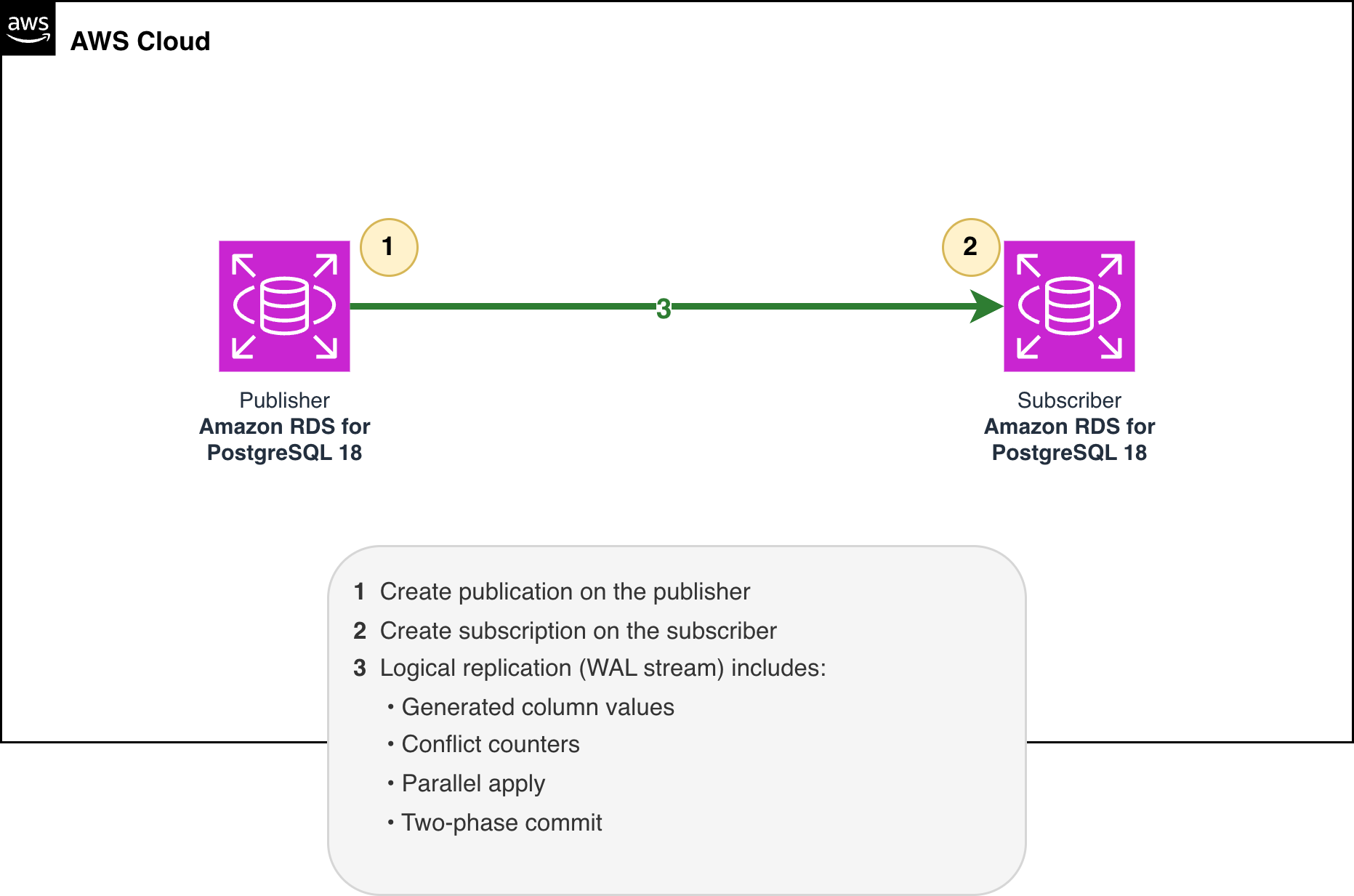
Figure 1: Logical replication setup with Amazon RDS for PostgreSQL 18
Replicating generated columns
Before PostgreSQL 18, if you had a table with a STORED generated column on the publisher, that column was skipped during logical replication. The subscriber either had to recompute the value locally (assuming it even supported the same expression) or go without it.
PostgreSQL 18 addresses this with a new publication parameter called publish_generated_columns. This parameter accepts two values:
stored: Publish all STORED generated columns in the table, including them in the replication stream as if they were regular columns.none(default): Exclude generated columns from the publication, which maintains backward compatibility with PostgreSQL 17 and earlier.
Separately, if you define an explicit column list on the publication, that list takes precedence over the publish_generated_columns parameter. You can include specific generated columns while excluding other regular columns.
Replicating the stored value is useful when the subscriber is a non-PostgreSQL system that cannot evaluate the generation expression, and when a read-heavy subscriber would otherwise spend cycles recomputing a value the publisher has already calculated.
Step 1: Create the publisher table
We create a products table where final_price is automatically calculated from the base price, discount rate, and tax rate:
Insert a few rows:
Step 2: Create the publication
Create a publication that includes the generated column:
To confirm that final_price is included, check pg_publication_tables:
Step 3: Create the subscriber table
On the subscriber, we create the same table structure, but because our publication uses the stored option, final_price must be a regular column on the subscriber rather than a generated column. If the subscriber also defines it as GENERATED, the apply process will fail because PostgreSQL cannot write a received value into a generated column.
Step 4: Create the subscription and verify
After the initial table synchronization completes (where the subscription copies existing publisher data to the subscriber), query the subscriber:
All three rows arrived with the correct final_price values, computed on the publisher and applied directly on the subscriber.
Step 5: Test ongoing replication
Back on the publisher, update a row:
The publisher recalculates final_price to 145.80 (150.00 * 0.90 * 1.08), and the updated value reaches the subscriber within seconds:
Insert a new row on the publisher:
On the subscriber:
The subscriber received the recalculated final_price for the updated row and the computed value for the newly inserted row. Both UPDATE and INSERT operations carry the generated column through the replication stream.
Comparing publication modes
To verify all three modes, we created publications for each and compared the column lists:
The explicit column list (Option 3) takes precedence over the parameter, so you can include a generated column while excluding regular columns such as discount_rate and tax_rate.
Improved conflict monitoring
Diagnosing a logical replication conflict on PostgreSQL 17 or earlier is often difficult. When the apply worker stops, the server log confirms that an error occurred. It does not indicate the type of conflict or how frequently it happened, which leaves you to reconstruct the cause from limited information.
PostgreSQL 18 adds seven new conflict counter columns to the pg_stat_subscription_stats view. Instead of a single error count, you now get a breakdown by conflict type:
confl_insert_exists:INSERTviolated a unique constraint (row already exists).confl_update_origin_differs:UPDATEon a row last modified by a different replication origin.confl_update_exists:UPDATEviolated a unique constraint.confl_update_missing:UPDATEtargeted a row that does not exist on the subscriber.confl_delete_origin_differs:DELETEon a row last modified by a different origin.confl_delete_missing:DELETEtargeted a row that does not exist on the subscriber.confl_multiple_unique_conflicts: Operation violated multiple unique constraints at once.
To test this, we deliberately caused an INSERT conflict. We inserted a row with product_id = 100 directly on the subscriber, then inserted a row with the same primary key on the publisher:
When the publisher tried to replicate the insert, the subscriber already had a row with product_id = 100. We then checked the stats:
The confl_insert_exists counter incremented to 1, which identifies the conflict as a duplicate primary key without requiring you to inspect the server log. The confl_update_origin_differs counter remains at 0 here. Origin conflicts only arise in multi-origin topologies such as bidirectional replication, and they are counted only when track_commit_timestamp is enabled on the subscriber. Note that this conflict stops the apply worker from processing further changes until the conflict is resolved. You can resolve it by deleting the conflicting row on the subscriber (which allows the publisher’s row to be applied) or by using ALTER SUBSCRIPTION ... SKIP to skip the conflicting transaction.
Parallel streaming is now the default
In PostgreSQL 17 and earlier, CREATE SUBSCRIPTION defaulted to streaming = off. That meant large transactions were fully buffered in memory before being sent to the subscriber. This could lead to elevated memory consumption proportional to transaction size (potentially several hundred MB to multiple GB for very large transactions), along with replication lag that grows until the entire transaction is decoded and shipped.
PostgreSQL 18 changes the default to streaming = parallel. Large transactions start replicating before they finish, and multiple parallel apply workers can process changes at the same time. You do not need to change any settings to get this behavior on new subscriptions.
We verified this by checking the subscription metadata:
The value p confirms that the subscription uses parallel streaming.
The parallel apply worker pool is controlled by two settings:
The defaults allow up to 2 parallel apply workers per subscription, drawn from a pool of 4 logical replication workers. For high-throughput workloads, you might want to increase these values.
Changing two-phase commit on live subscriptions
PostgreSQL 16 introduced two-phase commit support for logical replication, but you could only specify the setting when the subscription was created. To change it afterward, you had to drop the subscription and recreate it. Dropping the subscription removed the replication slot and forced a full resynchronization.
PostgreSQL 18 removes that limitation. You can now toggle two_phase on an existing subscription with ALTER SUBSCRIPTION.
Note: Two-phase commit requires prepared transactions to be enabled on both the publisher and the subscriber. On Amazon RDS and Aurora, the max_prepared_transactions parameter controls this. It is a static parameter that requires a reboot to take effect. Make sure it is set to a non-zero value (for example, 10) before testing two-phase commit.
We started by creating a subscription with two_phase disabled:
The state d indicates that two-phase commit is disabled. We can now enable it on the existing subscription:
The state changed to e (enabled). Because the replication slot was retained, replication resumed from the same position and required no resynchronization.
Testing prepared transactions
With two_phase enabled, we tested the full lifecycle. On the publisher, we prepared a transaction:
After PREPARE TRANSACTION, Eve’s row does not appear on the subscriber yet. But the subscriber has created its own prepared transaction, waiting for the publisher’s decision:
When we committed on the publisher:
Eve’s order appeared on the subscriber within seconds:
We also tested ROLLBACK PREPARED to confirm that rolled-back transactions do not reach the subscriber:
After we rolled back the prepared transaction and queried the subscriber, Frank’s order was absent. This confirmed that the rollback propagated through the two-phase stream and the prepared transaction was discarded on both the publisher and the subscriber.
Automatic cleanup of idle replication slots
Abandoned replication slots are a common operational issue with logical replication. When a subscriber goes offline, its slot continues to retain WAL on the publisher until disk space is exhausted. In PostgreSQL 17 and earlier, you had to monitor for these slots and drop them manually.
PostgreSQL 18 introduces idle_replication_slot_timeout to address this. When you set it to a non-zero value, the next checkpoint invalidates any slot that has stayed idle (unused by a replication connection) longer than the configured duration. The invalidated slot still appears in pg_replication_slots, now with an invalidation_reason, but it stops holding WAL and the publisher can reclaim that disk space.
The parameter defaults to 0, which disables the timeout, and its value is expressed in seconds. Because the setting is applied on configuration reload rather than at startup, you can change it in your Amazon RDS parameter group or in postgresql.conf without rebooting the instance.
To see how the tracking works, we created a manual replication slot and checked its inactive_since field:
The query returns the slot name test_idle_slot with active = false, an inactive_since timestamp of 2026-04-14 19:18:54, and an idle_duration of approximately 0.12 seconds. This confirms that PostgreSQL records the inactivity start time immediately.
The inactive_since timestamp is recorded as soon as the slot becomes inactive. For example, with idle_replication_slot_timeout set to 3600 (one hour), the next checkpoint after a slot has been idle for more than an hour invalidates it and releases the WAL it was holding. On Amazon RDS, you configure this in your custom parameter group, and the change takes effect without a reboot.
Considerations
Before you adopt these features in production, keep the following points in mind:
- Subscriber column type for generated columns: When you replicate a STORED generated column, the subscriber must define it as a regular column. If both sides define the column as
GENERATED, the apply process will fail because PostgreSQL cannot write a received value into a generated column. - Only STORED generated columns can be replicated. Virtual generated columns (which are the new default in PostgreSQL 18) cannot be replicated because they have no physical storage. The
publish_generated_columnsparameter uses an enum value specifically to allow for future expansion to virtual columns in later releases. - Origin tracking requires
track_commit_timestamp: Theconfl_update_origin_differsandconfl_delete_origin_differscounters only work whentrack_commit_timestamp = onis set on the subscriber. The other conflict counters work without it. - Idle slot invalidation happens at checkpoint time, not immediately. There can be a delay of up to
checkpoint_timeoutbetween when the slot exceeds the idle threshold and when it is actually invalidated. You can force a checkpoint manually if you need immediate cleanup. - Sequences are not replicated. Logical replication copies the generated ID values as row data, but the sequence counter on the subscriber is not synchronized. If you promote the subscriber to become the new primary, you need to manually advance the sequences to avoid duplicate key errors.
- Cross-version replication: When the subscriber runs a version earlier than PostgreSQL 18, the initial table synchronization will not copy generated column values (they arrive as
NULL). However, changes replicated through the ongoing WAL stream after the initial sync do include generated column values. For full support ofpublish_generated_columns, both publisher and subscriber must run PostgreSQL 18.
Cleanup
When you are done testing, remove the replication resources to avoid unnecessary costs and WAL accumulation.
On the subscriber, drop the subscriptions first:
On the publisher, drop the publications:
Drop the test tables on both publisher and subscriber:
If you created Amazon RDS instances for this walkthrough, delete them through the Amazon RDS console or the AWS Command Line Interface (AWS CLI) to stop incurring charges. If you modified an existing parameter group, consider reverting rds.logical_replication to 0 if you no longer need logical replication, and reboot the instance.
Conclusion
In this post, we demonstrated how to use the PostgreSQL 18 logical replication improvements on RDS for PostgreSQL: replicating STORED generated columns with the publish_generated_columns parameter, monitoring conflicts through the new counters in pg_stat_subscription_stats, verifying that parallel streaming is enabled by default, toggling two-phase commit on a running subscription, and configuring idle_replication_slot_timeout for automatic slot cleanup.
These features are available on RDS for PostgreSQL 18.0 and later and Aurora PostgreSQL. For more details, see the PostgreSQL 18 release notes and the logical replication documentation on the PostgreSQL website. To get started, create or upgrade to an Amazon RDS for PostgreSQL 18 instance and try these features in your own environment.