AWS Database Blog
Migrating data from Oracle to Amazon Aurora DSQL
Amazon Aurora DSQL is a distributed SQL database service that offers serverless, elastic scaling with strong ACID compliance across multiple AWS Regions. If you are evaluating Amazon Aurora DSQL for database modernization, you might face the challenge of migrating existing enterprise databases while working within the service’s current capabilities and constraints.
This post walks through migrating data from an Oracle source to Amazon Aurora DSQL, using AWS Database Migration Service (AWS DMS), Amazon Simple Storage Service (Amazon S3), AWS Glue, and AWS Step Functions to create an automated, cost-effective migration pipeline suitable for enterprise-scale deployments.
The complete source code for this solution is available in the sample-oracle-to-aurora-dsql-migration repository on GitHub.
Understanding Amazon Aurora DSQL
Amazon Aurora DSQL is a serverless, distributed SQL database designed for applications that require high availability, scalability, and performance. It offers the following key features:
- Serverless architecture – Amazon Aurora DSQL is a fully managed, serverless database service that automatically scales compute, storage, and execution layers based on demand.
- PostgreSQL compatibility – Amazon Aurora DSQL provides PostgreSQL-compatible SQL syntax and functionality, making it suitable for applications that can work with PostgreSQL interfaces.
- Distributed design – The service uses a distributed architecture to provide high availability and durability across multiple Availability Zones.
- Multi-Region support – Amazon Aurora DSQL supports multi-Region deployments for disaster recovery and global applications.
- IAM integration – The service integrates with AWS Identity and Access Management (IAM) for authentication and access control.
- Encryption – Amazon Aurora DSQL provides encryption at rest and in transit for data security.
Migration challenges and requirements
When you migrate an enterprise database to Amazon Aurora DSQL, you face several unique challenges:
- Authentication complexity – Amazon Aurora DSQL requires IAM-based authentication with specific token generation requirements. Only certain AWS services can assume the necessary roles, limiting direct connection options and requiring careful authentication management.
- Schema creation automation – Amazon Aurora DSQL requires explicit schema and table creation before data loading. This means you need automated schema analysis and conversion from source databases.
- Data loading constraints – Amazon Aurora DSQL supports data loading primarily through
COPYcommands from files, which creates specific requirements for migration strategies. The service requires files to be accessible locally to the database engine, influencing how you can structure your migration pipeline. - Cost optimization – Traditional approaches using Amazon Elastic Compute Cloud (Amazon EC2) instances for intermediate processing can result in significant storage and compute costs, particularly for large databases with extended migration windows.
Solution overview
The following diagram illustrates the solution architecture.
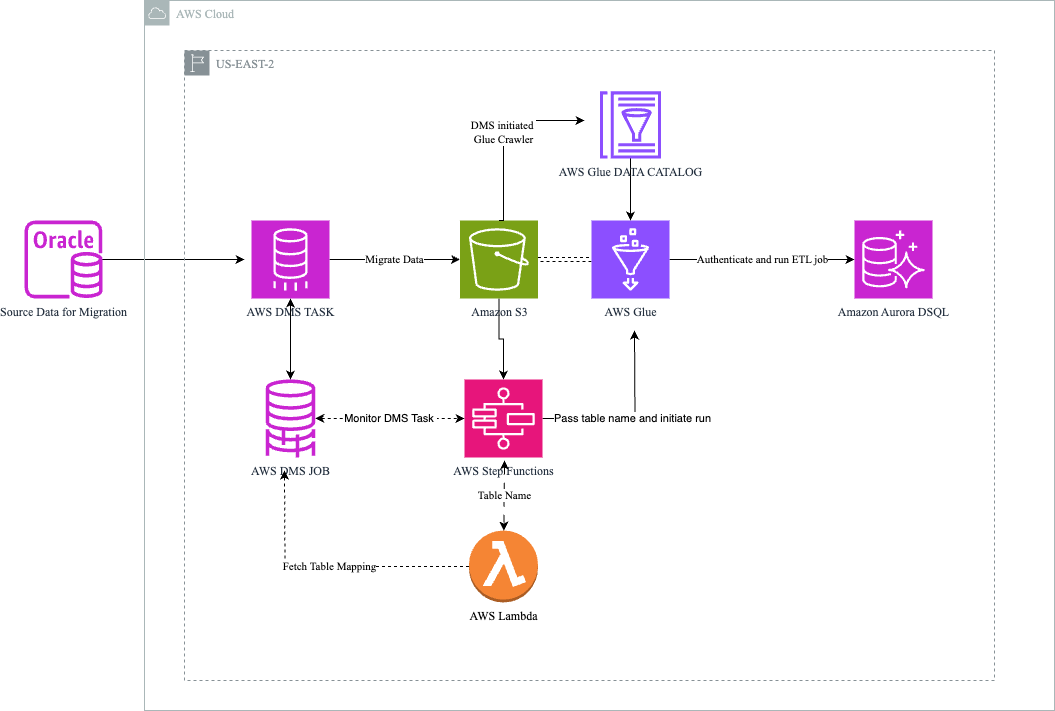
The workflow includes the following steps:
- The pipeline extracts data from the on-premises Oracle database. You can also use another relational database supported by AWS DMS as the source.
- AWS DMS migrates data to Amazon S3 and creates the AWS Glue Data Catalog.
- Step Functions initiates and monitors AWS DMS task progress and triggers an AWS Lambda function and AWS Glue job.
- The Lambda function fetches the table mapping from AWS DMS and passes it back to Step Functions, which forwards it to the AWS Glue job.
- AWS Glue connects with the target Amazon Aurora DSQL database and identifies columns using the Data Catalog. It then creates a schema at the target and transforms data to the target data type. Finally, it reads the data from Amazon S3 and loads it into the Amazon Aurora DSQL database.
Prerequisites
Before you get started, make sure you have the following prerequisites:
- A source Oracle database prepared for database migration by configuring it as a replication source for AWS DMS.
- An S3 bucket for intermediate data storage with:
- Block Public Access enabled.
- Default encryption (SSE-S3 or SSE-KMS) configured.
- The necessary permissions for AWS DMS to use as a target and for AWS Glue to access.
- User permissions to create a Step Functions workflow with a service assumed role to monitor the AWS DMS task, trigger the Lambda function, and manage AWS Glue jobs.
- The following IAM permissions scoped to the specific Amazon Aurora DSQL cluster:
iam:CreateServiceLinkedRole.dsql:DbConnect.dsql:DbConnectAdmin.dsql:GenerateDbConnectAdminAuthToken.dsql:GenerateDbConnectAuthToken.
Create the Amazon Aurora DSQL target instance
To create an Amazon Aurora DSQL cluster, complete the following steps:
- On the Amazon Aurora DSQL console, choose Clusters in the navigation pane.
- Choose Create cluster, and choose either Single-Region or Multi-Region.
- Configure the encryption settings, deletion protection, and tags.
- Choose Create cluster.
For detailed cluster creation steps, advanced configurations, and multi-Region setup options, see Getting started with Amazon Aurora DSQL.
Configure the AWS DMS task
Complete the following steps to configure your AWS DMS task:
- Create a replication instance with sufficient capacity to handle the data volume.
- Create an Oracle source endpoint with connection details and SSL mode set to
verify-fullfor encryption in transit. - Create an Amazon S3 target endpoint with the following settings:
DataFormatset toCSV.EncryptionModeset toSSE_KMS.ServerSideEncryptionKmsKeyIdset to your KMS key ARN.GlueCatalogGenerationandIncludeOpForFullLoadset toTrue.
- Create an AWS DMS migration task:
- Choose the full load migration type.
- Configure table mappings for the source schema.
- Set appropriate task settings for large object (LOB) handling and performance.
- Set the migration task startup configuration to Manually later.
For detailed AWS DMS configuration steps, endpoint settings, and task configuration options, see Creating a task, Using an Oracle database as a source for AWS DMS, and Using Amazon S3 as a target for AWS Database Migration Service.
Create the Lambda function
Create a Lambda function to extract table information from AWS DMS task mappings. The function parses the DMS task’s table mappings to identify the target table name, which it then passes to the AWS Glue ETL job.
For the complete Lambda function code, see the sample-oracle-to-aurora-dsql-migration repository on GitHub.
The function performs the following key operations:
- Parses the
tableMappingsfrom the DMS task event. - Iterates through DMS rules to find selection type rules.
- Extracts and returns the table name from the
object-locator.
Lambda configuration
- Memory – 128 MB (sufficient for table name extraction).
- Timeout – 15 seconds (set higher than 5 seconds).
- IAM role – Basic Lambda execution role with the following AWS DMS permissions:
dms:DescribeReplicationTasks– Read AWS DMS task details and table mappings.dms:DescribeTableStatistics– Access table-level migration statistics.
For complete Lambda IAM permission requirements, see Managing permissions in AWS Lambda and the AWS DMS API Reference.
Create an AWS Glue ETL job
The AWS Glue ETL job handles schema creation, data type mapping, and data loading into Amazon Aurora DSQL.
Data Catalog setup
AWS DMS automatically creates Data Catalog entries when using Amazon S3 as the target. You do not need a separate crawler. AWS DMS populates the Data Catalog during migration and catalogs tables with the proper schema information from the Oracle source.
Job configuration
- Job type – Spark ETL.
- AWS Glue version – 3.0 or later.
- Dependent JARs path –
postgresql-42.7.4.jar(download the JAR file and provide the S3 access path). - Python modules path –
boto3>=1.35.95(for Amazon Aurora DSQL authentication). - Worker type – Adjust based on data volume.
IAM permissions for the Glue job
The AWS Glue job requires permissions across the following services. For the complete IAM policy, see the sample-oracle-to-aurora-dsql-migration repository on GitHub.
| Statement | Actions | Purpose |
S3Access |
s3:GetObject, s3:ListBucket |
Read migrated data from Amazon S3 |
GlueDataCatalogAccess |
glue:GetDatabase, glue:GetTable, glue:GetPartitions |
Access schema metadata |
AuroraDSQLAccess |
dsql:DbConnect, dsql:DbConnectAdmin |
Connect to the target database |
DSQLTokenGeneration |
dsql:GenerateDbConnectAdminAuthToken, dsql:GenerateDbConnectAuthToken |
Generate authentication tokens |
For detailed AWS Glue IAM requirements, see Security in AWS Glue and Identity and access management for Amazon Aurora DSQL.
AWS Glue ETL job script
For the complete script, see the sample-oracle-to-aurora-dsql-migration repository on GitHub.
The script performs the following key operations:
- Token generation – Generates IAM authentication tokens using
boto3.client("dsql")withgenerate_db_connect_admin_auth_token(). - Schema discovery – Reads table schema from the AWS Glue Data Catalog.
- Data type mapping – Maps Oracle and Glue data types to PostgreSQL-compatible types for Amazon Aurora DSQL, as shown in the following table.
| Glue type | Amazon Aurora DSQL type |
string |
VARCHAR(255) |
int |
INTEGER |
bigint |
BIGINT |
double |
DOUBLE PRECISION |
float |
REAL |
boolean |
BOOLEAN |
timestamp |
TIMESTAMP |
date |
DATE |
decimal |
NUMERIC |
long |
BIGINT |
binary |
BYTEA |
map |
JSONB |
struct |
JSONB |
array |
TEXT[] |
- Input validation – Validates table names using regex
^[a-zA-Z0-9_]{1,64}$before any table name is used in SQL statements, to prevent SQL injection. - DDL execution – Creates tables in Amazon Aurora DSQL using JDBC connections with explicit transaction management.
- Data loading – Reads CSV data from Amazon S3, applies type casting, and writes to Amazon Aurora DSQL using JDBC with
REPEATABLE_READisolation level and a batch size of 9,900 rows.
Key Glue job configurations
- Token generation – Uses
boto3.client("dsql")with thegenerate_db_connect_admin_auth_token()method. - Token expiry – The maximum is 24 hours. Currently set to 1 hour.
- User ID – The user ID used in the sample code is
admin. - Data type mapping strategy – With
GlueCatalogGeneration, schema columns are assigned default data types that might not align with source values. Define a data type mapping strategy in the AWS Glue code. For Amazon Aurora DSQL supported data types, see the Amazon Aurora DSQL User Guide. - Isolation level –
REPEATABLE_READfor data consistency is required for the Amazon Aurora DSQL target.
Create a Step Functions state machine
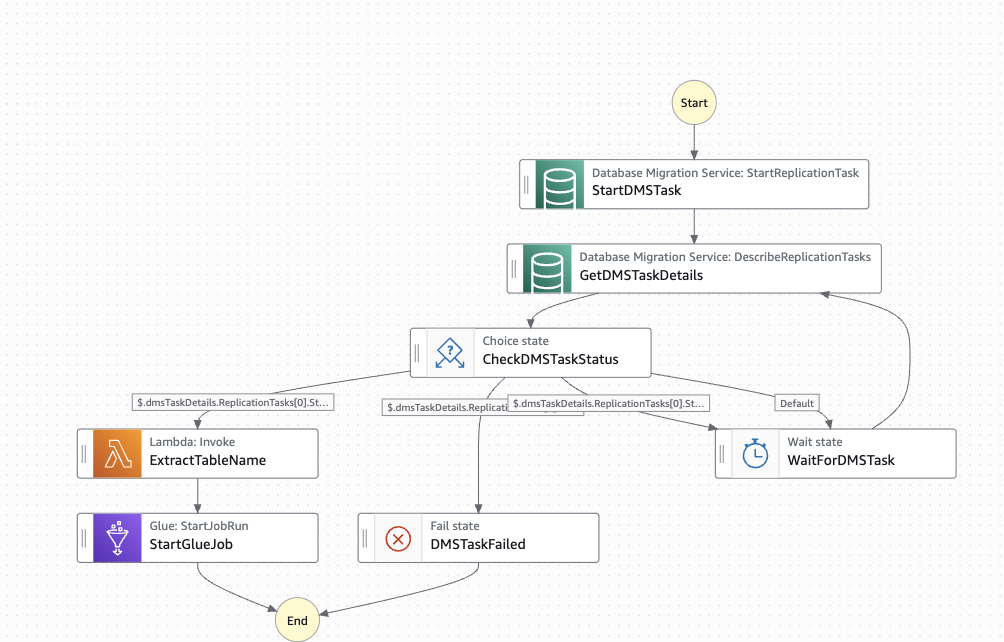
A Step Functions state machine orchestrates the migration workflow. The state machine starts the AWS DMS task and monitors it. When the AWS DMS task completes, it extracts the table mappings to pass table names to the AWS Glue job. It then triggers the AWS Glue job.
The following diagram illustrates the state machine workflow.
State machine workflow features
- Automated AWS DMS start – Starts the replication task programmatically.
- Progress monitoring – Polls the AWS DMS task status every 60 seconds.
- Completion detection – Waits for
stoppedstatus and 100% progress. - Error handling – Handles failed AWS DMS tasks appropriately.
- Lambda integration – Extracts table information for the AWS Glue job.
- AWS Glue job triggering – Starts the AWS Glue ETL job with table parameters.
Setup steps
To configure the state machine, complete the following steps:
- On the Step Functions console, choose Create state machine.
- Choose Write your workflow in code and enter the state machine definition. For the complete state machine definition, see the sample-oracle-to-aurora-dsql-migration repository on GitHub.
- Update the Amazon Resource Names (ARNs) and job name in the definition:
- Replace the AWS DMS task ARN with your task ARN.
- Replace the Lambda function ARN with your function ARN.
- Replace the AWS Glue job name with your job name.
- Make sure the referenced ARNs exist before creating the state machine.
- Create an IAM execution role with the following permissions:
dms:StartReplicationTask.dms:DescribeReplicationTasks.lambda:InvokeFunction.glue:StartJobRun.CloudWatchLogsDeliveryFullAccessPolicy(to store state machine runtime logs).
State machine states
The state machine orchestrates the migration through the following states:
| State | Type | Purpose |
StartDMSTask |
Task | Starts the DMS replication task |
GetDMSTaskDetails |
Task | Describes replication task status |
CheckDMSTaskStatus |
Choice | Routes based on status: stopped, failed, or running |
WaitForDMSTask |
Wait | Polls every 60 seconds |
DMSTaskFailed |
Fail | Error handling for failed tasks |
ExtractTableName |
Task | Invokes Lambda to get table name |
StartGlueJob |
Task | Triggers the AWS Glue ETL job with table name parameter |
For more information about setting up Step Functions and AWS DMS integration patterns, see the AWS Step Functions Developer Guide and Create and run AWS DMS tasks using AWS Step Functions.
Security considerations
This solution involves multiple AWS services handling potentially sensitive data. Follow these security best practices.
Shared responsibility model
This architecture follows the AWS shared responsibility model. Responsibilities are divided as follows:
| Service | AWS manages | Customer manages |
| Amazon Aurora DSQL | Database engine, patching, high availability, infrastructure security | IAM policies, VPC endpoint configuration, encryption key selection |
| Amazon S3 | Storage infrastructure, durability, availability | Bucket policies, encryption configuration, access control, Block Public Access |
| AWS DMS | Replication instance OS, engine patching | Endpoint security, SSL/TLS configuration, network access |
Security implementation priority
Implement security controls in this order before starting any data migration:
- Configure S3 bucket encryption (SSE-KMS) and Block Public Access.
- Create least-privilege IAM roles for each service (AWS DMS, Lambda, AWS Glue, Step Functions).
- Enable Amazon Aurora DSQL cluster encryption with customer-managed KMS keys.
- Configure VPC endpoints for Amazon S3 and AWS Glue to avoid data traversing the public internet.
- Enable AWS CloudTrail and Amazon CloudWatch logging for audit and monitoring.
- Validate that SSL/TLS is enforced for all database connections.
Security validation steps
After deployment, verify the following:
Additionally, verify the following:
- IAM policies contain no wildcard (
*) resources in production. - The DMS replication instance is in a private subnet with no public IP.
- Amazon Aurora DSQL connections use
sslmode=requirein all JDBC connection strings. - Authentication tokens expire within the configured timeframe (AWS recommends 1 hour).
Data protection during migration
- Enable encryption in transit for AWS DMS endpoints (SSL/TLS for the Oracle source, SSE-KMS for the Amazon S3 target).
- Do not log authentication tokens. Use short-lived tokens (1 hour) and store configuration in environment variables or AWS Secrets Manager.
- Apply S3 bucket policies that deny unencrypted transport using the
aws:SecureTransportcondition. For the complete bucket policy, see the sample-oracle-to-aurora-dsql-migration repository on GitHub. - Restrict AWS Glue job IAM roles to specific S3 prefixes and Amazon Aurora DSQL clusters. Avoid wildcard ARNs.
- Use KMS key policies to control which principals can encrypt and decrypt migration data.
Threat model
The following table describes the threats identified and mitigated in this architecture:
| Threat | Mitigation |
| Overprivileged IAM roles | Scope all IAM policies to specific resource ARNs rather than wildcards. |
| SQL injection via table names | Validate input using regex ^[a-zA-Z0-9_]{1,64}$ before using any table name in SQL statements. |
| Authentication token theft or replay | Use short-lived tokens (1-hour expiry), never log them, and store credentials in environment variables rather than code. |
| Unauthorized access to S3 intermediate storage | Enable Block Public Access, restrict bucket policies to specific IAM roles, and use SSE-KMS encryption. |
Code security review
All code samples in this post received a manual security review covering input validation, secure authentication handling, least-privilege access patterns, and protection against injection attacks. The review was performed using static analysis with Bandit 1.7 (Python) and ESLint security plugin (JavaScript).
Findings: No Critical or High severity issues were identified. Medium findings (informational logging) were reviewed and accepted as appropriate for sample code.
Before deploying to production, run your own static analysis scans using Amazon Inspector or equivalent tools such as Bandit (Python) and ESLint security plugins (JavaScript) to validate against your organization’s security standards.
Lambda security guidelines
- Deploy the function in a VPC private subnet with no internet access. Use VPC endpoints for AWS services.
- Encrypt environment variables using AWS Key Management Service (AWS KMS).
- Apply a resource-based policy to restrict invocation to Step Functions only.
- Use the principle of least privilege for the execution role (only
dms:DescribeReplicationTasksanddms:DescribeTableStatistics). - Set reserved concurrency to prevent runaway invocations.
Step Functions security guidelines
- Enable encryption at rest for the state machine using an AWS KMS customer managed key.
- Enable Amazon CloudWatch Logs with encryption for execution history.
- Avoid passing sensitive data (tokens, passwords) in state machine input or output. Use AWS Systems Manager Parameter Store or AWS Secrets Manager.
- Validate that the execution role follows least privilege (only permissions for AWS DMS, Lambda invoke, and AWS Glue StartJobRun).
- Restrict state machine access using IAM resource-based policies.
Cleanup
To avoid incurring future charges, delete the resources you created during this walkthrough:
- On the Step Functions console, choose your state machine and choose Delete.
- On the Lambda console, choose your function and choose Actions, Delete.
- On the AWS Glue console, choose your ETL job and choose Action, Delete job.
- On the AWS DMS console, delete the following resources in this order:
- The migration task.
- The endpoints (source and target).
- The replication instance.
- On the Amazon S3 console, empty and delete the migration bucket.
- On the Amazon Aurora DSQL console, choose your cluster and choose Delete.
- On the IAM console, delete the IAM roles and policies you created for this solution.
If you used customer-managed KMS keys, evaluate whether they are still needed and schedule deletion if appropriate.
Conclusion
In this post, we walked through migrating from Oracle to Amazon Aurora DSQL using an automated approach with AWS DMS, Step Functions, Lambda, and AWS Glue. This solution addresses the unique challenges of the Amazon Aurora DSQL serverless architecture. By using Amazon S3 as intermediate storage and implementing comprehensive error handling throughout the workflow, you can achieve reliable data migration while minimizing manual intervention and operational complexity.
As Amazon Aurora DSQL evolves, this migration framework establishes a solid foundation for database modernization initiatives. You can take full advantage of Amazon Aurora DSQL while reducing infrastructure costs and administrative overhead.
To get started with this migration approach:
- Clone the sample-oracle-to-aurora-dsql-migration repository on GitHub.
- Deploy the Step Functions workflow in your AWS account with a test table.
- Scale to your full workload.
For questions or feedback, share in the comments or visit the AWS re:Post community.