Desktop and Application Streaming
How ZS built Self-serve analytics at scale with Amazon WorkSpaces Applications
Digital transformation in healthcare analytics demands solutions that balance sophisticated capabilities with simplified access. ZS, a global management consulting and technology firm and an AWS Advanced Consulting Partner, has applied its expertise in advanced analytics, AI, and scalable technology platforms to address this challenge. Serving a wide range of industries including pharmaceuticals, healthcare, and financial services, ZS transformed a standard virtual desktop setup into a powerful analytics platform using Amazon WorkSpaces Applications (formerly Amazon AppStream 2.0). This solution now operates across three AWS Regions, serving over 700 daily users with persona-based access control, integrated development environments, and seamless single sign-on (SSO) integration with downstream AWS services. As an Amazon Redshift Service Delivery Partner, ZS has expertly integrated this high-performance data warehouse into their platform, which delivers 99.99% availability and empowers users with computational scale, simplified access, and consistent experience worldwide.
For pharmaceutical and healthcare clients, this translates to faster insights for critical initiatives while maintaining HIPAA and GDPR compliance. The implementation shows how ZS’s industry knowledge combined with AWS cloud-native architecture can elevate analytics delivery from basic application streaming to a comprehensive, self-service analytics system that unlocks the full potential of organizational data.
Introduction
ZS customers were looking for flexibility to use familiar Business Intelligence (BI) and analytics tools while maintaining secure, high-performance infrastructure without the complexity of provisioning or managing it. The goal was to enable a secure, scalable, and intuitive virtual workspace for data exploration & analytics, powered by AWS, tailored to each customer’s personas and needs.
To address these needs, ZS adopted Amazon WorkSpaces Applications as the foundation for delivering virtualized, cloud-hosted desktop applications.
ZS initially implemented Amazon WorkSpaces Applications to provide their clients with secure access to analytics tools. As usage grew and requirements evolved, they identified opportunities to enhance the platform’s capabilities, security, and user experience.
Business Challenges
The initial Amazon WorkSpaces Applications implementation faced several challenges as user needs evolved:
- Users with varying technical expertise struggled to navigate the default interface and quickly find the right tools and applications.
- New users lacked contextual help such as walkthroughs, user guides, or rich media content to adapt to the new environment.
- ZS couldn’t provide in-portal communication about important updates or changes in application layout or launch of new applications or planned maintenance activities resulting in user confusion and increased support tickets for ZS admin team.
- Role/Persona based access control needed greater granularity for visibility control.
- Ability to seamlessly achieve SSO integration with downstream AWS Services like Amazon Redshift & Amazon S3.
- The standard persistent storage was insufficient for heavy users of IDEs such as PyCharm.
- Data scientists required enhanced code development environments.
- Global users experienced inconsistent performance.
- Security and compliance requirements grew more complex.
Amazon WorkSpaces Applications is a fully managed application streaming service that provides users with instant access to their applications from anywhere. Amazon WorkSpaces Applications provides robust application streaming capabilities out of the box. You can customize the user experience to meet specific business requirements.
Solution Overview
To address these challenges, ZS enhanced their Amazon WorkSpaces Applications implementation with several key components:
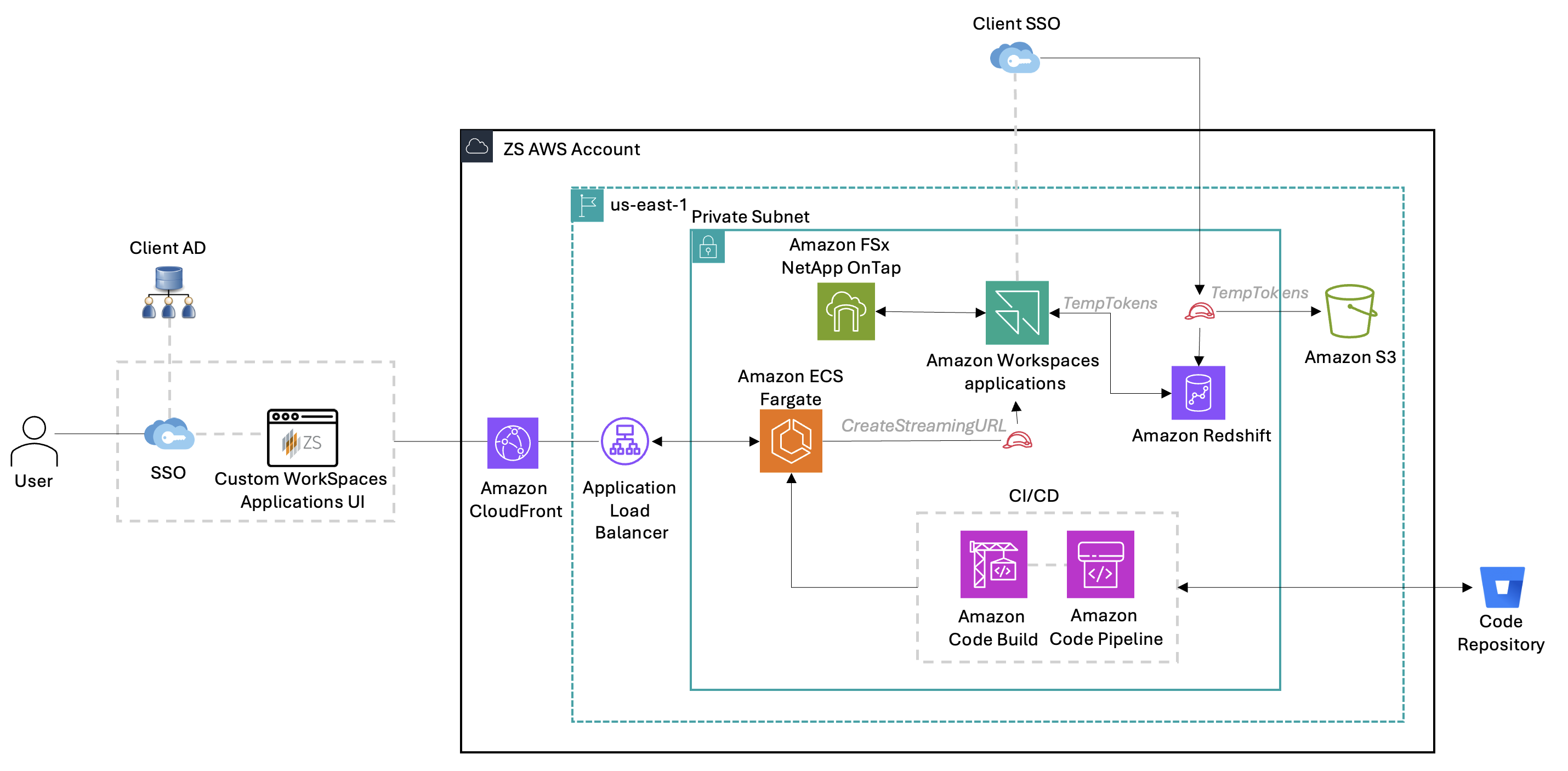
Figure 1 : Solution Overview
Solution Description:
To address the limitations of a standard Virtual Desktop Infrastructure (VDI) setup and enable a fully self-serve, secure, powerful, and role-aware analytics experience, ZS engineered a custom solution using a suite of AWS services anchored around Amazon WorkSpaces Applications and extended via a purpose-built UI layer, secure identity integrations, and scalable infrastructure.
The solution uses the following AWS services:
- Amazon WorkSpaces Applications – Provides the core application streaming capability.
- Amazon ECS on AWS Fargate – Hosts the custom UI layer.
- Amazon CloudFront – Delivers the UI globally with low latency.
- Amazon FSx for NetApp ONTAP – Provides high-performance storage for development workloads.
- Amazon CloudWatch – Monitors system performance and usage.
- AWS CodeBuild & AWS CodePipeline – Provides Continuous Integration & Continuous Deployment (CI/CD) capabilities to the core application.
Custom UI & Intelligent Access:
At the core of the solution is a custom-built user interface developed in Node.js, designed to reimagine the Amazon WorkSpaces Applications experience from the ground up. This UI acts as a dynamic and user-friendly entry point into the Amazon WorkSpaces Applications environment, hosted on an AWS Fargate based Amazon ECS cluster for scalability and made globally available via Amazon CloudFront.
Custom apps for Amazon Redshift, Amazon S3 & Amazon EC2/EMR appear directly in the Amazon WorkSpaces Applications catalog with tailored icons, creating a native-like experience for end users while abstracting away backend complexity. All custom application settings are then propagated to individual user sessions using Session Scripts and template-based Amazon WorkSpaces Applications Images.
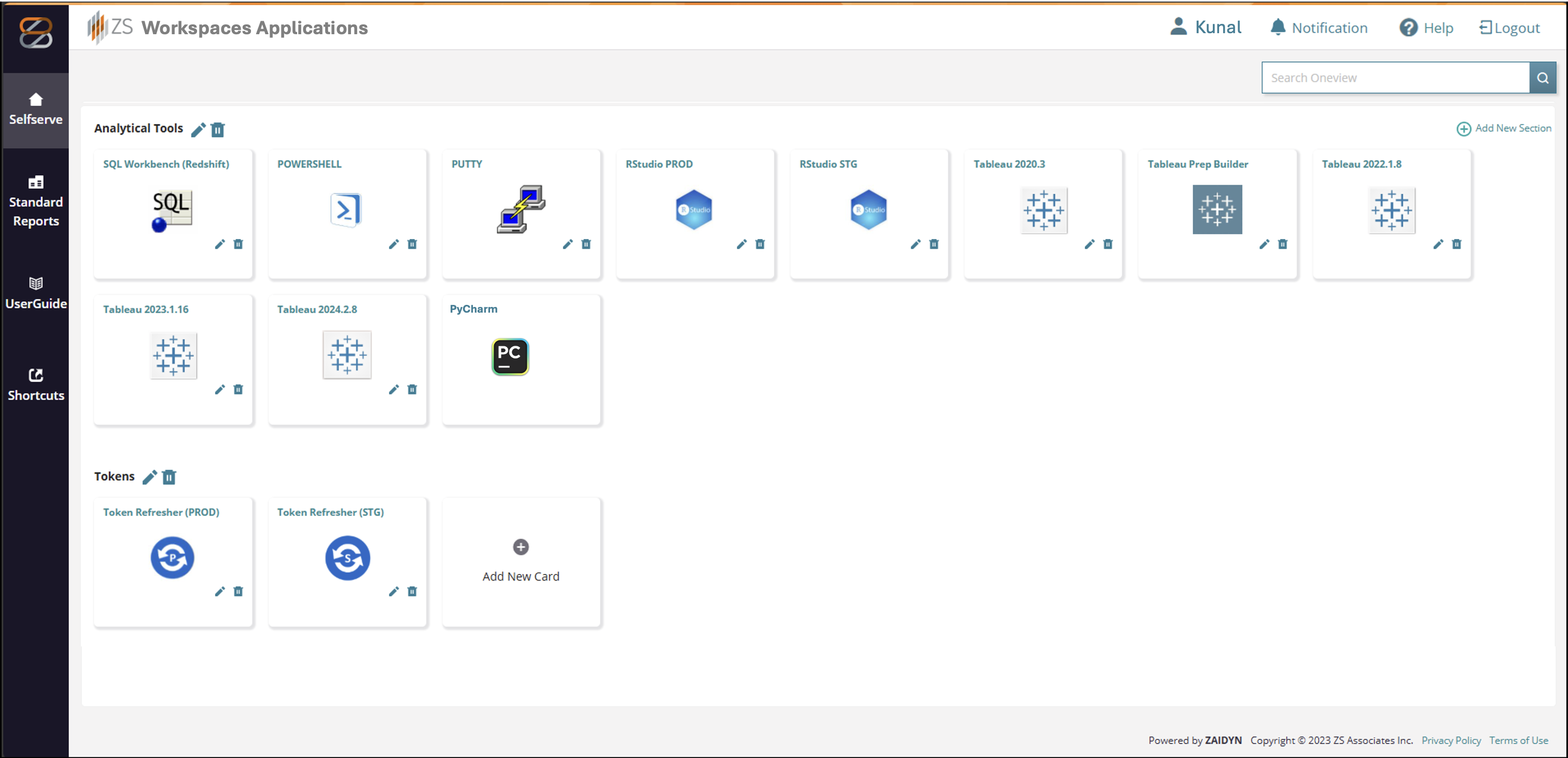
Figure 2: Custom WorkSpaces Applications UI Snapshot
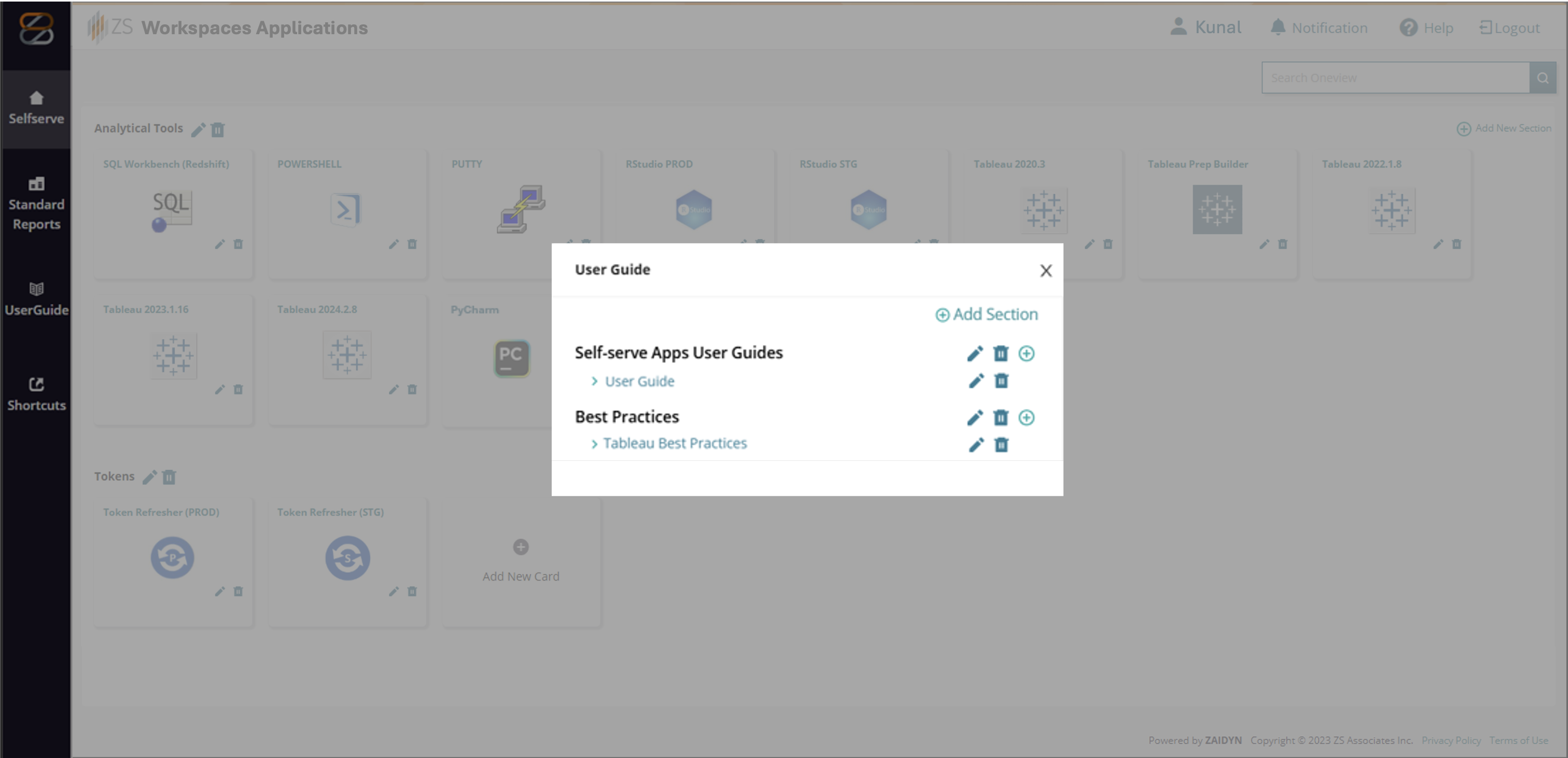
Figure 3: Contextual based user guides
Key UI enhancements include:
-
Intuitive App Organization:
Applications are grouped contextually (e.g., Analytical Tools, Development IDEs, etc.), helping users easily locate what they need. This layout mimics a digital workspace tailored to business personas, replacing the native Amazon WorkSpaces Applications app catalog.
-
Persona-Based Access Control:
Application visibility is dynamically controlled based on user roles. The custom UI integrates with each client’s SSO, determining which business user should have access to applications such as Tableau, PyCharm, etc.
-
Seamless Session Launch:
App icons in the custom WorkSpaces application UI calls Amazon WorkSpaces Applications CreateStreamingURL API, embedding user-specific session context and application parameters to launch a pre-configured Amazon WorkSpaces Applications session on demand.
-
Built-in Communication & Guide Panel:
The UI features contextual based user guides, walkthrough videos, and an announcement panel allowing ZS to communicate updates, outages, or onboarding tips directly within the Amazon WorkSpaces Applications entry point.
-
Scalable DevOps Integration:
Application code is deployed via a CI/CD pipeline powered by AWS CodeBuild and AWS CodePipeline, allowing teams to push UI updates seamlessly from ZS’s internal repositories to AWS Fargate based Amazon ECS.
SSO-based access for AWS services:
Users can access downstream services like Amazon Redshift and Amazon S3 through custom SSO/SAML-based authentication flows for a seamless experience:
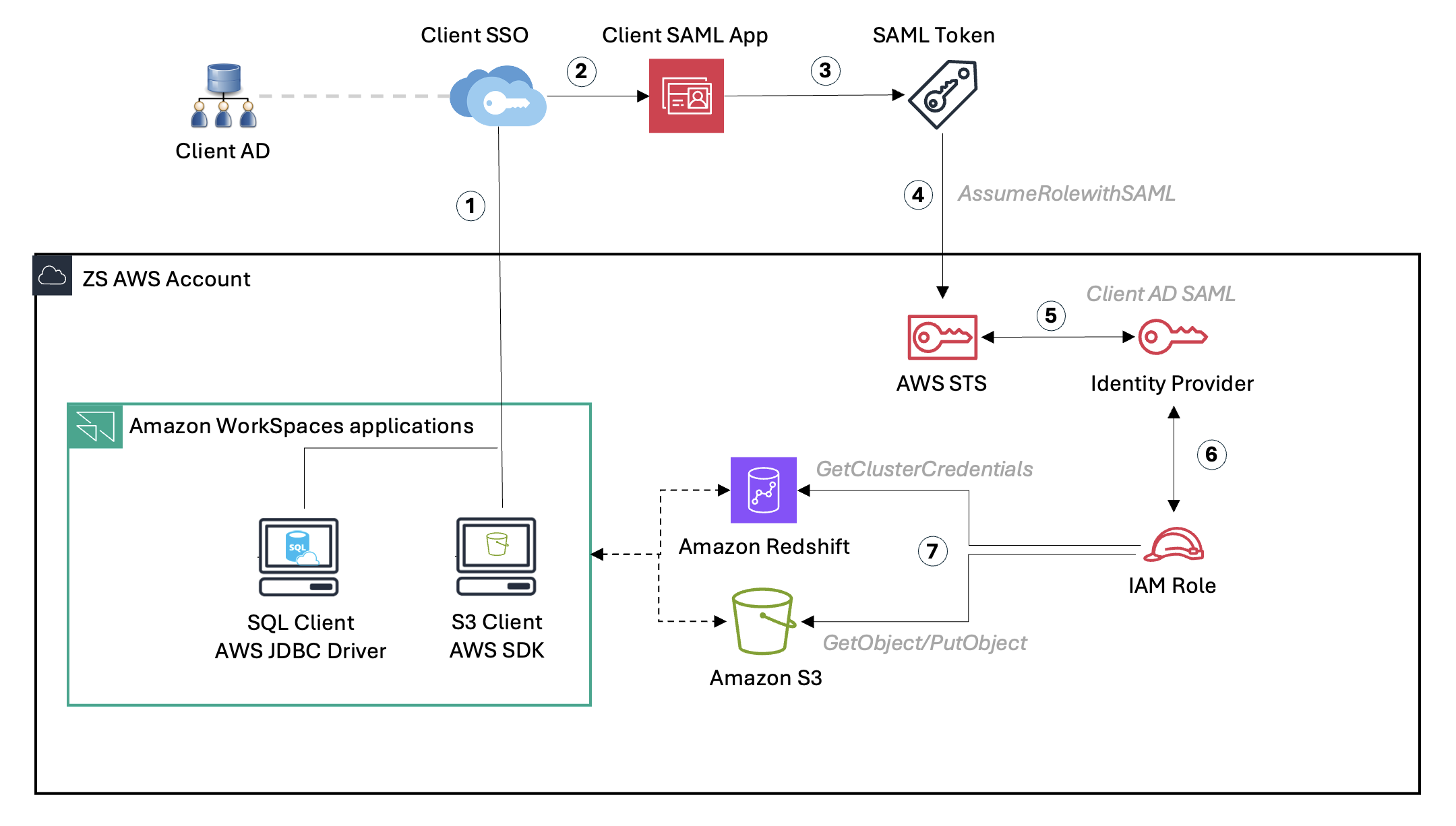
Figure 4: SSO-based access for AWS services
Amazon WorkSpaces Applications serves as a secure entry point not only for desktop analytics applications but also for downstream AWS services such as Amazon Redshift, Amazon S3, Amazon EC2, and Amazon EMR that power ZS’s data processing, analytics, and visualization workloads. To eliminate static credentials and improve security posture, ZS developed custom Amazon WorkSpaces Applications hosted applications that use temporary AWS IAM credentials via federated access, ensuring seamless access across all services from within Amazon WorkSpaces Applications sessions.
-
Amazon Redshift:
Amazon Redshift serves as the core analytical data warehouse for multiple ZS client-facing applications. Analysts and data scientists frequently connect to Amazon Redshift for querying curated datasets, building dashboards, and running data validation checks. A customized SQL Workbench/J (a DBMS-independent, cross-platform SQL query tool) application uses the client’s SAML-based SSO App to authenticate users via AssumeRoleWithSAML and GetClusterCredentials API. Enabling password less, temporary access to Amazon Redshift with scoped permissions without users having to memorize or expose their credentials.
-
Amazon S3: Folder-level secure access:
Amazon S3 is used to store client-specific and user-generated datasets that supplement curated data warehouses for exploratory or ad-hoc analysis so, a custom application built using the AWS SDK for Python (Boto3) provides users secure, scoped access to their designated Amazon S3 folders. Each user is authenticated via corporate SSO using the AssumeRoleWithSAML API, which issues temporary credentials. Folder-level access is dynamically enforced based on SAML attributes, ensuring users can only interact with their own data files for analysis.
-
Extending Storage for Power Users with Amazon FSx for NetApp ONTAP:
To support power users developing advanced Python-based ML models, ZS integrated Amazon FSx for NetApp ONTAP with Amazon WorkSpaces Applications. Custom session scripts within the Amazon WorkSpaces Applications image dynamically mount Amazon FSx volumes at session start, with access controls ensuring that each user has a private, isolated workspace. The enhancement enabled seamless IDE experiences for advanced users by integrating Amazon FSx for NetApp ONTAP, which provides scalable, high-performance storage for storage-intensive workloads.
-
Enhancements made in SSO Access to some downstream AWS Services
– Integration with the client’s Identity Provider (IDP) for SSO.
– Fine-grained access controls using AWS IAM roles.
Seamless SSO login for Amazon Redshift:
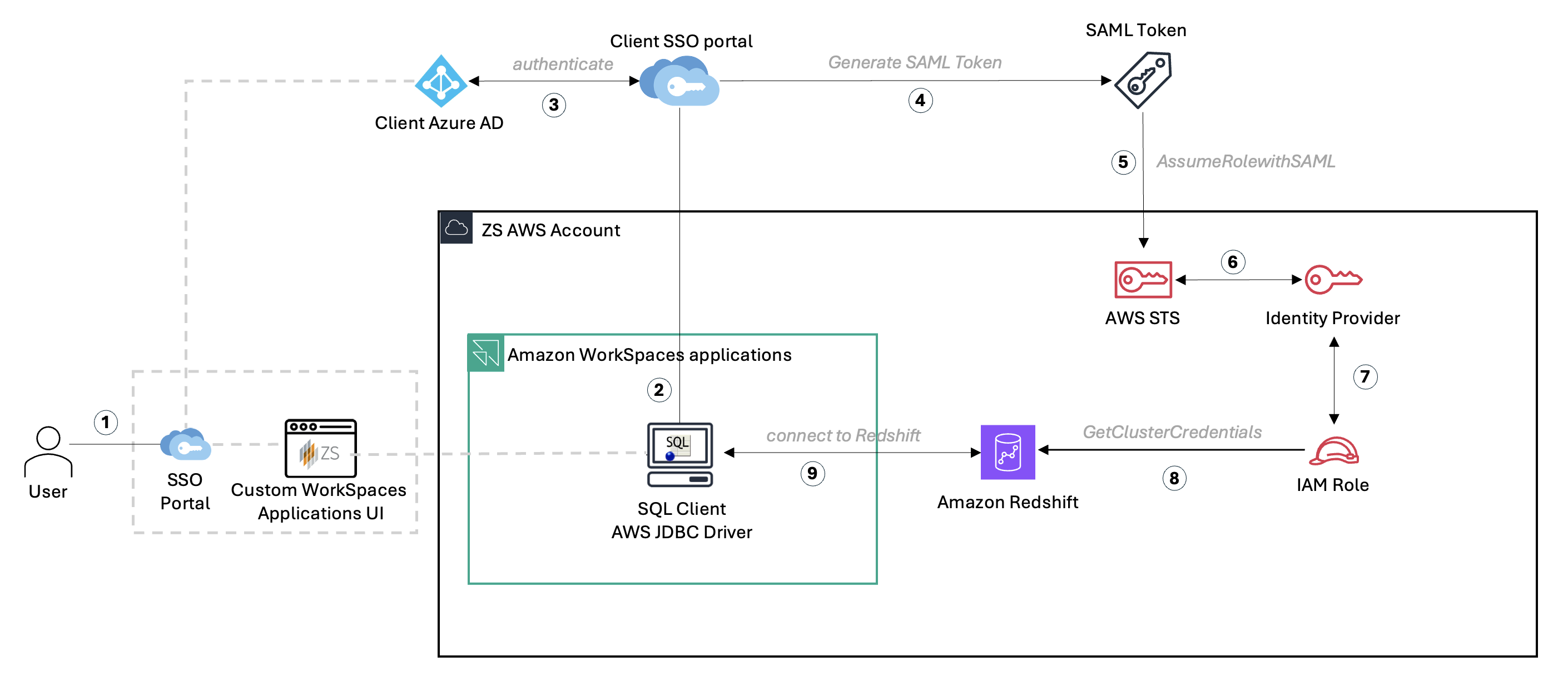
Figure 5: Federated SSO workflow enabling secure access to Amazon Redshift
Amazon Redshift authentication workflow:
- The user signs in to the corporate SSO portal and launches the Amazon WorkSpaces Applications session from the Custom Amazon WorkSpaces Applications UI hosted on Amazon ECS.
- Within WorkSpaces Applications, the SQL Workbench/J client preconfigured with custom connection properties—initiates a connection request to Amazon Redshift.
- The SQL client redirects the user to the client’s Azure AD login page to authenticate using corporate credentials.
- Upon successful authentication, Azure AD issues a SAML assertion containing the user’s federated identity and role mappings.
- The SQL client passes the SAML assertion to AWS STS via the AssumeRoleWithSAML API to obtain temporary IAM credentials.
- AWS STS validates the request and assumes a preconfigured IAM Role in the ZS AWS account, scoped for Amazon Redshift access.
- Using the temporary credentials, the SQL Workbench/J client calls the GetClusterCredentials API to retrieve database credentials.
- The client establishes a secure, passwordless connection to Amazon Redshift, allowing users to query and analyze data without managing static credentials.
When users launch SQL Workbench/J, the client configured with the properties shown below, it automatically opens a browser window for Azure authentication and upon successful sign-in, the session seamlessly connects to Amazon Redshift. This configuration defines the authentication plugin and connection parameters required for Amazon Redshift to perform SAML-based federated login via Azure AD. Refer to this blog for detailed setup instructions.
Below is an example SQL Workbench/J property configuration for Amazon Redshift authentication using Azure AD (customizable for other IdPs):
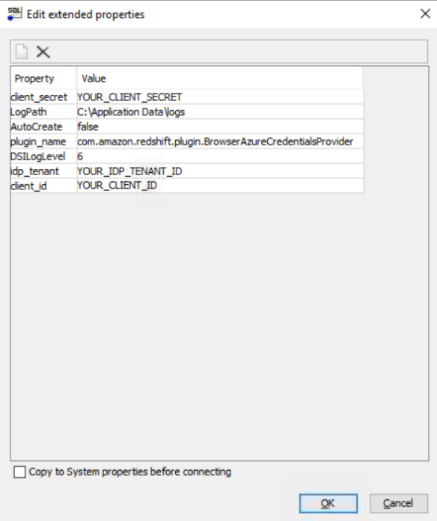
This setup allows users to connect to Amazon Redshift through Azure SSO directly from SQL Workbench/J within Amazon WorkSpaces Applications, eliminating password prompts and ensuring authentication is handled via federated credentials.
Seamless SSO login for Amazon S3:
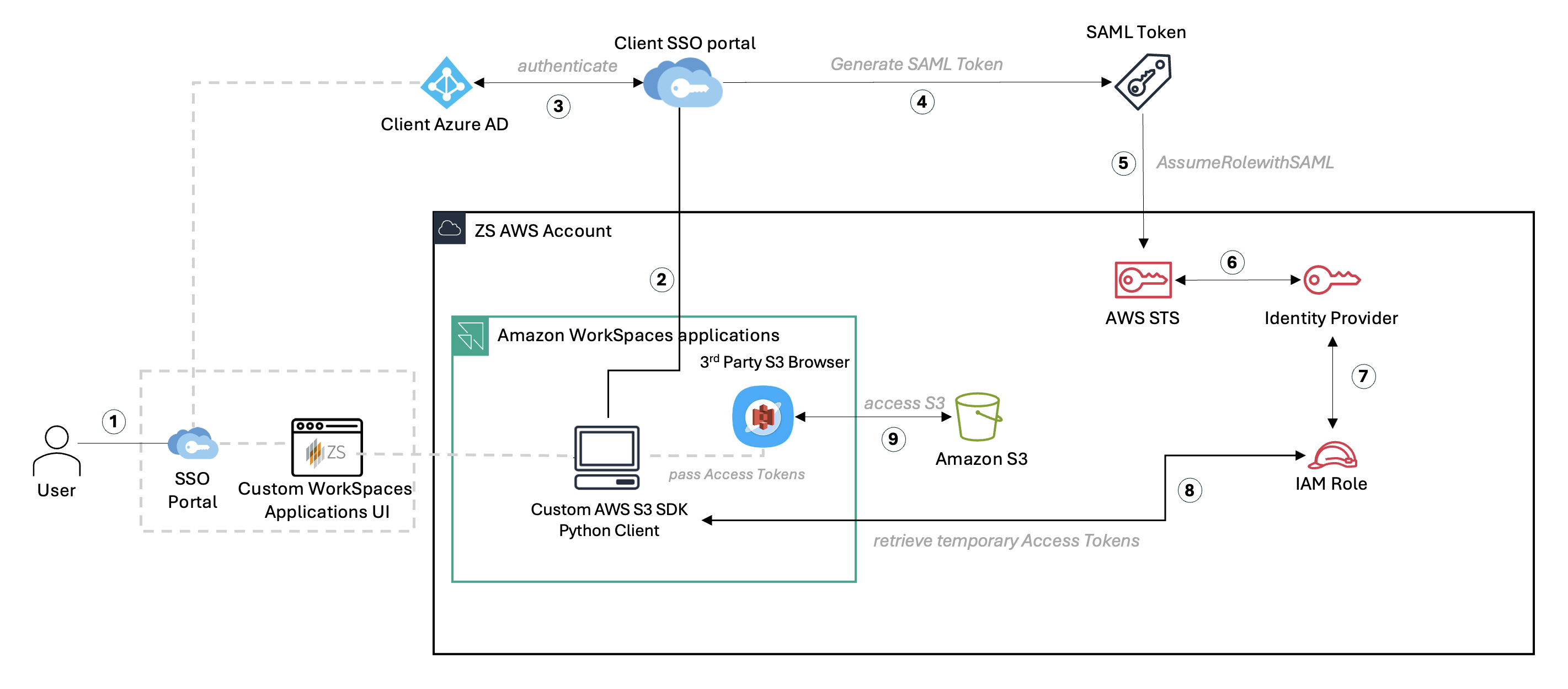
Figure 6: Seamless SSO Login flow for Amazon S3
To allow users to securely access their designated S3 folders without storing or sharing static credentials, ZS implemented a federated authentication flow again through a custom python-based application that integrates Azure Entra ID (formerly Azure AD) with AWS IAM and Amazon S3 and generates temporary Access Tokens which can then be configured in any S3 browser or programmatic flows to access S3. The Python application below is part of the Amazon WorkSpaces Applications Image and is exposed to end-users via the custom UI.
S3 access workflow:
- The user signs in to the corporate SSO portal and launches the Amazon WorkSpaces Applications session from the Custom UI hosted on Amazon ECS.
- Within Amazon WorkSpaces Applications, the user opens the custom AWS S3 Python client which interfaces with both AWS and a third-party S3 browser tool.
- The python client triggers an authentication request to the client’s Azure Active Directory (Azure AD) using SAML 2.0 federation.
- Upon successful authentication, Azure AD issues a SAML assertion containing the user’s identity.
- The SAML assertion is passed to AWS STS via the AssumeRoleWithSAML API to request temporary security credentials.
- AWS STS validates the request and interacts with the organization’s Identity Provider to authorize the session.
- A preconfigured AWS IAM Role scoped for Amazon S3 access is assumed, granting time-bound credentials tied to the authenticated user.
- The Python-based S3 client retrieves the temporary access keys, secret keys, and session token issued by AWS STS and stores them in the native credential config file used by tools that interact with AWS.
- Using credentials in the file, the S3 browser tool connects to Amazon S3, dynamically enforcing folder-level access controls based on user attributes (for example, s3://bucket_name//). Users can upload, download, and manage their own files securely through the integrated S3 browser.
The following example outlines how this integration works using the AWS SDK for Python (Boto3):
Initiate a SAML flow on Microsoft Azure using OAuth 2.0 API:
class BrowserAzureCredentialsProvider(SamlCredentialsProvider):
    def __init__(self: "BrowserAzureCredentialsProvider") -> None:
        super().__init__()
        self.idp_tenant: typing.Optional[str] = "Your_IDP_Tenant_ID"
        self.client_id: typing.Optional[str] = "Your_Client_ID"
        self.idp_response_timeout: int = 120
        self.listen_port: int = None
        self.redirectUri: typing.Optional[str] = None

    # method to provide a listen socket for authentication
    def get_listen_socket(self: "BrowserAzureCredentialsProvider") -> socket.socket:
        s: socket.socket = socket.socket(socket.AF_INET, socket.SOCK_STREAM)
        s.bind(("127.0.0.1", 0))
        # bind to any free port
        s.listen()
        self.listen_port = s.getsockname()[1]
        #self.listen_port = 5439
        return s

    # method to grab the field parameters specified by end user.
    # This method adds to it Azure specific parameters.
    def add_parameter(self: "BrowserAzureCredentialsProvider", info: RedshiftProperty) -> None:
        super().add_parameter(info)
        # The value of parameter idp_tenant.
        self.idp_tenant = info.idp_tenant
        # The value of parameter client_id.
        self.client_id = info.client_id

        self.idp_response_timeout = info.idp_response_timeout

        _logger.debug("Idp_tenant={}".format(self.idp_tenant))
        _logger.debug("Client_id={}".format(self.client_id))
        _logger.debug("Idp_response_timeout={}".format(self.idp_response_timeout))
        _logger.debug("Listen_port={}".format(self.listen_port))
Capture SAML response:
def get_saml_assertion(self: "BrowserAzureCredentialsProvider") -> str:

        if self.idp_tenant == "" or self.idp_tenant is None:
            raise InterfaceError("Missing required property: idp_tenant")
        if self.client_id == "" or self.client_id is None:
            raise InterfaceError("Missing required property: client_id")

        if self.idp_response_timeout < 10:
            raise InterfaceError("idp_response_timeout must be 10 seconds or greater.")

        listen_socket: socket.socket = self.get_listen_socket()
        self.redirectUri = "http://localhost:{port}/redshift/".format(port=self.listen_port)
        _logger.debug("Listening for connection on port {}".format(self.listen_port))

        try:
            token: str = self.fetch_authorization_token(listen_socket)
            saml_assertion: str = self.fetch_saml_response(token)
        except Exception as e:
            raise e
        finally:
            listen_socket.close()

        _logger.debug("Got SAML assertion")
        encoded_saml_assertion = self.wrap_and_encode_assertion(saml_assertion)
        root = ET.fromstring(base64.b64decode(encoded_saml_assertion))
        namespaces = {'saml': 'urn:oasis:names:tc:SAML:2.0:assertion'}
        username = root.find('.//saml:NameID', namespaces).text
        print(username)
        awsroles = []
        role_arns = []
        for saml2attribute in root.iter('{urn:oasis:names:tc:SAML:2.0:assertion}Attribute'):
            if (saml2attribute.get('Name') == 'https://aws.amazon.com/SAML/Attributes/Role'):
                for saml2attributevalue in saml2attribute.iter('{urn:oasis:names:tc:SAML:2.0:assertion}AttributeValue'):
                    awsroles.append(saml2attributevalue.text)
Generate Temporary Tokens from SAML Assertion:
Use the assume_role_with_saml() Boto3 API to authenticate users via the Azure Entra ID and generate temporary AWS credentials scoped specifically to their assigned folder within an S3 bucket.
Dynamic folder-level scoping is achieved by embedding a session policy JSON directly into the API call, restricting permissions to the user’s designated path e.g., s3://bucket_name//<username>/.
Below is a simplified example of how access is dynamically constrained using session policies and temporary credentials:
s3_policy = {
    "Statement": [
        {
            "Effect": "Allow",
            "Action": [
                "s3:PutObject",
                "s3:GetObject",
                "s3:DeleteObject",
                "s3:ListBucket"
            ],
            "Resource": [
                "arn:aws:s3:::bucket_name",
                f"arn:aws:s3:::bucket_name/{username}/*"
            ]
        }
    ]
}
Executing the assume_role_with_saml() Boto3 function to generate Access/Secret Keys and Session Tokens:
client = boto3.client('sts')
        response = client.assume_role_with_saml(RoleArn="your_iam_role_arn",
                                                PrincipalArn="your_iam_idp_arn",
                                                SAMLAssertion=encoded_saml_assertion, Policy=s3_policy, DurationSeconds=43200)
        credentials = response['Credentials']
        access_key = credentials['AccessKeyId']
        secret_key = credentials['SecretAccessKey']
        session_token = credentials['SessionToken']
These credentials can then be used to perform read/write/delete operations exclusively within the user’s scoped S3 folder, ensuring isolation and least-privilege access while maintaining seamless SSO integration.
Security enhancements include:
- Data encryption using AWS KMS.
- Session monitoring and auditing using Amazon WorkSpaces Applications Usage Reports (Amazon CloudWatch, Amazon S3, AWS Glue & Amazon Athena).
Development Environment Optimization
For data science workloads, ZS:
- Integrated PyCharm IDE.
- Implemented Git workflow automation.
- Added high-performance storage using Amazon FSx for NetApp ONTAP.
Global Performance Improvements
To ensure consistent performance worldwide:
- Deployed resources across multiple AWS Regions.
- Implemented Amazon CloudFront for UI delivery.
- Optimized Amazon WorkSpaces Applications fleet scaling with Amazon CloudWatch Alerts utilization metrics for proactive scaling enhancements.
Enhanced Access & Performance Auditing
- Enabled Amazon WorkSpaces Applications Usage Metrics Logging using Amazon S3 & AWS Glue Data Catalog and Amazon Athena for Query Engine.
- Enabled Amazon WorkSpaces Applications Utilization metrics via Amazon CloudWatch for proactive Amazon WorkSpaces Applications Fleet scaling enhancements.
Business Impact
The enhanced platform delivered significant improvements:
-
Faster Onboarding, Less IT Dependence:
Persona-based layouts and embedded training enable new users, especially in non-technical roles, to start in minutes without IT support, reducing onboarding time and support tickets.
-
Secure, Frictionless Access:
Federated, temporary access via IAM roles and SSO replaced static credentials, tightening security while improving user trust, compliance, and experience across all client environments.
-
Personalized User Experience:
Tailored app catalogs eliminate clutter, helping users focus on core analytics tasks and increasing efficiency.
-
Consistent Global Performance:
Built on AWS Fargate, Amazon ECS, Amazon WorkSpaces Applications, and Amazon CloudFront, the cloud-native architecture delivers 99.99% availability with sub-100ms global latency. Distributed teams enjoy consistent worldwide performance with measurable cost savings, all while maintaining GDPR and HIPAA compliance.
-
Optimized Operations and Developer Enablement:
Centralizing analytics tools within Amazon WorkSpaces Applications and integrating Amazon Redshift and Amazon S3 reduced infrastructure complexity and streamlined credential management. Amazon FSx for NetApp ONTAP enables Data Scientists to run storage-intensive ML workloads seamlessly, boosting productivity without compromising performance or isolation.
Best Practices and Lessons Learned
1. Performance Optimization
-
- Monitor and adjust fleet capacity proactively.
- Implement regional resource allocation.
- Regular performance testing.
2. Cost Management
-
- Implement auto-scaling policies.
- Use scheduled scaling for predictable workloads.
- Monitor and optimize resource usage.
Conclusion
ZS’s enhanced Amazon WorkSpaces Applications implementation demonstrates how organizations can build upon AWS services to create secure, scalable, and user-friendly solutions. By focusing on user experience, security, and performance, ZS created a platform that better serves their global user base while maintaining enterprise-grade security and compliance.
Next Steps
- Explore Amazon WorkSpaces Applications capabilities for your organization.
- Consider implementing custom UI layers for specific use cases.
- Review AWS IAM Identity Center for authentication needs.
- Contact AWS Solutions Architects for implementation guidance.
About the authors:
 |
Kunal Jain is a Cloud Platform Engineering Lead at ZS Associates, where he shapes cloud architectures to meet ZS’s high bar for security, efficiency, and innovation, while driving enhancements across both products and internal platforms. Since diving into AWS in 2020, he’s been relentlessly tinkering with every new tool in the cloud playbook. When he’s not bouncing around the AWS console hunting his next experiment, you’ll find him engrossed in the wisdom of books and indulging in the captivating world of cinema. |
 |
Gourang Harhare is a Senior Solutions Architect at AWS based in Pune, India. With a robust background in large-scale design and implementation of enterprise systems, application modernization, and cloud native architectures, he specializes in AI/ML, serverless, and container technologies. He enjoys solving complex problems and helping customers be successful on AWS. In his free time, he likes to play table tennis, enjoy trekking, or read books |