AWS DevOps & Developer Productivity Blog
Scaling Autonomous Operations with AWS DevOps Agent and ServiceNow
This post is co-written with Govind Menon, Head of MCP Product at ServiceNow.
Introduction
Enterprise teams managing applications on AWS often rely on ServiceNow as their IT service management (ITSM) system for incident tracking, change management, and configuration management. When incidents occur, engineers must context-switch between AWS, third party observability tools and ServiceNow, manually correlating data across those sources before updating ServiceNow incident records. This fragmented workflow delays resolution, increases mean time to resolution (MTTR), and introduces the risk of missed signals.
AWS DevOps Agent is a frontier agent that resolves and proactively helps prevent incidents, continuously improving reliability and performance of applications in AWS, and hybrid environments. In this post, we demonstrate how to integrate AWS DevOps Agent with ServiceNow using the Model Context Protocol (MCP) and ServiceNow Action Fabric, enabling autonomous incident investigation and resolution workflows that are governed by ServiceNow and that execute and record authorized actions directly on the application.
By the end of this post, you will be able to:
- Configure AWS DevOps Agent as an MCP client connecting to ServiceNow MCP Server created in the MCP Server Console
- Authenticate securely via OAuth 2.0 between AWS DevOps Agent and ServiceNow
- Enable dynamic discovery of ServiceNow tools exposed through Action Fabric and governed through the ServiceNow MCP Server Console
- Automate root cause analysis directly within ServiceNow incidents
Integrating ServiceNow MCP Server with AWS DevOps Agent
The integration between ServiceNow MCP Server and AWS DevOps Agent connects ITSM workflows with automated incident response through the Model Context Protocol (MCP), an open standard for AI agent-to-tool communication.
ServiceNow MCP Server Console lets you create a ServiceNow MCP Server and configure the tools it exposes, capabilities such as incident management, CMDB queries, and change requests as discoverable tools. The console governs what the agent can see and do through tool-level scoping, access control lists, and role masking. It is the access channel for ServiceNow Action Fabric, the application’s governed action layer: ServiceNow does not merely store the agent’s output, it controls and executes the actions the agent is authorized to perform.
AWS DevOps Agent acts as an MCP client that dynamically discovers available ServiceNow tools at runtime. You can create tools based on existing capabilities, such as ServiceNow NowAssist Skills.
When a ServiceNow incident triggers AWS DevOps Agent, the following happens:
- Correlates telemetry from Amazon CloudWatch, deployment data, and code changes
- Discovers available ServiceNow tools through the ServiceNow MCP Server
- Queries ServiceNow for related incidents, change records, and CMDB context
- Identifies root cause by correlating AWS telemetry with ServiceNow operational data
- Writes findings, root cause analysis, and mitigation plans directly into the ServiceNow incident
- Executes governed actions on the application (for example, creating a change request) through the tools the ServiceNow MCP Server Console exposes, where authorized
Security is built into every interaction. Communication uses OAuth 2.0 authentication with scoped
Permissions. The ServiceNow MCP Server Console governs which tools the agent can access and what actions it can perform, with every invocation authenticated, authorized at the tool and skill level, and recorded in an auditable trail that ServiceNow AI Control Tower can observe.
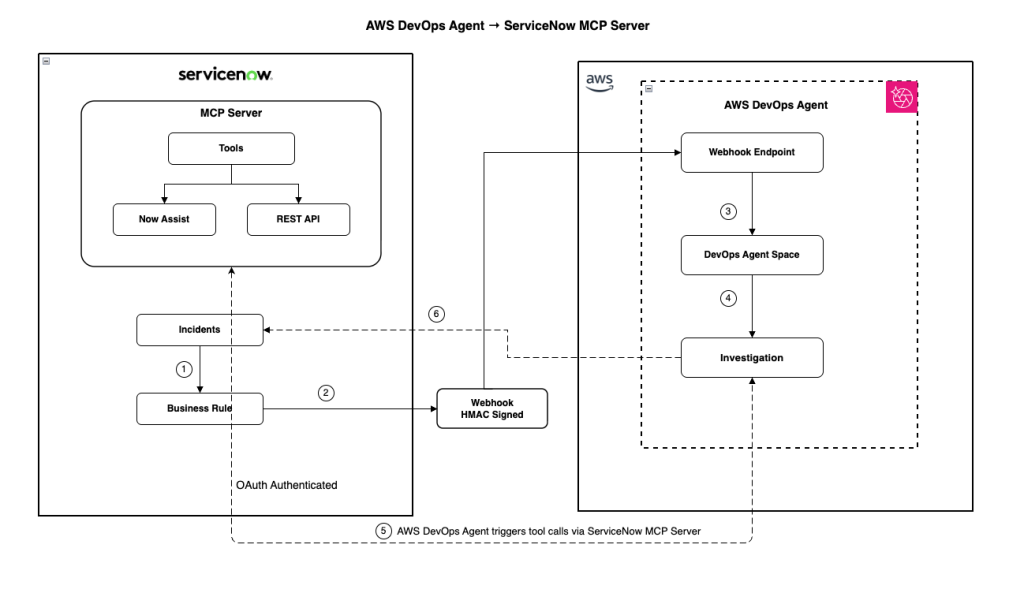
Figure 1: Integration architecture showing AWS DevOps Agent connecting to ServiceNow via MCP Server
Prerequisites
Before you begin, make sure you have access to and understanding of the following:
- An AWS account with permissions to create AWS Identity and Access Management (IAM) roles:
- Created AWS DevOps Agent Space role and Web app role
- Access to AWS DevOps Agent
- A ServiceNow instance with admin access
- ServiceNow MCP Server configured and accessible ServiceNow MCP Server configured and accessible on an AI Native subscription (Foundation, Advanced, or Prime) or via the standalone MCP add-on
Step 1: Configure the ServiceNow MCP Server and its Tools in the MCP Server Console
As first step, configure the ServiceNow instance to expose capabilities through the MCP Server:
- Navigate to the MCP Server Console in the ServiceNow Instance
- Create a new MCP Server (or select the MCP server provisioned).
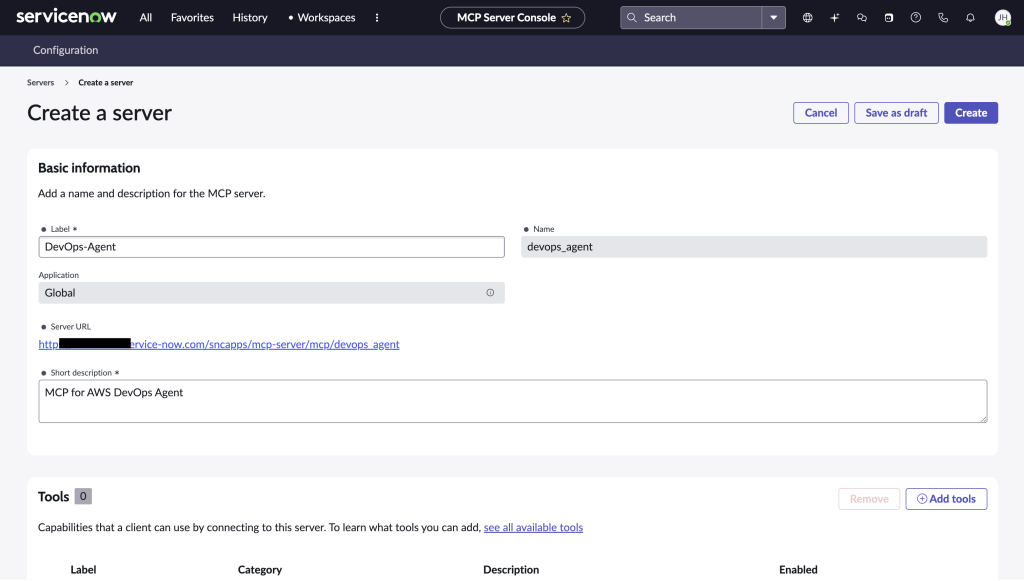
Figure 2: MCP Server Console in ServiceNow Instance
- Add Tools for the capabilities the agent needs (for example, incident read and update, CMDB query, change request creation), and scope each with ACLs and role masking so the agent can perform only authorized actions.
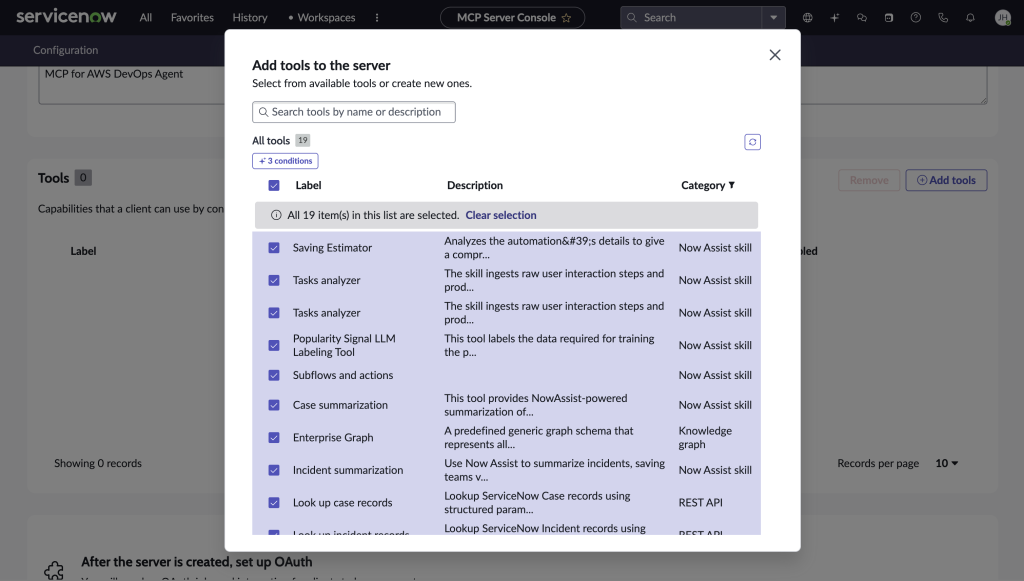
Figure 3: Tool selection in ServiceNow MCP Server
- Configure inbound authentication for the MCP Server.
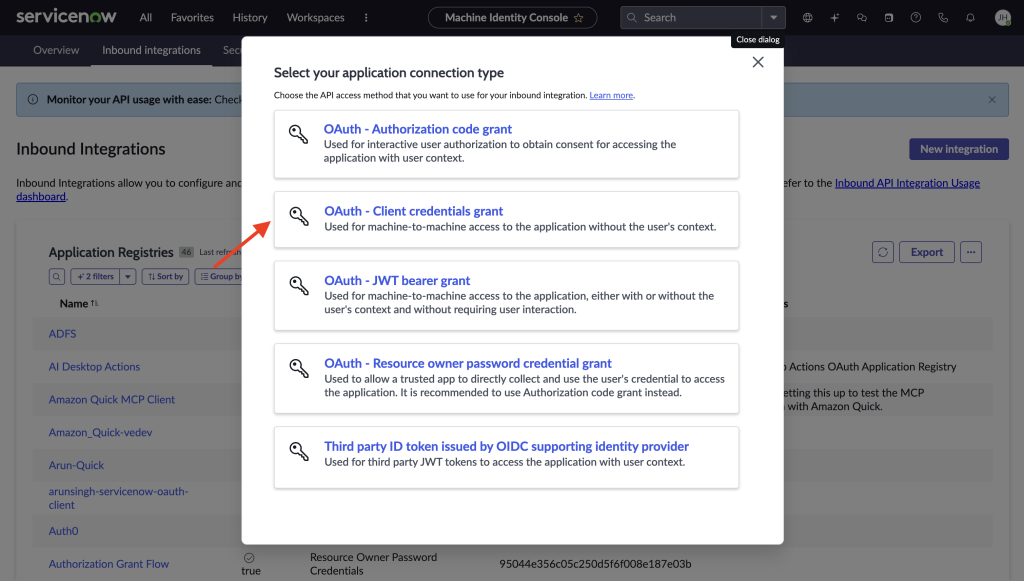
Figure 4: Create Inbound Integration – OAuth Client Credentials grant
Step 2: Create and configure a DevOps Agent Space
Create an AWS DevOps Agent Space in your AWS account to define the scope of resources the agent will monitor and investigate:
- Access the AWS DevOps Agent console
- Choose Create Agent Space and provide a name and description, and configure the required IAM roles (automated or manual setup)
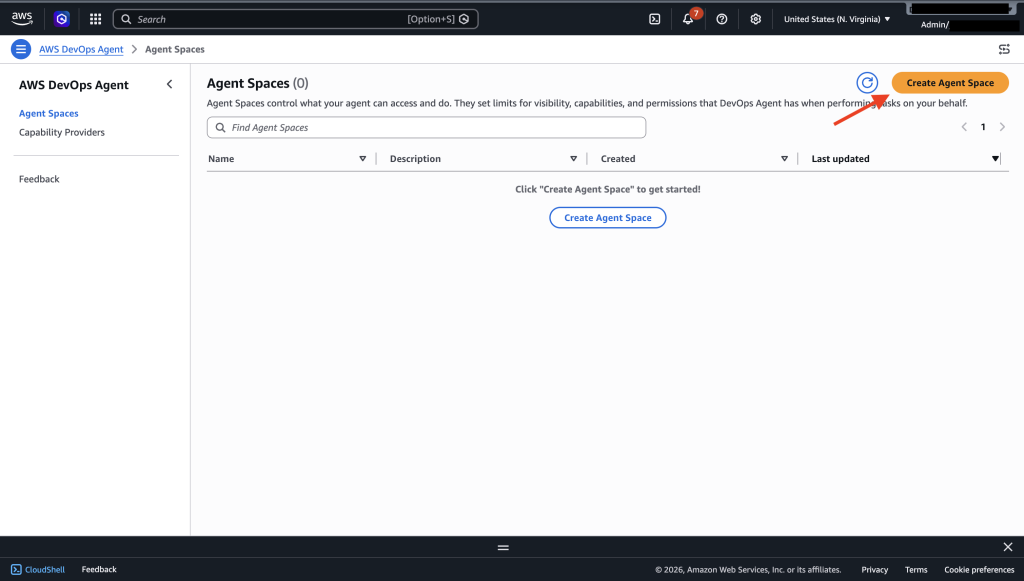
Figure 5: Creating an Agent Space in the AWS DevOps Agent console
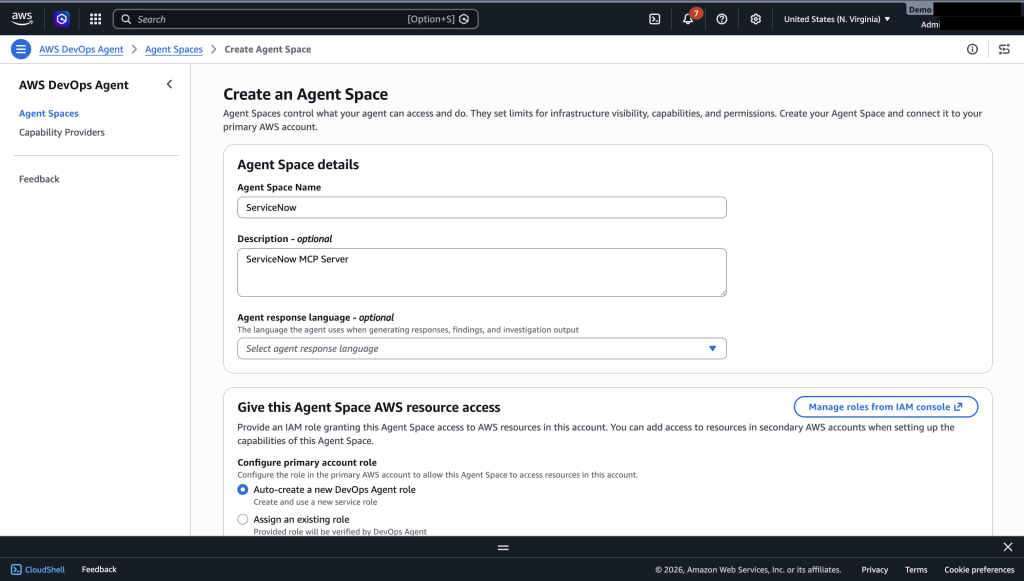
Figure 6: Agent Space Name and IAM role configuration
- Confirm creation of AWS DevOps Agent Space.
Step 3: Register ServiceNow MCP Server in the AWS DevOps Agent console
Register your ServiceNow MCP Server connection to enable tool discovery in the AWS DevOps Agent console.
- Navigate to Capability Providers in the AWS DevOps Agent console. Under MCP Server, select Add source, then Register New MCP Server.
- Enter your ServiceNow MCP Server endpoint URL:
https://<instance>.service-now.com/sncapps/mcp-server/mcp/<server_label>
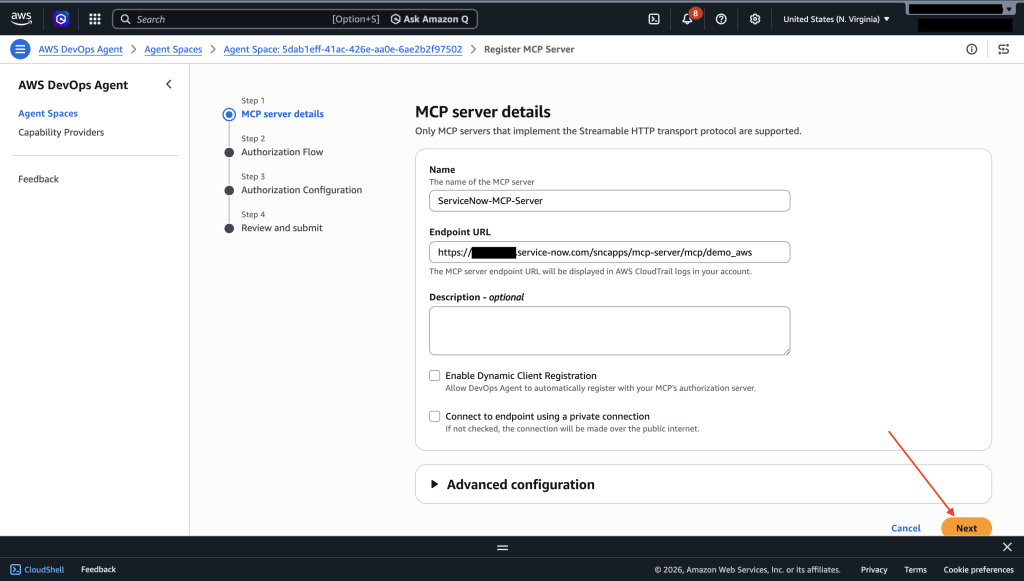
Figure 7: Entering the ServiceNow MCP Server endpoint URL
- Select OAuth Client Credentials as the authorization flow. Enter the Client ID, Client Secret, and Exchange URL (
https://<instance>.service-now.com/oauth_token.do) from Step 1.
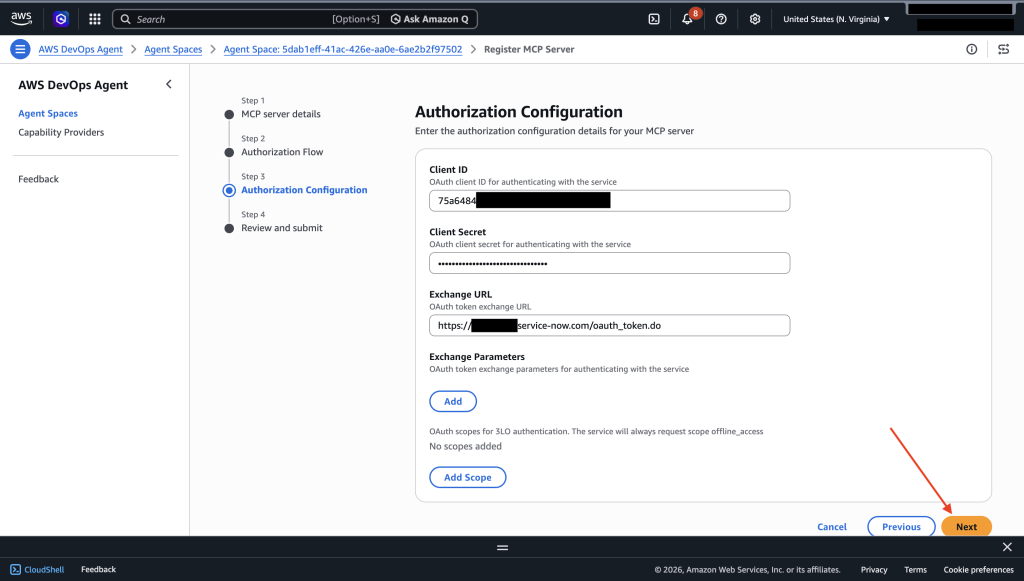
Figure 8: OAuth Client Credentials configuration for the ServiceNow MCP Server
- Submit the registration. AWS DevOps Agent validates the connection and discovers available tools. Select the tools to add to your Agent Space.
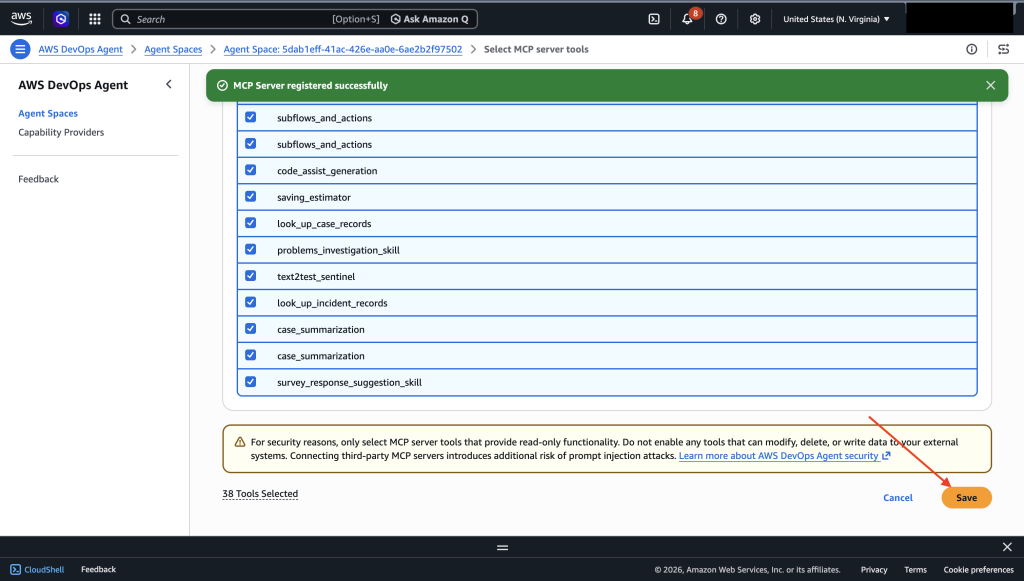
Figure 9: Selecting ServiceNow MCP tools to add to the Agent Space
- Confirm the MCP Server is associated and tools are connected.
Putting It All Together: End-to-End Test
Once the setup is complete, we need to make sure the connection is working.
- Navigate to Operator Access in the AWS DevOps Agent Space.
- Open a new chat window, and type “Can you show me all the incident in the past week from ServiceNow”
- Make sure the Agent calls the ServiceNow tools and shows the right results.
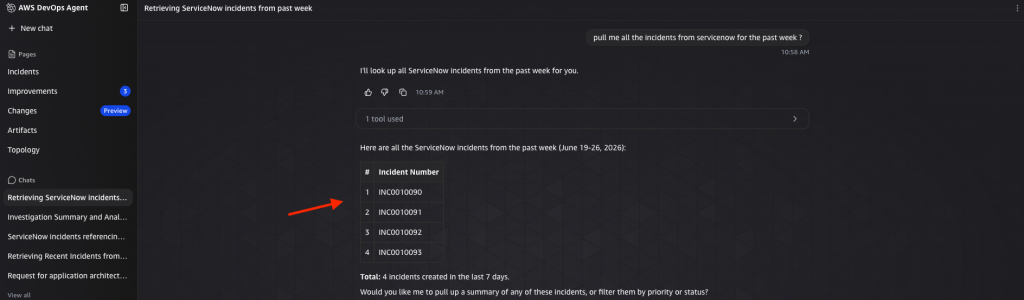
Figure 10: Test the ServiceNow MCP connection from AWS DevOps Agent
You can also configure your environment so that the creation of an incident in ServiceNow automatically triggers the AWS DevOps Agent. To set up this integration, follow the AWS documentation to establish the connection between AWS DevOps Agent and your ServiceNow instance. Then, create a Business Rule in ServiceNow. This enables incident creation to seamlessly trigger the DevOps Agent without manual intervention.
Once this setup is complete, here’s how the workflow comes together: when an incident is created, the DevOps Agent automatically investigates and adds relevant context such as root cause analysis, related changes, and affected resources directly back into the incident record. This means that by the time your Operations or SRE team picks up the incident, they already have the context they need to begin resolution, significantly reducing triage time and accelerating mean time to recovery (MTTR).
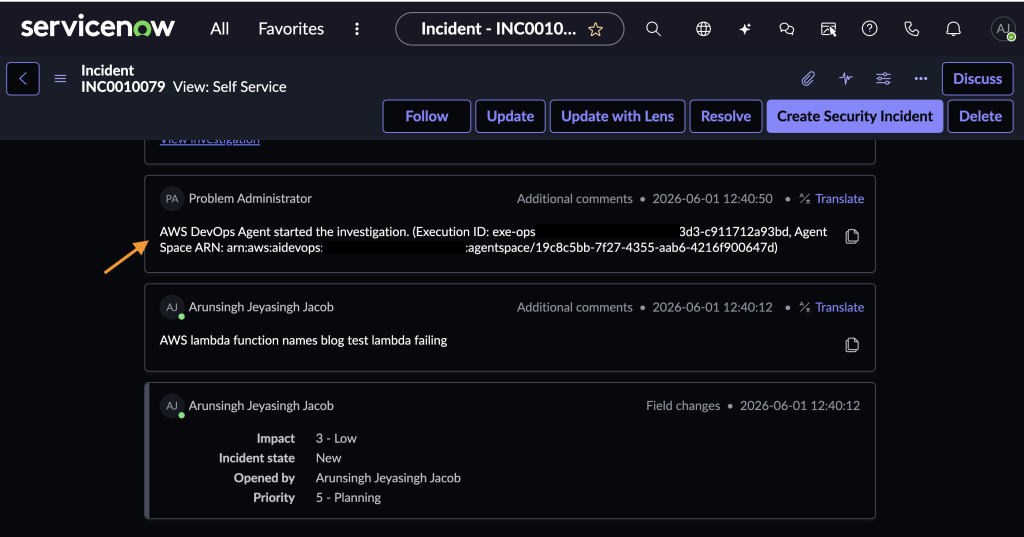
Figure 11: AWS DevOps Agent initiating an automated investigation on the ServiceNow incident
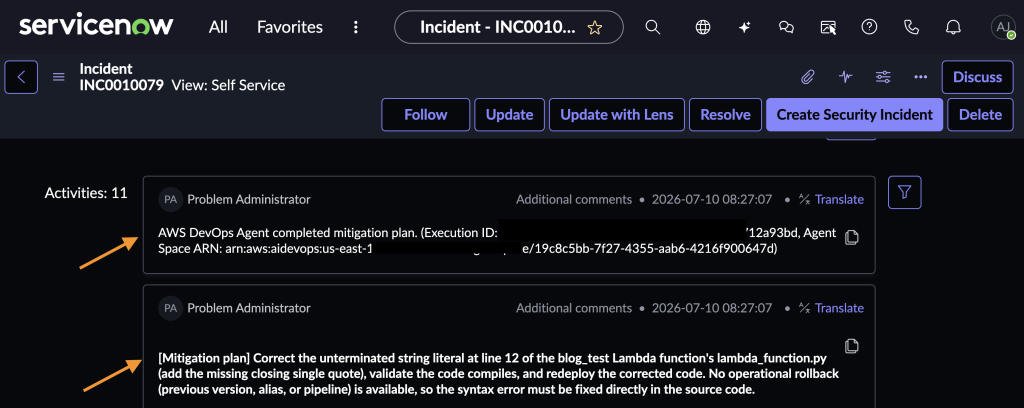
Figure 12: AWS DevOps Agent mitigation plan posted to the ServiceNow incident
Clean up
To avoid incurring ongoing costs, clean up your resources when you are done using the integration. For details on pricing, visit the AWS DevOps Agent pricing page.
When you are done using the integration, clean up your resources:
- Delete your Agent Space from the AWS DevOps Agent console
- Remove the ServiceNow MCP Server connection from your settings
- Delete the IAM roles created for the Agent Space
- (Optional) Disable the MCP Server configuration in your ServiceNow instance
Conclusion
For organizations running workloads on AWS and managing operations through ServiceNow, incident response has long meant toggling between systems and racing to document findings before context fades. The integration between AWS DevOps Agent and ServiceNow through MCP and Action Fabric alleviates that gap. The agent investigates autonomously, correlates telemetry with operational context, and documents root cause and mitigation directly in the incident record, compressing resolution times from hours to minutes.
And because the connection is built on MCP, an open protocol for agent-to-tool communication, what you configure today continues to expand as your ServiceNow workflows evolve. New tools exposed through Action Fabric are discovered and available to the agent immediately. To get started, visit the AWS DevOps Agent product page and ServiceNow MCP Server Console page.