AWS DevOps & Developer Productivity Blog
What’s new in AWS Transform – continuous modernization for re:Invent 2026
Since general availability in August 2026, platform teams have used continuous modernization through AWS Transform to keep tech debt from piling up. To see what customers have achieved, read the success stories on the AWS Transform – continuous modernization page.
Ahead of re:Invent 2026, we’re making the experience faster to start, easier to act on, and easier to extend. Setup takes a few steps, each issue shows up once across your estate, and remediations arrive as one pull request per repository. You can now bring your own skills (transformation definitions), have one generated when none fits, and ask chat about your estate or have it act for you. A new integration with AWS Health takes you from a planned lifecycle event (PLE), such as an AWS Lambda runtime reaching end of support, straight to the affected code.
Get started in a few steps
Getting your first findings used to mean creating personal access tokens, configuring AWS Identity and Access Management (IAM) roles, and picking analyses before you saw any findings.
Continuous modernization now connects to GitHub, GitLab, and Bitbucket through OAuth, so there are no tokens to manage. It also creates its execution role for you during onboarding.
As soon as your repositories are connected, continuous modernization recommends analyses for your estate. These include comprehensive tech debt for outdated dependencies and end-of-support runtimes, or modernization readiness for repositories that could move to containers or serverless. You choose which ones to run, and recommended analyses are scheduled by default, so your findings stay current without anyone rerunning them.
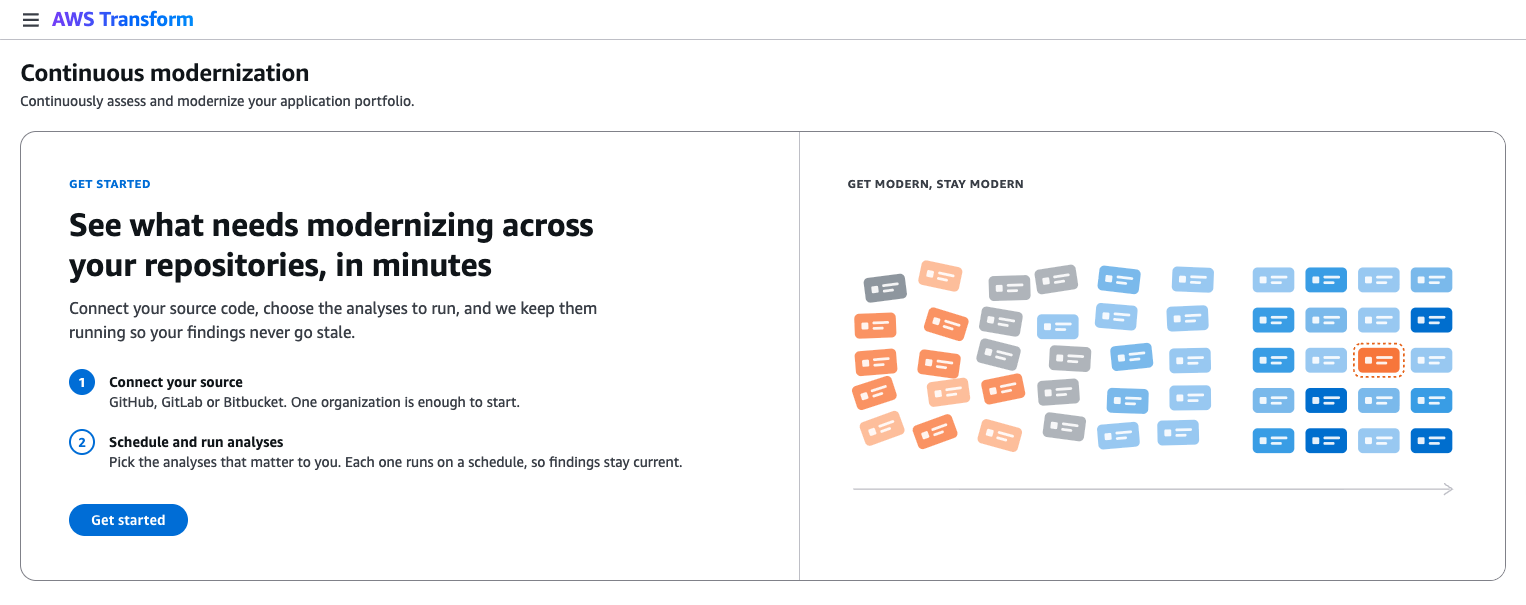
Figure 1: The continuous modernization Get started page, which connects your source and turns on recommended analyses.
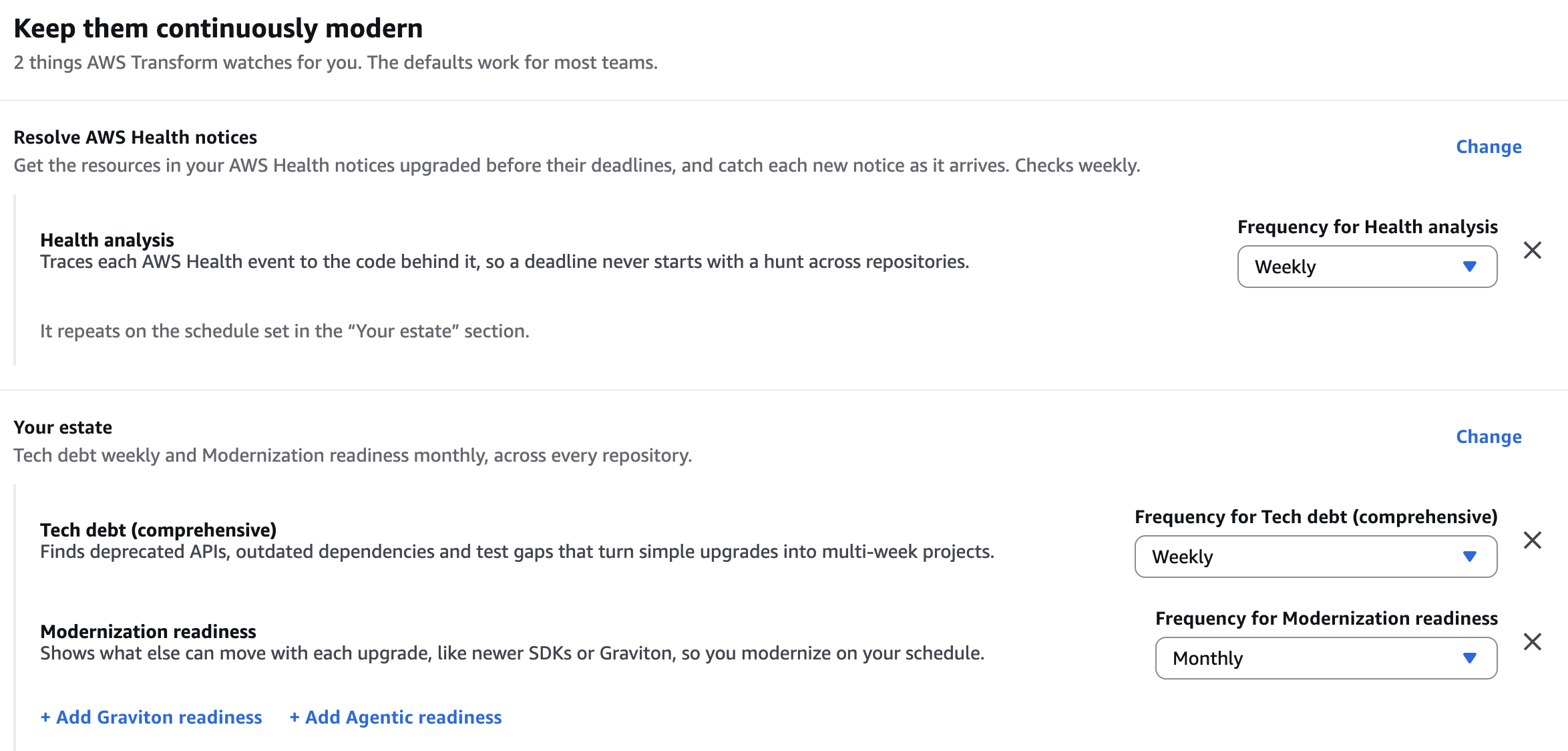
Figure 2: Recommended analyses scheduled to run automatically after you connect your source.
Start from what AWS Health already knows
AWS Health notifies you about planned lifecycle events (PLEs) that affect your account, such as a Lambda runtime reaching end of support or an Amazon Elastic Kubernetes Service (Amazon EKS) version upgrade. It tells you what’s changing and by when. Continuous modernization now integrates with AWS Health to find and fix the affected code.
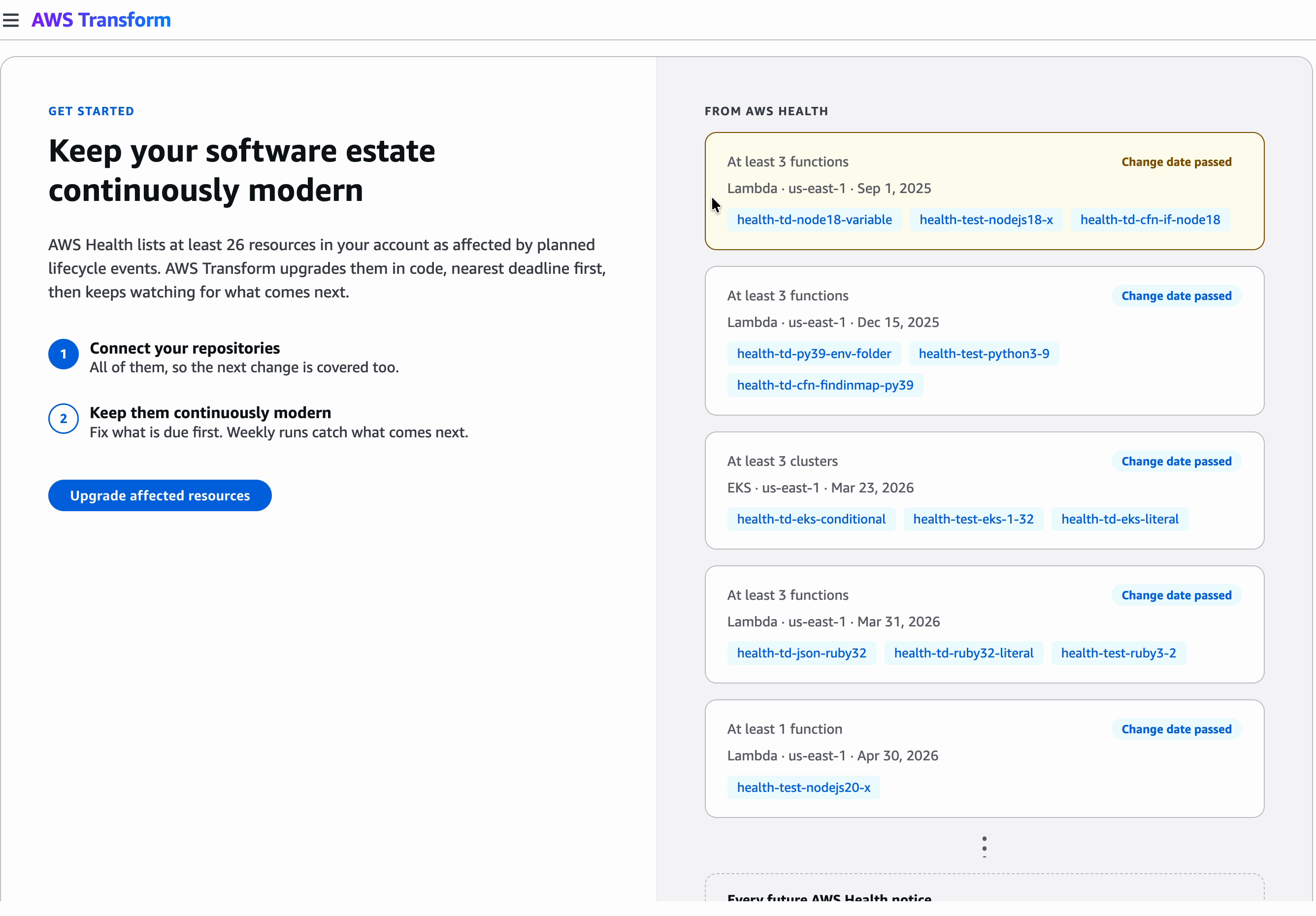
Figure 3: Planned lifecycle events from AWS Health, grouped by change deadline
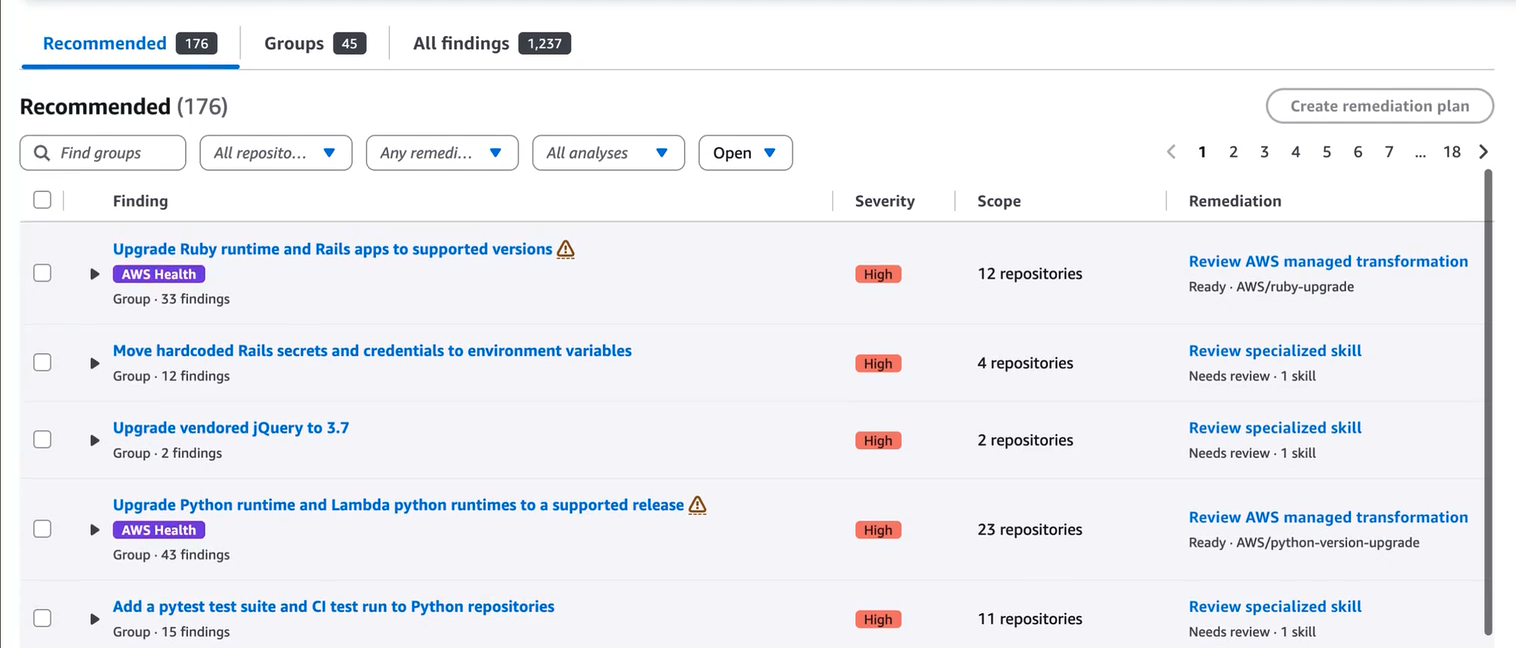
Figure 4: Findings from the AWS Health analysis, each mapped to a recommended transformation
Continuous modernization maps each PLE to the affected repositories and findings. For most PLEs, one remediation covers every affected repository. It applies the matching skill, such as an AWS managed Lambda runtime upgrade, and opens one pull request per repository. The deadline and affected resources stay with the work, so you can track each PLE until it’s cleared.
The integration uses the AWS Health API, which requires AWS Business Support+, AWS Enterprise Support, or AWS Unified Operations. In Regions without these plans, Business, Enterprise On-Ramp, or Enterprise Support also works. For details, see Integrating AWS Health with other systems using the AWS Health API.
Know exactly what to tackle first across your organization
Until now, an issue showed up as a separate finding in every repository it touched, so dozens of repositories using the same deprecated library meant dozens of findings to triage.
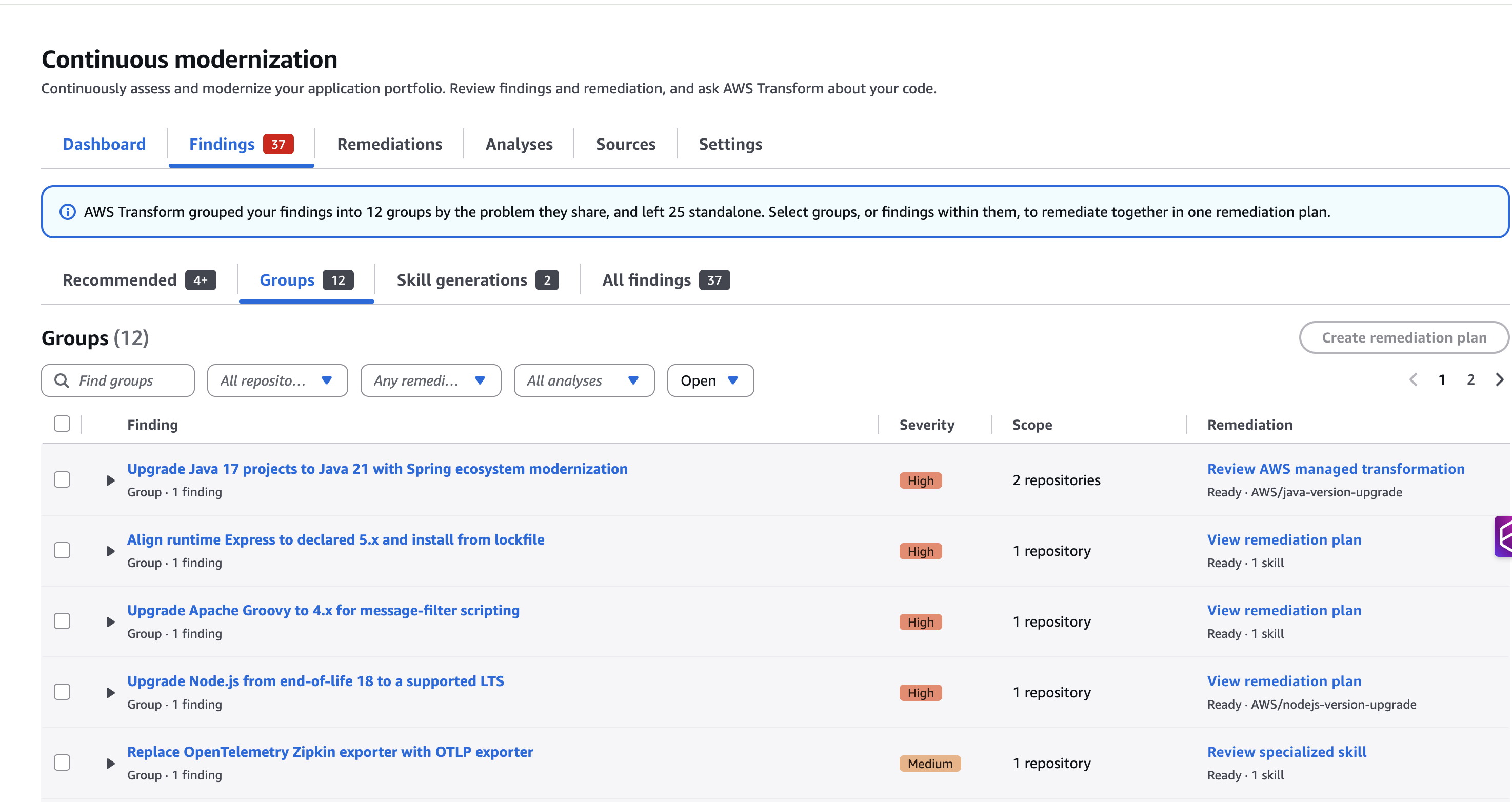
Figure 5: The redesigned Findings page grouping each issue with its affected repositories, severity, and recommendation
Continuous modernization now groups findings that share an underlying issue, so each issue appears once with every affected repository listed under it. On the redesigned Findings page, each group shows its severity, scope, safety bar status, and recommended AWS managed transformation or specialized skill. Select the groups you want to fix and choose Create remediation plan.
Resolve issues across your organization in one pass
Until now, each finding was remediated in its own pull request, so a repository with five findings meant five pull requests.
Now you can remediate a group of findings together, whether continuous modernization created the group or you did. It combines each repository’s findings into a single pull request, so app teams review and merge once per repository instead of once per finding.
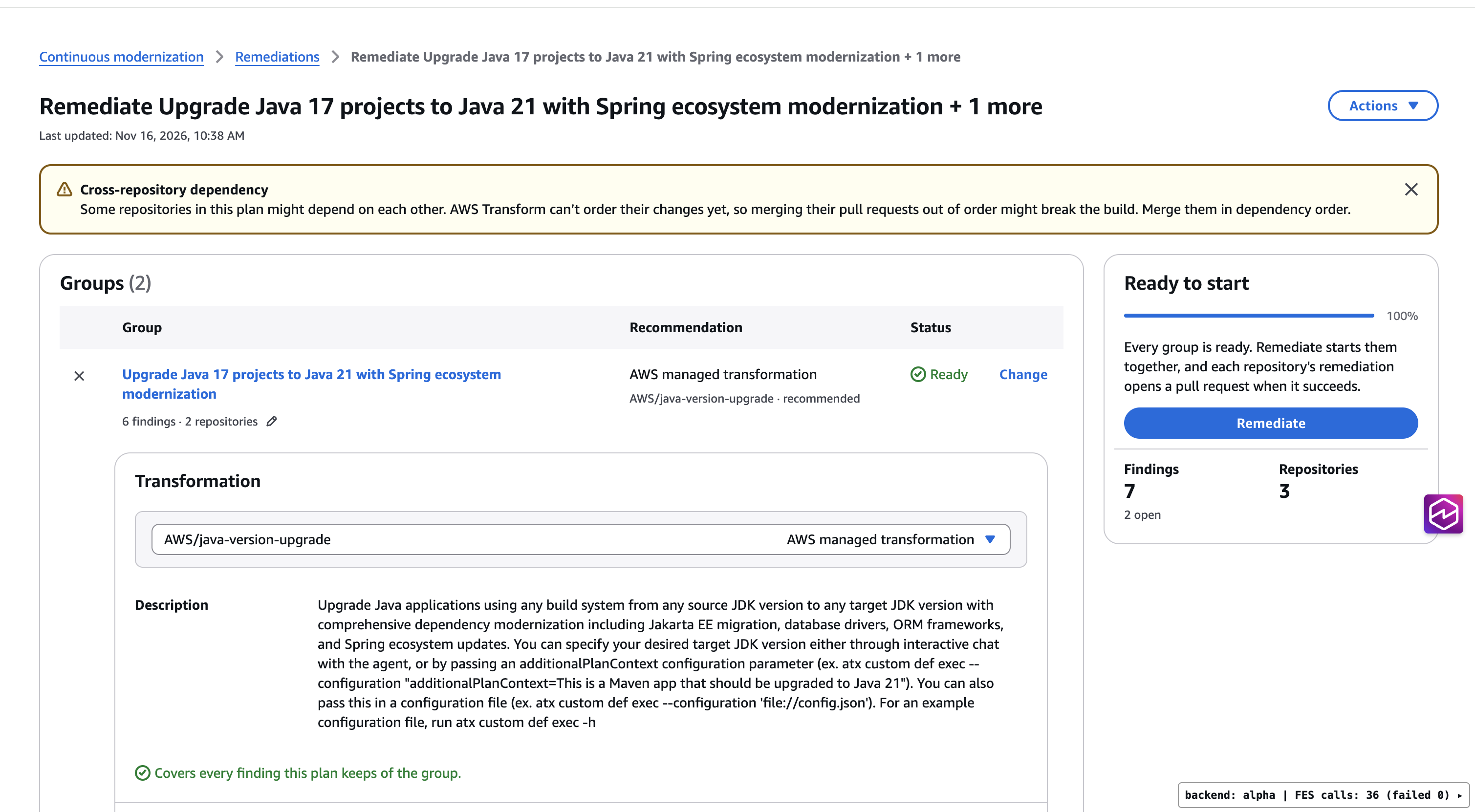
Figure 6: A remediation plan that combines issue groups into one pass with one pull request per repository
Remediate with your own skills
Most platform teams have standards that no general-purpose tool knows about, such as an approved logging framework, a required security configuration, or an internal API you’re retiring.
You can now run your own skills from the console, alongside AWS managed ones:
- Custom analysis scans your repositories against your rules and reports findings. It runs on AWS managed infrastructure or in your own account.
- Custom remediation applies your skills to resolve those findings. It runs on infrastructure in your own account, such as AWS Batch.
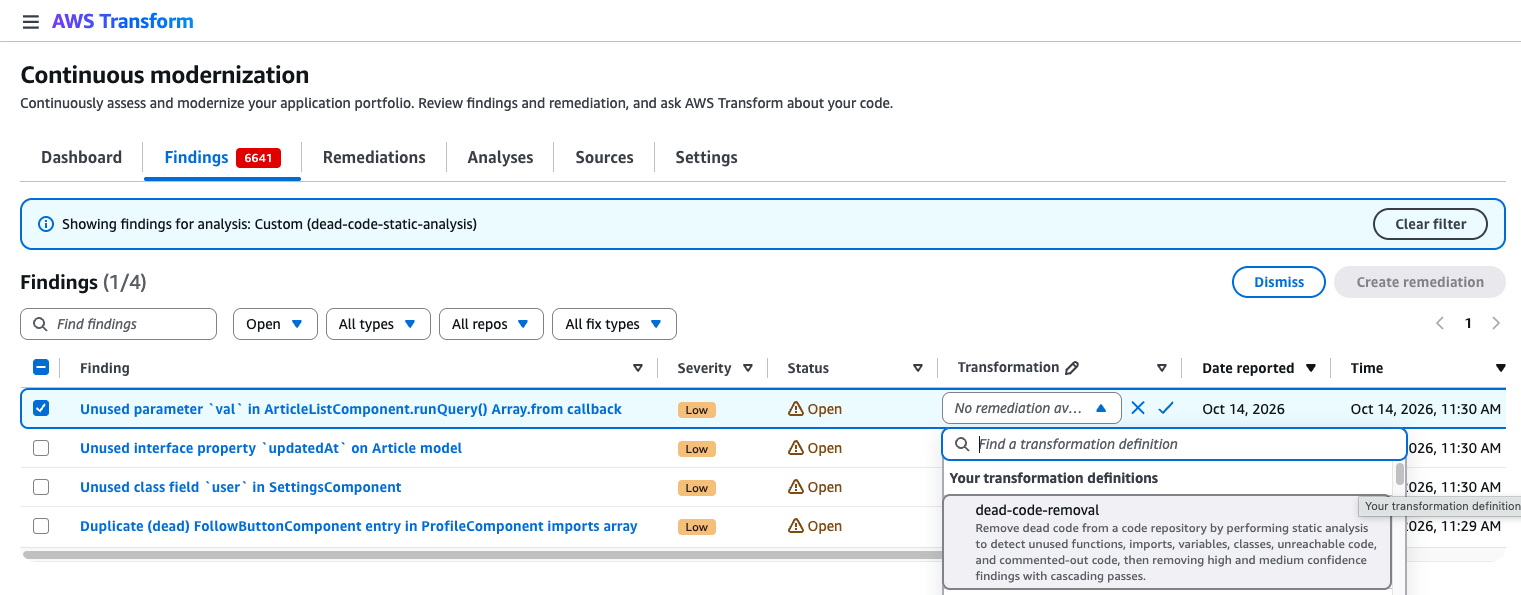
Figure 7: Running a custom analysis and selecting your own transformation definition from the console.
When no skill fits, one gets generated
Between AWS managed skills and your own, most findings have a recommended remediation ready. Most estates still have a long tail, such as an internal framework, an unusual build setup, or a library few others use.
When no skill fits a finding, continuous modernization now generates one, and nothing runs until you review the skill and what it will change. Then you choose one of the following options:
- Use it once to remediate this finding.
- Publish it to the skills registry in your AWS account, so it’s ready the next time the issue appears.
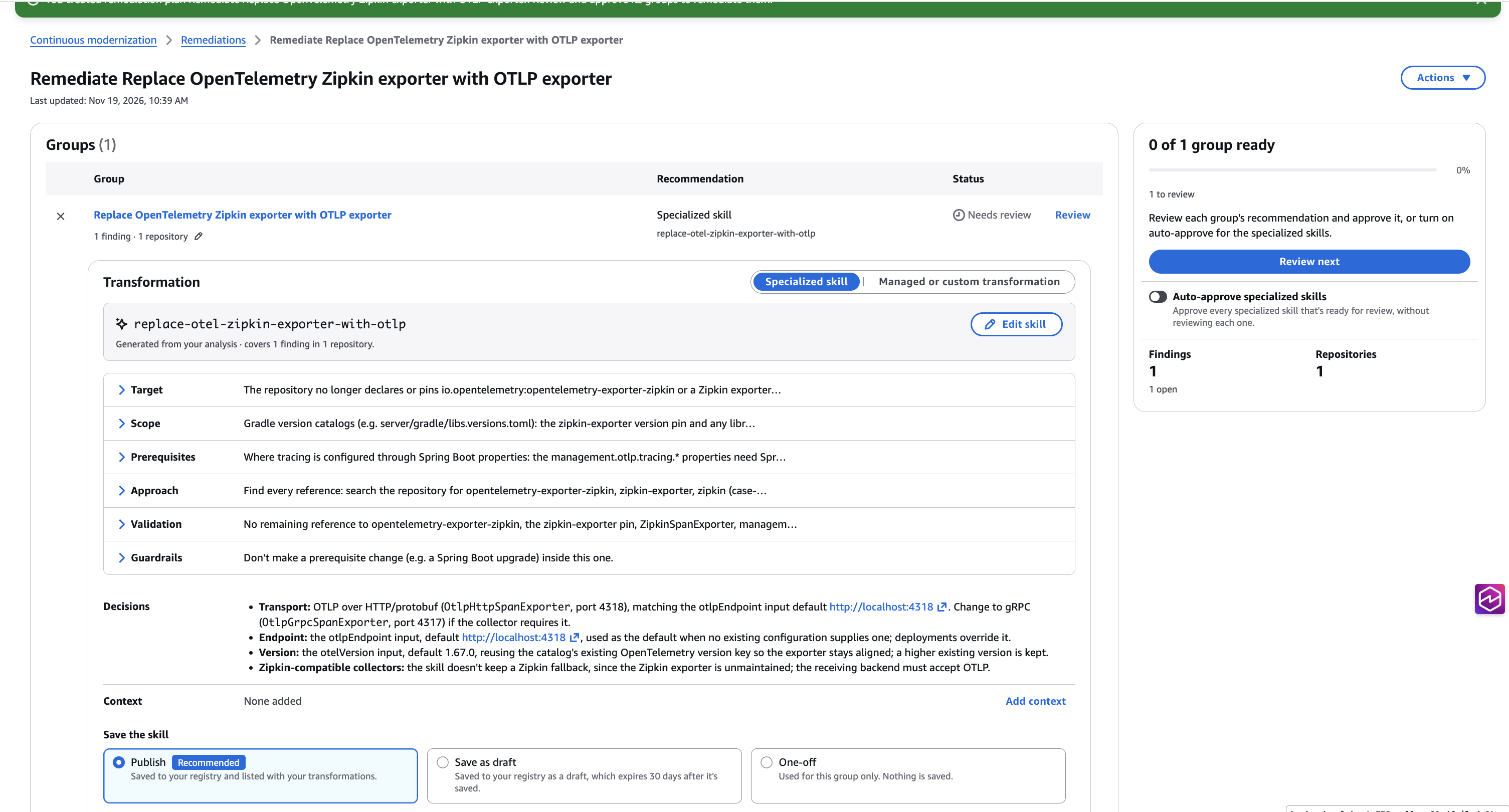
Figure 8: A generated skill shown with its target, approach, and validation for review before anything runs
Ask about your estate in plain language
Not every question fits a filter. In chat, you can ask about your findings, analyses, and remediations in plain language. For example:
- “What changed since the last analysis?”
- “Why did the remediation on checkout-service fail?”
- “Plan my week.” Chat summarizes failed work to unblock, remediations ready to start, and findings with no automated remediation.
Chat can also take action: start or schedule an analysis, start a remediation and check its progress, or dismiss findings in bulk. Every action shows a confirmation card first and runs with your own permissions. To ask about something specific, choose Ask about this on any finding, analysis, or remediation.
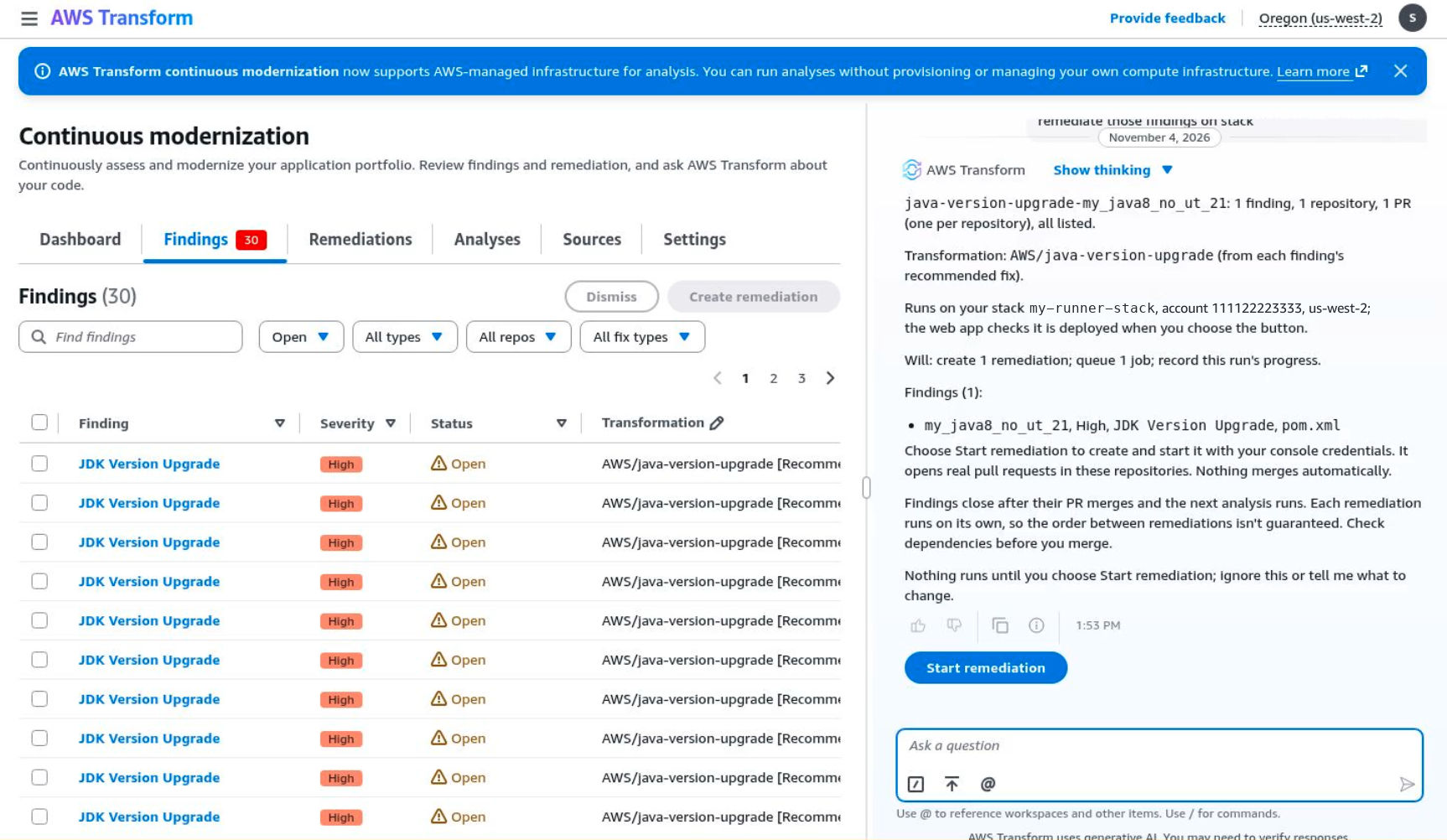
Figure 9: Chat answering a question about your estate and offering to start the remediation
Take your results anywhere
You can now download the artifacts from any analysis, such as its report. Share them with stakeholders, keep them as audit and compliance evidence, or feed them into your own dashboards and ticketing tools.
See it in action at re:Invent 2026
Try these new features today, and then join us in Las Vegas to see them live and talk with the team. Choose a session ID for times and repeats.
- MAM230 (breakout): From CI/CD to CI/CD/CM: Continuous modernization for AI-generated code.
- MAM350 (code talk): Continuous tech debt analysis and remediation, from findings to fixes.
- MAM344 (breakout): From migration to continuous modernization: reduce tech debt at scale.
- DVT309 (workshop): Your runtime is being deprecated. Your weekend isn’t.
- DVT323 (chalk talk): Tech debt anonymous: bring your worst code to this chalk talk.
- MAM205 (chalk talk): Move code modernization at scale from one-time to continuous.
- DVT301 (builders’ session): Bring your tech debt: build a custom transformation that fixes it.
Get started
Tech debt builds up one outdated dependency at a time. Continuous modernization now sets up in a few steps, shows each issue once, fixes it in one pull request per repository, and starts from what AWS Health already knows. To get started, use the following resources:
- Try it: Open Continuous modernization in the AWS Transform console.
- Read the docs: Continuous modernization in the AWS Transform User Guide.
- Take the workshop: A hands-on, self-paced continuous modernization workshop.
- Watch the demo: An interactive product walkthrough.
Have an AWS Health event waiting? Open Scheduled changes in the AWS Health Dashboard and choose Upgrade with Continuous Modernization.