.NET on AWS Blog
Scale multi-tenant SaaS with per-tenant version pinning using Amazon CloudFront
Multi-tenant SaaS providers often need to control which application version each tenant runs, a practice called per-tenant version pinning, so they can roll out new releases incrementally and move tenants between versions without downtime and manual changes. A common approach is to configure the Application Load Balancer with hostname-based routing rules, but this doesn’t scale. Each new customer requires an infrastructure change — a listener rule and a certificate slot. Switching a customer to a new version means editing a live load balancer rule. Eventually, you hit Application Load Balancer quotas.
This post demonstrates how to pin each tenant to a specific version (for example ga, preview, or canary) using Amazon CloudFront multi-tenant distributions with a version parameter, Amazon DynamoDB as the tenant catalog, and per-version ASP.NET application deployments on Amazon Elastic Container Service (Amazon ECS). Cross-version moves for tenants are zero-downtime because each version is always running.
Benefits of per-tenant version pinning with CloudFront multi-tenant distributions
- Tenant scale — Each tenant maps to a CloudFront distribution tenant. A single multi-tenant distribution supports up to 10,000 tenants (adjustable quota).
- Onboarding — A tenant is added through a single DynamoDB write, with no additional provisioning steps.
- Version switching — A tenant is moved between versions through a single update, and the change propagates automatically.
- Zero-downtime — Each version is always running. Switching is a parameter change, not a cutover.
- Custom domains and TLS — Each tenant gets their own AWS Certificate Manager (ACM) certificate and custom domain, with TLS termination handled at the CloudFront edge.
- Multi-region — Assign each tenant to a specific region. CloudFront routes to their regional origin automatically.
Solution overview
The following architecture diagram shows one multi-tenant distribution with a version parameter, and creates one distribution tenant per customer. CloudFront injects the parameter into the origin path, so when CloudFront forwards a tenant request to the regional Application Load Balancer, then to Amazon ECS, the path already carries the version (for example, /api… becomes /ga/api/...). The Application Load Balancer has a small, fixed set of path-based rules, one per version, regardless of tenant count. The same version parameter also selects the matching Amazon Simple Storage Service (Amazon S3) origin for static content.
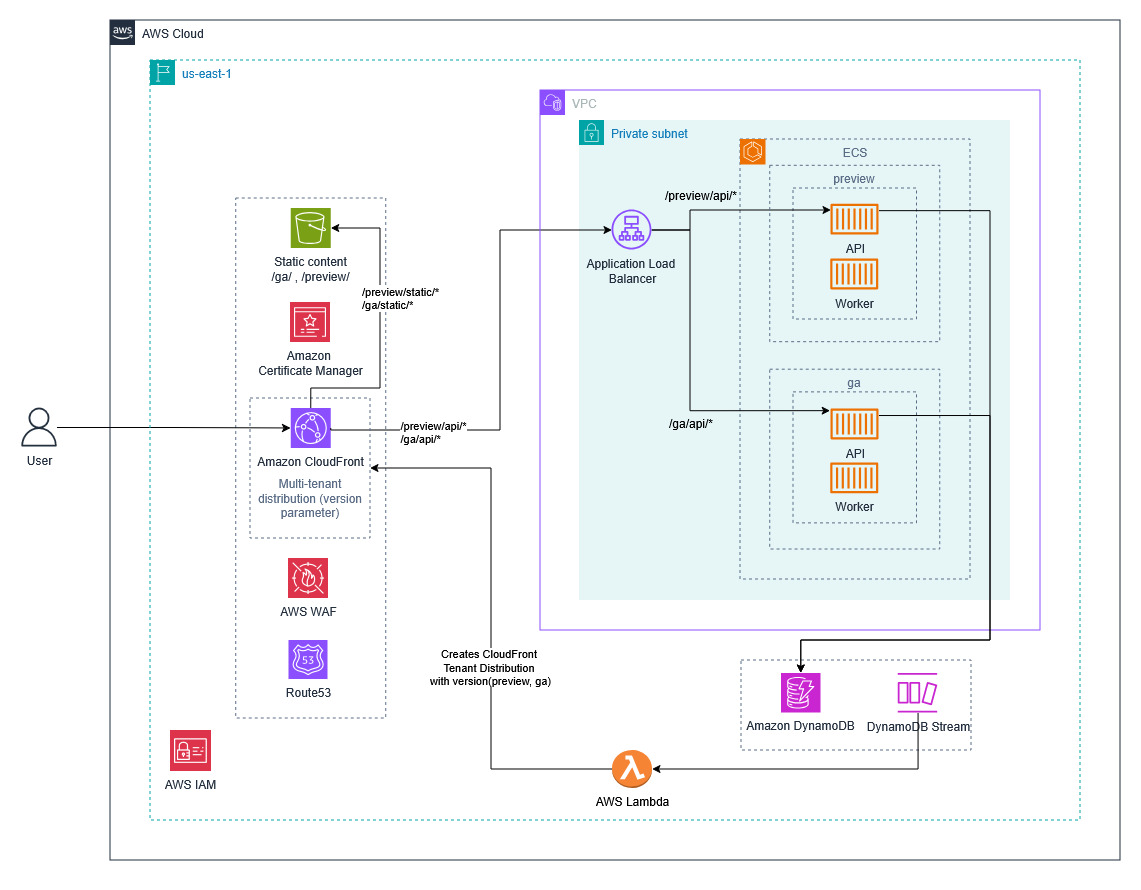
Figure 1: Architecture diagram
The request path determines which origin serves the response:
- Customer DNS resolution — The tenant creates a DNS CNAME record pointing their custom domain (for example, app.example.com) to the CloudFront distribution tenant endpoint (for example, d111111abcdef8.cloudfront.net). If the SaaS provider manages the tenant’s hosted zone in Amazon Route 53, ACM DNS validation for the tenant’s certificate can be automated.
- CloudFront multi-tenant distribution — AWS WAF inspects the inbound request. CloudFront then resolves the tenant’s
versionparameter and forwards it to the origin path. - Regional Application Load Balancer — path-based rules (
/ga/api/*, /preview/api/*, /canary/api/*) route to the right backend. The Application Load Balancer runs in a private subnet, reachable only through the CloudFront VPC origin. No public endpoint is exposed. - Per-version backend stacks — each version runs its own ASP.NET application on Amazon ECS.
- Static content (Amazon S3) — the same
versionparameter routes to versioned Amazon S3 prefixes (for example,s3://assets-bucket/ga/, s3://assets-bucket/preview/), so static assets match the tenant’s pinned version.
Prerequisites
For this walkthrough, you should have familiarity with Amazon CloudFront, Elastic Load Balancing (Application Load Balancer), AWS Certificate Manager, AWS Lambda, and Amazon ECS, and access to the following:
- An AWS account with permissions to manage CloudFront multi-tenant distributions, ACM certificates, DynamoDB Tables, Lambda functions, and Amazon ECS services.
- AWS Command Line Interface (AWS CLI) v2
- .NET SDK 10.0 or later
- An Amazon ECS cluster running in at least one Region
Walkthrough
The following steps walk through provisioning the infrastructure, configuring CloudFront, wiring the control plane, deploying per-version stacks, resolving tenants in the application, and onboarding a tenant.
Step 1: Provision the infrastructure
- Provision an Amazon ECS cluster For details, see Creating an Amazon ECS cluster.
- Provision an Application Load Balancer in your target region. For details, see Creating an Application Load Balancer.
- Upload tenant domain certificates to ACM.
Step 2: Create the multi-tenant distribution with a version parameter
- Create one CloudFront multi-tenant distribution that all tenants share. Declare a
versionparameter and reference it in the origin path:/{{version}}/api. - To protect the distribution with AWS WAF, create a web ACL and explicitly associate it with the multi-tenant distribution.
- To confirm, open the CloudFront console and verify the distribution status shows Deployed and the web ACL appears under the distribution’s Security tab. A request to /preview/api/… should now resolve the version parameter to preview and forward to the load balancer.
- The origin points at an internal hostname that fronts the regional Application Load Balancer (for example,
origin.internal.example.com). - Place the Application Load Balancer in a private subnet with no public IP. Configure the CloudFront multi-tenant distribution to reach it through a VPC origin. This eliminates any internet path to the origin — all traffic flows through CloudFront where AWS WAF inspects it before forwarding.
- To switch a tenant from the ga environment to preview, update the tenant’s version parameter from ga to preview. CloudFront immediately routes that tenant’s traffic from /ga/api/… to /preview/api/…. You should now see requests resolving to the preview environment — no deployment or DNS change is required. By default, CloudFront replaces the
Hostheader with the origin’s domain name. Attach an origin request policy that includesHost, so the ASP.NET Core app receives the customer’s original hostname.
For details, see Creating a multi-tenant distribution and Distribution tenants.
Step 3: Create the TenantConfig table and reconciliation Lambda
Create a DynamoDB table named TenantConfig with domain as the partition key. Turn on DynamoDB Streams with StreamViewType as NEW_AND_OLD_IMAGES. This table holds one item per tenant:
Schema:
| Attribute | Type | Notes |
domain (PK) |
String | Customer hostname, for example example.com |
tenantName |
String | Stable identifier used as the partition key for tenant-scoped data |
Version |
String | Version – ga or preview or canary |
certificateArn |
String | Certificate ARN for the tenant’s domain |
Example item:
{
  "domain": "example.com",
  "tenantName": "example-corp",
  "version": "ga",
  "certificateArn": "arn:aws:acm:us-east-1:111122223333:certificate/..."
}
Create AWS Lambda function to consume the DynamoDB stream and reconcile distribution tenants on each change:
- On
INSERT:create a distribution tenant with the tenant’s domain, certificate, andversionparameter. - On
MODIFY: update the distribution tenant (version change, certificate rotation). - On
REMOVE: delete the distribution tenant.
Sample reconciliation handler in C#:
public class TenantReconciliationHandler
{
    private readonly IAmazonCloudFront _cloudFront;
    private readonly string _distributionId;

    public TenantReconciliationHandler()
    {
        _cloudFront = new AmazonCloudFrontClient();
        _distributionId = Environment
            .GetEnvironmentVariable("DISTRIBUTION_ID");
    }

    public async Task Handle(DynamoDBEvent dbEvent)
    {
        foreach (var record in dbEvent.Records)
        {
            var image = record.Dynamodb.NewImage
                ?? record.Dynamodb.OldImage;

            if (image == null) continue;

            var domain = image["domain"].S;

            switch (record.EventName.Value)
            {
                case "INSERT":
                    var version = record.Dynamodb.NewImage["version"].S;
                    var certArn = record.Dynamodb.NewImage
                        .GetValueOrDefault("certificateArn")?.S;

                    await _cloudFront.CreateDistributionTenantAsync(
                        new CreateDistributionTenantRequest
                        {
                            DistributionId = _distributionId,
                            Name = domain,
                            Domains = new List<string> { domain },
                            CertificateArn = certArn,
                            Parameters = new List<Parameter>
                            {
                                new() { Name = "version", Value = version }
                            }
                        });
                    break;

                case "MODIFY":
                    var newVersion = record.Dynamodb.NewImage["version"].S;
                    var newCert = record.Dynamodb.NewImage
                        .GetValueOrDefault("certificateArn")?.S;

                    await _cloudFront.UpdateDistributionTenantAsync(
                        new UpdateDistributionTenantRequest
                        {
                            Name = domain,
                            Parameters = new List<Parameter>
                            {
                                new() { Name = "version", Value = newVersion }
                            },
                            CertificateArn = newCert
                        });
                    break;

                case "REMOVE":
                    await _cloudFront.DeleteDistributionTenantAsync(
                        new DeleteDistributionTenantRequest
                        {
                            Name = domain
                        });
                    break;
            }
        }
    }
}
Grant the Lambda execution role these additional permissions:
cloudfront:CreateDistributionTenant, cloudfront:UpdateDistributionTenant, cloudfront:DeleteDistributionTenant.
The Lambda function uses these permissions to manage the lifecycle of CloudFront distribution tenants programmatically: CreateDistributionTenant provisions a new tenant (with its version parameter) when a tenant is onboarded, UpdateDistributionTenant modifies an existing tenant’s configuration when its settings or version change, and DeleteDistributionTenant removes a tenant when it is offboarded. Without these permissions, the function cannot create, modify, or remove tenant distributions and the automation will fail with an access-denied error.
For details, see Creating a Lambda function and Using DynamoDB Streams with Lambda.
Step 4: Deploy per-version ECS services behind the Application Load Balancer
Deploy each version of the API as a separate Amazon ECS service behind the Application Load Balancer. Each service runs the same application code, but from a different container image tag — this is how the preview and ga environments stay isolated while sharing infrastructure.
The Application Load Balancer has a fixed set of listener rules, one per version:
/ga/api/* → app-gatarget group/preview/api/* → app-previewtarget group
To add a new version, create one new Amazon ECS service and add one Application Load Balancer routing rule that maps the version’s path (for example, /v2/api/*) to that service. This is all that’s required regardless of how many tenants use the version.
For details, see Deploying Amazon ECS services with a load balancer.
Step 5: Resolve the tenant from the request hostname
The CloudFront origin request policy in Step 2 forwards the customer’s original Host header, and the Application Load Balancer passes it through unchanged. ASP.NET Core middleware reads Host, looks up the tenant in DynamoDB, and attaches a TenantInfo object to the request.
Tenant resolution middleware:
public class TenantResolutionMiddleware
{
    private readonly RequestDelegate _next;
    private readonly IAmazonDynamoDB _ddb;
    private readonly IMemoryCache _cache;

    public TenantResolutionMiddleware(
        RequestDelegate next,
        IAmazonDynamoDB ddb,
        IMemoryCache cache)
    {
        _next = next;
        _ddb = ddb;
        _cache = cache;
    }

    public async Task InvokeAsync(
        HttpContext context, ITenantProvider tenantProvider)
    {
        var host = context.Request.Host.Host;

        if (string.IsNullOrEmpty(host))
        {
            context.Response.StatusCode = 400;
            return;
        }

        var tenant = await _cache.GetOrCreateAsync(
            $"tenant:{host}",
            async entry =>
            {
                entry.AbsoluteExpirationRelativeToNow =
                    TimeSpan.FromSeconds(30);

                var response = await _ddb.GetItemAsync(
                    new GetItemRequest
                    {
                        TableName = "TenantConfig",
                        Key = new Dictionary<string, AttributeValue>
                        {
                            ["domain"] = new AttributeValue { S = host }
                        }
                    });

                if (!response.IsItemSet) return null;

                return new TenantInfo(
                    Name: response.Item["tenantName"].S,
                    Version: response.Item["version"].S,
                    Host: host);
            });

        if (tenant is null)
        {
            context.Response.StatusCode = 404;
            return;
        }

        tenantProvider.Current = tenant;
        await _next(context);
    }
}
Register the middleware early in the pipeline. Downstream services inject ITenantProvider and read ITenantProvider.Current to access the resolved TenantInfo (name, version, host). Each tenant-scoped DynamoDB table uses tenantName as the partition key, so one tenant can never read or write another tenant’s data.
Step 6: Onboard a tenant
Onboarding is a single write to TenantConfig:
aws dynamodb put-item \
   --table-name TenantConfig \
   --item '{     "domain": {"S": "example.com"},     "tenantName": {"S": "example-corp"},     "version": {"S": "ga"},     "certificateArn": {"S": "arn:aws:acm:us-east-1:..."}   }'
The DynamoDB stream invokes the reconciliation Lambda, which creates the CloudFront distribution tenant with the customer’s domain, attaches the ACM certificate, and sets version = ga. The customer points their DNS at the distribution tenant’s routing endpoint once and never changes it, even when switching versions later.
Step 7: Move a tenant between versions
Switch a customer to preview with a single update:
aws dynamodb update-item \

          --table-name TenantConfig \

          --key '{"domain": {"S": "example.com"}}' \

          --update-expression "SET version = :v" \

          --expression-attribute-values '{":v": {"S": "preview"}}'
The stream triggers the Lambda, which calls update-distribution-tenant to change the version parameter. CloudFront routes the next request to the new origin path (/preview/api/...), and the Application Load Balancer routes it to the preview stack. Because the preview stack is already running, the move happens on the next request boundary.
Cleanup
To avoid ongoing charges, remove resources in this order:
- Update
TenantConfigto move all tenants off the version you want to retire. Wait for traffic to shift before deleting infrastructure. - Delete distribution tenants you no longer need. Removing a
TenantConfigitem triggers Lambda to delete the matching distribution tenant. - Delete the multi-tenant distribution after all distribution tenants are removed.
- Scale each per-version Amazon ECS service to zero and wait for tasks to drain. Then delete the services, task definitions, and ALB listener rules.
- Delete the Amazon ECS cluster, DynamoDB tables, and ACM certificates.
Multi-region extension
This architecture extends to multiple AWS Regions without changes to the control plane. CloudFront multi-tenant distribution, ACM certificates, reconciliation Lambda, and Amazon Route 53 stay in a single Region. Each additional Region gets its own Amazon VPC, Application Load Balancer, and Amazon ECS cluster running the same per-version services.
To enable multi-region extension, configure the TenantConfig table created in Step 3 of the walkthrough as a DynamoDB global table and add a replica in each application region. The tenant resolution middleware reads from the local replica, so lookups stay within the Region. Writes go to any replica and propagate automatically.
The multi-tenant distribution declares one origin per region. Add a region attribute to each TenantConfig item. The reconciliation Lambda reads this attribute and assigns the distribution tenant to the matching regional origin.
Conclusion
This post showed how to pin each tenant to a specific version (for example ga, preview, or canary) using CloudFront multi-tenant distributions with a version parameter. Amazon DynamoDB serves as the tenant catalog, and each version runs separate ASP.NET Core deployments on Amazon ECS.
Onboarding tenants and switching application version are achieved by one DynamoDB write respectively. Cross-version moves are zero-downtime because each version is always running.
Key takeaways:
- A single CloudFront multi-tenant distribution with a version parameter removes the need for per-tenant load balancer rules and certificates.
- The version parameter accepts any values you need, such as specific version pins, progressive rollout stages, or a combination of both.
- DynamoDB holds the authoritative configuration. One table, keyed by hostname, stores everything the control plane needs, and a DynamoDB Streams and Lambda reconciler keeps the edge configuration in sync.
- Tenant resolution runs in the application. ASP.NET Core middleware reads the forwarded Host header and looks up the matching tenant in DynamoDB.