IBM & Red Hat on AWS
Deploy IBM Granite 4.0 models on Amazon SageMaker AI
Disclaimer: Sample code, software libraries, command line tools, proofs of concept, templates, or other related technology are provided as AWS Content or Third-Party Content under the AWS Customer Agreement, or the relevant written agreement between you and AWS (whichever applies). You should not use this AWS Content or Third-Party Content in your production accounts, or on production or other critical data. You are responsible for testing, securing, and optimizing the AWS Content or Third-Party Content, such as sample code, as appropriate for production grade use based on your specific quality control practices and standards. Deploying AWS Content or Third-Party Content may incur AWS charges for creating or using AWS chargeable resources, such as running Amazon EC2 instances or using Amazon S3 storage.
Enterprise AI deployments face a critical challenge: balancing model performance with infrastructure costs while maintaining scalability across diverse workloads. Traditional large language models (LLMs) consume exponential memory as context length increases, forcing organizations to choose between capability and cost-effectiveness when building intelligent applications for code generation, document analysis, customer support, and agentic workflows.
IBM Granite 4.0 models help address this challenge through a hybrid Mamba and transformer architecture to reduce memory requirements. This enables you to deploy enterprise-grade AI applications on Amazon SageMaker AI across various instance types and workload scenarios.
In this post, we’ll walk you through the deployment process—from AWS Marketplace subscription to production implementation—and demonstrate three use cases: automated code generation, intelligent code completion, and function calling for agentic workflows. You’ll also learn how to integrate these models with AWS services to build scalable Retrieval Augmented Generation (RAG) applications, with enhanced security features that meet enterprise compliance requirements.
IBM Granite 4.0 Architecture and Capabilities
IBM Granite 4.0’s hybrid Mixture of Experts (MoE) architecture combines Mamba-2 layers and transformer blocks sequentially, in a 9:1 ratio. This architecture processes sequential information through memory-efficient Mamba-2 blocks while leveraging transformer attention mechanisms for complex reasoning tasks. It offers the following performance characteristics:
- Memory efficiency: Can achieve over 70% reduction in memory requirements, according to IBM. This reduction occurs when handling long inputs and multiple concurrent batches. The efficiency comes from the linear scaling properties of Mamba-2 layers versus the quadratic scaling of traditional attention mechanisms.
- Enhanced throughput: As context length increases, computational requirements scale linearly rather than quadratically, maintaining consistent throughput even with larger batch sizes or longer sequences.
- Flexible deployment options: You can deploy Granite 4.0 models on multiple Amazon SageMaker AI instance types, including G6e, P5, and P4d instances, to match your performance and budget requirements.
- Extended context handling: IBM has trained the models on data samples up to 512K tokens in context length. Performance has been validated on contexts up to 128K tokens, using no positional encoding (NoPE) as Mamba inherently preserves token order through sequential processing.
The Granite 4.0 model family includes multiple variants optimized for different deployment scenarios:
- Granite 4.0 h-micro: A dense hybrid model with 3B parameters, designed for resource-constrained environments
- Granite 4.0 h-tiny: A hybrid MoE model with 7B total parameters (1B active), designed for low-latency applications and function calling tasks within agentic workflows
- Granite 4.0 h-small: A hybrid mixture of experts (MoE) model with 32B total parameters (9B active), designed for enterprise workflows including multi-agent systems and customer support automation
IBM released Granite 4.0 models under the Apache 2.0 license and received ISO 42001 certification, meeting internationally recognized standards for AI management systems. They support enterprise AI tasks including instruction following, function calling for tool integration workflows, Retrieval Augmented Generation (RAG) with multi-turn conversations, and code generation with Fill-In-the-Middle (FIM) capabilities for IDE-style completion.
Reference Architecture
The following diagram illustrates an example RAG architecture (Figure 1) using IBM Granite 4.0 models from AWS Marketplace integrated with AWS managed services:
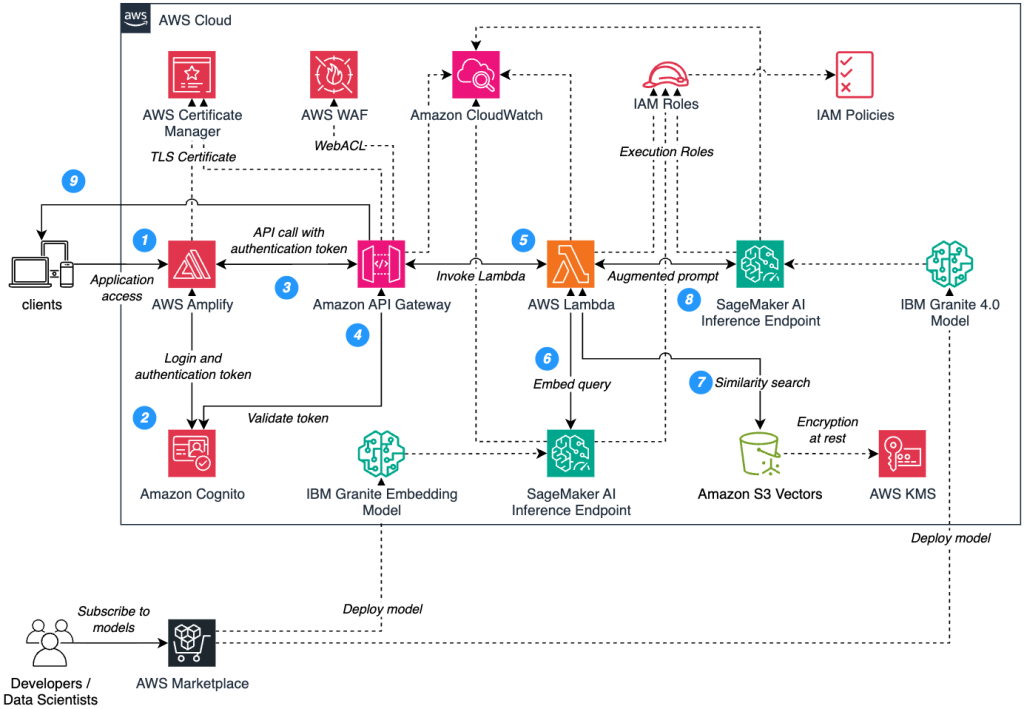
Figure 1. RAG architecture using IBM Granite models on Amazon SageMaker AI.
AWS Marketplace deployment
When you subscribe to IBM Granite 4.0 models on AWS Marketplace, you receive a model package ARN for deployment. Amazon SageMaker AI uses this package to create a model object, an endpoint configuration specifying instance type and scaling parameters, and a managed inference endpoint that handles provisioning, monitoring, and automatic scaling.
Request Flow Walkthrough
Let’s walk through the numbered request flow shown in Figure 1:
Step 1: Users authenticate through AWS Amplify secure identity framework, which forwards credentials to Amazon Cognito for validation against enterprise identity providers.
Step 2: Upon successful authentication, Cognito generates three JWT tokens—ID token for user identity, access token for API authorization, and refresh token for session management—enabling secure, stateless authentication across the application. AWS Certificate Manager provisions and manages TLS certificates, providing enhanced encryption between client applications and AWS Amplify endpoints.
Step 3: Users initiate queries through the application interface, triggering AWS Amplify to forward authenticated requests to Amazon API Gateway with JWT access tokens embedded in the Authorization header for secure API access. Amazon API Gateway immediately routes incoming requests through AWS WAF for security evaluation, web access control list (web ACL) rules assess each request against enterprise-grade protection policies including intelligent rate limiting, IP-based access controls, and OWASP Top 10 threat mitigation patterns.
Step 4: Amazon API Gateway forwards the JWT access token to Amazon Cognito for comprehensive token validation, where Cognito performs cryptographic signature verification against registered public keys, validates token expiration timestamps, and confirms issuer authenticity before returning a detailed validation response with user identity claims and authorization scope.
Step 5: Upon successful token validation, Amazon API Gateway triggers AWS Lambda function execution with the authenticated user query, where Lambda automatically assumes a predefined IAM execution role configured with restricted access permissions for SageMaker AI endpoint invocation, Amazon S3 Vectors access, and comprehensive Amazon CloudWatch logging capabilities for audit trail and performance monitoring.
Step 6: AWS Lambda invokes the IBM Granite embedding model deployed on Amazon SageMaker AI to transform the user query into high-dimensional vector representations, enabling semantic similarity matching against the knowledge base through advanced natural language understanding and contextual encoding for precise information retrieval.
Step 7: AWS Lambda executes semantic similarity search against the Amazon S3 Vectors using the generated query embedding, retrieving the most contextually relevant document chunks through cosine similarity calculations and distance-based ranking algorithms to ensure precise knowledge retrieval for accurate response generation.
Step 8: AWS Lambda constructs an enriched prompt by intelligently combining the original user query with the most relevant retrieved document chunks, creating a contextually aware input that maximizes response accuracy. This augmented prompt is then transmitted to the IBM Granite 4.0 model deployed on Amazon SageMaker AI, where the hybrid Mamba-2 and transformer architecture processes both the query context and retrieved knowledge to generate precise, factually-grounded responses that directly address the user’s information needs.
Step 9: The generated response is transmitted back through the secure AWS Lambda execution environment to Amazon API Gateway, where it undergoes final validation and formatting before being delivered to the client application through encrypted HTTPS channels, ensuring end-to-end security and maintaining response integrity throughout the entire request-response lifecycle.
Security and Observability
The architecture implements defense-in-depth security using AWS services, such as:
- AWS Certificate Manager provisions TLS certificates for data encryption in transit.
- AWS WAF protects Amazon API Gateway against web issues with rate limiting and IP filtering.
- AWS Key Management Service (AWS KMS) encrypts data at rest in Amazon S3 Vectors and SageMaker AI model artifacts.
- AWS Identity and Access Management (IAM) roles and policies implement restricted access controls across all services.
- Amazon CloudWatch captures latency metrics, response sizes, and any errors for monitoring and troubleshooting.
- Additionally, Amazon Virtual Private Cloud (Amazon VPC) provides network isolation for AWS Lambda functions and Amazon SageMaker AI endpoints.
Deploying Granite on Amazon SageMaker AI
Now let’s deploy an IBM Granite 4.0 model from AWS Marketplace to Amazon SageMaker AI inference endpoints. This walkthrough demonstrates this processes, using the ml.g6e.2xlarge instance type, but you can select from other supported instance types including ml.p5 and ml.p4d families to align with your specific performance requirements and cost optimization goals.
Cost considerations
Deploying and testing these examples requires a GPU-based inference endpoint. This will incur charges for Amazon SageMaker AI inference endpoints, data transfer, and API calls. Review Amazon SageMaker AI Pricing page before.
Prerequisites
Before you begin, ensure you have:
- An AWS account with AWS Identity and Access Management (IAM) permissions for AWS Marketplace subscriptions, Amazon SageMaker AI model deployment and endpoint operations, and Amazon CloudWatch logging. For details, see Identity and Access Management for Amazon SageMaker AI.
- Python 3.10 or later with boto3 and sagemaker packages installed, and AWS Command Line Interface (AWS CLI) version 2.x or later.
- Sufficient service quota for GPU-based SageMaker AI inference endpoints in your chosen AWS Region (verify in the Service Quotas console).
If you’re using SageMaker Studio, an IAM execution role is automatically available. For local or Amazon EC2 deployments, follow the security guidelines in IAM to create a role with the necessary permissions before proceeding.
Subscribe to IBM Granite 4.0 on AWS Marketplace
For this example, we’ll use the IBM Granite 4.0 h-small model. Subscribe to it by following these steps:
- Open the IBM Granite 4.0 h-small product page on AWS Marketplace
- Choose Continue to Subscribe
The following image shows AWS Marketplace page with subscription options and pricing information for IBM Granite (Figure 2):
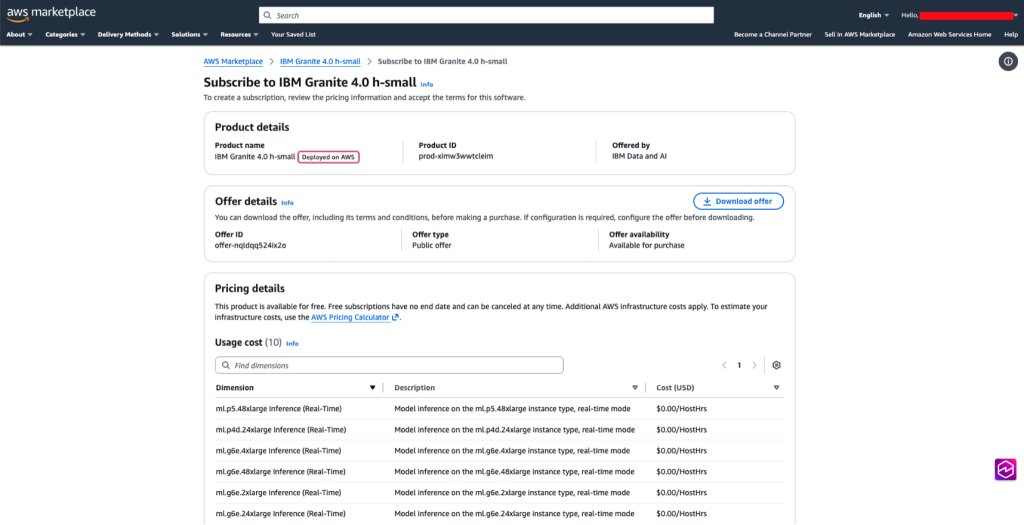
Figure 2. AWS Marketplace listing for the IBM Granite 4.0 h-small model, displaying subscription pricing and supported inference instance types.
- Review the terms and conditions, then choose Accept Offer
- Wait for AWS Marketplace to process your subscription (typically 1-2 minutes)
- When active, choose your AWS Region from the dropdown menu
- Copy the Product ARN for use in your deployment code. The ARN format follows this example:
arn:aws:sagemaker:region:123456789000:model-package/granite-4-0-h-small-fp8-v1-xxxxxxxx
Deploy the model to a SageMaker AI endpoint
Deploy the IBM Granite 4.0 model using the Amazon SageMaker Python SDK. The code retrieves your IAM execution role automatically in SageMaker Studio or prompts for an IAM role in local environments.
The following code deploys the model to Amazon SageMaker AI. Deployment takes approximately 10-15 minutes and creates a model object, endpoint configuration, and real-time endpoint. Replace <model-package-arn>, with the Product ARN you copied in step 6 of the previous section:
import json
import boto3
import sagemaker
from sagemaker import ModelPackage, get_execution_role
from datetime import datetime

sagemaker_session = sagemaker.Session()
region = sagemaker_session.boto_region_name

try:
    execution_role_arn = sagemaker.get_execution_role()
except ValueError:
    execution_role_arn = input("Enter your execution role ARN: ")

print(f"Execution Role: {execution_role_arn}")
print(f"Region: {region}")

# Replace with the Product ARN you copied from AWS Marketplace
model_package_arn = "<model-package-arn>"
print(f"Model Package ARN: {model_package_arn}")

model_name = "granite-4-0-h-small"
inference_instance_type = "ml.g6e.2xlarge"
instance_count = 1

model = ModelPackage(
    role=execution_role_arn,
    model_package_arn=model_package_arn,
    sagemaker_session=sagemaker_session
)

timestamp = "{:%Y-%m-%d-%H-%M-%S}".format(datetime.now())
endpoint_name = f"{model_name}-{timestamp}"

print(f"Deploying endpoint: {endpoint_name}")

deployed_model = model.deploy(
    initial_instance_count=instance_count,
    instance_type=inference_instance_type,
    endpoint_name=endpoint_name
)

print(f"Endpoint deployed: {endpoint_name}")
Once deployed, you should see output like the following image (Figure 3):

Figure 3. IBM Granite deployed to an Amazon SageMaker AI endpoint.
Save the endpoint name for use in the following examples. After deployment completes, you can verify the endpoint status in the console:
- Open the Amazon SageMaker AI console
- Choose Inference in the left navigation pane
- Select Endpoints
- Find your endpoint name in the list and confirm the status is InService, as seen in the following image (Figure 4):

Figure 4. Amazon SageMaker AI console displaying endpoint list with Granite endpoint status as InService.
Example use cases
The following sections demonstrate three use case examples for IBM Granite 4.0 models.
Example 1: Code generation
Code generation enables developer productivity tools, automated scaffolding, and programming education. The following code generates a Python function from a natural language description:
import json
import boto3

runtime_sm_client = boto3.client("runtime.sagemaker")

# Replace with your endpoint name from deployment
endpoint_name = "<endpoint-name>"

prompt = """<|start_of_role|>system<|end_of_role|>You are a helpful coding assistant.<|end_of_text|>
<|start_of_role|>user<|end_of_role|>Write a Python function to calculate the factorial of a number using recursion. Include a docstring and example usage.

Return only the Python code without any explanations or markdown formatting.<|end_of_text|>
<|start_of_role|>assistant<|end_of_role|>"""

payload = {
    "inputs": prompt,
    "parameters": {
        "temperature": 0.3,
        "max_new_tokens": 512,
        "top_p": 0.9,
        "repetition_penalty": 1.0
    }
}

response = runtime_sm_client.invoke_endpoint(
    EndpointName=endpoint_name,
    ContentType="application/json",
    Accept="application/json",
    Body=json.dumps(payload)
)

response_body = json.loads(response['Body'].read().decode('utf-8'))
if isinstance(response_body, list):
    generated_code = response_body[0]["generated_text"]
else:
    generated_code = response_body["generated_text"]

print("Generated code:")
print(generated_code)
The model generates a complete implementation including documentation, as seen in the following output (Figure 5):

Figure 5. Python factorial function generated by Granite 4.0 model.
Example 2: Fill-in-the-Middle (FIM) Code Completion
Fill-in-the-Middle completion demonstrates Granite’s ability to generate missing code segments within existing functions. The following code completes a Flask API endpoint by filling in the database query logic:
import json
import boto3

runtime_sm_client = boto3.client("runtime.sagemaker")
# Replace with your endpoint name from deployment
endpoint_name = "<endpoint-name>"

# Define code context
prefix = """@app.route('/users/', methods=['GET'])
def get_user(user_id):
    # Fetch user from database
    """

suffix = """    if not user:
        return jsonify({'error': 'User not found'}), 404
    return jsonify(user.to_dict()), 200"""

# Create FIM prompt with special tokens
prompt = f"""<|start_of_role|>user<|end_of_role|><|fim_prefix|>{prefix}<|fim_suffix|>{suffix}<|fim_middle|><|end_of_text|>
<|start_of_role|>assistant<|end_of_role|>"""

payload = {
    "inputs": prompt,
    "parameters": {
        "temperature": 0.1,
        "max_new_tokens": 200
    }
}

response = runtime_sm_client.invoke_endpoint(
    EndpointName=endpoint_name,
    ContentType="application/json",
    Accept="application/json",
    Body=json.dumps(payload)
)

response_body = json.loads(response['Body'].read().decode('utf-8'))
if isinstance(response_body, list):
    completion = response_body[0]["generated_text"].strip()
else:
    completion = response_body["generated_text"].strip()

print("**Code Before (with gap):**")
print(prefix + "# <<< MISSING CODE HERE >>>\n" + suffix)
print("\n\n**Complete Code:**")
print(prefix + completion + "\n" + suffix)
The model inserts appropriate database query logic, as seen in the following output (Figure 6):
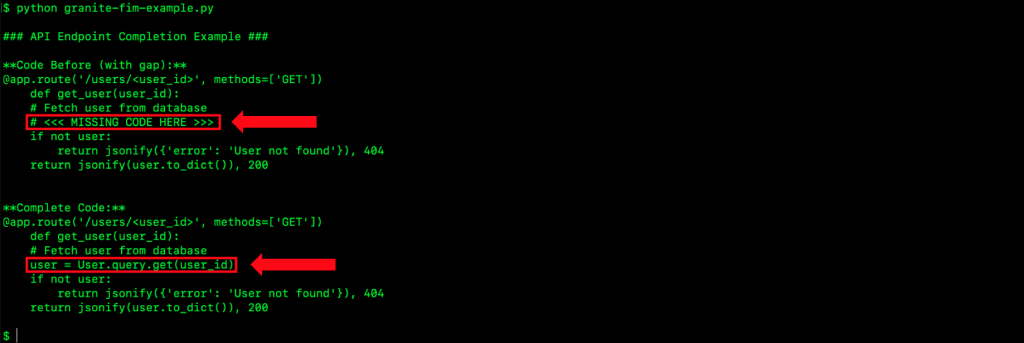
Figure 6. Fill-in-the-Middle code completion example with Flask API endpoint.
Example 3: Tool Calling
Tool calling enables agentic AI systems by allowing Granite to identify when to call external tools, extract parameters, and generate structured tool calls. The following code demonstrates Granite determining which tool to call based on the user request:
import json
import re
import sys
import boto3

runtime_sm_client = boto3.client("runtime.sagemaker")
# Replace with your endpoint name from deployment
endpoint_name = "<endpoint-name>"

# Define rectangle tools
tools_definition = """[
    {
        "type": "function",
        "function": {
            "name": "calculate_rectangle_area",
            "description": "Calculate the area of a rectangle",
            "parameters": {
                "type": "object",
                "properties": {
                    "length": {"type": "number", "description": "Length in meters"},
                    "width": {"type": "number", "description": "Width in meters"}
                },
                "required": ["length", "width"]
            }
        }
    },
    {
        "type": "function",
        "function": {
            "name": "calculate_rectangle_perimeter",
            "description": "Calculate the perimeter of a rectangle",
            "parameters": {
                "type": "object",
                "properties": {
                    "length": {"type": "number", "description": "Length in meters"},
                    "width": {"type": "number", "description": "Width in meters"}
                },
                "required": ["length", "width"]
            }
        }
    }
]"""

def calculate_rectangle_area(length, width):
    return length * width

def calculate_rectangle_perimeter(length, width):
    return 2 * (length + width)

tools = {
    "calculate_rectangle_area": calculate_rectangle_area,
    "calculate_rectangle_perimeter": calculate_rectangle_perimeter
}

if len(sys.argv) < 2:
    print("Usage: python granite-rectangle.py \"What is the area of a rectangle 5 meters long and 3 meters wide?\"")
    print("   or: python granite-rectangle.py \"What is the perimeter of a rectangle 5 meters long and 3 meters wide?\"")
    sys.exit(1)

user_question = " ".join(sys.argv[1:])

# Step 1: LLM generates tool call
prompt = f"""<|start_of_role|>system<|end_of_role|>You have access to tools for calculating rectangle area and perimeter.
Functions: {tools_definition}
Return ONLY a json object with function name and arguments.
<|end_of_text|>
<|start_of_role|>user<|end_of_role|>{user_question}<|end_of_text|>
<|start_of_role|>assistant<|end_of_role|>"""

response = runtime_sm_client.invoke_endpoint(
    EndpointName=endpoint_name,
    ContentType="application/json",
    Accept="application/json",
    Body=json.dumps({
        "inputs": prompt,
        "parameters": {"temperature": 0.1, "max_new_tokens": 100}
    })
)

tool_call = json.loads(response['Body'].read().decode('utf-8'))
tool_call = tool_call[0]["generated_text"] if isinstance(tool_call, list) else tool_call["generated_text"]
tool_call = re.search(r'\{.*\}', tool_call, re.DOTALL).group(0)
print(f"Tool call: {tool_call}")

# Step 2: Execute tool
tool_data = json.loads(tool_call)
tool_name = tool_data.get("name") or tool_data.get("function")
args = tool_data.get("arguments", tool_data)
result = tools[tool_name](**args)

if "area" in tool_name:
    calc_detail = f"{args['length']} × {args['width']} = {result}"
else:
    calc_detail = f"2 × ({args['length']} + {args['width']}) = {result}"
print(f"Calculation: {calc_detail}")

# Step 3: LLM generates response
final_prompt = f"""<|start_of_role|>system<|end_of_role|>You are a helpful assistant.
<|end_of_text|>
<|start_of_role|>user<|end_of_role|>Question: {user_question}
Calculation: {calc_detail} {"square meters" if "area" in tool_name else "meters"}
Provide a natural language answer.<|end_of_text|>
<|start_of_role|>assistant<|end_of_role|>"""

response = runtime_sm_client.invoke_endpoint(
    EndpointName=endpoint_name,
    ContentType="application/json",
    Accept="application/json",
    Body=json.dumps({
        "inputs": final_prompt,
        "parameters": {"temperature": 0.3, "max_new_tokens": 100}
    })
)

final_answer = json.loads(response['Body'].read().decode('utf-8'))
final_answer = final_answer[0]["generated_text"] if isinstance(final_answer, list) else final_answer["generated_text"]
print(f"\nAnswer: {final_answer}")
The output in Figure 7 illustrates the three-stage tool calling workflow in action:
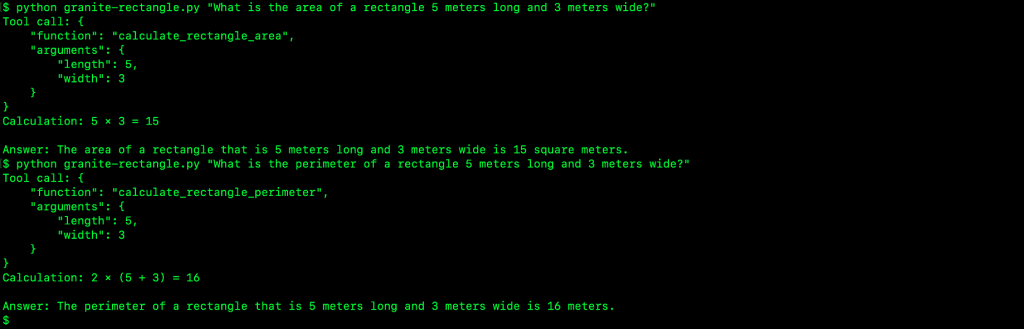
Figure 7. Calculation workflow showing tool call generation, function execution, and natural language response generation.
Clean up
To avoid ongoing charges for SageMaker AI resources, delete the endpoint and associated configurations you created. Delete resources through the SageMaker AI console or using the AWS CLI:
$ aws sagemaker delete-endpoint --endpoint-name <endpoint-name> --region <region>
$ aws sagemaker delete-endpoint-config --endpoint-config-name <endpoint-name> --region <region>
$ aws sagemaker delete-model --model-name <model-name> --region <region>
After running this code, verify that your resources are deleted:
- Navigate to the Amazon SageMaker AI console
- Choose Inference in the navigation pane, then choose Endpoints
- Confirm that your endpoint no longer appears in the list or shows a status of Deleting
Conclusion
In this post, you learned how to deploy IBM Granite 4.0 models from AWS Marketplace to Amazon SageMaker AI inference endpoints and implement practical use cases including code generation, Fill-in-the-Middle completion, function calling, and RAG workflows.
The hybrid architecture of IBM Granite 4.0 models combines Mamba-2 layers with transformer blocks to help with memory efficiency and throughput scaling. When deploying on Amazon SageMaker AI, you can choose from different model variants and select appropriate inference endpoint types to align with your specific workload requirements.
By integrating with additional AWS services like Amazon API Gateway, AWS Lambda, and Amazon S3 Vectors, you can build comprehensive generative AI applications with the security, scale, and observability controls needed for enterprise deployment.
Call to Action
Start building with IBM Granite 4.0 models on Amazon SageMaker AI today by exploring one of the use cases we’ve demonstrated, then adapt and extend the approach to address your specific business needs.
Visit the AWS Marketplace for IBM Granite and other data platform solutions on AWS:
- IBM Granite 4.0 h-small
- IBM Granite 4.0 h-tiny
- IBM Granite 4.0 h-micro
- IBM watsonx.governance as a Service on AWS
- IBM watsonx.data as a Service on AWS
- IBM watsonx Orchestrate
- IBM Db2 Warehouse as a Service
- IBM Netezza Performance Server as a Service
Additional Content:
- Building Agentic Workflows with IBM watsonx Orchestrate on AWS
- Scale AI governance with Amazon SageMaker and IBM watsonx.governance
- IBM Granite Code Models can now be deployed in Amazon Bedrock and Amazon SageMaker
- IBM Granite Value Proposition and Use Cases
- IBM Granite 4.0 models documentation
- IBM Granite models on Hugging Face