AWS for Industries
Centralized third-party connectivity in AWS: Architecture patterns for highly regulated environments
This post provides architectural guidance only and does not constitute legal or compliance advice. Consult your compliance and legal teams for your specific regulatory obligations
The patterns assume three things: you inspect traffic between networks, you keep traffic off the public internet, and your network team — not workload teams — approves connectivity. They work whether one or both sides initiate connections.
The foundation — Centralized network architecture
Most highly regulated customers start with this baseline architecture.
Core components
- Workload VPCs: Your application workloads run in isolated VPCs, organized by SDLC environment.
- Transit Gateway or AWS Cloud WAN: Central routing hub connecting workloads.
- Network segmentation: Lane separation to isolate different types of workloads. Common segments include:
- Production workloads
- Development/test workloads
- Shared services
- Third-party integrations
- Separation of duties:
- Workload teams who manage applications within their VPCs.
- Network teams who manage connectivity, routing, and security policies.
- Security teams who manage inspection and compliance.
Common requirements and implementation approaches
Traffic inspection — where and how
Option 1: In-line inspection in the DMZ VPC
You deploy inspection directly in the third-party DMZ VPC, so traffic passes through the inspection layer before it reaches the integration point.
Implementation:
- L3/L4 Inspection: Deploy AWS Network Firewall or third-party appliances behind a Gateway Load Balancer (GWLB).
- L7 Inspection: Use Application Load Balancer (ALB) with AWS WAF for HTTP/HTTPS traffic.
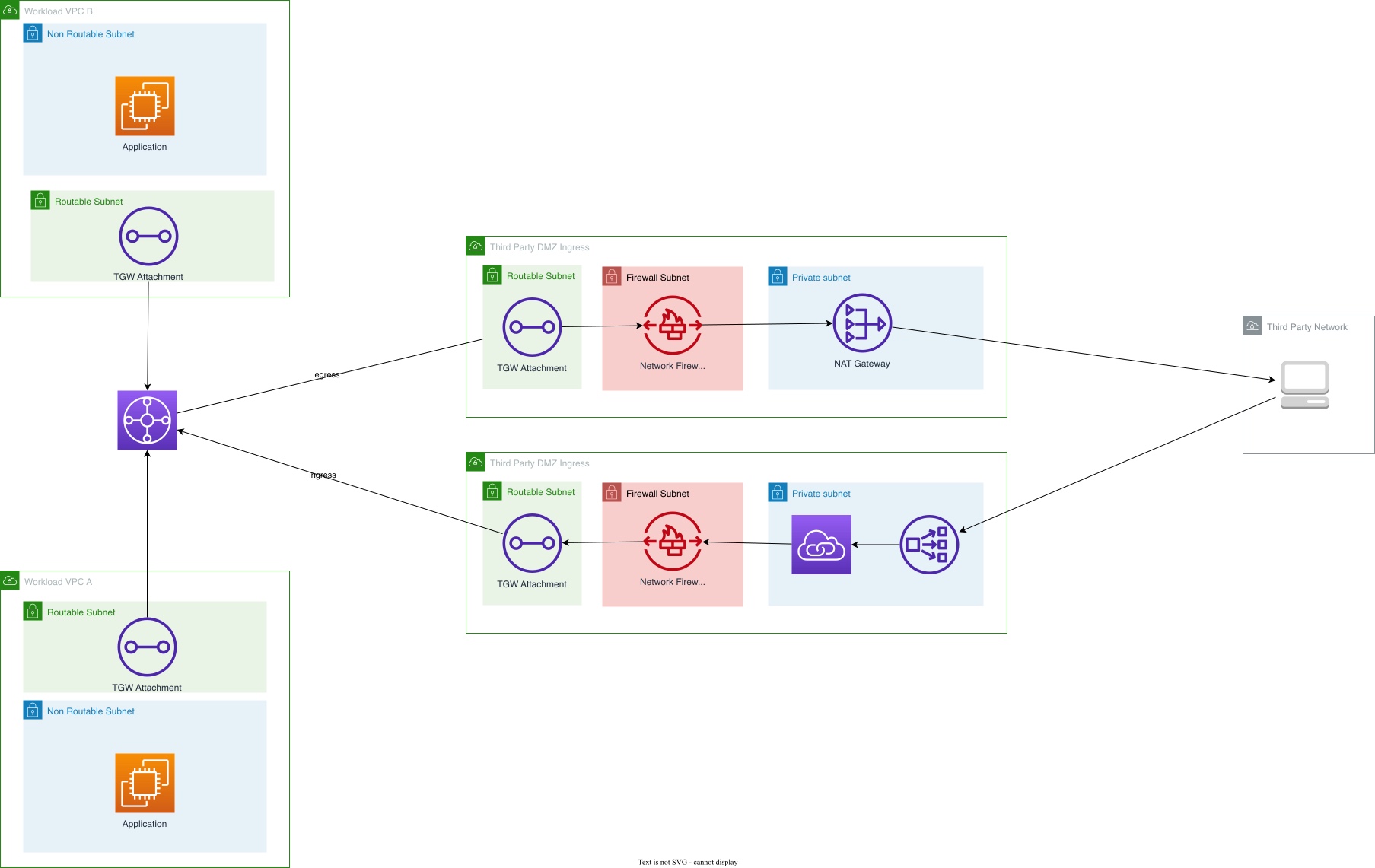
Figure 1: In-line inspection architecture in the DMZ VPC.
Option 2: Reuse existing east-west inspection
Third-party traffic flows through your existing east-west inspection infrastructure, the same setup you’ve already deployed for inter-VPC traffic inspection.
When to use this approach:
- You have confidence in your team’s ability to manage complex firewall rulesets.
- You’re treating third parties as “similarly to other workloads” from a network perspective.
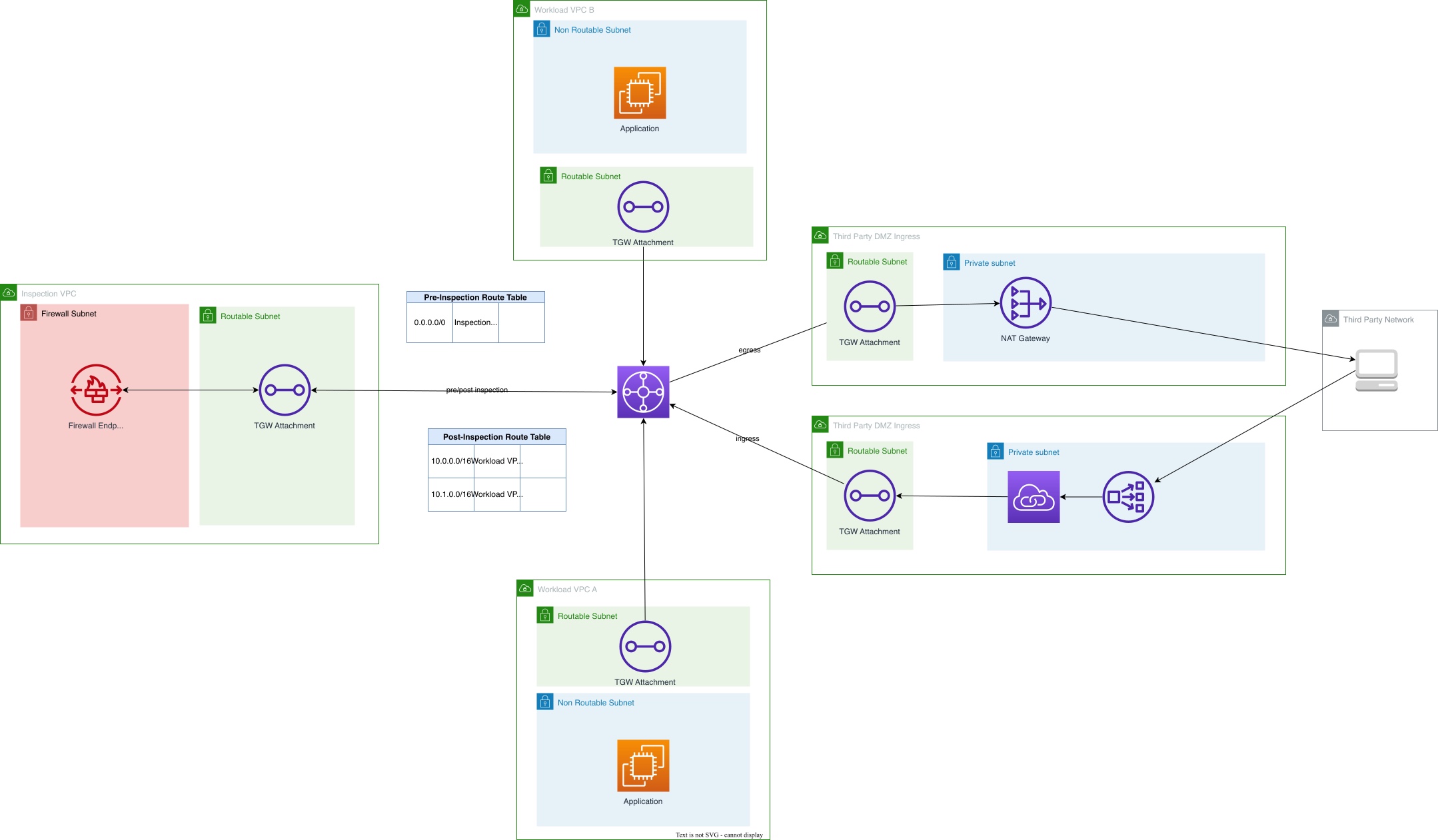
Figure 2: East-west inspection reuse architecture.
Architecture considerations:
- Third-party traffic routes through Transit Gateway/Cloud WAN to your centralized inspection VPC.
- Same inspection infrastructure handles both workload-to-workload and workload-to-third-party traffic.
- Requires careful firewall rule management to prevent unintended access.
Our recommendation: For the architecture diagrams that follow, we use in-line inspection in the DMZ VPC. This represents the pattern we see most often for customers new to third-party integrations or those with strict separation requirements.
Traffic mirroring and intrusion detection
Amazon VPC Traffic Mirroring copies network traffic from elastic network interfaces (ENIs) to monitoring appliances for deep packet inspection or forensic analysis. However, in third-party connectivity architectures, limitations apply — you cannot mirror PrivateLink endpoints, ALBs, NLBs, or Transit Gateway ENIs, and mirrored traffic requires proxy instances as targets. Processing and storing mirrored traffic is expensive, and you need a team to run and maintain the analysis tools.
We recommend implementing traffic mirroring only when required by regulatory compliance, and only when you have a team actively monitoring and acting on the captured traffic. For most customers, inline firewall inspection plus Amazon GuardDuty is enough. GuardDuty analyzes VPC Flow Logs, AWS CloudTrail logs, and DNS logs — no mirroring infrastructure needed.
Authentication and authorization
You can authenticate third-party connections in several ways:
Mutual TLS (mTLS)
With mTLS, both sides present certificates to verify identity. You can implement this at the ALB layer or in your application code:
- ALB-based mTLS: Application Load Balancer supports mTLS natively, validating client certificates before forwarding traffic to targets. This works well for HTTP/HTTPS workloads where you want the load balancer to handle certificate validation.
- Application-layer mTLS: Your application handles certificate validation directly. This approach is necessary when using PrivateLink with Network Load Balancers, as NLBs operate at Layer 4 and pass through encrypted traffic without terminating it.
OAuth and OIDC
For API-based integrations, Application Load Balancer supports OAuth 2.0 and OpenID Connect (OIDC) authentication. ALB can validate tokens from identity providers before forwarding requests to your applications. This approach works well for third parties consuming your APIs where you want centralized authentication at the load balancer layer rather than implementing it in each application.
DNS for internal endpoints
If you give third parties DNS names instead of IP addresses, you can fail over during maintenance without disrupting their connections. You can also change your backend infrastructure or move to a multi-region setup without asking partners to update their configurations. You have three options for DNS resolution:
Option 1: Public hosted zone returning private IP addresses
Create a public Amazon Route 53 hosted zone that returns RFC 1918 private IP addresses. This is straightforward to implement and works for third parties in most environments, including AWS, on-premises, and other clouds. While some security teams push back on exposing internal IPs in public DNS, RFC 1918 addresses aren’t routable on the internet. Your real security boundary is authentication and network controls, not DNS obscurity.
Option 2: Private hosted zone with VPC association
Create an Amazon Route 53 private hosted zone and associate it with the third party’s VPC using the associate-vpc-with-hosted-zone, which can be automated using AWS APIs, SDKs, or Infrastructure as Code
Requirements:
- Third party must have their infrastructure in AWS.
- You must associate the private hosted zone with each third-party VPC individually.
- For on-premises third parties, requires DNS forwarding configuration using Route 53 Resolver endpoints, which adds complexity.
Option 3: Route 53 Global Resolver with private hosted zones
Amazon Route 53 Global Resolver allows you to make private hosted zones available to specific external IP address ranges.
Advantages:
- Provides the security of private hosted zones.
- Works for third parties outside AWS.
- Avoids the “public DNS with private IPs” concern.
Requirements:
- Third parties must provide their source IP addresses for DNS queries.
- Best when third parties have static or predictable IP ranges.
Ingress patterns — third party connecting to your services
Pattern 1: AWS PrivateLink
With PrivateLink, the third party connects to your service through an endpoint in their VPC — no internet gateway or NAT required.
Components:
- Third-party DMZ VPC: Contains the inspection layer and integration infrastructure.
- VPC endpoint service: Backed by a Network Load Balancer (NLB) in your DMZ VPC.
- PrivateLink endpoint (ENI): Created by the third party in their VPC or network.
- Inspection layer: AWS Network Firewall or GWLB with third-party appliances.
- Workload VPC: Contains your application that the third party needs to access.
Traffic flow:
Third-Party VPC → PrivateLink endpoint(ENI) → VPC endpoint service → NLB (in DMZ VPC) → Inspection layer → Transit Gateway → Workload VPC
Key architectural detail: The PrivateLink endpoint (ENI) resides in the third-party’s network, not in your DMZ VPC. Your DMZ VPC only hosts the NLB that backs the VPC endpoint service. If you place the endpoint in your DMZ VPC instead, traffic won’t route through your inspection layer correctly.
Implementation considerations
Source identity challenges:
- Workloads see traffic originating from PrivateLink infrastructure IPs, not the third party’s original source IP.
- Use alternative identity mechanisms:
- VPC Endpoint ID
- AWS Account ID (if third party is in AWS).
- AWS Identity and Access Management (IAM) policies on the VPC endpoint service.
- Application-layer authentication (mTLS, OAuth)
Automation requirements:
- Creating PrivateLink connections involves multiple steps across different accounts.
- For self-service at scale, build automation using:
- Infrastructure as Code (AWS CloudFormation, Terraform, AWS Cloud Development Kit – CDK).
- Custom APIs or portals that orchestrate the setup.
This keeps responsibilities clear: your network team owns the NLB and VPC endpoint service in the DMZ VPC, and the third party creates the endpoint on their side.
Use this pattern when
- You need to scale to many third-party connections (tens to hundreds of partners).
- Third parties have an AWS presence.
- You need unidirectional connectivity (third party to you).
- You’re working with TCP-based protocols.
Trade-offs to consider
You get strong isolation and scalability, but you give up source IP visibility and bidirectional initiation. PrivateLink also doesn’t work if the third party has no AWS presence at all.
Pattern 2: AWS Direct Connect or Site-to-Site VPN with customer-managed VPC
When third parties cannot use PrivateLink (no AWS presence, need for bidirectional traffic, or other constraints), you can provide connectivity through Direct Connect or Site-to-Site VPN.
Architecture for third parties without AWS presence
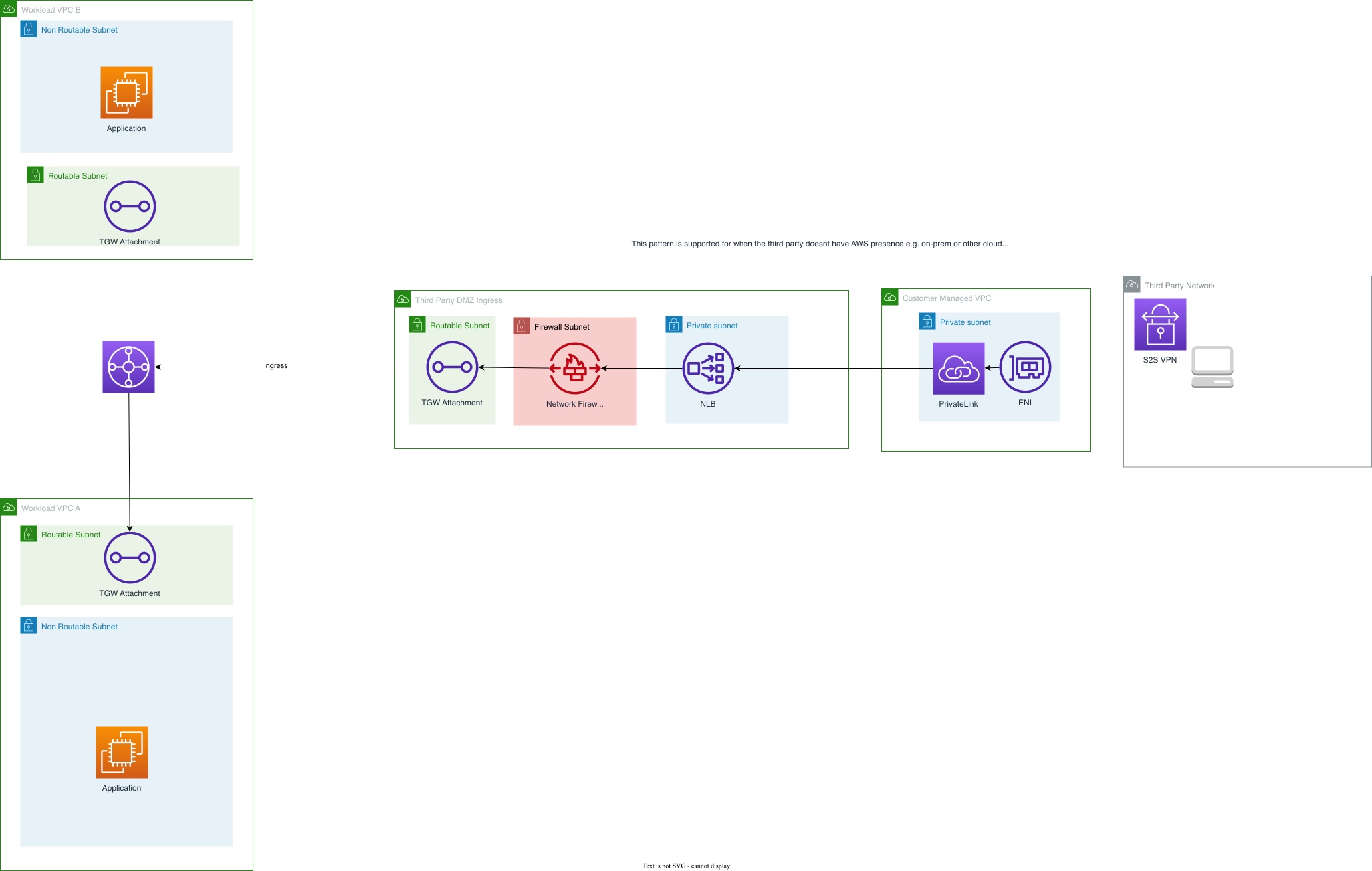
Figure 3: Direct Connect or VPN architecture for third parties without AWS presence.
Components:
- Customer-managed Integration VPC: A VPC you manage that serves as the integration point.
- Site-to-Site VPN or Direct Connect: Provides the network connection to the third party.
- PrivateLink endpoint (ENI): Created in your customer-managed VPC.
- VPC endpoint service: Points to NLB in your DMZ VPC.
- Third-party DMZ: Contains inspection and routing to workloads.
Traffic flow:
Third-Party Network → VPN/Direct Connect → Customer-managed VPC → PrivateLink endpoint → VPC endpoint service → NLB (in DMZ VPC) → Inspection layer → Transit Gateway → Workload VPC
Architecture for third parties with AWS presence
For third parties already in AWS who prefer Direct Connect or VPN over PrivateLink:
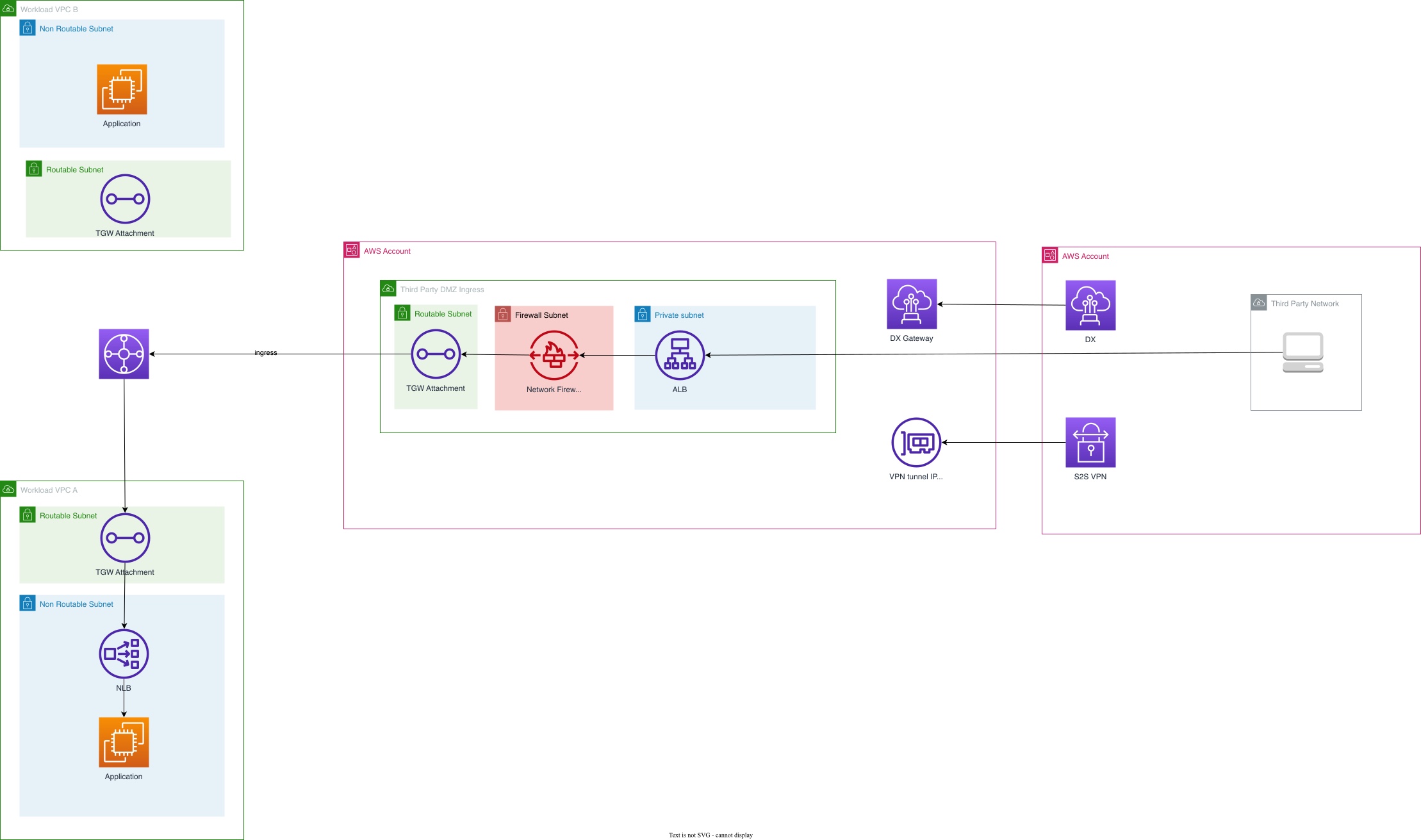
Figure 4: Direct Connect or VPN architecture for third parties with AWS presence.
Components:
- Third-Party VPC: Managed by the third party.
- Direct Connect or VPN: Connects their VPC to your DMZ VPC.
- ALB or NLB: In your DMZ VPC, receives traffic from the connection.
- Inspection layer: Inline inspection before routing to workloads.
Traffic flow:
Third-Party VPC → Direct Connect/VPN → DMZ VPC → ALB/NLB → Inspection layer → Transit Gateway → Workload VPC
Implementation considerations
Site-to-Site VPN setup:
- You provide VPN IPs and pre-shared keys (PSKs) to the third party.
- Third party configures their VPN device to establish tunnels.
Customer-managed VPC scalability:
- Each third party may require a separate customer-managed VPC.
Direct Connect vs. VPN trade-offs:
- Direct Connect: Higher bandwidth, lower latency, more consistent performance, but less scalable (requires physical circuit provisioning).
- Site-to-Site VPN: Fully API-driven, scales to many connections, lower bandwidth (1.25 Gbps per tunnel), suitable for most use cases.
This pattern works best if your third party
Ideal for:
- Has no AWS infrastructure.
- Needs bidirectional connectivity.
- Requires low latency for tight integrations (Direct Connect).
Consider alternatives when:
- You need to scale to 100+ third parties (PrivateLink is simpler at that scale).
- Third party has an AWS presence and can use PrivateLink.
Pattern 3: Amazon VPC Lattice resource gateway
VPC Lattice handles service discovery, load balancing, and authorization for you, which simplifies the architecture when your third party connects over HTTP, HTTPS, or gRPC. The Resource gateway feature allows external parties to connect to Lattice services.
Components:
- VPC Lattice Service network: Logical grouping of services.
- VPC Lattice Service: Your application exposed through Lattice.
- Resource gateway: Allows external connectivity to the service network.
- Third-Party Network: Connects via VPN or Direct Connect to the Resource gateway.
Traffic flow:
Third-Party Network → VPN/Direct Connect → Resource gateway → VPC Lattice Service → Application targets (in Workload VPC)
Protocol support: TCP, HTTP, HTTPS, and gRPC only. Not suitable for other protocols.
Service-level routing: Lattice provides routing based on:
- HTTP headers
- Path-based routing
- Weighted targets
- Health checks
Built-in authorization: Lattice supports fine-grained access policies using:
- IAM policies
- Service-to-service authentication
- Source-based access control
Critical limitation – No inline inspection: VPC Lattice does not support inline traffic inspection with AWS Network Firewall or GWLB. You cannot insert inspection appliances in the traffic path. For inspection, you have two options:
- East-West inspection: Route traffic through your existing east-west inspection infrastructure before it reaches Lattice. This requires careful routing configuration.
- Application-layer inspection: Implement a proxy application as the Lattice target. The proxy performs inspection/validation before forwarding to the actual workload.
Egress patterns — connecting to third-party services
When your workloads need to call a third-party API or send data to a partner, you route traffic outbound through your DMZ.
Pattern 1: PrivateLink for egress
When the third party exposes their services via PrivateLink:
Architecture:
Workload VPC → Transit Gateway → DMZ VPC → Inspection layer → PrivateLink endpoint (in DMZ VPC) → Third-Party VPC endpoint service
The difference from the ingress pattern: the PrivateLink endpoint resides in your DMZ VPC, and you are the consumer of the third party’s VPC endpoint service. You inspect traffic by routing it through your inspection layer in the DMZ VPC before it reaches the PrivateLink endpoint.
Pattern 2: Direct Connect or VPN for egress
Architecture:
Workload VPC → Transit Gateway → DMZ VPC → Inspection layer → Direct Connect/VPN → Third-Party Network
The same Direct Connect or VPN connection can support both ingress and egress traffic, simplifying the architecture when you need both directions.
Transit patterns — bidirectional network-wide connectivity
If you’re integrating with a highly trusted partner, or merging networks after an acquisition, consider full bidirectional routing instead of service-specific connections.
Pattern 1: Transit Gateway attachment
Attach the third party’s VPC (if in AWS) or their network (via Direct Connect/VPN) directly to your Transit Gateway.
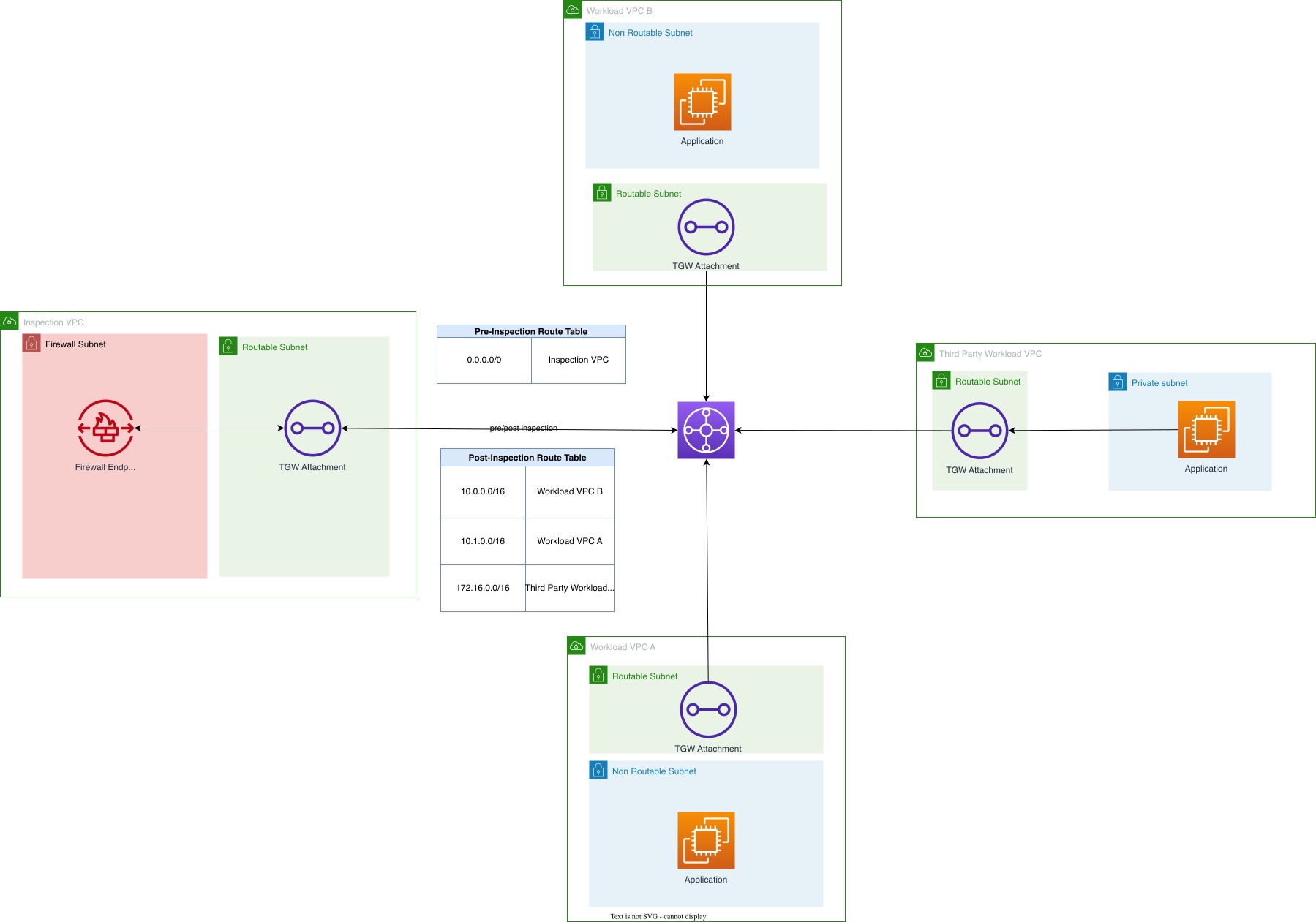
Figure 5: Transit Gateway attachment architecture for bidirectional connectivity.
Traffic flow:
Third-Party VPC → Transit Gateway (Third-Party Route Table) → Inspection VPC → Transit Gateway (Workload Route Table) → Workload VPC
Key implementation details
- Clear visibility into third-party traffic patterns.
- Ability to apply different routing policies.
- Simplified troubleshooting.
- Easier to revoke access if needed.
Traffic between third-party attachments and your workloads should flow through your inspection VPC. Configure route tables to enforce this:
- Third-party route table: Routes to workload CIDRs point to inspection VPC attachment.
- Inspection VPC: Routes back to Transit Gateway after inspection.
- Workload route tables: Routes to third-party CIDRs point to inspection VPC attachment.
Pattern 2: AWS Cloud WAN attachment with third-party segment
Cloud WAN lets you create a dedicated segment for third-party traffic and enforce routing policies that prevent third parties from reaching workloads without passing through inspection first.
Segment routing policy:
Third-Party Segment:
  - Can send traffic to: Inspection Segment only

Inspection Segment:
  - Can send traffic to: Other segments (after inspection)

Workload Segments:
  - Can send traffic to: Inspection Segment (which routes to third parties)
Decision framework — choosing the right pattern
| Requirement | Recommended pattern | Alternative |
|---|---|---|
| Scale to 50+ third parties | PrivateLink | N/A |
| Third party not in AWS | Customer-managed VPC + VPN | Direct Connect |
| Bidirectional traffic | Transit Gateway attachment | Direct Connect or VPN |
| HTTP/HTTPS APIs only | PrivateLink or VPC Lattice | ALB with Direct Connect |
| Merger/acquisition | Transit Gateway or Cloud WAN | N/A |
| Untrusted third party | PrivateLink with inspection | Customer-managed VPC + VPN |
| Trusted partner integration | VPC Lattice or TGW attachment | PrivateLink |
| Building solutions collaboratively | VPC Lattice (HTTP/HTTPS/gRPC) | Transit Gateway or Cloud WAN attachment |
| Need inline inspection | PrivateLink or Direct Connect/VPN | Not VPC Lattice |
| UDP protocol required | Direct Connect/VPN | NLB with PrivateLink (now supports UDP) |
| Small number of connections (<10) with high bandwidth needs | Direct Connect | N/A |
Conclusion
When you design centralized third-party connectivity, you make trade-offs between security controls, the number of partners you support, and how much operational work your team takes on. Regardless of which pattern you choose:
- Start with a centralized DMZ that separates third parties from your workloads, with mandatory inspection in between.
- Add traffic inspection between them, unless you have a high degree of trust and operational maturity. The inspection location (DMZ vs. east-west) depends on your operational preferences and risk tolerance.
- Automate provisioning so teams can set up new third-party connections without filing tickets or waiting on the network team. Manual provisioning doesn’t scale beyond a handful of third parties.
These patterns help you meet regulatory requirements while keeping third-party onboarding fast and repeatable.
Further reading
- AWS PrivateLink documentation
- AWS Direct Connect User Guide
- Amazon VPC Lattice User Guide
- AWS Transit Gateway documentation
- AWS Cloud WAN documentation
- AWS Network Firewall documentation
If you have questions or want to share your own architecture patterns, leave a comment below.
To get started, review the ingress and egress patterns that best match your current third-party relationships, and evaluate whether PrivateLink or Direct Connect fits your scale and protocol req