Artificial Intelligence
Implement automated smoke testing using Amazon Nova Act headless mode
Automated smoke testing using Amazon Nova Act headless mode helps development teams validate core functionality in continuous integration and continuous delivery (CI/CD) pipelines. Development teams often deploy code several times daily, so fast testing helps maintain application quality. Traditional end-to-end testing can take hours to complete, creating delays in your CI/CD pipeline.
Smoke testing is a subset of testing that validates the most critical functions of an application work correctly after deployment. These tests focus on key workflows like user login, core navigation, and key transactions rather than exhaustive feature coverage. Smoke tests typically complete in minutes rather than hours, making them ideal for CI/CD pipelines where fast feedback on code changes is essential.
Amazon Nova Act uses AI-powered UI understanding and natural language processing to interact with web applications, replacing traditional CSS selectors. Instead of maintaining brittle CSS selectors and complex test scripts, you can write tests using simple English commands that adapt to UI changes.
This post shows how to implement automated smoke testing using Amazon Nova Act headless mode in CI/CD pipelines. We use SauceDemo, a sample ecommerce application, as our target for demonstration. We demonstrate setting up Amazon Nova Act for headless browser automation in CI/CD environments and creating smoke tests that validate key user workflows. We then show how to implement parallel execution to maximize testing efficiency, configure GitLab CI/CD for automatic test execution on every deployment, and apply best practices for maintainable and scalable test automation.
Solution overview
The solution includes a Python test runner that executes smoke tests, ecommerce workflow validation for complete user journeys, GitLab CI/CD integration for automation, and parallel execution to speed up testing. Headless mode runs browser tests in the background without opening a browser window, which works well for automated testing.
The following diagram illustrates the testing workflow.

We walk through the following steps to implement automated smoke testing with Amazon Nova Act:
- Set up your project and dependencies.
- Create a smoke test with login validation.
- Configure validation for the entire ecommerce workflow.
- Configure the automated testing pipeline.
- Configure parallel execution.
Prerequisites
To complete this walkthrough, you must have the following:
- Access to Amazon Nova Act with API key.
- A GitLab repository.
- UV package manager. For instructions, refer to Installing uv.
- Familiarity with Python and GitLab CI/CD.
Set up project and dependencies
Create your project and install dependencies:
Create a test runner
Create smoke_tests.py:
Test your setup with the following commands:
Environment variables like NOVA_ACT_API_KEY keep sensitive information secure and separate from your code.
This solution implements the following security features:
- Stores API keys in environment variables or .env files (add
.envto .gitignore) - Uses different API keys for development, staging, and production environments
- Implements key rotation every 90 days using automated scripts or calendar reminders
- Monitors API key usage through logs to detect unauthorized access
You now have a modern Python project with Amazon Nova Act configured and ready for testing. Next, we show how to create a working smoke test that uses natural language browser automation.
Create smoke test for login validation
Let’s expand your foundation code to include a complete login test with proper structure.
Add main function and login test
Update smoke_tests.py:
Test your login flow
Run your complete login test:
You should see the following output:
Your smoke test now validates a complete user journey that uses natural language with Amazon Nova Act. The test handles page verification to confirm you’re on the login page, form interactions that enter user name and password credentials, action execution that clicks the login button, and success validation that verifies the products page loads correctly. The built-in error handling provides retry logic if the login process encounters any issues, showing how the AI-powered automation of Amazon Nova Act adapts to dynamic web applications without the brittleness of traditional CSS selector-based testing frameworks.
Although a login test provides valuable validation, real-world applications require testing complete user workflows that span multiple pages and complex interactions. Next, we expand the testing capabilities by building a comprehensive ecommerce journey that validates the entire customer experience.
Configure ecommerce workflow validation
Let’s build a comprehensive ecommerce workflow that tests the end-to-end customer journey from login to logout.
Add complete ecommerce test
Update smoke_tests.py to include the full workflow:
Test your ecommerce workflow
Run your comprehensive test suite:
You should see the following output:
Understanding the ecommerce journey
The workflow tests a complete customer experience:
- Authentication – Login with valid credentials
- Product discovery – Browse and select products
- Shopping cart – Add items and verify cart contents
- Checkout process – Enter shipping information
- Order completion – Complete purchase and verify success
- Navigation – Return to products and log out
The following screenshot shows the step-by-step visual guide of the user journey.
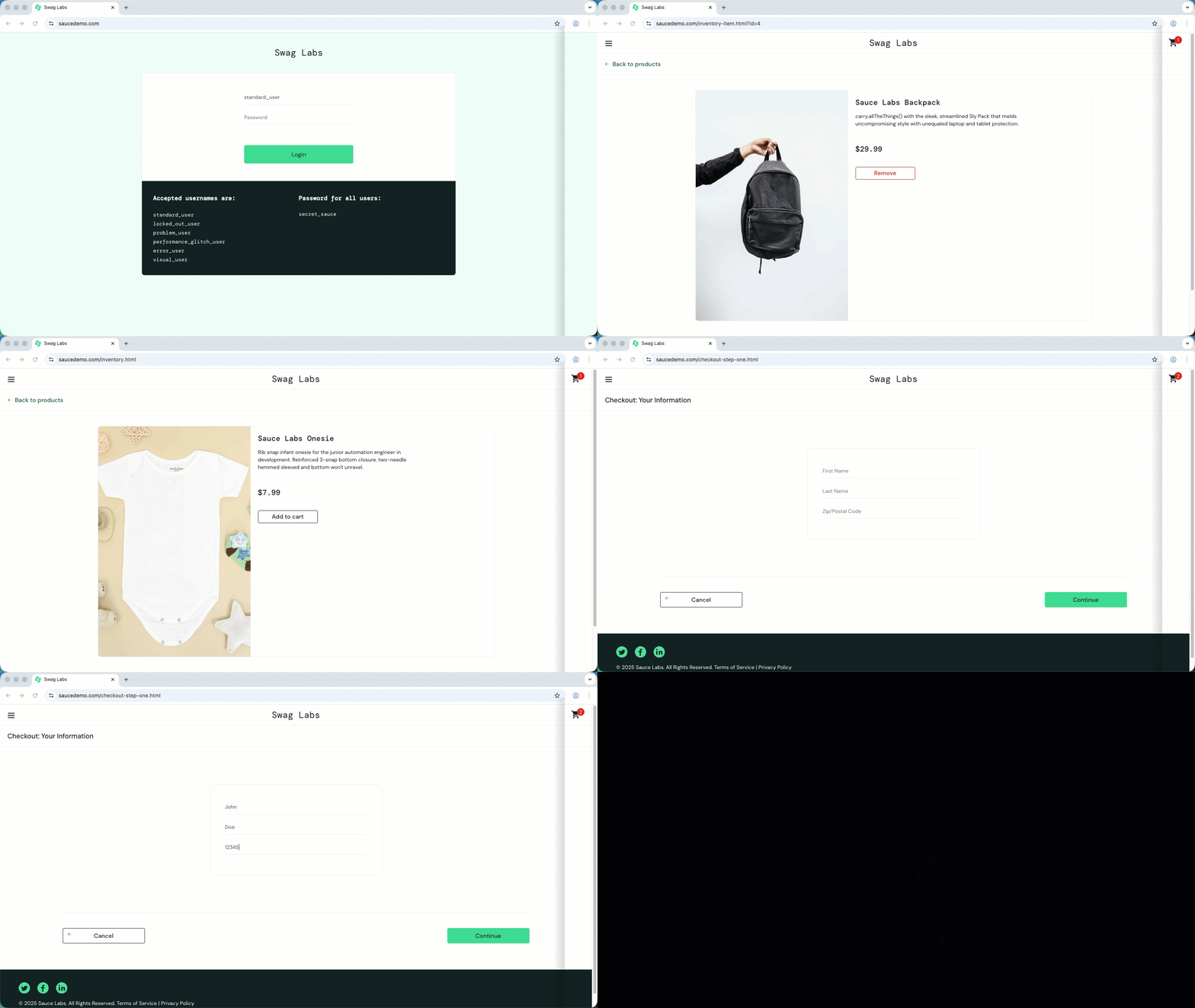
Your smoke tests now validate complete user journeys that mirror real customer experiences. The ecommerce workflow shows how Amazon Nova Act handles complex, multi-step processes across multiple pages. By testing the entire customer journey from authentication through order completion, you’re validating the primary revenue-generating workflows in your application.
This approach reduces maintenance overhead while providing comprehensive coverage of your application’s core functionality.
Running these tests manually provides immediate value, but the real power comes from integrating them into your development workflow. Automating test execution makes sure code changes are validated against your critical user journeys before reaching production.
Configure automated testing pipeline
With your comprehensive ecommerce workflow in place, you’re ready to integrate these tests into your CI pipeline. This step shows how to configure GitLab CI/CD to automatically run these smoke tests on every code change, making sure key user journeys remain functional throughout your development cycle. We show how to configure headless mode for CI environments while maintaining the visual debugging capabilities for local development.
Add headless mode for CI/CD
Update smoke_tests.py to support headless mode for CI environments by adding the following lines to both test functions:
Create GitHub Actions workflow
GitLab CI/CD is GitLab’s built-in CI system that automatically runs pipelines when code changes occur. Pipelines are defined in YAML files that specify when to run tests and what steps to execute.
Create .gitlab-ci.yml:
Configure GitLab CI/CD variables
GitLab CI/CD variables provide secure storage for sensitive information like API keys. These values are encrypted and only accessible to your GitLab CI/CD pipelines. Complete the following steps to add a variable:
- In your project, choose Settings, CI/CD, and Variables.
- Choose Add variable.
- For the key, enter
NOVA_ACT_API_KEY. - For the value, enter your Amazon Nova Act API key.
- Select Mask variable to hide the value in job logs.
- Choose Add variable.
Understanding the code changes
The key change is the headless mode configuration:
This configuration provides flexibility for different development environments. During local development when the HEADLESS environment variable is not set, the headless parameter defaults to False, which opens a browser window so you can see the automation in action. This visual feedback is invaluable for debugging test failures and understanding how Amazon Nova Act interacts with your application. In CI/CD environments where HEADLESS is set to true, the browser runs in the background without opening any windows, making it ideal for automated testing pipelines that don’t have display capabilities and need to run efficiently without visual overhead.
Test your CI/CD setup
Push your code to trigger the workflow:
Check the Pipelines section in your GitLab project to see the tests running.
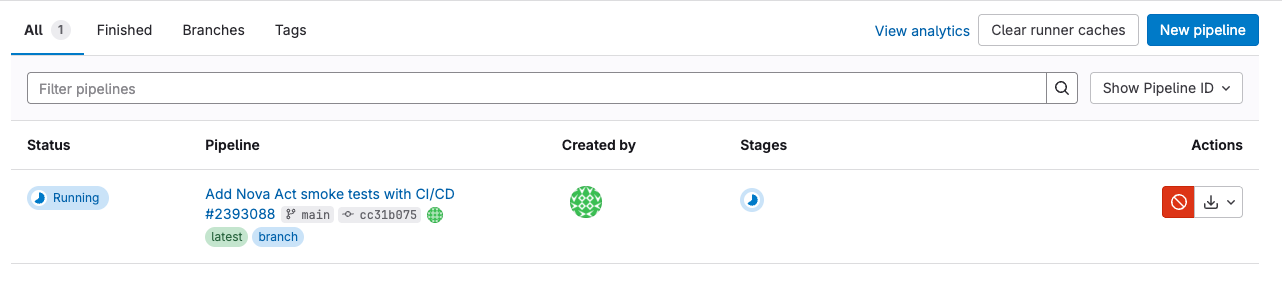
Your smoke tests now run automatically as part of your CI pipeline, providing immediate feedback on code changes. The GitLab CI/CD integration makes sure critical user journeys are validated before any deployment reaches production, reducing the risk of shipping broken functionality to customers.
The implementation shows how modern package management with UV reduces CI/CD pipeline execution time compared to traditional pip installations. Combined with secure API key management through GitLab CI/CD variables, your testing infrastructure follows enterprise security best practices.
As your test suite grows, you might notice that running tests sequentially can become a bottleneck in your deployment pipeline. The next section addresses this challenge by implementing parallel execution to maximize your CI/CD efficiency.
Configure parallel execution
With your CI/CD pipeline successfully validating individual test cases, the next optimization focuses on performance enhancement through parallel execution. Concurrent test execution can reduce your total testing time by running multiple browser instances simultaneously, maximizing the efficiency of your CI/CD resources while maintaining test reliability and isolation.
Add parallel execution framework
Update smoke_tests.py to support concurrent testing:
Update GitLab CI/CD for parallel execution
The parallel execution is already configured in your .gitlab-ci.yml with the MAX_WORKERS= "2" variable. The pipeline automatically uses the parallel framework when running the smoke tests.
Test parallel execution
Run your optimized tests:
You should see both tests running simultaneously:
Understanding parallel execution
ThreadPoolExecutor is a Python class that manages a pool of worker threads, allowing multiple tasks to run simultaneously. In this case, each thread runs a separate browser test, reducing total execution time.
Parallel execution provides benefits such as faster execution (because tests run simultaneously instead of sequentially), configurable workers that adjust based on system resources, resource efficiency that optimizes CI/CD compute time, and scalability that makes it straightforward to add more tests without increasing total runtime.
However, there are important considerations to keep in mind. Each test opens a browser instance (which increases resource usage), tests must be independent of each other to maintain proper isolation, and you must balance worker counts with available CPU and memory limits in CI environments.
Each parallel test uses system resources and incurs API usage. Start with two workers and adjust based on your environment’s capacity and cost requirements. Monitor your Amazon Nova Act usage to optimize the balance between test speed and expenses.
The performance improvement is significant when comparing sequential vs. parallel execution. In sequential execution, tests run one after another with the total time being the sum of all individual test durations. With parallel execution, multiple tests run simultaneously, completing in approximately the time of the longest test, resulting in substantial time savings that become more valuable as your test suite grows.
Your smoke tests now feature concurrent execution that significantly reduces total testing time while maintaining complete test isolation and reliability. The ThreadPoolExecutor implementation allows multiple browser instances to run simultaneously, transforming your sequential test suite into a parallel execution that completes much faster. This performance improvement becomes increasingly valuable as your test suite grows, so comprehensive validation doesn’t become a bottleneck in your deployment pipeline.
The configurable worker count through the MAX_WORKERS environment variable provides flexibility to optimize performance based on available system resources. In CI/CD environments, this allows you to balance test execution speed with resource constraints, and local development can use full system capabilities for faster feedback cycles. The architecture maintains complete test independence, making sure parallel execution doesn’t introduce flakiness or cross-test dependencies that could compromise reliability. As a best practice, keep tests independent—each test should work correctly regardless of execution order or other tests running simultaneously.
Best practices
With your performance-optimized testing framework complete, consider the following practices for production readiness:
- Keep tests independent. Tests are not impacted by execution order or other tests running simultaneously.
- Add retry logic by wrapping your test functions in try-catch blocks with a retry mechanism for handling transient network issues.
- Configure your GitLab CI/CD pipeline with a reasonable timeout and consider adding a scheduled run for daily validation of your production environment.
- For ongoing maintenance, establish a rotation schedule for your Amazon Nova Act API keys and monitor your test execution times to catch performance regressions early. As your application grows, you can add new test functions to the parallel execution framework without impacting overall runtime, making this solution highly scalable for future needs.
Clean up
To avoid incurring future charges and maintain security, clean up the resources you created:
- Remove or disable unused GitLab CI/CD pipelines
- Rotate API keys every 90 days and revoke unused keys.
- Delete the repositories provided with this post.
- Remove API keys from inactive projects.
- Clear cached credentials and temporary files from your local environment.
Conclusion
In this post, we showed how to implement automated smoke testing using Amazon Nova Act headless mode for CI/CD pipelines. We demonstrated how to create comprehensive ecommerce workflow tests that validate user journeys, implement parallel execution for faster test completion, and integrate automated testing with GitLab CI/CD for continuous validation.
The natural language approach using Amazon Nova Act needs less maintenance than traditional frameworks that use CSS selectors. Combined with modern tooling like UV package management and GitLab CI/CD, this solution provides fast, reliable test execution that scales with your development workflow. Your implementation now catches issues before they reach production, providing the fast feedback essential for confident continuous deployment while maintaining high application quality standards.
To learn more about browser automation and testing strategies on AWS, explore the following resources:
- Getting Started Using the Nova Act Dev Tools and explore the capability in Nova Act playground
- Amazon CloudWatch Synthetics for additional monitoring capabilities
- GitLab CI/CD documentation for CI/CD best practices
- AWS security best practices for securing your automation infrastructure
Try implementing these smoke tests in your own applications and consider extending the framework with additional test scenarios that match your specific user journeys. Share your experience and any optimizations you discover in the comments section.
About the authors
 Sakthi Chellapparimanam Sakthivel is a Solutions Architect at AWS, specializing in .NET modernization and enterprise cloud transformations. He helps GSI and software/services customers build scalable, innovative solutions on AWS. He architects intelligent automation frameworks and GenAI-powered applications that drive measurable business outcomes across diverse industries. Beyond his technical pursuits, Sakthivel enjoys spending quality time with his family and playing cricket.
 Shyam Soundar is a Solutions Architect at AWS with an extensive background in security, cost-optimization, and analytics offerings. Shyam works with enterprise customers to help them build and scale applications to achieve their business outcomes with lower cost.
 Reena M is an FSI Solutions Architect at AWS, specializing in analytics and generative AI-based workloads, helping capital markets and banking customers create secure, scalable, and efficient solutions on AWS. She architects cutting-edge data platforms and AI-powered applications that transform how financial institutions leverage cloud technologies. Beyond her technical pursuits, Reena is also a writer and enjoys spending time with her family.