Artificial Intelligence
Secure AI agents with Policy in Amazon Bedrock AgentCore
Deploying AI agents safely in regulated industries is challenging. Without proper boundaries, agents that access sensitive data or execute transactions can pose significant security risks. Unlike traditional software, an AI agent chooses actions to achieve a goal by invoking tools, accessing data, and adapting its reasoning using data from its environment and users. This autonomy is precisely what makes agents so powerful and what makes security a non-negotiable concern.
A useful mental model for agent safety is to isolate the agent from the outside world. To do this, think of walls around an agent that defines what the agent can access, what it can interact with, and what effects it can have on the outside world. Without a well-defined wall, an agent that can send emails, query databases, execute code, or trigger financial transactions is risky. These capabilities can lead to data exfiltration, unintended access to code or infrastructure, or prompt injection attacks. How can you enforce AI safety reliably, at scale, without slowing down innovation? Policy in Amazon Bedrock AgentCore gives you a principled way to enforce those boundaries at runtime, at scale.
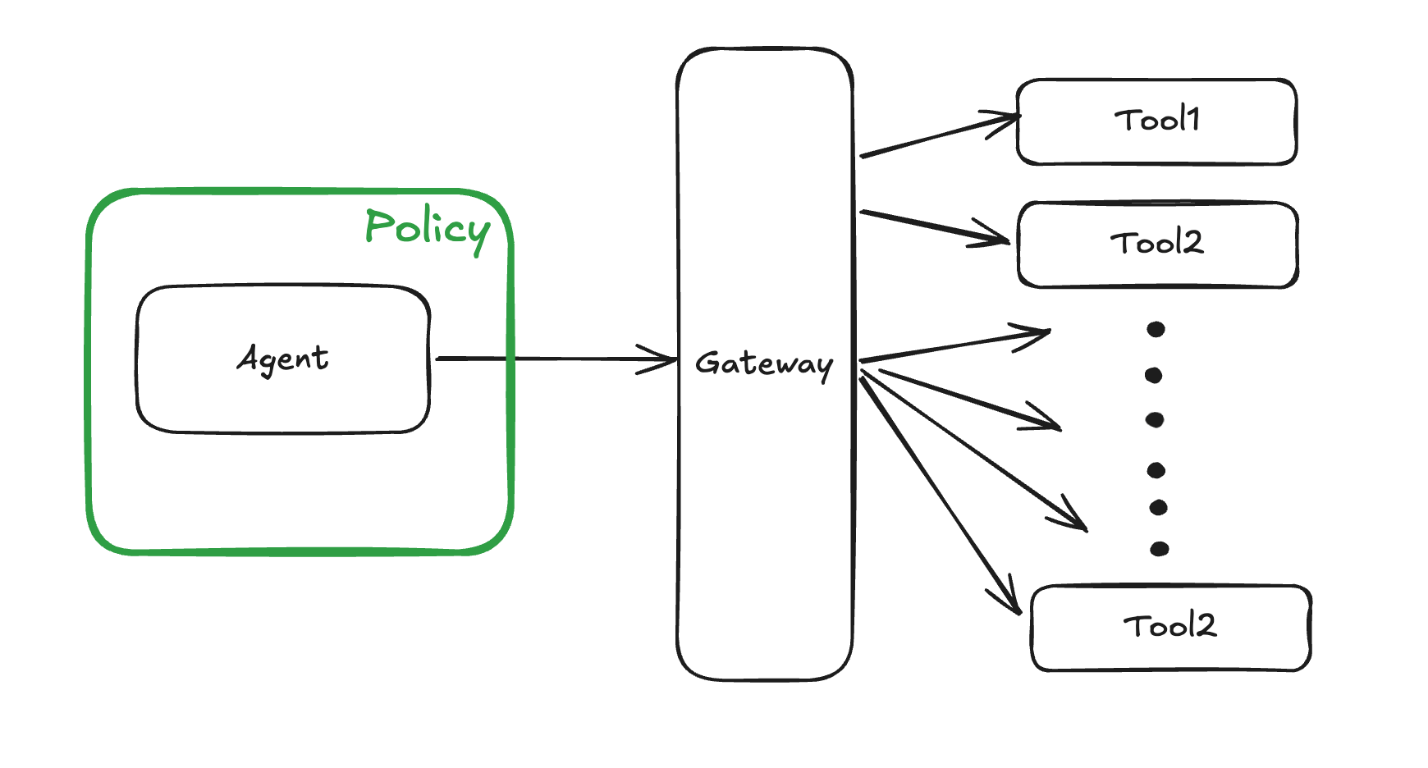
In this post, we use a healthcare appointment scheduling agent to understand how Policy in Amazon Bedrock AgentCore creates a deterministic enforcement layer that operates independently of the agent’s own reasoning. Healthcare is a natural fit for this exploration. Agents operating in this domain must handle sensitive patient data, respect strict access boundaries, and enforce business rules consistently. This requires deterministic policy enforcement to maintain the safety of patient data and secure runtime operations. The full sample is available on GitHub at amazon-bedrock-agentcore-samples.
You will learn how to turn natural language descriptions of your business rules into Cedar policies, then use those policies to enforce fine-grained, identity-aware controls so that agents only access the tools and data that their users are authorized to use. You will also see how to apply Policy through AgentCore Gateway, intercepting and evaluating every agent-to-tool request at runtime.
The missing layer: Why agents need external policy enforcement
Securing AI agents is harder than securing traditional software. The things that make agents powerful, such as open-ended reasoning, flexible tool use, and adaptability to new situations, also create unpredictable behaviors that are much harder to safely control. Agents rely on large language model (LLM) inference, which can hallucinate and has no built-in hard separation between trusted instructions and incidental text. This makes agents vulnerable to prompt injection and related adversarial attacks that exploit these LLM weaknesses to override safeguards and subvert intended behavior. These risks are often managed by constraining the agent in code. This works, but it carries subtle costs. The agent’s behavior is now only as safe as the correctness of that wrapper code, which is now an implicit security boundary. Reasoning about whether the policy is complete requires careful code review across a potentially large code base. When a security team needs to audit whether the right rules are in place, they’re reading application code rather than a clear, auditable policy definition. Policy in Amazon Bedrock AgentCore takes a different approach: move the policy entirely outside the agent. Now the policy is enforced before the tool invocation by the agent through AgentCore Gateway. Thus, policy is enforced regardless of what the agent does, regardless of how the agent is prompted or manipulated, and regardless of what bugs exist in the agent code itself. With this separation, you can focus on capability without treating every line of tool-calling code as a potential security boundary.
Cedar: Language for deterministic policy enforcement
Unlike embedding rules in agent code, external policy enforcement provides auditable security boundaries and separates capability development from security concerns. To make this kind of deterministic external enforcement practical, you need a policy language that is both machine-efficient and human-auditable. Cedar, used by Policy in Amazon Bedrock AgentCore, provides this missing layer by turning security intent into precise, analyzable policies.
Cedar is the authorization language used in AgentCore Policy because it was designed to be both a practical authorization language and a target for automated mathematical analysis. Each policy specifies a principal (who), action (what), and resource (where), with conditions in the when clause. The following example shows how to permit only Alice to view the vacation photo:
permit( principal == User::"alice", action == Action::"view", resource == Photo::"VacationPhoto94.jpg");In addition to attributes on principals, resources, and actions, you can use Cedar to pass a context object whose attributes (for example, readOnly) can be referenced in policies to condition decisions on runtime information. This following example shows how you might create a policy that allows the user alice to perform a readOnly action:
permit( principal == PhotoFlash::User::"alice", action, resource) when { context has readOnly && context.readOnly == true };Cedar’s semantics including default deny, forbid wins over permit and order-independent evaluation, make it straightforward to reason about policies compositionally. Evaluation latency is also minimal because of the restricted loop-free structure. Cedar policies do not have side effects like file system access, system calls, or networking. So, they can be safely evaluated without sandboxing, even when written by untrusted authors.
Policy in Amazon Bedrock AgentCore
Building on the need for deterministic, external enforcement, Policy in Amazon Bedrock AgentCore provides the concrete mechanism that evaluates every agent-to-tool request against explicitly defined Cedar policies. A policy engine is a collection of policies expressed in Cedar. To make policy authoring accessible, policies can be created in two ways: authored directly as Cedar for fine-grained programmatic control or generated from plain English statements that are automatically formalized into Cedar. Starting from natural language, the service generates syntactically correct Cedar code, validates it against the gateway schema, and analyzes it to surface overly permissive, overly restrictive, or otherwise problematic policies before they are enforced. After defined, Policy in AgentCore intercepts agent traffic through Amazon Bedrock AgentCore Gateways, evaluating every agent-to-tool request against the policies in the policy engine before granting or denying tool access.
Applying policy to a healthcare appointment scheduling agent
To make these concepts concrete, let’s walk through how Policy in Amazon Bedrock AgentCore can be applied to a healthcare appointment scheduling agent. This is an AI system that helps inquire about current immunization status/schedule, checks appointment slots, and books appointments. We want to secure the AI system using Policy to help prevent unauthorized access to patient records, inadvertent exposure of protected health information (PHI), or a patient canceling another patient’s appointment.
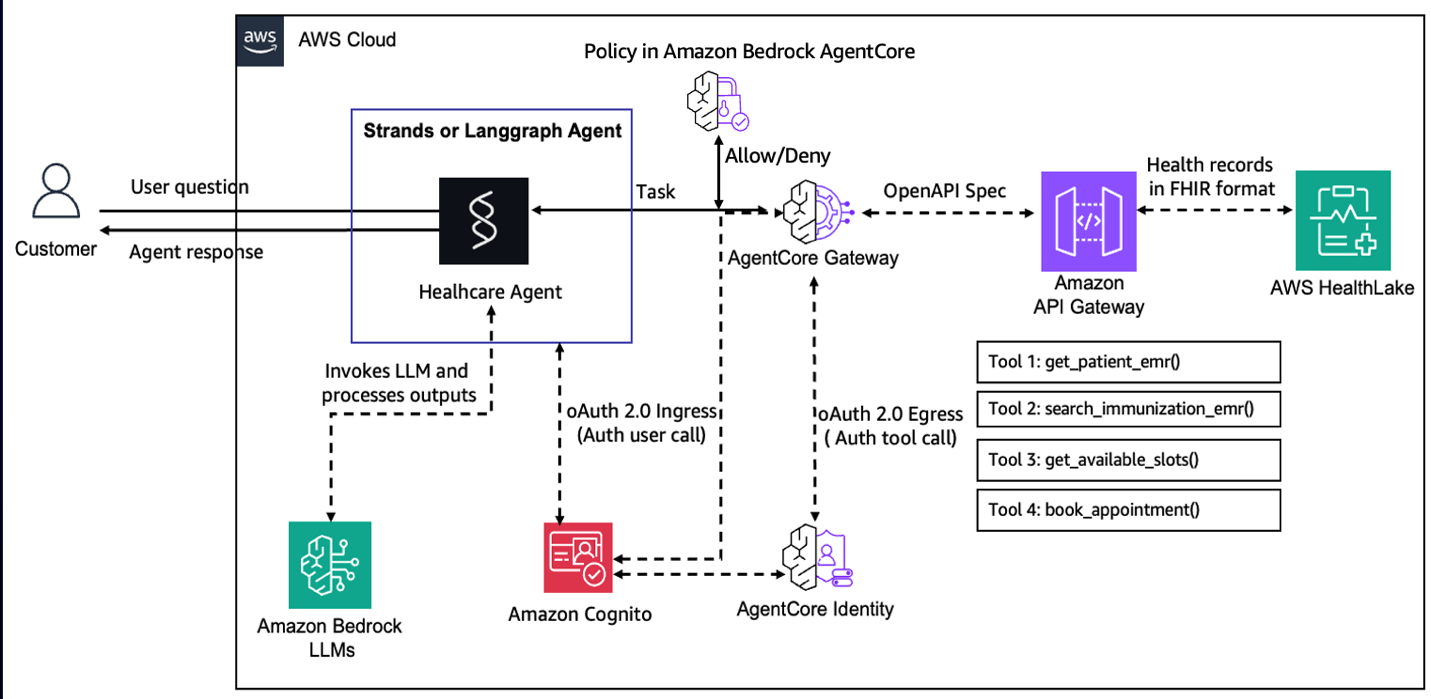
Policy in Amazon Bedrock AgentCore has a default-deny posture and forbid wins over permit default-deny posture and forbid automatically wins over permit. Together with these principles, we show how policies can be composed from a small set of readable, auditable Cedar rules to improve the safety of the AI agent in production.
Getting started
To try this example yourself, start by cloning the Amazon Bedrock AgentCore samples repository and navigating to the healthcare appointment agent folder:
From there, follow the setup and deployment instructions in the README for this directory to configure your AWS environment, deploy the sample stack, and invoke the agent end-to-end.
Prerequisites
To use Policy in Amazon Bedrock AgentCore with your agentic application, verify that you have met the following prerequisites:
- An active AWS account
- Confirmation of the AWS Regions where Policy in AgentCore is available
- Appropriate IAM permissions to create, test, and attach policy engine to your AgentCore Gateway. (Note: The IAM policy should be fine-grained and limited to necessary resources using proper ARN patterns for production usage):
[ { "Sid": "PolicyEngineManagement", "Effect": "Allow", "Action": [ "bedrock-agentcore:CreatePolicyEngine", "bedrock-agentcore:UpdatePolicyEngine", "bedrock-agentcore:GetPolicyEngine", "bedrock-agentcore:DeletePolicyEngine", "bedrock-agentcore:ListPolicyEngines" ], "Resource": "arn:aws:bedrock-agentcore:${aws:region}:${aws:accountId}:policy-engine/*" }, { "Sid": "CedarPolicyManagement", "Effect": "Allow", "Action": [ "bedrock-agentcore:CreatePolicy", "bedrock-agentcore:GetPolicy", "bedrock-agentcore:ListPolicies", "bedrock-agentcore:UpdatePolicy", "bedrock-agentcore:DeletePolicy" ], "Resource": "arn:aws:bedrock-agentcore:${aws:region}:${aws:accountId}:policy-engine/*/policy/*" }, { "Sid": "NaturalLanguagePolicyGeneration", "Effect": "Allow", "Action": [ "bedrock-agentcore:StartPolicyGeneration", "bedrock-agentcore:GetPolicyGeneration", "bedrock-agentcore:ListPolicyGenerations", "bedrock-agentcore:ListPolicyGenerationAssets" ], "Resource": "arn:aws:bedrock-agentcore:${aws:region}:${aws:accountId}:policy-engine/*/policy-generation/*" }, { "Sid": "AttachPolicyEngineToGateway", "Effect": "Allow", "Action": [ "bedrock-agentcore:UpdateGateway", "bedrock-agentcore:GetGateway", "bedrock-agentcore:ManageResourceScopedPolicy", "bedrock-agentcore:ManageAdminPolicy" ], "Resource": "arn:aws:bedrock-agentcore:${aws:region}:${aws:accountId}:gateway/*" }]Replace <region> and <account-id> with your values. For production, scope the resource ARNs to specific policy engine and gateway IDs rather than using wildcards. For the complete set of permissions including Gateway execution role configuration, see AgentCore Gateway and Policy IAM Permissions
Policy implementation steps
- To get started, first create a policy engine that can hold the required policies that we will create for the healthcare appointment scheduling agent.
- There are three different options to author policies. You can generate Cedar statements from rules expressed in natural language, use a form-based approach to Cedar policy creation, or directly provide the Cedar statement. In the next section, we will look at some examples which cover these authoring options.
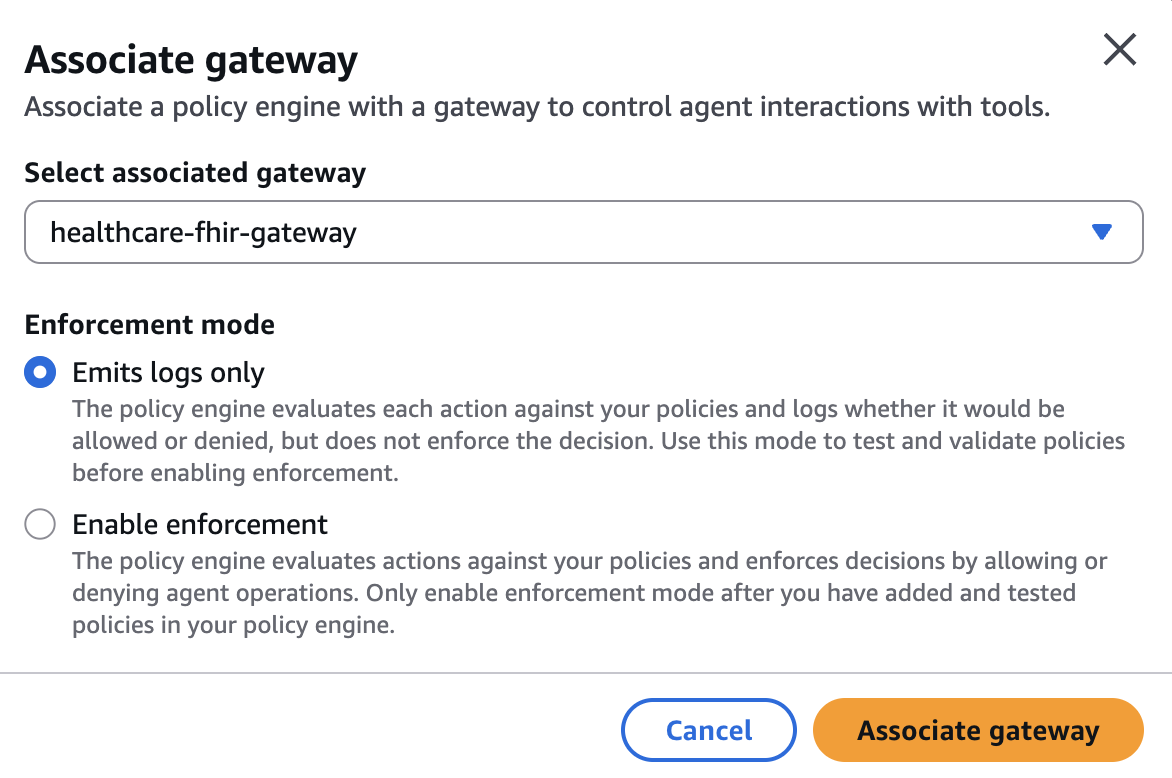
- Finally, the policy engine can be associated with a Gateway. This can be done in the
LOG_ONLYmode to validate how policies work for your agent without disrupting production traffic. This is done by observing the behavior recorded in the observability logs. When you are confident that the agent has the expected behavior, you can associate the policy engine with the gateway in the enforce mode.
The healthcare appointment agent has the following tools:
getPatient: GET /get_patient_emr— Get a patient record by the required query parameterpatient_id(string).searchImmunization: POST /search_immunization_emr— Search immunization records with required parametersearch_value(string; patient ID).bookAppointment: POST /book_appointment— Book an appointment by providingdate_string(string; “YYYY-MM-DD HH:MM”).getSlots: GET /get_available_slots— Get available slots by required query parameterdate_string(string; “YYYY-MM-DD”).
Now let’s author some policies for this agent to secure how the agent accesses these tools!
Identity-based policies
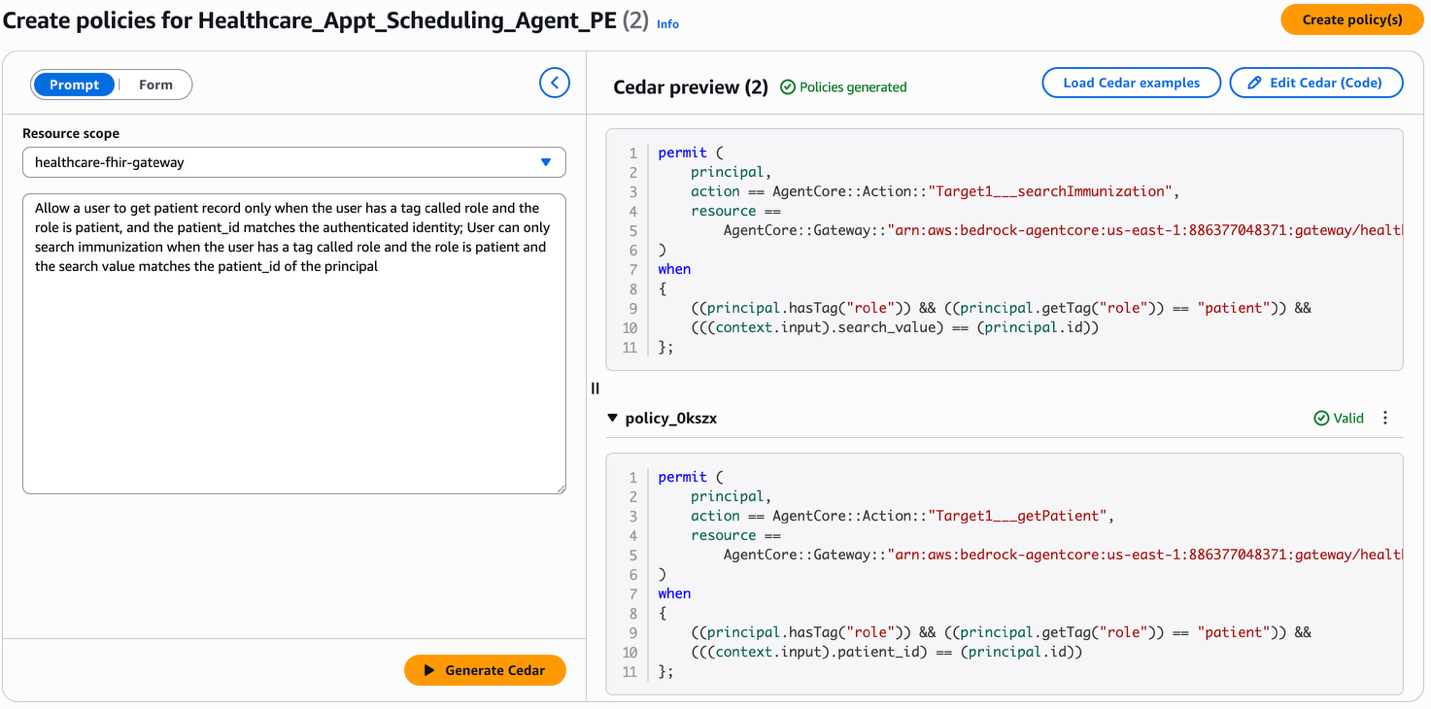
A fundamental rule in a healthcare agent is that patients should only be able to act on their own records. We want to create a policy that permits a patient to read their own patient/immunization records. For each tool, you can state that the tool parameter (patient_id in the case of the getPatient tool, search_value in the case of searchImmunization tool) must match the authenticated ID of the user. In the following image, we show you how you can author these policies by using statements in natural language and generating the corresponding Cedar policies.
Read vs. write separation
A common pattern in healthcare systems is to allow broad read access while tightly restricting write operations. An example policy for this agent would be to make reads possible only for an authenticated user with a suitable scope (for example, fhir:read) and keep the writes separately controlled. In the following image, you can see how the form-based policy creation works. You can choose the effect, principal, resource, action and provide the conditions to create a policy. The image shows the creation of a policy to allow users to access tools in the healthcare application’s gateway only when the principal contains fhir:read in the principal scope.
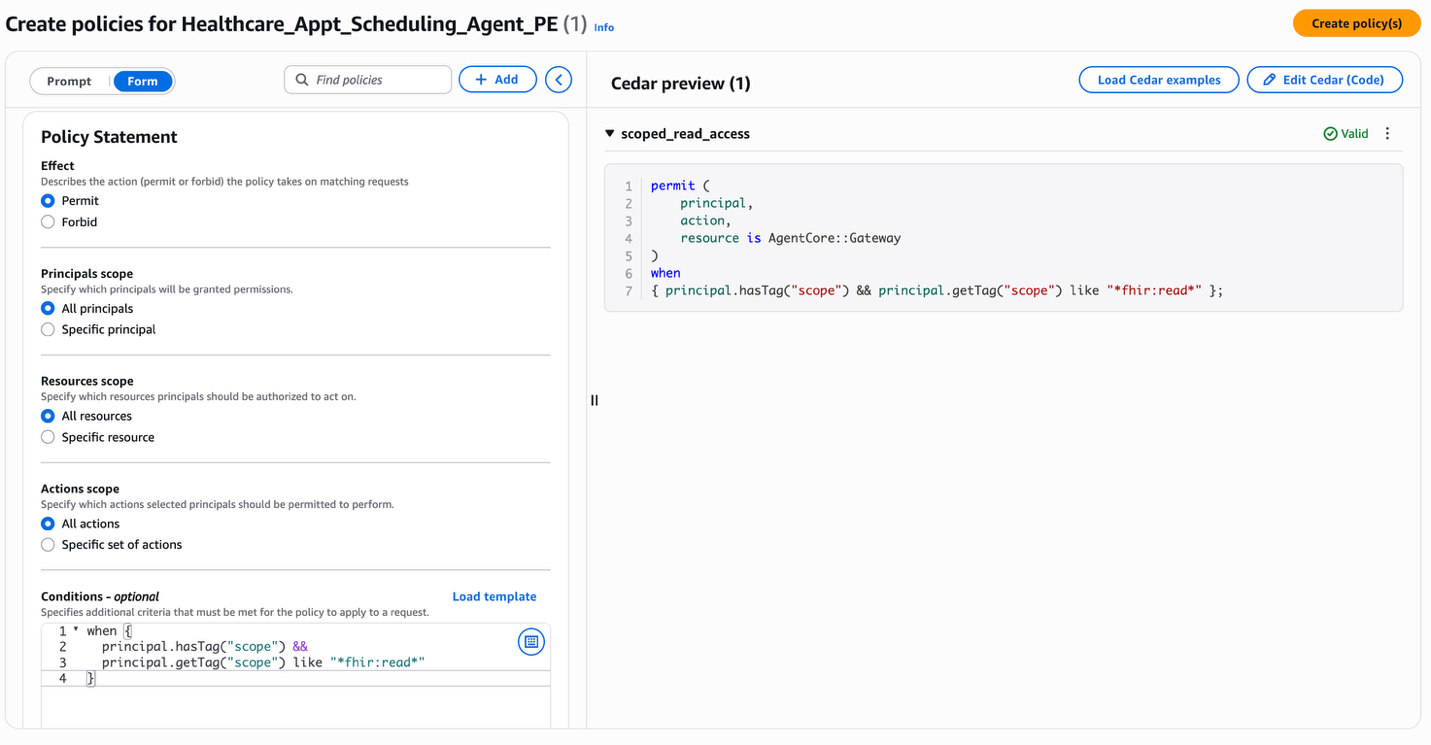
Like this policy for scoped read access, you can now use a scope appointment:write in the scope of the principal to control write access.
Risk controls on scheduling
Beyond access control, Policy can enforce business rules or dangerous patterns that help prevent abuse. By using explicit forbids to hard‑stop dangerous input patterns to tools, you can secure your application even if the agent is compromised. For example, let us create a policy to block showing appointment slots outside of limited hours.In the following image, you can see that the natural language statement “Allow users to get slots only between 9 am and 9 pm UTC” is converted to the Cedar policy.
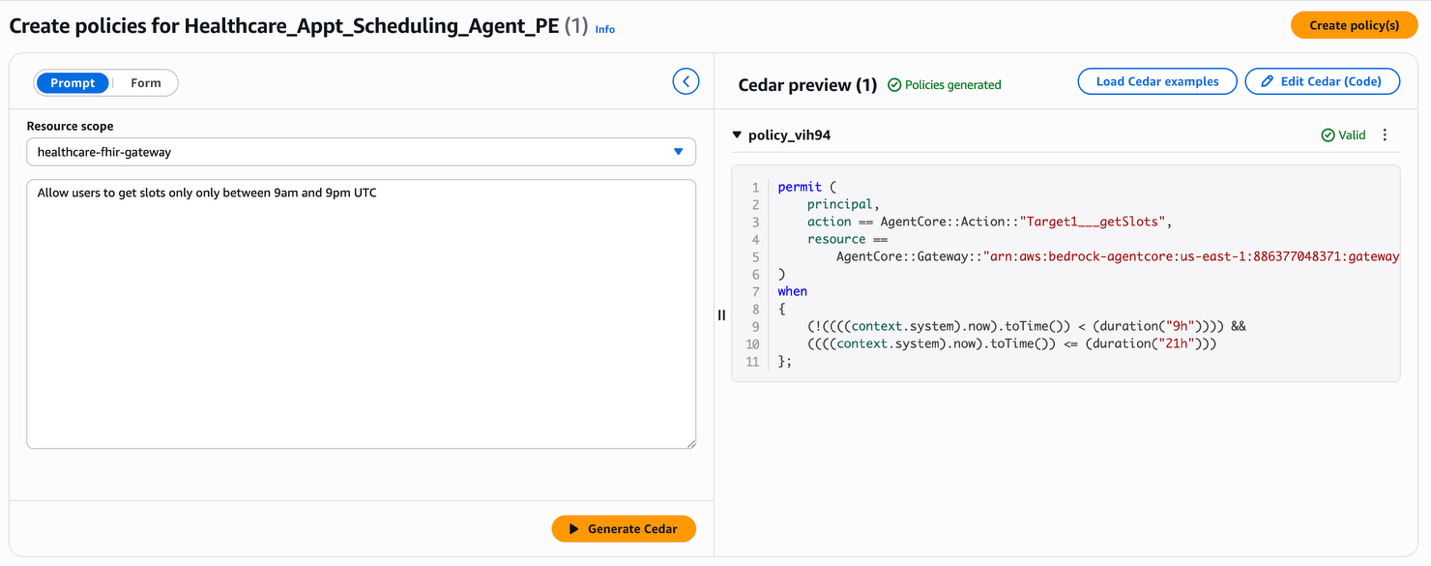
You can now build more policies for your use case and create a coherent policy set coherent to establish a complete security posture. The Policy engine evaluation model is default-deny: if no permit policy matches a request, it is blocked. Use broad permit rules for common, low-risk operations. Add targeted forbid rules for high-risk tools, sensitive data boundaries, and known abuse vectors. This layered approach helps you create a policy set that is both readable by a security auditor and enforceable at runtime independent of what the agent’s LLM reasoning produces. Here, the agent doesn’t need to “know” these rules. It doesn’t need to be prompted to respect them, fine-tuned to follow them, or trusted to apply them correctly under adversarial conditions. Policy in Amazon Bedrock AgentCore enforces them at the gateway, before tool call execution, regardless of how the agent arrived at its decision.
Testing policy enforcement
Let us now understand the behavior of the policies we have created and associated with the gateway for the healthcare appointment scheduling agent. The following two test cases demonstrate the identity-scoped access policy in action when the agent invokes the getPatient tool on behalf of a user. In both cases, the authenticated user is patient adult-patient-001.The Cedar policy being tested is the patient read-only access rule. This rule permits the getPatient tool call only when the `patient_id` in the request matches the authenticated user’s identity:
permit( principal, action == AgentCore::Action::"Target1___getPatient", resource == AgentCore::Gateway::"{gateway_arn}") when { principal.hasTag("role") && principal.getTag("role") == "patient" && context.input has patient_id && principal.hasTag("patient_id") && context.input.patient_id == principal.getTag("patient_id")};Test 1a — ALLOW: Patient accessing their own record**
The agent sends a tools/call request to the gateway to invoke getPatient with the tool parameter for patient_id set to adult-patient-001. Because the patient_id in the tool input matches the authenticated user’s patient_id claim, the Cedar policy permits the request:
Prompt: “Get my patient information for patient ID adult-patient-001”
Policy decision: ALLOW
Result: Patient record returned successfully
Test 1b — DENY: Patient accessing another patient’s record
Now the agent sends the same tools/call request for getPatient, with patient_id set to pediatric-patient-001. The Cedar policy compares the tool input against the authenticated user’s patient_id claim, finds a mismatch, and denies the request because there’s no matching permit policy.
Prompt: “Get patient information for patient ID pediatric-patient-001”
Policy decision: DENY
Result: Tool execution denied by policy enforcement
The same agent code, the same model, and the same tool are used in both cases. The only difference is the policy evaluation at the gateway boundary. The tool is protected from the denied request because the gateway intercepts it before execution.The following example demonstrates a different enforcement pattern: a forbid rule that blocks scheduling operations outside of permitted hours. The previous Risk Controls on Scheduling section used natural language to generate a permit rule that allows slot access during the 9 AM–9 PM window. The same constraint can be expressed as a forbid that explicitly blocks requests outside that window. Both approaches produce the same enforcement outcome; we use the forbid form to illustrate how Cedar’s “forbid always wins” semantics can hard-stop dangerous patterns:
forbid( principal, action == AgentCore::Action::"Target1___getSlots", resource == AgentCore::Gateway::"{gateway_arn}") when { context.input has date_string && (context.time.hour < 9 || context.time.hour > 21)};Test 2a — ALLOW: Requesting slots during permitted hours
The agent requests available slots for a date during clinic hours (e.g., 2 PM UTC). This policy’s when clause does not match because the request hour falls within the 9–21 range, so the request proceeds to the corresponding permit policy and succeeds.
Prompt: “Show me available appointment slots for 2025-08-15” (requested at 14:00 UTC)
Policy decision: ALLOW
Result: Available slots returned for the requested date
Test 2b — DENY: Requesting slots outside permitted hours
The agent makes the same request, but at 3 AM UTC. The forbid rule matches because the request hour is less than nine, and because forbid wins over permit in Cedar, the request is blocked regardless of the other permit policies.
Prompt: “Show me available appointment slots for 2025-08-15” (requested at 03:00 UTC)
Policy decision: DENY
Result: Tool execution denied by policy enforcement
Together, these test cases illustrate both enforcement patterns: permit with identity-scoped conditions and forbid with time-based restrictions. This is what makes external policy enforcement deterministic. The outcome depends on the policy definition and the request context, not on the agent’s reasoning.
Clean up resources
To avoid ongoing charges, delete the Amazon Bedrock AgentCore policies, remove test agents, and clean up any associated resources using the provided CDK destroy commands and the policy cleanup script. To run the cleanup script:
python policy/setup_policy.py --cleanupConclusion
AI agents are only as trustworthy as the boundaries that contain them. These boundaries must be enforced deterministically. Policy in Amazon Bedrock AgentCore gives you a principled way to define these boundaries and enforce them at the gateway layer on every agent-to-tool request. These policies are enforced independently of the agent’s reasoning and are auditable by anyone on your security team. For enterprises deploying agents in regulated industries, this separation between capability and enforcement is the foundation that makes production-grade agentic systems possible. In the next post in this series, we’ll dive into the key differences between Lambda interceptors and Policy in AgentCore Gateway, and walk through architectural patterns for using each individually and together, to build robust governed agentic applications.
Next steps
Ready to add deterministic policy enforcement to your own agents? These resources will get you up and running quickly:
- The Policy Developer Guide covers Cedar policy authoring, natural language to Cedar formalization, AWS KMS encryption, and CDK constructs for infrastructure as code (IaC) deployments.
- The AgentCore Getting Started workshop walks you through building and securing an agent end-to-end, including integrating Policy with AgentCore Gateway.
Have questions about implementing these policies in your specific use case? Share your thoughts in the comments on this post or connect with the community in the AWS forums.
Acknowledgement
Special thanks to everyone who contributed to the launch: teams lead by Pushpinder Dua, Raja Kapur, Sean Eichenberger, Jean-Baptiste Tristan, Sandesh Swamy, Maira Ladeira Tanke, Tanvi Girinath and Amanda Lester.