AWS for M&E Blog
Customize ad workflows with AWS Elemental MediaTailor Monetization Functions
Video publishers customize their ad-insertion workflows in many ways: fetching identity tokens to target audiences across sessions and devices, splitting traffic across ad servers for A/B tests, and enforcing geography-specific advertising rules. These customizations typically require code that execute externally from AWS Elemental MediaTailor, whether in a dedicated proxy service, an edge function, or the client application. Each of these options adds development, operational, and observability overhead.
MediaTailor has introduced MediaTailor Monetization Functions, a new capability that lets you run custom business logic at defined stages of the ad-insertion workflow directly within MediaTailor. You write lightweight expressions in JSONata, a JSON query and transformation language, and attach them to lifecycle hooks in your MediaTailor playback configuration. MediaTailor runs your logic inline, passes the results into the rest of the workflow, and emits Amazon CloudWatch metrics and logs for each execution.
This post explains the framework and walks through an end-to-end example using LiveRamp identity enrichment.
What you can do with Monetization Functions
You can use MediaTailor Monetization Functions to customize the ad-insertion workflow without running separate infrastructure. You can fetch identity tokens, user entitlements, audience segments, or contextual metadata at session start and include them in every outgoing ad request.
You can rewrite the ad decision server (ADS) URL per session to A/B test between providers, split inventory across partners, or route by device type or geography. Attach custom headers and parameters such as signing headers, experiment IDs, or compliance flags to ad requests. And you can apply conditional logic by chaining multiple steps together, where each step reads what the previous step produced.
How Monetization Functions works
A function is a small unit of logic defined in JSON. You author the logic as a declarative function definition, map it to a hook on your playback configuration, and MediaTailor executes it on the critical path. There is no separate service to deploy, scale, or monitor.
Lifecycle hooks
A function runs at a specific lifecycle hook point in the ad-insertion lifecycle. You attach hooks to functions on a playback configuration through a new FunctionMapping attribute on PutPlaybackConfiguration. One function can be reused across many playback configurations, and one playback configuration can map different functions to different hooks. At launch, MediaTailor supports two hooks, PRE_SESSION_INITIALIZATION and PRE_ADS_REQUEST. The following table outlines when these hooks run and their typical uses.

Figure 1: Hook reference table
The following flow diagram illustrates the workflow of these hooks during their typical uses.

Figure 2: Hook model diagram
Function types
Three function types cover the common patterns:
CUSTOM_OUTPUT– Pure data transformation using JSONata expressions. No external I/O.HTTP_REQUEST– Makes an outbound HTTP call, with URL, headers, and body all driven by JSONata expressions. The response is available to the rest of the function.SEQUENTIAL_EXECUTOR– Runs a list of functions in order. Each step can read what the previous step produced.
Inputs and outputs
A function reads from input fields and writes to output namespaces, both scoped to its lifecycle hook:
- At
PRE_SESSION_INITIALIZATION– A function sees the session (session.*), player parameters passed at session start (player_params.*), and event metadata (event.*). It can write toplayer_params.*, and those values persist for the lifetime of the session. Every subsequent ad break inherits them. - At
PRE_ADS_REQUEST– A function sees everything from session initialization plus the current ad break’s context (avail.*,scte.*) and the outbound ad request (adsRequest.*, includingurl,method,headers, andbody). It can also write toplayer_params.*,session.*,avail.*, orscte.*, but unlike at session initialization, these writes are one-time overrides. They apply to the current ad request only and don’t persist to the session.
Two additional data paths show up at runtime. HTTP_REQUEST functions can reference their outbound call’s response (response.body, response.statusCode, response.text) when evaluating output expressions. And inside a SEQUENTIAL_EXECUTOR, steps pass intermediate data to each other through the temp.* namespace.
Prerequisites
To follow along with the walkthrough, you need to have the following prerequisites in place:
- An existing MediaTailor playback configuration. If you don’t have one, refer to Getting started with MediaTailor.
- An active LiveRamp Authenticated Traffic Solution (ATS) agreement and a placement ID for your domain.
- The client app should pass the viewer’s hashed email and any other required parameters as player parameters at session initialization.
Walkthrough: Enrich ad requests with LiveRamp identity data using MediaTailor Monetization Functions
LiveRamp’s ATS returns a persistent, encrypted identity envelope for a viewer. Advertisers use these envelopes to match viewers to audience segments across publishers and return higher-value, personalized ads.
This walkthrough shows how to fetch an envelope at session start and include it in every ad request. You’ll complete the following three high-level steps create two functions and attach them to a playback configuration:
- Create the identity fetch
HTTP_REQUESTfunction. - Create a
CUSTOM_OUTPUTfunction that appends the stored envelope to the outbound ADS URL at each ad break. - Map both functions in the playback configuration.
Create the identity fetch HTTP_REQUEST function
Create an HTTP_REQUEST function that calls the LiveRamp ATS API with the viewer’s hashed email and stores the returned envelope as a player parameter:
- Open the MediaTailor console.
- In the left navigation pane, under Ad insertion, choose Functions.
- Choose Create function.
- Choose Use a recipe, choose LiveRamp ATS API, and continue to the function configuration page.
- Fill out the recipe parameters:
{
  "FunctionId": "fetchLiveRampEnvelope",
  "FunctionType": "HTTP_REQUEST",
  "HttpRequestConfiguration": {
    "Runtime": "JSONATA",
    "MethodType": "GET",
    "Url": "{% 'https://api.rlcdn.com/api/identity/v2/envelope?pid=YOUR_PLACEMENT_ID&it=4&iv=' & $encodeUrlComponent(player_params.hashed_email) & '&ct=' & player_params.consent_type & '&cv=' & $encodeUrlComponent(player_params.consent_value) & '&atype=3' %}",
    "Headers": {
      "Origin": "https://YOUR_APPROVED_DOMAIN",
      "X-Forwarded-For": "{% session.client_ip %}",
      "Accept": "application/json"
    },
    "RequestTimeoutMilliseconds": 2000,
    "Output": {
      "player_params.liveRampEnvelope": "{% response.statusCode = 200 ? response.body.envelopes[type=19].value : null %}"
    }
  },
  "Description": "Fetch LiveRamp envelope at session start"
}
Create a CUSTOM_OUTPUT function that appends the stored envelope to the outbound ADS URL at each ad break
Complete these steps:
- Repeat the steps from Create the identity fetch HTTP_REQUEST function previously in this post but choose Create from scratch and choose
CUSTOM_OUTPUTfor the function type. - Fill in the function details:
{
  "CustomOutputConfiguration": {
    "Output": {
      "adsRequest.url": "{% adsRequest.url & '&envelope=' & player_params.liveRampEnvelope %}"
    },
    "Runtime": "JSONATA"
  },
  "FunctionId": "enrichAdsWithEnvelope",
  "FunctionType": "CUSTOM_OUTPUT"
}
Map both functions in the playback configuration
Complete these steps:
- In the left navigation pane, choose Configurations.
- Choose your playback configuration, then choose Edit.
- Expand the Functions configuration section.
- For Session initialization hook, choose
fetchLiveRampEnvelope. - For Ad request hook, choose
enrichAdsWithEnvelope.
The resulting function mapping is:
{
    "FunctionMapping": {
        "PRE_SESSION_INITIALIZATION": "fetchLiveRampEnvelope",
        "PRE_ADS_REQUEST": "enrichAdsWithEnvelope"
    }
}
What happens at runtime
When a viewer starts a playback session, the player sends a session initialization request to MediaTailor with the viewer’s hashed email:
POST /v1/session/<playback-config-id>/index.m3u8
{
    "adsParams": {
        "hashed_email": "b4c9a289323b21a01c3e940f150eb9b8c542587f1abfd8f0e1cc1ffc5e475514",
        "consent_type": "1",
        "consent_value": "CPxxxxxxxxxxxxxxxxxxxxxxxxxxxxxxxxxxxxxxxxxxxxxxxxx"
    }
}
MediaTailor fires the PRE_SESSION_INITIALIZATION hook and runs fetchLiveRampEnvelope. The function calls LiveRamp’s ATS API with the hashed email in the query string:
GET https://api.rlcdn.com/api/identity/v2/envelope?pid=YOUR_PLACEMENT_ID&it=4&iv=b4c9a289323b21a01c3e940f150eb9b8c542587f1abfd8f0e1cc1ffc5e475514&ct=1&cv=CPxxxxxxxxxxxxxxxxxxxxxxxxxxxxxxxxxxxxxxxxxxxxxxxxx&atype=3
X-Forwarded-For: 192.0.2.1
Origin: https://your-approved-domain.com/
LiveRamp returns an identity envelope for the matched viewer. The function extracts the envelope value and stores it in player_params.liveRampEnvelope, where it persists for the lifetime of the session. At each ad break, MediaTailor fires the PRE_ADS_REQUEST hook and runs enrichAdsWithEnvelope. The function reads the stored envelope and appends it to the outbound ADS URL.
ADS request before functions:
https://ads.example.com/v1/vast?device=samsung&session=abc123ADS request after functions, with &envelope=AjDN1B4ALj0x appended:
https://ads.example.com/v1/vast?device=samsung&session=abc123&envelope=AjDN1B4ALj0xThe ADS uses the envelope to match the viewer to audience segments and return personalized ads. If either function fails or exceeds its timeout, MediaTailor discards the output and proceeds with default behavior.
The following screenshot shows this sequence.
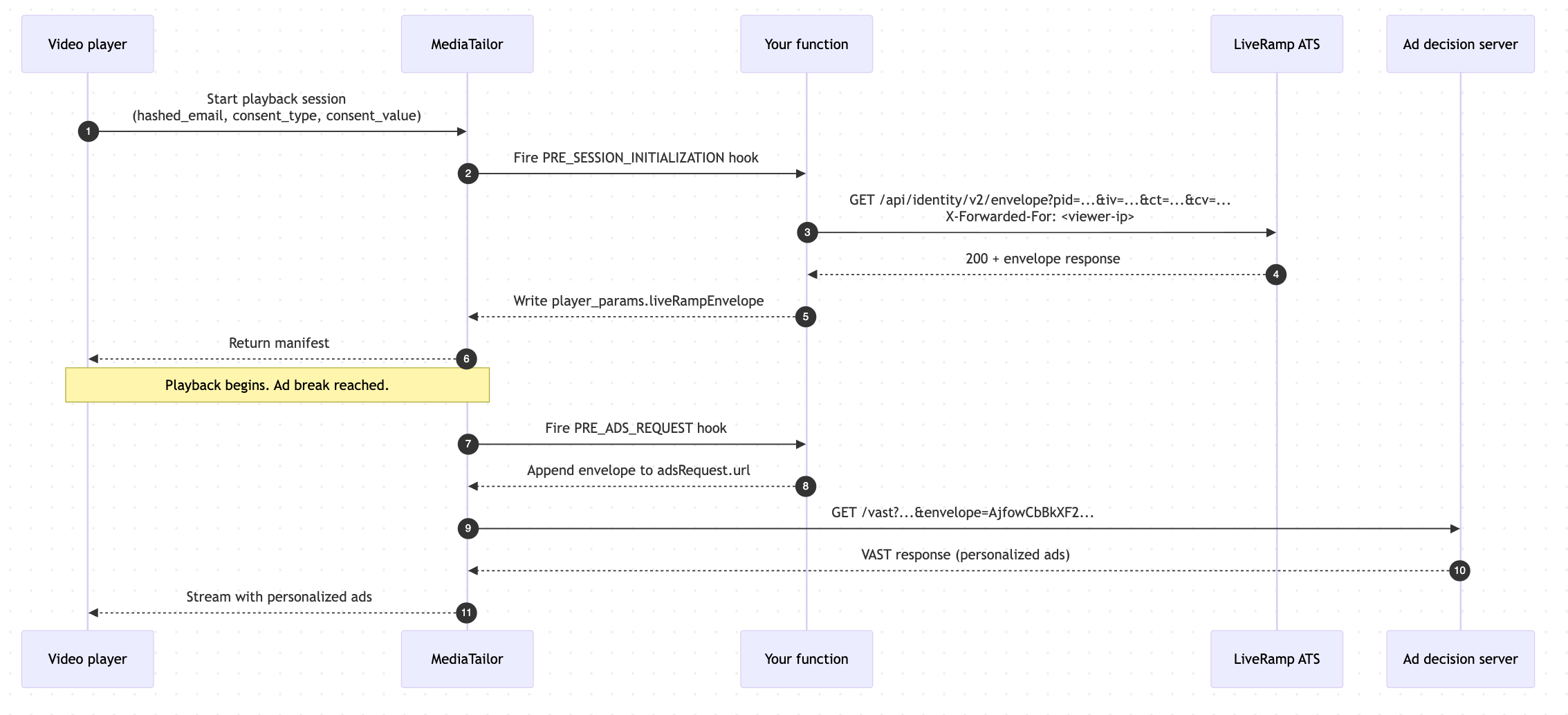
Figure 3: Sequence diagram
Observability
MediaTailor emits CloudWatch metrics at both the hook and function level:
- Invocations – Count of hook executions
- Errors – Count of hook errors
- Latency – Hook execution time (ms)
Metrics carry functionId and hookType dimensions. You can create CloudWatch dashboards to monitor error rate and latency percentiles, and you can monitor alarms for elevated error rates or approaching the hook timeout.
MediaTailor also writes structured log events to existing MediaTailor log groups:
MediaTailor/ManifestServicefor session-init eventsMediaTailor/AdDecisionServerInteractionfor ad-request events
Log events include an eventId that correlates hook-level and function-level events for the same invocation. Using these, you can pinpoint a specific function execution across log events.
Limits and execution
MediaTailor enforces execution, data, and expression limits on every function invocation to keep function issues from disrupting playback.
- Execution limits: Each hook runs under a 2-second execution budget that covers all function steps, including outbound HTTP calls. You can tune per-call HTTP timeouts with
RequestTimeoutMilliseconds, up to the remaining hook budget. ASEQUENTIAL_EXECUTORcan chain up to 10 steps, with a maximum nesting depth of 2. - Data limits: HTTP responses are parsed as JSON up to 2,000 characters. Larger responses appear as
nullinresponse.body, so request only the fields you need. Session-scoped player parameters are capped at 200 characters total at session initialization. - Expression limits: JSONata expressions run with CPU, memory, stack, and expression-length guardrails.
You can use 37 built-in functions to transform strings, do math, encode URLs, and read JSON responses. If a function or hook exceeds a limit or fails, MediaTailor discards the output and proceeds with default behavior, so a function issue never interrupts playback.
Pricing and availability
MediaTailor Monetization Functions is available today in all AWS Regions where MediaTailor is available. You are billed $0.0001 per hook invocation. One invocation includes the execution of all functions mapped to the lifecycle hook.
Conclusion
MediaTailor Monetization Functions gives you a programmable, observable way to customize ad-insertion workflows without standing up separate infrastructure. By defining logic as JSONata functions and mapping them to lifecycle hooks, you keep your customizations close to the ad-insertion workflow, with the latency, scaling, and observability characteristics of MediaTailor itself. As new hooks are added, you can extend the same functions and authoring patterns to new stages of the workflow without re-platforming your code.
For updates on new Monetization Functions capabilities, monitor the AWS Media Blog and the AWS What’s New page for MediaTailor announcements.