Migration & Modernization
Discover and migrate Microsoft Hyper-V workloads with AWS Transform
Introduction
For organizations running Microsoft Hyper-V on premises, migrating workloads to AWS offers a path to reduce infrastructure costs, eliminate licensing complexity, and unlock cloud-native capabilities. Yet the first weeks of a migration effort are rarely spent migrating. In any environment that has grown over years, whatever the platform, systems inventory and architectural documentation lags behind reality, utilization history is thin because capacity was planned for peak demand, and the dependencies between applications live mostly in the memory of the teams that built them. Assembling a business case from that starting point takes weeks, and planning migration waves without dependency data carry risks that everyone can feel.
AWS Transform for migrations removes those obstacles for Hyper-V estates through the Hyper-V auto-discovery capability of the AWS Transform discovery tool. The AWS Transform migrations workflow supports migrating virtual and bare metal servers from virtually any source.
A Hyper-V estate now moves through the same agentic, end-to-end journey the AWS Transform service provides: automated discovery, a data-driven business case, dependency-based migration planning, landing zone and network creation, and orchestrated rehost to Amazon Elastic Compute Cloud (Amazon EC2). The same workflow also covers VMware, KVM, Virtual Machines running on other clouds and bare metal servers; this post focuses on Hyper-V.
This post walks through discovering a Hyper-V environment with the discovery tool, and then through how AWS Transform uses the collected data, starting with building the Total Cost of Ownership (TCO) business case to servers running on AWS.
Discover your Hyper-V environment
The discovery tool is agentless, and inventories Hyper-V environments without installing anything on your servers. You register each Hyper-V host as a discovery source (System Center Virtual Machine Manager is not required), and the tool connects to the host over WinRM to read the configuration Hyper-V holds for every virtual machine: vCPU, memory, disks, network adapters, power state, and failover cluster membership. Collection then repeats hourly. Virtual machines visible through multiple cluster hosts are deduplicated automatically, so clustered VMs are counted once, and the server counts that feed your business case stay accurate.
The tool itself is shipped in the form of a virtual appliance, and one of its deployment options is a VHD image you import directly into Hyper-V Manager, so you can run it inside the environment you are discovering. A single appliance collects from every host you register. It can also collect from VMware vCenter and servers you import by CSV, including bare metal, in the same run for mixed estates. See Setting up the discovery tool and Deploy on Hyper-V.
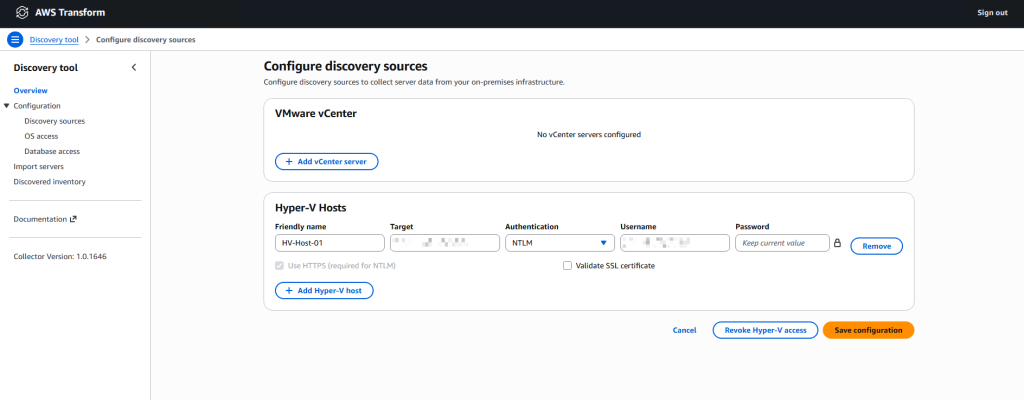
Figure 1: Configuring a Hyper-V host as a discovery source in the AWS Transform discovery tool
Connecting the discovery tool with the hypervisor accelerates the inventory process, and gets you a server list of the estate. The deeper value comes from the OS-level collection modules, which connect to the guests with credentials you provide, over WinRM for Windows and SSH for Linux for collecting:
- Performance metrics, sampled every 10 minutes by the OS-level performance module, capture the server performance such as CPU and memory, which is the input right-sizing depends on.
- Network connections between servers reveal application dependencies even if they were never documented.
- SQL Server discovery inventories installed components and editions, including Database Engine, Analysis Services, Reporting Services, and Integration Services.
- Oracle Database discovery collects Container Database and Pluggable Database topology, components, and sizing through direct SQL connections.
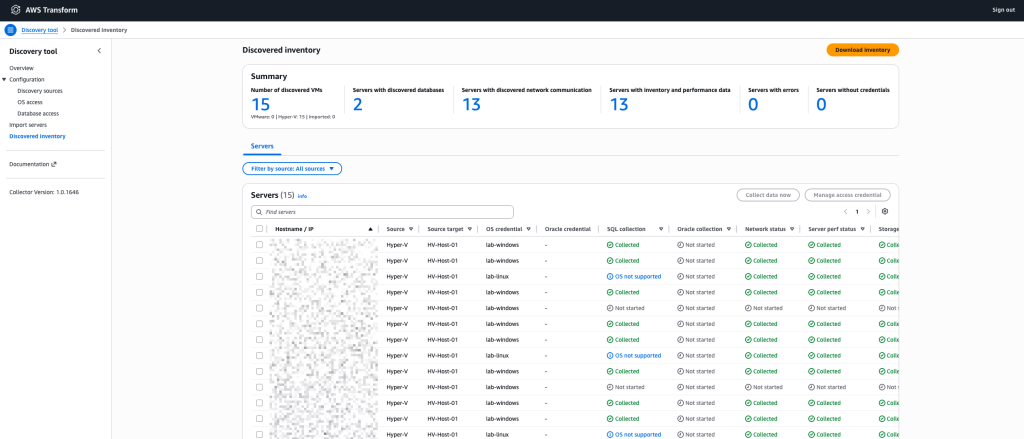
Figure 2: The Discovered inventory page of the AWS Transform discovery tool showing Hyper-V servers discovered in a lab environment
The tool stores everything it collects locally on the appliance. It needs no internet connectivity, AWS account or AWS Transform access while data is collected; you only connect to AWS when you upload the results.
After collection has run for a few days (recommended 30 days to cover a full business cycle including the peak periods that matter to your workloads), you download a single ZIP export containing up to 30 days of data. That export is the input for every step that follows, starting with the business case.
Build the business case
AWS Transform migration assessment turns that export into a TCO business case in minutes: a best-fit Amazon EC2 instance recommendation for each server, pricing across On-Demand and Reserved Instances, and a cost comparison against your on-premises baseline. Because the recommendations work from measured utilization rather than provisioned capacity, servers that were provisioned for peak demand years ago are right sized as EC2 instances.
For the Windows-heavy estates running on Hyper-V, Windows Server and SQL Server licensing is modeled as Bring Your Own License versus License Included, using the SQL Server editions the discovery module found rather than assumptions.
The assessment is conversational. You can adjust on-premises costs, add servers the export missed, remove servers from scope, change assumptions such as target Region, licensing model, or server sizing, and explore what-if scenarios through chat, with the business case updating in place. The output is a downloadable PDF business case, a detailed data export spreadsheet, and an executive presentation. Learn more about the assessment workflow in Accelerating migration assessments and planning with AWS Transform.
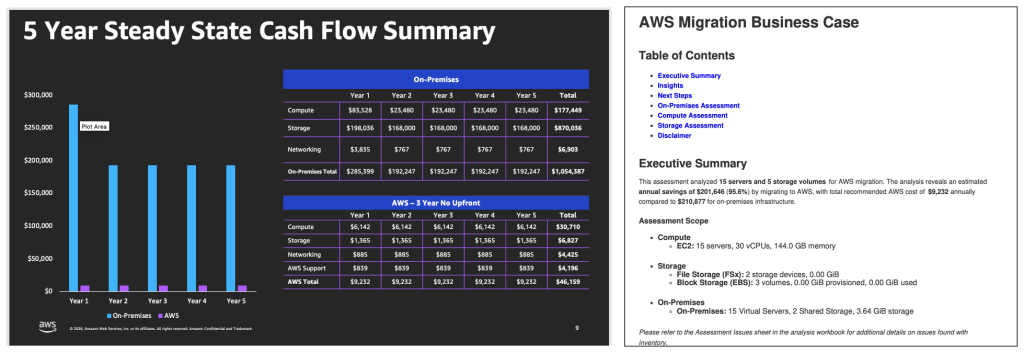
Figure 3: A migration business case generated from a Hyper-V estate sample inventory
Plan the migration
With the discovery tool export, AWS Transform for migrations analyzes the inventory and recommends a migration strategy for every server and application, following the industry-standard seven migration strategies. The network connection data drives application grouping and wave sequencing. Servers that communicate with each other are grouped into applications, and applications are sequenced into migration waves that respect their dependencies, so a wave does not strand part of an application on premises. Failover cluster membership collected during discovery feeds target design as well. AWS Transform records which servers ran under Windows Server Failover Clustering on premises. The target high availability design remains your decision. You might rebuild the cluster across Availability Zones or use the opportunity to modernize and move to a managed service such as Amazon RDS for SQL Server or Amazon FSx for Windows File Server, instead of landing a like-for-like single instance.
AWS Transform generates interactive diagrams and analytical reports during planning, including network topology maps, application dependency graphs, wave Gantt charts, and risk assessments, exported as interactive HTML, PDF, or Microsoft PowerPoint (.pptx). Application owners and infrastructure teams work in the same AWS Transform workspace, with Contributor, Approver, or Read-only roles, so they can review groupings and wave assignments while the plan is being built rather than after the fact. The exported diagrams and reports are what you then put in front of leadership to turn the plan into commitments.
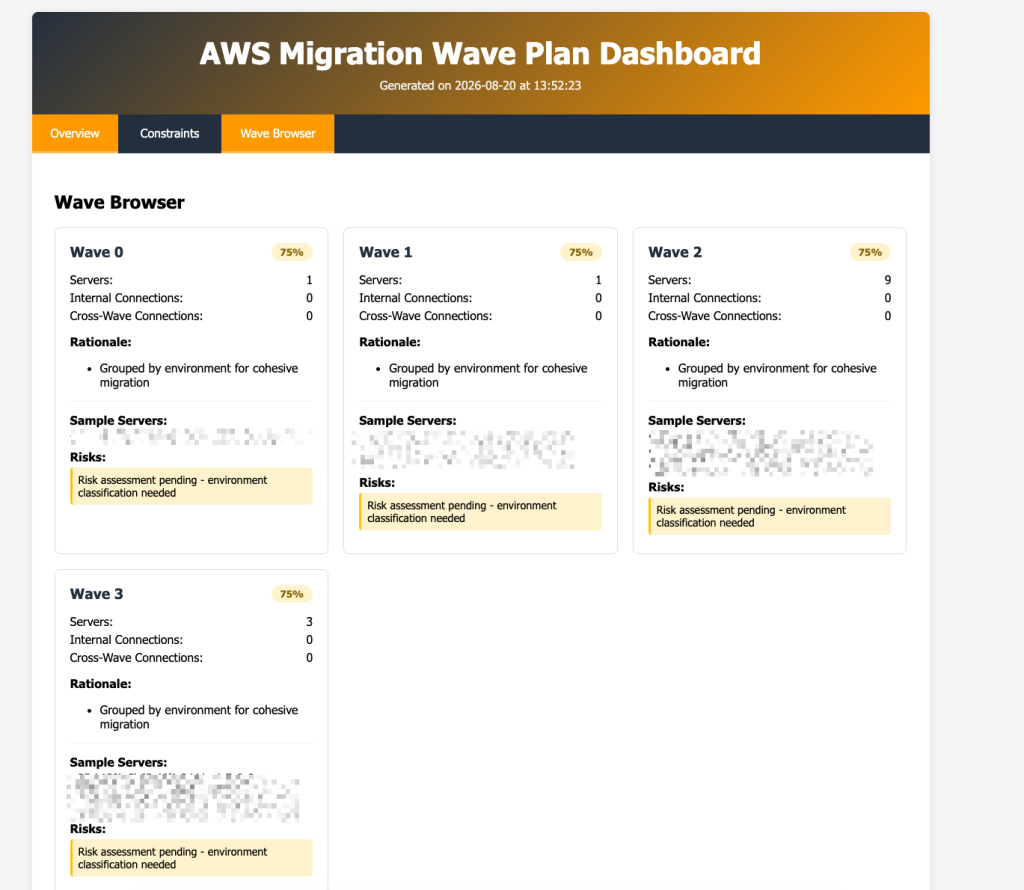
Figure 4: A migration wave plan generated from the discovered Hyper-V sample inventory, with servers grouped into applications and sequenced into waves
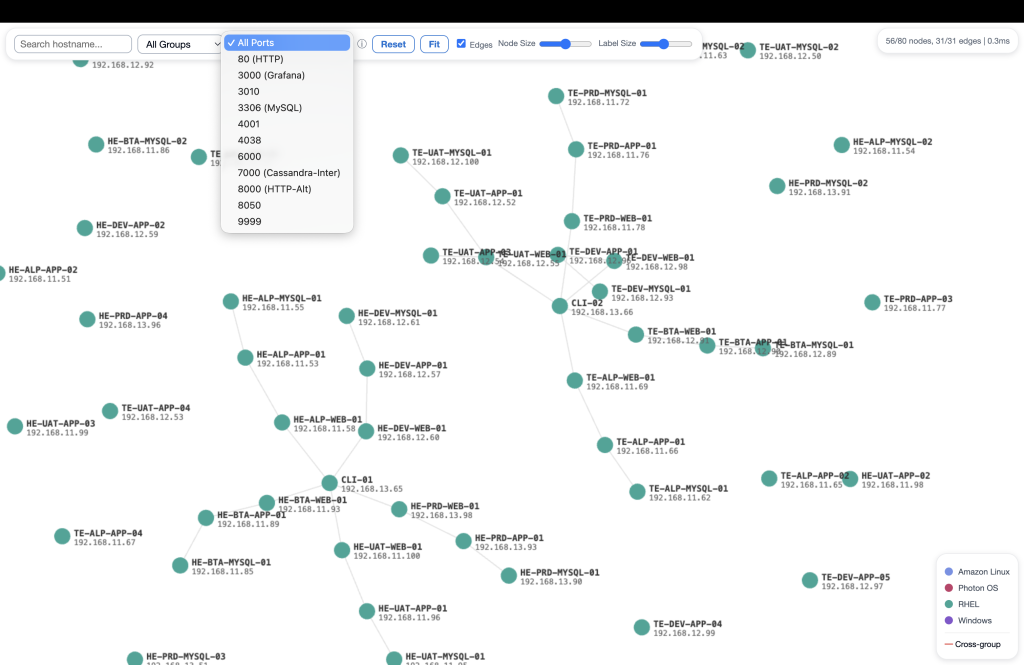
Figure 5: An interactive application dependency graph generated from the sample inventory
Prepare the landing zone and network
If the target AWS environment for the migrated applications has not been built yet, AWS Transform’s landing zone agent will offer to design and deploy one as part of the migration project. AWS Transform analyzes your migration inventory and business requirements and recommends an AWS multi-account strategy with AWS Organizations organizational units and account structure, applies recommended Service Control Policies, and either deploys the landing zone using AWS Control Tower, or generates Infrastructure as Code artifacts for you to deploy yourself. For existing environments, AWS Transform detects your current organization structure and recommends only the changes needed to close any gaps and align with AWS’s best practices.
The AWS Transform network migration agent translates the source environment configuration into AWS network resources, including VPCs, subnets, security groups, NAT gateways, transit gateways, routes, and route tables. You use the discovery tool export as the source network input or can add firewall configurations from Palo Alto Networks, Fortinet FortiGate, or Cisco ACI to drive security group generation. You choose a network topology, isolated VPCs or hub and spoke with centralized inspection, and review the generated design through the conversational interface before deployment. AWS Transform detects existing VPCs in the target account and flags CIDR conflicts ahead of deployment. The network migration agent can deploy the target network and security constructs for you, or provide the target network configuration as Infrastructure as Code artifacts in AWS CloudFormation, AWS CDK, Landing Zone Accelerator, or Terraform formats.
Rehost to Amazon EC2
Server migration is then organized into waves. For each wave, the agent walks you from wave setup and inventory validation through replication agent deployment, continuous block-level replication, test launches, and final cutover, while you keep control over configuration and approvals.
AWS Transform orchestrates the rehost and uses AWS Transform MGN (MGN) for data replication. Replication operates at the guest OS layer, so it runs on any bare metal, hypervisor, or cloud source as long as the operating system is on the supported operating systems list. Check that list early if your estate includes older operating systems, as it carries deprecation dates.
Replication is based on the AWS Transform MGN Replication Agent installed on each source server, so account for agent deployment and the change management approvals it may require. You install the agent in one of these three ways:
- MGN connector — Orchestrates replication agents installation remotely across your source servers for Windows and Linux operating systems. The connector runs on a Linux machine, so provision a Linux VM to host it. Best for large-scale installs across many servers.
- Manual installation — Run the agent installer on each source server directly. Best for a small number of servers or a first test.
- Organizational deployment tools — Push the agent through the software distribution tooling you already use, such as Microsoft Configuration Manager, Group Policy, or a configuration management tool. Best when you have existing deployment pipelines.
Post-launch actions, an MGN capability that AWS Transform orchestrates for you, automate modernization and validation tasks that run on each server immediately after it launches as a test or cutover instance. Predefined actions include installing the Amazon CloudWatch agent, joining an AWS Directory Service domain, converting SQL Server from BYOL to License Included, upgrading the Windows Server version, and validating volume integrity or process status, and using AWS Systems Manager documents, you can create your own custom actions for automating tasks, such as renaming a server. You define them once at the account level or customize them per server.
For Linux applications with accessible source code that you want to modernize, a wave can carry a containerize strategy instead. AWS Transform clones the source repositories, generates Docker artifacts, publishes container images, and deploys to Amazon Elastic Container Service (Amazon ECS) or Amazon Elastic Kubernetes Service (Amazon EKS).
Conclusion
AWS Transform supports Hyper-V migrations end to end. Discovery runs against your hosts, replacing weeks of manual collection. Every downstream capability consumes the result: a business case built on measured utilization and accurate SQL Server editions, migration waves sequenced by observed dependencies, a landing zone and network architecture generated, and an orchestrated rehost with modernization hooks at launch.
Throughout, the migration team, application owners, and approvers work in the same AWS Transform workspace, through the console or the MCP server integration, and AWS Transform generates a workspace summary report as a downloadable PDF that consolidates job statuses, wave planning, network migration, landing zone configuration, and rehost progress for stakeholder reporting.
To learn more, visit the AWS Transform documentation. To see the console experience before setting up an environment, walk through the interactive demos.
When you are ready, deploy the AWS Transform discovery tool and register your Hyper-V hosts as discovery sources. Let it run for a few days, then upload the export to AWS Transform migration assessment to generate your data-driven business case and get your migration started.