Microsoft Workloads on AWS
Deploying Microsoft Exchange Server with AWS Managed Microsoft AD Hybrid Edition
In today’s hybrid IT landscape, many organizations are strategically moving their infrastructure to Amazon Web Services (AWS) while maintaining certain on-premises services. Microsoft Exchange Server remains a critical communication platform for businesses and deploying it in AWS provides excellent opportunities to leverage cloud scalability and reliability. Whether you’re migrating an existing Exchange infrastructure or implementing a new deployment, this blog post will walk you through the process of deploying Microsoft Exchange Server in AWS.
Included is the architectural approach for deploying Exchange Server 2019 and Subscription Edition with AWS Managed Microsoft AD (Hybrid Edition), focusing on design considerations and deployment patterns. It specifically addresses key deployment considerations for Hybrid Edition and details the critical forest preparation steps required for successful Exchange implementation. It does not cover detailed step-by-step infrastructure configuration or post-deployment Exchange configuration procedures.
Note: Exchange Server 2019 reached end of support on October 14, 2025. By migrating to Exchange Server Subscription Edition (SE), you’ll benefit from ongoing security updates, patches, and Microsoft support to keep your environment protected.
Why Exchange Server with AWS Managed Microsoft AD (Hybrid Edition)
Deploying Microsoft Exchange Server with AWS Managed Microsoft AD Hybrid Edition offers organizations a streamlined approach to modernizing their communication infrastructure while preserving existing Active Directory identity systems and native Active Directory schema extension capabilities. This integration extends your on-premises or cloud self-managed Active Directory domain into AWS without requiring domain restructuring or identity synchronization, enabling native integration with AWS applications and services and leveraging AWS elasticity, reliability, and global reach.
Note: This guide uses Microsoft Exchange Server 2019. All commands, procedures, and screenshots captured are from Exchange Server 2019.
Solution Overview
Microsoft Exchange Deployment Topologies
Option 1: Single-Region Topology with High Availability
This topology deploys all Exchange components within a single AWS region, utilizing multiple Availability Zones (AZs) for high availability.
- Configuration: Two or more Exchange servers deployed across different Availability Zones within the same AWS region.
- Directory Services: Hybrid Edition with two AWS-managed and two self-managed domain controllers.
- High Availability: Database Availability Group (DAG) configured across AZs with automatic failover.
- Load Balancing: A Network Load Balancer distributes client connections. See Load balancing in Exchange Server and Elastic Load Balancing.
- Ideal for: Organizations with centralized operations or users primarily in one geographic region
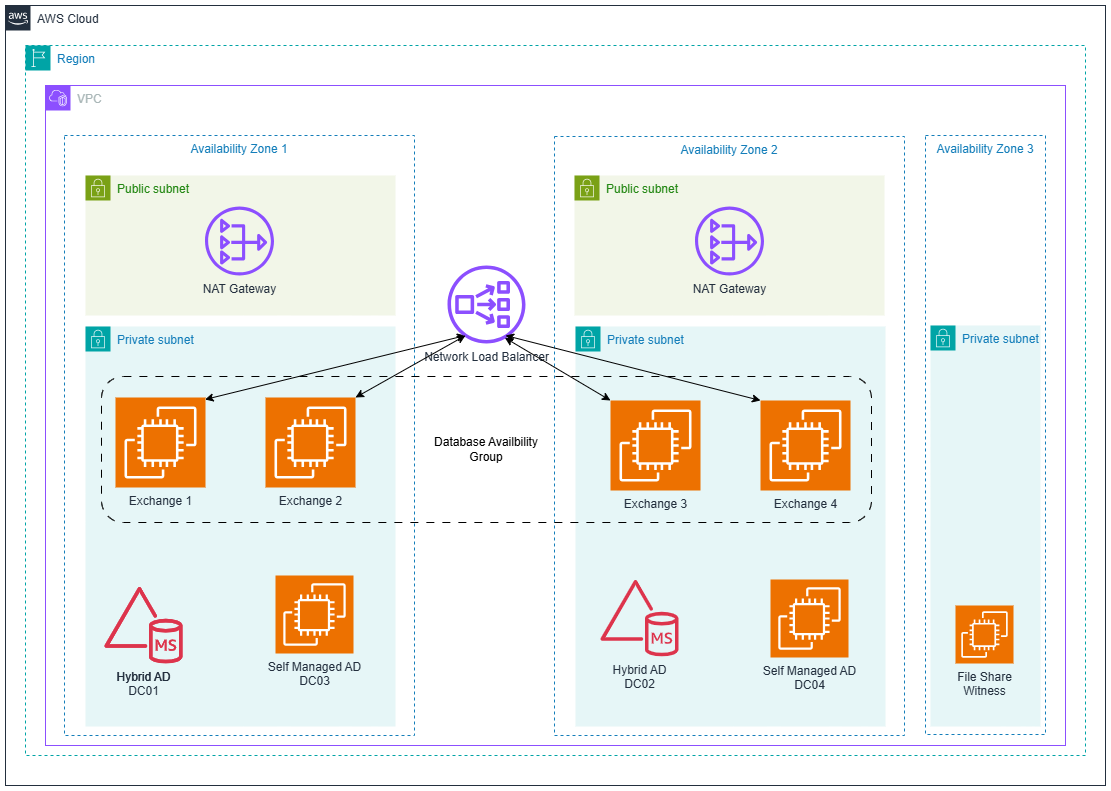
Figure 1 Deploying Exchange 2019 on AWS in a single region
Option 2: Multi-Region Topology
This topology deploys Exchange servers across multiple AWS regions to provide global coverage and disaster recovery:
- Configuration: Exchange server deployments in two or more AWS regions.
- Directory Services: Hybrid Edition with two AWS-managed and two self-managed domain controllers in the primary region and additional self-managed domain controllers in secondary regions to be fully resilient.
- High Availability: Single or Multiple DAGs configured with cross-region database copies.
- Load Balancing: Regionally deployed Network Load Balancer distributing client connections. See Load balancing in Exchange Server and Elastic Load Balancing.
- Ideal for: Global organizations with users distributed across multiple regions or disaster recovery capabilities.
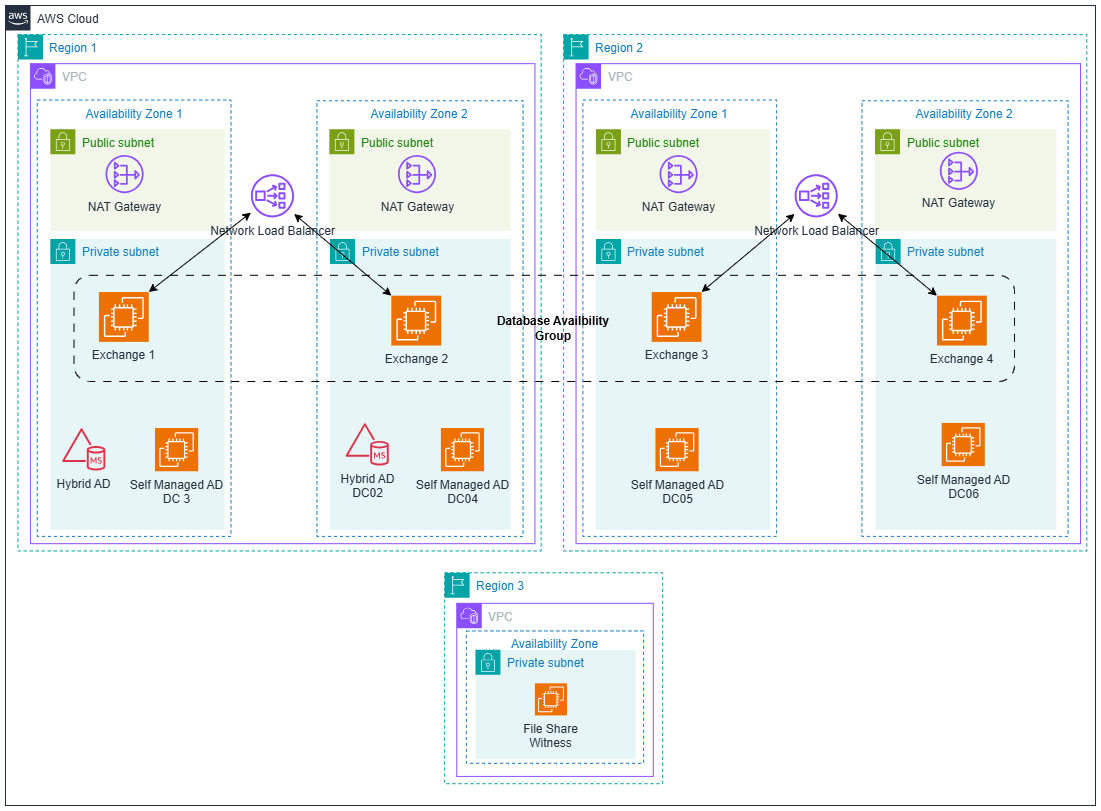
Figure 2: Deploying Exchange 2019 on AWS in multi-region
Option 3: Hybrid Topology
This topology maintains Exchange servers both on-premises and in AWS for gradual migration:
- Configuration: Exchange servers deployed in AWS with connectivity to existing on-premises Exchange.
- Directory Services: Hybrid Edition with two AWS-managed and two self-managed domain controllers extending your on-premises Active Directory.
- Connectivity: AWS Direct Connect or Site-to-Site VPN for secure, reliable connectivity.
- Mail Flow: Configured for seamless routing between on-premises and Exchange environments in AWS.
- High Availability: Multiple DAGs configured for on-premise and AWS across AZs with automatic failover.
- Load Balancing: Regional and on-premises Network Load Balancer distributing client connections, see Load balancing in Exchange Server and Elastic Load Balancing.
- Ideal for: Organizations transitioning from on-premises to cloud infrastructure over time.
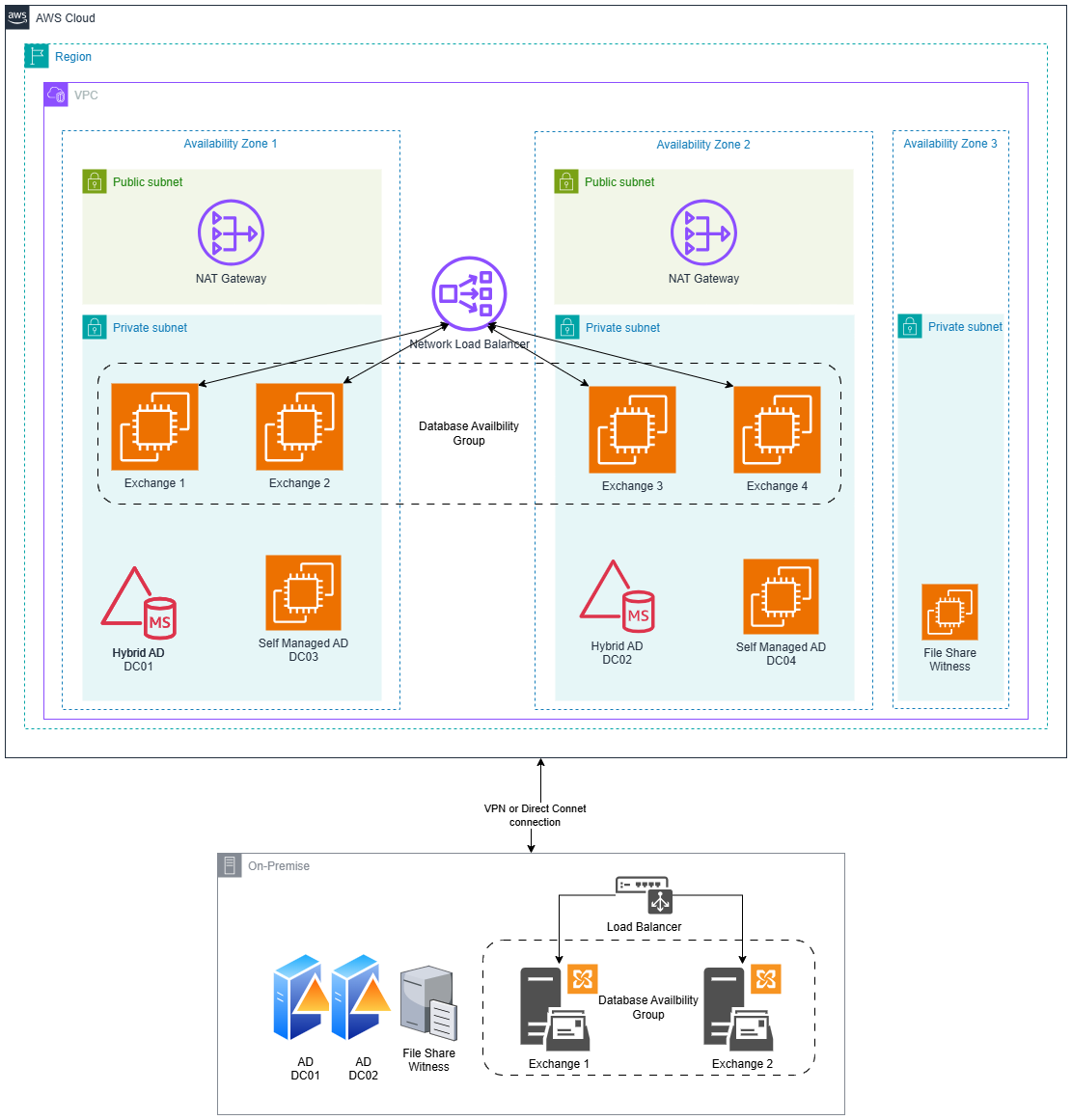
Figure 3 Hybrid deployment of Exchange 2019
Note: While the diagrams above show Exchange servers and domain controllers in the same Amazon Virtual Private Cloud (VPC), you can deploy them in separate VPCs with VPC peering or AWS Transit Gateway for additional network isolation and security.
Prerequisites
The following are the prerequisites to proceed with the Exchange Server 2019 deployment:
AWS Requirements
- An AWS account.
- An understanding of Amazon Machine Images (AMIs), Amazon Elastic Compute Cloud (EC2) instances, and how to launch a Windows Server Amazon EC2 instance.
- Familiarity with VPC networking concepts.
Infrastructure Planning
- Region and Availability Zone Selection: Choose a primary AWS region based on user proximity and compliance requirements. Within that region, deploy across multiple Availability Zones for high availability. For disaster recovery, consider adding a secondary region.
- EC2 Instance Sizing: Size Exchange servers based on user count and performance requirements; select appropriate instance types for domain controllers and witness servers.
- Storage Configuration: Configure Amazon Elastic Block Store (EBS) volumes with adequate IOPS for Exchange database performance.
- SSL/TLS Certificates: Obtain valid public certificates for Exchange client access services.
Active Directory Requirements
- Domain Environment: Extend an existing or install a new single-domain forest with at least two writable, self-managed domain controllers running Windows Server 2012 R2 or later, with Windows Server 2012 R2 or 2016 functional level. See Install a New Windows Server 2012 Active Directory Forest and Active Directory Domain Services functional levels.
- AWS Extension: Hybrid Edition Domain Controllers properly configured to extend your AD environment. Follow AWS Managed Microsoft AD (Hybrid Edition).
- FSMO Roles: All FSMO roles must be hosted on self-managed writable domain controllers located in the same Active Directory site where Exchange schema and domain preparation operations will run.
- AD sites configuration:
- Co-locate Exchange servers and writable domain controllers in the same Active Directory site.
- Hybrid Edition DCs are automatically placed in site AWS-DirectoryService-<region-name> (e.g., AWS-DirectoryService-us-west-1).
- VPC CIDR ranges are automatically added to the appropriate “AWS-DirectoryService-<region-name>” site for proper site-awareness.
- DNS Configuration: Configure DNS forwarding and conditional forwarders between on-premises DNS servers, self-managed domain controllers, and AWS Managed Microsoft AD DNS for seamless name resolution across hybrid environments and AWS infrastructure endpoints.
Required Permissions for Exchange Deployment
Active Directory Permissions
Administrative account with membership in:
- Schema Admins group.
- Enterprise Admins group.
- Domain Admins group.
AWS IAM Roles and Permissions
Create dedicated IAM roles with minimal required permissions:
- EC2 instance permissions for AWS Systems Manager access for patch management.
- Amazon CloudWatch logging permissions.
Infrastructure Components
- Witness Server: Additional Windows Server instance (non-Exchange) configured as File Share Witness (FSW).
- Networking: Properly configured security groups, NACLs, and routing to enable inter-server communication as per this reference.
- DNS Configuration: Fully functional DNS resolution between all servers in the environment.
Reference: Exchange Server 2019 and SE system requirements
Deploy AWS Infrastructure
Before deploying Exchange Server and configuring Active Directory integration, establish the foundational AWS infrastructure components based on your desired design:
VPC Structure and Networking
- Create a VPC with the necessary CIDR blocks for your organization.
- Design a subnet architecture across multiple AZs or Regions (public, private, and management subnets).
- Configure route tables and internet/NAT gateways as needed.
- Establish network connectivity (Direct Connect or Site-to-Site VPN) to on-premises environment.
AWS Directory Service Setup
- Deploy AWS Managed Microsoft AD Hybrid Edition.
- Ensure proper AD site configuration.
Security Configuration
- Configure network access control lists (ACLs) for additional network-level security.
- Configure instance permissions required for Systems Manager.
Deployment Steps
Prepare Active Directory for Exchange
Important Note: If you deploy Exchange in a multi-site Active Directory environment and is not in the same site as the self-managed domain controller that holds the Schema Master role, you cannot prepare Active Directory using the GUI wizard. Instead, follow the guide Exchange Setup command-line to specify the self-managed domain controller with Schema Master role.
Step 1: Prepare Schema
E:\Setup.exe /IAcceptExchangeServerLicenseTerms_DiagnosticDataON /PrepareSchema /DomainController:DC01.corp.local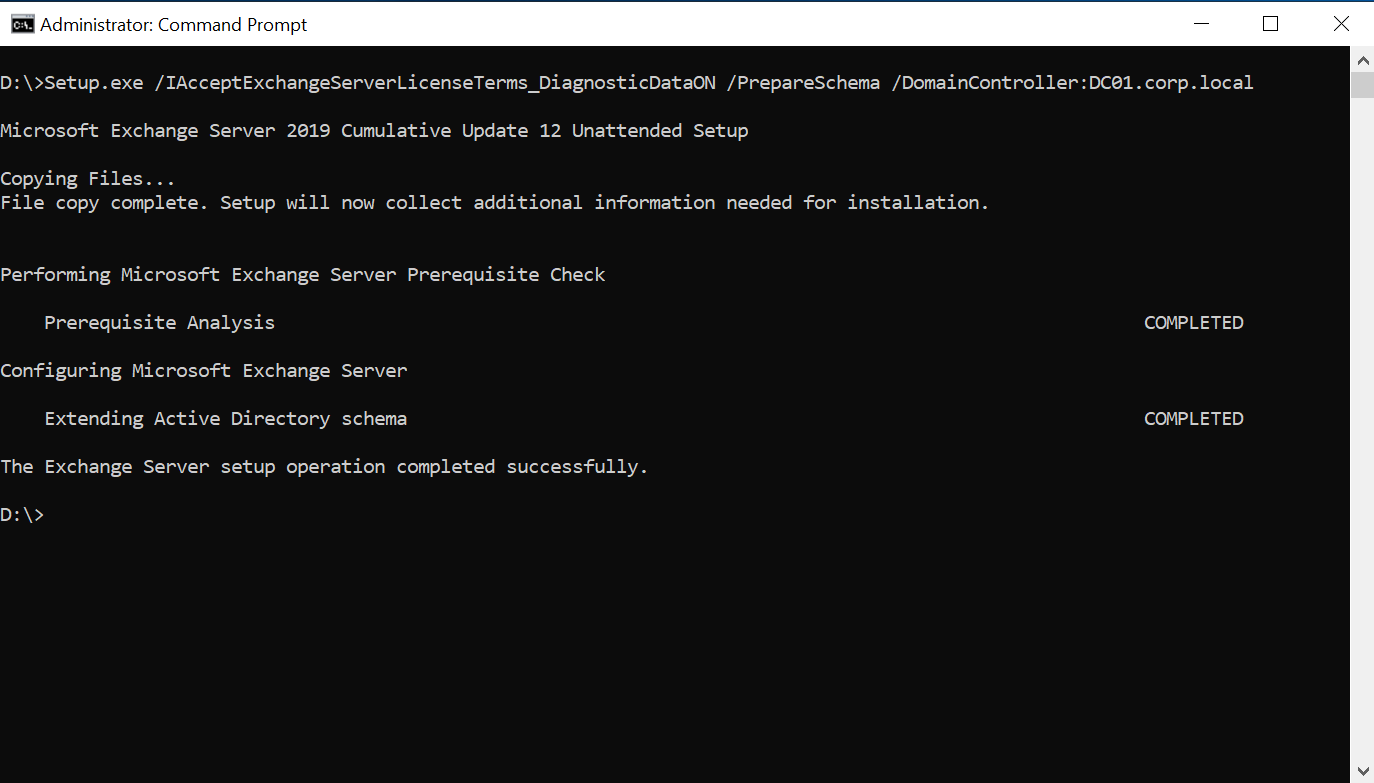
Figure 4 Prepare schema command output
Step 2: Prepare AD with organization name
E:\Setup.exe /IAcceptExchangeServerLicenseTerms_DiagnosticDataON /PrepareAD /OrganizationName:"Corp" /DomainController:DC01.corp.local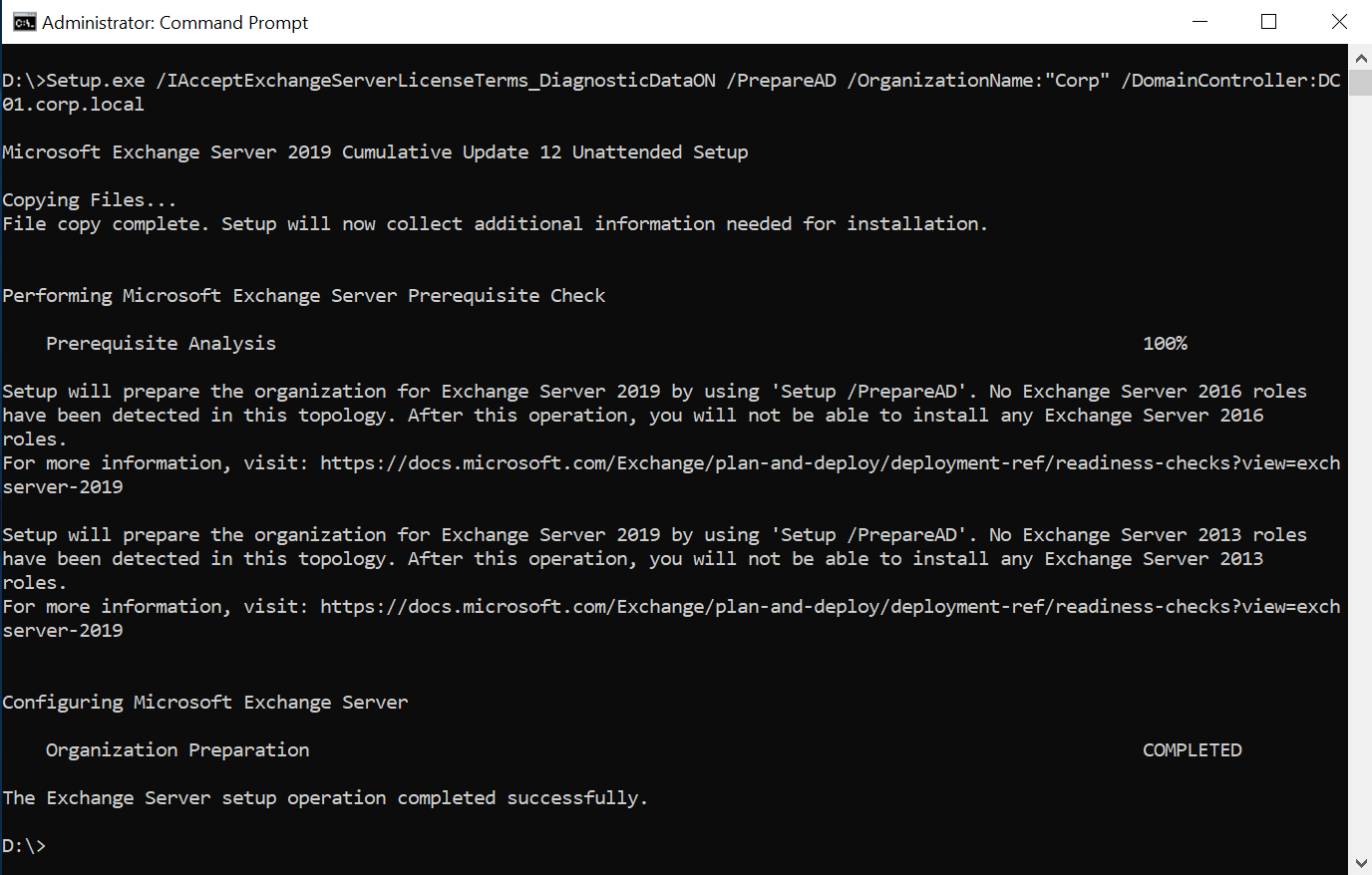
Figure 5 Prepare AD command output
Step 3: Prepare all domains
E:\Setup.exe /IAcceptExchangeServerLicenseTerms_DiagnosticDataON /PrepareAllDomains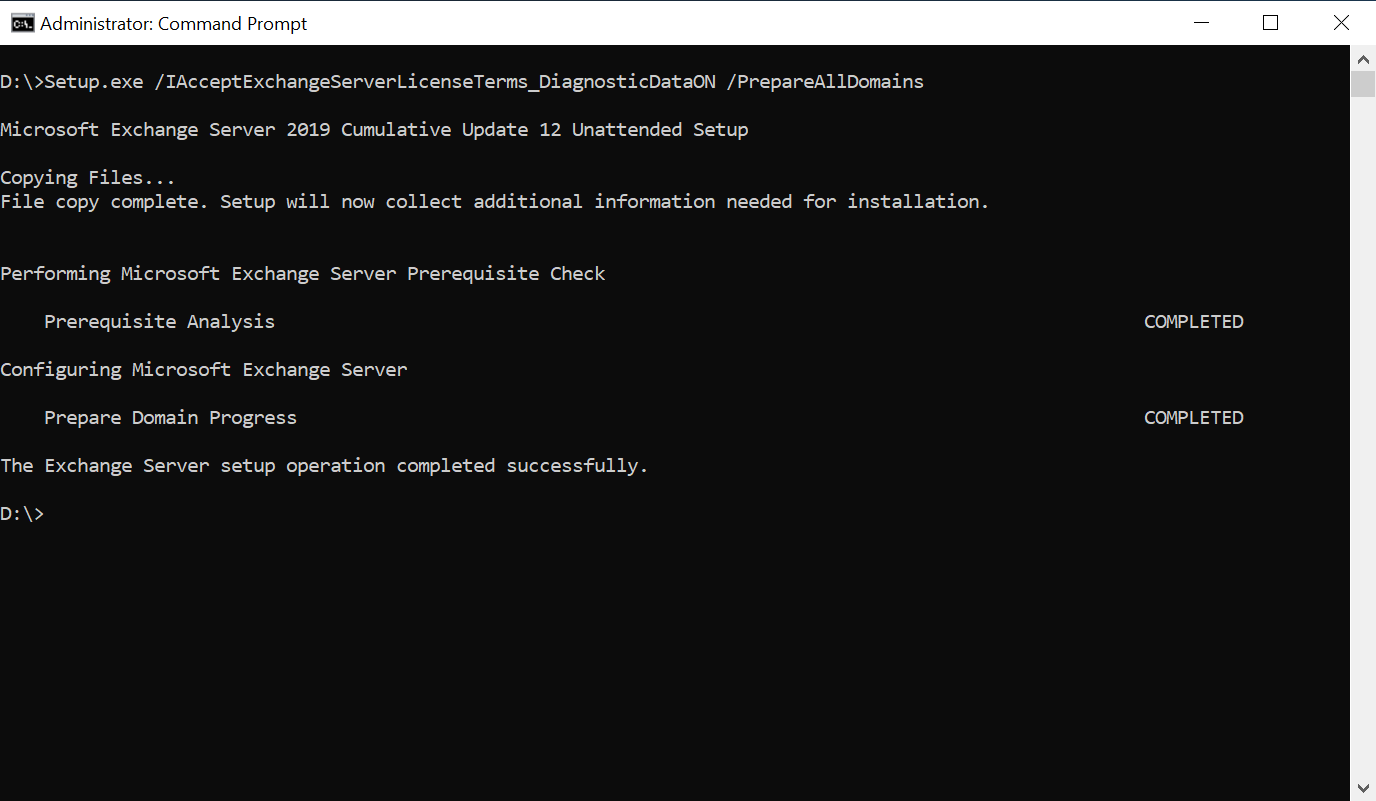
Figure 6 Prepare all domains command output
Important Considerations:
- Replace DC01.corp.local with your fully managed DC that holds FSMO roles.
- Replace /OrganizationName:”Corp”, with your organization name.
- Run commands with Schema Admin and Enterprise Admin privileges.
- Allow sufficient time for AD replication between each step.
- Verify the successful completion of each step before proceeding to the next.
Install Exchange Server
After successful Active Directory preparation, you can install Exchange Server using either the command line or the setup GUI.
Verify Installation
Check Exchange Services using the following PowerShell command:
Get-Service -Name "MSExchange*" | Where-Object {$_.StartType -eq "Automatic"} | Format-Table Name, Status, StartType -AutoSize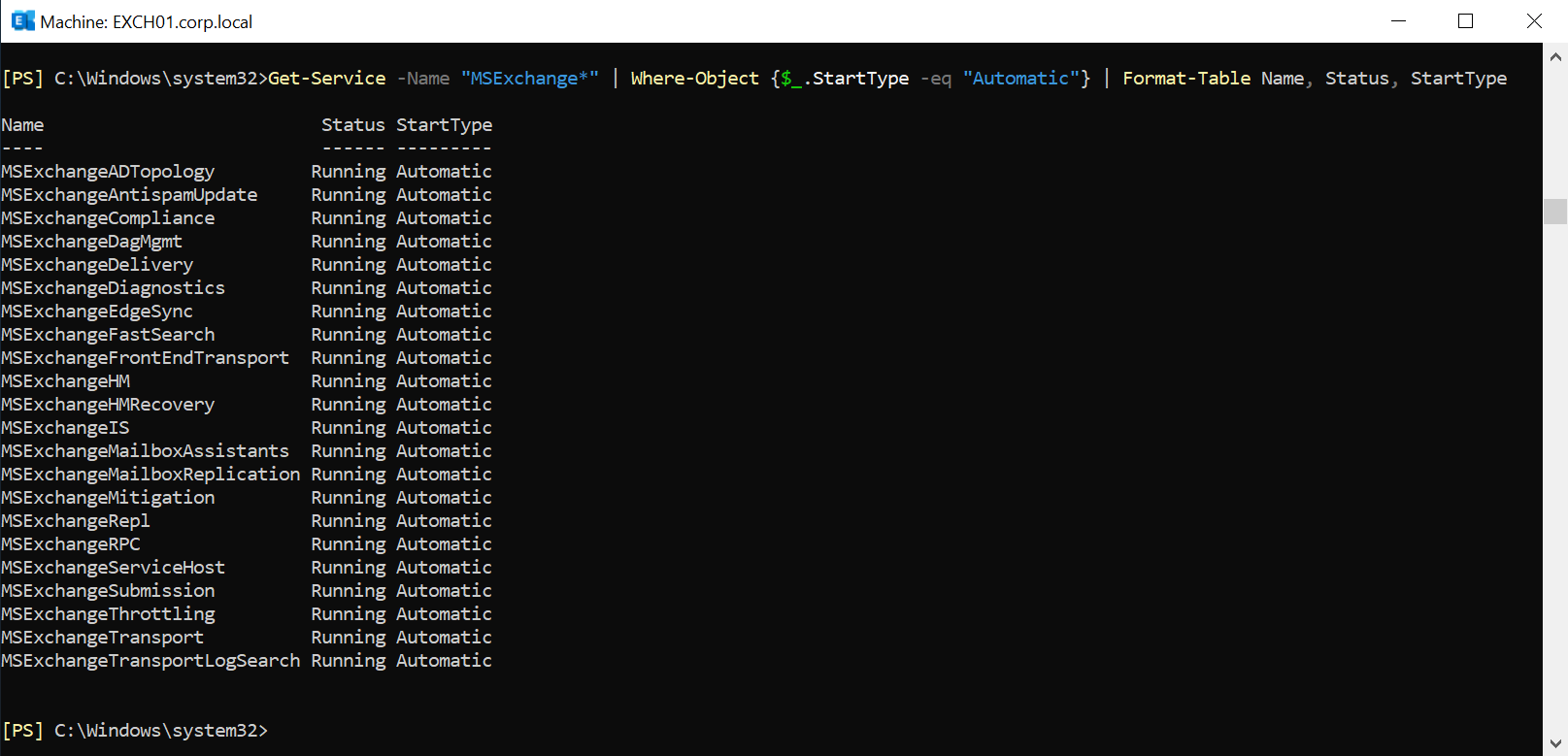
Figure 7 Installation verification output
Verify Exchange Admin Center:
- Open a browser on the Exchange server.
- Navigate to https://localhost/ecp.
- Log in with your domain administrator credentials.
- Confirm the Exchange Admin Center loads successfully as shown in the screenshot below:
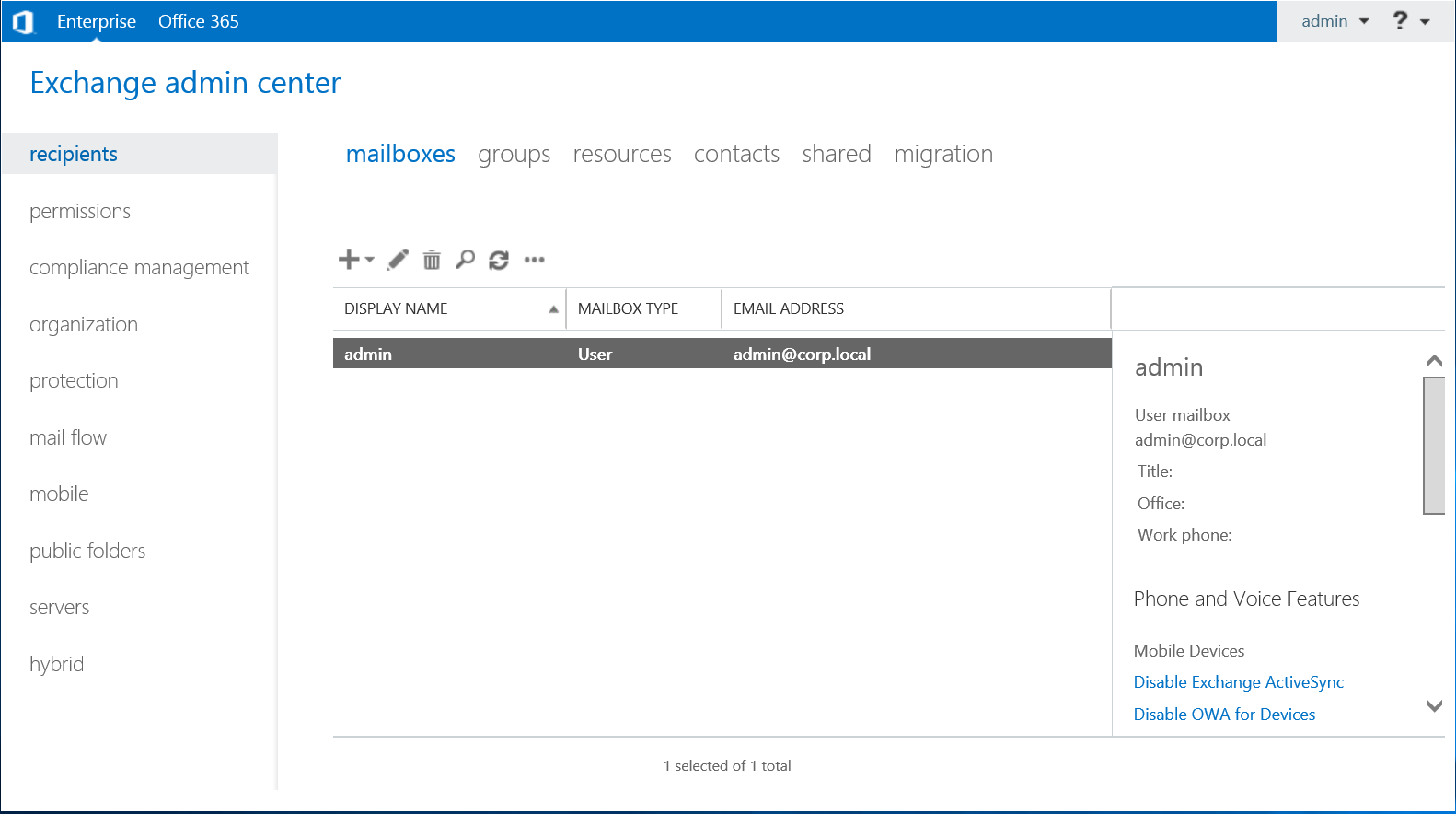
Figure 8 Exchange 2019 control panel
Post-Installation Tasks
Review the recommended post-installation tasks at Exchange Server post-installation tasks.
Cleaning Up
To avoid incurring charges for unused resources, it’s essential to decommission your Exchange Server deployment in AWS when no longer needed. This cleanup process involves deleting all resources created during implementation.
Conclusion
Deploying Microsoft Exchange Server on AWS with AWS Managed Microsoft AD Hybrid Edition streamlines communication infrastructure modernization while preserving existing Active Directory identity infrastructure. This approach extends your Active Directory domain directly into AWS, maintaining familiar authentication mechanisms while gaining cloud scalability and reliability. Following the deployment patterns in this guide enables organizations to successfully implement Exchange on AWS infrastructure with enhanced disaster recovery capabilities, allowing IT teams to focus on user experience rather than infrastructure management.
About the Author
Tamer Sherif is a Principal Solutions Architect with 18 years of experience specializing in Microsoft technologies and cloud infrastructure. Tamer focuses on helping organizations successfully migrate and optimize their Microsoft workloads on AWS, with expertise in Active Directory, Exchange Server deployments, and hybrid cloud architectures. He is passionate about enabling customers to leverage the scalability and reliability of AWS while maintaining the familiar Microsoft ecosystem they depend on for their business-critical operations.