Networking & Content Delivery
Deploying internal DNS zones for internet-facing load balancers
Since the launch of Elastic Load Balancing (ELB) in 2009, Amazon Web Service (AWS) customers of all sizes, regardless of the size or the complexity of their technical requirements, have utilized ELB as a fundamental service. The service continues to evolve with more deployment options like Network Load Balancers, Application Load Balancers, and Gateway Load Balancers, and with a growing set of use cases and integrations such as AWS PrivateLink and AWS WAF. In this post, we discuss a solution covering the first two, Network Load Balancers and Application Load Balancers.
Today, the two main ways to deploy Network Load Balancers and Application Load Balancers are internet-facing for public subnets, or internal for non-public subnets, and when deploying either, you receive a random DNS name to use within your own zones, like nlb-1234567890abcdef0.elb.us-east-1.amazonaws.com.
Internet-facing load balancers have their public IP addresses listed in the managed DNS name, with no record resolving to the load balancer’s internal-only addresses. This public-IP-only DNS can present specific challenges, for example, when using DNS-based destination rules on ingress inspection with third-party gateways between the Application Load Balancer or Network Load Balancer and the internet gateway, or when routing to the same internet-facing load balancers through an AWS Direct Connect private or transit virtual interface (VIF).
Figure 1 is an example scenario with ingress inspection using DNS-based rules in third-party gateways.
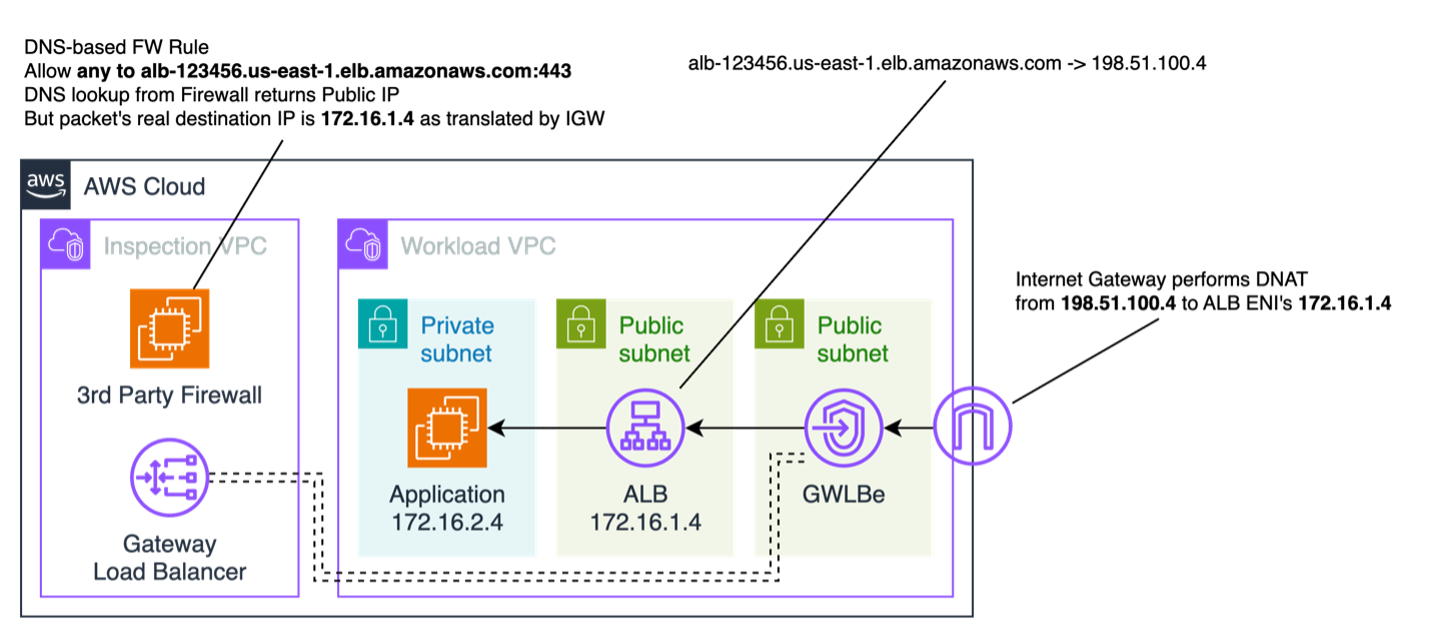
Figure 1: Example of DNS-based rules on ingress inspection returning public ELB addresses
To address those specific challenges, this post will guide you in deploying dedicated private hosted zones on Amazon Route 53 to host internal DNS records for your internet-facing load balancers and the automation needed to maintain the records always up-to-date.
Solution overview
This solution assumes you are using a scalable, multi-account environment and relies on AWS CloudTrail to send specific load balancer lifecycle events towards an Amazon EventBridge rule and custom bus, and uses an AWS Lambda function to create, modify, or delete DNS records in a Route 53 zone. This allows you to query a similar yet unique suffix for internal-only records within your VPCs. To keep track of mappings and elastic network interfaces, we store and maintain the state in an Amazon DynamoDB table. Figure 2 shows the overall solution architecture.
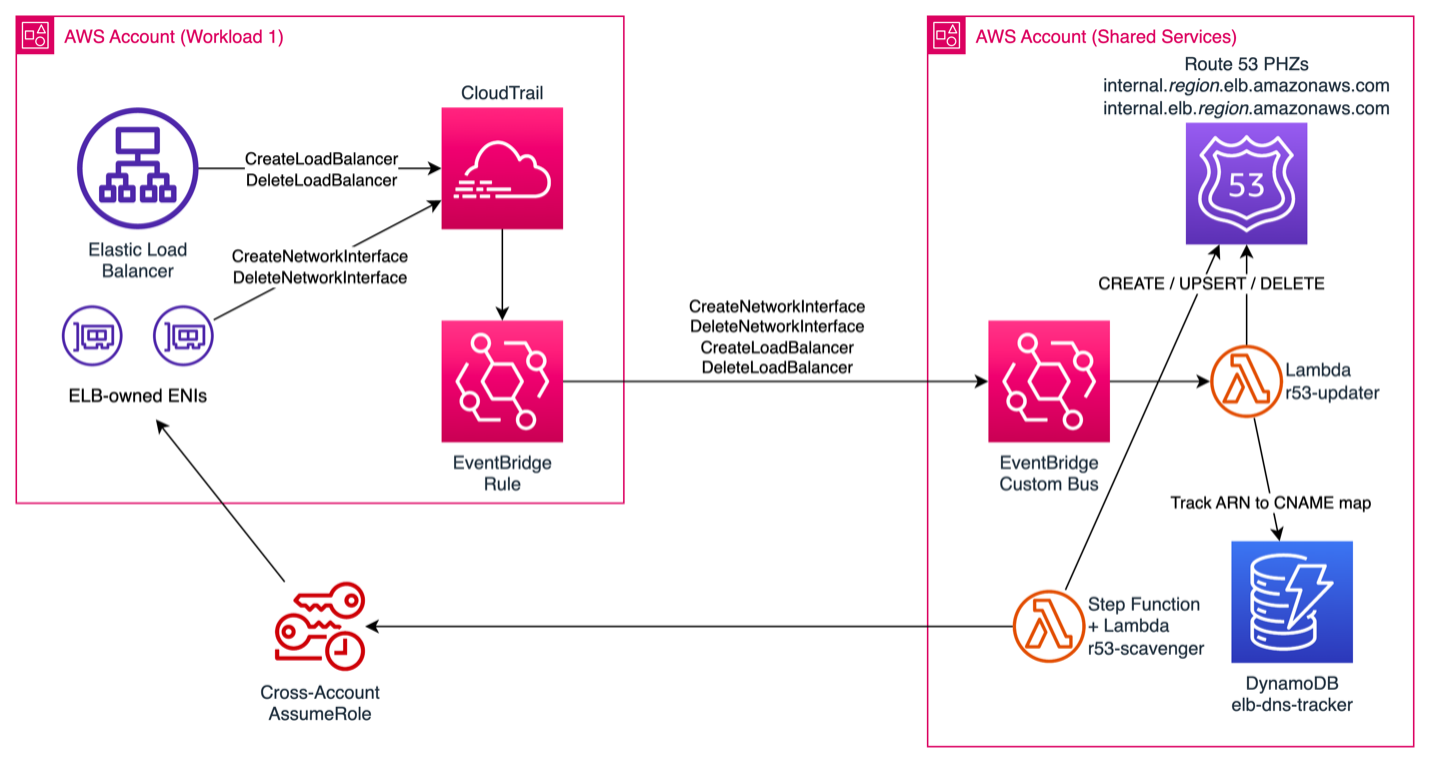
Figure 2: Solution architecture
Deployment
Breaking down the solution into its individual components, we will be deploying a few services either manually or using an AWS CloudFormation template.
The deployment assumes you rely on AWS Organizations for multi-account management because it uses the organization ID as the principal for permissions for the EventBridge bus receiving lifecycle events. It also requires you to operate out of a single Region with a single pair of hosted zones.
Deployment in the shared services account
To deploy the solution in the shared services account, you need to have the following:
- Two Route 53 private hosted zones per Region:
- Application Load Balancers will use internal.region.elb.amazonaws.com
- Network Load Balancers will use internal.elb.region.amazonaws.com
- Two Lambda functions:
- r53-scavenger – Lambda function to be invoked on a schedule and populate existing Application Load Balancer or Network Load Balancer private addresses into Route 53 private hosted zones
- r53-updater – Lambda function to be invoked on creations, updates, scaling, and deletions and maintain the private addresses in the Route 53 private hosted zones
- A DynamoDB table to track all changes and avoid cross-account lookups on updates
- An EventBridge custom bus to receive events from the EventBridge rules in each member account and send to the r53-updater Lambda
Deployment on all source or workload accounts hosting load balancer resources in scope
To deploy the solution on source or workload accounts, you need the following:
- A role to be assumed by Lambda for initial record discovery by the r53-scavenger Lambda
- An EventBridge rule on all source or workload accounts to trigger CloudTrail events
Post-deployment first run
Using AWS Step Functions, a one-time manual execution of the r53-scavenger Step Functions workflow will populate the Route 53 private hosted zones with any existing load balancer names and IPs, and it allows us to use the private DNS records.Any creations, changes (including scale operations), and deletions will invoke the r53-updater Lambda and be tracked in DynamoDB.
Walkthrough
For the solution to capture changes to load balancers and update Route 53 records, we need a way to invoke functions to do this, so we use EventBridge rules to send specific events to a custom bus.
Because Elastic Load Balancing operations log from two different CloudTrail sources depending on what action is happening, we need two EventBridge rules.
- On
CreateLoadBalancerandDeleteLoadBalancercalls, we see a source fromaws.elasticloadbalancing, and these are needed to either create or delete our Route 53 RecordSet. On CREATE, we use a placeholder value because we don’t yet know the actual network interface IP addresses our load balancer is using, only that it was created.
{
  "source": ["aws.elasticloadbalancing"],
  "detail": {
    "eventName": ["CreateLoadBalancer", "DeleteLoadBalancer"]
  }
}
- On
CreateNetworkInterfaceandDeleteNetworkInterfacecalls, we see the source asaws.ec2, but we only want to receive ELB actions, so we also filter onsourceIPAddressanduserAgentto only send events fromelasticloadbalancing.amazonaws.com.
{
  "source": ["aws.ec2"],
  "detail": {
    "eventSource": ["ec2.amazonaws.com"],
    "eventName": ["CreateNetworkInterface", "DeleteNetworkInterface"],
    "sourceIPAddress": ["elasticloadbalancing.amazonaws.com"],
    "userAgent": ["elasticloadbalancing.amazonaws.com"]
  }
}
These two rules funnel events into a custom EventBridge event bus on a centralized account, with specific permissions that only allow PutEvents for accounts within the organization. This can be opened more broadly if needed for cross-organization or individual cross-account permissions.
{
  "Version": "2012-10-17",
  "Statement": [{
    "Sid": "AllowAllAccountsFromOrganizationToPutEvents",
    "Effect": "Allow",
    "Principal": "*",
    "Action": "events:PutEvents",
    "Resource": "arn:aws:events:us-east-1:555555555555:event-bus/r53-updater",
    "Condition": {
      "StringEquals": {
        "aws:PrincipalOrgID": "o-1234567890"
      }
    }
  }, {
    "Sid": "AllowAccountToManageRulesTheyCreated",
    "Effect": "Allow",
    "Principal": {
      "AWS": "arn:aws:iam::555555555555:root"
    },
    "Action": ["events:PutRule", "events:PutTargets", "events:DeleteRule", "events:RemoveTargets", "events:DisableRule", "events:EnableRule", "events:TagResource", "events:UntagResource", "events:DescribeRule", "events:ListTargetsByRule", "events:ListTagsForResource"],
    "Resource": "arn:aws:events:us-east-1:555555555555:rule/r53-updater",
    "Condition": {
      "StringEqualsIfExists": {
        "events:creatorAccount": "555555555555"
      }
    }
  }]
}
This custom event bus is used to invoke a Lambda function called r53-updater that manages the Route 53 record lifecycle and keeps track of state in a DynamoDB table to avoid multiple API calls per operation. To run successfully, the function relies on a cross-account role to run both DescribeLoadBalancer and DescribeNetworkInterfaces calls when building the record.
When load balancers get created, we see our DynamoDB table being populated with the cname (external) and cnameint (internal) DNS records used. Figure 3 shows example records on this DynamoDB table.

Figure 3: DynamoDB table used for Amazon Resource Name (ARN) to CNAME or network interface mapping
And we can also see our DNS records in Route 53 added. On ELB scaling operations, more IP addresses could be added to the records to support additional network interfaces. Figure 4 shows an example of the Network Load Balancer record created by this solution.
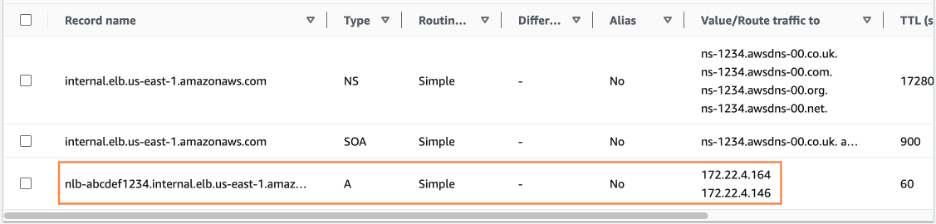
Figure 4: Example Network Load Balancer record populated by solution into a private hosted zone
Conclusion
With this solution deployed, you can now get the internal IPs used by internet-facing Application Load Balancers or Network Load Balancers using simple DNS queries, allowing easier lookups for internal firewall appliances or using split DNS to resolve to the same load balancer.
To get started, simply deploy the AWS CloudFormation templates as mentioned in the Deployment section above, and follow the post-deployment first run to populate your existing load balancer records.
About the author

Gonzalo Escarrá
Gonzalo Escarrá is a Solutions Architect at Amazon Web Services (AWS) specializing in Networking for the Financial Services industry. With over 20 years of experience in datacenter networking, he helps envision, design and build global-scale hybrid networks and solutions for customers.