AWS Storage Blog
Troubleshooting Amazon S3 access denied errors using Kiro CLI
Managing data access across multiple layers of permissions is a common industry challenge. Changes to AWS Identity and Access Management (AWS IAM) policies, Amazon Simple Storage Service (Amazon S3) bucket configurations, AWS Key Management Service (AWS KMS) key policies, or Amazon Virtual Private Cloud (Amazon VPC) endpoint policies can unintentionally cause access issues. When these access interruptions happen, they can halt critical business processes and affect multiple teams simultaneously, making rapid diagnosis and resolution essential for maintaining business continuity and reducing operational costs. Traditional troubleshooting approaches require sequential analysis of resource-based policies, identity-based policies, encryption settings, and VPC endpoint policies, which can create significant operational overhead as teams work to identify the root cause and implement appropriate fixes.
S3 serves as the backbone of AWS infrastructure, with services like AWS Lambda, Amazon Elastic Compute Cloud (Amazon EC2) and third-party applications relying on it for data storage, backup and content delivery. Kiro CLI is an AI-powered command-line tool that transforms complex AWS troubleshooting through intelligent analysis of service configurations, policies, and permissions across multiple AWS services. Traditional S3 access denied troubleshooting requires manually analyzing complex IAM policies, bucket configurations KMS permissions, and security controls across different layers, which can take hours to resolve and demands deep expertise in AWS permission models.
In this post, we discuss how Kiro CLI simplifies troubleshooting S3 access denied issues by walking through three real world scenarios: explicit deny statements in bucket policies, implicit deny statements from missing KMS permissions, and VPC endpoint policy restrictions. You will learn how Kiro CLI systematically analyzes the complete permission chain, including IAM policies, bucket configurations, encryption settings, and network controls, to quickly identify root causes and provide actionable remediation guidance.
Solution overview
This solution uses the enhanced error messages returned by Amazon S3 for access denied errors within the same organization. Kiro CLI transforms the complex process of troubleshooting S3 access denied errors into an intelligent, step-by-step diagnostic process through systematic analysis of the complete permission chain.
This post demonstrates Kiro CLI’s capabilities through three comprehensive scenarios:
- Explicit deny statements – Where bucket policies override IAM permissions
- Implicit deny scenarios – Involving missing AWS KMS permissions for encrypted objects
- Security control conflicts – VPC endpoint policies restrict S3 access despite proper IAM and bucket permissions
Kiro CLI automatically detects permission issues across multiple layers, from explicit policy denials to encryption permissions and account-level security controls, providing clear explanations of why access is being blocked along with guided remediation steps. This approach saves significant troubleshooting time compared to manual analysis, while offering structured remediation guidance for both common and complex S3 access scenarios. After we walk you through launching Kiro CLI, we explore how to troubleshooting the following S3 access denied issues:
- Scenario 1 – Troubleshoot explicit deny statements
- Scenario 2 – Troubleshoot implicit deny statements
- Scenario 3 – Troubleshooting restricting using an S3 VPC Endpoint policy
Prerequisites
To get started, complete the following prerequisite steps:
- If you’re new to Kiro CLI, refer to Get started in the Kiro documentation for initial setup guidance.
- Installation of Kiro CLI:
- Follow the installation steps in the documentation based on your operating system
- Verify the installation by running kiro –version in your terminal
- AWS credentials configuration:
- Configure your AWS credentials using aws configure
- The configured AWS profile will be used by Kiro CLI to validate S3 access permissions, and if you want to use a profile other than the default, you can reference specific profiles within your queries.
- If you’re troubleshooting permissions for a different role:
- Ensure your credentials can assume the target IAM role
- For validating permissions of another role, refer to the re:Post article for detailed steps to configure AWS credentials with role assumption.
Although this post uses IAM user credentials for simplicity, production environments should use temporary credentials, such as AWS Identity Center or AWS Security Token Service(STS) assume-role, with MFA enabled. If using long-term IAM user access keys, enable MFA and rotate keys every 90 days maximum. Kiro CLI can suggest policy changes and request permission to implement them; you can approve or deny each change. However, approving automated policy modifications can grant unintended permissions. Always review suggested changes carefully to understand the security impact, test in non-production environments, and follow your security review processes before approving changes to production. This post demonstrates Kiro CLI’s diagnostic capabilities only, not automated remediation.
Launch Kiro CLI
Open your terminal, verify your AWS identity using aws sts get-caller-identity, then launch Kiro CLI by executing the command kiro-cli chat.
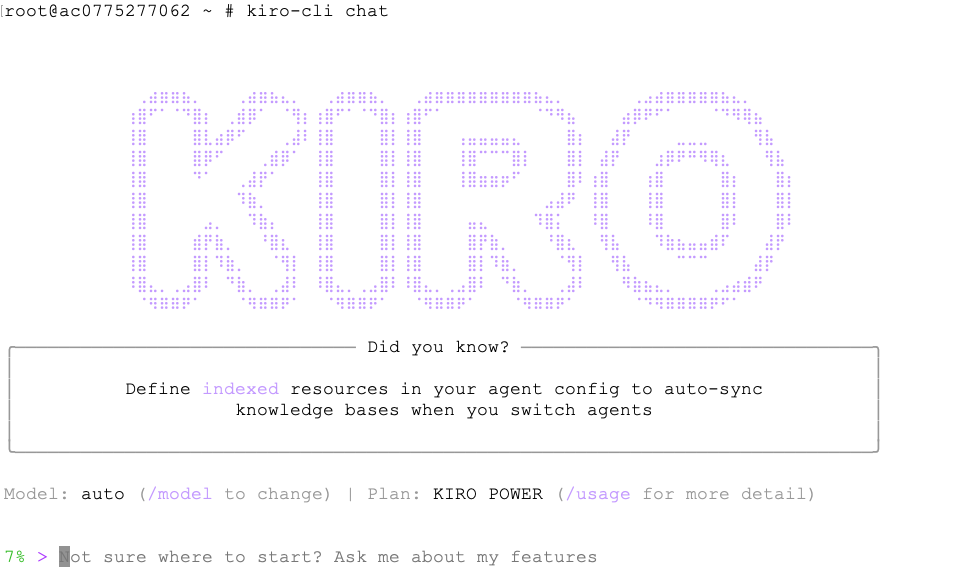
When troubleshooting S3 access denied issues, Kiro CLI conducts a systematic analysis by examining multiple configuration layers including bucket policies, IAM policies, object ownership settings, KMS key policies, and VPC endpoint policies. During this diagnostic process, Kiro CLI will request your permission to run specific AWS commands to gather the necessary configuration data.
When prompted, carefully review each permission request and confirm by entering y if you approve. We recommend using y (yes) instead of t (trust) in this scenario because y makes it possible to validate each change to your security policies before its made.
The following is an example permission prompt:
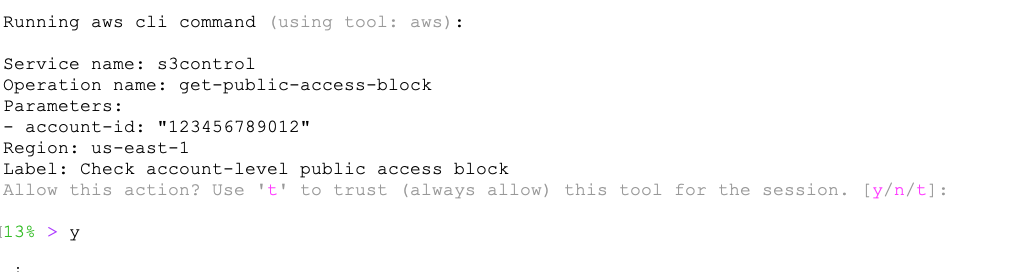
Kiro CLI systematically executes a series of AWS commands to analyze permissions across multiple layers, including bucket policies, IAM roles, encryption settings, and access controls. Based on your specific query, it provides comprehensive troubleshooting along with a detailed root cause analysis.
Kiro CLI uses low-level S3 API calls (such as “GetObject”) rather than high-level CLI commands (such as “aws s3 cp”) during its diagnostic process. Low-level API calls return more detailed error messages that include specific policy evaluation context, enabling Kiro CLI to pinpoint the exact permission layer causing the denial.
The following scenarios demonstrate how Kiro CLI diagnoses three common types of S3 access denied errors, each caused by a different layer in the AWS permission stack. We start with an explicit deny in a bucket policy, move to a missing AWS KMS decryption permission, and conclude with a restrictive VPC endpoint policy.
Scenario 1: Troubleshoot Explicit Deny Statements
In this scenario, a developer with permissions to download a file from a specific S3 bucket is unable to download the file. This represents a common situation where explicit deny statements override allow permissions.
When attempting to download a file from the S3 bucket amzn-s3-demo-company-reports, the developer encounters an access denied error:

Instead of manually examining multiple IAM policies and bucket configurations, the developer uses Kiro CLI to diagnose the issue with a natural language query.

Kiro CLI provides the following root cause analysis:
## Analysis Summary

Root Cause: The primary issue preventing you from downloading the S3 object is an explicit DENY policy at the bucket level.

### Permission Structure Analysis:

1. Bucket Policy (BLOCKING ACCESS):
  • Contains an explicit DENY statement for s3:GetObject action
  • Applies to one principal ("Principal": "arn:aws:iam::123456789012:user/johndoe")
  • Covers all objects in the bucket ("Resource": "arn:aws:s3::: amzn-s3-demo-company-reports/*")

2. Your IAM Permissions (SUFFICIENT):
  • You have s3:GetObject permission in your inline policy
  • Policy correctly targets the amzn-s3-demo-company-reports bucket
  • IAM permissions would normally allow the download

3. Bucket Policy Override:
  • Explicit DENY in bucket policy overrides any ALLOW in IAM policies
  • This is AWS's fundamental security principle: DENY always wins

### Key Finding:
Even though you have the required IAM permissions, explicit DENY statements in resource policies always override ALLOW statements,
regardless of IAM permissions.

### Resolution Options:
1. Remove or modify the bucket policy to allow your access
2. Contact the bucket owner to grant you access
3. Add an exception to the DENY policy for your user ARN

The bucket policy is the definitive blocker preventing your download access.
Scenario 2: Troubleshooting Implicit Deny Statements
In this scenario, a developer has sufficient S3 permissions but encounters access issues when trying to download an encrypted object, illustrating an implicit deny scenario where the absence of required AWS KMS permissions blocks access despite no explicit deny statements. This demonstrates how S3 access can be affected by permissions in related services like AWS KMS, highlighting the importance of comprehensive cross-service permission analysis.
When attempting to download a file from the S3 bucket amzn-s3-demo-company-reports, the developer encounters an access denied error:


Kiro CLI provides the following root cause analysis:
## Analysis Summary

Root Cause: KMS Key Permission Issue

The download failure is caused by insufficient KMS permissions, not S3 permissions. Here's the complete analysis:

### Permission Structure Analysis

S3 Permissions (Sufficient):
• Bucket ACL: You have FULL_CONTROL on the bucket
• Object ACL: You have FULL_CONTROL on the object
• No restrictive bucket policy exists
• Your AWS identity matches the bucket/object owner

KMS Permissions (Insufficient):
• Object is encrypted with KMS key: arn:aws:kms:us-east-1:123456789012:key/ab2c3d4e-e5f6-7890-abcd-ef1234567890. Your user arn:aws:iam::123456789012:user/UserA lacks kms:Decrypt permission
• Cannot even describe the key (lacks kms:DescribeKey permission)

### Root Cause
The object is encrypted with AWS KMS, but your IAM user doesn't have the required KMS permissions to decrypt it. Even though you own the S3 object, KMS uses separate permissions that must be explicitly granted.

### Required Actions
To fix this, you need one of the following:

1. Add KMS permissions to your IAM user/role:

json
   {
     "Effect": "Allow",
     "Action": [
       "kms:Decrypt",
       "kms:DescribeKey"
     ],
     "Resource": "arn:aws:kms:us-east-1:123456789012:key/ab2c3d4e-e5f6-7890-abcd-ef1234567890"
   }


2. Update the KMS key policy to allow your user access

3. Contact the key administrator to grant you decrypt permissions

The error confirms this: User: arn:aws:iam::123456789012:user/UserA is not authorized to perform: kms:Decrypt on resource
Scenario 3: Troubleshoot restrictions using a S3 VPC endpoint policy
In this scenario, an EC2 instance with a privileged IAM role encounters unexpected access denied errors when attempting to download objects from an S3 bucket. The instance routes S3 traffic through a gateway VPC endpoint, whose restrictive policy overrides the IAM permissions. This illustrates how VPC endpoint policies act as an additional authorization layer that can block access regardless of IAM privileges. Understanding the interplay between IAM policies, network paths, and endpoint policies is essential when troubleshooting S3 connectivity issues.
When attempting to download a file from the S3 bucket amzn-s3-demo-company-reports, the user encounters a forbidden error:

VPC endpoint policies operate outside the typical IAM and bucket policy evaluation path, making them one of the hardest access denied root causes to identify. The developer turns to Kiro CLI to surface this network-level restriction:

Kiro CLI provides the following root cause analysis:
## Analysis Summary

Based on my investigation, I've identified the root cause of why you can't download the S3 object s3://amzn-s3-demo-company-reports/HalfyearReports.pdf:

### Root Cause: VPC Endpoint Policy Restriction

The error message consistently shows: "no VPC endpoint policy allows the s3:GetObject action"

This indicates that:

1. Your EC2 instance is in a VPC that routes S3 traffic through a VPC endpoint
2. The VPC endpoint has a restrictive policy that explicitly denies S3 actions including:
   • s3:GetObject (downloading objects)
   • s3:GetBucketPolicy (viewing bucket policies)
   • s3:GetObjectAcl (viewing object ACLs)
   • s3:ListBucket (listing bucket contents)

### Permission Analysis

Your IAM role (EC2s3Admin) has sufficient permissions:
• AmazonS3ManagedAccess policy (S3 Download access)

However, VPC endpoint policies override IAM permissions when traffic routes through the endpoint.

### Required Actions to Fix

To resolve this issue, you need to:

1. Update the VPC endpoint policy to allow S3 actions:

json
   {
     "Statement": [
       {
         "Effect": "Allow",
         "Principal": {
        	  "AWS": "arn:aws:iam::123456789012:user/johndoe"
         },
         "Action": [
           "s3:GetObject",
           "s3:GetBucketPolicy",
           "s3:ListBucket",
           "s3:GetObjectAcl"
         ],
         "Resource": [
           "arn:aws:s3:::amzn-s3-demo-company-reports",
           "arn:aws:s3:::amzn-s3-demo-company-reports/*"
         ]
       }
     ]
   }

2. Or modify the route table to bypass the VPC endpoint for S3 traffic (routes through internet gateway instead)

The VPC endpoint policy is the bottleneck preventing access, despite having sufficient IAM permissions for S3 operations. This is not a recommended option as the traffic is not traversed through secure VPC Endpoint.
Conclusion
The troubleshooting methodology demonstrated in this blog post extends far beyond S3 access issues, offering a blueprint for diagnosing challenges across the entire AWS service ecosystem. Kiro CLI’s intelligent analysis can be similarly applied to troubleshoot issues in Amazon Relational Database Service (Amazon RDS), EC2 instances, Lambda, and other AWS services, following a similar systematic approach. By adopting Kiro CLI as a standard component of your AWS operational toolkit, organizations can significantly reduce resolution times and minimize service disruptions.
Try out Kiro CLI for your own troubleshooting use cases, and share your questions and feedback in the comments.