AWS Big Data Blog
Agentic AI for observability and troubleshooting with Amazon OpenSearch Service
Now, Amazon OpenSearch Service brings three new agentic AI features to OpenSearch UI. In this post, we show how these capabilities work together to help engineers go from alert to root cause in minutes. We also walk through a sample scenario where the Investigation Agent automatically correlates data across multiple indices to surface a root cause hypothesis.
Streamline Apache Kafka topic management with Amazon MSK
In this post, we show you how to use the new topic management capabilities of Amazon MSK to streamline your Apache Kafka operations. We demonstrate how to manage topics through the console, control access with AWS Identity and Access Management (IAM), and bring topic provisioning into your continuous integration and continuous delivery (CI/CD) pipelines.
How to set up an air-gapped VPC for Amazon SageMaker Unified Studio
In this post, we explore scenarios where customers need more control over their network infrastructure when building their unified data and analytics strategic layer. We’ll show how you can bring your own Amazon Virtual Private Cloud (Amazon VPC) and set up Amazon SageMaker Unified Studio for strict network control.
Navigating multi-account deployments in Amazon SageMaker Unified Studio: a governance-first approach
In this post, we explore SageMaker Unified Studio multi-account deployments in depth: what they entail, why they matter, and how to implement them effectively. We examine architecture patterns, evaluate trade-offs across security boundaries, operational overhead, and team autonomy. We also provide practical guidance to help you design a deployment that balances centralized control with distributed ownership across your organization.
Improve the discoverability of your unstructured data in Amazon SageMaker Catalog using generative AI
This is a two-part series post. In the first part, we walk you through how to set up the automated processing for unstructured documents, extract and enrich metadata using AI, and make your data discoverable through SageMaker Catalog. The second part is currently in the works and will show you how to discover and access the enriched unstructured data assets as a data consumer. By the end of this post, you will understand how to combine Amazon Textract and Anthropic Claude through Amazon Bedrock to extract key business terms and enrich metadata using Amazon SageMaker Catalog to transform unstructured data into a governed, discoverable asset.
Automated tag-based DAG permission management in Amazon MWAA
In this post, we show you how to use Apache Airflow tags to systematically manage DAG permissions, reducing operational burden while maintaining robust security controls that complement infrastructure-level security measures.
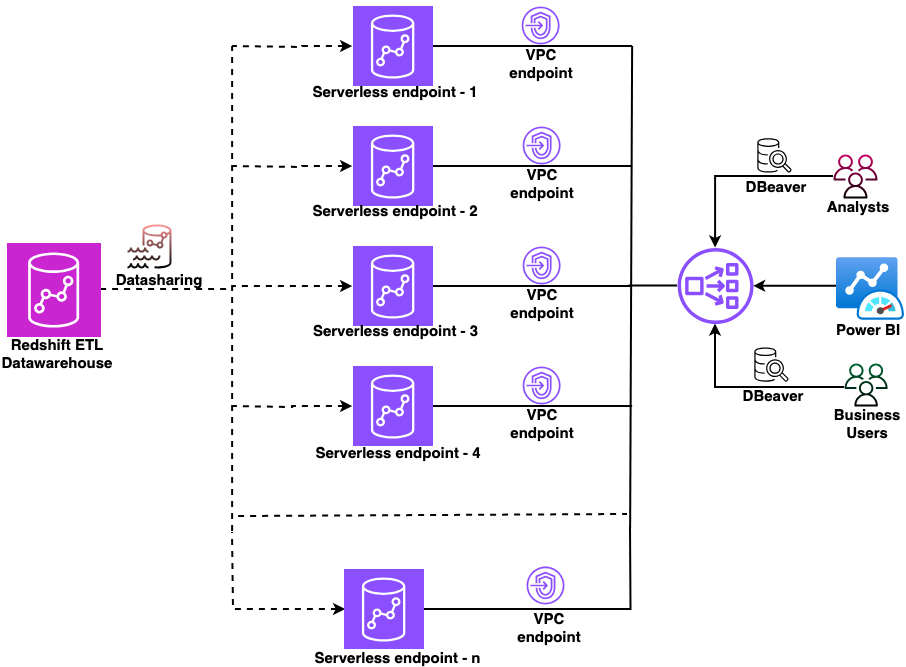
Secure multi-warehouse Amazon Redshift access behind a Network Load Balancer using Microsoft Entra ID
In this post, we show you how to configure a native identity provider (IdP) federation for Amazon Redshift Serverless using Network Load Balancer. You will learn how to enable secure connections from tools like DBeaver and Power BI while maintaining your enterprise security standards.
Securely connect Kafka client applications to your Amazon MSK Serverless cluster from different VPCs and AWS accounts
In this post, we show you how Kafka clients can use Zilla Plus to securely access your MSK Serverless clusters through Identity and Access Management (IAM) authentication over PrivateLink, from as many different AWS accounts or VPCs as needed. We also show you how the solution provides a way to support a custom domain name for your MSK Serverless cluster.
Build AWS Glue Data Quality pipeline using Terraform
AWS Glue Data Quality is a feature of AWS Glue that helps maintain trust in your data and support better decision-making and analytics across your organization. You can use Terraform to deploy AWS Glue Data Quality pipelines. Using Terraform to deploy AWS Glue Data Quality pipeline enables IaC best practices to ensure consistent, version controlled and repeatable deployments across multiple environments, while fostering collaboration and reducing errors due to manual configuration. In this post, we explore two complementary methods for implementing AWS Glue Data Quality using Terraform.
Automating data classification in Amazon SageMaker Catalog using an AI agent
If you’re struggling with manual data classification in your organization, the new Amazon SageMaker Catalog AI agent can automate this process for you. Most large organizations face challenges with the manual tagging of data assets, which doesn’t scale and is unreliable. In some cases, business terms aren’t applied consistently across teams. Different groups name and tag data assets based on local conventions. This creates a fragmented catalog where discovery becomes unreliable and governance teams spend more time normalizing metadata than governing. In this post, we show you how to implement this automated classification to help reduce the manual tagging effort and improve metadata consistency across your organization.