AWS Big Data Blog
Extract data from Amazon Aurora MySQL to Amazon S3 Tables in Apache Iceberg format
If you manage data in Amazon Aurora MySQL-Compatible Edition and want to make it available for analytics, machine learning (ML), or cross-service querying in a modern lakehouse format, you’re not alone.
Organizations often need to run analytics, build ML models, or join data across multiple sources. These are examples of workloads that can be resource-intensive and impractical to run directly against a transactional database. By extracting your Aurora MySQL data into Amazon S3 Tables in Apache Iceberg format, you can offload analytical queries from your production database without impacting its performance, while storing data in a fully managed Iceberg table store optimized for analytics. Built on the open Apache Iceberg standard, Amazon Simple Storage Service (Amazon S3) Table data is queryable from engines like Amazon Athena, Amazon Redshift Spectrum, and Apache Spark without additional data copies. You can also combine relational data with other datasets already in your data lake, enabling richer cross-domain insights.
Apache Iceberg and Amazon S3 Tables
Apache Iceberg is a widely adopted open table format that offers Atomicity, Consistency, Isolation, Durability (ACID) transactions, schema evolution, and time travel capabilities. It enables multiple engines to work concurrently on the same dataset, making it a popular choice for building open lakehouse architectures.
Amazon S3 Tables is a purpose-built, fully managed Apache Iceberg table store designed for analytics workloads. It delivers up to 3x faster query performance and up to 10x more transactions per second compared to self-managed Iceberg tables. It also automatically compacts data and removes unreferenced files to optimize storage and performance.
In this post, you learn how to set up an automated, end-to-end solution that extracts tables from Amazon Aurora MySQL Serverless v2 and writes them to Amazon S3 Tables in Apache Iceberg format using AWS Glue. The entire infrastructure is deployed using a single AWS CloudFormation stack.
Requirements
AWS offers zero-ETL integrations from Amazon Aurora to Amazon Redshift and Amazon SageMaker AI, enabling seamless data flow for analytics and machine learning workloads.
However, there isn’t yet a native zero-ETL integration between Amazon Aurora and Amazon S3 Tables. This means that organizations looking to use Amazon S3 Tables for their Lakehouse architecture currently face several requirements:
- Setting up ETL pipelines to extract data from Amazon Aurora and transform it into Apache Iceberg format
- Configuring networking and security for AWS Glue jobs to access Amazon Aurora databases in private subnets
- Coordinating the provisioning of source databases, ETL pipelines, and target table stores
- Managing the end-to-end workflow without native automation
Solution overview
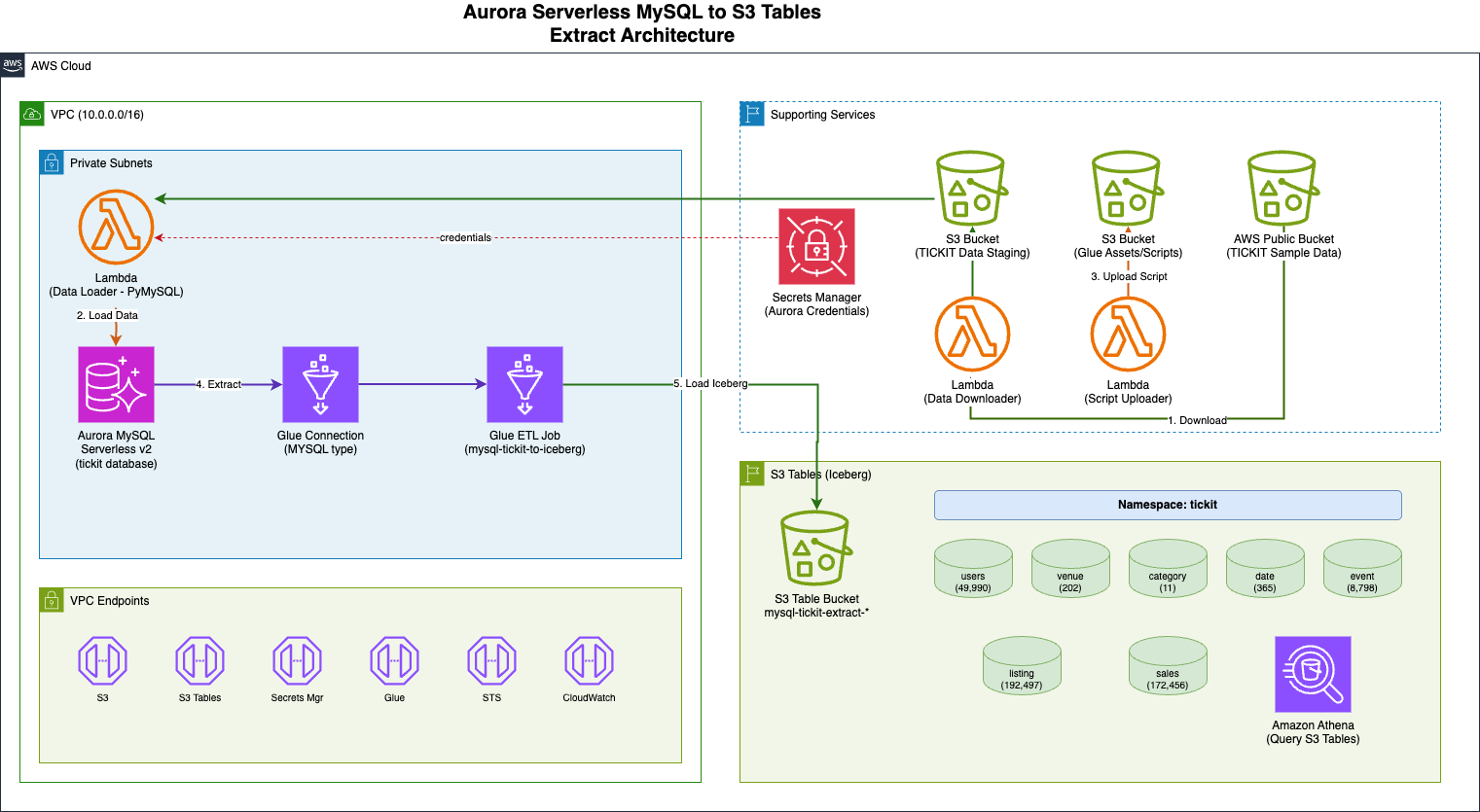
In this solution, you automate the extraction of relational database tables from Amazon Aurora MySQL Serverless v2 to Amazon S3 Tables in Apache Iceberg format using AWS Glue 5.0. To help you get started and test this solution, a CloudFormation template is provided. This template provisions the required infrastructure, loads sample data, and configures the Extract, Transform, Load (ETL) pipeline. You can adapt this template for your own scenario.
Sample data
This solution uses the TICKIT sample database, a well-known dataset used in Amazon Redshift documentation. The TICKIT data models a fictional ticket sales system with seven interrelated tables: users, venue, category, date, event, listing, and sales. The dataset is publicly available as mentioned in the Amazon Redshift Getting Started Guide.
Solution flow
The solution flow as shown in the previous architecture diagram:
- An AWS Lambda function downloads the TICKIT sample dataset (a fictional ticket sales system used in Amazon Redshift documentation) from a public Amazon S3 bucket to a staging S3 bucket.
- A second Lambda function, using PyMySQL (a Python MySQL client library), loads the staged data files into the Aurora MySQL Serverless v2 database using
LOAD DATA LOCAL INFILE. - The AWS Glue job reads seven TICKIT tables from Aurora MySQL through a native MySQL connection and writes them to Amazon S3 Tables in Apache Iceberg format using the S3 Tables REST catalog endpoint with SigV4 authentication.
- You can query the migrated data in S3 Tables using Amazon Athena.
The solution consists of the following key components:
- Amazon Aurora MySQL Serverless v2 as the source relational database containing the TICKIT sample dataset (users, venue, category, date, event, listing, and sales tables)
- AWS Secrets Manager to store the Aurora MySQL database credentials securely
- Amazon S3 staging bucket for the TICKIT sample data files downloaded from the public redshift-downloads S3 bucket
- AWS Lambda functions using PyMySQL to load data into Aurora MySQL
- AWS Glue 5.0 job (PySpark) to read tables from Aurora MySQL and write them to S3 Tables in Apache Iceberg format
- Amazon S3 Tables as the target storage for the migrated Iceberg tables
- Amazon VPC with private subnets and VPC endpoints for Amazon S3, S3 Tables, AWS Glue, Secrets Manager, AWS Security Token Service (AWS STS), CloudWatch Logs, and CloudFormation
Here are some advantages of this architecture:
- Fully automated setup: A single CloudFormation stack provisions the required infrastructure, loads sample data, and configures the ETL pipeline.
- Serverless and cost-efficient: Aurora MySQL Serverless v2 and AWS Glue both scale based on demand, minimizing idle costs.
- Apache Iceberg table format: Data is stored in Apache Iceberg format, enabling ACID transactions, schema evolution, and time travel queries.
- Network isolation and credential management: The resources run within private subnets with Virtual Private Cloud (VPC) endpoints, and database credentials are managed through AWS Secrets Manager.
- Extensible pattern: The same approach can be adapted for other relational databases (PostgreSQL, SQL Server) and other target formats supported by AWS Glue.
Prerequisites
To follow along, you need an AWS account. If you don’t yet have an AWS account, you must create one. The CloudFormation stack deployment takes approximately 30-45 minutes to complete and requires familiarity with Amazon S3 Tables, AWS CloudFormation, Apache Iceberg, AWS Glue, Amazon Aurora. This solution will incur AWS costs. The main cost drivers are AWS Glue ETL job runs (billed per DPU-hour, proportional to data volume) and Amazon S3 Tables storage and request charges. Remember to clean up resources when you are done to avoid unnecessary charges.
CloudFormation parameters
You can configure the following parameters before deploying the CloudFormation stack:
| Parameter | Description | Default | Required |
| S3TableBucketName | Name of the S3 Tables bucket to create (or use existing) | Yes | |
| DatabaseName | Name of the initial Aurora MySQL database | tickit | No |
| MasterUsername | Master username for Aurora MySQL | admin | No |
| VpcCidr | CIDR block for the VPC | 10.1.0.0/16 | No |
| S3TableNamespace | Namespace for S3 Tables | tickit | No |
Implementation walkthrough
The following steps walk you through the implementation. These steps are to deploy and test an end-to-end solution from scratch. If you are already running some of these components, you may skip to the relevant step. You can also refer to the aws-samples repository, sample-to-write-aurora-mysql-to-s3tables-using-glue for the entire solution.
Step 1: Deploy the CloudFormation stack
Deploy the CloudFormation template scripts/aurora-mysql-to-s3tables-stack.yaml using the AWS Console or the AWS Command Line Interface (AWS CLI). Provide a name for the S3 Tables bucket; the stack will create it automatically (or use an existing one if it already exists).
To deploy using the AWS Console (recommended), navigate to the AWS CloudFormation Console and use the CloudFormation template. Alternatively, to deploy using the AWS CLI first upload the template to an S3 bucket (the template exceeds the 51,200 byte limit for inline –template-body), then create the stack.
The stack will automatically:
- Create the S3 Tables bucket (or use existing if it already exists)
- Create a VPC with private subnets and VPC endpoints
- Provision an Aurora MySQL Serverless v2 cluster
- Download TICKIT sample data from the public Amazon S3 bucket
- Load the sample data into Aurora MySQL via a Lambda function using PyMySQL
- Create a Glue job configured to migrate data to S3 Tables in Iceberg format
Note: The S3 Tables bucket is retained when the stack is deleted to preserve your data.
Step 2: Verify the Aurora MySQL data
Retrieve the AuroraClusterEndpoint, DatabaseName, and SecretArn values from the CloudFormation stack, make a note of the AuroraClusterEndpoint, DatabaseName, and SecretArn. You can navigate to the Amazon Aurora Console, choose the Query Editor, and enter the values from the CloudFormation stack to connect. You can also choose your preferred method of connecting to an Amazon Aurora DB cluster.
Use the AWS CLI to retrieve the stack outputs: –
Then run the following SQL commands to verify the data load:
Step 3: Run the Glue job
Navigate to the AWS Glue Console, choose ETL jobs under Data Integration and ETL from the left panel. Select the AWS Glue job mysql-tickit-to-iceberg-job and choose Run job to start execution. You can also start the ETL job using the AWS CLI:
The AWS Glue job performs the following operations for each of the seven TICKIT tables:
- Reads the table from Aurora MySQL through the native MYSQL Glue connection
- Converts the data to a Spark DataFrame
- Creates the Iceberg table in the S3 Tables namespace using CREATE TABLE IF NOT EXISTS with the USING ICEBERG clause
- Inserts the data using INSERT INTO (or INSERT OVERWRITE if the table already exists)
- Verifies the record count and displays sample data
Step 4: Verify the results
After the AWS Glue job completes, verify that the tables have been created in your S3 Table bucket by navigating to the Amazon S3 Console. Choose Table buckets under Buckets and select your S3 Table bucket. You can also verify using the AWS CLI:
Select a table from the tickit namespace and choose Preview to inspect the data.
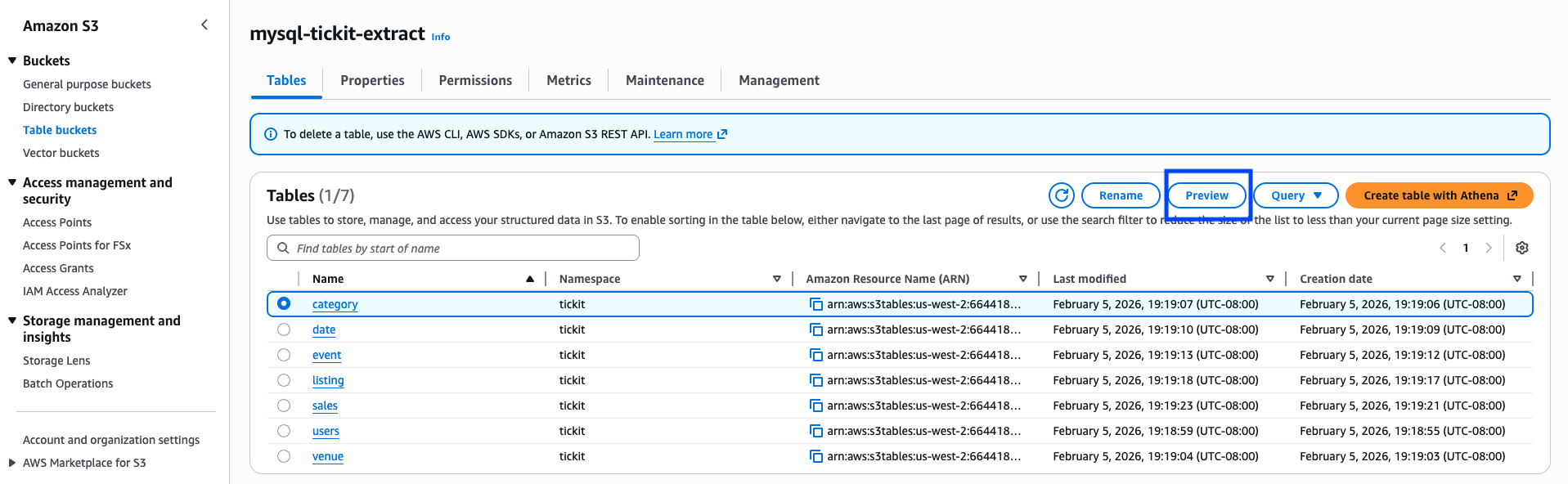
You can also query the migrated tables using Amazon Athena to validate the data.
Clean up resources
Remember to clean up resources when you no longer need them to avoid unnecessary charges.
Navigate to the CloudFormation console, search for your stack and choose Delete. Alternatively, use the AWS CLI:
The S3 Tables bucket is retained by default. To delete it, use the Amazon S3 console or the AWS CLI to remove the table bucket separately. The staging S3 bucket will be automatically emptied and deleted as part of the stack deletion.
Summary
In this post, we showed you how to extract data from Amazon Aurora MySQL Serverless v2 and write it to Amazon S3 Tables in Apache Iceberg format using AWS Glue 5.0. By using the native Iceberg support of AWS Glue and the S3 Tables REST catalog endpoint, you can bridge the gap between relational databases and modern lakehouse storage formats. By automating the entire pipeline through CloudFormation, you can quickly set up and replicate this pattern across multiple environments.
As AWS Glue and Amazon S3 Tables continue to evolve, you can take advantage of future enhancements while maintaining this automated migration pattern.
If you have questions or suggestions, leave us a comment.