AWS Big Data Blog
Introducing AWS Glue 6.0 for faster and more cost-effective data integration
Organizations running large data processing pipelines want lower costs, faster job runtimes, and dependable support for open table formats, without adding operational overhead. AWS Glue, a serverless, scalable data integration service that you can use to discover, prepare, move, and integrate data from multiple sources, has now launched AWS Glue 6.0, the new version of AWS Glue that addresses these needs. This version upgrade lowers AWS Glue pricing by 30% and improves performance with AWS optimized Apache Spark 4.1. It also augments developer experience with new features and adds support for Apache Iceberg V3 specifications that are suitable for enterprise adoption. The newly available AWS Glue 6.0 makes data processing workloads more manageable, faster to run, and easier to operate.
In this post, we cover the key capabilities of AWS Glue 6.0 and their performance benefits. We share code examples to help you take full advantage of the release, and we show you how to get started.
AWS Glue 6.0 highlights
AWS Glue 6.0 brings together four major improvements designed to transform how you build and run data integration workloads.
First, it upgrades the underlying runtime to Apache Spark 4.1.1, Python 3.13, Scala 2.13, and AWS SDK for Java 2.x, delivering performance improvements that can help with faster job completion times and lower costs.
Second, this release reduces current AWS Glue usage rate by 30%, and when combined with the performance improvements, you may realize an even lower effective cost.
Third, AWS Glue 6.0 introduces support for more capabilities of Apache Iceberg V3. This includes the VARIANT data type with automatic shredding, deletion vectors, row lineage tracking, nanosecond timestamps, and geo types. With these capabilities, you can build modern lakehouse architectures on the latest open table format standards.
Finally, new features like Spark Declarative Pipelines, Real-Time Mode for streaming and Python virtual environments with S3 caching are designed to further improve performance and developer experience. The following sections dive deeper into each of these areas.
Runtime upgrades
AWS Glue 6.0 upgrades the core runtime stack across the board, bringing newer versions of Apache Spark, Python, Scala, and the AWS SDK to your serverless data integration workloads.
- Apache Spark 4.1.1 – AWS Glue 6.0 runs an AWS optimized build of Apache Spark 4.1.1, a major generational leap from Spark 3.5 on AWS Glue 5.1. This release introduces improvements focused on intent-driven data engineering, real-time streaming with sub-second latencies down to single-digit milliseconds for stateless tasks, faster PySpark performance, and expanded SQL features.
- Python 3.13 – Supports Python 3.13, a stable release that brings interpreter changes, Python data model enhancements, standard library updates, and security updates.
- Scala 2.13 – Upgrades to Scala 2.13 which includes a collections library overhaul, language and syntax feature changes, standard library additions, and compiler performance updates.
Reduced Pricing
AWS Glue 6.0 cuts current AWS Glue pricing by 30%. This means every job you run on AWS Glue 6.0 costs 30% less per DPU-hour compared to AWS Glue 5.1, with no changes required to your workload configuration. When you combine this pricing reduction with the performance improvements delivered by runtime upgrades, your effective cost savings can compound because jobs can complete faster and consume fewer DPU-hours on a lower price point. If you run large-scale Extract, Transform, and Load (ETL) pipelines or recurring batch workloads, this compounding effect can help reduce your monthly spend.
To quantify the comparison, we ran the industry-standard TPC-DS benchmark at 3 TB scale on Parquet data stored in Amazon Simple Storage Service (Amazon S3), using 30 G.2X workers on AWS Glue. The following table compares the results we obtained in our tests for AWS Glue 6.0 and AWS Glue 5.1. Thus, based on TPC-DS benchmark at 3 TB scale, AWS Glue 6.0 delivers up to 36% better price performance than AWS Glue 5.1.
| . | AWS Glue 6.0 | AWS Glue 5.1 |
| Estimated Cost ($) | USD 5.61 | USD 8.87 |
Table 1: 3TB TPC-DS benchmark comparison between AWS Glue 6.0 and AWS Glue 5.1
Updated Open Table Format (OTF) support
AWS Glue 6.0 ships with updated versions of all three major open table formats – Iceberg 1.11.0, Hudi 1.1.1, and Delta Lake 4.2.0 – providing better performance, improved merge-on-read capabilities, streamlined concurrency control, and expanded SQL compatibility.
Besides supporting the latest open table format versions, AWS Glue 6.0 delivers Apache Iceberg V3 specification that is suitable for enterprise use. The highlight is Variant shredding, which AWS Glue uses to automatically decompose semi-structured data into physically optimized, columnar sub-fields, which should result in faster query read performance. Combined with deletion vectors for efficient row-level updates, UNKNOWN column types, default column values, and richer data type support, AWS Glue 6.0 is designed to make your open data lakes faster, more flexible, and more cost-efficient. AWS Glue 6.0 also adds support for geospatial data types (Geometry and Geography) and nanosecond-precision timestamps from the Apache Iceberg V3 specification, neither of which are currently supported in open-source Apache Spark 4.1. Additional features like row lineage tracking round out the Apache Iceberg V3 capabilities available on AWS Glue 6.0.
In the following sections, we illustrate select capabilities from Apache Iceberg V3 specification on AWS Glue 6.0.
- VARIANT column type
Apache Iceberg V3 introduces the Variant type to store semi-structured data (think JSON, XML, logs, and deeply nested event data) in a compact binary format. Variant shredding is designed to automatically decompose VARIANT columns into physically optimized, columnar sub-fields, facilitating predicate pushdowns and reducing scan overhead. It aims to provide simpler management of semi-structured data, without the need for complex flattening logic. With Variant type, you get the flexibility of embedding a JSON data type in your table columns while shredding is designed to help accelerate read queries and reduce costs.
- UNKNOWN column type
The UNKNOWN type in Apache Iceberg V3 acts as a flexible placeholder for columns where the data type is not yet determined at the time of table creation or data ingestion. Tables can accept all-null data initially, and the column type can be upgraded later without breaking ingestion pipelines or consuming applications. This can simplify schema evolution for rapidly changing data sources. Apache Iceberg V3’s UNKNOWN column type maps to Spark 4.1’s VOID type.
- DEFAULT column values
Apache Iceberg V3’s DEFAULT column values allow specifying a default value for a column in the table metadata. When you add a new column, the query engine is designed to automatically apply this default to older rows, without rewriting data or running manual backfill operations.
The following code demonstrates creating an Apache Iceberg V3 table that uses VARIANT and UNKNOWN types, and DEFAULT values for a column.
Prerequisites
To get started with this code example, make sure you have the following prerequisites.
- An AWS account.
- An AWS Identity and Access Management (IAM) role with permissions for AWS Glue, the AWS Glue Data Catalog, and Amazon S3. For more information, see Setting up IAM permissions for AWS Glue. This will be the AWS Glue job execution role.
- An S3 bucket to store the Iceberg table data.
Steps
To create an AWS Glue 6.0 job, use the following steps.
- Log in to your AWS account and open the AWS Glue console.
- Create a new ETL job, with Script editor option.
- Choose engine as Spark in the drop-down menu.
- Start fresh, Create script and copy-paste the following code.
- Replace the demo S3 bucket name with your bucket name in the code.
- Provide the following details in the Job details tab.
- A Name for the job.
- The IAM role you have from Prerequisites (2) for the IAM role of the job.
- Choose Glue 6.0 for the Glue version.
- Leave the rest as defaults.The following screenshot shows the Job details tab with illustrated values in the AWS Glue console.
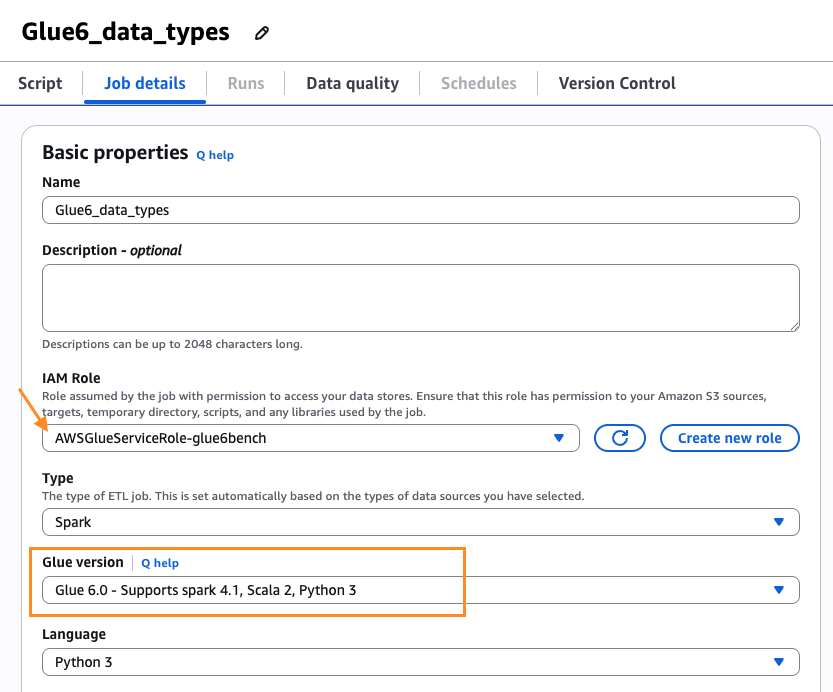
Figure 1: Job details tab with the Glue version set to Glue 6.0 - Scroll down. Under Advanced properties, for Job parameters, add the following additional Job parameter key-value pair:
--datalake-formats=icebergThe following screenshot shows the Job parameters with the illustrated key-value pair in the AWS Glue console.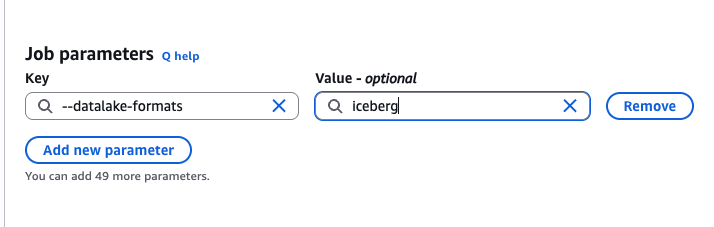
Figure 2: Job parameters with the datalake-formats key set to iceberg
- Save the job and choose Run.
- After the job is completed successfully, from the Runs tab – Run details, you can inspect the Output logs that take you to the logs in the Amazon CloudWatch console. The following shows the sample output for the
SELECTquery in the script.
Notice that we inserted two rows with values only in the record_id and the variant column. Variant column inserts were done using parse_json(). The reserved_field is of VOID type, hence returns NULL values. The status column is declared with a default active value and returns active, since the column was omitted during the insert operation.
- Deletion Vectors
Apache Iceberg V3 replaces the traditional positional delete files used in Apache Iceberg V2 to deletion vectors. This change can help improve Merge-on-Read (MoR) performance. This shift replaces heavy, multi-file Parquet reads with highly compressed, direct binary bitmaps that can provide lower storage overhead and faster reads on delete-heavy tables. In scenarios with heavy table updates, such as streaming change data capture (CDC) from operational databases, Apache Iceberg V3 can offer read performance advantage over Apache Iceberg V2. To validate the performance of deletion vectors, we created two identical AWS Glue streaming jobs and ingested the events into two different Iceberg tables, one in Apache Iceberg V2 and another in Apache Iceberg V3 format. The streaming CDC events were approximately 150,000 events per second, merge-on-read, update-heavy. Every micro-batch writes row-level deletes. We froze both tables at the same delete-heavy state and disabled compaction, leaving the tables with roughly 1.7 million rows in valid state out of the 26.4 million physical rows. The following table summarizes the read performance latency of the two Iceberg tables. We observed in this testing that reading from the delete-heavy Apache Iceberg V3 is at least 1.5 times faster than the reading from a similar Apache Iceberg V2 table. For larger enterprise scale Apache Iceberg V3 tables, the read performance could improve further.
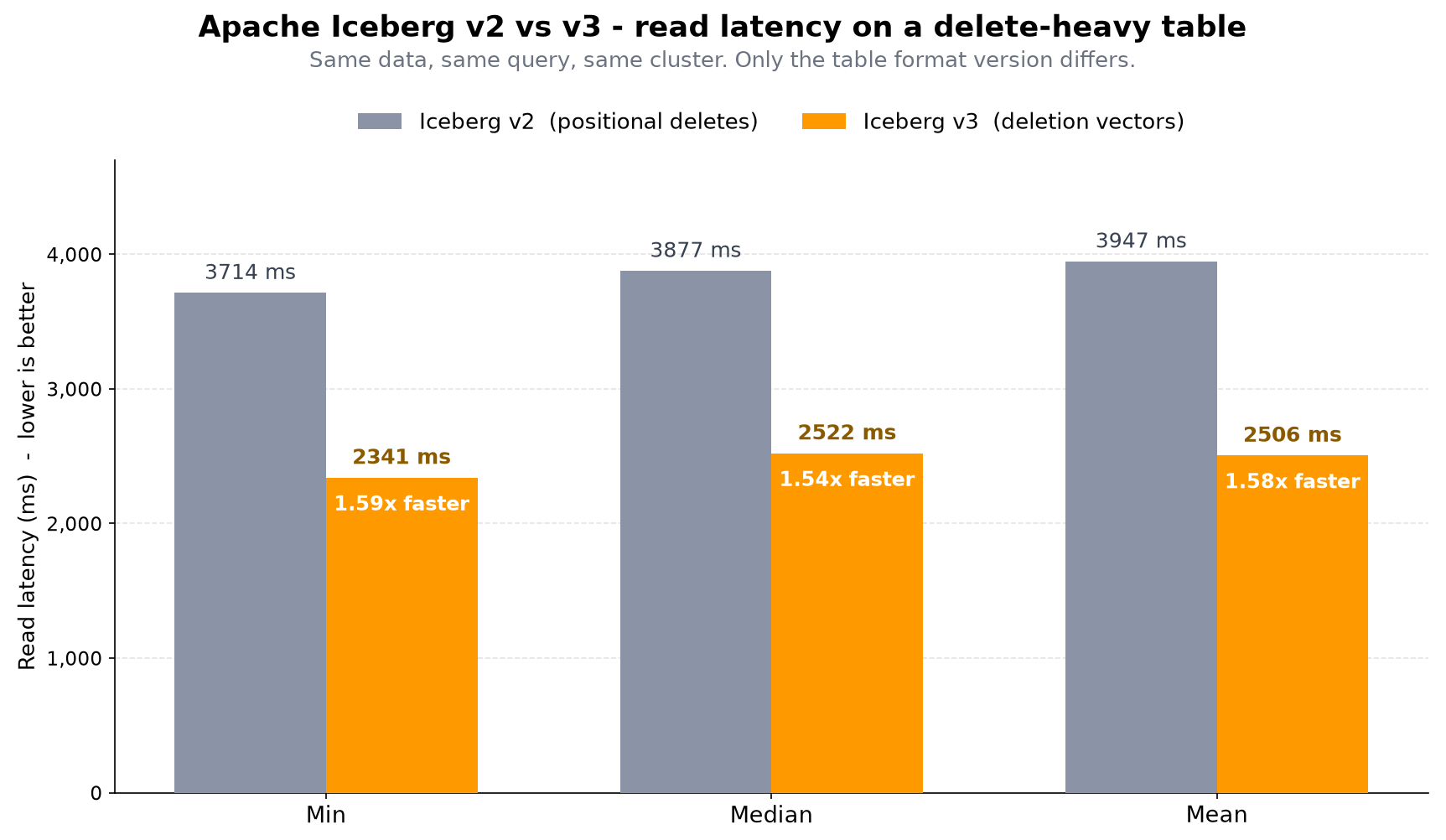
Table 2 – Read latency comparison between Apache Iceberg V2 delete files and Apache Iceberg V3 deletion vectors
New ETL features
AWS Glue 6.0 introduces several additional capabilities designed to simplify how you build and manage data pipelines, some of which are discussed in the following list.
- Spark Declarative Pipelines (SDP) where you define the outcomes you want for your entire data pipelines in a declarative fashion with SQL statements or Python decorators while AWS Glue handles execution flow, dependency resolution, parallelism, checkpointing, CDC, and recovery automatically. This helps you focus on business logic rather than orchestration plumbing.
- Real-Time Mode (RTM) for streaming delivers continuous execution for Structured Streaming with sub-second latencies, down to single-digit milliseconds for stateless tasks. This can help support real-time use cases like fraud detection, live dashboards, and event-driven architectures without managing dedicated streaming infrastructure.
- Arrow-Native UDFs/UDTFs execute Python functions directly on PyArrow batches without Pandas conversion overhead, which can result in faster performance for custom transformation logic at scale.
- Recursive Common Table Expressions (CTE) adds WITH RECURSIVE queries natively, allowing graph traversals and hierarchical queries without workarounds or external libraries.
- Python data source filter pushdown evaluates filters at the data source designed to minimize data movement, reduce the volume of data scanned, and improve job performance.
- With Python virtual environments and S3 caching, you can provide pre-built Python dependencies, which should result in reduced startup latency for AWS Glue jobs by eliminating runtime dependency resolution. For existing jobs that use
--additional-python-modules, no action is required. AWS Glue automatically handles the conversion to virtual environments when your job runs on AWS Glue 6.0.
Dependent library upgrades
The following table summarizes the key runtime and library version upgrades on AWS Glue 6.0.
| Feature | Glue 6.0 | Glue 5.1 |
| Spark | 4.1.1-amzn-0 | 3.5.6-amzn-1 |
| Python | 3.13.14 | 3.11.15 |
| Scala | 2.13.17 | 2.12.18 |
| AWS SDK for Java | 2.44.6 (Version 1.x removed) |
2.35.5 |
| Boto3 | 1.42.84 | 1.40.61 |
| Java | 17.0.20 | 17.0.19 |
| Iceberg | 1.11.0 | 1.10.0 |
| Hudi | 1.1.1 | .0.2 |
| Delta Lake | 4.2.0 | 3.3.2 |
| AWS Glue Data Catalog client | 4.11.0 | 4.9.0 |
| EMR DynamoDB connector | 6.1.0 | 5.7.0 |
| Arrow | 18.3.0 | 2.0.1 |
| Hive | 2.3.10-amzn-1 | 2.3.9-amzn-4 |
Table 3: Runtime and library version comparison across AWS Glue 6.0 and AWS Glue 5.1
Getting started
To get started with AWS Glue 6.0, you can use one of the following methods.
- Open the AWS Glue console and create a new ETL job, selecting Glue 6.0 for the Job version. You can also use AWS SDK, AWS Command Line Interface (CLI) and Amazon SageMaker Unified Studio for creating Glue jobs with version 6.0.
- To get started with AWS Glue 6.0 interactively, use Glue Interactive Sessions within Glue Studio Notebooks (via the %glue_version magic) or connect with Spark Connect from your local IDE.
- Migrate your existing AWS Glue jobs to AWS Glue 6.0 using the Spark Upgrade Agent.
Clean up
To avoid incurring costs, clean up the resources you created for this post.
- Delete the Data Catalog database and the Iceberg table.
- Delete the data and metadata folders of the Iceberg table from your S3 bucket.
- Delete the AWS Glue job and the AWS Glue job execution IAM role.
Conclusion
AWS Glue 6.0 is designed to be faster, more cost-effective, and easier to use for building your open data lakehouse architectures and orchestrating your data pipelines. In this post, we discussed the key highlights of AWS Glue 6.0 and illustrated usage of Apache Iceberg V3 features with code samples. You can create new AWS Glue jobs on AWS Glue 6.0 or migrate your existing AWS Glue jobs to benefit from these improvements.
With Apache Spark 4.1.1, Apache Iceberg V3, Python 3.13, upgraded open table format libraries, and new streaming capabilities, AWS Glue 6.0 aims to help you build new data applications or to operate your existing data pipelines more efficiently and with less maintenance overhead.
We encourage you to test AWS Glue 6.0 in your development environment today. Check out this blog that talks about upgrading your AWS Glue jobs to AWS Glue 6.0. Also, in the coming days and weeks, look out for blogs on individual topics illustrating various features of Spark 4.1.1 and Apache Iceberg V3 on AWS Glue 6.0.
Acknowledgements: We thank the numerous engineers and leaders who helped build AWS Glue 6.0 to support customers with a highly performant Spark runtime and other value-added capabilities.