AWS Database Blog
Migrate SQL Server multi-result-set procedures to PostgreSQL
A SQL Server stored procedure can return multiple result sets from a single call, a pattern commonly used to populate a business intelligence (BI) dashboard. For example, the result sets might contain sales by region, top customers, and daily sales trends. Each SELECT statement that returns rows to the caller produces a separate result set.
PostgreSQL stored procedures do not stream multiple independent result sets directly from a single call in the same way. PostgreSQL can expose multiple query results through refcursor output parameters. A refcursor is a cursor variable that contains the name of an open server-side cursor pointing to a query result. The application must fetch each cursor separately within the same transaction.
In this post, we present two alternatives to refcursors: session-scoped temporary tables that preserve relational results and JSON aggregation that combines the results into a single structured response. We compare both alternatives with a refcursor baseline. Using a representative T-SQL procedure, we show how to identify the source result sets, select an approach, implement the PostgreSQL and .NET/Npgsql changes, and validate functional equivalence. The examples are intended for database architects, application developers, and migration teams supporting dashboards, APIs, and BI applications.
Solution overview
Figure 1 shows how the application flow changes when a SQL Server multiple-result-set procedure is migrated using temporary tables or JSON aggregation.
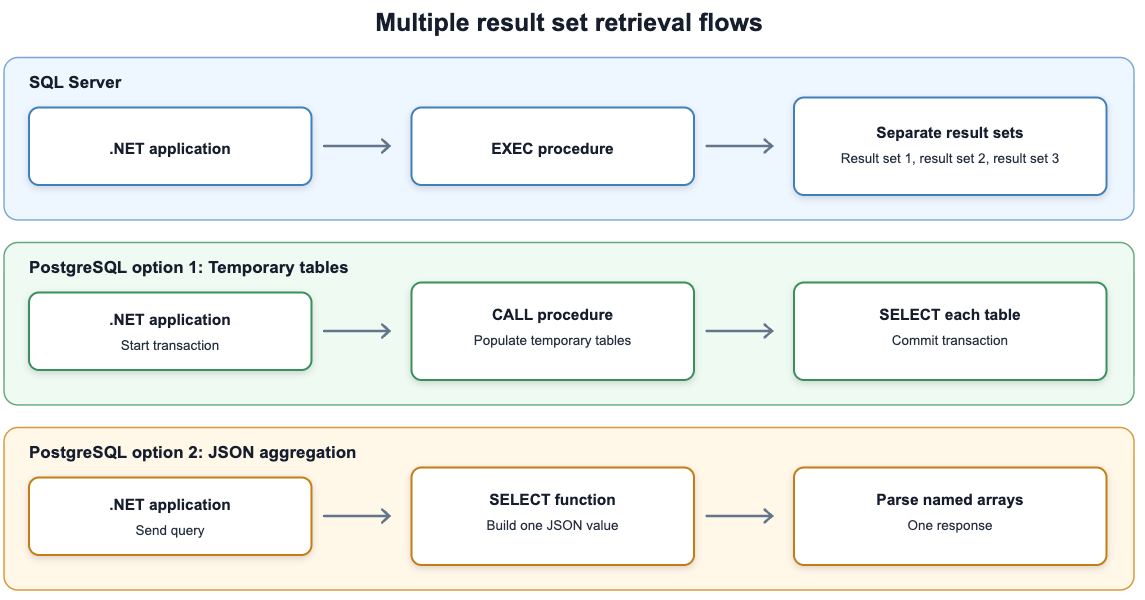
Figure 1: The SQL Server contract and the two PostgreSQL retrieval contracts used in this post
The two PostgreSQL approaches have different retrieval patterns and resource requirements. Use Table 1 as an initial guide, and validate your choice with representative data volumes and application workloads.
| Requirement | Temporary tables | JSON aggregation |
| Result shape | Separate relational tables | One document with a named array for each logical result set |
| Application flow | One procedure call followed by one query per table, on the same connection and transaction | One function query followed by client-side JSON parsing |
| Prefer when | For large result sets, the client streams rows, or follow-up filtering and indexing are useful | Results are bounded, one response is desirable, and the client already handles JSON efficiently |
| Primary trade-off | Session affinity and additional queries | The server and client materialize the complete payload in memory |
Table 1. Comparison of the temporary-table and JSON aggregation approaches
Prerequisites
The SQL techniques in this post use PostgreSQL procedures, introduced in PostgreSQL 11, and jsonb functions available in earlier releases. The walkthrough targets PostgreSQL 15 or later, .NET 8 or later, and Npgsql 8 or later. The benchmark results were collected on Amazon Aurora PostgreSQL-Compatible Edition 17.7. The source example uses CREATE OR ALTER PROCEDURE, available in SQL Server 2016 SP1 and later. Use the equivalent ALTER PROCEDURE syntax on an earlier supported release.
The database code uses standard PostgreSQL features and can run on Amazon Aurora PostgreSQL-Compatible Edition, Amazon Relational Database Service (Amazon RDS) for PostgreSQL, or self-managed PostgreSQL. The AWS provisioning, monitoring, and cleanup commands apply only to the AWS managed-service walkthrough. Verify that your chosen engine version and instance class are available in your AWS Region before provisioning.
You need the following:
- An AWS account and permissions to create an Aurora PostgreSQL cluster or an RDS for PostgreSQL DB instance, if you are following the AWS setup.
- A virtual private cloud (VPC), DB subnet group, database security group, and application security group. The application host must be able to resolve and reach the database endpoint.
- AWS Command Line Interface (AWS CLI) and psql. AWS CloudShell includes both tools, but use a CloudShell VPC environment or another client inside the VPC to reach a private database.
- .NET 8 or later and Npgsql 8 or later for the application examples.
- The Amazon RDS certificate bundle, so that psql and Npgsql can verify the server certificate.
- Familiarity with T-SQL stored procedures and PL/pgSQL, PostgreSQL’s procedural language for writing functions and procedures.
For background, see PL/pgSQL – SQL Procedural Language, Setting up for Amazon Aurora, and Setting up for Amazon RDS.
Analyze the source SQL Server procedure
Begin with the application contract, not a line-by-line syntax conversion. Identify every result-producing SELECT, the schema and ordering the caller expects, and the largest payload the procedure returns. The following illustrative T-SQL procedure returns three result sets for a BI dashboard workload.
Inventory the result sets before choosing the PostgreSQL contract:
| Logical result | Columns | Expected size | Migration implication |
| Sales by region | region, sale_count, total_amount | Small and bounded by region count | Well suited to JSON. Also straightforward as a temporary table |
| Top customers | customer_id, total_spend. Top 10 selected by descending spend | Exactly 10 rows | Well suited to JSON |
| Daily trend | sale_date, daily_total | Bounded by date range | JSON for normal dashboard ranges. Temporary tables if ranges or projections can become large |
Table 2. Result-set inventory for the sample SQL Server stored procedure
We implement this sample using both approaches so that you can compare how each one returns results from PostgreSQL to the application while keeping the underlying query logic unchanged. Because the three result sets are bounded, JSON aggregation would likely be the better production choice for this procedure. The temporary-table implementation demonstrates an alternative for similar procedures that return larger result sets, require row-by-row retrieval, or benefit from relational filtering and indexing. A procedure can also use a hybrid approach, returning small summaries as JSON and large detail results through temporary tables.
Prepare the walkthrough environment
If you already have a reachable PostgreSQL database, skip the AWS resource-creation commands and continue with the sample schema. For a temporary Aurora environment, first list the engine versions available in your Region and set environment-specific values. Use non-production resources and least-privilege credentials. For a temporary Aurora environment, scripts/provision-aurora.sh in the sample repository provisions the cluster and, optionally, a co-located Amazon Elastic Compute Cloud (Amazon EC2) client. Verify first that your chosen engine version and instance class are available in your AWS Region, and use non-production resources and least-privilege credentials. To reproduce the benchmark, run the client in the same Availability Zone as the writer.
Create the sample table and data
Configure Transport Layer Security (TLS) before you connect. Verify the server certificate and hostname, not only that the session is encrypted: in Npgsql, SSL Mode=Require encrypts the connection but doesn’t authenticate the server, so it gives no protection against an on-path attacker. Use VerifyFull for Npgsql and verify-full for psql, and set rds.force_ssl=1 in your DB parameter group so that the server also rejects unencrypted connections.
Pass the connection string to the .NET examples through the PGCONNSTR environment variable rather than hard-coding credentials. scripts/provision-aurora.sh prints the exact commands for retrieving the master password from AWS Secrets Manager and building the string, and sql/postgresql/01_schema_and_data.sql creates the sample table and loads 1,000,000 synthetic rows. In production, retrieve database credentials from AWS Secrets Manager or use AWS Identity and Access Management (IAM) database authentication rather than a static password.
Approach 1: Return relational results through temporary tables
For this approach, we use a procedure that materializes each logical result set in a separate session-scoped temporary table. The caller reads the tables using the same connection and transaction. This approach is useful when result sets can become large, the caller needs row-by-row retrieval, or follow-up queries benefit from relational filtering or indexing.
ON COMMIT DROP is intentional. The caller starts an explicit transaction, invokes the procedure, reads all three tables, and then commits. Committing drops the temporary tables. Without the explicit transaction, the CALL would complete its transaction and drop the tables before the application could query them. Without ON COMMIT DROP, the tables could remain for the lifetime of a pooled physical connection and collide with a later request.
Read temporary-table results with .NET and Npgsql
The following C# example uses Npgsql to call sp_dashboard_temp and map the three temporary-table result sets to strongly typed application records. Because the procedure creates the temporary tables with ON COMMIT DROP, the procedure call and all retrieval queries run sequentially on the same open connection and within the same explicit transaction. Each retrieval query includes an ORDER BY clause to produce deterministic ordering when required by the application. After all results have been read and mapped, the application commits the transaction, which drops the temporary tables. The ReadAsync helper executes each query and maps its rows to a List.
Approach 2: Return one document through JSON aggregation
For this approach, we use JSON aggregation to return all logical result sets in a single structured document. Each top-level property represents one result set, and its value is an array of rows. This approach is useful when the result sets are bounded and the caller prefers a single structured response.
COALESCE returns an empty array instead of JSON null when a query returns no rows. An ORDER BY in a subquery does not carry through the surrounding aggregate, so each array sets its order on the jsonb_agg call itself. All three reproduce the ordering the source procedure guarantees. In top_customers the clause appears twice and does two jobs. ORDER BY total_spend DESC, customer_id in the subquery decides which ten customers qualify, and the same clause inside jsonb_agg fixes the order they are returned in.
Parse the JSON response with .NET and Npgsql
A single query returns all logical result sets in one JSON document, eliminating the need to preserve the same database session across a procedure call and follow-up queries. The trade-off is that PostgreSQL must construct the complete JSON value before returning it, and the client creates another in-memory representation when parsing it. Keep payloads bounded and test memory consumption using the largest expected production inputs.
Validate the migrated procedure
Validate behavior before comparing performance. For a representative set of normal, boundary, empty, and high-volume inputs:
- Capture every SQL Server result set and map it to the corresponding PostgreSQL temporary table or JSON property.
- Compare column names, data types, nullability, and row counts. If row sequence is part of the application requirement, compare the ordering as well.
- Canonicalize values in the test harness and compare rows or hashes. Account for intentional type differences, such as SQL Server datetime to PostgreSQL timestamp, before hashing.
- Verify empty-result behavior. The JSON implementation returns []. The temporary-table implementation returns a table with zero rows.
- Exercise application error paths to confirm that transactions roll back and pooled connections are returned in a clean state.
- Load test with expected concurrency and peak date ranges. Monitor query latency, database load, temporary-file I/O, memory, network throughput, and client allocation.
The sample repository includes sql/postgresql/04_validate_equivalence.sql, which automates the PostgreSQL-side comparison. It reports row counts per logical result set from both contracts and counts symmetric differences between them. It also confirms the requested range actually returns rows so that a zero difference count is not vacuous, checks that all three JSON arrays are ordered, and verifies empty-range behavior. Comparing against the SQL Server source remains a separate step, because it requires a harness that can read both engines.
After functional parity is established, tune the converted SQL independently of the retrieval contract. Use EXPLAIN (ANALYZE, BUFFERS) and pg_stat_statements to identify expensive scans, sorts, and repeated work.
Considerations and limitations
Before choosing an approach, consider its operational requirements in addition to its performance. The following sections cover transaction and connection behavior, payload size and memory use, result semantics, and temporary storage.
Transactions, pooling, and failure handling
The temporary-table approach requires one physical connection for the complete operation. Begin the transaction before CALL, commit only after all reads succeed, and roll back on failure. ON COMMIT DROP removes the tables on commit or rollback. Use unique temporary-table names or prevent repeated calls in the same transaction if the same procedure can be invoked more than once.
The JSON approach has no session-affinity requirement after the function returns. However, large documents increase server memory, network payload size, client allocation, and garbage-collection pressure. Set input limits or paginate detail results instead of using one unbounded JSON response.
Independently of the retrieval contract, restrict inbound access on port 5432 to your application tier, require TLS with full verification, and use least-privilege database roles rather than the master user.
Ordering, types, and contract versioning
Neither a SQL table nor a JSON array should rely on incidental query order. Use an explicit ORDER BY for every result whose sequence matters. Validate mappings for numeric, dates, timestamps, nulls, and large integer values because JSON parsers and relational data readers can expose them differently. Treat top-level JSON property names and temporary-table column definitions as an API contract. Version them when making incompatible changes.
Temporary files and Aurora Optimized Reads
Temporary tables are not the same as PostgreSQL temporary files. Small temporary tables can remain in memory through temp_buffers, while sorts, hashes, and other operations can spill to temporary files when they exceed available working memory. To identify spilling, use EXPLAIN (ANALYZE, BUFFERS), review the temp_blks_read and temp_blks_written fields in pg_stat_statements, and monitor the TempStorageIOPS and TempStorageThroughput Amazon CloudWatch metrics where available.
For Aurora workloads with significant temporary-file I/O, Aurora Optimized Reads places PostgreSQL temporary files on local NVMe storage for supported instance classes, such as the db.r6gd, db.r8gd, and db.r6id families. On those instance classes, temp_tablespaces points at aurora_temp_tablespace. Temporary tables that outgrow temp_buffers are placed on NVMe as well, which makes this relevant to Approach 1 and not only to sorts and hashes. This can provide up to two times better latency and throughput for advanced queries that sort, join, or merge large volumes of data. It benefits queries whose data doesn’t fit in the DB instance’s available memory. It doesn’t benefit temporary operations that remain in memory. See Improving query performance for Aurora PostgreSQL with Aurora Optimized Reads for supported classes, Regions, metrics, and current performance guidance.
Performance comparison
We compared the two recommended implementations, temporary tables and JSON aggregation, with a refcursor baseline. Each implementation returned 15 logical result sets with the same four-column projection. Tests used 100, 1,000, and 10,000 rows per result set. These are three tested result sizes, not three migration patterns. The complete 15-result-set benchmark scripts and .NET/Npgsql client are available in the accompanying AWS Samples repository.
These are single-session measurements. The sales table fits entirely in shared_buffers, so every plan ran fully cached and no sort spilled to disk, and the heavier queries each planned two parallel workers on a two-vCPU instance. Read the figures as latency on a deliberately unconstrained instance rather than as behavior under concurrency.
| Rows per result set |
Refcursor p50 / p95 (ms)
|
Temp tables p50 / p95 (ms)
|
JSON aggregation p50 / p95 (ms) |
| 100 | 1,822.9 / 1,849.7 | 1,066.1 / 1,189.8 | 1,008.7 / 1,083.1 |
| 1,000 | 1,859.6 / 1,888.4 | 1,123.8 / 1,214.2 | 1,111.3 / 1,270.1 |
| 10,000 | 2,233.9 / 2,278.0 | 1,613.6 / 1,732.3 | 2,343.4 / 2,452.1 |
Table 3. End-to-end latency for the three result retrieval implementations
The result is a clear workload-dependent trade-off. JSON aggregation had the lowest p50 latency at 100 rows per result set and was 1.1 percent lower than temporary tables at 1,000 rows. At 10,000 rows, temporary tables had 31.1 percent lower p50 latency than JSON aggregation. Temporary tables also outperformed the refcursor baseline at every tested size. These results support using JSON for bounded dashboard payloads and temporary tables as payloads grow, but they do not establish a universal row-count threshold.
JSON aggregation also beat the refcursor baseline at 100 and 1,000 rows per result set, but was 4.9 percent slower at 10,000 rows. For this workload the crossover between the two recommended approaches falls somewhere between 1,000 and 10,000 rows per result set.
Note: Results vary with row width, query plans, instance class, concurrency, network topology, data distribution, and client parsing. Benchmark both approaches with representative production inputs and concurrency before selecting a contract.
Cleanup
Remove the sample database objects first. Session-scoped temporary tables are dropped when their transaction commits or rolls back, or when the connection closes.
If you also created the benchmark routines, drop them as well. sql/postgresql/99_cleanup.sql in the sample repository removes both the walkthrough objects and the benchmark variants, and notes the tsm_system_rows extension that the benchmark creates.
If you created the Aurora walkthrough resources, delete the writer and then the cluster; scripts/cleanup-aurora.sh in the sample repository deletes the writer, the cluster, the ingress rule, and any dedicated EC2 client. It skips final snapshots and permanently deletes the sample database, so use it only for disposable test resources.
Conclusion
If a multi-result-set procedure is blocking your migration, start with a representative complex procedure, inventory its result sets, and prototype both PostgreSQL contracts against real data volumes. JSON aggregation provides a one-response contract for bounded result sets. Temporary tables preserve relational retrieval and scale more predictably for larger payloads, but require one connection and transaction for the complete operation.