IBM & Red Hat on AWS
Running Red Hat AI on OpenShift with AWS Neuron
Running large language model (LLM) inference on AWS Inferentia and AWS Trainium chips requires an operator stack that integrates with Red Hat OpenShift. In a previous post, we introduced the AWS Neuron Operator for OpenShift. Since then, the operator has matured through continued collaboration between Red Hat and the AWS Neuron service team. It now provides a stable v1.x release, supports Neuron software development kit (SDK) 2.28, and powers Red Hat AI Inference on AWS silicon.
This post covers what’s new in the operator, how to deploy it with OpenShift GitOps (Argo CD) for production lifecycle management, and how to run Llama 3.1 8B inference with the Red Hat AI Inference vLLM Neuron image. Part 1 walks through a raw Kubernetes Deployment approach. Part 2 covers KServe-based model serving through Red Hat OpenShift AI.
What’s new since the initial release
The AWS Neuron Operator has reached v1.1.4 with nine releases and over 120 commits. Key improvements include:
- Stable v1.x API: The
DeviceConfigCustom Resource Definition (CRD) graduated fromv1alpha1tov1beta1. This provides a stable API surface for production deployments. - Rolling driver upgrades: The operator supports rolling upgrades of Neuron kernel modules across nodes. The
driverVersionfield supports controlled rollouts without cluster downtime. - Neuron SDK 2.28 support: Compatibility with the latest Neuron SDK, including updated device plugin and scheduler extension images.
- Continuous quality assurance: Prow-based CI jobs validate the operator against the supported OpenShift version matrix, run by Red Hat. The operator is a community project jointly supported by both Red Hat and AWS.
- Node metrics telemetry: A node-metrics
DaemonSetprovides Neuron hardware counters, memory usage, and runtime metrics without additional configuration. - Automated CI/CD: GitHub Actions workflows automate building, testing, and publishing operator images, bundles, and Operator Lifecycle Manager (OLM) index images on every release.
- Multi-node device plugin fixes: Resolved issues with device plugin permissions when running across multiple Neuron nodes.
- GitOps-ready deployment: With the Helm chart, you can deploy Node Feature Discovery (NFD), Kernel Module Management (KMM), and the Neuron operator as a single Argo CD application.
This progress reflects successful partner collaboration and co-development between Red Hat and AWS. The team resolved issues identified during testing through direct engagement with the AWS Neuron service team. This resulted in improvements to both the operator and the upstream Neuron components.
Architecture diagram
The following diagram shows how the operator stack components work together to run LLM inference on OpenShift with AWS Neuron.
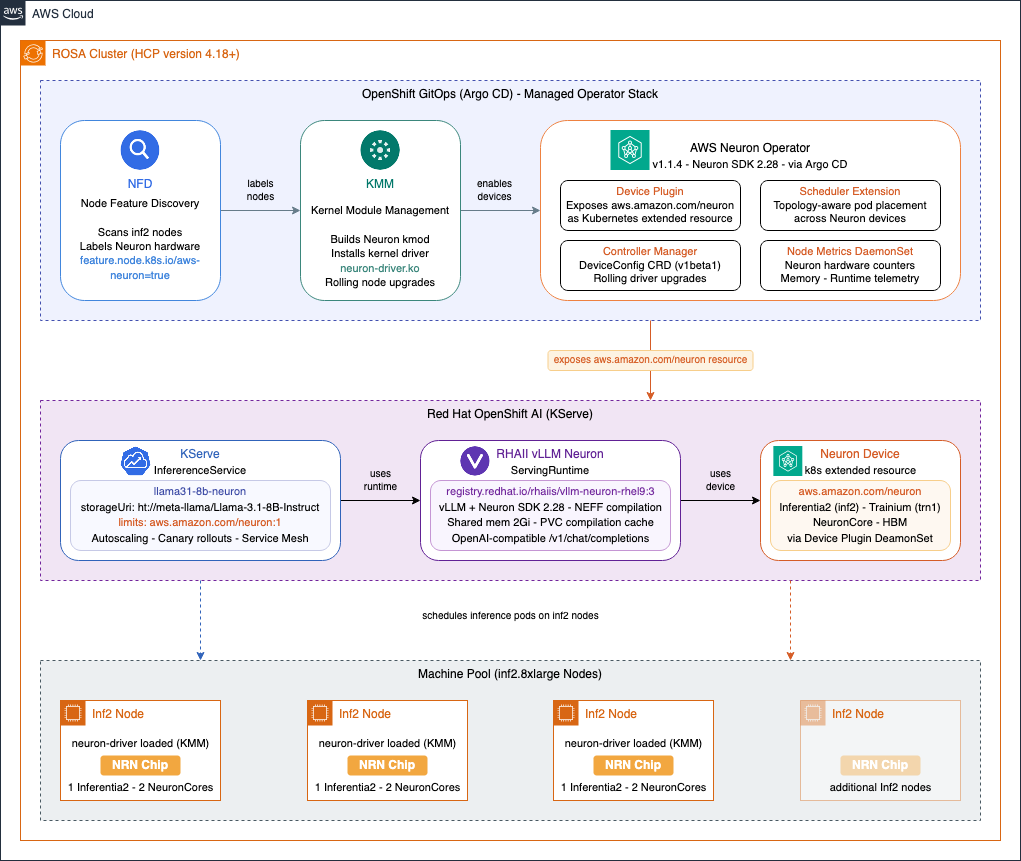
Figure 1. AWS Neuron Operator stack on OpenShift showing the relationship between NFD, KMM, the Neuron operator, vLLM, and KServe.
Implementation walkthrough
Prerequisites
- An active AWS account. Create an account if you don’t have one.
- Sufficient service quotas for Amazon Elastic Compute Cloud (Amazon EC2) Inferentia (inf2) or Trainium (trn1) instances in your target AWS Region. Check your AWS service quotas and request increases if needed, as default limits may be zero.
- Red Hat account and AWS Identity and Access Management (AWS IAM) permissions to create and manage Red Hat OpenShift Service on AWS (ROSA) clusters, launch Amazon EC2 Inf2 or Amazon EC2 Trn1 instances.
- A ROSA with Hosted Control Planes (HCP) cluster running one of the three latest supported versions (4.19, 4.20, or 4.21 at the time of writing), in a supported AWS Region (such as us-east-1 or us-west-2). Or, a self-managed OpenShift cluster on one of the three latest supported versions deployed on AWS.
- At least one inf2 or trn1 machine pool added to the cluster.
- The
occommand line interface (CLI) installed and authenticated withcluster-adminprivileges. - OpenShift GitOps operator installed (covered in Step 1).
- A Hugging Face account with an API token and approved access to the gated
meta-llama/Llama-3.1-8B-Instructmodel.
Note: This walkthrough requires cluster-admin privileges because it installs cluster-scoped operators (NFD, KMM, Neuron, Service Mesh, Serverless, OpenShift AI) and creates cluster-scoped custom resource definitions. This is consistent with the requirements for installing Red Hat OpenShift AI. In production environments, we recommend following least-privilege principles: restrict cluster-admin access to platform administrators performing the initial setup, and use namespace-scoped roles for teams deploying inference workloads (Steps 9–12).
Disclaimer: The AWS Neuron Operator is an open-source project jointly supported by Red Hat and AWS. The Helm charts, Argo CD application manifests, and example deployment configurations provided in this walkthrough are samples intended to accelerate adoption. You are responsible for testing, securing, and adapting them for production use based on your specific quality control practices and standards.
This walkthrough uses third-party open-source software including Red Hat OpenShift, Red Hat OpenShift AI, and Red Hat AI Inference. The use of these components is subject to their respective licenses and support agreements. Review the applicable license terms and Red Hat subscription requirements before deploying in your environment.
Cost considerations
This walkthrough deploys resources that incur AWS and Red Hat charges. Running inf2 and trn1 instances, a ROSA cluster, and associated storage volumes results in ongoing costs. The ROSA cluster also includes Red Hat OpenShift subscription costs. Monitor costs with AWS Billing and Cost Management and set up AWS Budgets alerts. For pricing details, see Amazon EC2 pricing, ROSA pricing, and Amazon Elastic Block Store (Amazon EBS) pricing.
Deploy the Neuron operator and run inference
Step 1: Install the OpenShift GitOps operator
We use OpenShift GitOps (Argo CD) to manage the full Neuron operator stack as a single application. This provides declarative, version-pinned deployments with automated sync and self-healing.
- In the OpenShift web console, navigate to Operators, OperatorHub (in newer OpenShift versions: Ecosystem, Software Catalog), search for Red Hat OpenShift GitOps, and choose Install with the defaults.
- Or use the CLI to apply the following subscription manifest:
oc apply -f - <<EOF
apiVersion: operators.coreos.com/v1alpha1
kind: Subscription
metadata:
 name: openshift-gitops-operator
 namespace: openshift-operators
spec:
 channel: latest
 installPlanApproval: Automatic
 name: openshift-gitops-operator
 source: redhat-operators
 sourceNamespace: openshift-marketplace
EOF- Verify the GitOps operator is running:
oc get pods -n openshift-gitopsStep 2: Deploy the AWS Neuron Operator with Argo CD
The operator repository includes a Helm chart that deploys all required components — NFD, KMM, and the Neuron operator itself — as a single Argo CD application.
- Apply the Argo application manifest from the release. This can take approximately five minutes to complete:
oc apply -f https://raw.githubusercontent.com/awslabs/operator-for-ai-chips-on-aws/v1.1.4/deploy/argocd/application.yamlThis creates an Argo CD application pinned to the v1.1.4 release tag. The application uses automated sync with self-healing and pruning enabled.
Note: If NFD and KMM operators are already installed on your cluster, disable them in the Argo application to avoid conflicts:
  helm:
     parameters:
       - name: nfd.enabled
         value: "false"
       - name: kmm.enabled
value: "false"- You can also create the Argo CD application from the CLI. For example, to track the latest on
main(useful for development, not recommended for production), apply the following manifest instead:
oc apply -f - <<EOF
apiVersion: argoproj.io/v1alpha1
kind: Application
metadata:
 name: aws-neuron-operator
 namespace: openshift-gitops
spec:
 project: default
 source:
   repoURL: https://github.com/awslabs/operator-for-ai-chips-on-aws.git
   targetRevision: main
   path: deploy/helm/aws-neuron-operator
 destination:
   server: https://kubernetes.default.svc
 syncPolicy:
   automated:
     prune: true
     selfHeal: true
   syncOptions:
     - SkipDryRunOnMissingResource=true
EOF- Monitor the sync progress:
oc get application aws-neuron-operator -n openshift-gitops- Once synced, verify that all Neuron components are running:
oc get pods -n aws-neuron-operator Verify that the controller manager, device plugin, scheduler, scheduler extension, and node metrics pods are all in Running state.
Step 3: Upgrade the operator
- To upgrade the operator with the GitOps approach, update the Argo application to target a new release tag:
oc patch application aws-neuron-operator -n openshift-gitops --type=merge -p '{"spec":{"source":{"targetRevision":"v1.3.0"}}}'In the preceding command, the targetRevision is set to v1.3.0. Set it to the desired version. Argo CD detects the change, computes the difference, and synchronizes the new version. The operator handles rolling upgrades of the Neuron kernel driver across nodes automatically when the driverVersion field is updated in the DeviceConfig.
- You can also apply the updated Argo application manifest from the new release:
oc apply -f https://raw.githubusercontent.com/awslabs/operator-for-ai-chips-on-aws/<DESIRED_RELEASE_VERSION>/deploy/argocd/application.yamlStep 4: Set up the inference namespace
- Create the Hugging Face token secret. You need this before deploying the inference workload:
oc create namespace neuron-inference

oc create secret generic hf-token \
 --from-literal=HF_TOKEN=<your-hf-token> \
-n neuron-inferenceNote: Rotate Hugging Face tokens regularly and restrict access to the hf-token secret to only the service accounts that require it. For enhanced secret management, you can use the AWS Secrets Manager CSI driver to sync secrets from AWS Secrets Manager into Kubernetes, providing centralized rotation, auditing, and access control.
Step 5: Deploy Red Hat AI Inference with Argo CD
The operator repository includes a ready-to-use Helm chart under deploy/examples/rhaiis that deploys Red Hat AI Inference with Llama 3.1 8B on Neuron.
- Deploy it as an Argo CD application:
oc apply -f - <<EOF
apiVersion: argoproj.io/v1alpha1
kind: Application
metadata:
 name: rhaiis-neuron-inference
 namespace: openshift-gitops
spec:
 project: default
 source:
   repoURL: https://github.com/awslabs/operator-for-ai-chips-on-aws.git
   targetRevision: v1.1.4
   path: deploy/examples/rhaiis
 destination:
   server: https://kubernetes.default.svc
 syncPolicy:
   automated:
     prune: true
     selfHeal: true
   syncOptions:
     - SkipDryRunOnMissingResource=true
EOF
This deploys the namespace, a PVC for model caching, the vLLM Neuron deployment with an init container that downloads the model from Hugging Face, and a service with an OpenShift route.
Step 6: Test the inference endpoint
- The first startup takes longer as vLLM compiles the model for Neuron. Monitor the deployment:
oc logs -f deployment/neuron-vllm -n neuron-inference- Once the vLLM server is ready, test the endpoint:
Note: The following request is for demonstration purposes only. In production, secure API access with authentication and TLS.
ROUTE_URL=$(oc get route neuron-vllm -n neuron-inference -o jsonpath='{.spec.host}')

curl https://$ROUTE_URL/v1/chat/completions \
 -H "Content-Type: application/json" \
 -d '{
   "model": "meta-llama/Llama-3.1-8B-Instruct",
   "messages": [{"role": "user", "content": "Explain quantum computing in simple terms"}],
   "max_tokens": 50
 }'
Serving with Red Hat OpenShift AI and KServe
The preceding deployment uses a raw Kubernetes Deployment. For production model serving with autoscaling, canary rollouts, and a standardized inference API, OpenShift AI provides KServe-based single-model serving. This section walks through deploying the same Llama 3.1 8B model with OpenShift AI and the Red Hat AI Inference Neuron runtime.
Step 7: Install Red Hat OpenShift AI and prerequisites with Argo CD
- OpenShift AI with KServe requires OpenShift Service Mesh and OpenShift Serverless. The operator repository includes a Helm chart under
deploy/examples/openshiftaithat installs all three as a single Argo CD application:
oc apply -f - <<EOF
apiVersion: argoproj.io/v1alpha1
kind: Application
metadata:
 name: openshift-ai
 namespace: openshift-gitops
spec:
 project: default
 source:
   repoURL: https://github.com/awslabs/operator-for-ai-chips-on-aws.git
   targetRevision: main
   path: deploy/examples/openshiftai
 destination:
   server: https://kubernetes.default.svc
 syncPolicy:
   automated:
     prune: true
     selfHeal: true
   syncOptions:
     - SkipDryRunOnMissingResource=true
EOF
This deploys Service Mesh, Serverless, the OpenShift AI operator, and a DataScienceCluster configured for KServe single-model serving (with unused components such as workbenches, pipelines, and training removed).
- Verify that OpenShift AI is ready:
oc get datasciencecluster default-dsc -o jsonpath='{.status.phase}'
# Should return: Ready
Step 8: Prepare the inference namespace for KServe
- The
neuron-inferencenamespace needs to be enrolled in the Service Mesh for KServe’s serverless mode to work. Label it:
oc label namespace neuron-inference istio-injection=enabled- Knative Serving resolves image tags to digests at the controller level, which requires registry credentials. To skip this for
registry.redhat.io(since the cluster’s global pull secret handles it at the node level):
oc patch configmap config-deployment -n knative-serving --type=merge -p '{"data":{"registries-skipping-tag-resolving":"kind.local,ko.local,dev.local,registry.redhat.io"}}'Note: OpenShift AI automatically configures Knative Serving with PVC support for persistent volume claims — no additional configuration is needed for the compilation cache optimization described in the Production optimizations section.
Step 9: Configure model access for KServe
- The KServe storage initializer needs the Hugging Face token to download gated models. Create a service account that references the
hf-tokensecret you created earlier:
oc apply -f - <<EOF
apiVersion: v1
kind: ServiceAccount
metadata:
 name: kserve-neuron-sa
 namespace: neuron-inference
secrets:
 - name: hf-token
EOF
Step 10: Verify the Neuron vLLM ServingRuntime
- The Argo application automatically deploys a custom
ServingRuntimethat uses the Red Hat AI Inference Neuron image. Verify that it’s available:
oc get servingruntime vllm-neuron-runtime -n neuron-inference- To inspect the full runtime definition:
oc get servingruntime vllm-neuron-runtime -n neuron-inference -o yamlThe runtime is pre-configured with several Neuron-specific settings:
- Red Hat AI Inference image: The container uses
redhat.io/rhaiis/vllm-neuron-rhel9:3, the official Red Hat AI Inference image built for AWS Neuron. This image includes vLLM with Neuron SDK support. - Neuron compilation artifacts: A writable
emptyDirvolume is mounted at/mnt/models/neuron-compiled-artifacts. KServe mounts the model directory read-only, and vLLM needs to write Neuron compilation outputs during startup. - Shared memory: The runtime provides an expanded
/dev/shm(2Gi) for PyTorch inter-process communication between the vLLM server and Neuron runtime workers. - Model format: The runtime registers as
vllm-neuronto avoid conflicts with GPU-based vLLM runtimes that may also be installed on the cluster. - Serving parameters: The Helm chart values configure defaults for
--tensor-parallel-size,--max-num-seqs, and--max-model-len. You can customize these per deployment.
Step 11: Deploy the InferenceService
- Create the
InferenceServicepointing to the model on Hugging Face:
oc apply -f - <<EOF
  apiVersion: serving.kserve.io/v1beta1
  kind: InferenceService
  metadata:
    name: llama31-8b-neuron
    namespace: neuron-inference
    annotations:
      serving.knative.dev/progress-deadline: "1800s"
  spec:
    predictor:
      serviceAccountName: kserve-neuron-sa
      model:
        modelFormat:
          name: vllm-neuron
        storageUri: "hf://meta-llama/Llama-3.1-8B-Instruct"
        runtime: vllm-neuron-runtime
        resources:
          limits:
            aws.amazon.com/neuron: "1"
            memory: 100Gi
          requests:
            aws.amazon.com/neuron: "1"
            memory: 10Gi
        env:
          - name: MODEL_NAME
            value: meta-llama/Llama-3.1-8B-Instruct
EOF- Monitor the deployment:
oc get inferenceservice llama31-8b-neuron -n neuron-inference -wWait until the READY column shows True. The first deployment takes longer as vLLM compiles the model for Neuron.
Step 12: Test the KServe inference endpoint
- Get the inference URL and send a request:
Note: The following request is for demonstration purposes only. In production, secure API access with authentication and TLS with proper certificate validation.
ISVC_URL=$(oc get inferenceservice llama31-8b-neuron -n neuron-inference -o jsonpath='{.status.url}')

curl -k ${ISVC_URL}/v1/chat/completions \
 -H "Content-Type: application/json" \
 -d '{
   "model": "meta-llama/Llama-3.1-8B-Instruct",
   "messages": [{"role": "user", "content": "Explain quantum computing in simple terms"}],
   "max_tokens": 50
 }'
The KServe deployment provides additional capabilities over the raw Deployment approach:
- Auto-scaling based on request load (scale to zero when idle)
- Standardized inference API with model versioning
- Canary roll-outs for model updates
- Built-in metrics and logging through the OpenShift AI dashboard
Production optimizations
The hf:// storage URI approach downloads the model from Hugging Face each time the pod starts. Neuron also compiles the model on every cold start. For production deployments, consider these optimizations to reduce cold start times:
- PVC for Neuron compilation cache: The optimization with the greatest effect on startup time. Attach a PVC to the
InferenceServiceto persist the Neuron compilation cache (compiled Neuron Executable File Formats, or NEFFs) across pod restarts. The first startup still takes approximately 30 minutes. Subsequent restarts skip compilation entirely and take approximately five minutes for model download only. OpenShift AI automatically enables PVC support. Seedeploy/examples/oai-inference/in the operator repository for ready-to-use manifests. Note that Amazon EBS-backed PVCs (ReadWriteOnce) support a single pod at a time. For multi-replica or multi-model scenarios, use Amazon Elastic File System (Amazon EFS) withReadWriteManyaccess mode. The Neuron SDK keys its cache by model graph hash, so multiple models can safely share the same volume. - Amazon EBS snapshots for cache cloning: After the first pod populates the compilation cache on a PVC, create a
VolumeSnapshot. New PVCs can be restored from the snapshot. This gives each replica a pre-warmed cache without repeating compilation. Amazon EBS volumes and snapshots on ROSA are encrypted at rest by default using AWS-managed keys. For additional control, you can configure a StorageClass with a customer-managed key registered in the AWS Key Management Service (AWS KMS). - Amazon S3 model storage: Upload the model to a private Amazon S3 bucket and use
s3://as the storage URI. Combined with IRSA (IAM Roles for Service Accounts) on ROSA, this provides fast, in-region model loading without downloading from external sources. See the KServe S3 storage documentation for setup details.
Clean up
To avoid ongoing charges, remove the resources you created in this walkthrough:
- Delete the Argo CD applications:
oc delete application.argoproj.io openshift-ai -n openshift-gitops

oc delete application.argoproj.io rhaiis-neuron-inference -n openshift-gitops

oc delete application.argoproj.io aws-neuron-operator -n openshift-gitops- Delete the inference namespace and its resources:
oc delete namespace neuron-inference- Remove the OpenShift GitOps operator through the OpenShift web console or the CLI.
oc delete subscription openshift-gitops-operator -n openshift-operators

oc delete csv -n openshift-operators -l operators.coreos.com/openshift-gitops-operator.openshift-operators=- If you created the ROSA cluster for this walkthrough, delete the inf2/trn1 machine pool or the entire cluster to stop compute charges. Example:
rosa delete machinepool -c <cluster-name> <machinepool-name>- Delete any Amazon EBS volumes or snapshots created for PVC caching.
Note: Deleting Argo CD applications with pruning enabled automatically removes the resources they manage. Verify that all resources are removed by checking the aws-neuron-operator and neuron-inference namespaces.
Summary
In this post, you deployed the AWS Neuron Operator on OpenShift with a GitOps approach, ran Llama 3.1 8B inference with the Red Hat AI Inference vLLM Neuron image, and configured KServe-based model serving through Red Hat OpenShift AI. You also explored production optimizations including PVC-backed compilation caching, Amazon EBS snapshots, and Amazon S3 model storage.
What’s next
The AWS Neuron Operator and Red Hat AI Inference integration continues to evolve. Upcoming areas of focus include broader instance type support (Trainium 3), deeper integration with Red Hat OpenShift AI, and performance optimizations for high-throughput inference workloads.