Artificial Intelligence
Speaker-labeled transcription with WhisperX on SageMaker AI
Any team working with spoken audio hits the same wall with generic speech-to-text. Think contact-center calls, all-hands meetings, podcasts, depositions, and broadcast media. These workloads need two things that standard transcription gets wrong. First, timestamps land at the utterance level, off by several seconds. Second, there’s no reliable answer to “who said what.” Those gaps make transcripts hard to search, caption, redact, or analyze at scale. A missing speaker label breaks compliance review, and an imprecise timestamp breaks a caption or a redaction.
WhisperX closes both gaps. It wraps OpenAI’s Whisper with batched inference, adds wav2vec2 forced alignment for precise per-word timestamps, and adds speaker diarization to label who spoke. These capabilities map directly to real workloads. Contact centers can measure talk time, check script adherence, and run sentiment analysis, while teams turn meetings into searchable notes. Media and e-learning teams generate accurate captions (in SubRip Subtitle (SRT) and Web Video Text Tracks (VTT) format) for large content libraries. Time-sensitive uses get text the moment someone speaks. In regulated fields like healthcare, legal, and finance, speaker-labeled transcripts support audits and legal discovery.
The AWS WhisperX Deep Learning Container (DLC) packages all of this into a GPU-ready image. You deploy it to an Amazon SageMaker AI real-time or asynchronous endpoint without building a custom image. In this post, we show how to deploy both endpoint types and when to choose each. We also cover the production details that matter: the GPU AMI pin, scaling, Amazon Simple Storage Service (Amazon S3) setup, and cost controls. This post is part of a multimodal series showcasing specialized AWS DLCs. The series spans three AWS DLCs across four use cases: (1) vLLM-Omni for text-to-speech, (2) vLLM-Omni for image and video, (3) WhisperX for speech-to-text (this post), and (4) llama.cpp.
What is WhisperX, and what workloads it unlocks
Whisper is a popular open source automatic speech recognition (ASR) model family from OpenAI that transcribes spoken audio into text accurately across many languages. It focuses on high-quality transcription and produces timestamps at the phrase or segment level. WhisperX is an open source project that builds on Whisper and extends it for production workloads. It adds per-word timestamps, speaker labels, and faster transcription, three capabilities that together turn raw audio into structured, analyzable transcripts.
Why a purpose-built Deep Learning Container
The AWS WhisperX DLC is a maintained, GPU-ready image that already contains Whisper, the alignment models, and the diarization weights, with no Hugging Face token required. It follows the standard Amazon SageMaker AI serving contract, so you deploy it like any other model.
- Serving contract: The container serves on port
8080and exposesPOST /invocationsfor inference andGET /pingfor health checks. - Request format: The endpoint expects
multipart/form-data, with the audio as thefilepart plus optional string fields such aslanguage,diarize, andresponse_format. Amazon SageMaker AI passes theContentTypeheader (including the multipart boundary) through to the container unchanged. - Output formats:
json,verbose_json,srt, andvtt, so the same endpoint feeds analytics pipelines and video editors alike.
Choosing between real-time and asynchronous endpoints
Amazon SageMaker AI supports both real-time and asynchronous endpoints, so you can serve the same WhisperX DLC through either pattern. The decision usually comes down to clip length and interactivity. For long audio, use the asynchronous endpoint: it’s the recommended path when transcription, alignment, and diarization need more time to run. Reserve the real-time endpoint for short, interactive clips that finish within the Amazon SageMaker AI 60-second response cap.
| Dimension | Real-time endpoint | Asynchronous endpoint |
| Best for | Short, interactive clips | Long audio, high-volume batch |
| Latency | Synchronous, must finish < 60s | Submit-and-poll. No response cap |
| Invocation | InvokeEndpoint (inline body) | InvokeEndpointAsync (S3 reference) |
| I/O | Body in request / response | Input + output in Amazon S3 |
| Scaling | Add instances (one request/container) | Add instances. Can autoscale to zero |
| Cost profile | Bills while endpoint is up | Scale-to-zero when idle saves cost |
Solution architecture
Both patterns share the same container contract. Amazon SageMaker AI forwards each request to the WhisperX DLC on port 8080. The real-time pattern is synchronous, and the asynchronous pattern brokers input and output through Amazon S3. Instance selection (ml.g4dn.xlarge for cost, ml.g5.2xlarge for headroom) and the required GPU AMI pin apply to both, and you scale throughput by adding instances rather than concurrency. The request/response sequence for each endpoint type is shown in its walkthrough section.
Prerequisites
- An AWS account and an Amazon SageMaker AI execution role that can
create_model,create_endpoint, and (for asynchronous inference) read and write S3. - GPU service quota for your endpoint instance type (for example,
ml.g4dn.xlargeorml.g5.2xlarge). - The WhisperX DLC image URI from Amazon Elastic Container Registry (Amazon ECR) (for example,
763104351884.dkr.ecr.<region>.amazonaws.com/whisperx:3.8.6-cu128-amzn2023-sagemaker). - For asynchronous inference, an S3 bucket whose name contains “sagemaker.” The default
AmazonSageMakerFullAccesspolicy grants S3 access only to such buckets.
A complete, runnable JupyterLab notebook that walks through these steps end to end is available in the AWS Samples repository. You can run it in Amazon SageMaker AI Studio against your own audio.
Walkthrough: Real-time endpoint
The real-time endpoint returns the transcript in the same synchronous call. Use it for short clips that comfortably finish within the 60-second cap. Figure 1 is a sequence diagram that traces a single real-time request end to end, from the client call through in-container transcription to the inline transcript.
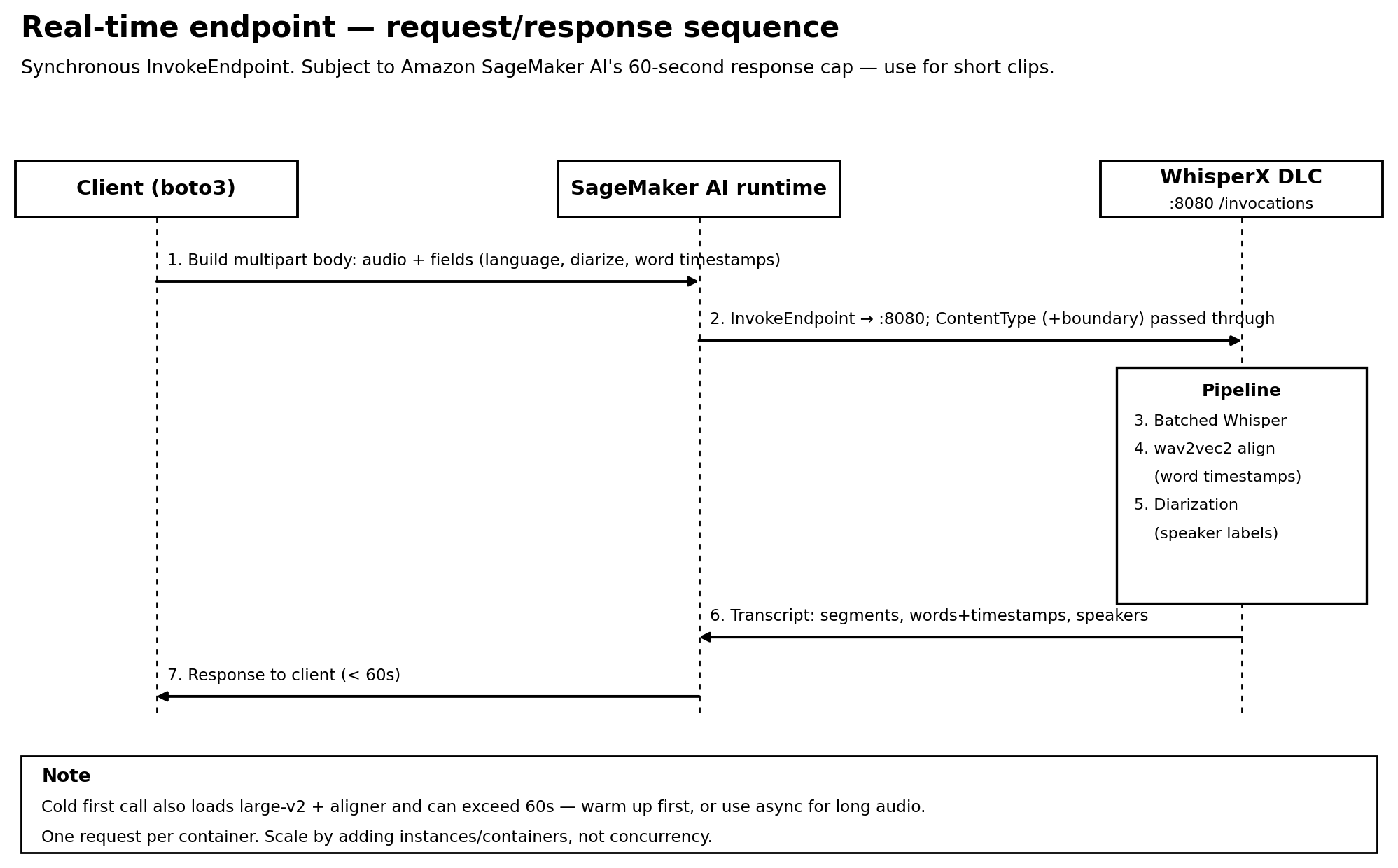
Figure 1: Real-time endpoint synchronous InvokeEndpoint flow, in-container transcription, and inline transcript within the 60-second cap
Reading the sequence end to end: the client assembles a multipart/form-data body (the audio as the file part plus fields such as language, diarize, and word-level timestamp granularity) and calls InvokeEndpoint. Amazon SageMaker AI forwards the request to the container on port 8080, passing the ContentType and its multipart boundary through unchanged. Inside the container, WhisperX runs voice-activity detection and batched Whisper transcription, wav2vec2 forced alignment for per-word timestamps, and speaker diarization to label who is speaking. It then serializes the result. The runtime returns the transcript (segments, words with timestamps, and speaker labels) inline to the client, which must complete within the Amazon SageMaker AI 60-second response cap.
Create the model and endpoint config
Register the WhisperX DLC as a model, where IMAGE_URI points at the WhisperX DLC in Amazon ECR, then create an endpoint config. On every GPU variant, you must set InferenceAmiVersion to al2-ami-sagemaker-inference-gpu-3-1. Without this pin, the endpoint fails to start with a zero-log CannotStartContainerError. Allow a generous startup health-check timeout because the weights load lazily.
Invoke with diarization and word timestamps
Build a multipart/form-data body with the audio as the file part and fields such as language=en, diarize=true, and response_format=verbose_json. The response contains segments, per-word timestamps, and speaker labels.
The example GitHub repository uses a public-domain recording of the air traffic control (ATC) communications from US Airways Flight 1549, the 2009 “Miracle on the Hudson” emergency landing. It’s a real multi-party radio exchange with background noise, radio compression, and rapid callsign and frequency readouts. Those conditions make it a strong test of transcription accuracy, word-level timestamps, and speaker diarization. The full approximately 3-minute recording is sent to the asynchronous endpoint, and a 40-second segment to the real-time endpoint.
Running this against a 40-second segment of the source audio returns the following diarized, word-timed transcript:
Walkthrough: Asynchronous endpoint
The asynchronous endpoint removes the 60-second cap and is the recommended path for long audio. Input and output are brokered through Amazon S3, and you poll for the result. Figure 2 is a sequence diagram that traces the full asynchronous lifecycle, from the S3 upload and InvokeEndpointAsync call through container processing to the S3 output and failure paths.
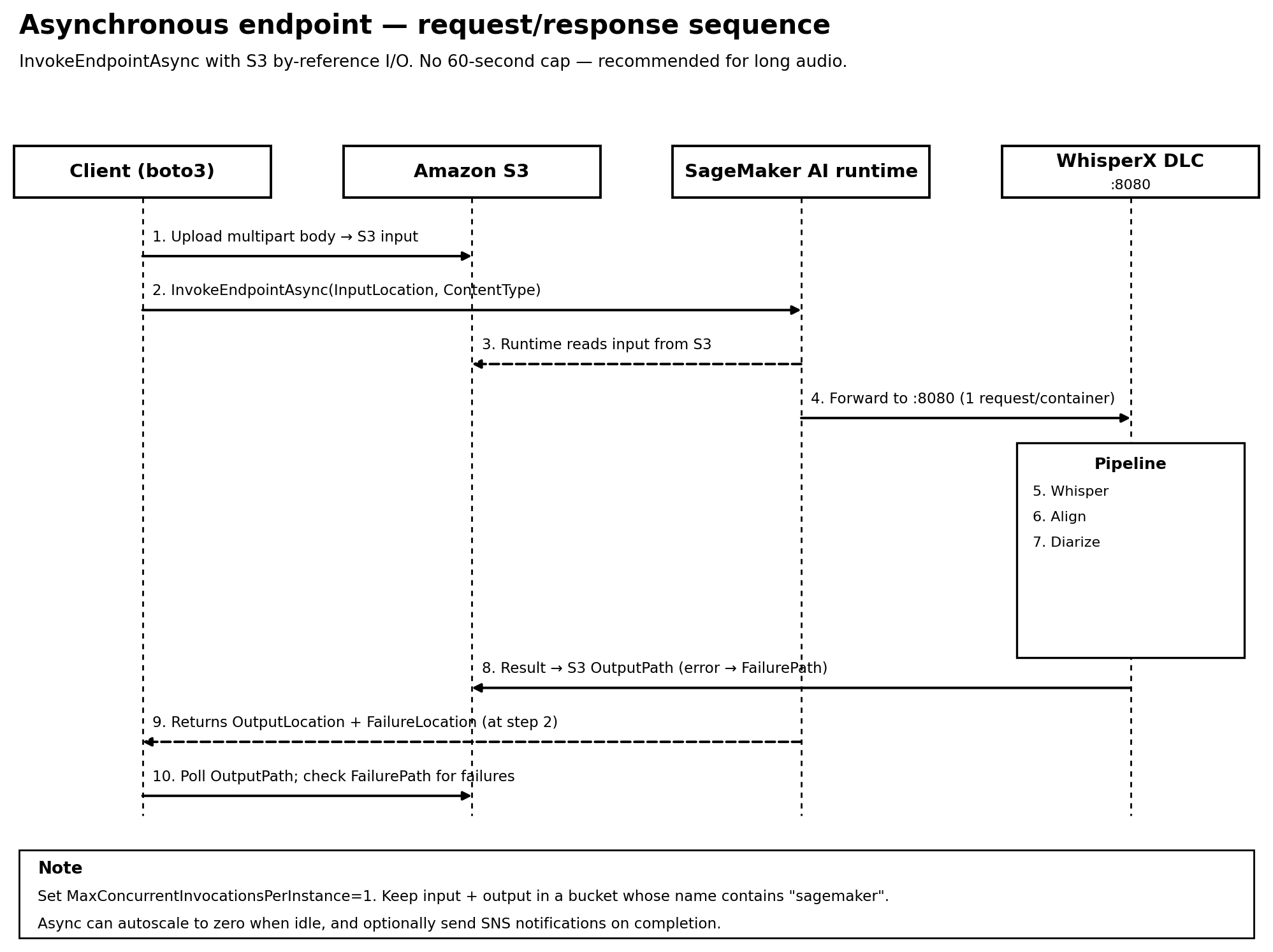
Figure 2: Asynchronous endpoint S3 by-reference InvokeEndpointAsync flow, single-worker processing, and results through the S3 output and failure paths
Reading the sequence end to end: the client uploads the multipart body to Amazon S3 and calls InvokeEndpointAsync with the object’s InputLocation. It receives an OutputLocation and FailureLocation immediately rather than waiting for the transcript. Amazon SageMaker AI reads the input from Amazon S3 and forwards it to the container on port 8080. There, the same voice-activity detection, batched transcription, forced-alignment, and diarization pipeline runs, one request per container. On success, the container writes the transcript to the S3 output path, or an error document to the failure path. The client polls the output path for the result and checks the failure path, so a failed job surfaces an error instead of looping indefinitely. Because work is brokered through Amazon S3, this path isn’t bound by the 60-second cap and suits long audio.
Create the asynchronous endpoint config
The only structural difference from the real-time endpoint is the endpoint config: it adds an AsyncInferenceConfig with an S3 OutputPath and S3FailurePath. Set MaxConcurrentInvocationsPerInstance=1 to match the container’s single-worker limit, and keep the same InferenceAmiVersion pin. IMAGE_URI is the same WhisperX DLC used for the real-time endpoint.
The rest of the workflow is identical to the real-time walkthrough. Building the multipart/form-data request (the build_multipart helper and transcription fields) is unchanged. You submit it with invoke_endpoint_async by S3 reference instead of invoke_endpoint, then read the transcript from the OutputLocation and check the FailureLocation. Cleanup is also the same.
Submitting the full approximately 3-minute recording to the asynchronous endpoint returns the following transcript (first and last five lines shown):
Cleaning up
A GPU endpoint bills continuously until you delete it. When you are done, delete the endpoint, endpoint config, and model for both endpoints, and remove any S3 input and output artifacts you no longer need.
Best practices and production considerations
- Pin the GPU AMI – Always set
InferenceAmiVersion=al2-ami-sagemaker-inference-gpu-3-1on GPU variants. The default host AMI ships drivers that fail to start this CUDA 12.8 image. - Scale by instances, not concurrency – Inference is serialized to one request per container. Set
MaxConcurrentInvocationsPerInstance=1on asynchronous endpoints and add instances or containers for throughput. - Autoscale asynchronous endpoints to zero – For bursty batch workloads, scale the asynchronous endpoint to zero instances when idle to cut cost, and use Amazon Simple Notification Service (Amazon SNS) completion notifications instead of tight polling.
- Right-size the GPU, and use instance pools for availability – Use
ml.g4dn.xlarge(T4) for cost orml.g5.2xlarge(A10G) for headroom. To avoid insufficient-capacity errors, list up to five instance types in an Amazon SageMaker AI instance pool. It provisions the highest-priority type first and falls back automatically when capacity is unavailable. - Secure the S3 artifacts – Turn on S3 Block Public Access, default SSE-S3 or SSE-KMS encryption, and BucketOwnerEnforced ownership on the asynchronous bucket. Scope the execution role to specific buckets and keys.
- Handle personally identifiable information (PII) responsibly – Transcripts of calls and meetings might contain sensitive data, so encrypt artifacts, restrict access, and apply redaction downstream using the word-level timestamps.
- Observe and retry – Monitor with Amazon CloudWatch, alarm on failures, and retry around the cold-start behavior described earlier. For deeper GPU and inference visibility, turn on the Amazon SageMaker AI detailed metrics and Insights dashboard on CloudWatch.
Conclusion
In this post, we showed how to deploy the AWS WhisperX Deep Learning Container to Amazon SageMaker AI for word-level, speaker-labeled transcription. We used a real-time endpoint for short interactive clips and an asynchronous endpoint for long, high-volume audio. We covered the production details that matter most: the required GPU AMI pin, single-request-per-container scaling, S3 bucket naming, and cost controls.
To go further, explore the WhisperX DLC deployment guide, review Amazon SageMaker AI asynchronous inference, and try the accompanying demo notebook against your own audio. You can also find the full working example in the AWS Samples GitHub repository.
Acknowledgements
The authors thank the AWS Deep Learning Containers and Amazon SageMaker AI teams for their technical review and contributions to the sample.