AWS for M&E Blog
Monetize your live streams using Amazon IVS server-side ad insertion
Live streaming platforms are growing fast, and with that growth comes the need to monetize content effectively. Whether you are building a creator-driven platform, a sports streaming service, or an interactive entertainment experience, video advertising is a critical revenue stream. However, implementing server-side ad insertion (SSAI) in live streams has traditionally required significant engineering effort and introduced complexity that can degrade the viewer experience.
Amazon Interactive Video Service (Amazon IVS) Low-Latency Streaming now supports SSAI, integrating with AWS Elemental MediaTailor to stitch ads directly into your live video streams at the server, delivering a seamless viewing experience while giving you access to ad decisioning, audience targeting, and personalization capabilities.
In this post, we show how you can monetize your live streams using Amazon IVS SSAI.
The challenge of monetizing live streams
With Amazon IVS, you can build low-latency interactive live streaming experiences with managed infrastructure. But turning those streams into ad revenue is harder than it looks. Client-side ad insertion introduces challenges including ad blockers, complex player transitions across platforms, and inaccurate delivery measurement. Building a server-side solution from scratch is equally demanding, requiring integration with ad decision servers (ADS), creative transcoding, stream stitching, and signaling. This is complex engineering work that doesn’t differentiate your product, taking resources away from what matters most to your viewers.
Solution overview
Amazon IVS SSAI removes this complexity by providing a managed, server-side ad insertion capability built into the Amazon IVS low-latency streaming pipeline. This solution offers the following benefits:
- Seamless ad stitching without client-side complexity – Ads are stitched directly into the video stream at the server before it reaches the viewer, maintaining the low-latency experience Amazon IVS is known for. There is no client-side ad SDK to integrate, no visible transitions between content and ads, and significantly reduced opportunity for ad blockers to interfere. Viewers experience ads as a natural part of the stream.
- Simple ad break control with operational visibility – Amazon IVS provides an API operation, InsertAdBreak, that lets you trigger ad breaks programmatically. You specify the channel and the duration, and Amazon IVS handles the rest. Each ad break publishes an Amazon EventBridge event with the expected insertion time, helping you drive UI updates, logging, or analytics pipelines in response.
- Ad decisioning and personalization – Through the integration with MediaTailor, Amazon IVS SSAI connects to your ADS to request and fill ads. MediaTailor passes per-viewer parameters to your ADS, allowing it to apply audience targeting, competitive exclusion, frequency capping, and other decisioning logic. You can define these parameters through the Amazon IVS playback authorization token, giving you control over the viewer context sent with each ad request.
- Programmatic inventory and measurement – Server-side ad insertion stitches ads on the server, but programmatic ad platforms such as Google Ad Manager require client-side signals for ad tracking, viewability verification, and programmatic access. Amazon IVS SSAI supports integration with the Datazoom SDK, which provides client-side ad beaconing, IAB Tech Lab’s Open Measurement SDK compliance, and the Google PAL SDK to meet these requirements. Datazoom also offers a data platform with real-time QoE observability, advertising monetization dashboards, and connectors to AWS services such as Amazon Simple Storage Service (Amazon S3) and Amazon Kinesis, available under separate commercial terms. Enabling Datazoom data collection is optional and not required to use Amazon IVS SSAI. The Datazoom SDK can also be used to track ad breaks for UI treatments (incoming ad, ad duration, VOD timeline decoration, and more).
- Scales with your platform – A single MediaTailor playback configuration and Amazon IVS ad configuration can serve multiple channels. When a live stream is recorded to Amazon S3, Amazon IVS includes SCTE-35 ad markers (industry-standard cue points for ad insertion) in the VOD playlist, so you can monetize on-demand content using the same ad infrastructure.
- Viewer controls – Using playback authorization tokens, you can opt specific viewers out of ads by adding the claim “
aws:ads-opt-out“: true to the JWT, supporting use cases such as subscriber-only ad-free experiences.
The following diagram illustrates the solution architecture.
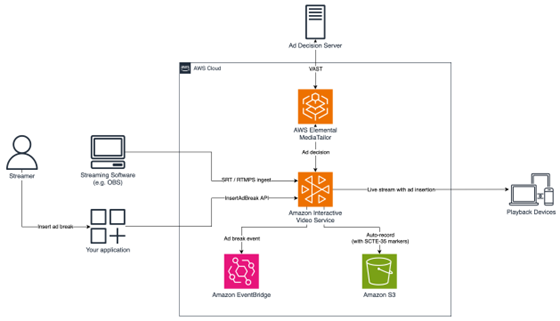
Figure 1: Amazon IVS SSAI architecture overview
Getting started with Amazon IVS SSAI involves three configuration steps: creating a MediaTailor playback configuration, creating an Amazon IVS ad configuration, and associating the ad configuration with your channel. We walk you through these steps in the following sections.
Prerequisites
Before you begin, you need the following resources:
- An AWS account
- An Amazon IVS channel with the container format set to TS (see Getting Started with IVS Low-Latency Streaming)
- A Video Ad Serving Template (VAST) compliant ADS URL (or use the sample ADS provided when you create a MediaTailor playback configuration)
Create MediaTailor playback configuration
To create a MediaTailor playback configuration that connects your ADS to Amazon IVS, complete the following steps:
1. On the MediaTailor console, choose Create configuration.
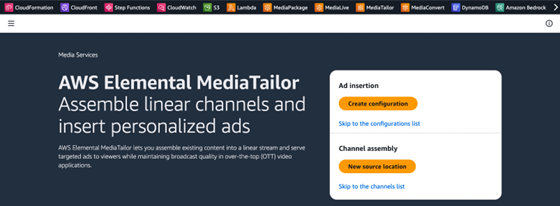
Figure 2: AWS Elemental MediaTailor console
2. Under Required settings, configure the following fields:
a. For Name, enter a name for your configuration, for example my-ssai-config.
b. For Content source, enter your Amazon IVS channel playback URL prefix, ending in live-video.net/. This prefix is shared across Amazon IVS channels in your account and AWS Region, which means a single MediaTailor playback configuration can serve multiple Amazon IVS channels. You can find your playback URL prefix on the Amazon IVS console on the channel details page.
c. For Ad decision server, enter the URL of your VAST-compliant ADS. For testing, you can use the AWS Live Event Framework sample ADS: https://n8ljfs0h09.execute-api.us-west-2.amazonaws.com/v1/ads?duration=[session.avail_duration_secs].
The [session.avail_duration_secs] token is a MediaTailor dynamic variable. When an ad break is triggered, MediaTailor replaces it with the requested break duration in seconds before calling your ADS. This allows the ADS to return ads that fit the available break window. For the full list of available dynamic variables, see MediaTailor dynamic ad variables for ADS requests.
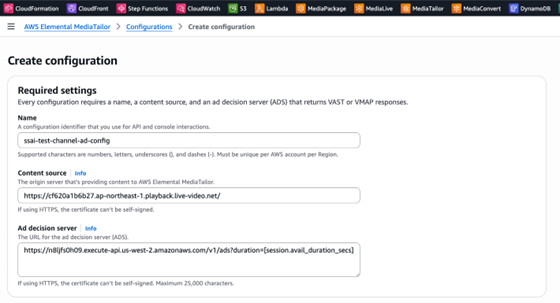
Figure 3: Creating a MediaTailor playback configuration with required settings
3. Under Personalization details, for Ad insertion mode, choose Player select. This is required for Amazon IVS SSAI.

Figure 4: Setting the ad insertion mode to Player select
4. Choose Create configuration.
5. After the configuration is created, note the playback configuration Amazon Resource Name (ARN), which you will need in the next step.
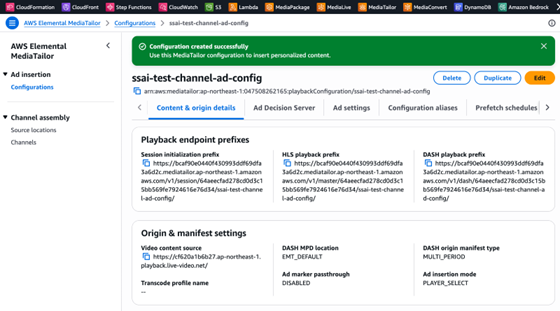
Figure 5: MediaTailor playback configuration created successfully
Create Amazon IVS ad configuration
An ad configuration links your Amazon IVS resources to your MediaTailor playback configuration. A single ad configuration can be reused across multiple channels. Complete the following steps to create an Amazon IVS ad configuration:
1. On the Amazon IVS console, choose Ad configurations under Low-latency streaming in the navigation pane.
2. Choose Create ad configuration.
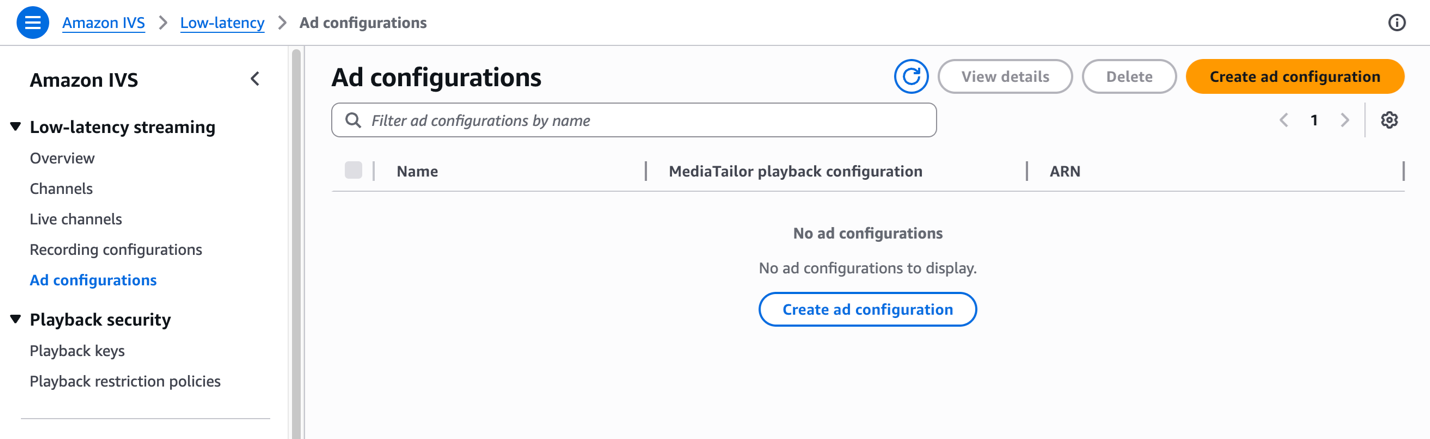
Figure 6: Amazon IVS ad configurations page
3. For Ad configure name, optionally enter a name for your ad configuration, for example my-ad-config.
4. For Elemental MediaTailor playback configuration, choose your MediaTailor playback configuration. The dropdown menu lists MediaTailor playback configurations in your account. If you have not yet created one, choose Create MediaTailor playback configuration to open the MediaTailor console in a new tab.
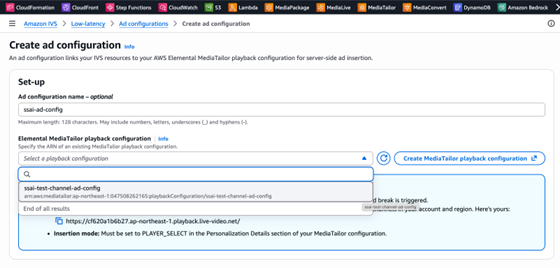
Figure 7: Selecting a MediaTailor playback configuration for the ad configuration
The console displays a reminder of the three MediaTailor settings required for ad insertion to work: the ADS URL, the content source (your Amazon IVS playback URL prefix), and the insertion mode set to PLAYER_SELECT.
5. Choose Create ad configuration.
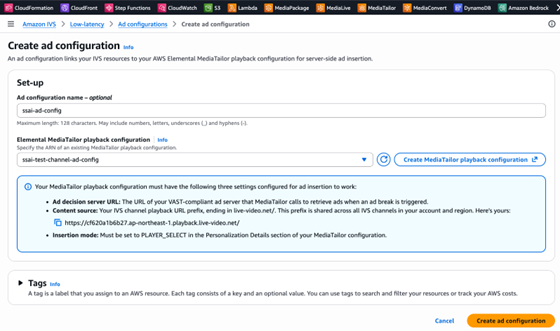
Figure 8: Completed ad configuration form with MediaTailor requirements
Associate ad configuration with your channel
Complete the following steps to associate the ad configuration with your channel:
1. On the Amazon IVS console, open your channel.
2. Choose Edit.
3. Under Server-side ad insertion, turn on Enable server-side ad insertion.
4. For Ad configuration, choose your ad configuration.
5. Choose Save changes.
Your channel is now configured for server-side ad insertion.
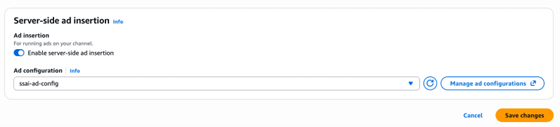
Figure 9: Enabling server-side ad insertion on an Amazon IVS channel
Insert ads into live streams
Now that your channel is streaming, call the InsertAdBreak API to trigger an ad break:
When the ad break is successfully scheduled, Amazon IVS publishes an EventBridge event (Amazon IVS Ad Break State Change) containing a target_start_time timestamp indicating when ads will begin appearing in viewer playlists. If no ad can be filled, for example if your ADS doesn’t return an ad or the creative hasn’t yet been transcoded by MediaTailor, source content continues uninterrupted.
One ad break can be active per channel at a time. Subsequent calls to InsertAdBreak while a break is in progress return a 409 ConflictException.
Player SDK integration
The Amazon IVS Player SDK surfaces events across supported platforms when an ad break is played, notifying your application when ads start, progress, and end. The following table summarizes the events, payloads, and triggers.
| Event | Payload | Trigger |
| Ad break started | AdBreak | First segment of ad break |
| Ad creative started | AdCreative | First segment of each creative |
| Ad time update | AdTimeUpdate | Every second during ad playback |
| Ad creative ended | AdCreative | Last segment of each creative |
| Ad break ended | AdBreak | First content segment after break |
The following code is an example using the Web SDK to build a simple ad countdown overlay:
For platform-specific event names and payloads, see the Amazon IVS Player SDK documentation for Web, Android, and iOS.
Viewer tracking and targeting
You can pass per-viewer parameters to your ADS through the Amazon IVS playback authorization token. Add a claim with the following format:
These values are passed to MediaTailor and mapped to [player_params.player_name] and [player_params.content_genre] template variables in your ADS URL. For more detail, see MediaTailor passing parameters to ADS.
Clean up
When you are done with the solution, clean up any resources you created to avoid incurring ongoing charges.
Conclusion
In this post, we showed how you can monetize your live streams using Amazon IVS SSAI. To get started, see Server-Side Ad Insertion (SSAI). For questions or feedback, visit AWS re:Post or contact an AWS representative to learn how we can help.