AWS for M&E Blog
S4C on Freely: How a local broadcaster delivered a complex live TV workflow with AWS Elemental Media Services
S4C has been the home of Welsh-language television since 1982. In its recent “digital first” strategy, the public service broadcaster describes itself as being “more than a TV channel,” and its mission is clear: to show the world through the Welsh language with content for audiences in Wales, the UK, and beyond on the platforms that they watch. Part of fulfilling that mission in the new era of TV over IP means reaching audiences on connected TVs—not only through traditional broadcast.
When Freely launched as the UK’s modern free-to-air streaming platform for connected TVs, it offered S4C a direct path to millions of households. The challenge was that joining Freely meant meeting a specific set of technical standards, including DVB DASH (Dynamic Adaptive Streaming over HTTP) for adaptive streaming delivery, and it all had to be implemented reliably at scale.
S4C has a lean engineering team. Building and operating a delivery stack that meets those requirements from scratch without additional resources would have been challenging. Working with Amazon Web Services (AWS), S4C built a production-ready pipeline using AWS Elemental Media Services—and got its channel live on Freely.
What Freely demands from broadcasters
Freely is built on open standards, which is good news for interoperability, but it means broadcasters must meet specific technical requirements to join the platform:
- DVB DASH manifest format for adaptive bitrate streaming
- EBU-TT-D subtitles for accessibility compliance if captions are produced by content provider
- Accessibility metadata embedded in the stream so players can surface audio description and subtitle options correctly if it’s produced by content provider
In addition to Freely requirements, S4C needs to fulfill its own requirements, such as multi-language support, monetization, and audience measurement. So, beyond Freely’s platform requirements, S4C brought its own needs to the integration.
Multi-language audio is central to S4C’s identity as a Welsh-language broadcaster. The Freely platform supports multi-language audio, and S4C took full advantage of this, delivering English, Welsh, and Welsh audio description (AD) tracks to viewers. English and Welsh subtitle tracks are also included.
As a public service broadcaster, S4C needed to monetize its Freely channel through advertising and measure the audience accurately. S4C chose to add server-side ad insertion (SSAI) to the pipeline, using FreeWheel as its Ad Decision Server (ADS). FreeWheel is S4C’s existing ad management platform, and integrating it into the Freely delivery pipeline meant S4C could serve targeted advertising during commercial breaks without disrupting the viewing experience.
S4C also required Kantar audience measurement markers to be embedded in ad creatives.
End-to-end AWS media pipeline
Live streaming involves ingesting video, audio and captions, transcoding it into multiple formats with adaptive bitrate (ABR) technology, packaging it for HTTP(S) delivery, hosting it for content delivery network (CDN) access, and distributing it globally through edge caching for optimal viewer experience.
S4C built an end-to-end AWS media pipeline that follows this four-step workflow:
- Ingestion and encoding with AWS Elemental Live
- Packaging with AWS Elemental MediaPackage (MediaPackage)
- Ad insertion with AWS Elemental MediaTailor and FreeWheel
- Delivery with Amazon CloudFront
Encoding with AWS Elemental Live
S4C’s playout system outputs a linear TV channel in SDI format. That signal feeds into AWS Elemental Live, which handles live video encoding that runs on hardware on premises at S4C. S4C configured AWS Elemental Live to encode the signal to ABR Common Media Application Format (CMAF), meeting several requirements in a single pass.
Video and audio segments alignment
This creates a seamless, broadcast-quality transition between the show and the commercial. Perfect Instantaneous Decoder Refresh (IDR) frames alignment could be achieved with 3.84 seconds or its half (1.92 seconds), applicable for 25 video frames per second (fps) stream with Advanced Audio Coding (AAC) audio codec and low complexity (LC) profile at a sample rate of 48,000 Hertz (Hz). The segment in that case ends exactly when an audio frame ends and a video group of pictures (GOP) ends. This allows the ad to be replaced with frame-accurate precision.
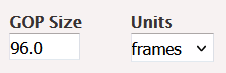
To achieve this for the S4C setup, the GOP size was set to 96 full video frames:
96 video frames × (1∕25 fps) = 3.84 seconds
For audio, AAC LC codec is used at a sample rate of 48,000 Hz. This configuration allows the encoder to process 180 full audio samples in 3.84 seconds as standard frame size used in AAC LC compression is 1024:
48000 Hz∕1024 × 3.84 seconds = 180 audio samples
For the CMAF segmentation segment length, the unit was set to 3 seconds. Because the GOP is 3.84 seconds, this will create output CMAF segments of 3.84 seconds.
The following Elemental Live screenshots show these configuration details.
Video:

Audio:

CMAF packaging:
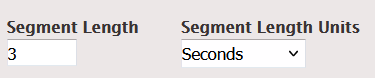
The resulting output values for this configuration will be a duration of 3.84 seconds for CMAF segments with 96 full video frames and 180 full audio frames in it.
Multi-language audio
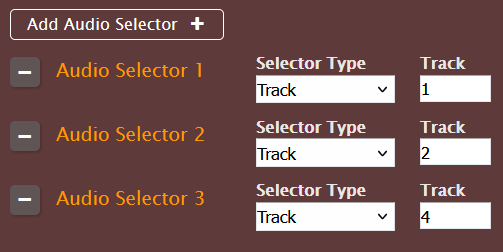
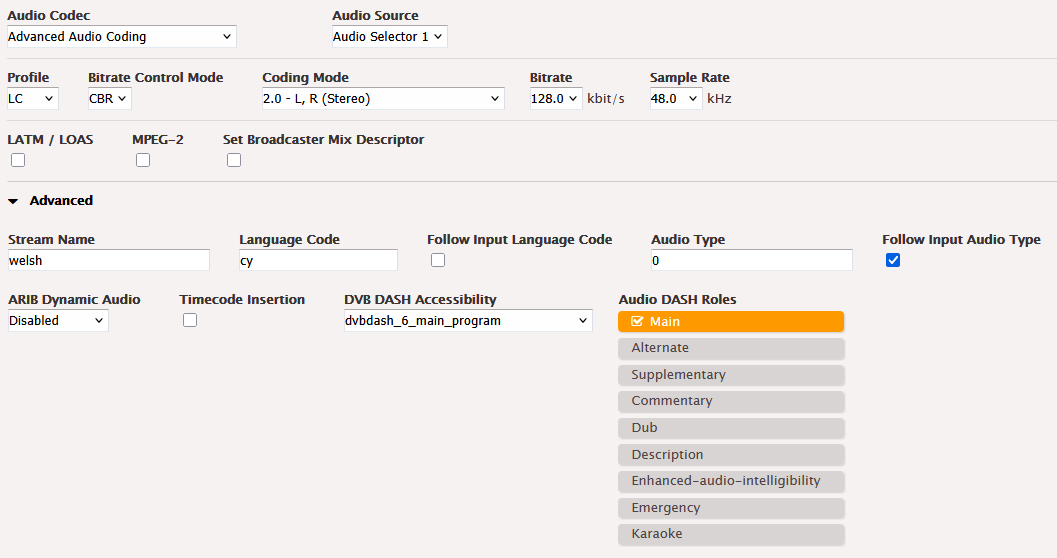
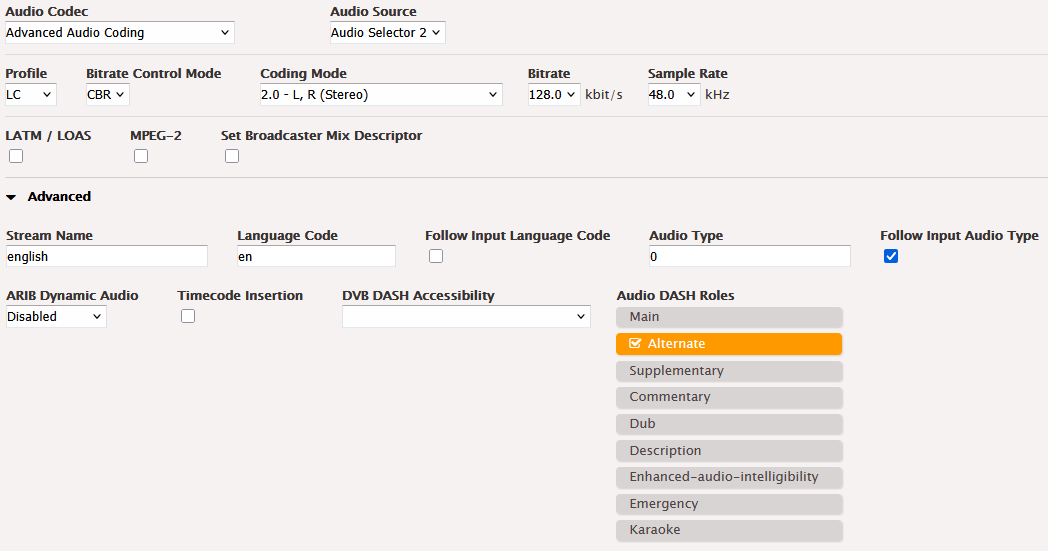
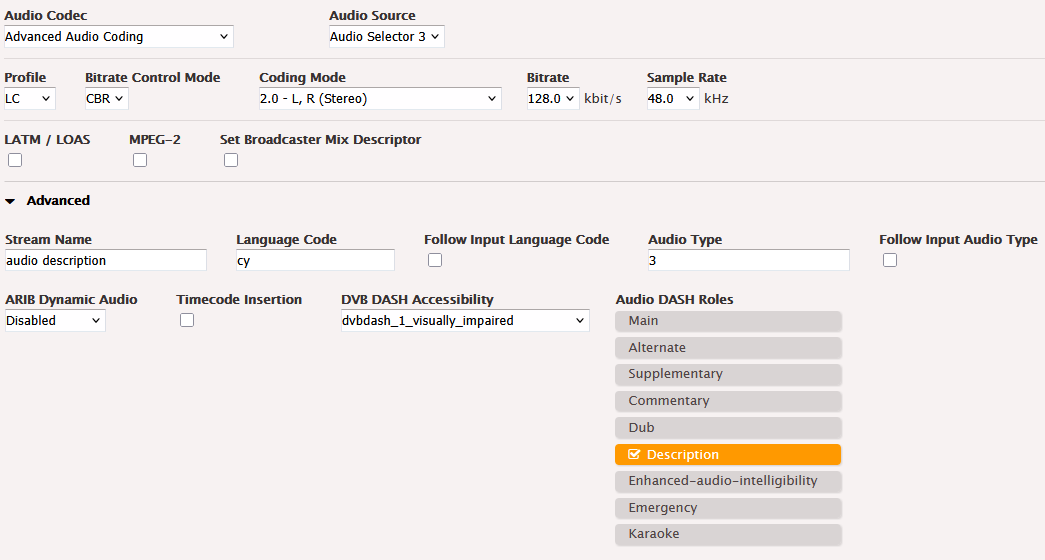
English, Welsh, and Welsh AD tracks are preserved and passed to the encoding engine. To achieve this, three audio selectors were configured with the correct track number for each, which was taken from the playout system configuration. The following screenshot shows these configurations.
Captions
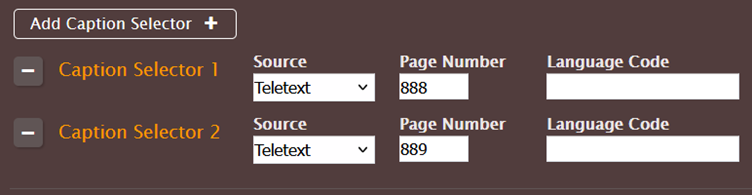
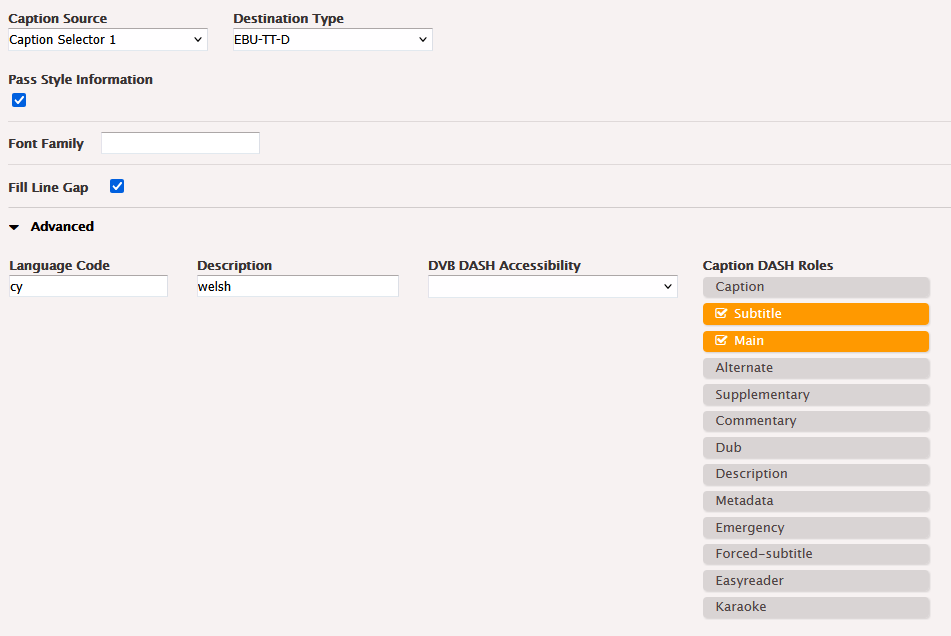
English and Welsh subtitle tracks are preserved and sent for further processing (Teletext to EBU-TT-D conversion). To achieve this, caption selectors should be correctly selected. The following screenshot shows these configurations.
Accessibility metadata
Elemental Live embeds the metadata that downstream players need to surface audio description and subtitle options to viewers. To achieve this, you need to select the correct accessibility tags in advanced settings for audio and caption output stream configuration. The following screenshots show this configuration.
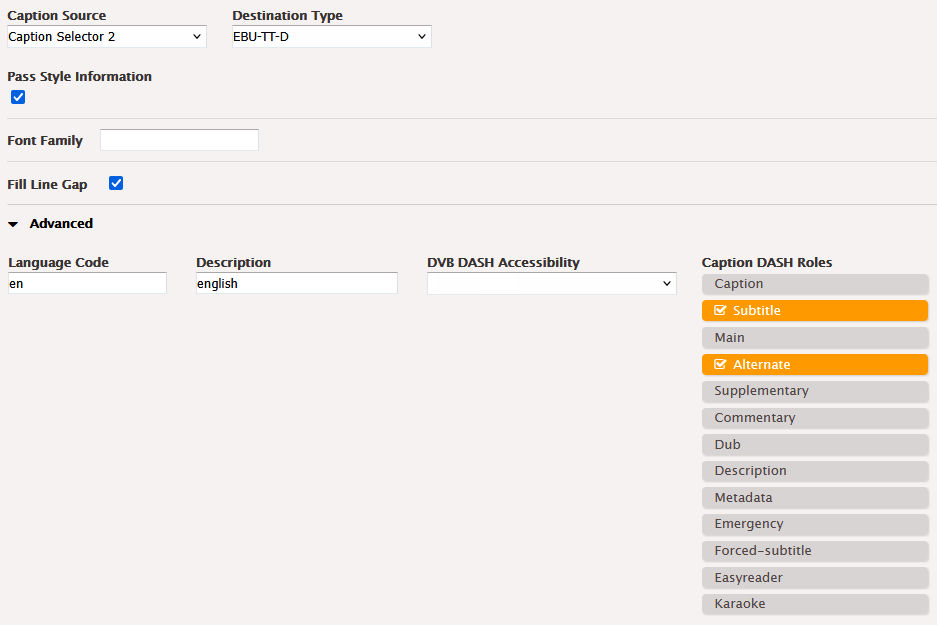 Preserving ad markers
S4C’s playout inserts ad markers at the start and end of commercial breaks. AWS Elemental Live preserves this data and passes it downstream
To achieve this, the ad avail trigger option should be correctly selected. For the S4C use case, this should be set to SCTE-104/35 TimeSignal with APOS. This is shown in the following screenshot.
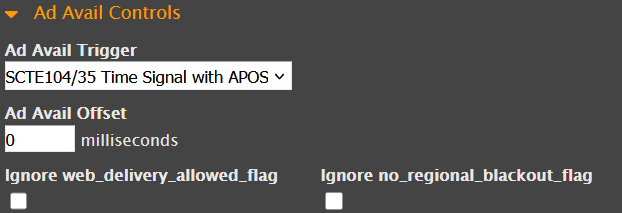
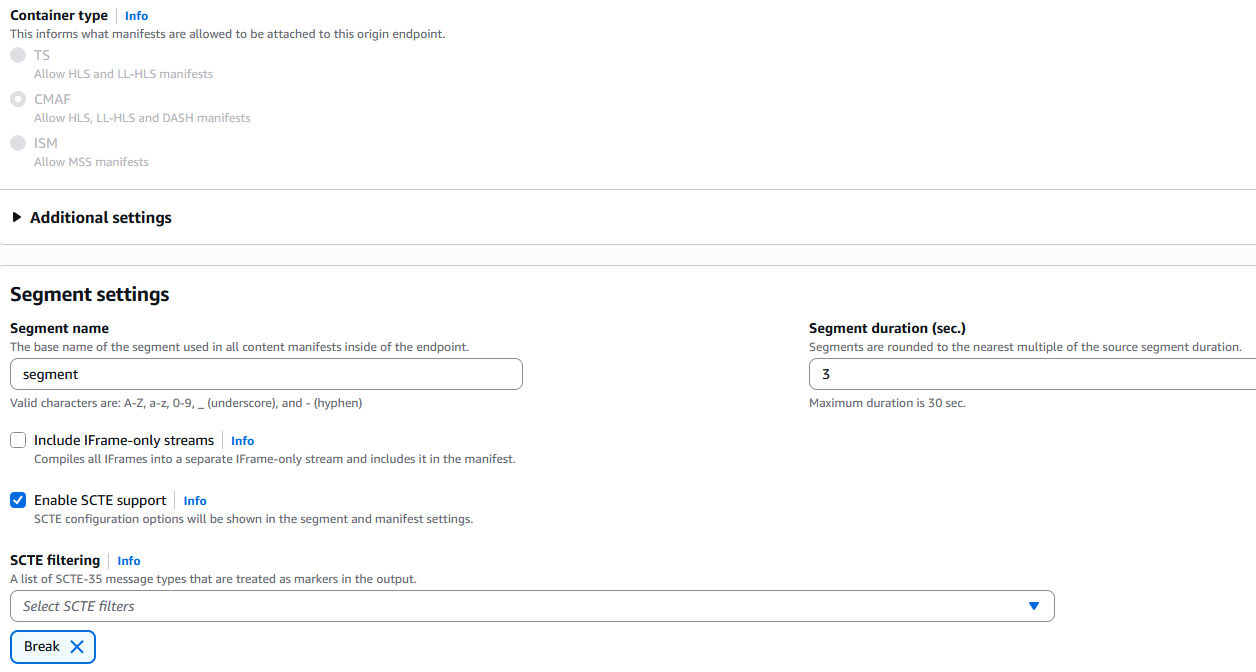
To preserve ad markers on output, the CMAF output group configuration should include SCTE without the segmentation option, as shown in the following screenshot.

Packaging with MediaPackage
The ABR CMAF signal from Elemental Live feeds into MediaPackage v2. This is where the stream is packaged into the format Freely requires, DVB DASH. MediaPackage v2 was chosen specifically because it supports the capabilities Freely mandates:
- DVB DASH manifest output – The standard Freely uses for adaptive streaming
- EBU-TT-D subtitle format – The European standard for broadcast subtitles
- Accessibility tagging in the manifest – Freely-enabled players can correctly identify and present audio description and subtitle tracks to viewers
MediaPackage also preserves the ad markers from playout, passing them through to the next stage of the pipeline intact.
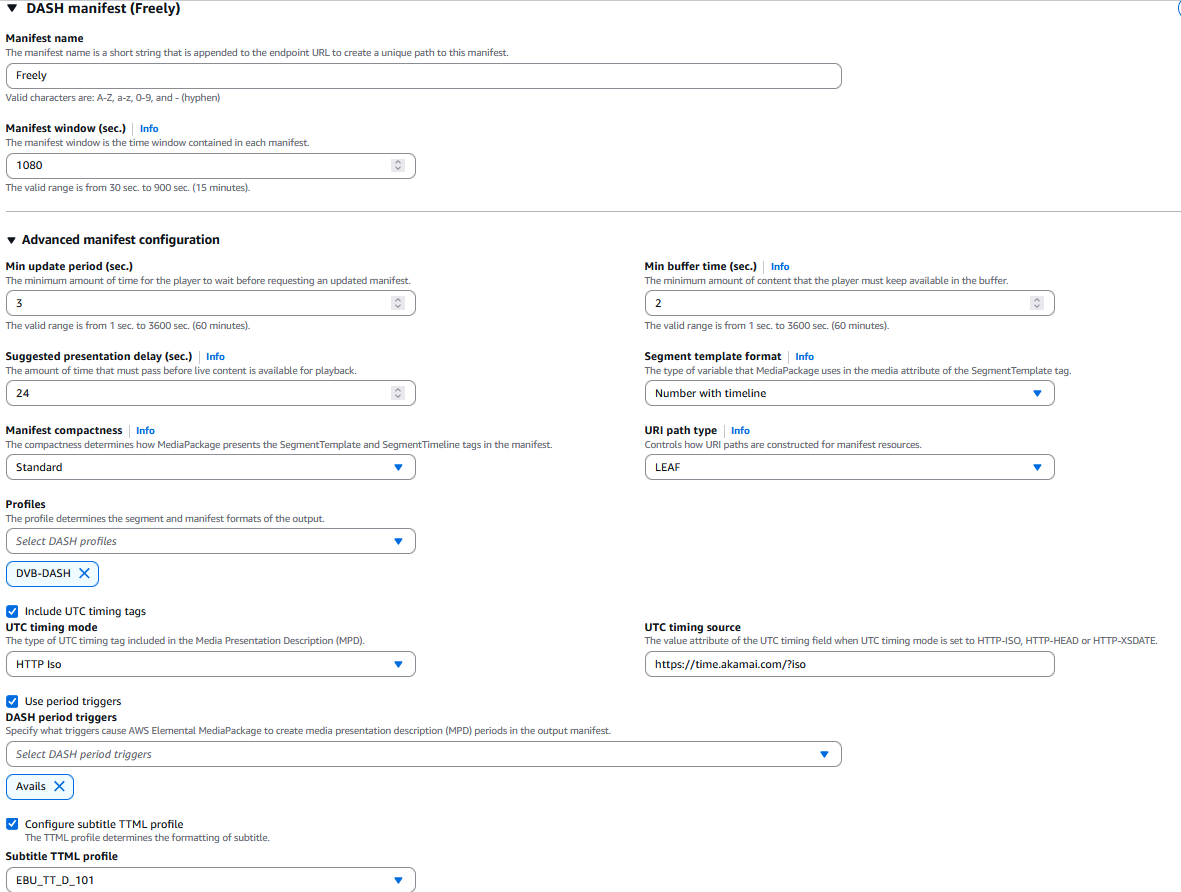
The following screenshot shows the DASH manifest configuration of the MediaPackage v2 endpoint. For Segment duration, choose 3 seconds (choose 4 if HLS manifest is planned to be used for the same endpoint). For Profiles, choose DVB-DASH. For DASH period triggers, choose Avails. For Manifest compactness, choose Standard. For Subtitle TTML profile, choose EBU_TT_D_101. Set the Manifest window at 1,080 seconds, which is 18 minutes. The standard maximum Manifest window in MediaPackave v2 is 15 minutes, but that can be extended to 18 minutes (the length required by Freely) by using a soft limit increase through service quotas. These configurations are shown in the following screenshot.
To protect origin (MediaPackage) from overload, CloudFront is used as a manifest cache layer between origin and MediaTailor.
Ad insertion with MediaTailor and FreeWheel
The DVB DASH manifest from MediaPackage is pulled by MediaTailor, which provides SSAI capabilities. S4C integrated MediaTailor directly with FreeWheel, which serves as S4C’s ad decision server (ADS). Here’s how the monetization workflow operates:
- S4C’s playout system inserts ad markers at the start and end of every commercial break.
- That data is preserved through Elemental Live and MediaPackage.
- When MediaTailor encounters an ad marker indicating an ad break, it sends an ad request to FreeWheel, passing session and context information to determine which personalized ads to serve for that viewer.
- FreeWheel responds with a Video Ad Serving Template (VAST) ad response containing the selected ad creatives. MediaTailor then performs manifest manipulation, dynamically replacing segments in the DBV DASH manifest to splice in the ad content during the designated ad break. When MediaTailor encounters an ad creative for the first time, it automatically downloads and transcodes it to match the stream’s encoding profile.
- The result is a personalized ad experience for each S4C viewer during commercial breaks, without interrupting the viewing experience.
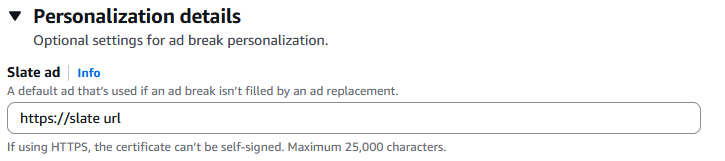
- To deal with duration inconsistency between the original commercial break and the ads returned by the ad decision server, the slate ad was configured in MediaTailor by adding a URL where the slate media file is located.
The following screenshot shows this configuration.
Two key additional requirements made ad transcoding more complex than a standard SSAI setup:
- Multi-language support – Ad creatives need to be transcoded to match the multi-language audio configuration of the S4C stream.
- Kantar audience measurement markers – Kantar markers must be embedded in ad creatives for UK audience measurement.
To meet both requirements, a custom transcode profile (CTP) was configured in MediaTailor. This can be done through AWS support at the time of this writing. As a result of the support action, the name of the CTP will be provided, which needs to be added to the MediaTailor configuration. The following screenshot shows this configuration.

This profile applies the correct audio track handling (the captions track is excluded for ads because ads usually don’t include captions) and embeds Kantar markers during ad transcoding. This way, every ad served to S4C viewers meets both the stream’s technical requirements and the broadcaster’s measurement obligations.
The CTP should include the following Kantar Watermarking settings:
CredentialsSecretName, the Amazon Resource Name (ARN) of your secretChannelNameContentReferenceKantarServerUrlKantarLicenseId
Each audio configuration should have the following attributes:
StreamName: welsh or englishLanguageCodeControl: USE_CONFIGUREDCustomLanguageCode: cy or en
In addition, some other key settings are required to achieve video and audio alignment for ad segments. The following are the key video, audio, and packaging-related settings.
Video related:
GopSize: 96FramerateNumerator: 25FramerateDenominator: 1GopSizeUnits: FRAMESNumberBFramesBetweenReferenceFrames: 2
Audio related:
AudioDuration: MATCH_VIDEO_DURATIONAudioNormalizationSettings:TargetLkfs: -23Codec: AACCodecProfile: LCSampleRate: 48000
Packaging related settings:
SegmentLength: 3MinFinalSegmentLength: 1FragmentLength: 3SegmentControl: SEGMENTED_FILESWriteSegmentTimelineInRepresentation: DISABLEDDashManifestStyle: FULL
Lastly, the MediaTailor configuration should have the internal configuration shown in the following examples. This can only be done through AWS support at the time of this writing.
calculateSegmentLength = trueenableAccessibilityTagMatching = truemanifestRequestTimeOutMilliseconds = 3000
Delivery with Amazon CloudFront
With the stream fully prepared—encoded, packaged to DVB DASH, and with SSAI applied—CloudFront delivers the live content to Freely viewers at scale. CloudFront provides the CDN layer that makes reliable, minimum possible latency delivery across the UK. Freely viewers receive the S4C stream through their connected TVs without needing a subscription, a set-top box, or additional hardware.
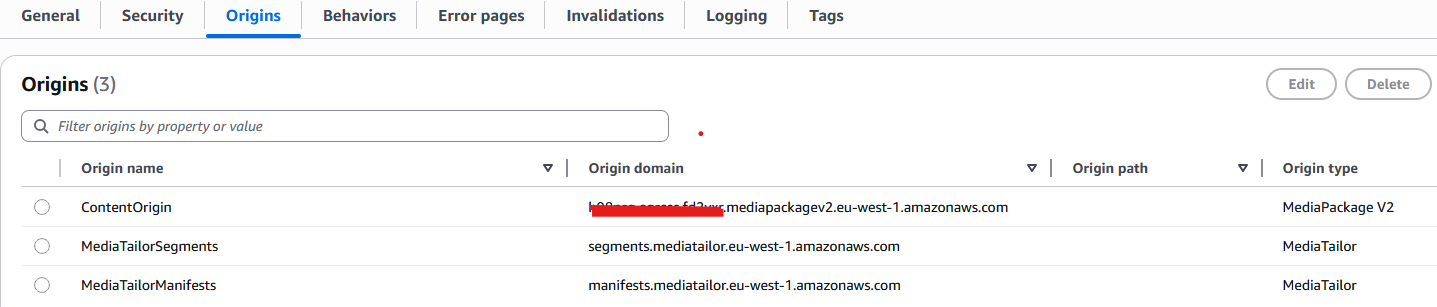
When configuring Amazon CloudFront for a SSAI workflow, there are three origins that need to be created: original content origin (MediaPackage), MediaTailor origin that creates personalized manifests, and another MediaTailor origin that stores ads. The following screenshot shows these configurations.
In addition, you need to remember the following:
- Personalized manifests generated by MediaTailor are not cached by CDNs.
- Live content video can be cached by CDNs.
- Ad video can be cached by CDNs.
Detailed instructions on how to configure CloudFront with MediaTailor can be found at Integrating AWS Elemental MediaTailor with Amazon CloudFront in the AWS Elemental MediaTailor User Guide.
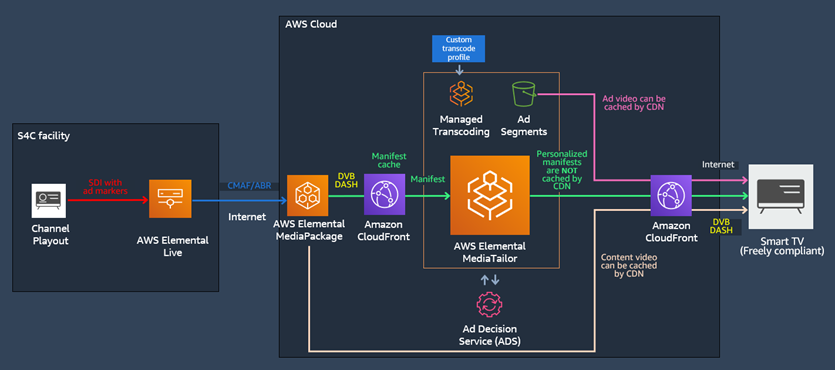
The workflow from S4C’s playout system through to Freely viewers using Amazon CloudFront is as follows:
- S4C playout (on-premises) – Outputs SDI signal with ad markers.
- AWS Elemental Live – Encodes to ABR CMAF with multi-language audio, captions, accessibility metadata, and ad markers preserved.
- AWS Elemental MediaPackage v2 – Packages to DVB DASH with EBU-TT-D subtitles, accessibility tagging, and ad markers preserved.
- AWS Elemental MediaTailor – SSAI with FreeWheel, which uses CTP during ads transcoding to deal with multi-language and Kantar.
- Amazon CloudFront – CDN delivery.
- Freely viewer (connected TV icon) – End point.
The following architecture diagram shows this signal flow.
Results
Since launching on Freely, S4C has extended its reach to a new generation of viewers watching on connected TVs, without requiring a subscription, satellite dish, TV antenna or set-top box. “Joining Freely meant meeting a complex set of modern streaming requirements, from DVB DASH delivery to multi-language audio, subtitles, accessibility metadata, and server-side ad insertion. AWS Elemental Media Services allowed us to bring all of those elements together in a streamlined workflow, making it possible for a small engineering team to deliver a fully compliant service and bring Welsh-language content to Freely viewers reliably and quickly,” said Nathan Tamblyn, S4C lead solutions architect.
What this shows for other broadcasters
S4C’s Freely integration demonstrates something important: in the new era of TV over IP, complex delivery requirements—including DVB DASH, EBU-TT-D, multi-language audio, SSAI with FreeWheel ad decisioning, custom ad transcoding, and Kantar measurement—are achievable for broadcasters who have the right architecture and the right support.
S4C’s architecture, built on AWS Media Services, handled every requirement within a single, integrated workflow. S4C’s engineering team designed and operated the pipeline without needing to build custom infrastructure for packaging, ad insertion, or CDN delivery. AWS solutions architects supported the process by helping validate the architecture and specific components.
For public service broadcasters and content owners considering connected TV distribution, S4C’s experience shows that the barrier isn’t organizational size—it’s having the right architecture in place.
About S4C
S4C is a public service broadcaster and the only Welsh language television channel in the world. S4C distributes a wide range of programs including drama, documentaries, news, music, entertainment, live sports, and children’s programs. Online content includes HANSH, a unique brand with content aimed mainly at 16-to-34-year-olds. S4C Clic—S4C’s player and on-demand service—provides exclusive content, catch up, archive material, and box sets. All S4C content is also available on demand through BBC iPlayer. Read more about S4C.
About Freely
Freely is the UK’s first free-to-air streaming platform for connected TVs, bringing together public service broadcasting and on-demand content—free for viewers with a compatible device and internet connection. Read more about Freely.