AWS Messaging Blog
Build an autonomous ecommerce assistant with AWS End User Messaging, Amazon Bedrock AgentCore, and OpenClaw
In this post, we walk through Claw Boutique, an open-source reference architecture that connects a web storefront, WhatsApp, email, and Telegram into a single OpenClaw-driven ecommerce experience on AWS. Buyers interact through WhatsApp and a web store. The shop owner manages everything from Telegram, where an artificial intelligence (AI) agent processes restock, refund, and order commands.
The project uses Amazon Bedrock AgentCore Runtime with the Strands Agents SDK, an open-source framework for building AI agents, for real-time buyer chat. Amazon Elastic Kubernetes Service (Amazon EKS) hosts the seller-side AI agent (OpenClaw, an open-source AI agent gateway). AWS End User Messaging Social provides managed WhatsApp Business integration. The entire stack deploys with a single AWS Cloud Development Kit (AWS CDK) command.
Architecture overview
The architecture separates concerns into three channels that share a common Store API and database.
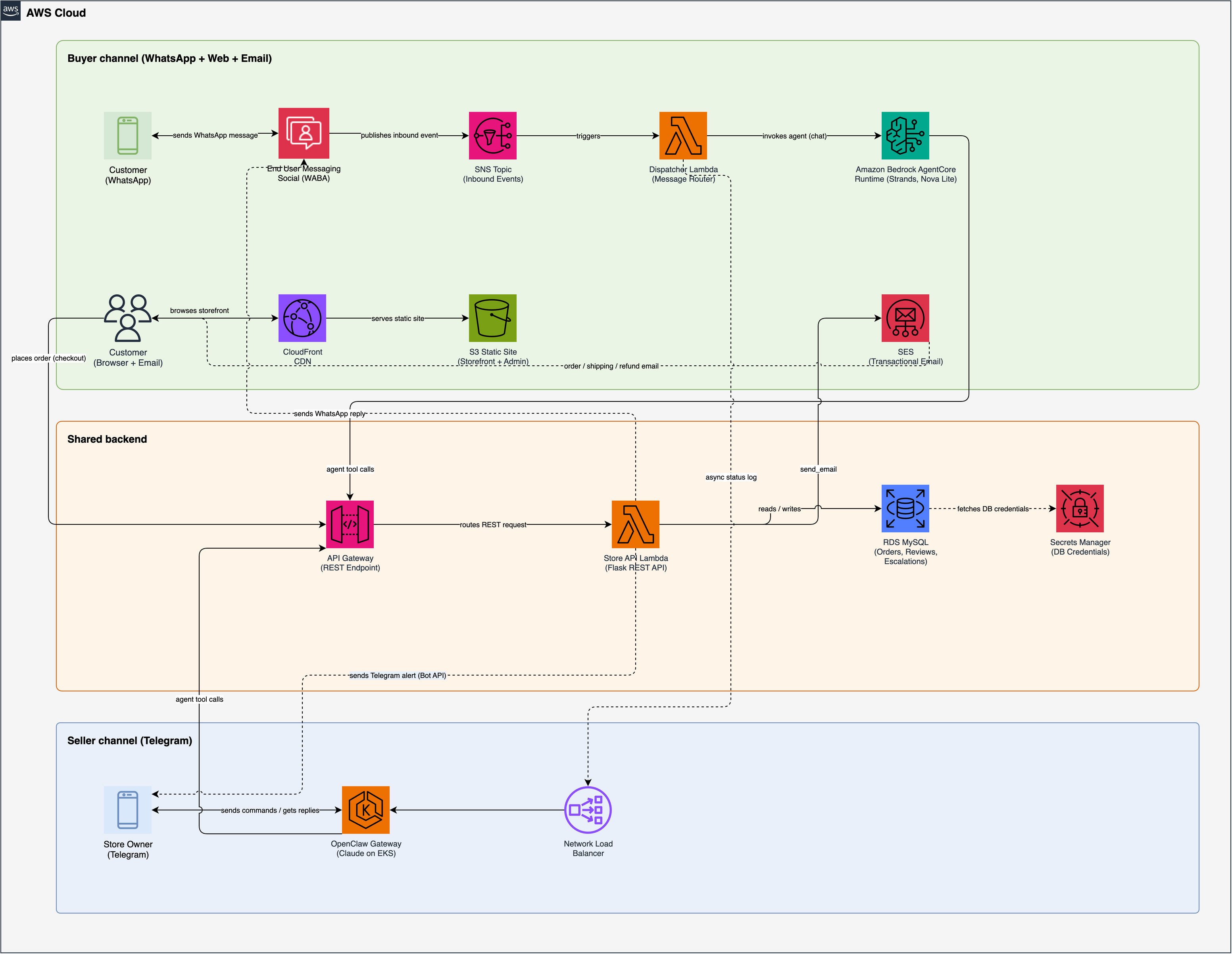
Figure 1 – Claw Boutique architecture on AWS
Buyer channel (WhatsApp): Inbound WhatsApp messages arrive through AWS End User Messaging Social, which provides a managed WhatsApp Business API integration. Messages publish to an Amazon Simple Notification Service (Amazon SNS) topic, which triggers a Dispatcher AWS Lambda function. The dispatcher invokes a Strands Agent hosted on Amazon Bedrock AgentCore Runtime, running Amazon Nova Lite for real-time, tool-calling conversations. AgentCore Memory provides session continuity across messages. The agent can look up products, check order status, escalate issues, and send replies back through WhatsApp.
Seller channel (Telegram): The store owner receives stock alerts, review escalations, and order notifications on Telegram. An AI agent runs on Amazon EKS via the OpenClaw gateway. The owner replies with natural language commands such as “restock hoodies” or “apologize to the buyer,” and the agent runs the appropriate Store API calls.
Web storefront: Amazon CloudFront serves a static site from Amazon Simple Storage Service (Amazon S3). The checkout flow calls the Store API through Amazon API Gateway. The same API backs both the storefront and the admin dashboard.
All three channels converge on a single Store API Lambda function (Python/Flask) backed by Amazon Relational Database Service (Amazon RDS) for MySQL. Amazon Simple Email Service (Amazon SES) sends transactional email messages for order confirmations, shipping updates, and refund notices.
How it works: The order lifecycle
A single order touches the web storefront, WhatsApp, email, Telegram, and the admin dashboard. Here is the full flow.
1. Place an order
You visit the storefront, add items to the cart, and check out. The Store API creates the order in Amazon RDS and returns an order number.
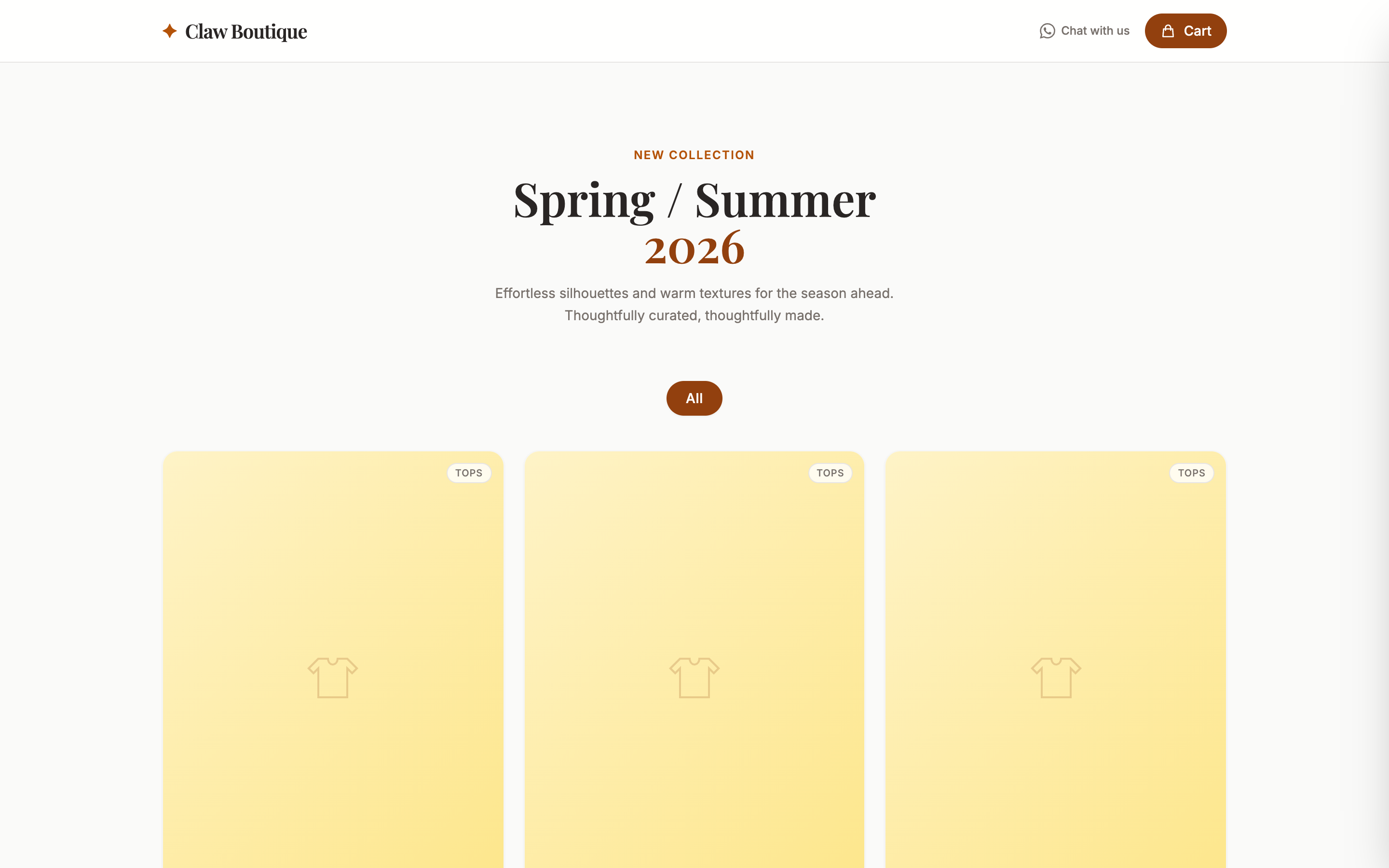
Figure 2 – The Claw Boutique storefront
2. Order confirmation on WhatsApp and email
Two things happen right after checkout. The buyer receives a WhatsApp message with the order number, items, and total, followed by a feedback survey asking them to rate their experience from 1 to 5. At the same time, Amazon SES sends a confirmation email with the same order details.
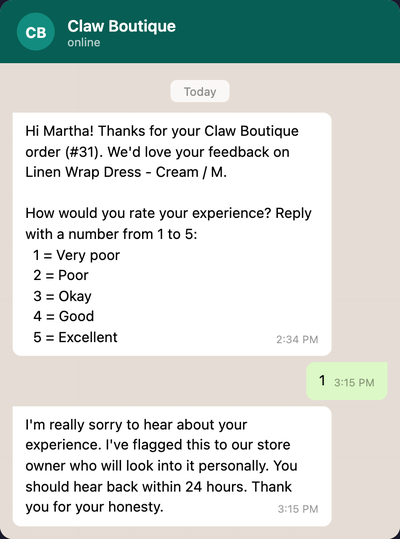
Figure 3 – WhatsApp order confirmation and feedback survey
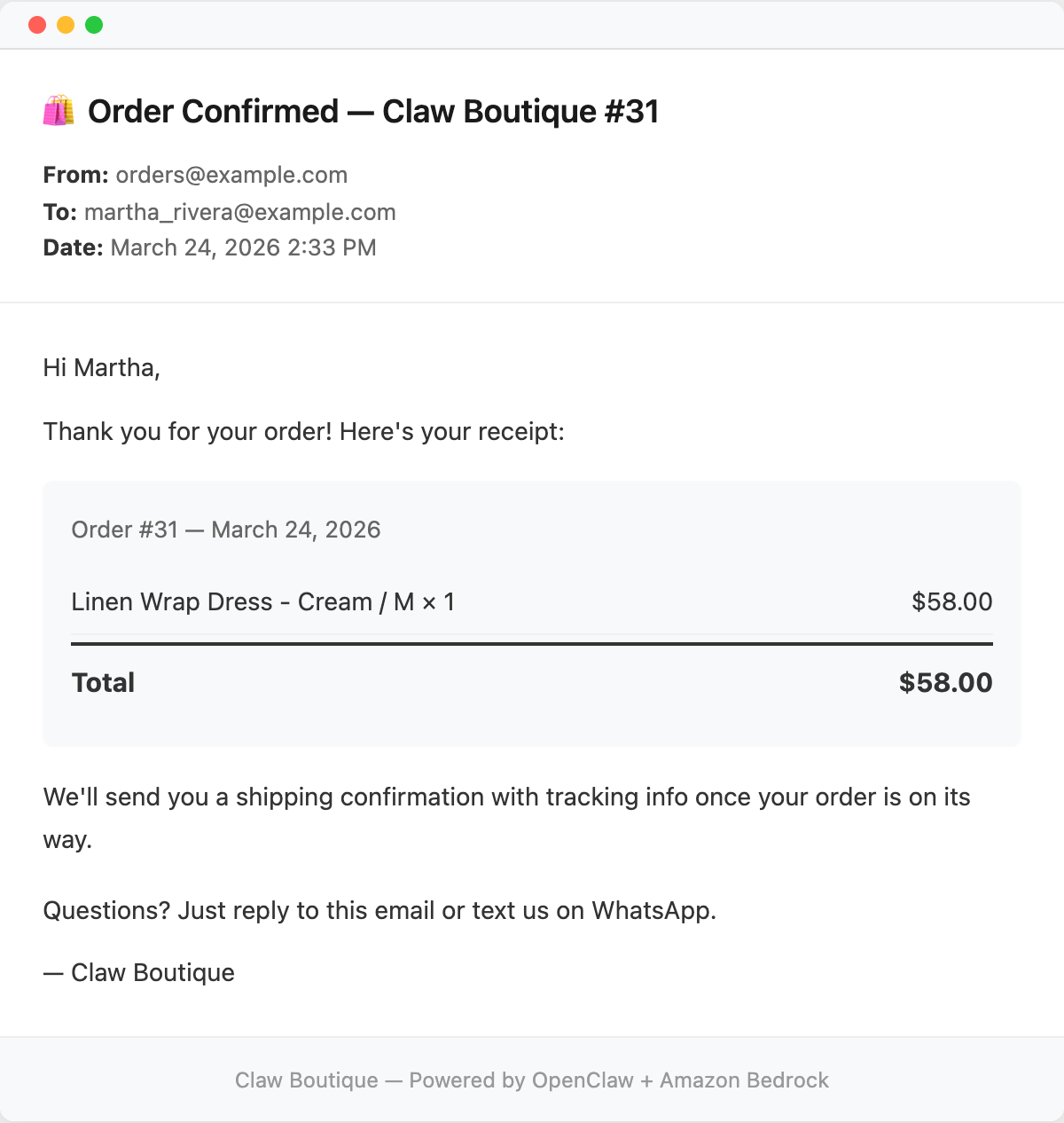
Figure 4 – Order confirmation email via Amazon SES
3. Stock alert on Telegram
Every purchase triggers a stock check. If any item is out of stock, running low (fewer than 5 units), or projected to sell out within 7 days, the seller gets a Telegram alert with current stock levels and sell-through rates. The seller can reply with a command such as “restock hoodies 20” and the AI agent runs it.
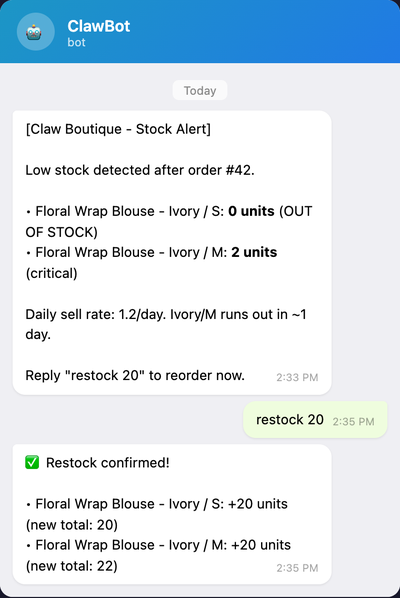
Figure 5 – Telegram stock alert with restock command
4. Negative feedback triggers an escalation
The buyer replies “1” to the WhatsApp survey. The Store API creates an escalation record and sends the seller a Telegram alert with the buyer’s name, phone number, rating, and review text.
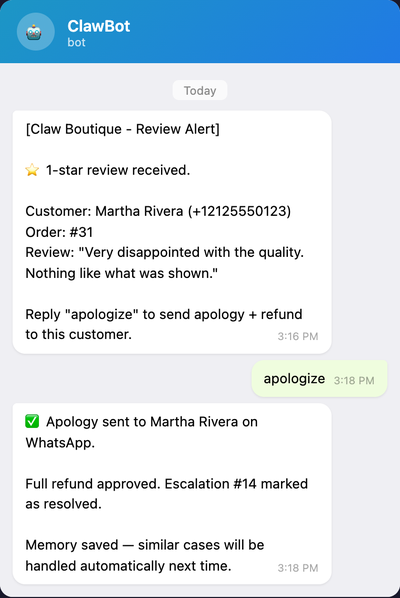
Figure 6 – Telegram review escalation alert
5. Seller resolves the issue from Telegram
The seller replies “apologize” on Telegram. The AI agent looks up the unresolved escalation and takes four actions: sends a WhatsApp apology to the buyer, sends a refund confirmation email via Amazon SES, marks the order as “refunded” in the database, and resolves the escalation. If there are multiple open escalations, the agent lists them and asks which one to resolve.
6. Admin dashboard
The seller can also open the admin dashboard to view orders (now showing “refunded” status), escalation history, stock levels, and AI-generated business insights based on order patterns and buyer feedback.
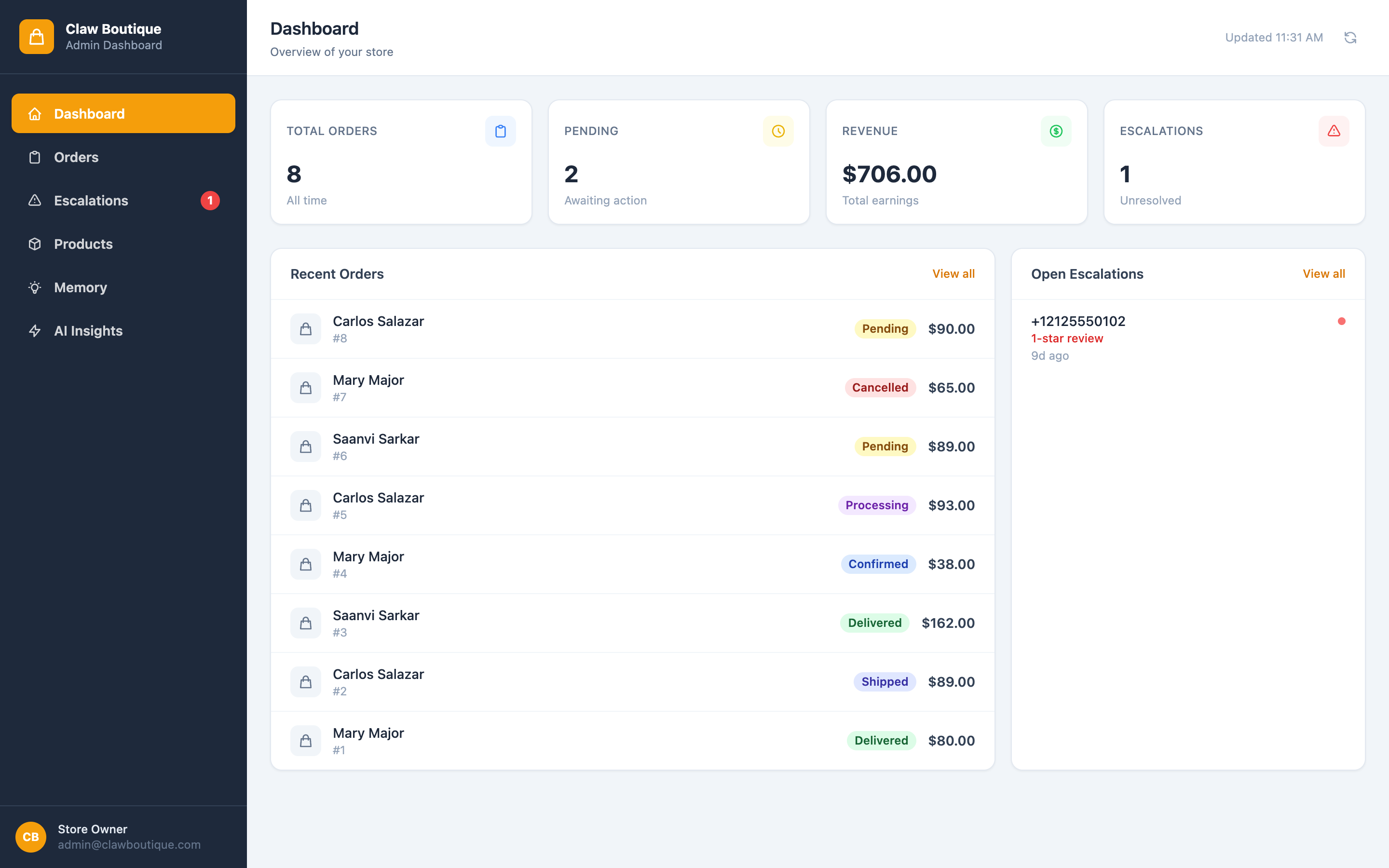
Figure 7 – Admin dashboard with orders and insights
Ordering directly through WhatsApp
Buyers can also browse and order by texting the WhatsApp business number directly. The Strands Agent on AgentCore manages the full conversation: showing available products, checking order status, answering product questions, and escalating issues to the store owner.
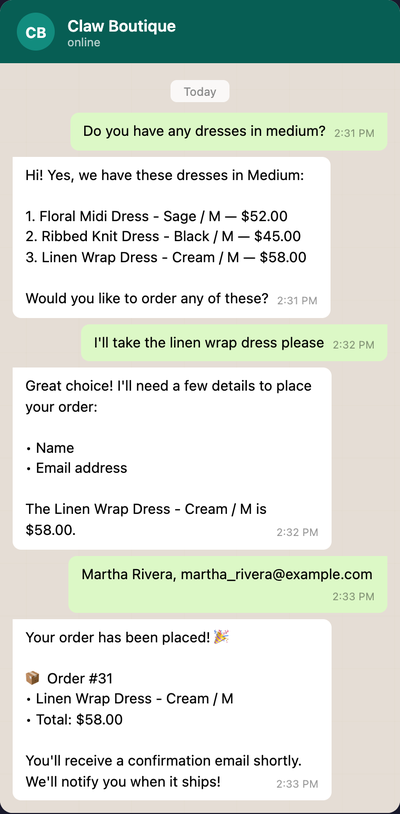
Figure 8 – Ordering through WhatsApp via Amazon Bedrock AgentCore
Why two AI models?
Claw Boutique uses two AI models for different purposes, each chosen for the characteristics that matter most in its channel.
Amazon Nova Lite (via Amazon Bedrock AgentCore) for the buyer channel: Buyer-facing WhatsApp interactions need to be fast and cost-effective. Amazon Nova Lite provides sub-second responses with reliable tool calling at a fraction of the cost of larger models. AgentCore Runtime hosts the agent container, while AgentCore Memory manages conversation history per buyer phone number. The Strands Agents SDK handles tool definitions, orchestration, and model interaction with minimal boilerplate.
AI agent (via OpenClaw on Amazon EKS) for the seller channel: The seller channel involves more complex tasks: interpreting ambiguous commands, managing multi-step workflows (such as resolving escalations that span WhatsApp, email, and the database), and generating business insights. The model’s reasoning capabilities are well suited for these. OpenClaw provides the gateway, tool execution, and memory management layer.
This approach keeps buyer-facing latency low and costs predictable, while giving the seller access to deeper reasoning when managing the business.
Prerequisites
Before you deploy, make sure you have the following:
- AWS Command Line Interface (AWS CLI) configured with credentials.
- Node.js 18+ and Docker running locally.
- A Telegram bot token (obtainable from @BotFather).
- A WhatsApp Business Account linked to AWS End User Messaging Social.
- A verified Amazon SES email address.
Deploying the solution
The entire stack deploys with AWS CDK. A single cdk deploy command provisions the Amazon Virtual Private Cloud (Amazon VPC), Amazon EKS cluster, Amazon RDS database, Lambda functions, Amazon API Gateway, Amazon CloudFront distribution, Amazon S3 bucket, Amazon SNS topic, and all AWS Identity and Access Management (IAM) roles and security groups. AWS CDK also runs database initialization (schema and seed data), Docker image build, Amazon Elastic Container Registry (Amazon ECR) push, and Amazon EKS deployment.
Configuration values (Telegram token, WhatsApp IDs, Amazon SES email) go into a CDK context file. Cold deploy takes about 25-30 minutes.
You can find the full source code and deployment instructions in the GitHub repository.
Cleaning up
To avoid ongoing charges, delete the resources created in this walkthrough when you’re done experimenting. Run the following command from the cdk/ directory:
This removes the Amazon EKS cluster, Amazon RDS database, Lambda functions, and all other resources created by the stack. No context values are needed for destroy.
Conclusion
In this post, we showed how to build an ecommerce bot using OpenClaw and Amazon Bedrock AgentCore. By combining AWS End User Messaging Social for WhatsApp, Amazon Bedrock AgentCore Runtime for real-time buyer conversations, and Amazon EKS for a seller-side AI agent, you can create a system where buyers order through the channels they already use, and store owners manage their business from a single Telegram chat.
The project is open source and deploys with a single AWS CDK command. You can use it as a starting point and adapt it to your own product catalog, messaging channels, and business logic.
To learn more and get started:
- Claw Boutique GitHub repository.
- AWS End User Messaging documentation.
- Amazon Bedrock AgentCore documentation.
- Strands Agents SDK documentation.
- Amazon EKS documentation.
- Amazon SES documentation.