AWS Messaging Blog
Centralized dashboard for monitoring SES identities
Organizations running Amazon Simple Email Service (Amazon SES) across multiple AWS accounts face a common challenge: visibility. When you have dozens or hundreds of accounts sending email, answering basic questions becomes surprisingly difficult:
- How many SES identities exist across my organization?
- Which identities are verified and pending?
- Are there stale or unused identities that should be cleaned up?
- Which accounts are sending from which domains?
- Is DKIM properly configured for all sending domains?
Without centralized visibility, security teams can’t audit email-sending capabilities, compliance teams can’t enforce domain policies, and operations teams discover rogue identities only after deliverability issues arise.
This post presents two solutions for building a centralized SES identity dashboard across your AWS Organization. Each collects identity data from all member accounts and presents it through Amazon Athena and Amazon Quick Sight.
- Option 1: A single AWS Lambda function that scans all accounts sequentially, best for organizations with fewer than 50 accounts.
- Option 2: An AWS Step Functions state machine with a Map state for parallel execution, best for organizations with 50 or more accounts.
Both solutions provide centralized visibility into your SES posture with minimal member account footprint. You can deploy the option that best suits your needs by following the guidance in this post.
Solution architecture
The following diagram shows the end-to-end scan workflow, from the scheduled trigger through cross-account collection to the Amazon Athena and Amazon Quick Sight presentation layer.
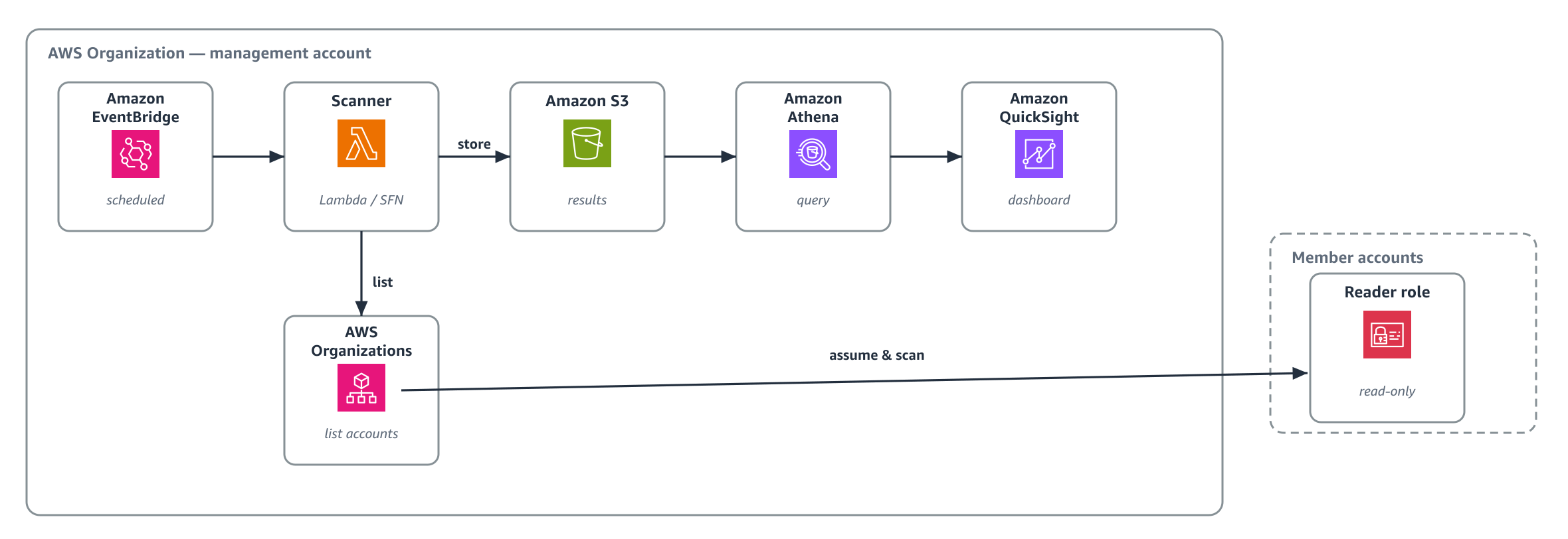
Figure 1: End-to-end SES identity scan workflow from the scheduled trigger through cross-account collection to the Athena and Amazon Quick Sight presentation layer
- Amazon EventBridge triggers the scan on a daily schedule.
- The scanner discovers all active accounts through AWS Organizations.
- For each account, it assumes a read-only AWS Identity and Access Management (IAM) role deployed through AWS CloudFormation StackSets.
- It scans SES identities across all enabled AWS Regions using the Amazon SES v2 API.
- Results are written to Amazon Simple Storage Service (Amazon S3) in JSON Lines format.
- Amazon Athena queries the data using standard SQL.
- Amazon Quick Sight provides interactive dashboards.
For each identity, the scan collects the attributes Amazon SES reports for that identity: identity name, type (domain or email), verification status, DKIM configuration (signing enabled, status, and current key length), the custom MAIL FROM domain and its status, and whether sending is enabled.
SPF and DMARC are published as DNS records by the domain owner rather than reported by Amazon SES, so they make a natural next layer to add on top of this scan.
Option 1: Single Lambda (fewer than 50 accounts)
A single AWS Lambda function handles the entire scan sequentially, at approximately 30 seconds per account. Because a sequential scan of 50 or more accounts exceeds what one invocation can complete, Option 2 parallelizes the work across accounts.
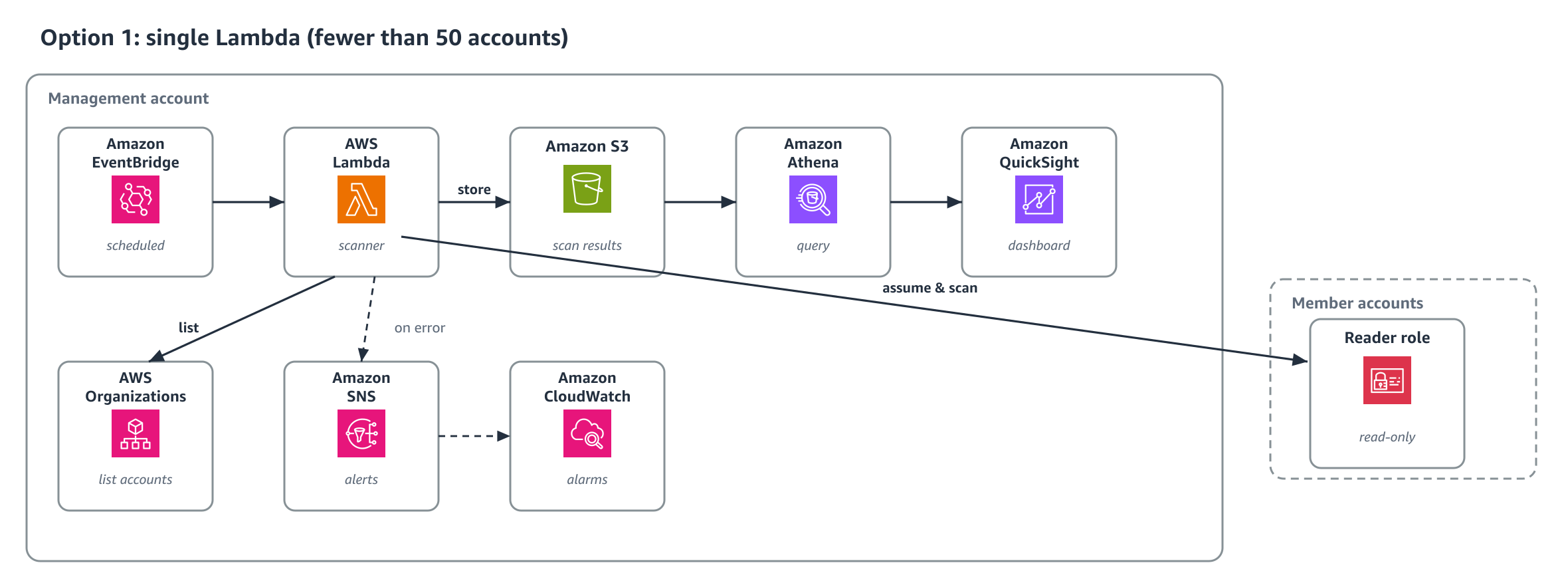
Figure 2: Option 1 architecture using a single Lambda function to scan accounts sequentially
How Option 1 works
- Amazon EventBridge triggers the scanner Lambda on a daily schedule (configurable).
- The Lambda calls
organizations:ListAccountsto discover all active member accounts. - For each account, it calls
sts:AssumeRoleto assume theSES-Identity-Readerrole. The role’s trust policy requires three conditions: the scanner role’saws:PrincipalArn, youraws:PrincipalOrgID, and a per-deployment external ID passed as aNoEchoparameter. Generate a unique value for this deployment, and don’t reuse a fixed one. - Using the assumed credentials, it calls
ec2:DescribeRegionsto discover enabled Regions, thenses:ListEmailIdentitiesandses:GetEmailIdentityin each Region. - Results are written to Amazon S3 as JSON Lines, both a timestamped historical path and a
latest/path for Athena. - If any accounts or Regions fail, the Lambda records the failures in
scans/summary/latest.jsonand publishes an error summary to Amazon Simple Notification Service (Amazon SNS). If accounts exist but zero identities are collected, the run fails without overwriting scans/latest (the previous good scan is preserved) so theSES-Scanner-Errorsalarm fires. - Amazon CloudWatch alarm (a missed-run alarm) fires if no successful scan occurs within 25 hours. Additional alarms cover Lambda Errors and dead-letter-queue depth.
Deploying Option 1 in your AWS account
Prerequisites for Option 1:
- AWS account access with permissions to deploy CloudFormation stacks and StackSets.
- Your AWS Organization ID (format:
o-xxxxxxxxxx). - Your management account ID (12 digits).
- From the repository, you need the
ses-reader-role.yamlandses-scanner-stack.yamlfiles found in/option-1/.
Step 1: Deploy the cross-account IAM role
Template: option-1-ses-reader-role.yaml
- Enable trusted access between CloudFormation StackSets and AWS Organizations. This is a one-time prerequisite for service-managed StackSets and is a no-op if already enabled.
- In the CloudFormation console, this is offered automatically the first time you create a service-managed StackSet. Alternatively, run the following command from the management account:
aws organizations enable-aws-service-access --service-principal member.org.stacksets.amazonaws.com - Open the AWS CloudFormation console in your management account.
- Navigate to StackSets and choose Create StackSet.
- Upload the
ses-reader-role.yamlfile. - Configure the parameters:
ManagementAccountId: Your 12-digit management account ID.OrganizationId: Your organization ID (o-xxxxxxxxxx). Restricts assumption to principals in your organization.ExternalId: A unique random secret you generate for this deployment (8–128 chars). Supply the same value to the scanner stack in Step 2. Don’t reuse the sample value.ScannerRoleName: Leave default (SES-Identity-Scanner-Role) unless you renamed the scanner role.
- Choose Service-managed permissions.
- Enable Auto-deployment (so new accounts automatically receive the role).
- Deploy to your organization root (r-xxxx) in a single Region (IAM roles are global).
- Wait for the operation to show SUCCEEDED for all member accounts.
This deploys a strictly read-only IAM role (SES-Identity-Reader) to all member accounts. The role grants only the SES v2 read actions it uses (ses:ListEmailIdentities, ses:GetEmailIdentity) plus ec2:DescribeRegions, and no write or other permissions.
Step 2: Deploy the scanner stack
Template: option-1-ses-scanner-stack.yaml
- Open the AWS CloudFormation console in your management account.
- Choose Create stack, then With new resources (standard).
- Upload the
ses-scanner-stack.yamlfile. - Configure the parameters:
ScheduleExpression: Scan frequency (default:rate(1 day)).OrganizationId: Your organization ID (o-xxxxxxxxxx). Scopes cross-accountsts:AssumeRolethrough anaws:ResourceOrgIDcondition.ExternalId: The same value you generated in Step 1.AlertEmail: Email address that receives scan-error summaries and CloudWatch alarms.
- Acknowledge IAM resource creation and choose Submit.
- Wait for CREATE_COMPLETE.
- After the stack is created, confirm the SNS subscription in the email sent to AlertEmail. Until you confirm, error notifications and alarms are not delivered.
The stack creates:
- Two S3 buckets (a scan-results bucket and an access-logs bucket, both versioned, public access blocked, with lifecycle rules including noncurrent-version expiration).
- A Lambda function (Python 3.12, 512 MB, 15-minute timeout) with an explicit CloudWatch log group (90-day retention).
- An Amazon EventBridge rule, an SQS dead-letter queue.
- CloudWatch alarms (missed run, Lambda Errors, DLQ depth).
- An SNS topic with an email subscription.
- An enforced encrypted Athena workgroup.
- An AWS Glue database with table definition for Athena.
Note on data retention: Timestamped historical scans are written under scans/archive/, and both lifecycle rules (expiration and transition to Infrequent Access) are scoped to that prefix. Three pointers are continuously overwritten: scans/latest/, scans/summary/, and athena-results/. These are deliberately excluded from expiration, so the most recent good scan is always preserved, including when a run fails closed.
Step 3: Test the scanner
- Open the AWS Lambda console.
- Select the
SES-Identity-Scanner-v2function. - Choose Test, create a test event with payload
{}, and choose Test. - Review the execution result, which should show accounts scanned, total identities found, and any errors.
- Verify the JSON Lines file exists in your S3 bucket under
scans/latest/.
Step 4: Query with Amazon Athena
- Open the Amazon Athena console.
- Select the workgroup the stack creates (
<stack-name>-ses-identity). It enforces an encrypted results location inside the hardened scan-results bucket, so you do not set a query result location manually. - Select the
ses_identity_dashboarddatabase. - Run the following queries to explore your organization’s SES posture.
Organization summary:
Identities requiring action:
More queries: option-1-sample-athena-queries.sql
Step 5: Visualize with Amazon Quick Sight
- Open the Amazon Quick Sight console.
- Create a new dataset using Amazon Athena as the data source.
- Select the
ses_identitiestable from theses_identity_dashboarddatabase. - Import the data into SPICE for fast dashboard performance.
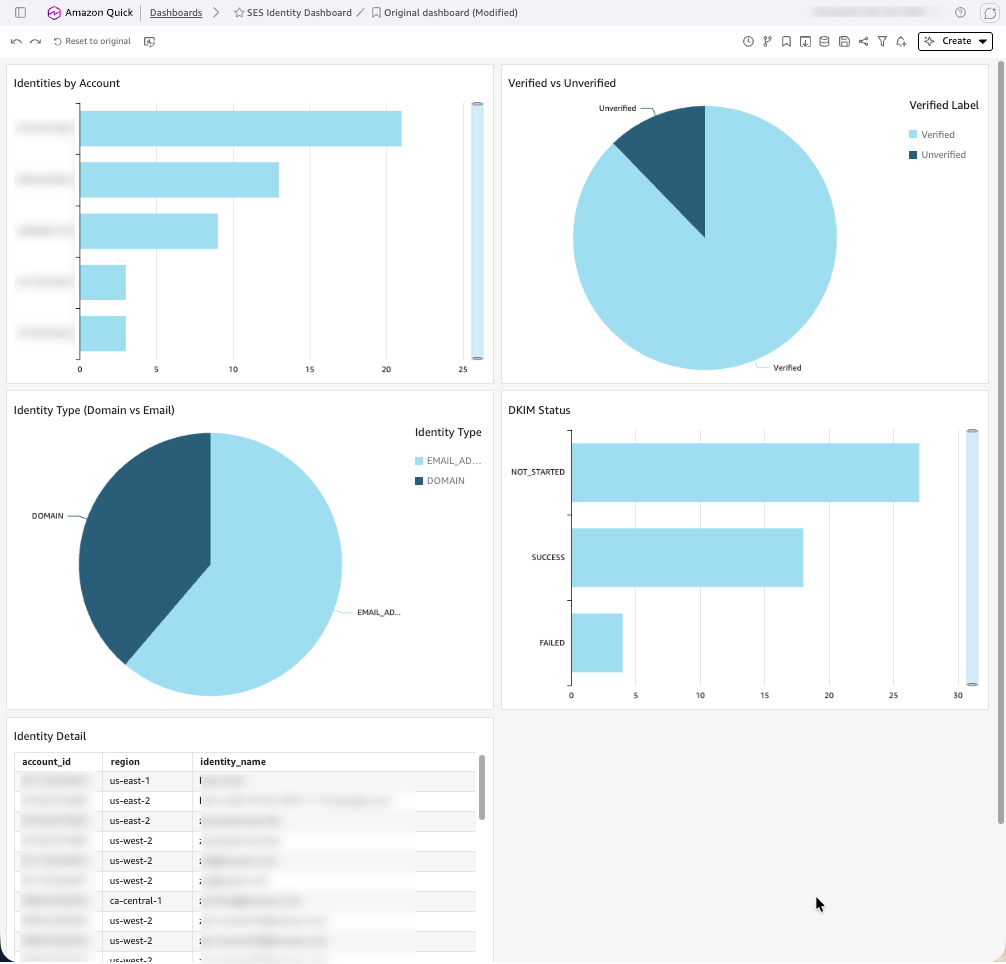
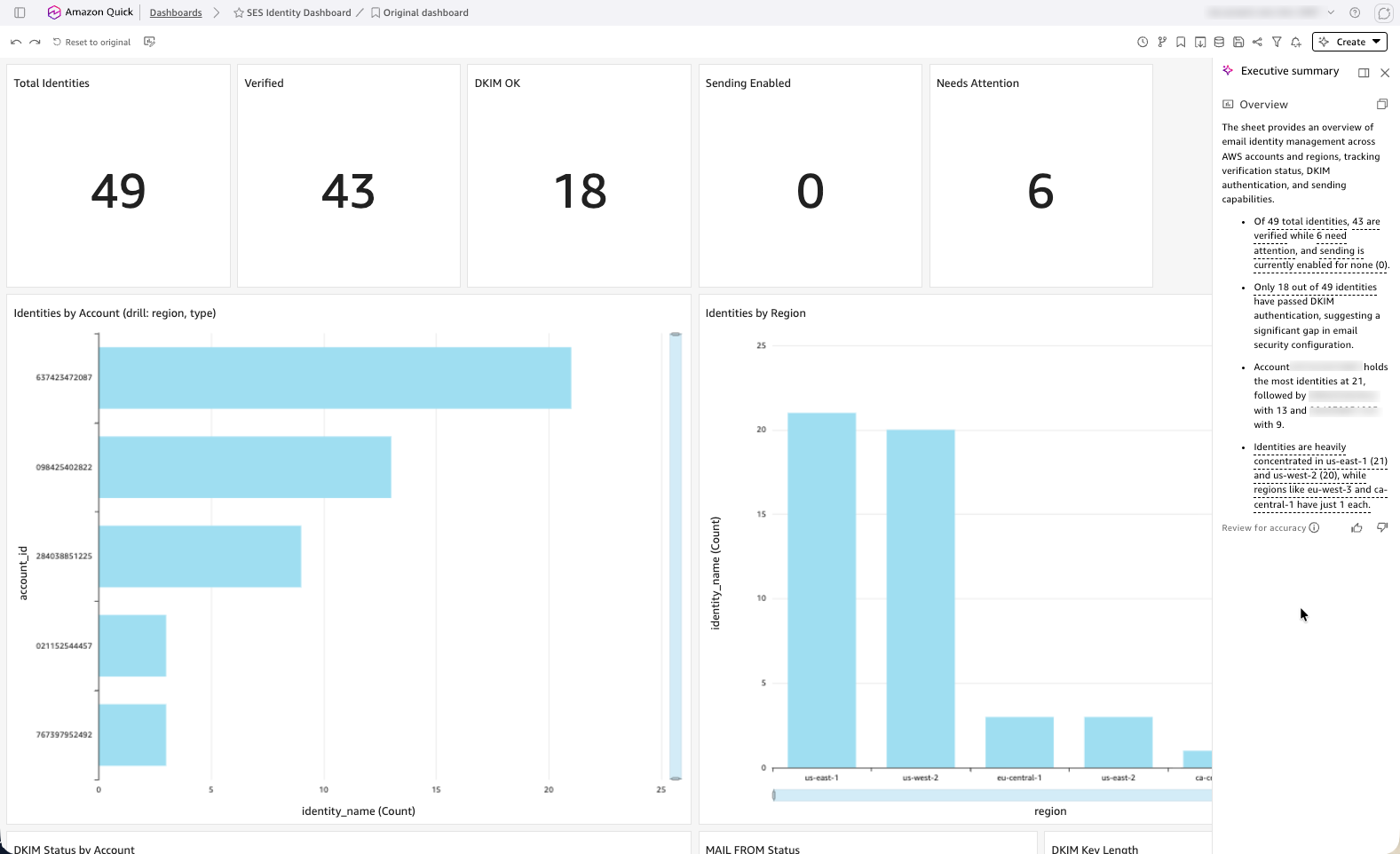
- Create visualizations: bar chart (identities by account), pie chart (verified and unverified), heat map (identities by Region and account), and a detail table with filters.
- Schedule SPICE refresh to run after the daily scan completes.
 |
 |
Option 2: Step Functions with parallel account scanning (50+ accounts)
AWS Step Functions with a Map state provides parallel execution. With up to 40 concurrent per-account scans, an estimated 280 accounts complete in roughly 3–5 minutes, with built-in retry logic and per-account error isolation. The template uses an inline Map, which caps concurrency at 40. To scale beyond 40, switch the ItemProcessor mode to DISTRIBUTED. This additionally requires three actions on the state machine plus S3 ItemReader/ResultWriter permissions.
states:StartExecutionstates:DescribeExecutionstates:StopExecution
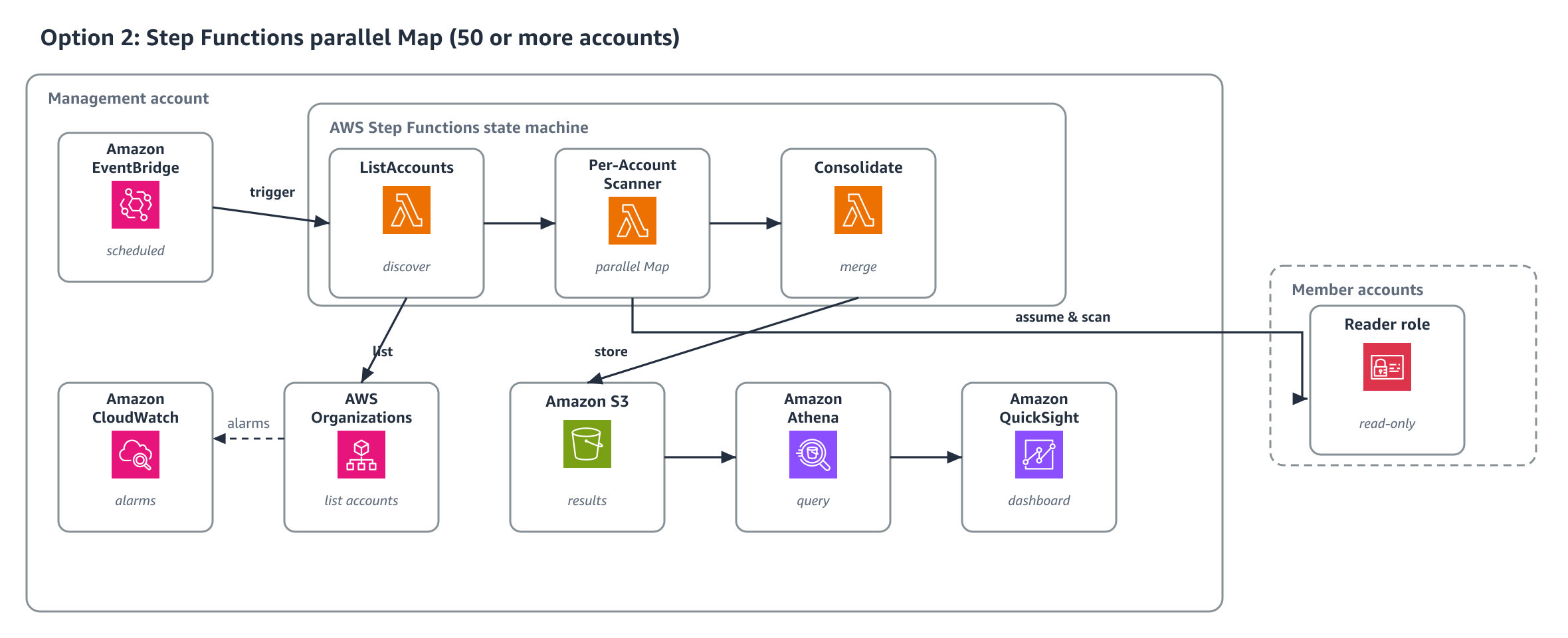
Figure 3: Option 2 architecture using a Step Functions state machine with a Map state for parallel account scanning
Prerequisites for Option 2:
- AWS Organizations enabled with a management account (or delegated administrator).
- Permissions to deploy CloudFormation StackSets across member accounts.
- Amazon SES configured in one or more member accounts (identities to scan).
- Console access to AWS CloudFormation, AWS Lambda, Amazon S3, and Amazon Athena.
- Clone the repository:
How Option 2 works
Refer to Option 2 image for the workflow:
- Amazon EventBridge triggers the Step Functions state machine on schedule.
- The ListAccounts Lambda discovers all active organization accounts and returns them as a JSON array.
- The Map state iterates over the accounts array with
MaxConcurrency: 40(inline Map. Do not raise above 40 without switching to a Distributed Map). - Each Per-Account Scanner Lambda receives a single account ID, assumes the reader role, scans all enabled Regions, and writes per-account results to S3. Per-region and per-identity failures are reported in-band rather than silently dropped.
- The Consolidate Lambda merges all per-account files into a single JSON Lines file at the
scans/latest/path. It also writeslatest.jsonand fails the execution only when zero identities were collected and at least one account, Region, or identity failed. A legitimately empty organization (every account scanned cleanly with no identities) is treated as healthy, and the previousscans/latest/is preserved when the run fails closed. - On any account failure, Step Functions automatically retries (two attempts, 60-second interval, backoff rate 2.0).
- Failed accounts are captured in the execution output without stopping the scan for other accounts.
The Map state processes up to 40 accounts concurrently. Each per-account Lambda completes in approximately 30 seconds, so 280 accounts finish in 3–5 minutes. State machine logging and AWS X-Ray tracing are enabled. A SES-Scanner-SFN-Execution-Failed alarm covers failed executions. The Step Functions console provides a visual execution history showing exactly which accounts succeeded or failed.
Deploying Option 2 in your AWS account
Template: option-2-ses-scanner-stepfunctions.yaml
- Confirm the
SES-Identity-Readerrole is already deployed to all member accounts (Step 1 from Option 1). - Open the AWS CloudFormation console in your management account.
- Upload the
ses-scanner-stepfunctions.yamlfile. - Configure the parameters:
OrganizationId: Your organization ID (o-xxxxxxxxxx). Scopessts:AssumeRolethroughaws:ResourceOrgID.ExternalId: The same per-deployment secret used by the reader role.AlertEmail: Address subscribed to the alert SNS topic (confirm the subscription email).ScheduleExpression.- and optionally
MaxConcurrency(default 40. Bounded 1–40 for the inline Map).
- Acknowledge IAM resource creation and choose Submit.
- Wait for CREATE_COMPLETE.
- The Athena table schema, sample queries, and Amazon Quick Sight dashboard configuration are the same as Option 1. Only the AWS Glue database name differs. Option 2 creates
ses_identity_dashboard_sfn, while Option 1 usesses_identity_dashboard.Point your Athena queries and Amazon Quick Sight dataset atses_identity_dashboard_sfn. Query results are written to the enforced encrypted workgroup<stack-name>-ses-identity-sfn. Select it in the Athena console. The distinct names let both options run in the same account.
Clean up
To remove all resources created by this solution:
- Delete the scanner CloudFormation stack from your management account.
- In StackSets, delete all stack instances, then delete the StackSet itself.
- If you created test SES identities, delete them from the SES console in each account.
- Empty and delete the S3 bucket if it was not removed by the stack deletion (buckets with objects require manual emptying).
Conclusion
This solution gives your organization a single, centralized view of SES identities across all accounts, deployed in minutes with minimal member account footprint.
Start with Option 1 for immediate value. When your organization grows beyond 50 accounts, deploy Option 2. The data format, Athena queries, and Amazon Quick Sight dashboards remain unchanged. Only the orchestration layer changes.
To get started, clone the repository and deploy Option 1. For more information, see Amazon SES v2 API reference and Amazon Quick Sight User Guide.