Networking & Content Delivery
AI best practices for AWS network operations with AI agents and MCP
This post is for platform and SRE teams running 24/7 network operations who want AI Agents and Model Context Protocol (MCP) for intelligent, automated event response, and for individual engineers who want agentic diagnostics during development and triage. If you are in the first group, focus on AWS DevOps Agent, Amazon Bedrock AgentCore, and the AWS Agent Registry. If you are in the second, the IDE Agents section and MCP server configuration are your starting point. Both groups share the same MCP server foundation.
The network operations challenge
It’s 2:47 AM. Traffic between your production Amazon Virtual Private Cloud (VPCs) is dropping. Amazon CloudWatch alarms fire across three regions. Your on-call engineer is context-switching between flow logs, security groups, NACLs, and AWS Cloud WAN segments, trying to mentally stitch together a network path spanning dozens of resources. A misconfigured AWS Transit Gateway (TGW) silently drops traffic for hours. An AWS Direct Connect flap looks like an application failure. A VPC Endpoint policy returns only a 403. Three structural barriers compound this at scale:
Signal-to-Noise: Telemetry volume far exceeds any team’s ability to correlate manually in real time.
Multi-Domain Expertise: A single event requires simultaneous expertise across routing, firewalls, DNS, and load balancers. These skills are rarely concentrated in one person.
Identical Symptoms, Different Causes: A TCP timeout could be a missing TGW return route, VPN instability, a NACL rule gap, or an AWS Network Firewall rule. Each requires different tools and teams.
This is where AI agents provide a structural advantage. They correlate telemetry across services automatically, bridge domain knowledge gaps by querying every data source in parallel, and compress root cause identification from hours to minutes. This blog shows how to use agentic tools like Kiro alongside managed services like DevOps Agent, Bedrock AgentCore, and the Agent Registry to build this capability with structured investigation skills, scoped IAM boundaries, and human approval gates at every consequential step.
The AI NetOps stack
Solving the multi-domain correlation problem requires an autonomous system that queries live data sources (route tables, flow logs, IAM policies), correlates signals across services, and takes structured actions. Building this requires four layers: an orchestrating agent, domain-specific tools (MCP servers), a governance registry, and a runtime that handles execution across multiple accounts and Regions.
Figure 1 shows these layers: AI Agents (Kiro IDE, Bedrock AgentCore, DevOps Agent) connect via MCP Protocol to MCP Servers (AWS Network, CloudWatch, IAM, IaC, PCAP Analyzer, Knowledge Bases Retrieval, Support), which interacts with AWS Services (Network Firewall, ALB/NLB/GWLB, Transit Gateway, VPC, Cloud WAN, CloudWatch, S3, CloudTrail, Bedrock Knowledge Bases, CloudFormation, IAM) through read-only IAM roles. A Skills.md file feeds the agents’ diagnostic methodology.
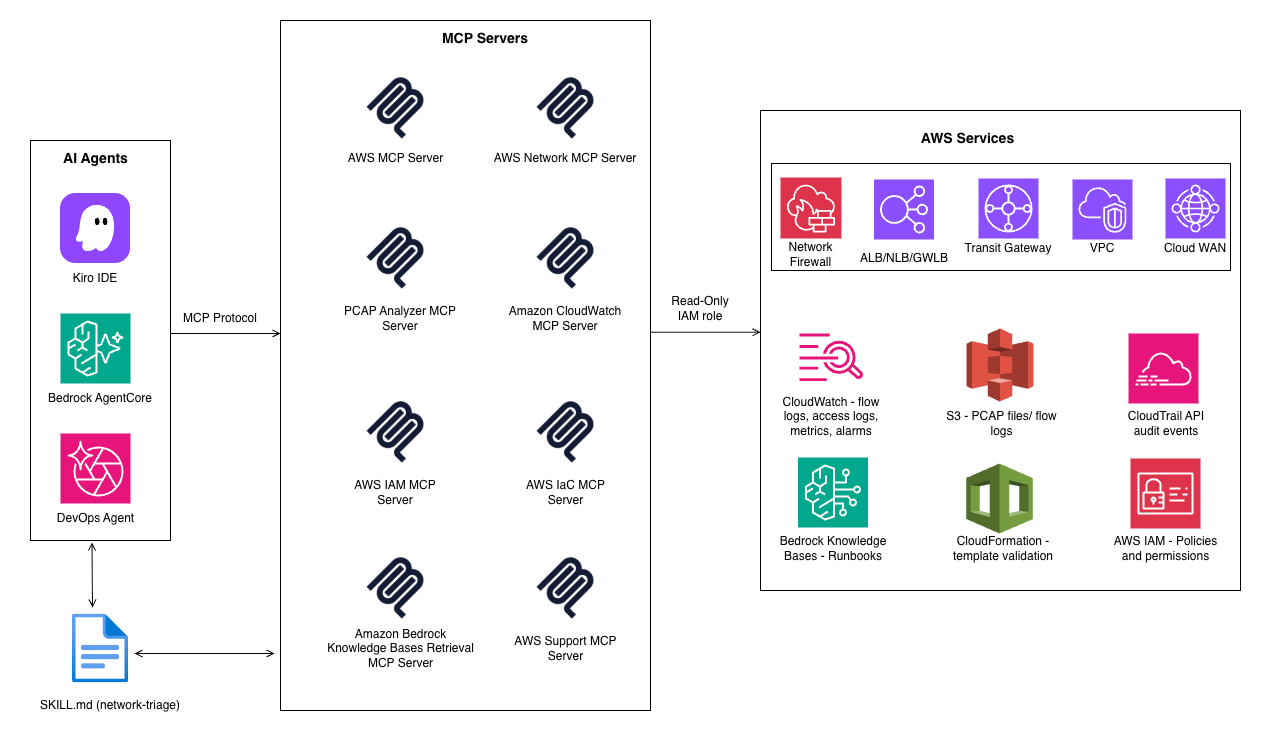
Figure 1: Layers of AI network operations
Agents
Choose based on your requirements: managed solutions like DevOps Agent, self-managed custom agents using Bedrock AgentCore with AgentCore Gateway, or agents running on individual workstations like Kiro and other MCP-compatible IDE agents. See the Agent Option Choice section for a comparison table.
MCP servers
An agent is only as capable as the data sources it can reach. Network troubleshooting data is scattered across routing tables, flow logs, packet captures, IAM policies, and runbooks. MCP servers bridge this gap by giving agents structured, domain-specific access through a unified interface. See the Best Practices section for the recommended configuration.
AWS DevOps Agent
This is the fastest path to agentic network operations. A zero-touch managed agent that begins investigating the moment an alert fires. Investigations trigger automatically from Amazon CloudWatch, Dynatrace, Datadog, Grafana, New Relic, or Splunk via webhooks, and from ServiceNow or PagerDuty tickets (for the full list, refer to the AWS DevOps page). It ingests telemetry from CloudWatch and Amazon S3, correlates with recent deployments from GitHub and GitLab, and understands why an application broke.
Custom agent with Amazon Bedrock AgentCore
Organizations requiring controls like custom prompts, proprietary tools, specific investigation ordering, or internal system integration, use AgentCore. AgentCore Gateway converts APIs, AWS Lambda functions, and MCP servers into secure, managed tool endpoints. Encode your diagnostic methodology as an agent skill and publish it to the Agent Registry to govern tool discovery. AgentCore Memory persists context across sessions; AgentCore Observability captures traces, logs, and metrics for full auditability.
AWS Agent Registry
Agent Registry provides governance layer for both DevOps Agent and custom Bedrock AgentCore agents. Publish MCP servers, agent skills, and custom resources as approved, discoverable resources. Both engineers and AI agents discover published resources through hybrid semantic search. Maintain separate production and development registries; deprecated records are immediately removed from all discovery queries. Think of it as the control plane for your agent environment.
IDE and desktop agents
The same MCP servers work directly on an engineer’s workstation. Kiro, Kiro CLI, and other MCP-compatible agents support MCP server configuration natively. Add the same JSON profile to your IDE and gain identical diagnostic capabilities like querying flow logs, tracing routes, analyzing PCAPs, and inspecting IAM policies.
Agent option choice
Teams don’t have to choose one strategy. Use DevOps Agent for automated production incident response, a custom Bedrock AgentCore agent for organization-specific workflows, and IDE agents for ad-hoc investigation. The MCP servers are the constant: same tools, same data access, governed by the read-only IAM role regardless of which agent invokes them.
| Dimension | DevOps Agent | Custom (Bedrock AgentCore) | IDE Agents |
| Best for | Automated production incident response | Organization-specific workflows, custom toolchains | Ad-hoc troubleshooting, dev-time diagnostics |
| Trigger | CloudWatch alarm (zero-touch) | API call, event rule, or manual | Engineer types a prompt |
| Setup effort | Minimal: configure integrations + Agent Space | Medium: build agent logic, deploy runtime | Minimal: add MCP JSON to IDE config |
| Memory | Learns from past investigations | AgentCore Memory persists across sessions | Stateless (per-session only) |
| Governance | Agent Space boundaries, IAM, audit trail | Full IAM, Observability, Agent Registry | Individual IAM credentials, no central audit |
Core use cases
Network operations spans four core activities. Each presents unique challenges that agents address differently.
1. Intelligent troubleshooting with agent skills
The most impactful use case is incident investigation. When an alarm fires, the agent needs a structured methodology, not ad-hoc tool calls. Encode your diagnostic procedures as an agent skill in a SKILL.md file stored in a version-controlled repository. For enterprise governance, publish it to the Agent Registry. Where the skill lives depends on the agent type:
DevOps Agent: Create the skill in the console. It loads automatically when an alert matches the skill description.
Custom Bedrock AgentCore agent: Store SKILL.md in Git or S3; reference explicitly in the prompt (SKILL: network-triage).
IDE agents: Store SKILL.md in your project repository. The agent loads it when prompted.
A network-triage skill similar to SKILL.md file, defines ordered investigation layers with an explicit stop condition: halt at the first confirmed fault. The routing and policy tools come from the AWS Network MCP Server; the protocol analysis tools require the PCAP Analyzer MCP server.
2. Configuration analysis
Configuration drift is the leading cause of network issues. Agents compare live AWS Config state against IaC baselines and attribute deltas via AWS CloudTrail: which IAM principal made the change, when, and how. The same capability that investigates incidents also detects drift before it causes one.
3. Change management
Network changes carry real risk. A route table modification can create asymmetric forwarding visible only under specific traffic patterns. Agents automate three steps engineers typically rush or skip:
Pre-change: Snapshot routing state using tools like get_all_tgw_routes / get_all_cloudwan_routes. Run simulate_cloud_wan_route_change to flag asymmetry or black-hole risks. Gate the change on simulation passing.
During change: Monitor topology change events and route propagation via tools like get_cloudwan_logs in real time. If propagation stalls, trigger automatic rollback.
Post-change: Trigger a time-bounded PCAP capture and run tools like analyze_tls_handshakes + analyze_tcp_retransmissions. Subtle regressions (elevated retransmissions below alarm thresholds) are visible only at the packet level.
4. Operational intelligence
Individual metric thresholds miss faults that only appear when signals correlate. A Flow Log REJECT ratio increase combined with a Security Group CloudTrail modification from the same window points to a policy change that broke traffic. A Direct Connect egress drop combined with a Border Gateway Protocol prefix withdrawal indicates a routing issue, not a link failure. Agents evaluate these multi-signal combinations continuously, surfacing fault precursors before users report impact.
Best practices
Agent effectiveness depends on the quality of their operational environment. An agent with incomplete permissions, missing flow logs, or untagged resources produces incomplete investigations.
MCP servers
Use the following MCP servers as your starting configuration. For the latest official servers list, full JSON config, and IAM policies, see the AWS MCP repository. All servers work with any MCP-compatible client. Save the config in your client’s settings location (e.g. Kiro reads .kiro/settings/mcp.json).
| MCP server | NetOps role |
| AWS MCP Server | Secure, authenticated access to supported AWS services through a small, fixed set of tools |
| AWS Network MCP Server | VPC/TGW/Cloud WAN path tracing, flow log queries, route analysis, Network Firewall inspection |
| PCAP Analyzer MCP Server | Protocol-layer forensics: TLS handshakes, TCP retransmissions, SNI mismatches |
| CloudWatch MCP Server | Active alarm analysis, alarm history, metric data; pinpoints when/where before investigation begins |
| IAM MCP Server | Role/policy inspection, permission simulation; surfaces identity failures presenting as network errors |
| Bedrock KB Retrieval MCP Server | Runbooks, ADRs, post-incident reports; grounds findings in your org’s architecture intent |
| AWS IaC MCP Server | CloudFormation validation (cfn-lint, cfn-guard); validates fixes before deployment |
| AWS Support MCP Server | Creates Support cases with full diagnostic context when service-plane faults are suspected |
Data foundation tiers
Agents reason over data. If critical signals are missing, investigations will be incomplete regardless of methodology. Verify that your data foundation covers all three tiers:
| Tier | Sources |
| Structured | VPC/TGW Flow Logs (CloudWatch Logs), CloudWatch, AWS Config, CloudTrail, Network Firewall logs, DNS Firewall logs |
| Semi-structured (Packet) | VPC Traffic Mirroring writing PCAPs to S3 (SSE-KMS encrypted) |
| Unstructured | Amazon Bedrock Knowledge Bases using runbooks and Architecture Decision Records |
Cost considerations
Plan your rollout incrementally. Begin in one account or region, validate the cost profile, and broaden scope. Key cost drivers: AWS Config (per configuration item; scope to network resource types only), VPC Flow Logs (per GB ingested; use S3 for cost efficiency), CloudTrail (first management trail per region is free), and VPC Traffic Mirroring (per ENI-hour; use targeted, time-bounded sessions only, not continuous monitoring).
Structure your Agent Spaces intentionally
Grant access to accounts relevant to the application. Separate production from non-production. For tightly coupled microservices, use a single Agent Space per resolver group. An Agent Space too narrow misses cross-account context; too broad introduces noise.
Verify IAM permissions are complete but scoped
Deploy the full recommended IAM policy from day one. The AWS Network MCP Server requires specific read-only permissions (ec2:Describe*, networkmanager:Get*, logs:StartQuery, etc.). Missing a single permission like logs:GetQueryResults silently breaks flow log analysis.
Tag your resources consistently
Agents use tags to understand resource purpose and ownership. A TGW attachment tagged Environment=Production, Service=PaymentAPI gives dramatically more context than an untagged tgw-attach-0abc123.
Comprehensive recording for agent visibility
Turn on organization-level AWS Config recording for network resource types and CloudTrail management events in production accounts. For non-production environments, turn on recording selectively. Scope Config to resource types your agents investigate (e.g. AWS::EC2::SecurityGroup, AWS::EC2::VPC, AWS::EC2::TransitGateway).
Write effective prompts
Vague prompts force agents to pull everything and waste tokens. Precise prompts with bounded time windows, specific endpoints, and explicit skip-lists produce faster results. Include: the skill to invoke, source/destination VPC and IPs, time window (e.g. 13:30-15:30Z), what to skip (DNS reachable, RDS available), and safety constraints (read-only, capture pre-change state). For a structured prompt example, see the AWS Network MCP Server documentation.
Security, governance, and human-in-the-loop
Agent access to production infrastructure requires the same security rigor as any other automation:
IAM separation: Diagnostic agents are strictly read-only. Remediation agents assume a separate role only after human approval, with tag conditions blocking writes to any resource tagged Environment: production.
Auditability: Use STS AssumeRole with RoleSessionName set to the incident ticket ID. Every API call links unambiguously to a specific incident in CloudTrail.
Change gates: Three gates before any agent-proposed change: syntactic (does the resource exist?), semantic (does this create a routing loop?), and impact (is it reversible in a single API call?).
PCAP security: Encrypt all S3 captures with SSE-KMS. When PCAP Analyzer runs locally via stdio, packet content stays within your environment. For remote deployments, verify encrypted transport scoped to your VPC.
Output controls: Configure Amazon Bedrock Guardrails to redact IP addresses and account IDs from outputs shared outside the investigation context.
Read-only investigation and pre-change simulations run autonomously. Route change simulations are autonomous; the engineer approves or rejects before anything touches production. Security Group or Network Firewall modifications require the agent to recommend the change and prepare a rollback command. Changes to production TGW routes or Direct Connect VIFs require explicit human approval before any action.
Measuring success
Establish a baseline before deploying agents. Track Mean Time to Resolution (MTTR), investigation accuracy, and operational efficiency (reduction in after-hours pages). At scale, manual review of every agent output becomes impractical. Use LLM-as-a-Judge: send the full investigation transcript (alert, tool calls, reasoning, root cause) to a second Bedrock model with a structured evaluation prompt scoring root cause correctness, evidence completeness, reasoning coherence, and methodology adherence.Three patterns make this effective:
- Pairwise comparison — present agent root cause alongside engineer-confirmed root cause; judge semantic match.
- Rubric-graded evaluation — 1–5 scale per quality dimension; weight methodology adherence highest.
- Continuous calibration — compare LLM-as-a-Judge scores against human expert scores periodically; below 85% agreement, refine the prompt or switch models.
A declining score on evidence completeness almost always indicates a data foundation gap.
Getting started incrementally
You don’t need the full stack on day one:
- Turn on VPC Flow Logs to CloudWatch Logs in production accounts. Use S3 where Logs Insights is not required.
- Register Transit Gateways with AWS Network Manager.
- Tag resources consistently (Environment, Service, Owner).
- Provision the recommended IAM policy for the Network MCP Server.
- Create SKILL.md in the DevOps Agent Web App and assign to an Agent Space.
- Connect the Network MCP Server and run it on your next incident.
- Measure MTTR before and after. Use the results to make the case for the full stack.
Common pitfalls
| Pitfall | Fix |
| Flow logs routed to S3 instead of CloudWatch Logs | Route to CloudWatch Logs. All Network MCP flow log tools require Logs Insights. |
| TGW not registered with Network Manager | MCP tools use the Network Manager API. Without registration, tools return empty with no error. |
| Missing logs:GetQueryResults permission | Silently breaks all flow log analysis. Provision the full IAM policy on day one. |
| Treating flow logs as sufficient for all faults | ACCEPT both sides but app fails = protocol-layer fault. Escalate to PCAP. |
| Agent Spaces too broad | Mixing prod/non-prod reduces precision. Use one Agent Space per resolver group. |
| Skipping the skill | Ad-hoc tool calls produce inconsistent results. Always invoke network-triage-skill explicitly. |
| Overreliance on the agent | The agent is a copilot, not an autopilot. Remediation actions require human review. |
Conclusion
Network operations at scale requires correlating signals across routing, security policy, DNS, protocol behaviour, and identity in real time. No single engineer holds that full picture; AI agents do. DevOps Agent receives CloudWatch alerts and begins correlating before your on-call engineer has opened a terminal. The Network MCP Server and companions provide read-only access across every network domain. The Agent Registry verifies that only approved, versioned tools run in production. With Bedrock AgentCore, you can manage execution, memory, and observability across multi-account, multi-region environments. The result: shorter investigations with confirmed root causes, validated fixes, and a human in the approval seat.Agentic AI doesn’t replace operational discipline; it amplifies it. Teams that tag resources, turn on flow logs, and maintain runbooks will see the most dramatic improvements. The tools exist today; the incremental path outlined above lets you start small, measure impact, and expand coverage as confidence grows.
To get started, sign up for AWS DevOps Agent, configure your first MCP server with the JSON profile from the AWS MCP repository, and follow the Getting Started Incrementally steps in this post.