Networking & Content Delivery
Building a modern network for your VMware workloads using Amazon Elastic VMware Service
As organizations look to accelerate their cloud migration journey, many customers are seeking ways to lift and shift their existing VMware workloads to Amazon Web Services (AWS) without the overhead of refactoring applications or retraining staff. You can use Amazon Elastic VMware service (Amazon EVS) to run VMware Cloud Foundation (VCF) directly within your Amazon Virtual Private Cloud (VPC), providing the fastest path to migrate and operate your VMware workloads on AWS.
One challenge customers raise in migrating VMware workloads to AWS is connecting and architecting networking in the cloud. The networking model in Amazon EVS has some differences from typical on-premises VMware deployments. In this post, we demystify the Amazon EVS networking model, walk you through proven architectural patterns, and highlight key considerations that can help you plan and deploy Amazon EVS successfully.
Understanding EVS networking components
Amazon EVS is an AWS-managed automation framework purpose-built to deploy and operate VCF workloads on AWS infrastructure, as shown in Figure 1. Amazon EVS fully integrates VCF’s software-defined data center (SDDC) stack (vSphere, vSAN, and NSX) into Amazon VPCs, providing seamless hybrid cloud operations while preserving VMware tools and APIs. Amazon EVS networking follows a two-layer model that separates Amazon VPC networking so that customers can use VMware NSX software defined networking:
- Underlay Layer (VPC infrastructure): Comprises the Amazon VPC, subnets, route tables, and ENI-attached ESXi hosts running in customer-selected subnets. This layer handles host management traffic (vSphere, vSAN) and provides IP connectivity through the default or main VPC route table.
- Overlay Layer (NSX software-defined networking): NSX Managers deploy within the management workload domain and orchestrate logical switches (segments), T0/T1 gateways, and services (NAT, Load Balancing, DHCP). Customer workloads run exclusively on overlay segments, abstracted from underlay VPC networking while enabling NSX micro-segmentation and portable networking policies.
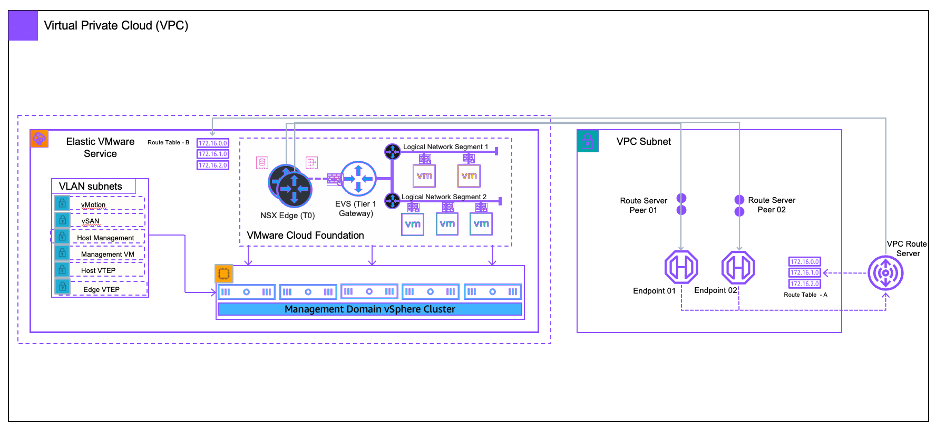
Figure 1: Amazon EVS integration with Amazon VPC using route server endpoints
Key components deep dive
- vSphere Cluster: Amazon EVS deploys a consolidated VCF architecture (vCenter, NSX Manager, vSAN) so that customers can create one or more workload domains. ESXi hosts are launched as Amazon Elastic Compute Cloud (Amazon EC2) bare-metal instances (for example i4i.metal) in a customer-owned VPC and customer-defined subnets. SDDC Manager and vCenter provide management of the SDDC and vSphere cluster components. These components run within the first SDDC cluster, also called the management domain. Furthermore, three clustered NSX Managers managers run in the first SDDC cluster, providing centralized network policy orchestration. The control plane configures overlay transport zones, segment profiles, and gateway firewall rules.
- NSX Edge nodes: Two edge nodes are deployed in edge clusters within the first cluster or management domain. The T0 Gateway establishes eBGP peering with VPC Route Server endpoints in each AWS Availability Zone (AZ) subnet, advertising overlay CIDRs. T1 Gateways (one per tenant/workload) connect segments and provide stateful services. NSX Edges are active-standby for resiliency.
- VPC route server endpoints and BGP peering: Amazon EVS uses Amazon VPC Route Server as the underlay BGP neighbor. Each T0 Edge connects to a VPC Route Server endpoint and forms eBGP sessions over underlay ENIs. Only the VPC default or main route table is modified. Amazon EVS injects 0.0.0.0/0 pointing to the T0 ENIs for outbound traffic and propagates overlay prefixes inbound. This design removes custom route table sprawl and streamlines automation.
Planning your network architecture
Successful Amazon EVS deployments hinge on pre-deployment network planning, particularly regarding CIDR allocation, subnet isolation, and DNS resolution. Amazon EVS imposes strict constraints to provide operational stability, scalability, and integration with other AWS services. Misconfigurations in these areas are a leading cause of deployment failures.
CIDR planning and constraints
Amazon EVS requires dedicated, non-overlapping CIDR blocks for infrastructure and workload networking. AWS can provide customers with a tool to help assemble this information. This tool is a spreadsheet that includes account, VPC, CIDR, and DNS information to plan during onboarding to validate feasibility before provisioning begins.
- VCF uses different subnets for specific purposes (for example management, vSAN, NSX interfaces, and appliances), as shown in Figure 2. Amazon EVS provides the orchestration to provide appropriate subnet deployments. A minimum /24 CIDR per VPC is needed for underlay infrastructure, and no customer workloads (including bastion hosts or monitoring agents) may be launched in Amazon EVS-managed subnets. These are dedicated exclusively to VCF components.
- Non-VCF subnets can be deployed and used within the same VPC. Consider AWS Well-Architected best practices when adding other workloads to an Amazon EVS VPC.
- Amazon EVS has a max subnet size of /24. The host-vtep network consumes two addresses per host so a /24 can host up to 112 hosts.
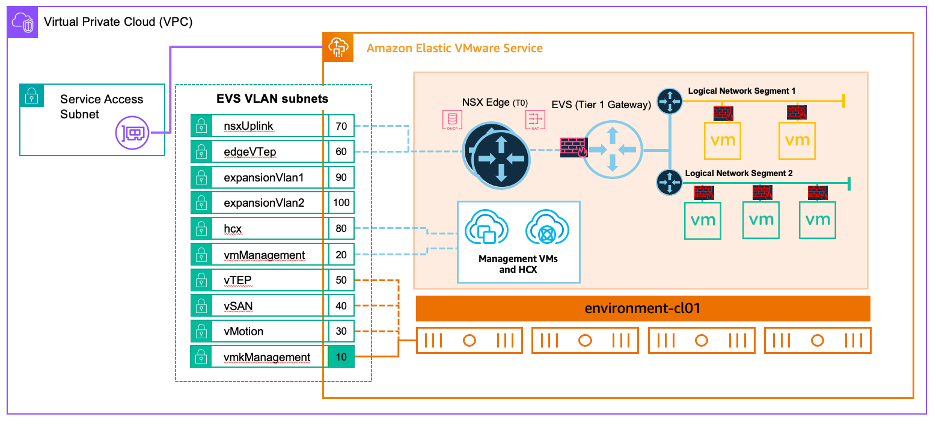
Figure 2: EVS VLAN subnets for overlay network
- Overlay segment design and VM networks: These use hierarchical CIDR allocation for overlay segments (for example /24 per application tier). Plan for growth and more workloads. Consider route summaries to provide further route table efficiency.
- Non-overlapping CIDR requirements: All overlay CIDRs should not overlap with the following:
- The VPC primary CIDR
- On-premises networks (for AWS Direct Connect and AWS Transit Gateway)
- Other Amazon EVS workload domains in the same AWS account. Amaon EVS uses BGP prefix advertisement, and overlaps cause silent traffic blackholing.
- Overlapping subnets within the NSX network segments can also provide a good way to isolate workload for testing purposes.
DNS
DNS resolution must be configured and validated prior to Amazon EVS deployment. Amazon EVS (VCF) deployment fails if resolution isn’t done properly or if typos exist.
- Amazon EVS can use Amazon Route 53 Resolver for DNS resolution. The vCenter and NSX Manager appliances are preconfigured with a DNS forwarder that can send queries to Route 53 Resolver inbound endpoints (deployed in the VPC).
- Amazon EVS can also use other DNS services such as Microsoft DNS, Infoblox, or other third-party solutions.
- Testing with nslookup or dig -x from an external host before initiating Amazon EVS launch can prevent time consuming and potentially costly failed deployments.
Prerequisites
Refer to this prerequisite checklist to help gather and organize information for a successful deployment. This can be used alongside the spreadsheet shared previously for planning. Proper upfront planning removes 90% of Amazon EVS networking deployment issues. The checklist provides direction for the following:
- VPC CIDR
- Amazon EVS (VCF) subnets
- Route 53 Resolver
- Forward/reverse DNS validated end-to-end
Common networking patterns
In this section we discuss some common architectures to consider for your deployments.
Pattern 1: Connectivity from Amazon EVS VPC to other VPCs and on-premises network using Transit Gateway and AWS Cloud WAN.
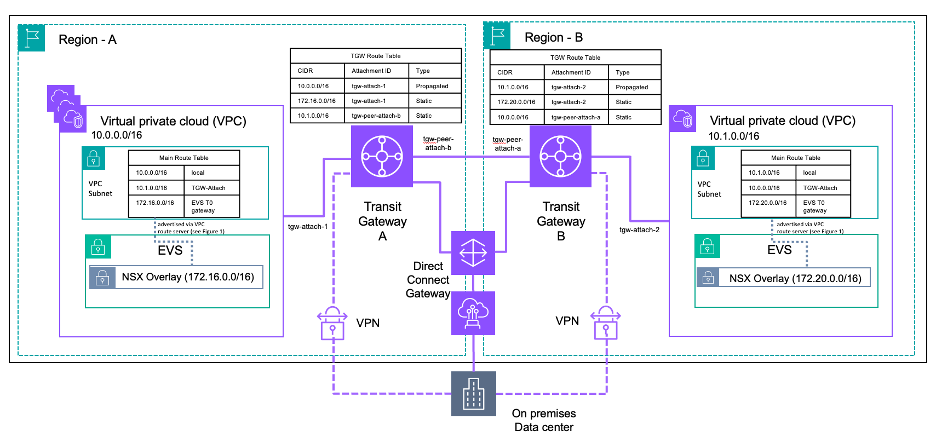
Figure 3: Connectivity from Amazon EVS VPC to other networks using Transit Gateway
This pattern shown in Figure 3 is for when you need consistent, scalable connectivity from your Amazon EVS overlay segments to multiple VPCs, on-premises/external networks, and other AWS Regions.
There following points are essential for this pattern:
- At the time of writing, VPC peering isn’t supported. Transit Gateway and/or AWS Cloud WAN is needed for connectivity from an Amazon EVS VPC to other VPCs.
- Direct Connect using Transit VIFs or AWS Site-to-Site VPN must terminate on Transit Gateway/AWS Cloud WAN, not in the Amazon EVS underlay VPC. Amazon EVS doesn’t support Private VIFs or VGW based site-to-site VPNs.
- Although NSX overlay prefixes are learned by VPC Route Server through BGP and propagated to VPC route tables, Transit Gateway and AWS Cloud WAN don’t automatically import these routes. Therefore, you must add static routes in Transit Gateway/AWS Cloud WAN route tables pointing to the Amazon EVS VPC attachment for each NSX overlay CIDR range (as shown in Figure 3). For AWS Cloud WAN, these static routes are configured in the core network policy.
- As you expand to more AWS Regions, consider that AWS Cloud WAN has a modern policy-driven global network. This removes manual Transit Gateway peering and enables dynamic routing between AWS Regions and VPCs.
Pattern 2: Private connectivity from Amazon EVS to AWS and non-AWS services using AWS PrivateLink.
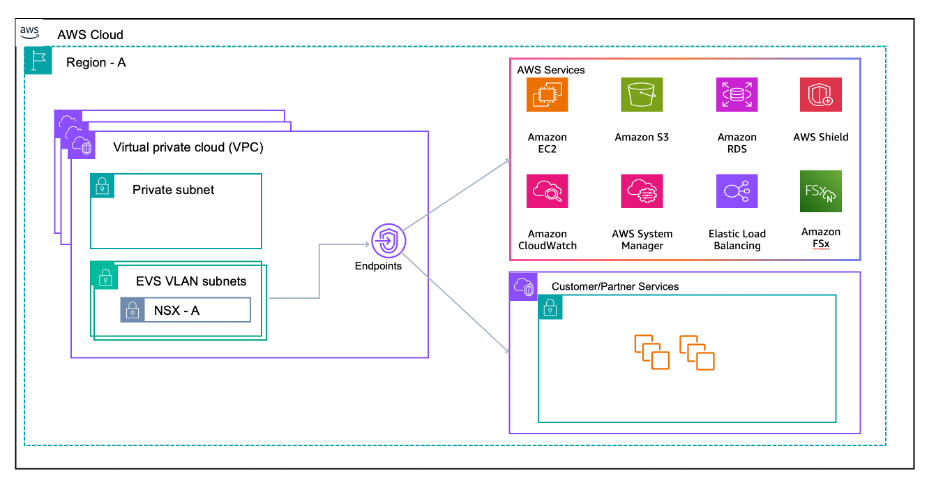
Figure 4: Private connectivity from Amazon EVS VPC to AWS and non-AWS services
Workloads on NSX overlay segments need to consume AWS services (such as Amazon Simple Storage Service (Amazon S3) and Amazon DynamoDB), customer-managed services, or third-party ISV services privately without traversing the internet.
Interface endpoints: Use interface VPC endpoints for connectivity to AWS services. Place interface endpoints in non-Amazon EVS subnets in the Amazon EVS VPC, or in a different shared services VPC accessible over Transit Gateway/AWS Cloud WAN. Route traffic to the endpoints from Amazon EVS overlay through the T0. At the time of writing, S3 Gateway endpoints aren’t supported with Amazon EVS. Interface endpoints should be used for Amazon S3 access from Amazon EVS workloads.
Private DNS: VPC DNS attributes must be enabled. If using interface endpoints with Private DNS, then configure appropriate Route 53 Resolver forwarding rules for split-horizon DNS scenarios.
Service Network Endpoints and Resource Endpoints: If you want to use Lattice for zero-trust connectivity for service-to-service or resource connectivity, then you can use Service Network Endpoints or Resource Endpoints. Lattice Service Network Endpoints and Resource Endpoints can be accessed from NSX overlay networks through the T0 to the VPC. Lattice Service Network Associations aren’t supported for Amazon EVS at the time of writing, and the use of endpoints is required for connectivity.
Best practice: Dedicated Amazon EVS VPCs
Consider keeping your Amazon EVS VPC dedicated exclusively to Amazon EVS resources. Place shared services other non-Amazon EVS workloads in adjacent VPCs connected through Transit Gateway or AWS Cloud WAN. This approach provides clearer blast-radius boundaries, better cost allocation and chargeback, and compliance and security auditing.
Security policy enforcement
Security in Amazon EVS requires a defense-in-depth approach, enforcing policies at multiple layers.
NSX Distributed Firewall (DFW)
The vDefend DFW provides L2 – L7 firewall capabilities applied directly at the VM’s network interface within the hypervisor kernel. DFW enables micro-segmentation and offers capabilities such as the following:
- East-west traffic control between NSX logical segments
- Dynamic security groups based on tags
- IDS/IPS capabilities through vDefend and other security features such as application aware filtering
Consult with your Broadcom VMware account team for current VCF NSX licensing options.
AWS security controls
AWS security groups don’t apply to Amazon EVS ENIs on Amazon EVS VLAN subnets. However, you can use security groups to control traffic to interface endpoints and other workloads in non-Amazon EVS subnets.
You can use Network ACLs (NACLs) for underlay hygiene on Amazon EVS VLAN subnets to allow traffic for protocols such as DNS, SSH, Hybrid Cloud Extension (HCX) for hybrid connections to on-premises, BGP for VPC Route Server peering, etc.
You should consider deploying AWS Network Firewall or Partner Firewall solutions (through Gateway Load Balancer) at VPC ingress/egress points for the following:
- North-south traffic inspection/control
- IDS/IPS for traffic entering/leaving the Amazon EVS environment
- Security features such as URL filtering, threat intelligence, compliance and audit logging, etc.
Monitoring
AWS monitoring services such as VPC Flow logs only see the underlay traffic on Amazon EVS ENIs, not the NSX overlay traffic. For overlay visibility, use VMware tools such as Aria operations for Networks, NSX Traceflow, etc.
Considerations
- Ensure NSX transport MTU settings align with Amazon EC2/VPC underlay capabilities. Current generation EC2 instances support jumbo frames of up to 9001 bytes, Transit Gateway supports up to 8500 bytes, and Direct Connect supports up to 8500 bytes for Transit VIFs. Consider the MTU restrictions within NSX.
- The NSX Edge T0 gateway can become a throughput bottleneck if undersized. Monitor NSX Edge data path metrics and follow VMware’s performance guidance for Edge sizing and tuning.
- Amazon EVS requires two VPC Route server endpoints for resiliency within the same Availability Zone. The two NSX Edge T0 nodes run in Active/Standby mode with each edge peering with one VPC Route Server endpoint.
- The active T0 edge handles all north-south traffic. Monitor failover times and test failure scenarios to verify that your applications can tolerate Edge node failover events.
- Amazon EVS supports IPv4 only. IPv6 isn’t available at the time of writing.
- Amazon EVS supports the default BGP keepalive mechanism for peer liveness detection. Multi-hop Bidirectional Forwarding Detection (BFD) isn’t supported.
- Upon creation, VLAN subnets are implicitly associated with your VPC’s main route table. After deployment, you can explicitly associate the Amazon EVS VLAN subnets to a custom route table, which you should create for NSX connectivity.
- Security groups don’t apply to Amazon EVS ENIs, instead use NACLs for underlay access control. Consider more NSX security options to provide stateful security policies for the Amazon EVS workload.
- The information in this post may change as the Amazon EVS service gains more capabilities.
Conclusion
Amazon Elastic VMware Service (Amazon EVS) puts the VMware Cloud Foundation stack directly inside your VPC, giving you the control and flexibility of VMware technology in AWS. To be successful with your deployment, plan thoroughly upfront, choose the right routing pattern, and enforce security at the right layers. You can follow these principles so that your VMware workloads run on AWS infrastructure with well-established networking, security, and operations patterns while gaining access to the breadth of AWS services for modernization and innovation.
About the authors

Victor Babasanmi
Victor is a Sr. Networking Specialist Solutions Architect at AWS. He focuses on providing customers with technical guidance on planning and building solutions using best practices, and proactively keeps their AWS environments operationally healthy. When he is not helping customers, you may find him playing soccer, working out, or looking for a new adventure somewhere.

Craig Herring
Craig Herring serves as a Senior Specialist Solutions Architect at AWS, specializing in Infrastructure Migration and Modernization. Since joining the company in 2021, Craig has been applying his extensive 35-year industry experience to assist customers in transitioning to and maximizing the benefits of AWS solutions. Outside of work, Craig cherishes quality time with his wife, Lindy, and their large family, which includes eight children and three grandchildren. His personal interests span socializing with friends, indulging in performance cars and driving events, maintaining an active lifestyle, and building audio gear.