AWS Physical AI Blog
Isaac Lab on AWS: From Simulation to Registered Policy
Introduction: The missing layer in Physical AI on AWS
Physical AI systems, those that perceive, reason, and act in the physical world, are moving fast from research into production deployments. Training policies in GPU-accelerated simulation compress months of real-world experience into hours of computing, without the cost, time, or safety risks of physical experimentation. A task that would need thousands of real trials to converge can be learned overnight across hundreds of parallel virtual instances, then transferred to hardware.
Yet for teams moving beyond initial research, the bottleneck has shifted. The hard problem is no longer compute, it’s the development environment itself. An engineer building a physical AI system needs to write reward functions, visualize simulation in real time, iterate on task design, track experiments, register the best policy, and hand it off for deployment. Assembling that workspace on a cloud GPU instance means installing NVIDIA drivers, configuring Isaac Lab and Sim, standing up a remote desktop, wiring in training pipelines, integrating experiment tracking, and securing the stack for a team, weeks of undifferentiated heavy lifting before a single policy gradient is computed. Pre-built marketplace AMIs solve only a fraction of this: they give you a GPU with a driver, but not the complete development-to-training-to-governance workflow.
In this post, we introduce Isaac Lab on AWS, an AWS Cloud Development Kit (AWS CDK) solution that builds the entire environment from scratch on top of stock Canonical Ubuntu 24.04. The solution bakes a golden AMI with NVIDIA Isaac Sim 5.1.0, Isaac Lab v2.3.2, the NVIDIA 580 driver, an Amazon DCV remote desktop, and all host configuration. It provisions a shared VPC, an integrated Amazon SageMaker AI training plane with managed MLflow, and operates equally well as a single GPU workstation for an individual researcher or as a private, multi-user self-service platform for an entire engineering team.
What Isaac Lab on AWS provides
Isaac Lab on AWS is an AWS CDK solution that provisions the physical AI development lifecycle, from interactive simulation to managed training to model governance, in a single, coherent deployment. Every component is designed to work together from day one.
A golden AMI that boots ready to use
An Amazon Elastic Compute Cloud (Amazon EC2) Image Builder pipeline bakes a golden AMI on top of stock Canonical Ubuntu 24.04, pre-installing NVIDIA Isaac Sim, Isaac Lab, the NVIDIA GPU driver, an XFCE desktop, and an Amazon DCV server. The image pins exactly one validated version set of Isaac Lab, Sim, Python, and torch, since windowed RTX rendering is sensitive to the driver branch underneath it.
Because Isaac Lab is baked rather than installed at boot, a GPU host never pays the on-boot provisioning cost that the raw base AMI requires; a fresh host only needs to pre-warm the Isaac Sim shader, extension, and texture caches before it accepts sessions, so users never pay that cost interactively. The same image is reused for every subsequent host launch, whether that’s a single workstation or an auto-scaling fleet.
The bake itself is a one-time cost for a transient builder instance, run concurrently with the AWS CDK stack chain. The build is skipped on later deploys as long as the golden AMI’s content hash still matches the pinned inputs. Bumping a pinned version, a new Isaac Lab commit, changes that hash and re-bakes.
Two deployment topologies from a single codebase
A single configuration switch selects between two genuinely different topologies, not a feature toggle.
Instance Mode provisions independent GPU workstations in a public subnet, each with its own public IP, its own Amazon DCV endpoint (https://<PublicIp>:8443), and indexed AWS CloudFormation stack outputs. Inbound access is scoped to user-configured CIDR ranges and prefix lists. There is no broker and no login, you connect straight to a box. This is the fastest path from deployment to productive simulation work for a known group of users.
Fleet Mode is a private, multi-user self-service platform. GPU hosts run in private, egress-only subnets with no public IPs as an auto-scaling fleet. Users authenticate to a React portal backed by Amazon Cognito with mandatory TOTP-based MFA, then start a session; a control-plane API allocates a free GPU, grows the fleet as needed, protects in-use hosts from scale-in, and connects the user through an Amazon DCV Connection Gateway and Session Manager broker behind an internet-facing Network Load Balancer, where a short-lived session token is the access gate. Each user receives a persistent home directory, on Amazon Elastic File System (Amazon EFS) or a per-user Amazon Elastic Block Store (Amazon EBS) volume, that survives session boundaries and instance replacements, and idle capacity is reclaimed automatically.
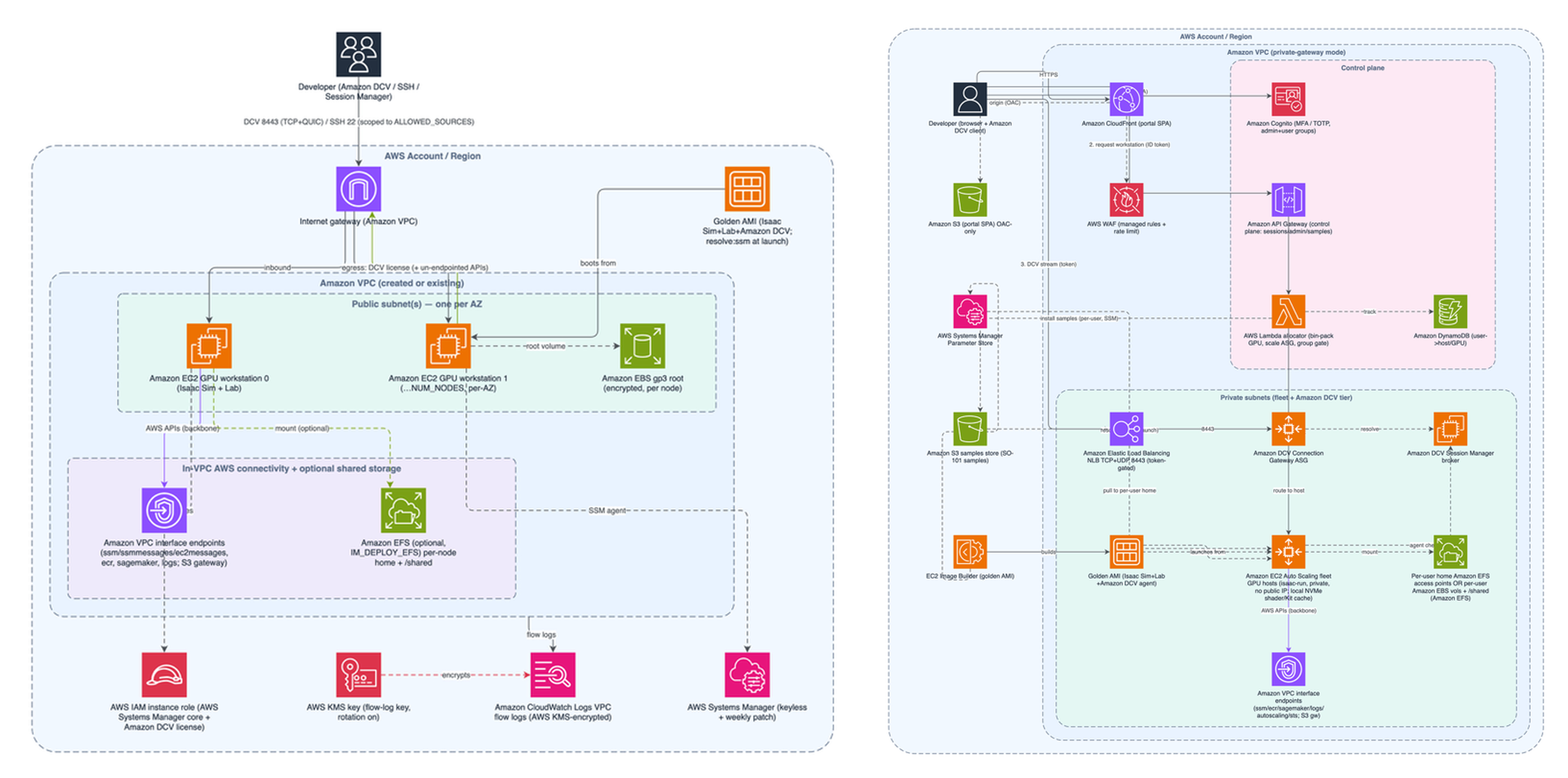
Figure 1. Instance-Mode (left) and Fleet-Mode (right) architectures: independent public GPU workstations reached directly over Amazon DCV, versus a private, brokered, auto-scaling multi-user platform.
An integrated Amazon SageMaker AI training plane
Both deployment modes provision an Amazon SageMaker AI training plane as a first-class component: managed Amazon SageMaker Training Jobs, a derived training container image in Amazon Elastic Container Registry (Amazon ECR), an Amazon Simple Storage Service (Amazon S3) training store, and Amazon SageMaker managed MLflow.
A central architectural choice is project-as-input training. The container image is a fixed runtime, Isaac Sim, Isaac Lab, and the RL frameworks, while your research project arrives as an Amazon SageMaker input channel at job-submission time. You iterate interactively on the simulation desktop and then submit the exact same project directory to a managed training job at scale, with no Docker rebuild, no image push, and no waiting.

Figure 2. The training plane: project-as-input from the workstation to a managed Amazon SageMaker Training Job, with metrics and model versions landing in managed MLflow.
Experiment tracking and model governance
Every training job streams metrics to Amazon SageMaker managed MLflow in real time. A hook in the training container mirrors Isaac Lab’s TensorBoard scalars to MLflow metrics, logs the run’s hyperparameters, and uploads the checkpoint directory on completion, so your projects automatically get tracking.
On job completion, the same hook registers the trained policy in the MLflow model registry. The registered model is named for the task, so every run of a task accrues as successive versions of a single model, and each version is tagged with provenance, so a reviewer can tell versions apart before promoting one.
Promotion is a deliberate act in the managed MLflow registry UI: pick a version and set an alias such as staging or production. The solution’s job is to capture and label the artifact, not to serve it, resolving an alias to a checkpoint and deploying it is your team’s integration point, and a clean one, because the contract is a stable alias rather than a path. Because governance lives in the managed registry, there is no extra service to run or secure, and the tracking server is shared across the deployment.
Included sample projects
The solution ships with three ready-to-run samples that demonstrate the full develop → train → track → register workflow. Each is a self-contained Python package that runs interactively on the simulation desktop and submits to Amazon SageMaker without code changes:
| Sample | What it demonstrates |
|---|---|
| SO-ARM101 RL reach-grasp-lift | PPO policy (rsl-rl) for a 6-DOF arm learning to reach, grasp, and lift a cube; plus camera-image collection for downstream VLA training. |
| SO-ARM101 teleoperation | Human demonstration capture writing HDF5 imitation-learning datasets, in two input modes: keyboard (SE3 + differential IK), or a physical SO-101 leader arm on your own desk driving the simulated follower. The leader’s joint stream is tunneled to the instance over AWS Systems Manager port forwarding, so no inbound application port is opened. |
| Unitree H1 rough terrain | Humanoid locomotion on procedurally generated rough terrain (skrl PPO), and the platform’s distributed-training reference. |
Table 1: The three bundled samples.
The H1 sample ships no custom task code, it delegates to Isaac Lab’s own skrl trainer, which makes it the minimal template for running any stock Isaac Lab task on the platform.
Architecture deep dive
Network and security
The two modes reflect distinct architectural models. In Instance Mode, hosts reside in a public subnet with DCV and SSH scoped to explicit CIDR ranges or prefix lists, and AWS Systems Manager Session Manager as a keyless fallback, sufficient for a known user group. Fleet Mode applies a more restrictive posture: GPU hosts in private, egress-only subnets; all interactive traffic routed through a DCV Connection Gateway fronted by a Network Load Balancer, with a short-lived, per-connection session token as the access gate; Amazon Cognito enforcing TOTP-only MFA on admin-created users; and AWS WAF managed rule groups in front of the Amazon CloudFront-hosted portal.
Common to both modes:
- Private AWS connectivity. When the solution creates the Amazon Virtual Private Cloud (Amazon VPC), it provisions a full interface-endpoint suite so host <-> AWS traffic stays on the AWS backbone.
- Encryption at rest and in transit. Amazon EBS volumes and Amazon EFS filesystems are encrypted; the Amazon S3 stores use SSE-S3. Customer-managed AWS Key Management Service keys encrypt the VPC flow-log group, the session-log group, and the alerts topic. Training jobs run with inter-container traffic encryption enabled.
- Resource governance. An AWS CDK aspect walks the synthesized tree and enforces prefixed names, required tags, and optionally an AWS Identity and Access Management (IAM) permissions boundary, including on the roles and functions AWS CDK generates automatically. Governance tags are also delivered, so runtime-created resources (training jobs, MLflow runs, per-user home volumes) carry them too.
- Static analysis in the development loop. The repository wires in awslabs’ Automated Security Helper (ASH), so the codebase is scanned as it changes rather than at release time.
DCV Streaming: TCP and QUIC
Amazon DCV establishes the initial connection over TCP 8443 for authentication and control-plane traffic, then upgrades the pixel stream to QUIC over UDP on the same port when network conditions permit. QUIC eliminates the head-of-line blocking inherent in TCP streams, a lost packet costs only its own frame data, so interactive simulation stays visually responsive on networks with moderate packet loss.
This is why DCV was chosen over Isaac Sim’s own WebRTC viewport streamer: DCV delivers the same UDP-grade streaming performance plus a full desktop, a brokered multi-user front door, and automatic TCP fallback.
Fleet Mode: Allocation, sizing, and idle reclaim
Deploy-time configuration drives the fleet’s shape, including instance type, and min/max number of hosts. Between that floor and ceiling, capacity follows demand: a request that finds no free GPU grows the group by a host and parks the user in scaling_out until it is ready.
Reclaim is a two-level reaper on a five-minute evaluation schedule, and it keys on DCV client connection state, not CPU or GPU load. At the session level, a session with no client connected for longer than the session idle reap time is closed and its GPU freed. At the instance level, once a host has had no live sessions for the instance idle reap time, the Amazon EC2 Auto Scaling group scales it in, down to the floor; that delay keeps a just-emptied host warm for a returning user. Both idle reap times are configurable, based on user requirements.
Persistent homes survive reclaim. With Amazon EFS, a regional filesystem with per-user access points means any host can mount any home. With Amazon EBS, the control plane creates and attaches a per-user encrypted gp3 volume for local-disk speed, keeps users AZ-sticky, and migrates the home by snapshot-and-restore when a session lands in another Availability Zone, a real delay, not an instant hop, and rate-limited so a user isn’t migrated repeatedly. Either way the split is the same: ~/ is private and durable, /shared is on Amazon EFS and deliberately writable by the whole team, and the GPU and shader caches stay on local disk as disposable per-host state.
Training Plane: Runtime separation and auto-registration
The Amazon ECR training image is a fixed artifact, Isaac Sim, Isaac Lab, and RL framework dependencies, built once via AWS CodeBuild and promoted through environments like any other software release. Research code (reward functions, curriculum schedules, hyperparameter sweeps) arrives as a project archive delivered as an Amazon SageMaker input channel, entirely separate from the runtime layer. The container runs your project’s install.sh, then your scripts/train.py, which imports your task package off sys.path to register it, nothing is grafted into the image’s Isaac Lab tree.
Because the submit path is user-facing, it is guard railed on the way in: the API validates the requested instance type against allowed instance types and caps nodes per job at the configured maximum instance count. Set both to match your appetite before you hand the portal to a team.
During training, metrics stream to managed MLflow. On completion, the post-training step creates a versioned, provenance-tagged model in the MLflow registry. No human action is required to capture the output of any training run.
Prerequisites:
Before deploying Isaac Lab on AWS, ensure the following are in place:
- An AWS account – Permissions to deploy AWS CDK stacks and create the associated resources (Amazon EC2, Amazon VPC, Amazon S3, Amazon ECR, Amazon SageMaker, and AWS IAM roles). If deploying Fleet Mode, you also need permissions for Amazon Cognito, Amazon CloudFront, Amazon API Gateway, AWS Lambda, and Amazon DynamoDB.
- GPU instance quota – Check your “Running On-Demand G and VT instances” vCPU quota in the target region (Service Quotas, quota code L-DB2E81BA). A single g6e.4xlarge workstation requires 16 vCPUs, and the golden-AMI builder adds approximately 4 more during the initial build. New accounts often default to 0, which causes the deployment to fail with ‘VcpuLimitExceeded’ – request an increase before deploying.
- Local tooling – Your development machine needs uv (which provisions its own Python), Node.js with npm for the AWS CDK CLI, make, and configured AWS credentials.
- Pre-deploy validation – Run ‘make environment-readiness’ before deploying – it checks all preconditions in one pass: .env configuration, AWS credentials, CDK bootstrap status, golden AMI state, and GPU vCPU quota.
- No Marketplace subscription required – The solution builds on the public Canonical Ubuntu 24.04 AMI, resolved automatically from AWS Systems Manager Parameter Store. NVIDIA Isaac Sim and Isaac Lab are installed during the golden-AMI bake on the NVIDIA GPU instance under license agreement.
Walkthrough: From zero to a registered policy
The walkthrough below is Fleet Mode, which is what every screenshot in this post was captured from. Instance Mode is the same story with steps 4.1 and 4.2 removed: there is no portal, so you read DcvUrl{i} from the stack outputs and connect the DCV client straight to the host. Everything below assumes a deployed platform and an account an administrator has already created, so the walkthrough picks up where a new user does, at the portal sign-in.
Sign in and claim a GPU
Fleet users land on the portal (Amazon CloudFront + AWS WAF, Amazon Cognito login with TOTP MFA). The Home tab is deliberately spare: claim a session, or open MLflow.

Figure 3. The portal Home tab. One button claims a GPU-pinned Isaac Sim desktop; the second opens managed MLflow with the same portal login, no separate sign-in and no AWS credentials.
When the session is ready, the portal shows which instance and which GPU index you were pinned to, and offers both connection paths, the native Amazon DCV client for best performance, or an in-browser session with no install.
Starting a session when the fleet has no free GPU triggers a scale-out, and the portal reports that state rather than hiding it.
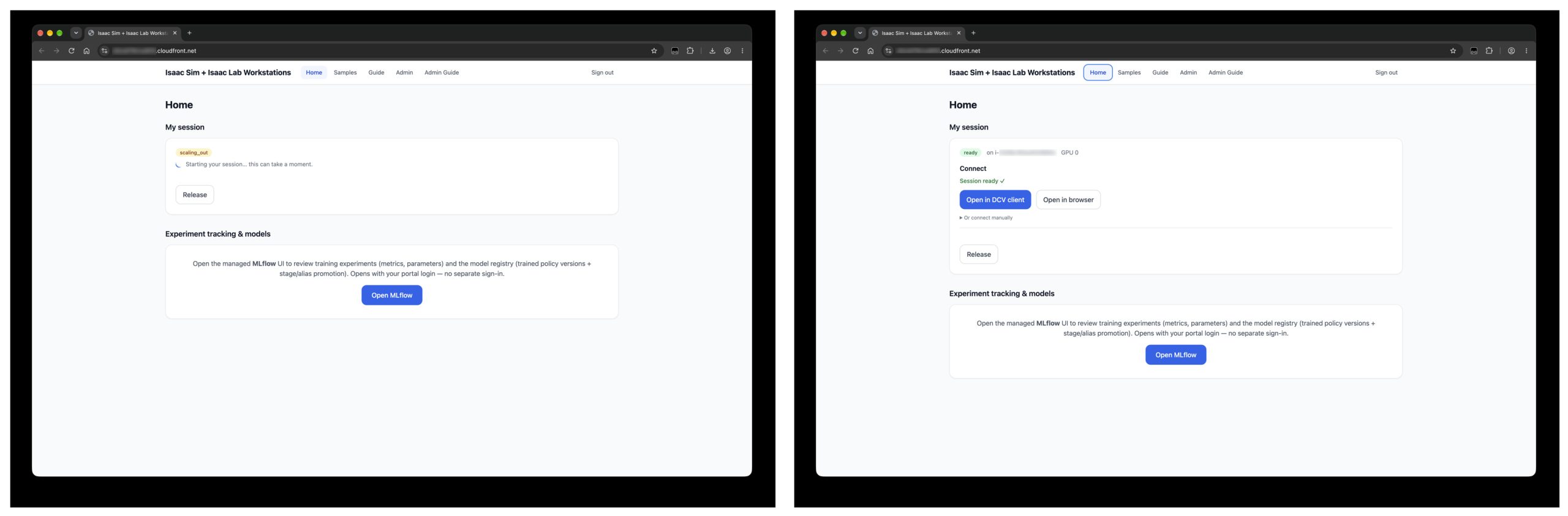
Figure 4. Claiming a session: the control plane grows the fleet (left, state scaling_out while a host boots from the golden AMI), then the session is ready (right), pinned to GPU 0 on a named instance with native-client and in-browser connection options.
Sessions are sticky and client-independent: close the client and reconnect from another machine to land on the same desktop. The connection token is short-lived and only gates connecting, a live session is never interrupted, and the portal re-mints a token each time you connect. Release ends the session and frees the GPU for someone else; merely closing the client does not, unless the session extends past the configured idle reap time.
Samples and in-app guides
Samples are installed per-user from the portal, into the caller’s own home, and each sample carries its full how-to inline.
The portal also renders the user guide and, for members of the Amazon Cognito admin group only, an admin guide and a live view of every session on the fleet, with force-release for a stuck or abandoned GPU.
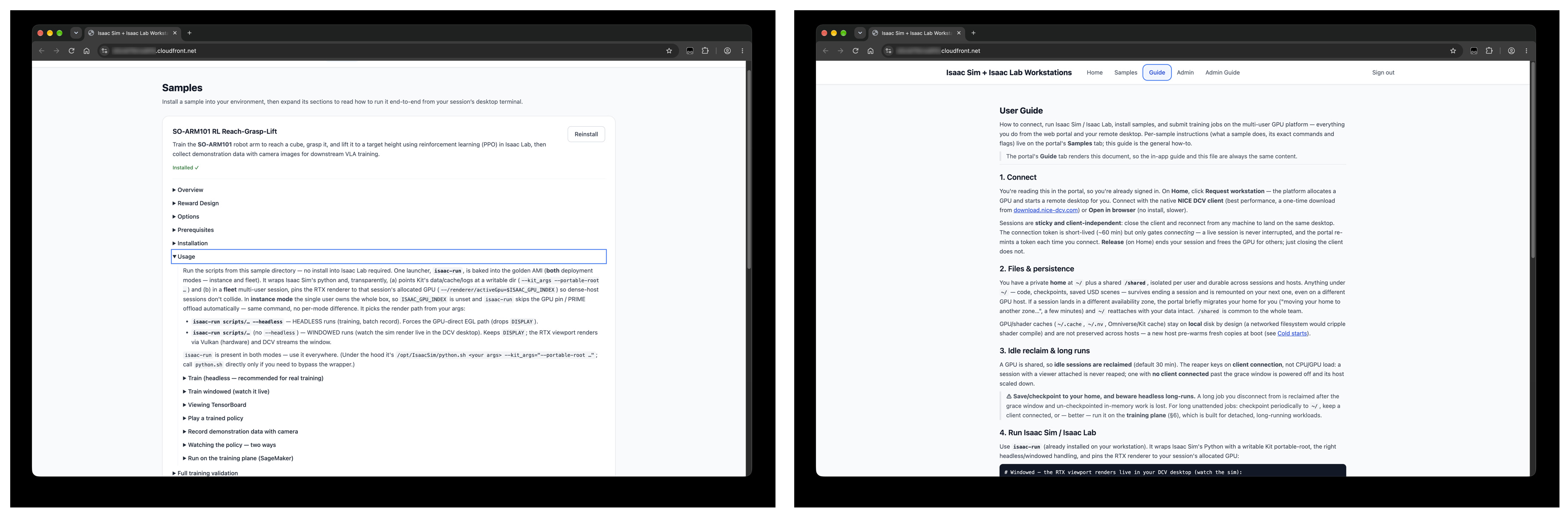
Figure 5. The Samples tab (left): install a sample into your own home, then expand its sections for exact commands and flags. The user guide (right) is rendered from the repository’s own markdown, so the in-app guide and the docs cannot drift apart.
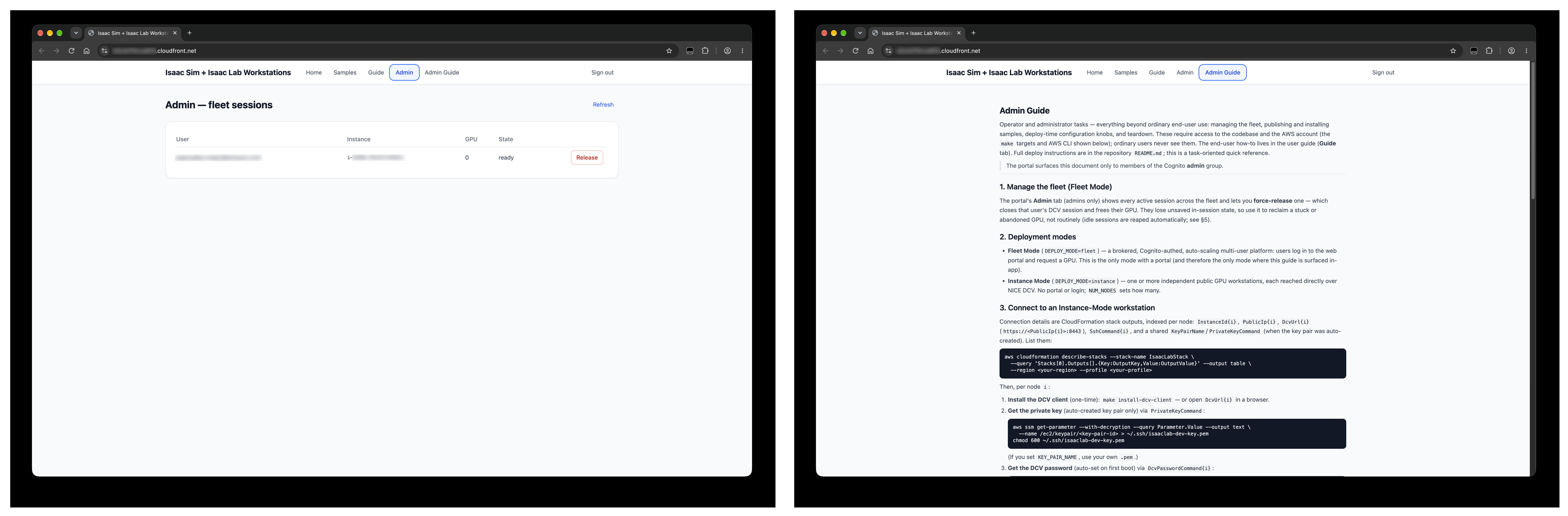
Figure 6. Admin-only surfaces: every active session across the fleet with force-release (left), and the admin guide (right), surfaced in-app only to Amazon Cognito admins.
Develop interactively on the desktop
Connecting drops you onto a full XFCE desktop with Isaac Sim ready to launch. Everything runs through isaac-run, a launcher baked into the golden AMI in both modes: it wraps Isaac Sim’s Python with a writable Kit portable-root and, in a multi-user fleet session, pins the RTX renderer to the GPU you were allocated so co-tenant sessions don’t collide. From there, the same training command works in both modes, and the provided SO-ARM101 pick and place sample shows an example of adding a headless option. Omitting the option renders the RTX viewport through Vulkan, which DCV streams to you; adding it forces the GPU-direct EGL path. In Figure 7, 128 SO-ARM101 arms are learning to reach, grasp, and lift simultaneously, rendered live over the remote desktop.
The reward breakdown streams in a terminal alongside the viewport, which is what makes reward-function iteration tight: change a weight, restart, and watch the components move.
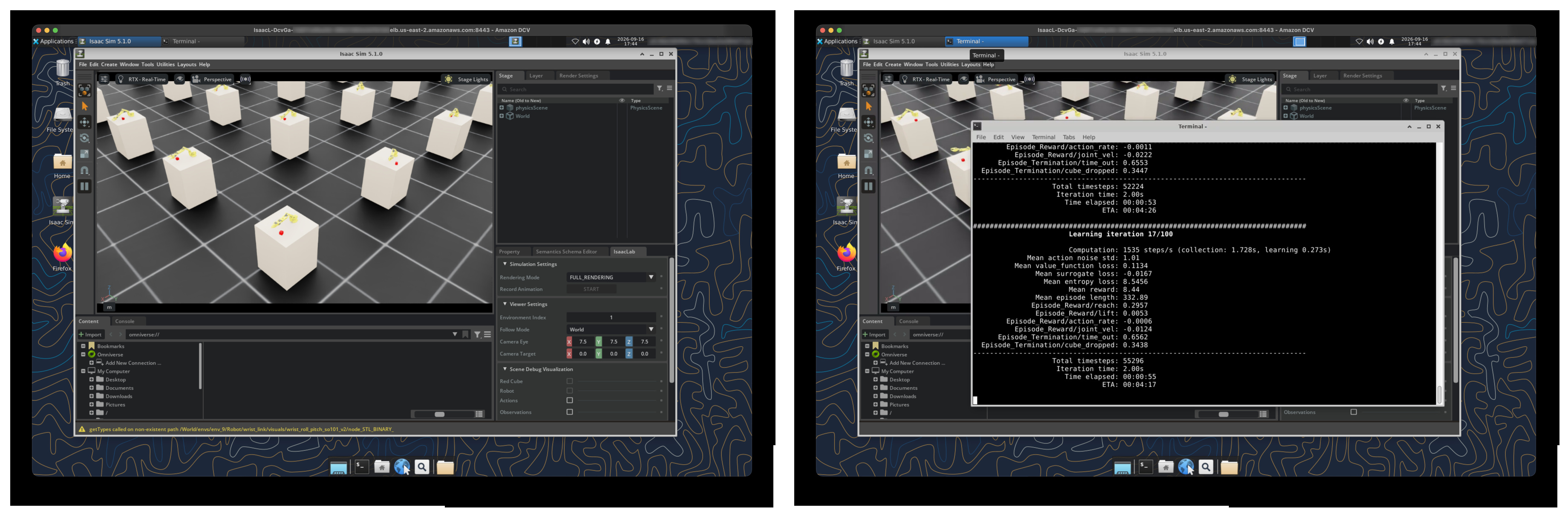
Figure 7. Parallel SO-ARM101 environments training live in Isaac Sim 5.1.0 (left), with Isaac Lab’s viewer panel for switching environments and camera framing; the per-term reward breakdown in the desktop terminal (right), next to the live viewport.
Scale the same directory to a managed training job
When the reward function behaves, one command submits the same directory as a managed Amazon SageMaker Training Job. The bundled helper discovers the training plane and your identity from the host, uploads the project to your own prefix in the training store, and launches the job, no repository, no Amazon Cognito subject ID, no hand-crafted API call. Instance Mode users run the same helper using the instance role rather than Amazon Cognito.
Amazon SageMaker provisions the instance, mounts the project from Amazon S3 as an input channel, starts the fixed container, and runs the training script. There is no image rebuild in this loop.
Metrics stream to managed MLflow while the job runs, so you can watch the reward terms separate long before it finishes. The figures below are from the illustrative run above, the SO-ARM101 task at 512 environments for 1,500 iterations, and they show what the platform surfaces on its own, with no instrumentation added to the sample. Treat the values as one run’s behavior, not a benchmark: throughput and reward depend on the task, environment count, instance type, and region.
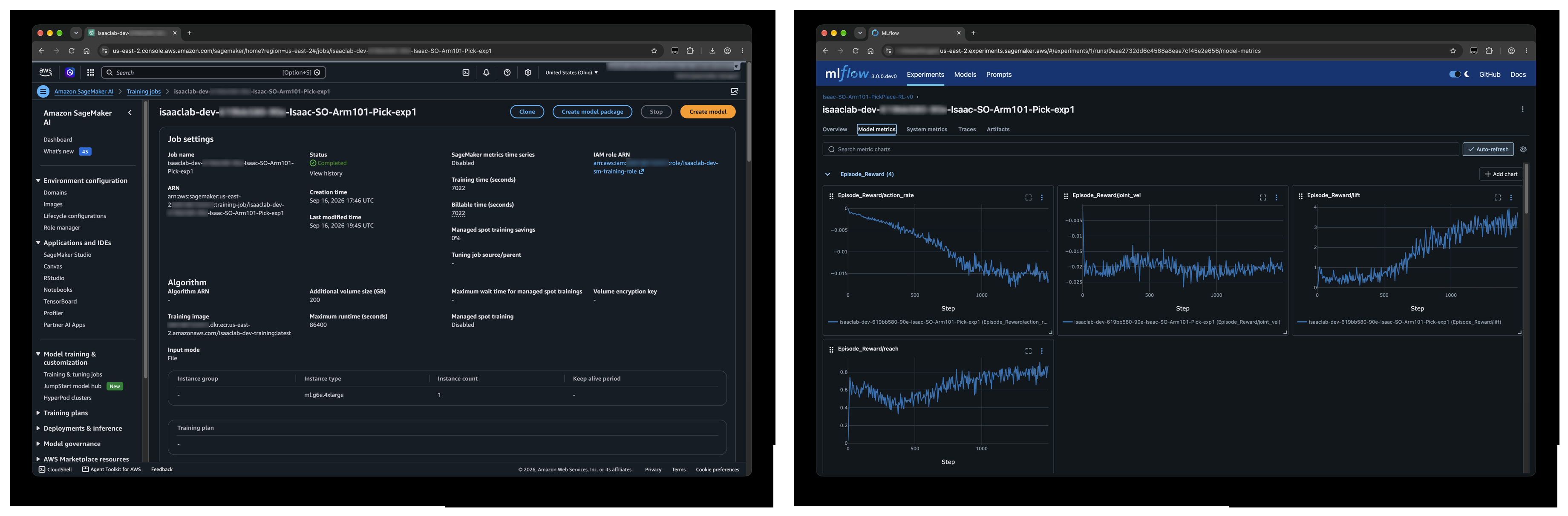
Figure 8. The completed job in the Amazon SageMaker AI console (left), running the derived training image from Amazon ECR on a single GPU instance; per-term reward curves streaming into managed MLflow during the run (right).
Governance: The policy registers itself
No handoff step is needed to capture the artifact. On finalize, the policy is registered under a model named for the task, so every future run of this task accrues as another version of the same model. The version carries the provenance a reviewer needs before promoting anything, who trained it, from which run, and what it scored, plus the model signature, here a 19-dimensional state-only observation vector (this task trains camera-free; the scene’s camera exists only for demo capture).
Policy promotion is completed when a version and its checkpoint are associated with an alias.
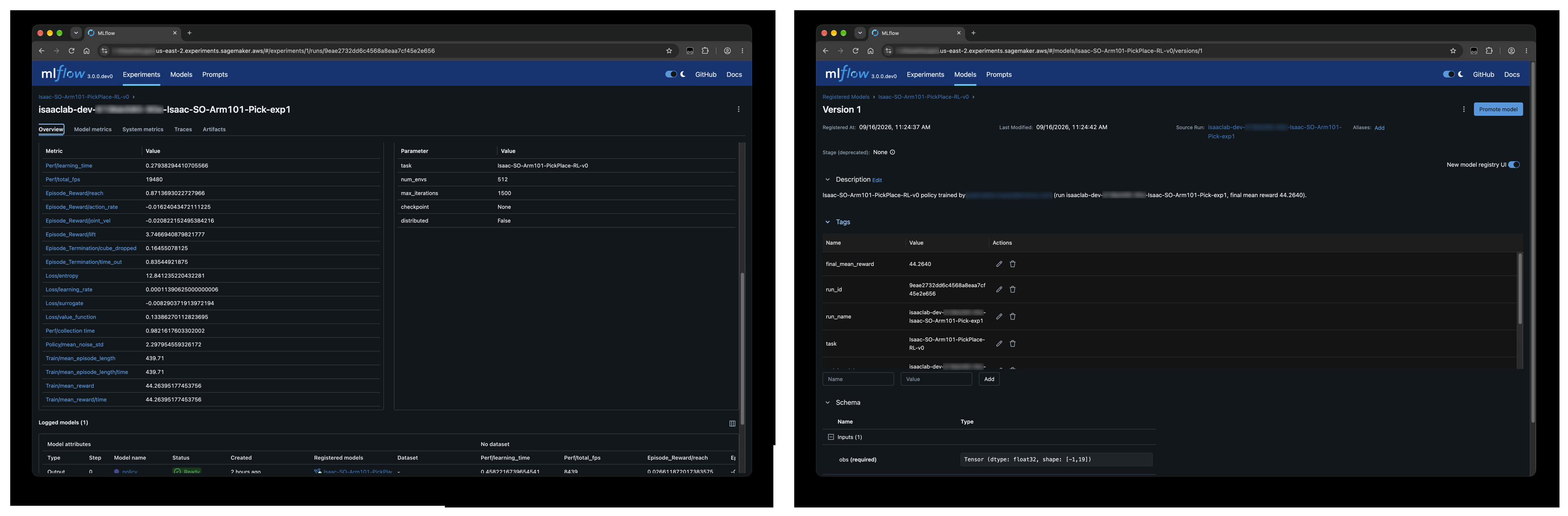
Figure 9. The run’s Overview (left): final metrics beside the hyperparameters that produced them. Version detail (right): provenance tags, the source-run link, the signed input schema, and the promotion and alias controls.
Multi-GPU and multi-node training
The Unitree H1 rough-terrain sample is the platform’s distributed reference, and it is state-only by design, proprioception plus a terrain height-scan, no cameras. That matters, because a camera or render sensor is not supported on the non-cuda:0 ranks of a distributed Isaac Lab job, so a rendering task would crash every rank above the first. State-only training is what makes multi-GPU work.
On the box, isaac-run runs a single process, so single-GPU is a plain isaac-run script; for multiple GPUs you launch under torchrun through isaac-run, so you keep the writable Kit portable-root.
A multi-GPU workstation can be driven data-parallel across all of its GPUs. A fleet session is pinned to exactly one GPU by design, so on-box runs there are always single-process, to go multi-GPU or multi-node from a fleet session, submit a training job with an instance-count argument.
On the training plane, the container entrypoint launches your script under torchrun whenever the topology has more than one GPU or node. It adds a distributed argument for you only when the job runs Isaac Lab’s stock trainer; a project train.py declares its own argparse, so you opt in at submit time, the samples here are written to accept it, and a single-GPU project script is never handed a flag it would reject.
Cleanup
To avoid ongoing charges, run ‘make destroy’ from the repository root. This tears down all provisioned stacks – GPU instances or fleet, VPC, SageMaker training plane, Amazon ECR image, managed MLflow tracking server, and in Fleet Mode, the Amazon Cognito user pool and portal.
By default, ‘make destroy’ retains your Amazon S3 training store, Amazon EFS home directories, and Amazon EBS volumes so training artifacts and user data are not accidentally deleted. Retained resources are reported at the end of teardown. To fully purge everything including all Amazon S3 object versions, run ‘make clean-and-destroy’ instead.
After teardown, confirm in the Amazon EC2 console that no GPU instances remain running in the target region.
Cost considerations
The solution is built to minimize idle spend, and the levers are worth knowing before you deploy.
Instance Mode bills Amazon EC2 GPU instances while they run. Stopping instances when you are done eliminates the compute charge entirely, and because Isaac Lab is baked into the AMI, it restarts to a ready desktop in minutes. If your scenes are lighter, lower memory GPU families are alternatives.
Fleet Mode adds the platform’s own always-on components, AWS NAT gateway, NLB, the Amazon DCV gateway and broker hosts, and Amazon CloudFront, but the GPU fleet itself scales to the floor, which can be zero during off-hours. Per-user homes on Amazon EFS incur only storage charges when nobody is connected. This is the trade: Fleet Mode adds a fixed platform cost, then stops paying per idle user, the pool reclaims to its floor, where Instance Mode bills a box per person until someone stops it.
Training jobs bill only for job runtime, with no idle cost between runs, and Amazon SageMaker Savings Plans reduce the per-hour rate further. Because the submit path is self-service, two guardrails, the instance-type allowlist and the per-job node cap, are the controls that keep a team’s training spend predictable. The managed MLflow tracking server is the exception to pay-per-run: the training plane is provisioned in both modes, so the tracking server bills from deployment onward whether or not a job is in flight.
The golden-AMI build is a one-time cost on a transient instance, and it is skipped on later deploys unless a pinned version changed. Its cost is negligible against the per-boot provisioning time it permanently eliminates.
For current rates, price your intended instance types and region with the AWS Pricing Calculator, the Amazon EC2 G-instance pricing page, and Amazon SageMaker AI pricing.
Getting started
The solution is currently available through your AWS account team. Contact your AWS Solutions Architect or account representative for access and deployment guidance, or see the related resources below for companion material on Amazon SageMaker-based training and VAMS integration.
If you are exploring physical AI development more broadly, whether as a startup building toward production or an enterprise team evaluating simulation-to-real pipelines, the Physical AI Fellowship, a collaboration between AWS, NVIDIA, and MassRobotics, provides technical guidance, compute resources, and ecosystem access for teams working at this frontier.
Conclusion
Physical AI development requires more than training infrastructure. It requires an integrated environment where robotics engineers can visualize, iterate, train, track, and govern their work without managing cloud infrastructure. Isaac Lab on AWS solves that assembly problem: the golden AMI eliminates driver and installation overhead; the two-topology design serves individual researchers and multi-user teams from one codebase without compromise; project-as-input removes the Docker rebuild tax from every iteration; and automatic MLflow registration closes the loop from training run to governed artifact.
The run in this post went from an interactive desktop to a registered and provenance-tagged model version, with no infrastructure work in between, and nothing to wire up between the desktop and the training plane. Whether you are a solo researcher who needs a GPU desktop with Isaac Lab ready to go, or a team lead provisioning a fleet, the destination is the same: a trained and registered robot policy, without the weeks of setup that usually precede the first one.
Related resources
- Scale Robot Reinforcement Learning with NVIDIA Isaac Lab on Amazon SageMaker AI
- GPU-Accelerated Robotic Simulation Training with NVIDIA Isaac Lab in VAMS
- NVIDIA Advances Physical AI With Accelerated Robotics Simulation on AWS
- Accelerating Physical AI with AWS and NVIDIA
- Guidance for Physical AI for Robotics on AWS
- Transforming the Physical World with AI: The Next Frontier in Intelligent Automation
- NVIDIA Isaac Lab Documentation
- Amazon DCV