AWS Security Blog
Automate certificates with ACME support in AWS Certificate Manager
Customers tell us that managing TLS certificates at scale is one of their biggest operational concerns. The Certification Authority Browser Forum (CA/Browser Forum) has mandated a phased reduction in maximum certificate validity for public certificates. By March 2027, the maximum validity drops to 100 days. By March 2029, it lasts for 47 days. For an organization managing 1,000 certificates, the final transition means roughly 30 renewal events every day. Renewal and rotations of renewed certificates at that cadence isn’t something manual processes or ticket-driven workflows can sustain at scale.
We recently announced Automated Certificate Management Environment (ACME) protocol support in AWS Certificate Manager (ACM). With this launch, you can use the ACME clients your teams already know, including popular open source tools like certbot, cert-manager, acme.sh, and win-acme, to automate public certificate issuance and renewal for your infrastructure. Customers that are using third-party certificate authorities (CAs) can point their existing ACME-compatible clients at ACM instead of their current CA, with minimal reconfiguration. This applies whether it’s running on Amazon Web Services (AWS), on premises, or in a hybrid environment. Certificates created through ACME are registered in ACM, giving you a unified view of your entire certificate inventory.
This post covers how the feature works, how to get started, and the controls and best practices to help you manage certificate issuance at scale.
Background
ACME is an open source protocol that automates the process of verifying domain ownership and issuing certificates and has become a standard mechanism for certificate automation. While ACM has long provided managed certificate issuance and renewal for AWS-integrated services such as Elastic Load Balancing (ELB), Amazon CloudFront, and Amazon API Gateway, many customers also need to automate certificates for their own infrastructure, including servers they manage in their data centers, Kubernetes clusters, Internet of Things (IoT) fleets, and hybrid environments. Until now, those customers had to turn to external providers. This launch brings the ACM automation model to that same infrastructure, using the standard ACME protocol with AWS managed certificate endpoints.
How it works
The feature introduces a new centrally provisioned and managed resource type: the ACME endpoint. Each endpoint is an AWS resource with a unique ACME directory URL and AWS Identity and Access Management (IAM)-based access controls. You create and manage endpoints through the ACM API or AWS Management Console, and point your existing ACME clients at the endpoint URL. Certificates issued through your endpoint are automatically registered with ACM, appearing in your certificate inventory alongside certificates created by the RequestCertificate and ImportCertificate API calls.
The architecture separates into two planes. In the control plane, PKI administrators use ACM APIs to create ACME endpoints, pre-approve the domains an endpoint is allowed to issue for, and generate external account binding (EAB) credentials. In the data plane, ACME clients register with an endpoint using EAB credentials and request certificates for domains the administrator has already validated. This architecture is how we provide customers the ability to scale. Instead of each client proving domain ownership on every request, a principal with appropriate ACM permissions (typically your PKI administrator) validates domains once at the endpoint level, and then application owners don’t need DNS credentials to get a certificate.
Adding to the data plane, EABs control client access to the endpoints. Each EAB is bound to an IAM role that controls what certificate operations the ACME client can perform, and credentials you generate in ACM are distributed to authorized ACME clients. An ACME client authorized for one endpoint can’t use a different endpoint. This creates security boundaries between environments. For example, a client authorized for your development endpoint can’t obtain certificates from your production endpoint.
Figure 1 shows the ACME request flow through ACM. An ACME client authenticates to an ACME endpoint using EAB credentials. The endpoint routes certificate orders to Amazon Trust Services for issuance. Issued certificates are registered in ACM inventory, where Amazon EventBridge and AWS CloudTrail provide expiration alerting and audit logging.
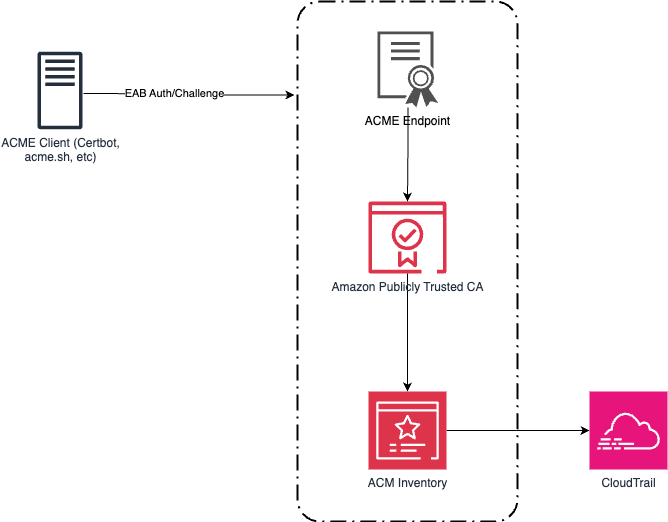
Figure 1: An ACME architecture and workflow
Getting started
Getting started with the new ACME feature in ACM is straightforward. Use the following steps to create your first ACME-generated certificate.
Prerequisites
- An AWS account with permissions to create and manage ACM resources
- An ACME client installed on your infrastructure (for example, Certbot, cert-manager, acme.sh, or others)
- AWS Command Line Interface (AWS CLI) installed on your device (see this blog post for the console equivalent)
- Amazon Route 53 hosted zone for your domain, or the ability to create a CNAME record with your DNS provider
Step 1: Create an ACME endpoint
Before you can use ACME clients with ACM, you need to create an ACME endpoint. This endpoint provides the URL that your ACME clients will use to request certificates.
- Run the following command from the AWS CLI to create an ACME endpoint:
- Note the endpoint Amazon Resource Name (ARN) from the response.
- Run the following command to retrieve the endpoint URL, replacing the ARN with your endpoint ARN:
- Save the output of the ACME
EndpointUrl:
Step 2: Pre-approve a domain
Before ACME clients can request a certificate, the administrator validates the domain using DNS once at the endpoint level. Use DomainScope to control exactly which certificate patterns are allowed:
- Enabling only
ExactDomainrestricts clients to that specific name, Subdomainsenabled allows names likeapi.example.com,Wildcardsenabled allows*.example.com.
Leave a scope disabled to block that pattern outright, even if an otherwise-valid ACME request asks for it. For a production endpoint, consider enabling only ExactDomain and Subdomains and leaving Wildcards disabled for a stricter posture.
If your domain is hosted in Route 53, specifying HostedZoneId lets ACM create the required CNAME record automatically. If your domain is hosted elsewhere, omit it and create the provided CNAME record manually with your DNS provider. Validation typically completes within a few seconds after the record is in place.
You will receive the following response back:
Step 3: Generate EAB credentials
EAB credentials authenticate your ACME clients to your endpoint. Generate a unique set of credentials for each client or environment to maintain security boundaries.
- Run the following command to generate your EAB credentials, adjusting your expiration to fit your organization’s risk profile:
- Note the response from a successful invocation of the command
- Run the following command to retrieve the credentials. You’ll need these values for your ACME client configuration the next step.
- Save the
KeyIdandMacKeyfor the next step.
Step 4: Configure your ACME client
With your endpoint URL and EAB credentials ready, you can now configure your preferred ACME client. The following examples show configuration for two popular clients. As a reminder, the server information was retrieved in step 1, part 4 as the EndpointUrl.
acme.sh:
Certbot:
After the initial registration, your ACME client handles renewals.
Enterprise controls
Other ACME alternatives can provide certificates but don’t give the same amount of control and governance for customers that need to scale their certificate environment. The following controls are available to help reduce risk across your organization.
Domain validation
Customers managing large numbers of domains told us they need a way to prevent unauthorized certificate issuance across their domain space. Domain validation gives you this control. For each domain you validate, you enable the certificate patterns it should be allowed to issue, whether it’s ExactDomain, Subdomains, or Wildcards. For example, if you validate internal.example.com and enable only Wildcards, an ACME client can request *.internal.example.com but a request for internal.example.com itself or api.internal.example.com is rejected. This enforcement happens at the endpoint level, before requests reach the ACM certificate authority, and you can validate multiple domains under a single endpoint, each with its own scope.
Centralized certificate visibility
Certificates issued through your ACME endpoints are registered with ACM. You can use the aws acm list-certificates command to see all your issued certificates.
IAM authorization, CloudTrail audit logging and observability
Endpoint management operations are authorized through IAM and logged to CloudTrail. You can use IAM policies to control which principals can create endpoints, generate EAB credentials, and manage domain constraints.
Best practices
For customers implementing ACME certificates for the first time, consider the following best practices for your organizations.
Segment endpoints along organizational or environment boundaries
The endpoint serves as a useful method of isolation for larger organizations. A large enterprise can create one endpoint per organizational boundary (business unit, subsidiary, or environment) instead of a single shared endpoint company-wide. Each endpoint has its own pre-approved domains and its own set of EABs, so a compromised credential in one business unit has no path to certificates in another.
However, weigh this against your operational overhead as well. A reasonable starting point is one endpoint per environment (dev, staging, andprod) within a business unit, expanding to per-business-unit endpoints only where compliance or organizational requirements call for it.
Manage EAB credentials securely
Anyone holding a validKeyIdandMacKeyfor an endpoint can obtain certificates for any domain pre-approved on that endpoint, so these credentials deserve the same handling you’d give an access key.
- Avoid hard coding the
MacKeywhere possible by using a secret store such as AWS Secrets Manager. Distribute it only to the ACME clients that you authorize to use the endpoint. - Set the expiration of the EAB to an acceptable level. While EAB supports long-lived credentials, not all scenarios require an indefinitely long EAB.
- When creating the role for each EAB, adhere to concept of least privilege. Creating a role per EAB, rather than sharing a role across all bindings, can help reduce risk in your AWS environment.
- Audit
CreateAcmeExternalAccountBindingandGetAcmeExternalAccountBindingCredentialscalls in CloudTrail separately. Because retrieving the actual key material is a distinct API call from creating the binding, alerting on retrieval events is a stronger signal of real credential distribution than binding creation alone.
Automate how EABs are associated with clients at runtime
Generate a unique set of EAB credentials for each client or environment rather than sharing one binding across multiple ACME clients. As you begin to scale with multiple endpoints, usesome of the following patterns to reduce operational toil.
- Name each EAB and its bound IAM role after the client it belongs to (team, application, environment), so the binding’s purpose is obvious from
DescribeAcmeExternalAccountBindingoutput alone, without cross-referencing a spreadsheet. - Store each client’s
KeyIdandMacKeyunder a secrets path scoped to that client (for example, a Secrets Manager path per team and environment), and let the client’s provisioning pipeline retrieve its own credentials. - In Kubernetes, use one ClusterIssuer or namespace-scoped Issuer per EAB rather than one shared issuer across teams. This keeps the client-to-EAB association explicit in cluster config, and lets you revoke one team’s access without touching anyone else’s.
- For ephemeral infrastructure (build agents, autoscaled fleets), provision EAB credentials as part of your infrastructure-as-code or continuous integration and deployment (CI/CD) pipeline instead of a one-time manual handoff, so credential lifecycle tracks infrastructure lifecycle.
Monitor your deployment of ACME
ACME’s power is through automation, and organizations should monitor their ACME usage for anomalies.
- Alarm on issuance failures, not just successes. At 45-day certificate validity, a silent renewal failure gives you far less runway to react than the months of time you might be used to with longer-lived certificates.
- Test renewal automation before you depend on it. Force a manual renewal against a non-production endpoint and confirm your client, monitoring, and on-call runbooks behave as expected, before the CA/Browser Forum’s shortened validity windows turn a failed renewal into a disruptive event for your organization.
Availability and pricing
ACME support in AWS Certificate Manager is available today in all commercial AWS Regions and will be available in AWS GovCloud (US), the China Regions, and the AWS European Sovereign Cloud partitions at a later date. See the ACM pricing page for more information on ACME pricing.
Conclusion
The phased reduction in certificate validity can’t easily be solved without automation. ACME support in ACM gives you that automation through a standard protocol and standard tooling, while keeping the visibility and governance controls your security teams rely on from ACM.
To get started, see the AWS Certificate Manager documentation or follow the getting started guide.
If you have feedback about this post, submit comments in the Comments section below.