AWS Storage Blog
Adopt AWS Backup policies at enterprise scale using AWS Organizations
Consider a platform team responsible for data protection across a large, regulated enterprise. Over years of growth, the organization now runs hundreds of Amazon Web Services (AWS) accounts across many teams and AWS Regions, and each team has configured its own backup approach. The platform team now faces a familiar challenge: how to enforce consistent, auditable backup governance across the entire estate without managing a separate configuration in every account. Backup coverage can be uneven, difficult to prove during an audit, and expensive to maintain. As the account count keeps growing, the manual, per-account approach becomes harder to sustain.
AWS Organizations backup policies for AWS Backup address this challenge by enabling centralized, inheritable backup governance across an entire organizational structure. Through policy inheritance, organizations can define backup rules at the root or organizational unit (OU) level and have those rules flow down to member accounts automatically. Combined with account-level and Region-level variables, backup policies support dynamic resource targeting without requiring per-account customization, making it possible to protect hundreds of accounts with a small number of well-designed policies.
In this post, we show how to design AWS Organizations backup policies that scale efficiently using nested backup plans, inheritance operators, and built-in variables. We also share best practices and considerations for operating at scale, including how to adopt these policies in an existing estate without creating coverage gaps during the transition.
Understanding backup policy inheritance
Before looking at how policies scale, it helps to separate two related concepts. A backup plan defines what to protect and how, through its rules, schedules, lifecycle settings, and resource selections. A backup policy is an AWS Organizations construct that defines one or more backup plans and applies them to member accounts through the organization hierarchy.
That hierarchy follows an inheritance model. Policies attached at the organization root flow down through OUs to individual member accounts. The effective policy for an account is the merged result of all policies inherited from its parent hierarchy, combined with any policies attached directly to the account itself.
The following example shows a typical organization structure, with a root; separate OUs for Security, Production, and Dev/Test; and member accounts within each OU. You create and manage these policies from the organization’s management account, or from a delegated administrator account for AWS Backup, and attach them at the root, an OU, or an individual account. A policy attached at the root would apply to every account across all three OUs, whereas a policy attached at the Production OU would apply only to its member accounts, prod-001, prod-002, and prod-003.
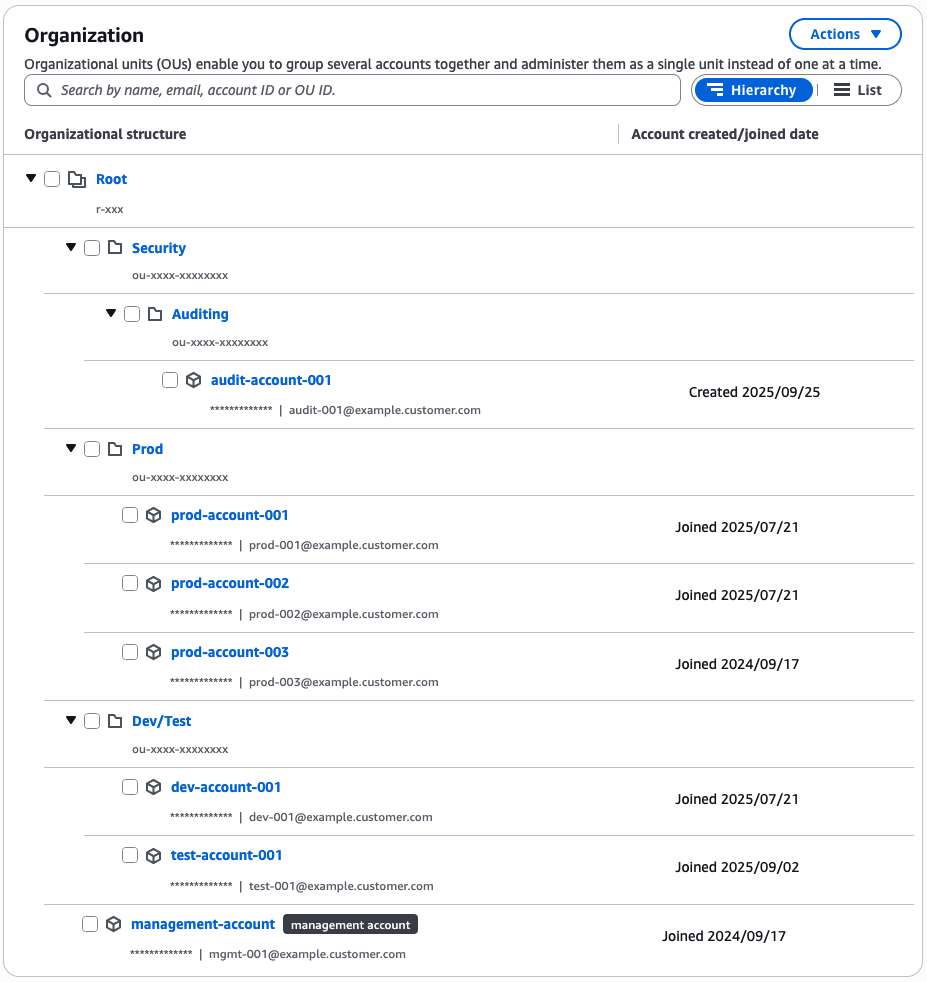
Figure 1: Example AWS Organizations structure showing multiple OUs
Where the policy is attached determines what each account inherits. Inheritance is further controlled through three operators, which you apply as keys in the policy JSON, wrapping the value they act on:
- @@assign – Sets or overwrites a value at the current level
- @@append – Adds values to an inherited list without removing existing entries
- @@remove – Removes specific values from an inherited list
For example, a root-level policy can use @@assign to set a base list of protected Regions.
"regions": { "@@assign": ["us-east-1", "eu-west-1"] }
An OU-level policy can then @@append a Region specific to a business unit.
"regions": { "@@append": ["ap-southeast-1"] }
An account-level policy can @@remove an inherited Region it does not need, for example a non-production account removing a cross-Region copy target to avoid the cost of copies it does not require.
"regions": { "@@remove": ["ap-southeast-1"] }
Combining operators this way lets you build layered governance without duplicating entire policy definitions at each level.
Parent policies can also restrict what lower-level policies are allowed to change. By setting @@operators_allowed_for_child_policies on a key, you control whether child policies can assign, append, or remove values for that key. This prevents lower-level policies from weakening the protections defined higher in the hierarchy.
Design pattern: Multiple plans within a single policy
Each backup policy JSON document can contain multiple named backup plans under the plans key. This is a key design lever for scaling. Rather than creating a separate policy for each backup requirement, you can define several plans within one policy document, each with its own rules, lifecycle, and resource selection criteria. A common approach is to define tiered protection levels (Gold, Silver, Bronze) as separate plans within a single policy, where each tier represents a group of resources with aligned recovery requirements. For example, Gold covers mission-critical applications with the tightest recovery objectives, Silver covers important business workloads that can tolerate slightly longer recovery, and Bronze covers non-critical or easily reproducible resources.
Recovery objectives are not the only factor in tier design. Some resources must be retained for a defined period to meet compliance or legal requirements regardless of their criticality, so factor retention obligations into your tiering alongside recovery needs, or define a dedicated plan for long-retention workloads.
For example, a single policy can contain the following:
{
  "plans": {
    "GoldTierPlan": {
      "rules": {
        "HourlyRule": {
          "schedule_expression": { "@@assign": "cron(0 * ? * * *)" },
          "lifecycle": { "delete_after_days": { "@@assign": "90" } }
        },
        "DailyRule": {
          "schedule_expression": { "@@assign": "cron(0 5 ? * * *)" },
          "lifecycle": { "delete_after_days": { "@@assign": "365" } }
        }
      },
      "regions": { "@@assign": ["us-east-1", "eu-west-1", "ap-southeast-1"] },
      "selections": { ... }
    },
    "SilverTierPlan": {
      "rules": {
        "DailyRule": {
          "schedule_expression": { "@@assign": "cron(0 5 ? * * *)" },
          "lifecycle": { "delete_after_days": { "@@assign": "90" } }
        },
        "WeeklyRule": {
          "schedule_expression": { "@@assign": "cron(0 5 ? * 1 *)" },
          "lifecycle": { "delete_after_days": { "@@assign": "365" } }
        }
      },
      "regions": { "@@assign": ["us-east-1", "eu-west-1"] },
      "selections": { ... }
    },
    "BronzeTierPlan": {
      "rules": {
        "DailyRule": {
          "schedule_expression": { "@@assign": "cron(0 5 ? * * *)" },
          "lifecycle": { "delete_after_days": { "@@assign": "14" } }
        }
      },
      "regions": { "@@assign": ["us-east-1"] },
      "selections": { ... }
    }
  }
}
In this example, three protection tiers coexist within a single policy. Each plan contains multiple rules that define different backup frequencies: hourly and daily for Gold, daily and weekly for Silver, and daily only for Bronze. Each plan also scopes its own Region list and resource selections independently. The Gold tier targets resources tagged backup-tier:gold, Silver targets backup-tier:silver, and so on. Delivering all three tiers from a single policy keeps your policy count low, so you can scale protection across hundreds of accounts without multiplying the number of policies you manage. This also reduces administrative overhead and maintains a clear mapping between protection levels and the resources they cover.
Backup cost scales with the volume of data stored, the retention period, and any cross-Region or cross-account copies, so in this example the high-frequency, long-retention Gold tier costs more per resource than Bronze. Assign each resource to the tier that matches its recovery requirements rather than defaulting everything to the highest tier. For current pricing, see the AWS Backup pricing page.
When a plan contains multiple rules with overlapping time frames, AWS Backup optimizes by taking a single backup for the rule with the longer retention period, provided both rules target the same vault and their start windows overlap. This optimization considers the full start window, not just the scheduled backup time. This means you can define granular rules within a plan without concern about redundant backups being created when schedules coincide.
Design pattern: Account and Region variables
Backup policies support the built-in variables $account and $region, which resolve dynamically at runtime to the target account ID and Region. These variables are essential for constructing vault Amazon Resource Names (ARNs) and copy action targets that work across your entire organization without hardcoding account-specific or Region-specific values.
The key to unlocking the full potential of these variables is adopting a consistent naming convention for your backup resources. If every account provisions a vault named LocalBackupVault and an AWS Identity and Access Management (IAM) role named AWSBackupRole, your policies can reference those names directly and let the variables handle the account and Region context. The policy becomes a single, reusable template that applies identically across the accounts it reaches. Without consistent naming, you would need account-specific overrides, which defeats the purpose of centralized governance.
Consider a cross-account copy rule that sends backups to a central vault:
"copy_actions": {
  "CopyToCentral": {
    "target_backup_vault_arn": {
      "@@assign": "arn:aws:backup:$region:123456789012:backup-vault:CentralVault"
    },
    "lifecycle": {
      "delete_after_days": { "@@assign": "365" }
    }
  }
}
Here, $region directs the copy to target the correct Regional vault in the central account, whereas the central account ID is specified directly. For the primary backup vault within each member account, you reference the vault by name:
"target_backup_vault_name": {
  "@@assign": "LocalBackupVault"
}
Because vault names are resolved per-account and per-Region automatically, the same policy works across every account that has a vault with that name. This removes the need to create account-specific policies entirely.
The following example uses both variables when defining the ARN for a logically air-gapped vault:
"target_logically_air_gapped_backup_vault_arn": {
  "@@assign": "arn:aws:backup:$region:$account:backup-vault:AirGappedVault"
}
This single line targets the correct logically air-gapped vault in each account and Region combination, replacing what would otherwise require individual policy definitions per account.
Design pattern: OU-level segmentation
Not all accounts require identical backup treatment. Production workloads typically need more frequent backups, shorter recovery point objectives, and longer retention than development or sandbox environments. OU-level segmentation addresses this by attaching different policies at different points in the hierarchy.
The following is a common pattern:
- Organization root – Attach a baseline policy that defines daily backups with 14-day retention for all tagged resources across all accounts.
- Production OU – Attach an additional policy that adds hourly backups, cross-Region copy rules, and 90-day retention for critical workloads.
- Non-production OU – No additional policy needed. These accounts inherit only the baseline.
Because inheritance operators allow appending without overwriting, the production OU policy adds to the baseline rather than replacing it. This layered approach keeps your total policy count low while providing differentiated protection levels across your environment.
You can extend this further by nesting OUs. For example, a Regulated sub-OU under Production could append a copy action targeting a logically air-gapped vault, adding immutable backups for compliance-sensitive workloads without modifying the parent production policy.
Putting it together: Example policy architecture
Consider an organization with 300 accounts across 12 Regions, split into three OUs: Production (80 accounts), Staging (60 accounts), and Development (160 accounts).
A scalable policy design for this organization uses just three policies:
- Baseline policy (attached at root) – Defines a daily snapshot plan targeting supported resource types tagged with backup:true. Uses LocalBackupVault as the target vault name (provisioned in all accounts using AWS CloudFormation StackSets). Covers all 12 Regions. Retention: 14 days.
- Production policy (attached at Production OU) – Adds an hourly backup plan for key resources, for example, Amazon Simple Storage Service (Amazon S3) and Amazon DynamoDB. Adds a cross-Region copy rule using $region to target a disaster recovery Region. Extends retention to 90 days for daily snapshots.
- Critical workloads policy (attached at Production OU) – Targets resources tagged backup-tier:critical. Adds an additional backup copy rule to a logically air-gapped vault using $region and $account variables. Retention: 365 days with transition to cold storage after 90 days.
This architecture protects 300 accounts across 12 Regions with three policies. Each account receives an effective policy that is the merged result of its inherited policies, with no manual per-account configuration required.
Considerations and best practices
When implementing backup policies at scale, keep the following in mind:
- Vault pre-provisioning – Provision backup vaults and IAM roles in every target account and Region before attaching your policies. By deploying these prerequisites organization-wide with CloudFormation StackSets, accounts are ready to apply their effective policy as soon as it takes effect.
- IAM role consistency – The IAM role specified in your policy (typically
AWSBackupDefaultServiceRole) must exist in every account that receives the effective policy. Include role creation in your StackSet deployment alongside vault provisioning. - Effective policy validation – Use the AWS Organizations console or the
DescribeEffectivePolicyAPI to verify the merged policy for any account. This confirms that inheritance operators are producing the expected result and helps catch unintended overrides early. - Resource selection strategy – Backup policies support both tag-based and resource-type-based selection. You can target resources of a given type, filter by tags, or combine both approaches within the resources key. If your policies use tag-based selection, establish consistent tagging standards across your organization and enforce them with tag policies or AWS Config rules to prevent resources from falling outside backup coverage.
- Policy size awareness – Individual backup policies have a maximum character size of 10,000 characters per policy. Using multiple plans within a single policy is efficient, but monitor your policy document as you add plans and rules. If you approach the character limit, split logically related plans into separate policies attached at the same hierarchy level.
- Testing in a sandbox OU – Before attaching a new policy to a production OU, test it against a small set of accounts in a sandbox OU. Validate the effective policy output and confirm that backup jobs complete as expected before expanding scope.
- Adopting policies in an existing estate – If accounts already have their own backup plans, introduce the organization policy alongside them rather than replacing them at once. Attach the policy to a small set of accounts first and use the effective policy view to confirm coverage before wider rollout. Keep existing plans running until centrally governed backups are confirmed, then retire the local plans, which prevents coverage gaps during the transition.
- Protect backups with service control policies – Combine your backup policies with service control policies (SCPs) to add a centrally governed guardrail around backup operations. Applied across the organization, SCPs let you control which principals can modify backup configuration, vaults, and recovery points, so the protections defined in your policies are consistently enforced at every account. Managing both from the organization level keeps governance and its guardrails in one place as you scale.
Conclusion
Scaling backup governance across hundreds of accounts doesn’t require hundreds of policies. By combining multiple backup plans within single policy documents, using inheritance operators to layer protection at different OU levels, and applying built-in variables for dynamic account and Region resolution, you can build a compact, maintainable policy architecture that grows with your organization.
To get started, review Backup policy syntax and examples and Understanding declarative policy inheritance. Start with a single baseline policy at your organization root and iterate from there as your protection requirements evolve.
This post focused on backup creation at scale. Related capabilities such as AWS Backup Audit Manager and AWS Backup restore testing extend the same centralized model to compliance monitoring and recovery validation and are natural next steps after your policy design is in place.