AWS Storage Blog
Deploy Amazon S3 Object Lock with Cross-Region Replication and KMS encryption using AWS CloudFormation
Organizations in regulated industries such as financial services, healthcare, and the public sector must retain certain records unchanged for a defined period and prove that they were never altered. This write-once-read-many (WORM) requirement also adds a layer of protection against ransomware and accidental deletion. Many of these organizations must also keep a usable copy available even if an entire geographic region becomes unavailable, and keep every copy encrypted. Because these retention, encryption, and resilience controls depend on one another, the order and permissions you configure them with matter. When you capture that configuration as code, every deployment gets the same correct, tested settings.
Amazon S3 provides these capabilities as built-in features, so you can meet all three needs without adding third-party software. Amazon S3 Object Lock applies a WORM model that helps prevent objects from being changed or deleted for a defined period, which gives you the audit-ready retention that compliance regimes require. Amazon S3 Cross-Region Replication (CRR) maintains a continuously updated copy in a second AWS Region, helping to reduce the impact of a Regional disruption on your access to records. To protect data at rest, AWS Key Management Service (AWS KMS) provides keys that you own and audit to encrypt the objects in both copies. When you define them together as infrastructure as code with AWS CloudFormation, you can deploy the full setup with a few commands, and auditors get a single, version-controlled record of how your data is protected.
In this post, we show you how to deploy these features together with three CloudFormation stacks. You create an S3 source bucket with S3 Object Lock and a default encryption setting that encrypts new objects with server-side encryption with AWS KMS keys (SSE-KMS), replicate its objects to an S3 Object Lock-enabled destination bucket, where the replicas are encrypted with a separate KMS key in the destination Region, and replicate S3 Object Lock retention and legal-hold state. We also show how to work around a CloudFormation cross-Region reference constraint. The result is a repeatable, auditable way to stand up compliant and resilient storage, with every object encrypted at rest, that you can adapt to your own requirements. You no longer need to wire these features together by hand each time. For records whose retention period depends on a future business event, such as a contract ending or an account closing, see Flexibly control Amazon S3 Object Lock retention based on real business events, which shows how to use variable retention with an event hold.
Note: The CloudFormation templates, scripts, and code samples in this post and its companion repository are provided as examples only, without warranty of any kind, and are not intended for direct use in production without your own review, testing, and adaptation. Deploying them creates real AWS resources, including S3 buckets, KMS keys, and an IAM role, that incur charges and that you are responsible for managing and removing. Test in a non-production account first, and review IAM policies and S3 Object Lock retention settings against your own organization’s security and compliance requirements before adapting this solution for production. In particular, take care with COMPLIANCE mode: once applied, an object’s retention period cannot be shortened or removed by any user, including the account root user, until it expires.
Solution overview
The solution deploys a source bucket in one Region (we use us-west-2) that replicates to a destination bucket in a second Region (us-west-1). Both buckets have S3 Object Lock and S3 Versioning enabled. The source bucket’s default encryption encrypts new objects with a customer-managed KMS key in us-west-2, and the replication rule encrypts each replica with a separate customer-managed KMS key in us-west-1, the same key the destination bucket uses for its default encryption. An IAM role grants S3 the permissions it needs to read the source objects, including their S3 Object Lock state, and write the replicas to the destination bucket. During replication, S3 uses the source KMS key to decrypt each source object and the destination KMS key to encrypt the replica, so each copy is protected by a key in its own Region.
The following diagram illustrates the solution architecture.
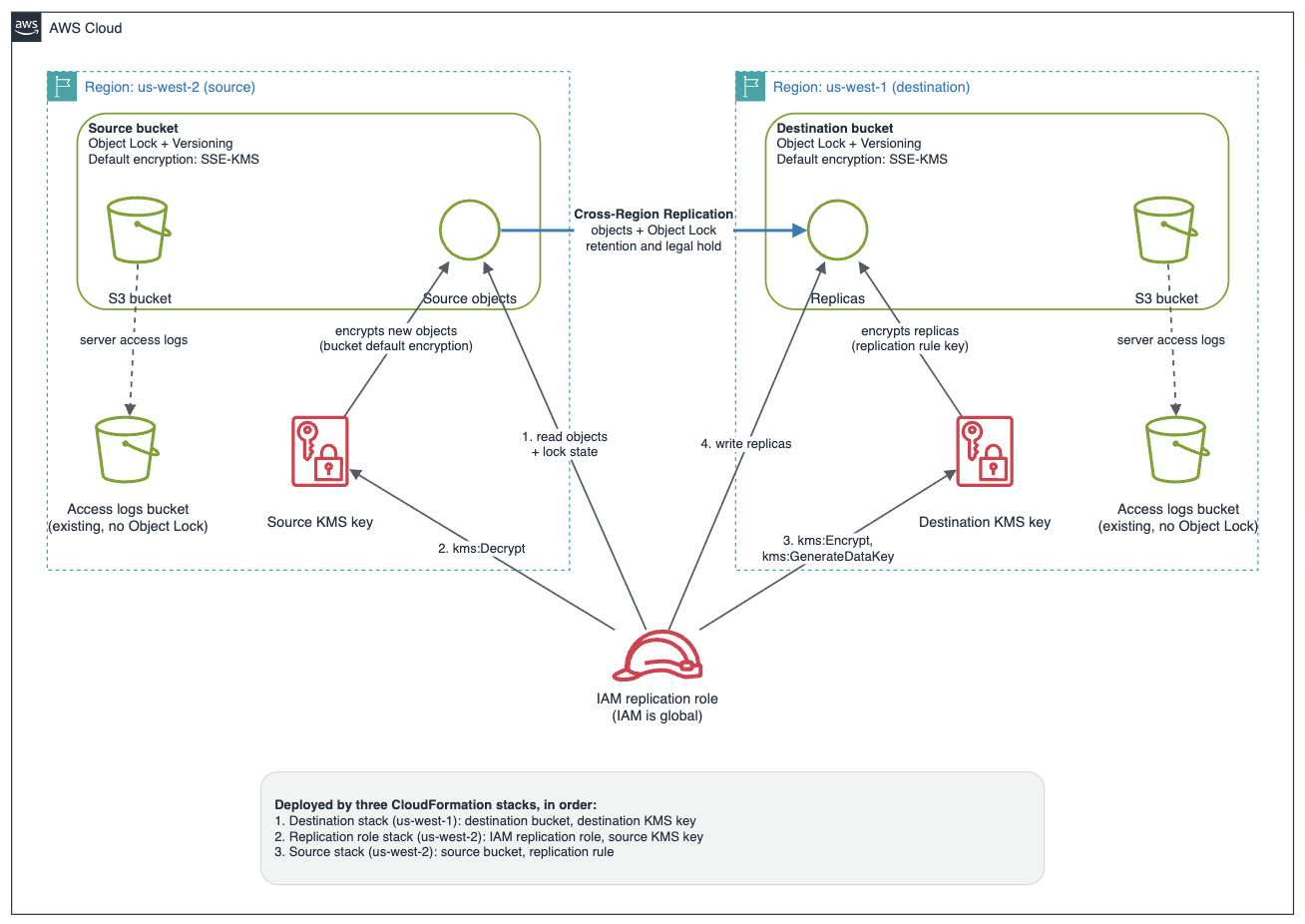
Figure 1: Architecture of the S3 Object Lock cross-Region replication solution with per-Region SSE-KMS encryption
Before we walk through the templates, it helps to understand the requirements that connect these features:
- S3 Object Lock requires S3 Versioning to be enabled.
- To replicate from a bucket that has S3 Object Lock enabled, the destination bucket must also have S3 Object Lock enabled, because replication copies each object’s S3 Object Lock settings along with its data.
- To replicate SSE-KMS-encrypted objects, you must explicitly opt in with
SourceSelectionCriteria, specify a destination KMS key in the destination Region, and grant the replication role KMS permissions in both Regions.
Because the buckets are in two Regions and a CloudFormation stack operates within a single Region, the solution uses three stacks: a destination stack, a replication role stack, and a source stack. We deploy the role as its own stack, before the source bucket exists, so it has a real Amazon Resource Name (ARN) before anything (including you, if you bring your own KMS key) needs to reference it. We explain why this matters in the section about the replication role stack.
Prerequisites
To implement the solution in this post, you must have the following prerequisites:
- An AWS account with permissions to create S3 buckets, KMS keys, and IAM roles.
- The AWS Command Line Interface (AWS CLI) v2 installed and configured, or access to the CloudFormation console.
- Two globally unique S3 bucket names.
- Access to the GitHub repository containing the CloudFormation templates and scripts.
- A pre-created logging bucket with its name available for the deployment commands referenced in the walkthrough below.
Part 1: Deploy the destination stack (us-west-1)
Deploy the destination first, so replication has a target. It creates a customer-managed KMS key and a bucket with S3 Object Lock, versioning, and default encryption.
We set BucketKeyEnabled: true to reduce AWS KMS request costs through S3 Bucket Keys. The KMS key policy grants the account root full control, so the replication role (created in the next stack) can use the key through its own IAM policy. This approach avoids a circular dependency that would arise if the key policy referenced the role while the role referenced the key.
Part 2: Deploy the replication role stack (us-west-2)
This is where the architecture differs from a simpler two-stack design, and it is worth explaining why before showing the template.
The replication role’s policy needs to name four real resource ARNs: the source bucket, the destination bucket, the source KMS key, and the destination KMS key. If you created that role inside the same stack as the source bucket, and you wanted to bring your own KMS key with a policy scoped to that specific role rather than to account root, you would hit a chicken-and-egg problem. The role’s ARN would not exist yet at the point you need to grant it on your existing key, because CloudFormation creates the role and the bucket in the same deployment.
Creating the role in its own stack, deployed before the source stack, solves this. By the time you need to reference the role’s ARN anywhere, including in an existing KMS key’s policy, it already exists as a real value. This stack also creates the source-side KMS key (or takes an existing one you supply), because the role’s policy needs that key’s ARN too, and the key has the same timing concern.
This policy grants the replication role three groups of S3 permissions in addition to the KMS permissions: s3:ListBucket and s3:GetReplicationConfiguration on the source bucket itself, the object-level s3:GetObjectVersion* and S3 Object Lock read actions on the source objects, and s3:ReplicateObject, s3:ReplicateDelete, and s3:ReplicateTags on the destination objects. S3 replication requires all three groups. If you test with an identity that already has broad account permissions, replication can appear to work even when the role’s own policy is incomplete, so scope the role explicitly as shown here.
Because decryption happens in the source Region and re-encryption in the destination Region, the two kms:ViaService conditions reference different Regions. Using a single Region for both is a common cause of replicas failing to write.
This stack outputs ReplicationRoleArn and SourceKmsKeyArn, both real values now, which the source stack takes as parameters in Part 3.
Bring your own KMS key
Both the destination stack and the replication role stack create a dedicated KMS key by default, so you can deploy without supplying your own key while evaluating the solution. Many organizations instead manage a smaller set of approved, audited customer-managed keys. Both templates support this: leave the key ARN parameter blank to create a new key, or pass in the ARN of a key you already own to skip key creation. Each template exposes an optional parameter (ExistingKmsKeyArn on the destination stack, ExistingSourceKmsKeyArn on the replication role stack) that defaults to an empty string, and a Condition creates the key only when the parameter is blank.
If you bring your own key, neither template modifies that key’s policy. An existing key’s policy must grant whoever needs it kms:Encrypt, kms:Decrypt, and kms:GenerateDataKey. If you skip this, the stack still deploys successfully, but replication fails at runtime, because CloudFormation cannot check KMS permissions ahead of time. For the source key, this is exactly why the role exists as its own stack: by the time the role stack finishes, its ARN is real, so you can grant that exact ARN on your existing source key before the source stack runs.
Name the replication role
By default, CloudFormation generates a unique name for the role. If your organization has naming conventions for IAM roles, pass a name through the ReplicationRoleName parameter instead. Setting an explicit name means CloudFormation requires the CAPABILITY_NAMED_IAM capability instead of CAPABILITY_IAM. The deployment script requests CAPABILITY_NAMED_IAM for the role stack unconditionally, so this works whether or not you provide a role name.
Part 3: Deploy the source stack (us-west-2)
By the time you reach this stack, both the destination bucket and the replication role already exist as real resources. The source stack’s job is narrow: create the source bucket with S3 Object Lock, versioning, default encryption that uses SSE-KMS for new objects, and the replication configuration that points at the destination and uses the role.
Notice that Role: !Ref ReplicationRoleArn and KMSMasterKeyID: !Ref SourceKmsKeyArn are both plain !Ref on parameters, not !GetAtt on a resource this stack creates. This stack has no AWS::IAM::Role and no AWS::KMS::Key of its own. It consumes both by ARN.
S3 Object Lock retention and legal-hold state replicate automatically once the destination bucket has S3 Object Lock enabled and the role holds s3:GetObjectRetention and s3:GetObjectLegalHold. No additional replication-rule setting is required.
Optional: Reduce replication lag with S3 Replication Time Control
By default, S3 replicates objects asynchronously, without a guaranteed completion time. For compliance-sensitive workloads where a second copy must exist within a predictable window, you can enable S3 Replication Time Control (S3 RTC). S3 RTC helps you meet compliance or business requirements for data replication and provides visibility into S3 replication times. It replicates most objects that you upload to S3 in seconds, and 99.9 percent of those objects within 15 minutes, backed by a service level agreement (SLA). S3 RTC requires S3 Replication metrics, which you can also enable on replication rules that don’t use S3 RTC. To enable S3 RTC, add both a ReplicationTime block and a Metrics block to the rule’s Destination, as shown in the following example. S3 RTC incurs an additional per-gigabyte charge, so weigh it against your recovery-point requirements.
Deploy the three stacks
Because CloudFormation operates within a single Region, and the role must exist with a real ARN before the source stack runs, you deploy in a fixed order: destination, then the replication role, then source. The following script automates the handoff so you never copy values by hand.
Run it with your bucket names:
Run it with your bucket names, KMS Key:
Verify the deployment
After deployment, upload a test object to the source bucket and confirm that a replica appears in the destination bucket. Confirm the replication status, and then confirm that the replica carries the same S3 Object Lock retention and is encrypted with the destination key, not the source key.
Matching Mode and RetainUntilDate values on the source and destination objects confirm that Object Lock retention replicated correctly, not just that the object copied. A SSEKMSKeyId on the replica that matches the destination key ARN confirms re-encryption in the destination Region.
A constraint to plan for: Cross-Region references
CloudFormation cross-stack references (Fn::ImportValue) and nested stacks operate within a single Region, so you cannot define both Regional buckets in one template and wire them together automatically. The two supported patterns are:
- Multiple stacks with an orchestration step (the script in this post), which suits a single account.
- AWS CloudFormation StackSets with an AWS Systems Manager Parameter Store handoff, which scales to many accounts and Regions.
Best practices and considerations
- Versioning is mandatory for both S3 Object Lock and replication.
- GOVERNANCE vs. COMPLIANCE mode: In COMPLIANCE mode, no user, including the root user, can shorten or remove a retention period before it expires. Validate your configuration with GOVERNANCE mode first.
- Protect against excessive retention with a bucket policy or resource control policy that denies PutObject requests specifying retention periods beyond a threshold.
- Use
DeletionPolicy: Retainon buckets and KMS keys so that removing a stack does not attempt to delete locked data or the key required to decrypt it. - For cross-account replication, add a destination bucket policy and include the replication role’s principal in the destination KMS key policy.
Cleaning up
Because the buckets and KMS keys use DeletionPolicy: Retain, deleting the three stacks does not delete them. To avoid ongoing charges, remove test data, and then delete the buckets and schedule key deletion manually, subject to any active S3 Object Lock retention, which prevents deletion of locked object versions until it expires. Make sure to delete resources in both AWS Regions where you deployed this solution (us-west-1 and us-west-2).
Conclusion
In this post, we showed how to provision Amazon S3 Object Lock, Cross-Region Replication, and SSE-KMS encryption for objects together with AWS CloudFormation as a repeatable, auditable deployment. The key is to respect the requirements that connect the features (versioning, matching S3 Object Lock on the destination, explicit opt-in for KMS-encrypted objects, and Region-correct KMS permissions) and to plan for the cross-Region reference constraint by using multiple stacks with an orchestration step. Splitting the replication role into its own stack, deployed before the source bucket, means that if you bring your own KMS key, you can grant that role’s real ARN on it before anything depends on that permission. We invite you to deploy this solution in your own environment and adapt the templates to your compliance and resilience requirements.