AWS Storage Blog
How Hathr.AI delivers multi-tenant agentic RAG for regulated US government workloads with Amazon S3 Vectors
Healthcare, legal, and public sector organizations are turning to AI to work through large volumes of documents, but much of this data is too sensitive for consumer AI tools. Hathr.AI, a leader in secure AI for healthcare and other regulated industries, addresses this need. Hathr.AI’s HIPAA-aligned tool integrates with Amazon Bedrock in AWS GovCloud (US), isolated AWS Regions with FedRAMP High authorization. Thousands of organizations, from independent practitioners to the US Federal Government, use its tool for medical record reviews, litigation medical chronologies, controlled unclassified information, and medical coding, billing, and claims.
Hathr.AI never trains models on customer data, keeps information segmented within its AWS GovCloud (US) environment, and lets customers decide how long their files exist. A typical user, like a hospice nurse, might upload a 400-page chart, get an eligibility summary, and delete the file before lunch. To make each upload searchable, Hathr.AI splits the document into chunks, converts each chunk into a vector embedding, and writes those embeddings to the customer’s vector index. When the customer deletes the file, Hathr.AI deletes those vectors right away. Across thousands of users, this creates a vector workload where data is constantly created and deleted.
As volume grew, Hathr.AI quadrupled the instance sizes in its Amazon DocumentDB (with MongoDB compatibility) deployment to keep up. It then moved vector search to Amazon S3 Vectors, a capability of Amazon Simple Storage Service (Amazon S3), which better fit this high-churn, multi-tenant workload and its immediate deletion requirements, and gave each customer its own vector index. Since the cutover, Hathr.AI has served vector queries with zero failed requests at sub-100 ms average latency and has shrunk its Amazon DocumentDB cluster to one quarter of its peak size.
In this post, we walk through the architecture behind those numbers: an AWS Step Functions ingestion pipeline, per-customer S3 Vectors indexes, and Strands Agents on Amazon Elastic Container Service (Amazon ECS) with AWS Fargate calling a foundation model in Amazon Bedrock. You will learn the multi-tenant patterns Hathr.AI uses to keep compliance boundaries clean, how faster vector queries let Hathr.AI move from static Retrieval Augmented Generation (RAG) to agentic retrieval, and what to check before you run S3 Vectors in AWS GovCloud (US).
The challenge: High-churn vector search on a database cluster
Hathr.AI launched RAG on Amazon DocumentDB vector search because its document text already lived there, and one cluster holding chunks, metadata, and embeddings served the team well at low volume.
Hathr.AI users create and remove vectors all day. One upload writes hundreds or thousands of embeddings, and a deletion removes them minutes or hours later. A contractual non-retention commitment means a delete must take effect right away, so the team can’t push deletions into a nightly cleanup job.
Hathr.AI’s high-churn vector workload competed with the transactional working set for instance memory, so the team kept sizing up until it had quadrupled the cluster size.
Every customer shared the same cluster capacity. A large ingestion burst from one customer could slow chat for the rest, and each scale-up raised the cost of the whole database to buy headroom for one workload. Hathr.AI needed a vector store suited to high churn that would keep each customer’s vectors separate, run in AWS GovCloud (US), and leave the team with no cluster to manage.
Why Hathr.AI chose Amazon S3 Vectors
Amazon S3 Vectors stores and queries vector embeddings through a dedicated set of APIs, with no infrastructure to provision. Hathr.AI chose it for four reasons:
- Per-customer index isolation – A vector bucket holds up to 10,000 vector indexes, and each index has its own Amazon Resource Name (ARN). Hathr.AI gives each customer its own index and scopes AWS Identity and Access Management (IAM) policies to that ARN.
- No cluster to manage – Hathr.AI has no instances to size and no index rebuilds to schedule.
- AWS GovCloud (US) support – S3 Vectors became available in AWS GovCloud (US-East) and AWS GovCloud (US-West) in July 2026, so Hathr.AI’s vectors stay inside the same boundary as the rest of the application.
- Consistent performance under churn – AWS reports latency as low as 100 milliseconds for more frequent queries and sub-second latency for infrequent queries. Hathr.AI’s production numbers match, and its delete volume has no visible effect on them.
Solution overview
The following figure shows the retrieval architecture of the Hathr.AI tool. Document ingestion runs along the top, and agentic retrieval runs along the bottom. Both paths share a per-tenant data layer: S3 Vectors holds embeddings in one index per customer, and Amazon DocumentDB holds the text chunks those embeddings point to. Ingestion runs on AWS Step Functions, and every stage in the workflow is an AWS Lambda function. Each document gets its own execution with a durable history, and each stage has its own retry policy, so a throttled Amazon Bedrock call retries without restarting the document. Step Functions also gets the pipeline past the 15-minute Lambda timeout. Embedding a large document can take more than an hour, so a Map state splits the chunks into batches and runs each batch in its own Lambda invocation.
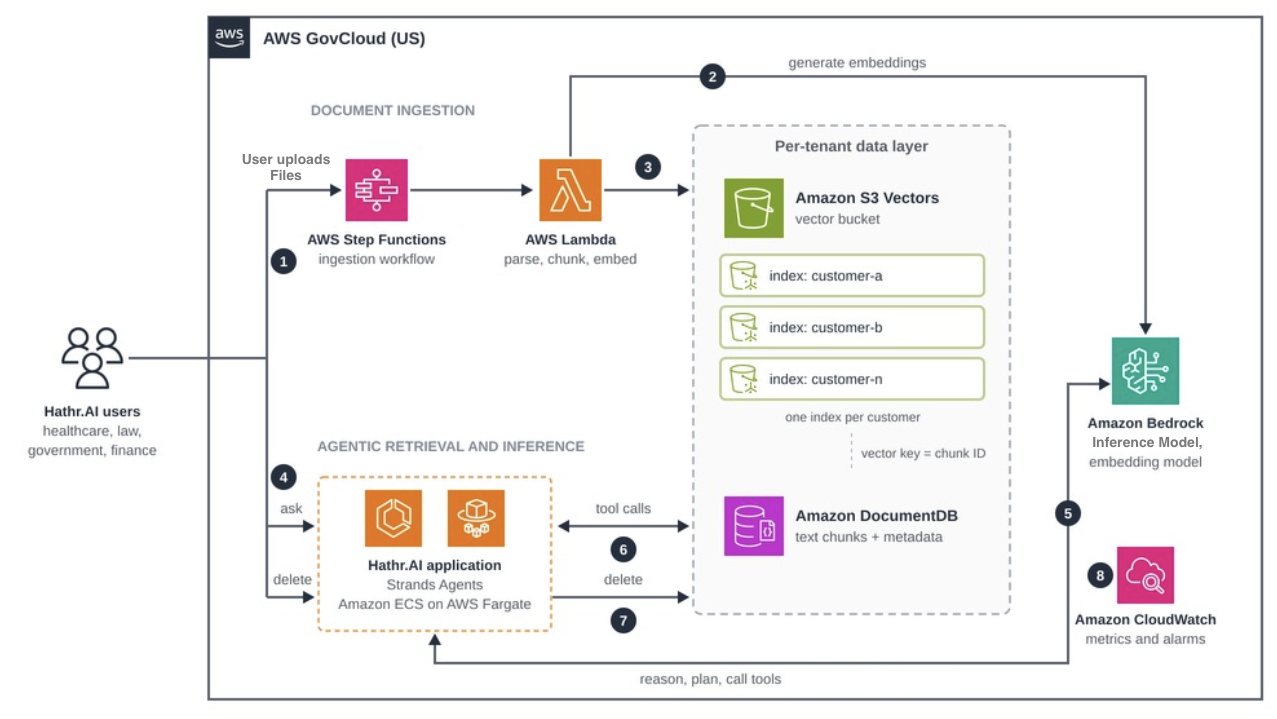
Figure 1: Hathr.AI document ingestion and agentic retrieval architecture in AWS GovCloud (US)
- A user uploads a document, and the Hathr.AI application starts a Step Functions workflow for that file.
- AWS Lambda functions parse and chunk the document and call an embedding model in Amazon Bedrock.
- Lambda writes each text chunk to Amazon DocumentDB and its embedding to the S3 Vectors index for that customer, using the chunk ID as the vector key.
- A user asks a question, and the request reaches a Strands Agents service on Amazon ECS with AWS Fargate.
- The agent uses Amazon Bedrock to analyze the conversation and determine whether to search and what to search for.
- The agent’s search tool queries the customer index in S3 Vectors, loads the matching chunk text from Amazon DocumentDB, and returns it to the model. The model can rephrase and search again before it answers.
- When a user deletes a document, the Hathr.AI application calls DeleteVectors on that customer’s index and then removes its text chunks from Amazon DocumentDB. Deleting all of a user’s documents, or closing the account, deletes the whole index with DeleteIndex.
- Amazon CloudWatch collects metrics from each stage and raises alarms on errors, latency, and ingestion time.
Architecture decisions
Hathr.AI built this pattern around four architecture decisions.
Decision 1: Ingest documents with Step Functions and Lambda
Each upload starts a Step Functions execution that runs Lambda functions to extract text, split it into chunks, and generate embeddings in Amazon Bedrock.
Decision 2: Write vectors to the customer index
Lambda writes each chunk to Amazon DocumentDB first, then writes the embedding to S3 Vectors with the chunk ID as the vector key. Hathr.AI stores document_id as filterable metadata so a query can target the files a user selected. S3 Vectors metadata pre-filtering is now available in AWS GovCloud (US). Indexes in new vector buckets use it by default, which can improve recall for selective queries such as filtering to the files a user selected.
Decision 3: Delete vectors with the document
Hathr.AI’s delete path reads the chunk IDs for a document from Amazon DocumentDB, calls DeleteVectors on the customer index in batches of 500, and then removes the chunks. Each delete touches one customer index, so a heavy delete day for one customer leaves query performance unchanged for the others.
Decision 4: Migrate behind a feature flag
Hathr.AI built the S3 Vectors read and write paths behind a feature flag while Amazon DocumentDB still served production traffic, writing new embeddings to both stores and backfilling the existing ones. The team flipped the flag for customers, moving vector search to S3 Vectors while retaining Amazon DocumentDB for text chunks and metadata. S3 Vectors has no capacity to provision, no indexes to size, and no cluster to tune, so there was far less to build, test, and maintain than a self-managed vector store would need.
Multi-tenant design patterns
Hathr.AI gets three things from one index per customer.
Noisy neighbors stay contained
S3 Vectors enforces write limits per index: up to 1,000 combined PutVectors and DeleteVectors requests per second and up to 2,500 vectors inserted or deleted per second. A customer who uploads 50,000 pages at once consumes its own index budget and leaves the other indexes alone. These limits apply to S3 Vectors. Amazon Bedrock and Amazon DocumentDB remain shared.
Compliance boundaries follow the resource model
Hathr.AI’s ingestion role can write to the appropriate S3 Vectors indexes in the selected AWS Region, and the agent runtime role can query those indexes and do nothing else in S3 Vectors. You can also override encryption per index and assign a customer managed AWS Key Management Service (AWS KMS) key to a single tenant. Offboarding takes one call, which deletes the vectors and metadata in that index and can’t be undone.
Scaling follows a known path
Each index holds up to 2 billion vectors, each vector bucket holds up to 10,000 indexes, and each account can create up to 10,000 vector buckets per Region. That’s up to 20 trillion vectors in one vector bucket, and in theory 200 quadrillion per account in each Region. Past the per-bucket limit, add vector buckets and map each tenant ID to one bucket with a deterministic function. Review the S3 Vectors limitations page before you design your own scheme.
Settle index settings before you create your first index. Dimension, distance metric, non-filterable metadata keys, and encryption can’t change after creation, so a new embedding model means new indexes and a re-embedding job.
Agentic retrieval: From static RAG to tool use
Hathr.AI’s first RAG design ran one retrieval per question. It embedded the question, pulled the top results from Amazon DocumentDB, and placed them in the prompt. The team limited retrieval to one search per question to manage the latency and memory requirements of the combined document and vector workload.
With S3 Vectors, Hathr.AI dropped that constraint. At sub-100 ms per query, an agent can run several searches per question and still answer within Hathr.AI’s latency budget, so the team moved to an agentic pattern built on Strands Agents. Strands Agents runs a model-driven loop: the foundation model reads the question, calls a search tool, inspects the results, and either answers or searches again with a better query.
Take a hospice reviewer asking about heart failure eligibility. The model can search for ejection fraction, then for recent hospitalizations, and rephrase “CHF” as “congestive heart failure” if the chart uses the long form. A single static retrieval misses some of those passages.
Hathr.AI’s tool definition carries one security decision we recommend to regulated builders. Tenant isolation doesn’t rely on a metadata filter. Each customer’s vectors live in their own index, and Hathr.AI’s server picks that index from the authenticated session, so a query can only reach one customer’s vectors. Within that index, a metadata filter on the source document limits the search to the files the user selected. The agent chooses only the query text, the number of results, and optionally a subset of those files. A prompt injection hidden in an uploaded document can’t steer retrieval into another customer index.
Cap the number of searches per turn so a confused agent can’t loop. Strands Agents can cancel a tool call after it reaches a count you set using a hook (see Limit Tool Counts), and its turn limit backs that up. Hathr.AI enforces its cap inside the search tool with a per-request counter passed through invocation state, and logs every refused search.
Running S3 Vectors in AWS GovCloud (US)
AWS GovCloud (US) Regions run in a separate AWS partition, and teams moving designs from commercial Regions need to account for a few differences. You also need to make sure that you conform to AWS GovCloud (US) requirements. These requirements provide a level of protection and scrutiny for your customers. Access is limited to vetted US entities and US persons.
S3 Vectors runs in both AWS GovCloud (US) Regions. Bedrock model availability can differ between AWS GovCloud (US) and commercial Regions, so confirm your embedding and chat models before you commit to a design.
Update ARNs and endpoints
AWS GovCloud (US) ARNs use the aws-us-gov partition, so IAM policies and infrastructure as code templates that hardcode arn:aws will fail. If your boundary requires FIPS 140-3 validated endpoints, turn on the FIPS option in your SDK and confirm the endpoint in the AWS GovCloud (US) User Guide. The AWS GovCloud (US) console has its own sign-in at console.amazonaws-us-gov.com.
Know what you inherit
Under the AWS shared responsibility model, AWS operates and secures the service, and you own its configuration: IAM scope, encryption keys, deletion workflows, and logging. AWS CloudTrail logs S3 Vectors management events by default. Turn on data events as well if your auditors need a record of PutVectors, QueryVectors, and DeleteVectors calls, which gives you evidence that deletions happened. Before you add any service to your authorization boundary, confirm its status on AWS Services in Scope by Compliance Program and the HIPAA Eligible Services Reference, and record it in your system security plan.
Results
Hathr.AI measured these results in production after the cutover in the summer of 2026:
- Zero failed requests for vector search since cutover.
- Sub-100 ms average query latency.
- Less than one-tenth of the previous P99 time from document upload to ready-to-query.
- 4x lower database cost after Hathr.AI downsized the Amazon DocumentDB cluster to one quarter of its previous size.
The cost result came from moving embeddings out of instance memory. Amazon DocumentDB now stores text and metadata, a job it handles at a fraction of its old size. For users, faster ingestion means a shorter wait between uploading a chart and asking the first question.
Cleanup
If you try this pattern with the S3 Vectors getting started tutorial, delete the vector indexes and vector bucket you created when you finish. Also remove any test Amazon DocumentDB clusters, ECS services, Lambda functions, and Step Functions state machines to avoid future charges.
Conclusion
Regulated customers ask an AI tool to answer fast and keep nothing it doesn’t need. For Hathr.AI, per-customer indexes in Amazon S3 Vectors met both demands inside AWS GovCloud (US): queries stay near 100 ms under constant churn, and each customer’s vectors sit behind their own ARN. Fast retrieval also made agentic search practical, so the agent can search, rephrase, and search again before it answers. Next, Hathr.AI is adding multimodal search so users can query images and scanned pages alongside text.
To start building, open the Amazon S3 console or the AWS GovCloud (US) console, follow the getting started tutorial, and read the S3 Vectors documentation. For more customer architectures, read how MIXI built natural language search over billions of photos and how Precisely uses AI agents with S3 Vectors. To see the Hathr.AI tool, start a 7-day free trial or explore the Hathr.AI HIPAA-aligned AI API.