What’s the Difference Between NFS and SMB?
- What’s the Difference Between NFS and SMB?
- What is NFS and how does it work?
- What is SMB and how does it work?
- Similarities between SMB and NFS
- Key differences: NFS vs. SMB
- When to use: NFS vs. SMB
- Challenges in implementation: NFS vs. SMB
- Summary of differences: NFS vs. SMB
- How can AWS support your remote file sharing needs?
What’s the Difference Between NFS and SMB?
Network File System (NFS) and Server Message Block (SMB) are file access storage protocols or rules for efficient file sharing between a client and a server over a network. The ability to communicate, collaborate, and share files effectively is essential for any organization’s day-to-day operations. With NFS, a user (or client device) can connect to a network server and access files on the server. It has rules that allow multiple users to share the same file without data conflicts. Similarly, SMB also allows users to read files on the server. NFS is native to Linux, while SMB is native to Windows. Windows now also supports NFS by default, and Linux supports SMB with Samba. With both NFS and SMB, the client can access remote network device files as if it were local to the client.
What is NFS and how does it work?
The Network File System (NFS) protocol was created by Sun Microsystems in 1984 as a stateless file-sharing protocol for Unix-based systems. Since then, NFS has been through several updates, including the transition to being a stateful protocol in NFS Version 4. The most recent version of NFS is NFSv4.2, which was developed by a working group from the Internet Engineering Task Force. It added features like server-side copy, sparse file support, and application data blocks. NFS remains popular among Linux users.
Here’s how communication works between an NFS-enabled client and an NFS server.
- First, a client requests a file or directory from the server using remote procedure calls (RPC).
- The server then checks the following:
- The file or directory is available
- The client has required access permissions
- The server then mounts the file or directory remotely on the client and shares access via a virtual connection.
For the client, NFS makes using the remote server file similar to accessing a local file during operations.
Among other features, NFS clients cache files for improved access speed, lock files where multiple computers are trying to write to the same file concurrently, and provide synchronized file attribute updates.
What is SMB and how does it work?
The Server Message Block (SMB) protocol has been through several different iterations since it was first developed. It was released in 1983 by Barry Feigenbaum at IBM for the DOS operating system, the precursor of Windows. With deep integration into Windows’ product suite, SMB remains the default file sharing protocol for Windows operating systems.
The current version of SMB is SMB 3.1.1, with past versions including SMB 1.0, SMB 2.0, SMB 2.1, SMB 3.0, and SMB 3.0.2. A rebrand of SMB 1.0, named CIFS (Common Internet File System), is sometimes mentioned within the literature, but it is deprecated and not installed in modern infrastructure. You should use the most current version of SMB in development, or upgrade the version in legacy architectures where possible.
The process of client-server communication is similar to NFS at a high level. The differences between SMB and NFS are in the finer details and operational mechanisms. For example, in SMB, file systems are not mounted on the local SMB client. Instead, a network share hosted on the SMB server is accessed via a network path.
Similarities between SMB and NFS
The Server Message Block (SMB) and Network File System (NFS) protocols both operate with a client-server model, where files are shared on the remote server and used by the local client. Once the protocols are set up correctly, when you access remote network files and directories on the server, it works as if they were local to the file system on the client machine.
Here are other similarities between SMB and NFS:
- Both allow clients to perform create, read, update, and delete (CRUD) operations on files and directories on the server.
- You can use them with multiple operating systems. This includes each mainstream operating system: Windows environments and Linux environments.
- SMB and NFS are often used in legacy networked environments, particularly in on-premises infrastructure.
Key differences: NFS vs. SMB
Network File System (NFS) and Server Message Block (SMB) have some differences in their operational details.
Original design
While both NFS and SMB can be used across operating systems, the SMB protocol is the native Windows file sharing default. Windows functionality is built around SMB. You need tools such as Samba to use SMB on Linux computers to access remote Windows server files.
In contrast, the NFS protocol was designed specifically for Unix systems. It’s a native file-sharing protocol and the default file-transfer protocol in most Linux distributions. NFS is now also built into Windows.
Shared resources
SMB has been built so that you can share a range of network resources, including native file sharing, print sharing, and named pipes. SMB also supports virtual machine storage.
This is in contrast to NFS, which has native support for sharing files and directories, but no printer support. NFS also supports VM storage in various environments by other methods.
Performance overhead
SMB includes optional features such as encryption and signing that can introduce overhead when enabled.
NFS has lower protocol overhead and can perform more efficiently for large file transfers, depending on the version, configuration, and workload.
When to use: NFS vs. SMB
Typically, Network File System (NFS) and Server Message Block (SMB) are used to create and manage local area networks (LANs) with homogenous operating system environments. In these environments, shared storage needs to be accessed as if it were local files. NFS and SMB are also used in legacy networked environments over distance, and hybrid cloud environments with gateways.
SMB file share
If you want to set up a network-attached storage (NAS) in a LAN, SMB is the easiest choice to share and access files over the network, where there are Windows, Mac, and Linux operating systems.
The following examples are other common use cases:
- Windows-based local area networks for organizations where several client machines require shared storage
- Advanced sharing operations that require native support for printers
NFS file share
You can use NFS for these scenarios:
- You have a local network connection with mainly Unix-based machines (including Linux-based environments) on the network
- Workflows that require large sequential file access
A note on cloud storage architectures
It’s important to note that SMB and NFS may not be the primary user-facing file sharing protocols in cloud-based file storage and sharing architectures.
Cloud storage providers use proprietary systems to manage their internal configurations, although they are often based on SMB or NFS under the hood. Providers offer compatibility services to allow existing or new NFS and SMB systems to interoperate with their cloud storage products and services.
Challenges in implementation: NFS vs. SMB
Both Server Message Block (SMB) and Network File System (NFS) require configuration on the server and client machines to operate correctly. They don’t just work out of the box. The access permissions and user-based authentication system must be configured correctly on both the client machines and the server. When there is a mismatch in operating system types between the client and server, additional configuration or software may be required.
Configuring NFS and SMB is typically a job for system administrators or network administrators. The task requires working knowledge of the protocol’s security considerations to ensure secure operations and optimal efficiency. If a new version of SMB or NFS is released, admins must upgrade systems and configurations as required.
In cloud-based file storage architectures, many organizations use modern, fully managed solutions for sharing files instead of the do-it-yourself approach required for SMB or NFS. These solutions use NFS or SMB to some extent, but the complexity in management is abstracted away from the administrator.
These solutions typically offer additional features that are accessible through a user-friendly interface. For example, they might offer an automated authentication system, elastic storage management, automatic integration with other cloud services, and advanced security controls.
Summary of differences: NFS vs. SMB
|
NFS |
SMB |
|
|
What is it? |
Network File System |
Server Message Block |
|
Best suited for |
Linux-based network architectures |
Windows-based architectures |
|
Shared resources |
A wide range of network resources, including files and storage devices, and virtual machine storage |
A wide range of network resources, including files and storage devices, and virtual machine storage. Printer services are explicitly defined |
|
Performance Overhead |
Lower, depending on the version, configuration, and workload |
Higher with added features |
How can AWS support your remote file sharing needs?
Amazon Web Services (AWS) offers a range of services for Server Message Block (SMB) support, Network File System (NFS) support, and other remote access needs.
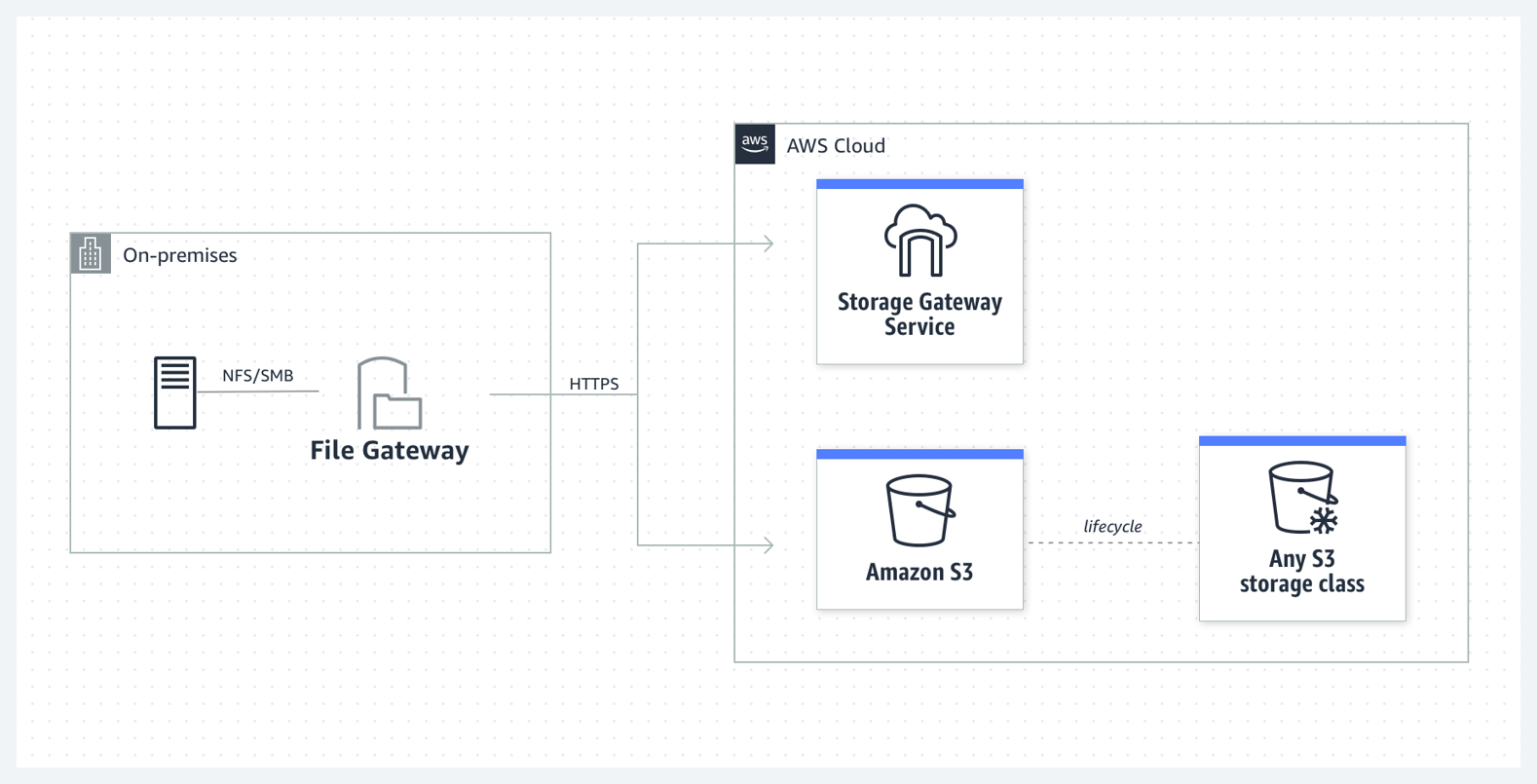
If you have an existing custom on-premises file storage system, you can use AWS Storage Gateway to connect it to cloud-based storage for unlimited storage and efficiency in a hybrid cloud solution. Combined with Amazon S3, it’s possible to share your SMB-based or NFS-based on-premises storage with low latency and efficient access to your cloud services and storage. For more information, read how to create an SMB file share with a custom configuration.
If you want to migrate an SMB or NFS server to the cloud to reduce operational overheads, take advantage of elastic scaling, or increase availability, you can do so with Amazon FSx. Amazon FSx is compatible with NetApp’s ONTAP, Windows File Server, Lustre, and OpenZFS.
For modern file sharing services, Amazon Elastic File System (EFS) is a serverless, fully elastic, fully managed NFS file storage solution. With Amazon EFS, you can mount your network file system on Amazon EC2 instances, Amazon Elastic Container Service (ECS) or Amazon Elastic Kubernetes Service (EKS) containers, AWS Lambda functions, or on-premises servers. Amazon EFS is designed for easy elastic file storage and sharing across modern AWS cloud-based and hybrid architectures.
Get started with file sharing on AWS by creating a free account today.
Browse all cloud computing concepts
Browse all cloud computing concepts content here:
Did you find what you were looking for today?
Let us know so we can improve the quality of the content on our pages