AWS for M&E Blog
Support for HLS Interstitials in AWS Elemental MediaTailor
AWS Elemental MediaTailor supports HLS Interstitials for both video-on-demand (VOD) and live workflows in AWS Elemental MediaTailor. The implementation of support for interstitials introduces server-guided ad insertion (SGAI) in MediaTailor, which complements existing server-side ad insertion (SSAI) support. HLS Interstitials offer a versatile and efficient solution for managing and integrating advertising content within HLS streams. By adopting SGAI, customers can benefit from improved video start times (VST), optimized ad render rates, seamless ad insertion, and reduced manifest delivery latencies. To understand more about the benefits of HLS Interstitials and SGAI, read this AWS for M&E blog post detailing how you can increase monetization while lowering total cost of ownership (TCO) with server-guided ad insertion.
Understanding HLS Interstitials
In 2021, Apple introduced HLS (HTTP Live Streaming) Interstitials, aimed at streamlining the management of advertisements and other ancillary content within HLS streams. HLS Interstitials offer a straightforward method to schedule ads seamlessly into content streams. Interstitials themselves are self-contained media assets, which eliminates the need for complex manipulation of manifests and simplifies the ad scheduling process by referencing the respective ad playlist from the primary content. HLS Interstitials empower content providers to reduce VST, optimize ad inventory, and enhance ad delivery during playback by employing late binding and using a distinct player instance for interstitials play out.
The following figures visualize the differences between SSAI stitched ads vs SGAI interstitials.


HLS Interstitials in AWS MediaTailor
The following figure shows the process when VOD HLS Interstitials are used in MediaTailor. It’s important to note that there is no interaction with the ad decision server (ADS) until the client encounters an HLS Interstitial EXT-X-DATERANGE tag and requests the ASSET-LIST URI from MediaTailor. This facilitates some of the benefits that are outlined in the next section.

Why AWS MediaTailor for HLS Interstitials
- Seamless Viewing Experience – AWS Elemental MediaTailor offers the capability to dynamically condition ad assets to match the ABR ladder of content streams. This allows content providers to enhance the viewing experience by providing a seamless transition between ads and content streams.
- Improved Cacheability of Variant Manifests – AWS Elemental MediaTailor employs the
#EXT-X-DEFINEtag, which allows for variable substitutions, resulting in a common manifest that is highly cacheable and can be used to serve multiple MediaTailor sessions. - Reduce Video Start Time for VOD Sessions – Significantly shorten the time-to-first-frame (TTFF) for viewers. MediaTailor will only make requests to the ADS for ads when the client play head nears the
EXT-X-DATERANGEtag and requests theASSET-LISTfrom MediaTailor. In turn, this can facilitate reduced load on the ADS and improved render rates if viewers drop from the stream prior to the end of the play-out. - Flexibility and Session State – Currently, device support for HLS Interstitials is not widespread and some devices may never be fully compatible, so MediaTailor supports a hybrid ad insertion mode that allows customers to designate SSAI or SGAI, on a per session basis.
- Observability – AWS MediaTailor integrates with AWS CloudWatch by offering a suite of CloudWatch Metrics and CloudWatch logs, enabling effective monitoring of MediaTailor resources.
- Scalability and Reliability – AWS Elemental MediaTailor has been proven to support millions of concurrent viewer sessions, providing a robust and reliable service to support ad insertion for high viewership events.
- Flexible ADS Transactions – AWS Elemental MediaTailor will perform scheduling of interstitials based on supported SCTE markers, as well as parsing of SCTE35 parameters to provide signaling for the ADS.
- Low-Latency HLS (LL-HLS) Support for Live Streams – MediaTailor natively supports LL-HLS tags including
#EXT -X-SERVER-CONTROL, #EXT -X-PRELOAD-HINT, #EXT -X-RENDITION-REPORT, #EXT -X-PART,and#EXT -X-PART-INF. During main content playback, MediaTailor maintains partial segments to preserve low-latency delivery. During ad breaks, MediaTailor inserts full segments to ensure reliable ad playback, then resumes partial segments when content returns. - Pre-roll Support for Live – MediaTailor supports pre-roll ad insertion for live HLS Interstitials sessions. You can configure a separate ad decision server (ADS) for pre-roll ads. This gives you flexibility to monetize the initial viewer join independently from mid-roll breaks.
- Server-Side Beaconing – MediaTailor supports server-side ad tracking for HLS Interstitials sessions, firing beacons for impression, start, first quartile, midpoint, third quartile, and completion events. Server-side beaconing includes deduplication and adaptive throttling to ensure accurate measurement.
- Ad Prefetching – MediaTailor supports ad prefetching for HLS Interstitials sessions, enabling you to pre-fetch ad decisions from the ADS ahead of ad breaks. This reduces ADS load during ad breaks and improves ad fill rates for high-concurrency live events. You can use existing prefetch schedules, including recurring prefetch, with SGAI sessions by enabling guided prefetch mode during session initialization.
How to get started with HLS Interstitials on AWS Elemental MediaTailor
AWS Elemental MediaTailor playback configurations must be configured to allow SGAI sessions before players can initialize HLS Interstitials-enabled sessions. Prior to enabling SGAI on your MediaTailor playback configurations, make sure that your clients support the playback of HLS Interstitials. The following methods demonstrate how to enable SGAI-mode on a MediaTailor playback configuration.
API
Use the new field "InsertionMode": "PLAYER_SELECT" in the PutPlaybackConfiguration API to enable the ability for players to initialize MediaTailor sessions with either GUIDED (SGAI – HLS Interstitials) or STITCHED (SSAI) mode. The default for InsertionMode is STITCHED_ONLY, which does not allow players to initialize MediaTailor sessions with HLS Interstitials. To understand more about the PutPlaybackConfiguration request syntax, see the public docs here.
Console
Customers may also use the AWS Console to enable HLS Interstitials on a MediaTailor playback configuration. A new field called “Ad Insertion Mode” now exists with the following values:
- “Stitched only” – This is the default selection. This value only enables SSAI mode on the playback configuration.
- “Player select” – Select this option to allow HLS Interstitials sessions on the playback configuration.

Session state
Once a MediaTailor playback configuration is enabled with SGAI, the HLS Interstitials feature can be enabled during session initialization on a per-session basis. The process to enable the feature differs from creating sessions using the HLS/DASH playback prefix (implicit session initialization), versus the session initialization prefix (explicit session initialization).
How to enable HLS Interstitials for the session using HLS playback prefixes
From the player, initialize a new MediaTailor playback session using the following query string:
On the player, construct a JSON message body for the session initialization request to MediaTailor:
- Inside an adsParams object, provide any parameters that MediaTailor should pass to the ADS. These parameters correspond to [player_params.param] settings in the ADS template URL of the MediaTailor configuration.
- To enable HLS Interstitials, add the insertionMode key at the top level of the session initialization body and set the value to GUIDED, as seen in the following example. The default InsertionMode value is STITCHED.
- To understand more about client-side session initialization, see the public docs here.
VOD Multi-variant manifest
For SGAI-enabled sessions, MediaTailor includes the unique, encoded player session data as a #EXT-X-DEFINE: value in the multi-variant manifest, which will dynamically replace the #EXT-X-DEFINE:IMPORT variable in the variant playlists, when requesting the ASSET-LISTs.
Example VOD origin multi-variant manifest
Example personalized VOD multi-variant manifest:
VOD Variant manifest
For SGAI-enabled sessions, there are no changes required to how ad breaks are signaled in the template manifest. MediaTailor will insert EXT-X-DATERANGE tags at the ad break markers. For VOD workflows, MediaTailor also includes a PROGRAM-DATE-TIME (PDT) tag on the first media sequence segment in the manifest. The interstitials have EXT-X-DATERANGE START-DATE values relative to this PDT, based on the ad break position in the timeline.
Example origin variant manifest using CUE-OUT in a VOD workflow:
Example MediaTailor output variant manifest using CUE-OUT in a VOD workflow:
To maximize the efficiency of using HLS Interstitials, MediaTailor combines the use of interstitials signaling with the #EXT-X-DEFINE tag, a feature introduced by Apple HLS to support variable substitution. This gives MediaTailor the ability to deliver the same child playlist to all sessions that are HLS Interstitials-enabled. The EXT-X-DEFINE variable in the multi-variant playlists directs each MediaTailor session client to fetch personalized ad asset lists. Using this variable, MediaTailor is capable of generating common variant manifests and manifest URIs across various MediaTailor sessions. As a result, these variant manifests are highly cacheable and smaller in size, when compared to fully stitched manifests, which allows for lower manifest request latency when delivered by a content delivery network (CDN). Beyond that, MediaTailor makes use of the X-RESUME-OFFSET tag, which players can leverage to ensure frame-accurate transitions between ads and content.
Live HLS Interstitials Manifest Examples
MediaTailor supports HLS Interstitials for live streaming workflows, extending SGAI capabilities to both VOD and live use cases. In live workflows, the manifest is a sliding window that updates as new content segments become available. MediaTailor inserts #EXT-X-DATERANGE tags dynamically as ad break markers (SCTE-35 signals) appear in the live stream.
Example Live Origin Manifest:
Example MediaTailor Output Live Variant Manifest:
Example MediaTailor Output Live Multi-Variant Manifest:
ASSET-LIST
The ASSET-LIST attribute carries the URI to a JSON file that contains a list of ad asset URIs and their duration for a particular ad break. The ASSET-LIST response contains client tracking information, including beacon URIs and beacon timing for each ad. Upon the ASSET-LIST request from the client, MediaTailor will request ads from the ad decision server to fill the break and personalize the ASSET-LIST response. If the ad decision server responds with a VAST XML, MediaTailor will fill that particular break with all of the ads in the VAST response. If the ADS responds with a VMAP XML containing ads for all of the breaks in the template manifest, MediaTailor will pre-schedule all of the ads for each break specified in the VMAP response.
Example ASSET-LIST call to MediaTailor
The following example is a template of how the asset-list URI is constructed:
The availData parameter includes information about the particular ad break based on timing and SCTE-35 data in the origin manifest. It is unique to a particular break but shared among all player sessions. The sessionData parameter includes information about the individual player sessions. The sessionData query parameter should be dynamically replaced with the sessionData value that exists in the session’s multi-variant playlist. For example:
Example ASSET-LIST JSON response
Server-Side Beaconing for HLS Interstitials
With HLS Interstitials, MediaTailor handles ad tracking and measurement on behalf of the client through server-side beaconing. This benefits devices with limited beacon-firing capabilities, privacy-sensitive environments, and workflows where you need consistent tracking regardless of client behavior.
How Server-Side Beaconing Works
When you enable server-side beaconing, MediaTailor proxies ad segment requests through a /v1/segment path. As the client requests each ad segment, MediaTailor issues a 301 redirect to the actual ad segment URI while firing the appropriate tracking beacons based on playback progression. MediaTailor accurately tracks ad consumption without relying on the client to fire beacons.
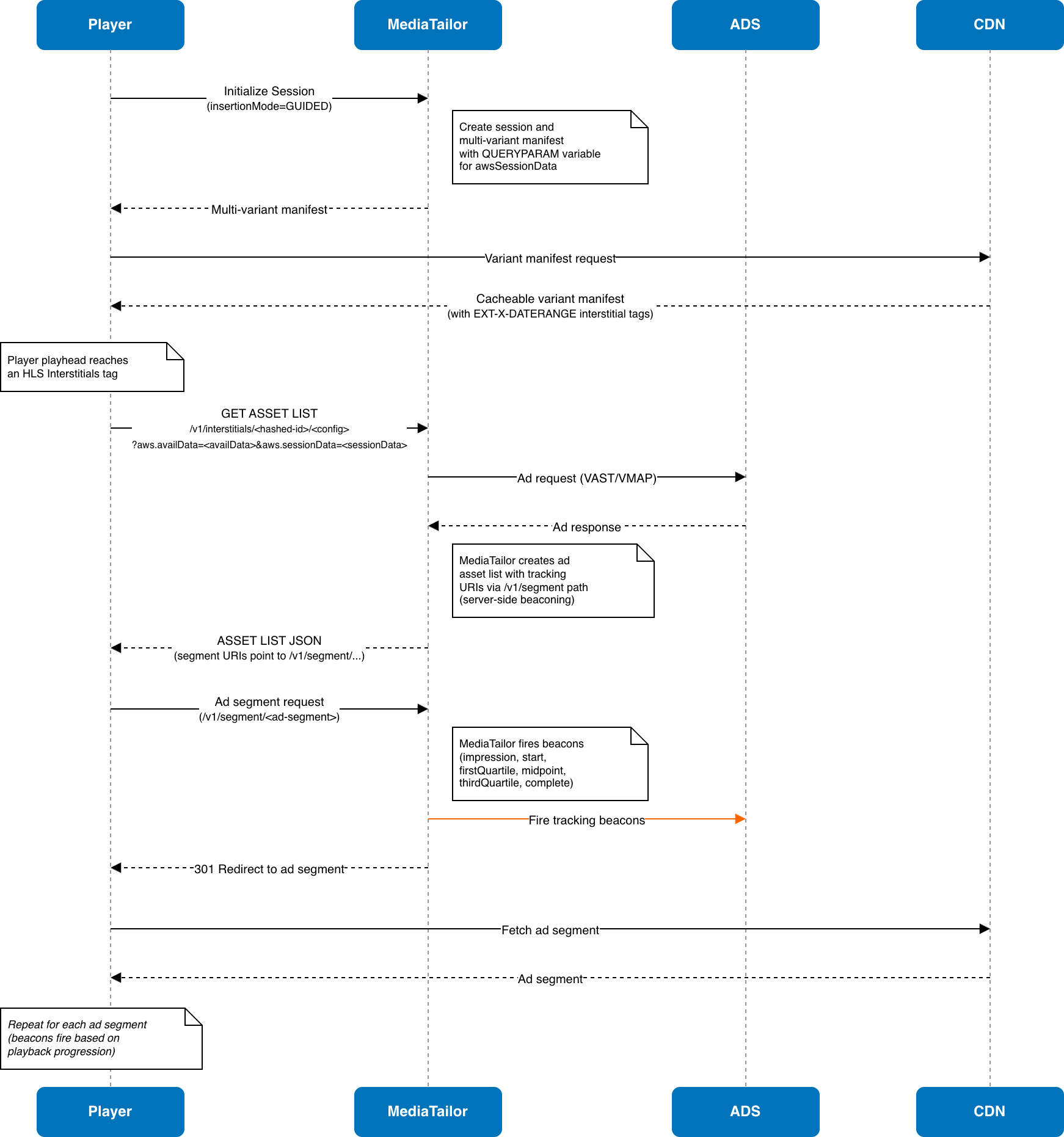
Server-side beaconing includes beacon deduplication to prevent duplicate tracking events and adaptive throttling to manage beacon volume during high-concurrency events.
Beaconing Events:
| Event | When Fired |
| impression | When the first segment of an ad is requested |
| start | At the beginning of ad playback |
| firstQuartile | At 25% of ad duration |
| midpoint | At 50% of ad duration |
| thirdQuartile | At 75% of ad duration |
| complete | At 100% of ad duration |
QUERYPARAM Import Requirement
For HLS Interstitials sessions, MediaTailor uses the #EXT-X-DEFINE:QUERYPARAM mechanism (HLS version 11+) to pass session-specific data from the multi-variant manifest into variant playlists and asset list URIs. This replaces the #EXT-X-DEFINE:IMPORT approach used in earlier HLS versions.
With QUERYPARAM, the player automatically extracts query parameters from the multi-variant manifest URI and substitutes them into the variant playlist URIs. This enables MediaTailor to deliver common, cacheable variant manifests while still routing each session to personalized asset lists.
Requirements:
- The player must support HLS version 11 or later for server-side beaconing with
QUERYPARAM. - MediaTailor supports client-side beaconing with HLS version 8+.
- MediaTailor does not support wildcard parameter forwarding. You must explicitly map each ADS parameter using [
player_params.PARAM_NAME] in the ADS URL template. - Use the
ads.prefix for parameters intended for the ADS. - Manifest query parameters are limited to 2,000 characters total.
Pre-roll for Live HLS Interstitials
MediaTailor supports pre-roll ad insertion for live HLS Interstitials sessions. Pre-roll ads play when a viewer first joins a live stream, monetizing the initial tune-in before the viewer reaches the live content.
How Pre-roll Works in Live
When a player initializes a live HLS Interstitials session, MediaTailor includes a pre-roll EXT-X-DATERANGE tag in the manifest. The CUE attribute is set to PRE,ONCE, indicating this is a pre-roll that plays once per session. The START-DATE is set to 1970-01-01T00:00:00.000Z (Unix epoch), signaling to the player that this interstitial plays before any content.
Example pre-roll DATERANGE tag in a live manifest:
Separate ADS for Pre-roll
You can configure a dedicated ad decision server URL for pre-roll ads, separate from the ADS used for mid-roll breaks. Use different ad sources, targeting strategies, or fill rates for the initial viewer experience versus in-stream ad breaks.
Ad Prefetching for HLS Interstitials
MediaTailor supports ad prefetching for HLS Interstitials sessions, reducing ad decision latency and improving fill rates during high-concurrency live events. In traditional SSAI, MediaTailor uses periodic manifest requests to trigger prefetch retrieval from the ADS ahead of ad breaks. With SGAI, variant manifests are CDN-cached and MediaTailor does not see per-session manifest requests.
Note: When prefetch is enabled for SGAI sessions, variant manifests are not CDN-cacheable because MediaTailor requires per-session manifest requests to coordinate prefetch scheduling. As the HLS Interstitials specification evolves and the player ecosystem matures, MediaTailor will introduce additional prefetch modes that preserve manifest cacheability.
To enable prefetch for HLS Interstitials, create a prefetch schedule on your playback configuration and include the guidedPrefetchMode parameter during session initialization:
Or via explicit session initialization:
Conclusion
The support for HLS Interstitials in AWS Elemental MediaTailor is a response to the evolving needs of the streaming media industry, providing you with more tools to enhance content delivery and monetization strategies. Customers can leverage the AWS Elemental MediaTailor support for HLS Interstitials to provide an improved viewer experience. Video players can take advantage of HLS Interstitials to provide seamless ad transitions with frame accuracy, lower video startup times, and improved render rates. With identical manifests for all end-user sessions, CDN providers have the ability to cache and deliver manifests at the edge to achieve lower latencies. ADS requests also benefit from lower latencies, as players only request ads when reaching an HLS Interstitials tag. With live stream support, server-side beaconing, pre-roll ads, ad prefetch, and LL-HLS compatibility, MediaTailor provides a robust SGAI solution across VOD and live workflows.
Now available
HLS Interstitials for VOD and live workflows is supported in all the regions where AWS Elemental MediaTailor is available. For the original feature announcements, see the AWS What’s New posts for VOD streams and live streams. HLS Interstitials for VOD workflows is supported in all the regions where AWS Elemental MediaTailor is available. Check the full region list for future updates. With pay-as-you-go pricing, you only pay for the number of interstitials scheduled by MediaTailor. To learn more, see the MediaTailor pricing page in the AWS documentation.