AWS Partner Network (APN) Blog
Detect secrets before they ship with the GitGuardian power for Amazon Kiro
By: Henri Hubert, Senior Engineering Manager – GitGuardian
By: Len Gomes, Partner Solutions Architect – AWS
By: Akram Al Sheikh, Security Partner Solutions Architect – AWS

AI-powered coding agents can generate hundreds of lines of code in seconds, and with that speed comes a new category of risk. When an agent scaffolds a microservice, provisions infrastructure, or wires up a third-party API, it might embed a database connection string or an access token directly in the source code. The code compiles, the pull request merges, and the secret is live before a human reviewer notices.
According to the GitGuardian State of Secrets Sprawl 2026 report, 28.6 million secrets were exposed on public GitHub in 2025, a 34 percent increase year over year. As agentic development accelerates, the detection of hardcoded credentials has to move from after-the-fact scanning into the development workflow itself, catching secrets at the moment they are created.
In this post, we explain how powers in Amazon Kiro bring partner expertise into the agent when it’s needed, show what the GitGuardian Kiro power does, and share how AWS Secrets Manager completes the remediation loop.
Why secrets detection belongs inside the agentic workflow
Traditional secrets scanners run in continuous integration and continuous delivery (CI/CD) pipelines or as periodic repository audits. By the time a scanner flags a credential, copies of it might already exist in a container image, a log file, or a downstream repository. Agents write and commit changes faster than people do, so security checks need to happen at the moment code is written.
Checking code where it is written reduces that risk. With the GitGuardian Kiro power installed, the agent can scan new code for secrets when it’s committed. Git hooks can also check each commit before it’s created and each push before it leaves your machine. A secret caught at this stage can be removed before it reaches a build artifact or a shared repository.
How Kiro powers move security to the point of creation
The question we hear often from our customers is how to put security in the agent loop without slowing the agent down. In our experience working with customers and partners, teams respond by moving security checks into a post-build pipeline, which means secrets aren’t caught until after the code is written. Kiro powers close that gap. A power stays out of the agent’s context until the conversation calls for it, then loads its tools and expertise on demand. An independent software vendor such as GitGuardian can package its detection expertise once, maintain it in one place, and have it activated when the work turns to credentials.
What the GitGuardian Kiro power does
After you install the GitGuardian Kiro power, the Kiro agent can scan your code and guide remediation without you leaving the editor. The power runs scans with ggshield, the open source command line interface (CLI) from GitGuardian, and connects to the GitGuardian Model Context Protocol (MCP) server to work with incidents in your GitGuardian workspace. The power provides three core capabilities:
- Secrets detection across multiple surfaces: You can ask the agent to scan files in your workspace, a repository’s complete commit history (including secrets that later commits removed), staged changes before a commit, and Docker images or PyPI packages. GitGuardian reports that its detection engine recognizes more than 700 secret types with a false-positive rate below 1 percent.
- Guided remediation: When the power finds a hardcoded credential, the agent guides the fix for that type of secret. It removes the value from the code, points the code to an environment variable or to a stored secret instead, and recommends AWS Secrets Manager as the home for the replacement credential. The power doesn’t revoke or rotate credentials for you. That step stays under your control, and we explain how we recommend handling it later in this post.
- Honeytokens for early warning: The power can also generate honeytokens: decoy AWS credentials that look real but give no access to AWS resources. You place them where legitimate users have no reason to use them, such as example configuration files, internal documentation, or runbooks. If anyone tries to use a honeytoken, GitGuardian sends an alert with details about the attempt, which gives your security team an early signal of unauthorized activity.
How Secrets Manager completes the remediation loop
Finding a secret is the first half of remediation. An exposed credential stays usable until someone revokes it, issues a replacement, and keeps that replacement out of the code. The Verizon 2025 Data Breach Investigations Report found that leaked secrets discovered in GitHub repositories took a median of 94 days to remediate. A secret caught before it’s committed leaves no copy in Git history to clean up, and the fix becomes a code change instead of an incident.
AWS Secrets Manager is where we recommend storing the replacement credential. In our view, three things make an exposed credential dangerous: it’s stored in plaintext, anyone who can read the code can use it, and rotating it means changing the code. Secrets Manager turns all three into managed controls, so the fix holds without another code change. Every secret is encrypted with an AWS Key Management Service (AWS KMS) key, only the AWS Identity and Access Management (IAM) principals that you permit can retrieve it, and AWS CloudTrail records each retrieval. Applications read the current value at runtime, so the secret can rotate without a deployment, and no developer has to handle the new credential.
Rotation then becomes routine work on a schedule that you set. Amazon Relational Database Service (Amazon RDS) and Amazon Aurora can manage rotation of their administrative database credentials for you, and an AWS Lambda rotation function can rotate other types of secrets.
One case needs different handling. If the exposed credential is an AWS access key, we don’t recommend storing it in Secrets Manager. Deactivate the key, review CloudTrail for activity that used it, and replace it with temporary credentials from an IAM role, so there’s no long-term key left to expose. For more information, see Secure access keys in the IAM User Guide.
Illustrative scenarios
The following scenarios show how the GitGuardian Kiro power fits into common development workflows. They’re illustrative and aren’t based on a specific customer deployment.
- Catching a secret in agent-generated code: A developer asks the Kiro agent to scaffold a new REST API, and the generated code includes a database connection string with an embedded password. The GitGuardian Kiro power flags it during the pre-commit check, and the agent replaces the value with a reference to a secret in Secrets Manager before the code reaches the repository.
- Auditing an inherited repository: A team takes over a project with years of commit history. A full-history scan finds three API tokens that were removed from the code but remain in Git history. The team confirms which tokens are still valid, revokes and replaces them, and records the findings for its next compliance review.
- Early warning with honeytokens: An operations team places a honeytoken in an internal runbook. Weeks later, GitGuardian sends an alert because an unknown system tried to use the decoy key. The security team traces the attempt to a CI/CD pipeline that had unintended access to the runbook, and removes that access before a real credential is involved.
Getting started
Install the GitGuardian Kiro power in one click from the Amazon Kiro Powers panel. The power appears in the panel as ggshield by GitGuardian, as shown in Figure 1. During setup, you authenticate with a GitGuardian account, and the Kiro agent handles the remaining configuration. For details, see the GitGuardian Kiro power documentation.
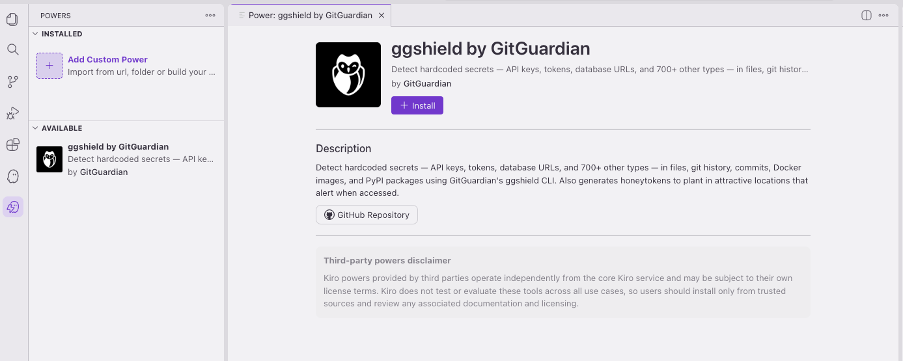 Figure 1 – The GitGuardian Kiro power in the Amazon Kiro Powers panel, ready to install in one click.
Conclusion
In this post, we explained how the GitGuardian Kiro power brings secrets detection, remediation guidance, and honeytoken-based intrusion detection into the Kiro agentic development environment. As AI coding agents generate more of your code base, catching hardcoded credentials at the point of creation, rather than after they’ve reached a repository, reduces your exposure window and simplifies your compliance posture.
Combined with AWS Secrets Manager for credential rotation and management, this integration gives development teams a practical path to securing agentic workflows from code to production.
Learn more about GitGuardian or explore the GitGuardian Platform in AWS Marketplace.

GitGuardian – AWS Partner Spotlight
GitGuardian is an AWS Partner specializing in non-human identity security and secrets management, providing end-to-end solutions from secrets detection in code to remediation, observability, and proactive prevention of leaks.