AWS Architecture Blog
Streamlining access to powerful disaster recovery capabilities of AWS
Learn how you can use AWS services like AWS Backup and AWS Elastic Disaster Recovery (AWS DRS), along with AWS Resilience Competency Partner solutions like Arpio to implement powerful and comprehensive Disaster Recovery solutions.
Resilience is the ability of your application to keep running even when “bad stuff” happens. A critical part of your resilience strategy is Disaster Recovery (DR). DR is what protects you against less frequent, but bigger faults like natural disasters, technical faults, and bad actors. To maintain critical business continuity, disaster recovery requires recovering your workload to a new site, such as a different AWS Region or AWS account.
AWS provides powerful tools for all aspects of resilience. However, achieving a comprehensive Disaster Recovery solution for your cloud workloads using native AWS services requires planning and engineering effort. This is because, as the Shared Responsibility Model for Resiliency states, resilience is a shared responsibility between AWS and the customer. This blog post will help you understand your responsibilities and show you how to reduce the work required to access the powerful DR capabilities of AWS.
In this blog post, we take a building blocks approach. Starting with the tools like AWS Backup to protect your data, we then add protection for Amazon Elastic Compute Cloud (Amazon EC2) compute using AWS Elastic Disaster Recovery (AWS DRS). Finally, we show how to use the full capabilities of AWS to restore your entire workload—data, infrastructure, networking, and configuration, using Arpio disaster recovery automation.
Your recovery site
For DR, your recovery site is usually going to be a different AWS Region (cross-Region) or a different AWS account (cross-account) than where your workload runs.
Cross-Region backup and recovery are essential for disaster recovery. This helps to keep your workloads protected if an event causes your source Region to be unable to run your workload. AWS Regions are strong fault isolation boundaries, so the event in your source is highly unlikely to affect your recovery Region.
Cross-account backup is a critical security measure to enable recovery from malware and ransomware. By storing copies of your data in a separate clean room recovery account with distinct credentials, you create an isolated environment that can’t be accessed, even if the source account is compromised.
Protecting your data
We start with your data—your data is the foundation of your workload.
Each AWS data storage resource offers the ability to back up or replicate your data. For example, Amazon Elastic Block Store (Amazon EBS) snapshots, Amazon Relational Database Service (Amazon RDS) for Db2) Backups, and Amazon Simple Storage Service (Amazon S3) replication, offer data protection for Amazon EBS volumes, Amazon RDS Databases instances, and Amazon S3 Buckets respectively. Figure 1, for example, illustrates the several methods and destinations of backup and replication for Amazon RDS.
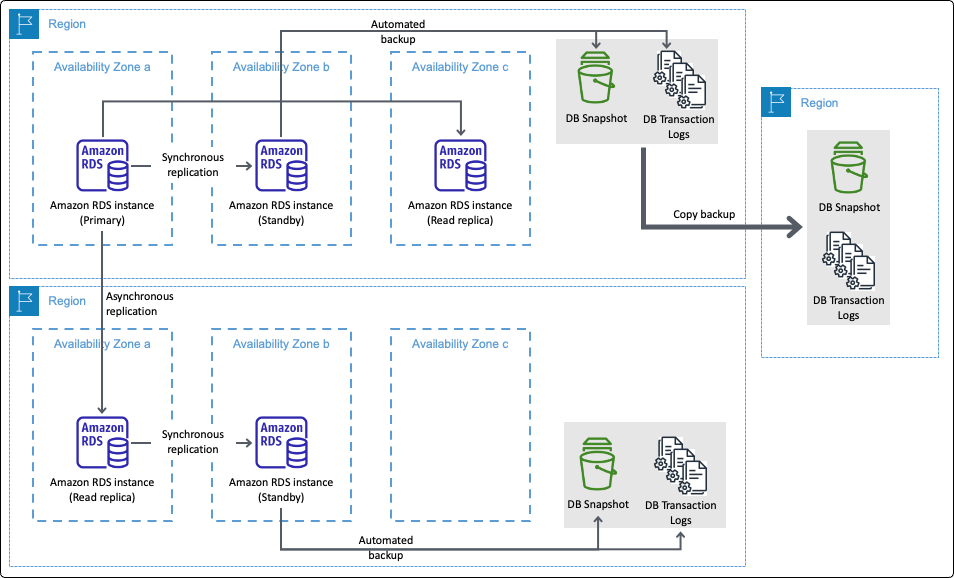
Figure 1. AWS Backup and replication for Amazon RDS
AWS Backup takes this further, tying together many of these disparate backup technologies, giving a single plane of glass to configure data backup plans across resources. AWS Backup also added backup capabilities for AWS resources that previously didn’t have them such as Amazon Elastic File System (Amazon EFS) and Amazon FSx. It also provides the ability to back up your data to a different AWS Region or AWS account. It even enabled cross-Region backup for services like Amazon DynamoDB, which previously didn’t have that capability.
AWS Backup is a powerful tool for protecting your data. With your data protected, you will then need additional automation to get to a fully recovered workload. If you want to build this yourself, AWS offers the tools to do this. In this prior blog post on Backup and Restore, we go more into detail about adding automation using Amazon EventBridge and AWS Lambda functions for automated recovery. For more information, see figures 6 and 7.
With its ability to create vaults for secure storage, define policies for governance, and set schedules for automation, AWS Backup centralizes and streamlines the backup process. Instead of managing backups service by service, you can enforce consistent protection across resources, reduce manual effort, and streamline recovery when it matters most.
Protecting your Amazon EC2 compute
As important as data is, only restoring your data isn’t a complete solution to recovering from disaster. You must also restore your compute resources.
For static Amazon EC2 instances, you can create snapshots of your instances as Amazon Machine Images (AMIs), or use AWS Backup to manage this for you. By static instances, we mean those you create directly and maintain, as opposed to those created by Amazon EC2 Auto Scaling. Such a strategy can deliver a Recovery Points Objective (RPO) and Recovery Time Objective (RTO) of minutes to hours. The size (and growth in size) of your EC2 instances determines the time to back them up. Their size and launch time determines the time to restore them.
If you need real-time RPO (near-zero data loss) and RTO (recovery) in minutes or less, then AWS DRS is the solution here. AWS DRS provides a nearly continuous block-level replication, recovery orchestration, and automated server conversion capabilities. With these, you to achieve a crash-consistent recovery point objective of seconds, and a recovery time objective typically ranging between 5–20 minutes. You can also use AWS DRS to configure your recovery Amazon Virtual Private Cloud (Amazon VPC). So, with the right settings, you can get your EC2 networking to look like your primary environment.
Protecting everything in your entire workload
Restoring data and static EC2 instances is only part of the disaster recovery solution that you need. Modern workloads often rely on a broader range of compute services, including EC2 Auto Scaling, AWS Lambda, Amazon ECS, and Amazon Elastic Kubernetes Service (Amazon EKS). For ECS and EKS, you can run on EC2 instances or go serverless with AWS Fargate. You will need a solution that can restore either of these.
The challenge with these services is making sure that they are recreated with the right configuration and metadata. For example, EC2 instance types and volume sizes, EC2 user data, or AWS Lambda function code, and not everything here is stateless. Both ECS and EKS can rely on persistent Amazon EBS volumes or Amazon Elastic File System (Amazon EFS). In those cases, recovery requires restoring the data and reattaching volumes restored from backup to the correct ECS tasks or EKS pods.
You can build automation to do all of this, or you can rely on an AWS Resilience Software Competency Partner solution to take care of this for you. Arpio is a software as a service (SaaS) product focused on discovering and backing up everything it takes to run your workload on AWS, and recovering it cross-Region and cross-account as a fully functional workload.
Figure 2 illustrates how AWS tools (left) establish a powerful foundation for robust workload recovery. Beyond these foundational building blocks, full recovery requires additional resources (right), including AWS compute options as discussed. Furthermore, complex networking (potentially spanning VPCs and accounts), infrastructure, and IAM principals are critical. Arpio uses and extends AWS Backup, AWS DRS, and other AWS service capabilities to back up and restore a functional AWS workload, including all its necessary components. This unburdens you from the undifferentiated heavy lifting of building your own automation. You still have responsibilities in the shared responsibility model, but Arpio takes on most of the work of getting you backed up and recovered.
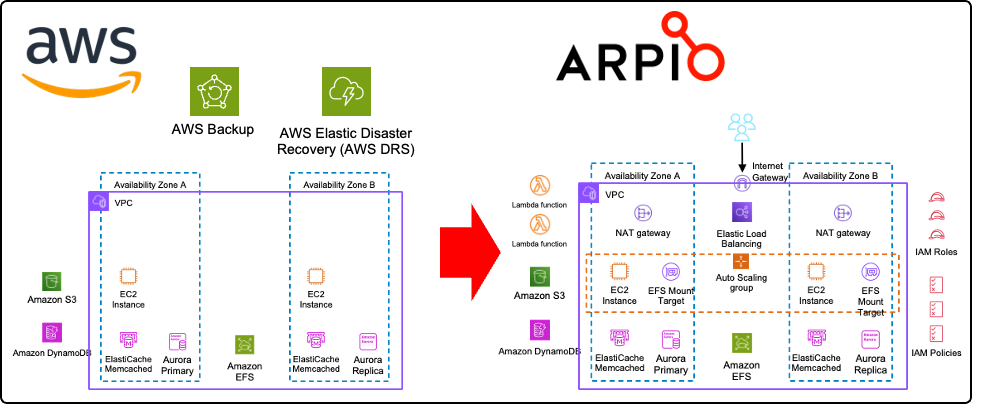
Figure 2. AWS tools on the left provide a powerful foundation for full recovery on the right
Even with data, compute, networking, infrastructure, and IAM principals restored, there is another requirement to achieve full recovery: translation of your configuration. For example, an application that accesses the Amazon RDS database requires configuration information about the DB endpoint and credentials. When restoring your RDS instance into your recovery environment, it will have a new endpoint. Arpio addresses this using a two-fold strategy. First Arpio will find all references to the early database endpoint name and translate them to the new database endpoint name. Next, Arpio will also create an Amazon Route 53 private hosted zone in the recovered VPC, mapping the early endpoint to the new one using a CNAME record. This way, applications still using the early name still connect to the newly recovered database. Arpio also securely backs up the credentials in your recovery account, for every database backup taken, ready to be recovered for the point in time that you recover your database from. Figure 3 shows how your recovered application can seamlessly access your restored database.
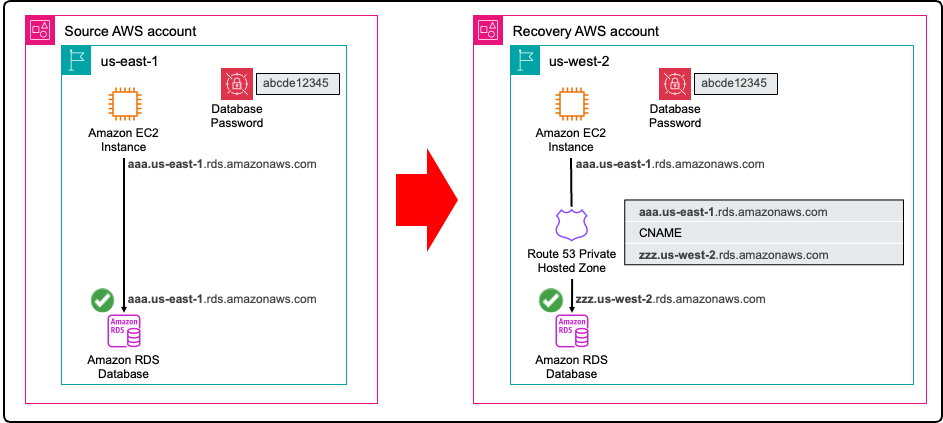
Figure 3. Arpio automation ensures your applications can access your restored database in the recovery environment
Figure 4 shows a sample AWS workload protected by Arpio. In the standby state, you can see how Arpio is coordinating multiple AWS services. When a disaster or ransomware event occurs, you can launch a recovery. This will create a fully recovered workload as seen in the recovery stage on the right.
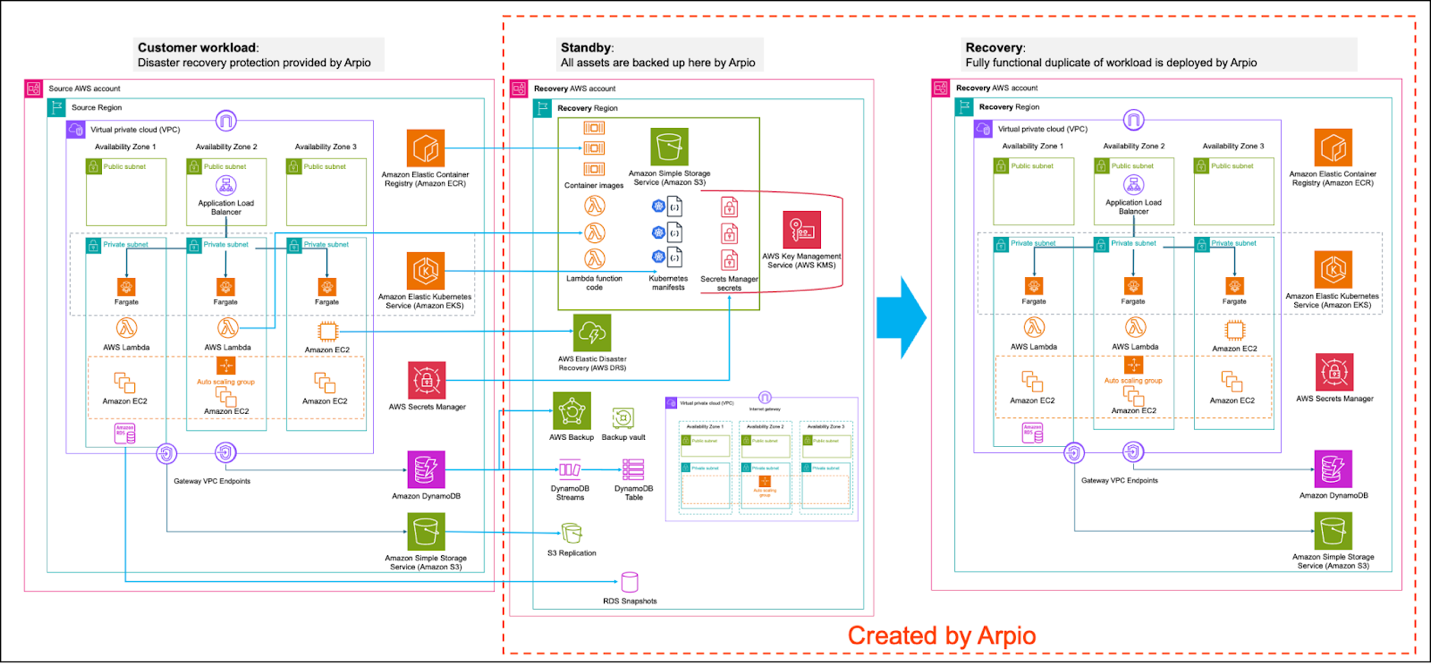
Figure 4. Sample AWS workload protected by Arpio
Arpio does all of this in your accounts, on your behalf. To enable this, Arpio applies AWS Well-Architected Tool (AWS WA Tool) best practices for security, using only IAM roles with least-privilege permissions. For example, the IAM role used to access your source AWS account is incapable of changing or mutating your source workload and is explicitly denied from reading or exfiltrating any data.
With its ability to back up over 140 AWS resources and restore them as fully functioning AWS workloads in a cross-Region cross-account recovery environment, Arpio builds on top of the powerful AWS tooling to streamline your complete workload recovery.
Conclusion
Disaster recovery (DR) is essential for a robust resilience strategy. By using the powerful tools offered by AWS and complementing them with AWS Resilience Competency Partner solutions like Arpio, organizations can significantly streamline access to comprehensive and powerful disaster recovery capabilities for their AWS workloads.