AWS Compute Blog
Handling large volume of transactions with AWS Lambda Managed Instances
Pre-scheduled events like concert ticket on-sales and product launches can drive a load spike 100 times higher than the baseline. The spike persists for a few hours while the inventory clears, then traffic returns to normal. If you miss the first minute of the on-sales, customers experience errors while competitors keep selling, and the event’s reputation takes a hit. Over-provision for the burst, and you pay for peak capacity 24 hours a day, 365 days a year. The actual peak lasts 10 minutes and happens 10 times a year.
In this post, you will see how AWS Lambda Managed Instances, a capability of AWS Lambda, handles predictable traffic bursts. It keeps compute capacity warm before the on-sales event opens and scales it back down afterward. You will see a reference ticketing implementation that sustains 40,000 transactions per second (TPS) for 120 seconds.
Understanding Lambda Managed Instances
Lambda Managed Instances runs your Lambda functions on Amazon Elastic Compute Cloud (EC2) instances in your account, including Graviton4 and memory-optimized instance types. AWS handles the underlying infrastructure lifecycle (provisioning, scaling, patching, and routing), while you benefit from EC2 pricing including Compute Savings Plans and Reserved Instances.
Lambda Managed Instances provides several benefits. With pre-provisioned execution environments (EE), capacity is already warm before traffic arrives, so there are no cold starts when a burst hits. Scaling bounds are configurable with MinExecutionEnvironments and MaxExecutionEnvironments for each function, and each new EE comes online in 1–2 seconds. With multi-concurrent invocations, one EE handles multiple requests at once, which improves utilization for I/O-heavy handlers. You also get EC2 pricing, so Compute Savings Plans and Reserved Instances apply instead of per-request Lambda pricing.
Lambda Managed Instances is well suited for predictable, spike-shaped workloads that need sustained compute capacity during the peak and can scale back down when traffic returns to the baseline.
Predictable burst workloads work best with Lambda Managed Instances
This post focuses on one of the key capabilities of Lambda Managed Instances: absorbing scheduled traffic bursts without provisioning for peak year-round. Some of the use cases where Lambda Managed Instances helps are ticket and event on-sales (concerts, sports, festivals), live streaming and voting events, and scheduled batch and report generation nightly or hourly jobs that consume steady compute during a defined window.
Use case: High-throughput ticket booking with Lambda Managed Instances
To demonstrate Lambda Managed Instances handling predictable traffic bursts, we built a concert ticketing backend. The solution implements the industry-standard queue-plus-hold-and-confirm booking flow, a pattern that ticketing platforms, airlines, and hotels use to prevent overselling during large traffic spikes. It separates user traffic management from the critical database transactions required to lock inventory.
The following diagram presents the detailed architecture of the solution we built.
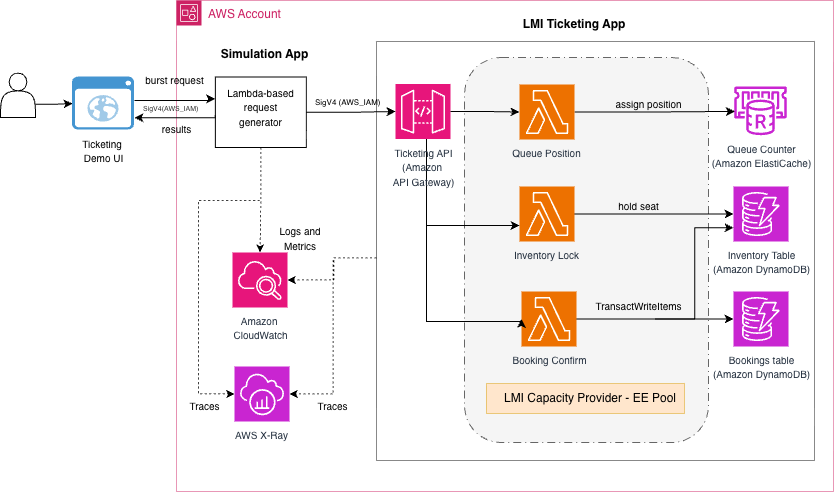
Figure 1: Architecture of the concert ticketing solution across two AWS CloudFormation stacks
The solution deploys two AWS CloudFormation stacks in a single AWS Region. In the first stack, Amazon API Gateway routes public HTTPS traffic through three ticketing handlers hosted in Lambda Managed Instances on a shared capacity provider. Amazon ElastiCache Serverless for Valkey holds the atomic queue counter. Amazon DynamoDB holds durable per-seat state across a write-sharded inventory table (500 shards) and a bookings table. WarmThroughput is pre-provisioned to absorb the burst without waiting for adaptive capacity. A separate simulation stack drives synthetic load through a three-tier Lambda fan-out, reproducing the on-sales burst shape at any target TPS.
Public traffic and load-generation traffic take completely separate code paths, so the load generator’s own scaling behavior does not affect measurements on the ticketing stack. Each successful booking traverses three Lambda handlers. Handler queue-position assigns an atomic virtual queue number using an INCR on a single ElastiCache key. Handler inventory-lock places a time-bounded hold on a specific seat through a DynamoDB conditional UpdateItem, moving it from AVAILABLE to HELD with a time to live (TTL) of 180 seconds. Handler booking-confirm executes a single TransactWriteItems call that atomically transitions the seat from HELD to CONFIRMED and writes a durable booking record. Either both writes succeed or neither does.
All three handlers are stateless, because each request they receive is treated as an independent, standalone transaction. The mutable state lives in ElastiCache and DynamoDB, stored with safety features like conditional writes and atomic operations to avoid collisions, race conditions, and overwrites. This is why the multi-concurrent EE model of Lambda Managed Instances can serve thousands of simultaneous invocations per instance safely.
What makes this solution better with Lambda Managed Instances
With Lambda Managed Instances, you keep the same Lambda programming model, one function per handler, and the same deployment story, while Lambda Managed Instances handles the fleet. Raise MinExecutionEnvironments a few minutes before an on-sales opens, let it burst inside the Min to Max range while traffic is live, and scale back down when the window closes.
Deploy the application
For the full deployment instructions, refer to the README file in the GitHub repository after you have cloned it.
Prerequisites
- AWS Command Line Interface (CLI) version 2 configured with credentials.
- AWS Serverless Application Model (SAM) CLI installed.
- Python 3.13+ with
boto3installed. - An existing Amazon Virtual Private Cloud (VPC) with at least two subnets in different Availability Zones, plus either a NAT Gateway or VPC endpoints for DynamoDB and Amazon CloudWatch Logs.
- AWS Service Quotas – the initial deployment works with an AWS account’s default service quota. Peak-load testing requires EC2 vCPU and API Gateway throttle quotas increase.
Run the application
Once deployed, all test traffic goes through the simulation API. The sample includes an optional single-page web user interface (UI) (see the demo-ui/ folder in the repository) that wraps the same endpoints and renders the per-burst results interactively.
Read the “Cost considerations” section before running a simulation to understand the cost you will incur in the process.
1. Smoke test – low TPS to verify the pipeline end-to-end:
By default, deploy.sh provisions a cost-safe baseline of three warm EEs (Min=1, Max=3 per handler). The following smoke test works on this baseline.
2. Peak-load test
To reproduce the headline result, scale the Lambda handlers to the per-handler Min and Max values before firing the peak-load test. Refer to the Peak-load testing section of the GitHub repository before firing the burst. This also requires an EC2 vCPU and an API Gateway account-throttle quotas increase above the default.
3. View results
The response includes total requests, total bookings written to DynamoDB, delivered peak TPS, and end-to-end latency percentiles.
Interactive demo UI
The sample repository ships an optional single-page web UI (in the demo-ui/ folder) that wraps the same simulation and dashboard endpoints as the preceding curl examples. Point it at your simulation API endpoint, then fire bursts and view results interactively without leaving the browser.
Configure and start the UI:
Fire a burst. Choose a target load (a preset button or a custom TPS value), set the sustain duration and ramp, then choose Start burst. The UI sends a POST request to /simulation/start and stores the returned run_id and event_id, so you can query DynamoDB directly if you want to drill deeper.
View results. After the burst completes, choose View results. The UI queries API Gateway metrics, DynamoDB, CloudWatch Logs Insights, and CloudWatch Lambda metrics in parallel to reconstruct the run: total requests received, durable bookings written, and a per-handler table showing EEs used, Lambda throttles, and p95/p99 latency.
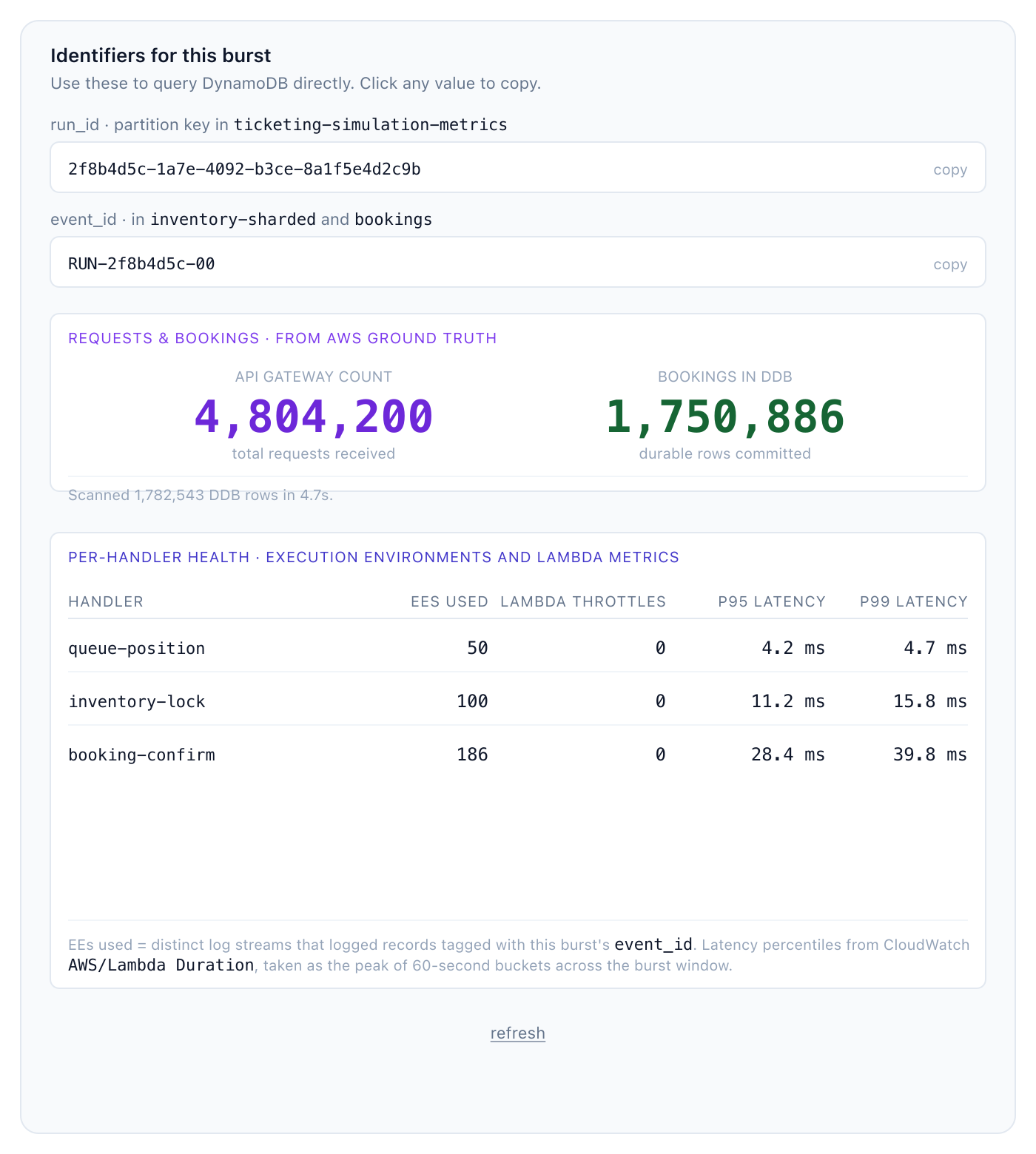
Figure 2: Demo UI results panel from a 40,000 TPS, 120-second run
The panel shows 4,804,200 API Gateway requests and 1,750,886 durable bookings, plus a per-handler table with the baseline EE pool (50/100/150 for queue-position, inventory-lock, and booking-confirm). During the burst, 36 additional EEs are pre-emptively warmed on booking-confirm, with zero Lambda throttles and p99 latencies of 4.7, 15.8, and 39.8 ms.
The identifiers panel at the top exposes the burst’s run_id (the partition key in the simulation metrics table) and event_id (used in both the inventory and bookings tables), so you can locate them directly in DynamoDB or CloudWatch Logs Insights for the specific burst you ran.
What we measured
Across a load range from 5,000 to 40,000 requests per second, the pre-warmed EE pool served every burst without cold-start impact. Key results from the headline 40,000 TPS × 120-second burst:
| Metric | Value |
| Delivered peak throughput | 40,035 req/sec |
| Total HTTP requests | 4,804,200 |
| Durable bookings written to Amazon DynamoDB | 1,750,886 |
| End-to-end p50 / p99 latency | 44 ms / 121 ms |
| AWS Lambda errors | 0 |
| AWS Lambda concurrency throttles | 0 |
| Amazon DynamoDB write throttles | 0 |
The tested range spanned 5,000 to 40,000 requests per second, an 8× spread in delivered load. Across it, p99 latency stayed within a 3 ms band. Doubling sustained throughput from 20,000 to 40,000 requests per second held at exactly 121 ms, which confirms that the pre-warmed pool had substantial headroom throughout the tested range.
Observability
Lambda Managed Instances automatically publishes metrics to CloudWatch and structured logs to CloudWatch Logs, giving you visibility into function performance and capacity utilization without additional code. During a burst, the metrics that matter most are:
- Duration percentiles per handler to confirm p99 latency stays flat as load rises.
- ConcurrencyThrottles to detect if any handler hits its
MaxExecutionEnvironmentsceiling. - Errors for handler-side failures.
- EE count (log-derived) to observe how quickly Lambda Managed Instances adds warm capacity above
Min.
The sample repository includes a demo dashboard endpoint that queries CloudWatch metrics, CloudWatch Logs Insights, and DynamoDB in parallel to reconstruct a per-burst report, API Gateway request count, durable bookings landed, distinct EEs used, and per-handler latency percentiles. Reconciling the simulation-side counts against the AWS ground truth catches load-generator artifacts and confirms the system-under-test numbers.
Cost considerations
Lambda Managed Instances uses EC2 instance pricing plus a 15% management fee. Compute Savings Plans and Reserved Instances apply to the underlying instance cost.
The Lambda Managed Instances configuration runs a small always-on baseline and uses a scaling script to pre-warm to 50/100/150 EEs in the minutes leading up to each event, then scales back down to baseline afterward.
To simulate a peak load under controlled conditions, the fleet is pre-warmed for a 7-minute window (5-minute ramp and 2-minute burst) then scaled back down. The cost breakdown can be as follows.
| Component | Volume | Rate | Cost |
| API Gateway requests | 4.8 M | $3.50 per 1 M | $16.80 |
| DynamoDB writes | 8.8 M WCU | $1.25 per 1 M | $11.00 |
| Lambda Managed Instances compute (peak window) | 75 × c7i.4xlarge × 7 min | $0.821 / instance-hr | $7.18 |
| Lambda Managed Instances request charges | 4.8 M | $0.20 per 1 M | $0.96 |
| CloudWatch Logs (~2 GB) | ingestion | $0.50 per GB | $1.00 |
| Amazon ElastiCache Serverless for Valkey | 4.8 M INCR operations |
ECPU-based | $0.30 |
| Total per burst | ~$37.00 |
The estimated cost for simulating each burst is around $37.
Best practices
Based on experience building this solution, here are key recommendations:
- Pre-warm before scheduled events. Raise
MinExecutionEnvironmentsusing an Amazon EventBridge Scheduler rule or a manual scaling script when you expect major spikes, giving Lambda Managed Instances enough time to scale the underlying instances. Restore the low baseline after the event. - Set MaxExecutionEnvironments aggressively. Lambda Managed Instances adds new EEs to your capacity provider. A high
MaxExecutionEnvironmentsvalue costs nothing while idle but absorbs unexpected demand during the burst. - Write-shard hot DynamoDB tables. For workloads writing thousands of items per second to one logical entity (a single event, a single product SKU), spread writes across a synthetic sharded partition key. This sample uses 500 shards per event.
- Use WarmThroughput on DynamoDB tables. Pre-provision physical partitions before the burst rather than waiting for adaptive capacity to expand during the first minute of the on-sales.
- Keep hot atomic counters out of DynamoDB. Single-row atomic increments in DynamoDB cap at approximately 1,000 operations per second.
- Make write endpoints idempotent. The sample uses a caller-provided
booking_idon the confirmation endpoint so that retries produce the same booking record instead of duplicates.
Clean up
When you are done exploring the solution, remove the provisioned resources to avoid ongoing charges. For the full cleanup commands and exact steps, refer to the GitHub repository README file.
Conclusion
Lambda Managed Instances brings the same Lambda programming model to workloads that need sustained, pre-provisioned compute during predictable bursts: ticket on-sales, product launches, registration windows, and other scheduled surge patterns. The concert ticketing example shows how a queue-plus-hold-and-confirm pattern built on Lambda Managed Instances can sustain 40,000 requests per second while costing less than an always-on EC2 fleet sized for the same peak.
Explore the Lambda Managed Instances documentation and try building your own predictable-burst serverless application. You can find the complete code for this example in the GitHub repository.