AWS Database Blog
Build zero-downtime write architectures for Amazon Neptune
Building high-availability applications with Amazon Neptune can require zero-downtime write architectures that maintain service continuity during maintenance windows, failover events, and scaling operations. Your graph database applications face a critical choice: reject writes and degrade user experience, or buffer writes in durable storage until Neptune is available again. In this post, we describe the write queue architecture pattern for Amazon Simple Queue Service (SQS), Amazon Kinesis Data Streams (KDS) or Amazon Managed Streaming for Apache Kafka (MSK). This architecture places a durable message queue between your application and Neptune so your application can accept graph writes continuously, even during Neptune unavailability. You will learn design considerations for the write queue architecture pattern for single-Region deployment, including idempotency, ordering, monitoring strategies, and multi-Region deployment.
What causes Neptune write unavailability?
Before building the solution, first understand when Neptune can’t accept writes:
- Static parameter group changes: Parameters like neptune_streams require a reboot of each instance.
- Scaling operations: Changing the writer’s instance type requires a restart. The best practice is to scale the read replica to the size you want and invoke a failover operation, although there are brief moments of write downtime.
- Failover events: Promoting a read replica takes up a few seconds (often ~30s).
- Engine patching and upgrades: Instances in a cluster restart simultaneously during maintenance windows.
- Regional events: Might render a single-Region deployment unavailable for the duration of the event.
Each of these events typically lasts seconds to minutes, but for a high-throughput graph application serving real-time requests, even 60 seconds of rejected writes can mean thousands of lost mutations. The write queue pattern removes this window entirely.
Write availability with queue based architecture
One effective pattern for Neptune high availability is decoupling write acceptance from write execution by placing a durable message queue between your application and Neptune. Your application continues accepting writes even when the Neptune writer is temporarily unavailable during maintenance windows, failover events, or scaling operations.
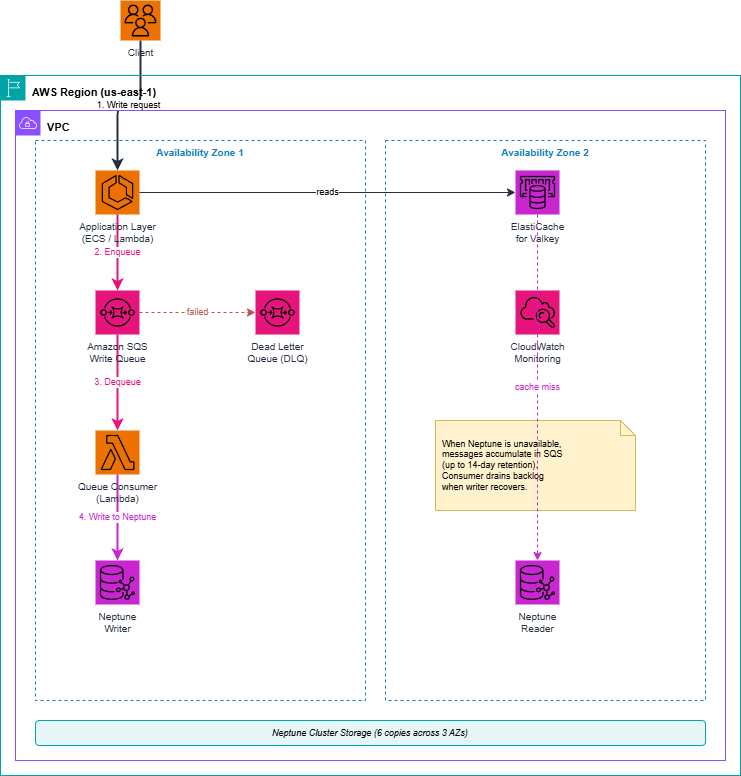
Figure 1 – Write queue architecture, single Region
How the write queue pattern works
This architecture follows a consistent pattern.
1. Application writes go to the queue, not directly to Neptune. When a client submits a write (a new vertex, edge, or property update), the application serializes the graph operation into a message. The message then goes to an SQS queue, KDS, or MSK. The application returns a success response to the client as soon as the queue durably stores the message. Note that these are also Regional resources. For availability details, see the SQS, KDS, or MSK documentation. Multi-Region write architecture is discussed later in this post.
Sample message payload format
When serializing graph mutations for the queue, use a structured JSON envelope that contains everything the consumer needs to execute the write idempotently or you can use operation-based format instead of storing raw queries. Query can be independently built by consumers:
Key fields:
- messageId: UUID for deduplication (SQS dedup ID or DynamoDB idempotency key).
- timestamp: Enqueue time used to measure replication lag.
- operation: Semantic type (upsert_vertex, upsert_edge, delete_vertex, update_property).
In this approach, the consumer maps the operation + payload to the appropriate query at execution time. This is more flexible (the consumer can switch query languages or add validation) but adds logic to the consumer. Make sure to always include messageId (deduplication), timestamp (lag measurement), and entityId (ordering key).
2. A consumer process reads from the queue and writes to Neptune. Under normal conditions, the consumer processes messages in near-real-time. The end-to-end latency from enqueue to Neptune write is typically sub-second for SQS, low single-digit seconds for Kinesis Data Streams with standard batch intervals.
3. When Neptune is unavailable, the queue absorbs writes. During a maintenance window, failover, or Regional outage, the consumer cannot reach Neptune. The queue accumulates messages. SQS retains messages for up to 14 days. Kinesis Data Streams retains records for up to 365 days (with extended retention). The application continues returning success to clients throughout.
4. When Neptune recovers, the consumer drains the queue. The consumer applies the backlog of accumulated writes to Neptune in order. The consumer can be multi-threaded if the data is not dependent on order. Depending on volume, this drain period might take minutes to hours. Application availability is not dependent on the availability of Neptune.
Tradeoffs of using the write queue pattern
While the write queue architecture delivers significant availability gains, it introduces tradeoffs to evaluate against your requirements:
Increased operational complexity: You now have an additional component to monitor and maintain. The queue, the consumer process, the dead-letter queue (DLQ), and the associated Amazon CloudWatch alarms. Consumer failures, poison messages, and ordering bugs become new failure modes that didn’t exist with direct Neptune writes.
Debugging overhead: When a write doesn’t appear in Neptune, the root cause could be anywhere in the pipeline: enqueue failure, consumer lag, DLQ routing, or a Neptune constraint violation. Troubleshooting requires correlating logs across multiple services rather than a single database error.
Cost. The queue, the consumer compute, and the monitoring infrastructure add incremental cost that scales with write volume. For an estimate based on your scenario, see the pricing pages discussed in the next section.
Eventual consistency: Writes are accepted immediately but only visible in Neptune after the consumer processes them. Applications requiring strict read-after-write consistency need a hybrid approach (synchronous for critical paths, async for the rest). Synchronous means direct to Neptune for operations where the client must immediately read back what it just wrote. For example, “create a fraud alert node and immediately traverse it to block a transaction.” These writes bypass the queue and go straight to Neptune. If Neptune is down, these writes fail (and the app must handle the error). Asynchronous goes through the queue. For everything else, for example, bulk ingestion, relationship updates, and property changes where a sub-second delay is acceptable. These go through the write queue and benefit from the full availability guarantee. Most teams find that 90–95% of their writes can be async. Only a small set of latency-sensitive, traversal-critical operations need the synchronous path.
Choosing between SQS, KDS, and MSK
All three services work well as the durable buffer. The right choice depends on your workload characteristics, existing infrastructure, and operational appetite (assuming an average Neptune graph mutation message of ~1 KB):
| Factor | SQS Standard | SQS FIFO | KDS | MSK |
| Ordering | Best effort | Strict within group | Strict within shard | Strict within shard |
| Delivery | At least once | Exactly once | At least once | At least once (exactly once with transactions) |
| Throughput* | Nearly unlimited | 3K-70K msg/sec | ~1K msg/sec/shard | ~1K msg/sec/partition (scales with cluster) |
| Retention | Up to 14 days | Up to 14 days | Up to 365 days | Unlimited (tiered) |
| Replay | No | No | Yes | Yes (offset based) |
| Cost | Per mil request
Pricing Page |
Per mil request
Pricing Page |
Per shard/hour
Pricing Page |
Per broker/hour + storage.
Pricing page. |
*Throughput assumes ~1 KB average message size (typical for a serialized Gremlin/openCypher mutation). FIFO range: 3K (default with batching) to 70K (High Throughput Mode). Kinesis: 1 MB/sec/shard = ~1K msg/sec at 1 KB. MSK scales with brokers and partitions. A single MSK broker can have hundreds of partitions.
Decision guide
- If ordering doesn’t matter: Use SQS Standard.
- If ordering matters within an entity/node/vertex: Use SQS FIFO with a message group ID per entity, or Kinesis Data Streams with a partition key.
- If you need replay capability: Use Kinesis Data Streams (re-read from any position in the stream) or MSK.
- If write volume exceeds 3,000 msg/sec: Use Kinesis Data Streams with multiple shards, SQS Standard (auto-scales) or MSK.
- If you already run MSK or need schema enforcement: Use MSK. Kafka Connect supports codeless Neptune ingestion, and consumer groups support fan-out to multiple downstream systems.
Choose SQS FIFO or Kinesis Data Streams only when ordering or replay requirements matter. Choose MSK if you already have MSK infrastructure and throughput requirements are very high (over millions per second) or you need the Kafka Connect ecosystem. For most Neptune workloads, SQS Standard is the starting point.
Designing for idempotency
Idempotency is a critical design consideration. Because SQS and KDS provide at least once delivery, the same message might be delivered more than once. Your Neptune write operations must be idempotent. Applying the same operation twice must produce the same result as applying it once.
Gremlin: Use mergeV() and mergeE()
Instead of creating new vertices (which creates duplicates on retry), use upsert semantics:
openCypher: Use MERGE
Additional deduplication strategies
- Message deduplication IDs: SQS FIFO queues reject accidental duplicate messages (network retries, application crashes) within a 5-minute deduplication window based on a content hash or explicit deduplication ID. For intentional duplicates you must use explicit deduplication IDs that are unique per intent, for example, IDs made up of a timestamp, version number, and UUID.
- Idempotency keys in Amazon DynamoDB table: For important writes, record the message ID in a DynamoDB table before writing to Neptune. Check on retry whether the message was already processed. This is to avoid wasting compute for messages that are already landed in Neptune. Each Neptune write consumes instance CPU, memory, and I/O on the writer instance, contributing to unnecessary load that can increase query latency for other operations. If SQS delivers 10% duplicates during a high-throughput drain, you’re adding 10% more Neptune write operations that produce no new data. A DynamoDB lookup can be a more efficient solution than a full Neptune mergeV() traversal.
Ordering considerations
Graph mutations often have dependencies. Graph mutations in Neptune database typically require that vertices exist before edges can connect them. When ordering matters, consider two options:
Option 1: SQS FIFO with message group IDs
Group related writes by entity. Within a message group, SQS FIFO guarantees strict ordering, and different message groups are processed in parallel. For more information, see Using the SQS message group ID.
Option 2: Kinesis Data Streams with partition keys
Route related writes to the same shard. Within a shard, Kinesis Data Streams preserves insertion order. The consumer processes records sequentially within each shard.
When ordering doesn’t matter: If your writes are independent (such as ingesting new vertices from different sources), use SQS Standard. It is the default, lower-cost option that scales without the 3,000 msg/sec FIFO limit.
Monitoring and backpressure
A write queue is only as good as your ability to monitor it. Set Amazon CloudWatch alarms for the following key metrics:
| Metric | Service | Alarm Condition | Meaning |
| ApproximateNumberOfMessagesVisible | SQS | Growing beyond baseline | Neptune down or consumer failing |
| ApproximateAgeOfOldestMessage | SQS | Approaching 14-day limit | Messages will expire |
| IteratorAge | Kinesis Data Streams | Growing steadily | Consumer falling behind |
| GetRecords.IteratorAgeMs | Kinesis Data Streams | > threshold (for example, 1 hour) | Significant processing lag |
Dead letter queue (DLQ)
Configure a DLQ for messages that fail to write to Neptune after a configurable number of retries (such as 3–5 attempts). DLQ messages typically indicate data issues like constraint violations, malformed queries, or schema conflicts rather than transient failures.
Backpressure alerts
- Queue depth not returning to zero after a maintenance window ends: Consumer is not draining properly.
- Consumer errors increasing: Investigate for data issues.
- Messages approaching retention limit: Risk of permanent data loss.
Read-after-write consistency tradeoffs
Because writes are asynchronous, your application cannot guarantee that a write is visible in Neptune immediately after the client receives a success response. For many graph workloads like recommendations, social feeds, knowledge graph updates, this sub-second delay is acceptable, therefore this approach works for the majority of use cases. This is a fundamental tradeoff of the write queue pattern. Three strategies for managing it:
Strategy 1: Read from cache for recently written data
Maintain a short-lived cache (Amazon ElastiCache) of recent writes. When the application reads recently written data, check the cache first. This pattern behaves like read-after-write consistency during the brief window between enqueue and Neptune write. Note that it only solves point lookups on recently written entities, not graph traversals. It is useful for confirming your own recent writes (for example, what properties does the new node have?). It also helps with deduplication checks (for example, whether you already wrote the new node, so you don’t resubmit). For traversal use cases, consider it a critical path and use Strategy 2.
Strategy 2: Synchronous path for specific operations
For operations that require immediate consistency (such as “did this transaction already occur?”), bypass the queue and write directly to Neptune. When Neptune is unavailable, important writes fail but you limit this to a small subset of operations.
Strategy 3: Measuring write lag with embedded timestamps
If your use case needs visibility into the delay between write acceptance and Neptune persistence, you can embed a timestamp in each SQS message at enqueue time, then measure the delta when the consumer successfully writes to Neptune. Publish this as a CloudWatch custom metric (for example, WriteQueueLag). Under normal operations, this is sub-second. During maintenance drain, it gives you real-time visibility into how far behind the consumer is. This can be important for workloads with strict service level agreement (SLA) reporting or observability requirements. It provides a concrete, measurable way to quantify read-after-write consistency lag, without requiring architectural changes.
| Strategy | Complexity | Availability | Consistency |
| Cache for recent writes | Medium | High | Near immediate |
| Dual path (sync + async) | High | Partial | Immediate for specific operation |
| Accept eventual | Low | Highest | Seconds delay |
Dual Region write queue architecture
The single-Region write queue works well for absorbing writes during planned maintenance or brief failover events. However, it has a limitation in a multi-Region architecture:
If your use case demands multi-Region architecture, use Neptune global databases instead. Neptune global database provides a reader/writer in the primary Region and additional read-only secondary clusters in different AWS Regions.
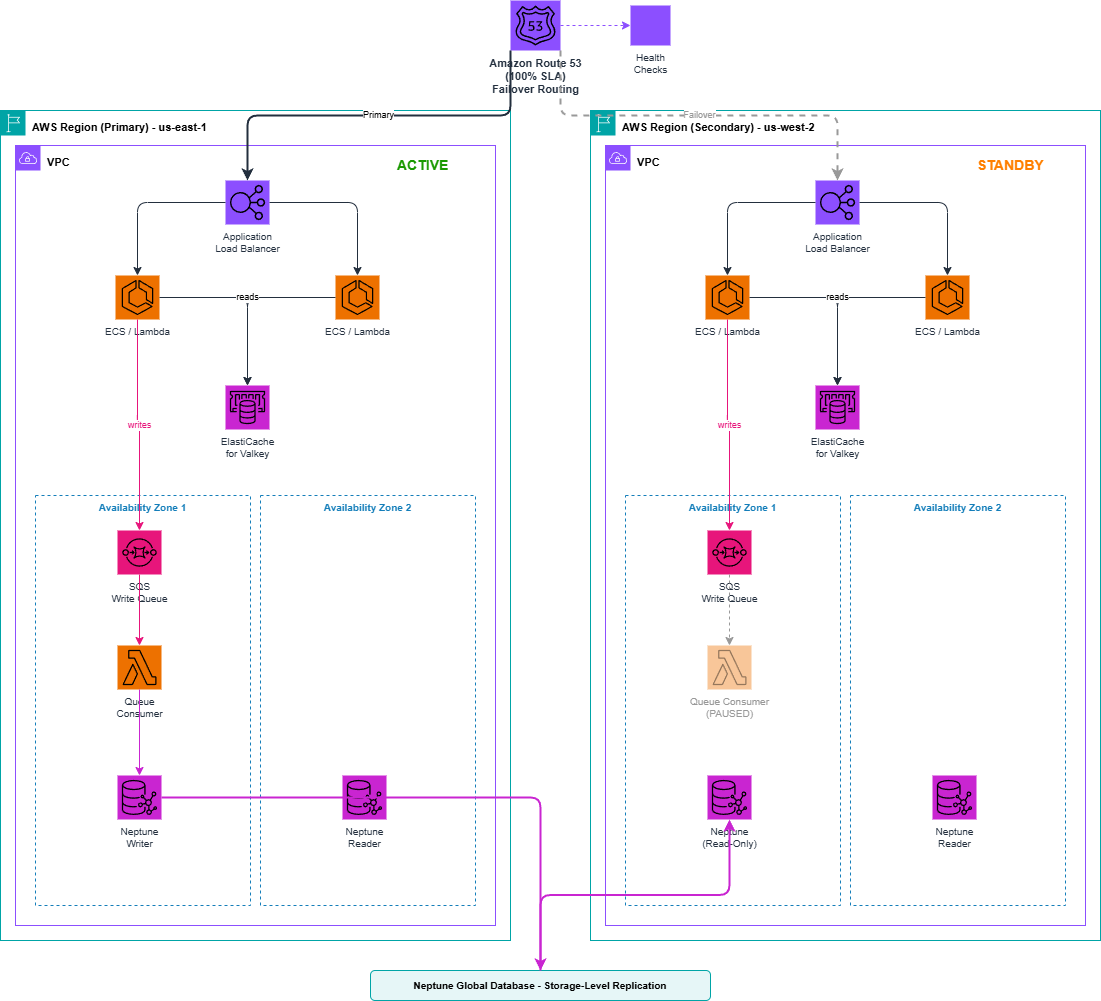
Figure 2 – Write queue architecture, multi-Region
If Amazon Route 53 fails over to the secondary Region, any writes sitting in the primary Region’s SQS queue that have not yet been flushed to Neptune are stranded. SQS queues exist as regional resources. The secondary Region’s consumer cannot read from the primary Region’s queue.
Solution: Deploy a write queue in each Region
- Primary Region: Write queue consumer is active, processing messages in near-real-time.
- Secondary Region: Write queue exists but the consumer is paused. The secondary Neptune global database cluster operates in read-only mode.
- During failover: Route 53 redirects traffic to the secondary. The secondary’s consumer activates after Neptune global database is detached and promoted. New writes flow into the secondary Region’s local queue.
- Recovery: After the old primary recovers, stranded messages are drained and reconciled.
Tradeoffs
- This architecture never rejects writes.
- Each Region has local, low latency write acceptance.
- The old primary’s queue strands writes until that Region recovers.
- You must reconcile stranded writes during recovery.
The size of this exposure depends on queue depth at failover time. Under normal operation, the backlog is close to zero.
Architecture checklist
Before adopting a write queue architecture for Neptune, verify these design considerations:
- Idempotent writes: All Neptune mutations use mergeV()/mergeE() or MERGE.
- Queue configured: SQS with 14-day retention or Kinesis Data Streams with appropriate retention.
- DLQ configured: Dead letter queue with maxReceiveCount set (for example, 5).
- Consumer deployed: Consumer with retry logic (for example, AWS Lambda, Amazon Elastic Container Service (Amazon ECS), or Amazon EC2-based consumer).
- Monitoring in place: CloudWatch alarms on queue depth, message age, consumer errors.
- Ordering strategy: Standard (unordered) or FIFO/Kinesis Data Streams (ordered).
- Consistency strategy: Cache, dual-path, or eventual consistency.
- Drain time tested: Consumer can drain a realistic backlog within your recovery time objective (RTO).
- Regional architecture: For multi-Region, deploy queues in both Regions with consumer activation logic.
Additional resources
Amazon Neptune Architecture samples
Detailed architecture of writing to Amazon Neptune from Kinesis Data Streams
Conclusion
In this post, you learned that the write queue pattern enhances the high availability architecture of Neptune. By decoupling write acceptance from write execution, this pattern helps maintain application responsiveness during maintenance windows, failover events, and scaling operations. The tradeoff is eventual consistency. The queue accepts writes immediately, but Neptune displays them after a brief delay.