AWS Database Blog
Introducing filtered export from Amazon DynamoDB to Amazon S3
Today, we are launching filtered export for Amazon DynamoDB, so you can export only the items and attributes you need, without consuming any table capacity. Export to Amazon Simple Storage Service (Amazon S3) has written every item in a table since it launched in 2020. Incremental export, added in 2023, writes every item that changed in a time window.
Filtered export adds a FilterSpecification to the same ExportTableToPointInTime request for you to provide the expressions to get only the items and the attributes you want, and the export writes the matching data to S3. It reads from the point-in-time recovery (PITR) backup rather than the table, so it consumes no table capacity and has no effect on production traffic.
In this post, we introduce filtered export and recover a single tenant’s data after a bad deployment with one incremental export instead of a 4 TB restore. We then show two further patterns: sharing a tenant’s history with customer contact attributes excluded, and relocating a tenant to another Region with a point-in-time export and an S3 import.
A quick look at DynamoDB export to Amazon S3
Amazon DynamoDB is a serverless, fully managed, distributed NoSQL database with single-digit millisecond performance at any scale. Export to Amazon S3 reads from the PITR backup, so an export of any size consumes no read capacity and does not compete with your application for throughput.
A full (non-incremental) export, writes every item as it existed at a point in time within the PITR window, which extends up to 35 days. An incremental export writes the items that changed between two points in time, at least 15 minutes and at most 24 hours apart, with the new image of each item and optionally the old image.
Both write newline-delimited DynamoDB JSON or Amazon Ion to your bucket, with a manifest-summary.json file describing the export and a manifest-files.json file listing every data file with its item count and checksum under a service-generated export ID. Amazon Athena reads the compressed data files directly, so a table definition over the data folder is enough to query an export with SQL.
Introducing filtered export
Until now, the unit of export was the table. To recover one tenant from a multi-tenant table holding several hundred, you exported all of them and selected the subset downstream, or you ran a Query against the tenant’s partition and received only the current state.
Filtered export moves the selection into the export request. The request gains a FilterSpecification object with five fields, using the expression syntax you already use with Query and Scan:
| Field | What it does |
| KeyConditionExpression | Selects one partition key value, optionally with a sort key condition, following Query semantics. Restricts the partitions the export reads, so the export processes less data. |
| FilterExpression | Conditions on both key and non-key attributes, with the operators you use with Scan. Applied to each item after the read, so it selects what is written without reducing the data processed. Key attributes can only be given if there was no KeyConditionExpression provided. |
| ProjectionExpression | Names the attributes to write. |
| ExpressionAttributeNames | Substitution tokens for attribute names. The examples in this post alias every name, because names such as Status are reserved words. |
| ExpressionAttributeValues | Substitution tokens for attribute values. |
Key condition expression is the one you would write for a Query but the two operations differ in what they read. Query reads the table as it is now, one page at a time, and consumes read capacity. Filtered full export reads the PITR backup at a time you choose and return the partition as it was at that point in time. Filtered incremental exports return the items that changed in a window, each with its state before the window and at the end of it. It writes the result to S3, in this account or another, with no table capacity and without writing code to page and upload.
Filtering applies to full exports and incremental exports: the ExportType selects FULL_EXPORT or INCREMENTAL_EXPORT, and the FilterSpecification selects the items and attributes. DescribeExport returns the FilterSpecification that was applied, and filtered export uses the same AWS Identity and Access Management (IAM) permissions as full export.
The following screenshot shows the filter options when requesting an export on the DynamoDB console:
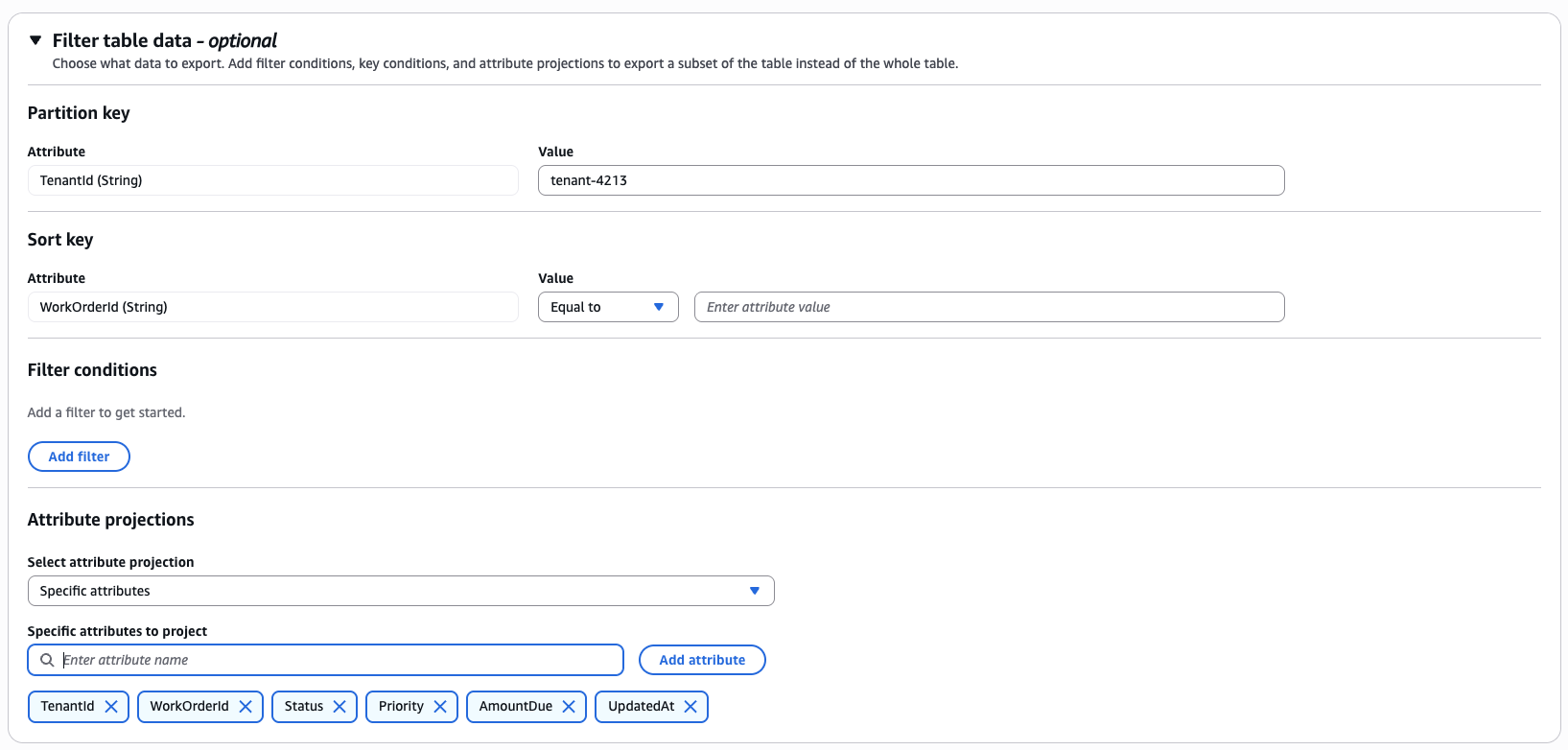
Figure 1: Filter options for a point-in-time export in the Amazon DynamoDB console
Prerequisites
To follow along with this post, you must have the following prerequisites:
- An AWS account with a DynamoDB table that has PITR enabled. The examples use a table named FieldServiceData in the US East (N. Virginia) Region (us-east-1).
- The examples use amzn-s3-demo-bucket, and a second bucket in the Europe (Ireland) Region (eu-west-1), amzn-s3-demo-destination-bucket, for the relocation.
- The AWS Command Line Interface (AWS CLI) configured with credentials that allow exports from the table and writes to the buckets.
- Access to Amazon Athena for the impact assessment section.
Recovering one tenant after a bad deployment
AnyCompany Field Ops is a software as a service (SaaS) provider that manages field service work orders for its customer companies. One DynamoDB table, FieldServiceData, holds every tenant’s work orders. TenantId is the partition key, and WorkOrderId is the sort key. Each item carries Status, Priority, CustomerEmail, CustomerPhone, AmountDue in cents, and UpdatedAt, an ISO 8601 timestamp the application stamps on every write. The table is about 4 TB across several hundred tenants.
At 13:55 UTC on September 10, the team deploys a new version of its billing reconciliation service, which includes a data migration job flagged to run against tenant-4213 first. The job starts at 14:02 UTC. A defect recomputes AmountDue with the wrong multiplier and sets Status to COMPLETED on active work orders. At 14:42 UTC, the tenant reports wrong balances and closed work orders. The on-call engineer halts the job, and a rollback is live by 14:50 UTC. About 48,000 items belonging to tenant-4213 now carry wrong values, and no other tenant was touched.
The team needs tenant-4213’s items as they were at 14:00 UTC, before the job’s first write. A PITR restore would produce a 4 TB copy of the table, of which about 2 GB belongs to the tenant. A Query of the tenant’s partition would return the items as they are now. An incremental export over the corruption window uses new and old images and the tenant’s partition key as the key condition expression. It writes only the tenant’s items that changed between 14:00 and 14:45 UTC, each with its state before the window and its state at the end of it. One export holds the affected set and the pre-incident copy.
Request the export
The following AWS CLI command requests the export. The window runs from 14:00 to 14:45 UTC, which covers the job’s writes and satisfies the 15-minute minimum for an incremental export. The key condition selects the tenant’s partition key, and the request carries no filter or projection, because recovery needs complete items:
Check the export status
ExportTableToPointInTime returns an ExportArn and the export runs in the background. DescribeExport reports the status:
The response echoes both specifications:
ItemCount is the number of tenant-4213 items that changed inside the window, not the item count of the table or of the tenant.
Inspect the output in Amazon S3
The export uses the incremental export layout, with manifests under the export ID folder and data files in the data folder beneath the prefix:
Every line in every data file is one tenant-4213 item that changed inside the window, with its OldImage, the state immediately before 14:00 UTC, and its NewImage, the state at the end of the window. The following record is one such item, formatted on multiple lines for readability:
A record with no OldImage is an item created inside the window, and a record with no NewImage is a deletion. No other tenant’s data is present, so the recovery prefix can be shared with the incident team.
Assess the impact with Amazon Athena
The following Athena statement defines a table over the export. Each image column mirrors the DynamoDB JSON structure, so every attribute is a struct whose field name is its type descriptor:
The following query separates the job’s writes from the tenant’s own activity in the window. The job set Status to COMPLETED and multiplied AmountDue, so a record whose Status changed to COMPLETED while AmountDue also changed carries the corruption signature. An update that changed one of them alone, or an insert with no OldImage, is ordinary application traffic:
The result is the list of work orders to repair. The write-back step applies the same signature in code, so the query is the review before anything is written to production.
Write the pre-incident items back
The following script streams the export’s data files from S3, selects the records that carry the corruption signature, and writes each OldImage back with PutItem. The condition expression replaces an item only while its UpdatedAt still falls inside the corruption window. A work order that a customer or the application updated after the rollback is left as it is:
PutItem replaces the whole item, so rerunning the script after a partial failure converges on the same end state with no bookkeeping. The following output is from two consecutive runs against a small table seeded with the same incident. The second run finds every restored item carrying its pre-window UpdatedAt again, so the condition fails and nothing is written:
The old image is the item’s state before the window started. A record whose written_at is not one of the job’s write times was also touched by someone else inside the window. Review those before the bulk write-back.
Sharing one tenant’s history with chosen attributes
AnyCompany Field Ops agrees to give a partner analytics team the work order history of tenant-7788. The agreement excludes customer contact details. A ProjectionExpression names the attributes to write, so CustomerEmail and CustomerPhone never reach the shared bucket:
Every exported item contains the six projected attributes and nothing else:
The projection is an include list: you name what to share, and the attributes you leave out never reach the bucket. It does not inspect values, so a free-text field that carries personal information passes through unless you leave it out. The destination bucket can live in another account or another Region.
Relocating one tenant to another Region
A tenant of AnyCompany Field Ops moves its operations to Europe and asks for its data to be held there. A full filtered export at a point in time writes the tenant’s items to a bucket in eu-west-1, and import from S3 loads them into a table there. The other tenants stay where they are. The following command exports the tenant as of the agreed cutover time to a bucket in eu-west-1:
The output follows the full export layout: every data file sits under the export ID folder and each line holds one item wrapped in an Item field, with every attribute present because there is no projection.
The following command imports the export into a new table in eu-west-1. Import from S3 reads DynamoDB JSON export files directly and creates the table with the key schema you specify:
Import from S3 creates a new table, so declare any global secondary indexes in TableCreationParameters. Writes for the tenant that arrive in us-east-1 between the export time and the cutover are the application’s responsibility to replay or drain before switching traffic. The tenant’s items stay in the source table until the application deletes them.
Pricing
Filtered export uses the same pricing as full and incremental export, at the same rate per GB, with no premium for filtering. A filtered export can cost less than a full export of the same table. When the key condition expression specifies a partition key, the export reads only the partitions that hold that key rather than the whole table. It bills on that matched data, subject to the 10 MB per-export minimum that applies to exports today. A filter on non-key attributes does not reduce the data the export reads.
Amazon S3 bills storage and requests for the objects the export writes, and Amazon Athena bills per byte scanned. The recovery export holds the tenant’s items that changed in a 45-minute window, each with two images, where an unfiltered incremental export of the same window would hold every tenant’s changes. The relocation export holds the tenant’s 2 GB, where a full export would write the 4 TB table. The export consumes no table read capacity. PITR continuous backups, which filtered export requires, are billed at the standard PITR rate.
Considerations
Keep in mind the following:
- PITR must be enabled on the source table, the same requirement as full export. Exports can target any point in the PITR window, which extends up to 35 days.
- The key condition expression follows Query semantics: one partition key value, equality only, with an optional sort key condition. A filter expression is applied after the read, so it selects what is written without reducing the data the export processes.
- If you want a non-equality condition on the partition key that the key condition expression does not allow, express it in the filter expression instead. A filter expression can reference a partition or sort key attribute only when that key is not already used in the key condition expression.
- Filtered export does not work with secondary indexes at launch, matching full export.
- The export has the same consistency model as full export: all writes up to the requested time are captured with eventual consistency across partitions, and the export is not transaction aware.
- Cross-account and cross-Region destinations are supported, following the same model as full export.
Clean up
To avoid incurring ongoing charges, delete the resources you created for this post. DynamoDB never deletes export output from your bucket. The following commands remove the exported objects:
The following statement drops the Athena table, which holds metadata only:
The following command deletes the imported table in eu-west-1 if it was created only to follow along:
If you created the source table for this post, delete it as well, or disable PITR on it, because PITR continues to bill at the standard rate while enabled. Export task metadata expires from DescribeExport and ListExports after 90 days.
Conclusion
In this post, we introduced filtered export, which narrows an export to one partition key, to items that meet a condition, and to a chosen set of attributes. We recovered a single tenant’s items from a 4 TB table with one incremental export over the corruption window, which delivered the changed items and their pre-incident state together. We reviewed them with Amazon Athena and wrote the old images back with a conditional PutItem. The same request shape shares a tenant’s history with chosen attributes only and moves a tenant to another Region with a point-in-time export and an S3 import.
Filtered export is available in all commercial Regions. To get started, see DynamoDB data export to Amazon S3, and let us know in the comments what you export.