AWS Database Blog
Run least-privilege AWS DMS CDC migration from SQL Server
When you configure change data capture (CDC) from a self-managed SQL Server source, the default AWS Database Migration Service (AWS DMS) setup grants sysadmin to the endpoint login. Organizations with separation-of-duties or least-privilege controls often can’t approve that access. The migration can then stall even though the database and network are ready.
This post goes beyond existing guidance on setting up ongoing replication for a standalone SQL Server without sysadmin. It covers the full least-privilege pattern end to end: CDC with certificate-signed wrapper procedures, per-replica setup for Always On Availability Groups, and secrets and encryption handled through AWS Secrets Manager and a customer managed AWS Key Management Service (AWS KMS) key. If you only need the base non-sysadmin setup, start with Setting up ongoing replication on a standalone SQL Server without sysadmin. Use this post when your security team also blocks the broader permissions those steps assume.
In this post, we show you how to run AWS DMS CDC from SQL Server without granting sysadmin to the DMS endpoint login. You configure SQL Server replication metadata, create version-aware certificate-signed wrapper procedures, apply the exact permissions verified in an end-to-end test, integrate AWS Secrets Manager, and validate CDC from the task logs. We also cover Always On Availability Group (AG) requirements and complete cleanup.
Quick start
The sample repository provides two equivalent setup paths:
- All-in-one: Edit and run
dms_setup_standalone_nonsysadmin.sqlon a standalone source. - Modular: Run
sql/01throughsql/04. Usesql/05_ag_replica_setup.sqlon each AG replica.
Before either path, run sql/00_configure_replication.sql to configure distribution, create a publication compatible with AWS DMS, and add primary-key tables as filtered articles. After setup, add enableNonSysadminWrapper=true; to the DMS source endpoint.
In our end-to-end validation, IS_SRVROLEMEMBER('sysadmin') returned 0, AWS DMS found both wrapper objects, and CDC captured two inserts and one update in one table plus two inserts and one delete in another.
How the least-privilege model works
During CDC, AWS DMS reads SQL Server transaction log records through fn_dump_dblog. DMS also needs to locate the first transaction at or after a requested timestamp. The tested awsdms.rtm_position_1st_timestamp procedure performs that lookup by querying fn_dump_dblog for the first LOP_BEGIN_XACT record that meets the timestamp. It doesn’t call a separate fn_position_1st_timestamp function.
SQL Server restricts this log access to sysadmin. Instead of granting that role to the interactive DMS login, the solution creates two certificate-based logins and adds only those logins to sysadmin. Certificate logins have no password and can’t open sessions. Their permissions enter the execution context only while SQL Server runs a correctly signed procedure. The DMS login itself remains outside every elevated server role.
Why use certificate signing
We considered three approaches:
| Approach | Advantage | Why it was or wasn’t selected |
Grant sysadmin to the DMS login |
Least configuration | Rejected because the interactive endpoint session receives unrestricted instance access |
| Use a SQL Server Agent proxy | Scopes SQL Server Agent job-step credentials | Rejected because proxies do not grant permissions to ordinary DMS database sessions |
| Sign wrapper procedures with certificates | Adds permissions only during signed module execution | Selected because it preserves DMS functionality without elevating the endpoint login |
The resulting DMS login has CONNECT SQL, VIEW ANY DEFINITION, and VIEW SERVER STATE at server scope, specific object permissions in master and msdb, and db_owner in the source database. It has zero elevated server-role memberships.
Solution overview
The solution connects a self-managed SQL Server source, running on premises or on Amazon Elastic Compute Cloud (Amazon EC2), to an Amazon Aurora PostgreSQL-Compatible Edition target through an AWS DMS replication instance. The same source-side configuration works with other AWS DMS targets.
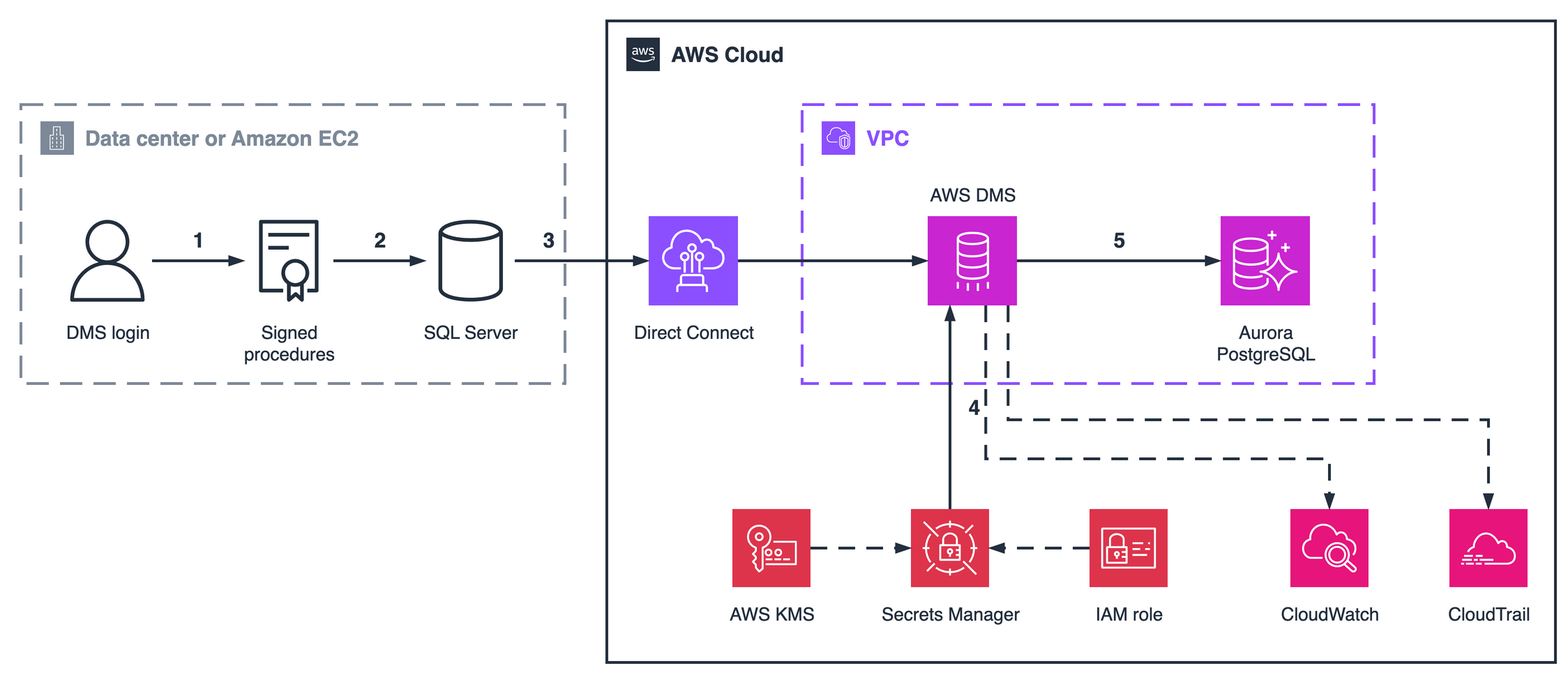
Figure 1: Least-privilege SQL Server CDC architecture. The numbers mark the five steps that follow. Dashed lines are supporting relationships: AWS KMS encrypts the secret, the IAM role grants read access to it, and AWS DMS publishes task metrics to CloudWatch and API activity to CloudTrail. The signed wrapper procedures live in the master database, the source runs in full recovery model, and the Secrets Manager credentials are optional.
The numbered steps in Figure 1 are:
- The non-sysadmin DMS login calls the signed
awsdms.rtm_dump_dblogandawsdms.rtm_position_1st_timestampprocedures inmaster. - SQL Server activates the certificate login permissions only while each signed procedure runs, so the procedure can read the transaction log.
- The DMS replication instance connects to the source over AWS Direct Connect or VPN and reads changes through those procedures. Distribution and a transactional publication retain the metadata that AWS DMS uses for CDC.
- The replication instance optionally retrieves the endpoint credentials from AWS Secrets Manager, encrypted with a customer managed AWS KMS key and read through an AWS Identity and Access Management (IAM) role scoped to that one secret.
- AWS DMS applies the captured changes to Aurora PostgreSQL. Amazon CloudWatch reports task metrics, and AWS CloudTrail records AWS API activity.
Prerequisites
Before you begin, complete these prerequisites in order:
- Use a self-managed SQL Server source version supported by AWS DMS, configured with full or bulk-logged recovery. See Using Microsoft SQL Server as a source for AWS DMS. This walkthrough was validated on SQL Server 2022 Standard Edition with AWS DMS 3.5.4.
- Use an edition that can act as a transactional replication publisher, such as Standard or Enterprise. Express and Web editions can only be subscribers, so the publication step fails on them.
- Install and run SQL Server Agent. Distribution and the log reader agent depend on it.
- Enable SQL Server authentication (Mixed Mode) on the instance. The DMS endpoint uses a password-based SQL login, which an instance running in Windows-authentication-only mode can’t create. Confirm with
SELECT SERVERPROPERTY('IsIntegratedSecurityOnly');, which must return0. Changing this setting requires a SQL Server service restart. - Create a dedicated SQL Server login for the DMS endpoint. Don’t add it to
sysadmin. Endpoint passwords must not contain semicolon (;), plus (+), or percent (%) characters. - Obtain temporary
sysadminaccess for the administrator who configures distribution, creates the publication, and installs the signed modules. - Create the replication working directory before you configure distribution, and grant the SQL Server Agent service account write access to it. Distribution setup fails if the path doesn’t exist or is not writable.
- Establish network connectivity from the DMS replication instance to SQL Server. For an on-premises source, use AWS Direct Connect, VPN, or another approved route.
- If a private DMS replication instance has no internet egress, create an interface virtual private cloud (VPC) endpoint named
com.amazonaws.<region>.secretsmanager. Enable private DNS and allow TCP 443 from the DMS instance security group to the endpoint security group. - Install SQLCMD if you use the modular setup or cleanup scripts.
- For AG sources, capture the DMS login SID from the primary so you can use the identical SID on every replica.
Step 1: Create the DMS login
Create a dedicated server login before running either setup path. Use the same password that you store in Secrets Manager or supply directly to the endpoint:
Verify that the login is not elevated:
Expected output:
Step 2: Configure MS-Replication
AWS DMS uses SQL Server replication metadata for tables with primary keys. Distribution alone isn’t enough: The source database also needs a continuous transactional publication and articles for the captured tables. Without them, a CDC task can start but capture no changes.
Run the repository script from the source database context:
Point REPLDATA_DIR at a directory that already exists and that the SQL Server Agent service account can write to. Distribution setup fails otherwise.
For a standalone source, this configures both distribution and publication. For an AG, run this command on the primary with CREATE_PUBLICATION=1. The AG setup script later runs the same replication script with CREATE_PUBLICATION=0 on each secondary, because every replica needs local distribution but the publication belongs on the primary.
The script performs these actions:
- Configures the SQL Server instance as its own distributor when distribution is absent.
- Enables publishing on the source database.
- Creates an anonymous, continuous, log-based publication in the shape AWS DMS expects.
- Adds each primary-key user table as a log-based article with
@filter_clause = '(1=0)'.
The (1=0) filter is deliberate. It prevents native transactional replication from moving rows, while preserving publication metadata and log markers. AWS DMS transfers the data by reading the log through the signed wrappers.
Expected output includes the publication and each article added:
Important: The script excludes tables without primary keys. Configure Microsoft Change Data Capture (MS-CDC) separately for those tables. Otherwise AWS DMS doesn’t capture their changes through this publication path.
Step 3: Store credentials in Secrets Manager
Secrets Manager integration works for on-premises sources because the DMS replication instance, not the SQL Server host, retrieves the endpoint secret from AWS. If policy prohibits cloud storage of the on-premises credentials, supply them directly on the DMS endpoint and skip the CloudFormation template. The SQL Server certificate-signing model is unchanged.
The repository template creates:
- One endpoint credential secret for AWS DMS.
- One operator-only certificate password secret.
- A customer managed AWS KMS key.
- A least-privilege IAM role for AWS DMS.
Deploy the template:
The template uses the AWS::LanguageExtensions transform to build the secret JSON, so the deployment requires CAPABILITY_AUTO_EXPAND. The transform keeps each password as a parameter reference, which preserves NoEcho protection: no plaintext password appears in the processed template.
The endpoint secret contains:
The AWS DMS role must trust the Region-specific service principal dms.<region>.amazonaws.com in addition to dms.amazonaws.com. Otherwise CreateEndpoint rejects the role. The template configures both principals. It grants the role secretsmanager:GetSecretValue only on the endpoint secret and kms:Decrypt only when invoked through regional Secrets Manager. The certificate password secret remains available to the SQL operator, not to AWS DMS.
Step 4: Install the signed wrappers and grants
Choose one of the following equivalent paths.
Option A: Run the all-in-one standalone script
Edit the three CHANGE ME values in dms_setup_standalone_nonsysadmin.sql: the existing DMS login, source database, and certificate password. Run the script as sysadmin:
The script validates the login and database before changing objects. It then creates the helper, version-aware procedures, canonical certificate identities, and complete grants.
Option B: Run the modular scripts
Run scripts 01 through 04 from the repository root:
Both paths now create the same object contracts and names.
Understand the installed objects
awsdms.split_partition_list parses the partition list supplied by AWS DMS. awsdms.rtm_dump_dblog uses that list to return only relevant transaction log operations. The parameter count of the internal fn_dump_dblog function differs among SQL Server versions, so the setup discovers the count from sys.all_parameters and generates the correct number of trailing default parameters.
awsdms.rtm_position_1st_timestamp also queries fn_dump_dblog. It locates the first LOP_BEGIN_XACT record whose begin time is at or after the timestamp requested by AWS DMS.
The setup signs each procedure with a separate certificate. Both certificates use the operator-provided certificate password and create these canonical, non-interactive logins:
awsdms_rtm_dump_dblog_loginawsdms_rtm_position_1st_timestamp_login
Only these certificate logins join sysadmin.
Review the verified DMS login permissions
The setup applies this minimum working set, verified during the end-to-end test:
| Scope | Permissions | Why required |
| Server | CONNECT SQL, VIEW ANY DEFINITION, VIEW SERVER STATE |
Connect and inspect server metadata/state used by capture |
master wrappers |
EXECUTE on both awsdms procedures; SELECT on awsdms.split_partition_list and sys.fn_dblog |
Invoke signed log-reading code and resolve partitions |
master replication procedures |
EXECUTE on sp_addpublication, sp_addarticle, sp_articlefilter, sp_repldone, sp_replincrementlsn |
Read and maintain replication metadata and log sequence number (LSN) state |
msdb |
SELECT on backupset, backupmediafamily, backupfile |
Locate transaction log backup history for LSN tracking |
| Source database | db_owner |
Perform the database-level operations AWS DMS requires |
The approach removes instance-level sysadmin. It doesn’t remove the documented source database db_owner requirement.
Step 5: Create the DMS source endpoint
Create the source endpoint using the endpoint secret and role outputs from the CloudFormation stack:
Two details matter here. The Secrets Manager fields belong inside --microsoft-sql-server-settings, because AWS DMS has no top-level --secrets-manager-secret-id parameter. And --database-name remains required even though the secret already contains dbname. Omitting it returns The parameter DatabaseName must be provided and must not be blank. You don’t specify server, port, username, or password, because AWS DMS reads those from the secret.
If endpoint creation fails with Role <arn> should have the DMS Regional Service Principal 'dms.<region>.amazonaws.com' as trusted entity, the role is missing the Region-specific principal. Deploy the current template and use its role output.
Always On Availability Group considerations
SQL Server logins are instance-level objects and must use the same SID on every replica. Certificates, certificate logins, signatures, and server-level grants also require local setup on each replica.
Get the SID on the primary:
Run sql/05_ag_replica_setup.sql from the repository root on each secondary replica. The script configures distribution locally without creating duplicate publication state, validates or creates the matched-SID login, and then reuses canonical scripts 01–04, including the complete grants:
For a read-only secondary, use the AG listener or replica FQDN as appropriate and apply these extra connection attributes:
| ECA | Value | Purpose |
applicationIntent |
ReadOnly |
Routes the connection to a readable secondary |
multiSubnetFailover |
yes |
Speeds up multi-subnet connection handling |
alwaysOnSharedSynchedBackupIsEnabled |
false |
Uses the backup behavior required by this capture path |
activateSafeguard |
false |
Allows secondary-replica CDC for this documented scenario. Evaluate this setting with the DMS service team before production use |
setUpMsCdcForTables |
false |
Prevents DMS from attempting privileged MS-CDC setup |
enableNonSysadminWrapper |
true |
Directs DMS to use the signed wrappers |
See Working with self-managed SQL Server Always On availability groups for current support requirements.
Validate the deployment
Complete all four checks before treating the configuration as ready.
Verify the endpoint login is not sysadmin
Expected output:
Confirm that elevation is scoped to the signed procedures
Impersonate the DMS login and attempt both paths to the transaction log in the same session. The two results are the security property of this design:
One login, one session, two outcomes: refused directly, permitted through the signed procedure. The certificate elevates the procedure, not the account. As a final check, confirm the login still can’t perform privileged work. CREATE LOGIN returns error 15247.
Verify AWS DMS found the wrapper objects
Start the CDC task and inspect the SOURCE_CAPTURE task log. The tested DMS output includes these lines:
These lines prove that AWS DMS found the helper and wrapper selected by enableNonSysadminWrapper=true;. Use these object checks as the validation evidence for AWS DMS 3.5.4.
Security and operational considerations
- Procedure recreation removes signatures. Re-run the signing step after replacing either wrapper. Confirm signatures through
sys.crypt_propertiesbefore restarting CDC. fn_dump_dblogis version-sensitive. Use the version-aware scripts. Fixed parameter lists can fail after moving between SQL Server versions.- Certificate rotation needs a maintenance window. Create replacement certificates, replace signatures, and update the operator secret. SQL Server can’t re-encrypt a certificate in place.
- Endpoint secret rotation doesn’t restart running tasks. Restart the DMS task in a controlled window after rotating endpoint credentials.
- Private DMS instances need Secrets Manager reachability. Without NAT or the interface VPC endpoint, endpoint access tests can time out with
curlCode: 28. - Endpoint passwords reject
;,+, and%. Generate a replacement password without these characters before creating the endpoint. - Tables without primary keys need separate MS-CDC preparation. The publication script deliberately excludes them.
- The source login still has
db_owner. This solution removes server-levelsysadmin, not the database role that AWS DMS needs. - AG setup is per replica. SIDs, certificates, certificate logins, signatures, and grants must remain aligned after adding or replacing a replica.
For audit evidence, enable CloudTrail for DMS, Secrets Manager, IAM, and KMS API calls. Use SQL Server Audit to record DMS login activity. These controls provide evidence for separation-of-duties reviews without claiming automatic compliance with a specific framework.
Clean up
Stop and remove the DMS task and endpoint before removing the SQL Server objects. On a standalone source or AG primary, remove the sample publication, source-database grants, and local wrapper objects:
On every AG secondary, remove instance-local objects and grants without modifying the read-only source database:
The script performs dependency-ordered cleanup:
- Drops the sample
AR_PUBLICATION_*publication and its articles whenREMOVE_PUBLICATION=1. It leaves shared distribution configuration intact. - Revokes the exact server,
master,msdb, and source-database grants. - Drops both procedure signatures.
- Removes both certificate logins from
sysadminand drops the logins. - Drops both certificates, wrapper procedures,
split_partition_list, and theawsdmsschema. - Drops database users when
REMOVE_DMS_USERS=1.
The script never drops the pre-existing DMS server login or shared distributor. Use REMOVE_DMS_USERS=0 when the database users predated this walkthrough or support another workload. Delete the Secrets Manager secrets and IAM role with the CloudFormation stack when they are no longer needed. The KMS key is retained by design to prevent accidental loss. Schedule key deletion separately only after confirming that no retained secrets need it.
Applicability to other targets
The certificate-signing and SQL Server publication configuration applies to the SQL Server source regardless of target. You can use the same source-side approach with Amazon Relational Database Service (Amazon RDS) for PostgreSQL, Amazon RDS for MySQL, Amazon Simple Storage Service (Amazon S3), and other targets that AWS DMS supports. Target-specific schema conversion and data-type behavior remain outside the scope of this post.
Conclusion
You configured AWS DMS CDC from self-managed SQL Server while keeping the endpoint login out of sysadmin. The verified permission set, signed wrapper procedures, publication metadata, Regional DMS trust policy, and task-log checks turn the documentation fragments into a repeatable and auditable deployment. The end-to-end test demonstrated six captured data changes while the DMS login retained zero elevated server-role memberships.
As your next step, clone the least-privilege AWS DMS CDC sample repository and run the quick-start path in a non-production SQL Server environment.
Further reading
- Setting up ongoing replication on a standalone SQL Server without sysadmin
- Migrate from a Microsoft SQL Server Always On read-only replica to Amazon Aurora PostgreSQL with AWS DMS
- Manage AWS DMS endpoint credentials with AWS Secrets Manager
- Configure change data capture parameters on Amazon RDS for SQL Server