.NET on AWS Blog
From Azure Functions to AWS Lambda: A .NET Developer’s Migration Playbook
Introduction
Serverless has become the default for event-driven .NET workloads, and many teams that started on Azure Functions are now consolidating onto AWS to unify their compute, data, and AI in single cloud. If you run C#/.NET serverless functions on Azure and want to move to AWS Lambda, this playbook gives you an end-to-end, repeatable approach.
Migrating .NET serverless workloads to Lambda unlocks significant cost and performance advantages—up to 34% better price-performance with Graviton2 (arm64), sub-second cold starts via Lambda SnapStart for .NET, and the ability to consolidate compute, data, and AI on a single cloud. Lambda further strengthens the value proposition with response streaming for GenAI and large payloads, built-in Function URLs, a first-class managed .NET 10 runtime, and native event-driven integration with AWS services — including direct invocation from 25+ services and poll-based event source mappings for streaming and queue workloads.
This guide organizes the journey into seven phases — from discovery through post-migration optimization.
To help you follow along with the examples in this post, we have published a companion repository on AWS Samples. The repository contains all the code snippets and sample projects referenced throughout this blog.
Prerequisites & Assumptions
To get the most of this guide, you should have the following:
- Audience — .NET developers and architects familiar with the Azure Functions isolated worker model and modern C#.
- Runtime — examples target C# on .NET 10.
- Tooling — .NET 10 SDK, AWS SAM CLI, AWS CLI, and a container runtime (Docker or compatible) for local emulation.
- AWS access — an AWS account with IAM credentials to manage AWS Lambda, Amazon API Gateway, Amazon Simple Queue Service (Amazon SQS), Amazon Simple Storage Service (Amazon S3) and Amazon EventBridge.
- Framework — AWS Lambda handlers use the Lambda Annotations framework; Powertools for AWS Lambda (.NET) is used for logging, tracing, and metrics.
Why AWS Lambda for .NET Workloads
Before diving into mechanics, it helps to understand what you gain by targeting Lambda for a .NET serverless workload.
| Benefit | What it means |
| Price-Performance | Graviton2 (arm64) functions deliver up to 34% better price-performance. Lambda bills per-millisecond (1 ms granularity) with no per-execution minimum. |
| Cold-Start Optimization | Lambda SnapStart provides sub-second startup for .NET 10 managed runtimes with no code changes. Provisioned Concurrency can eliminate cold starts entirely. |
| Response Streaming | Stream responses progressively to clients — ideal for GenAI, real-time dashboards, and large payloads. |
| Function URLs | Built-in HTTPS endpoints without needing API Gateway for simple use cases. |
| Managed Runtime | Run C#/.NET 10 on a fully managed Lambda runtime — no container packaging required. |
| Service Integration | Event source mappings for queue and stream sources (SQS, Kinesis, DynamoDB Streams, MSK, Amazon MQ, DocumentDB), direct event-driven invocation from 25+ AWS services, and integration with 200+ services through Amazon EventBridge. |
| Runtime Modernization | AWS Transform (agentic AI) can upgrade Lambda runtimes at scale across your organization. |
The diagram in Figure 1 summarizes the seven phases and key activities covered in this playbook — from discovery and feature mapping through code migration, IaC, testing, cutover, and post-migration optimization.
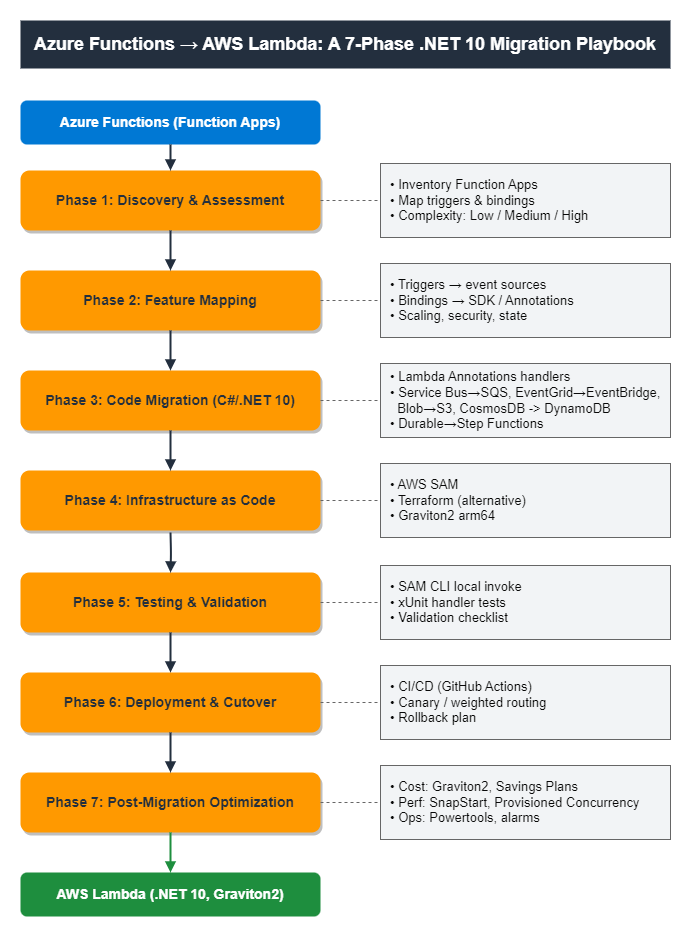
Figure 1. The seven-phase migration path from Azure Functions to AWS Lambda
Phase 1: Discovery and Assessment
Catalog your existing Azure Functions workload — triggers, bindings, dependencies, and configuration — to establish the migration scope.
Begin by compiling a comprehensive inventory of your Azure Functions workload. Capture each of the following:
- Function Apps and their groupings — Azure groups multiple functions in a Function App; Lambda treats each function independently.
- Triggers and Bindings — document all triggers (HTTP, Timer, Queue, Blob, Cosmos DB, Event Hub, Service Bus, Event Grid) and input/output bindings.
- Runtime and Language — note the .NET version and programming model.
- Configuration — capture App Settings, Connection Strings, Key Vault references.
- Networking — document VNet integration, Private Endpoints, IP restrictions.
- Dependencies — list dependent services: Azure Storage, Cosmos DB, Service Bus, Event Grid, Redis, SQL, etc.
- Durable Functions — identify stateful orchestrations that will map to AWS Step Functions.
- Monitoring — Application Insights queries, alerts, and dashboards.
Phase 2: Feature Mapping
Map Azure Functions concepts to their AWS Lambda equivalents and assign complexity indicators to prioritize your migration sequence. Azure Functions and AWS Lambda share the same serverless mental model but differ in how triggers, bindings, and platform features are expressed. This section maps the concepts with a complexity indicator to prioritize and sequence your migration.
2.1 Triggers & Dependency Mapping
| Azure Functions Trigger | AWS Lambda nearest Equivalent | Complexity | Notes |
| HTTP trigger | API Gateway (REST/HTTP API) or Function URL | Low | Function URLs for simple setup; API Gateway for routing, auth, throttling |
| Timer trigger | Amazon EventBridge Scheduler | Low | Cron and rate expressions supported |
| Queue Storage trigger | Amazon SQS event source mapping | Low | Batch processing, visibility timeout |
| Service Bus trigger | Amazon SQS (standard/FIFO) or SNS | Medium | SQS FIFO for ordered processing |
| Event Hubs trigger | Amazon Kinesis Data Streams or MSK | Medium | Event source mapping with batching |
| Cosmos DB change feed | Amazon DynamoDB Streams | Medium | Real-time change data capture |
| Blob Storage trigger | Amazon S3 event notifications | Low | Supports prefix/suffix filtering |
| Event Grid trigger | Amazon EventBridge | Medium | Centralized event bus with schema registry |
| Kafka trigger | Amazon Managed Streaming for Apache Kafka (Amazon MSK) event source mapping | Medium | Managed Kafka with native Lambda integration |
| RabbitMQ trigger | Amazon MQ (RabbitMQ) event source mapping | Low | Native support |
| Durable Functions | AWS Step Functions | High | Orchestration, fan-out/fan-in, human approval workflows |
| Key Vault | AWS Secrets Manager / Parameter Store, a capability of AWS Systems Manager | Low | Secret and config management |
| Application Insights | Amazon CloudWatch and AWS X-Ray | Low | Logs, metrics, distributed tracing |
2.2 Bindings & Programming Model
Azure Functions uses declarative input/output bindings (via attributes) to connect to services. For AWS Lambda use the Lambda Annotations framework it provides a comparable attribute-driven model: you decorate a method with [LambdaFunction] and an event attribute (for example, [RestApi], [HttpApi], or [SQSEvent]), and the source generator wires up the handler and generates the corresponding SAM resources. For cloud operations not covered by the Lambda Annotations framework, use the AWS SDK for .NET directly within the handler. Powertools for AWS Lambda (.NET) further reduces boilerplate for logging, tracing, parsing, and idempotency.
The following table compares key programming model features between Azure Functions and AWS Lambda:
| Feature | Azure Functions | AWS Lambda |
| Function grouping | Multiple functions per Function App | Multiple [LambdaFunction] methods per class/project |
| Entry point | Handler with trigger attribute | Method with [LambdaFunction] + event attribute |
| Dependency injection | Built-in DI container (.NET isolated) | Built-in DI via [LambdaStartup] + [FromServices] |
| Middleware | Built-in middleware pipeline | Powertools for AWS Lambda (.NET) middleware |
| Shared code | Extension bundle | Lambda Layers for shared dependencies |
2.3 Scaling & Concurrency
The following table maps scaling and concurrency behavior between Azure Functions (Flex Consumption plan) and AWS Lambda:
| Feature | Azure Functions | AWS Lambda |
| Scale to zero | Yes | Yes |
| Concurrency / instance | Configurable (>1) | 1 invocation per execution environment |
| Cold-start mitigation | Always Ready instances | Provisioned Concurrency + SnapStart (.NET 10) |
| Max instances | 1,000 (configurable) | 1,000 / region (increasable to 10,000+) |
| Billing granularity | Per-millisecond (100 ms minimum per execution) | Per-millisecond (1 ms, no minimum) |
2.4 Networking, Observability & Security
The following table maps Azure networking, observability, and security features to their nearest AWS equivalents:
| Azure Feature | Nearest AWS Equivalent |
| VNet Integration | VPC configuration (ENI-based) |
| Private Endpoints | VPC + ALB / API Gateway (private) |
| Application Insights | Amazon CloudWatch + AWS X-Ray |
| Log Analytics | CloudWatch Logs Insights |
| Azure Monitor Alerts | CloudWatch Alarms + EventBridge |
| Managed Identity | IAM Execution Role |
| Key Vault references | AWS Secrets Manager / Parameter Store |
| Authentication (EasyAuth + Entra ID) | Amazon Cognito / API Gateway authorizers |
2.5 State & Orchestration
The following table maps Azure Durable Functions stateful patterns to their AWS Step Functions equivalents:
| Azure | Nearest AWS Equivalent |
| Durable Functions (orchestration) | AWS Step Functions |
| Durable Entities (stateful actors) | Step Functions + DynamoDB |
| Fan-out / fan-in patterns | Step Functions Map state |
| Human approval workflows | Step Functions callback patterns |
Phase 3: Code Migration (C#/.NET 10)
This is the heart of the migration. Convert your Azure Functions handlers to AWS Lambda using Lambda Annotations. Following are side-by-side C# examples showing the Azure Functions pattern and its AWS Lambda equivalent on .NET 10.
AWS SAM
When migrating Azure Functions to AWS Lambda, the AWS Serverless Application Model (AWS SAM) is the recommended framework for this migration. It extends CloudFormation with simplified serverless syntax — declarative YAML that defines Lambda functions, event sources, permissions, and configuration in one place. You define, test (locally), and deploy with a single command.
DI setup with a Lambda Annotations startup class
Start with the startup class. Register all service dependencies in the default DI container.
AWS Lambda (C#/.NET 10) — Startup.cs (Lambda Annotations DI)
using Amazon.Lambda.Annotations;
using Microsoft.Extensions.DependencyInjection;

[LambdaStartup]
public class Startup
{
    public void ConfigureServices(IServiceCollection services)
    {
        // Register AWS SDK clients and app services once; injected via [FromServices]
        services.AddSingleton<Amazon.EventBridge.IAmazonEventBridge,
        Amazon.EventBridge.AmazonEventBridgeClient>();
        services.AddSingleton<IOrderService, OrderService>();
    }
}
3.1 HTTP Trigger
HTTP triggers are the most common starting point. On Azure you use [HttpTrigger]; on AWS Lambda you use [HttpApi] or [RestApi] with the Lambda Annotations framework to expose an HTTPS endpoint.
Azure Function
[Function("hello")]
public async Task<HttpResponseData> Run(
    [HttpTrigger(AuthorizationLevel.Function, "get", "post")] HttpRequestData req)
{
    var name = System.Web.HttpUtility.ParseQueryString(req.Url.Query)["name"];
    var response = req.CreateResponse(HttpStatusCode.OK);
    await response.WriteStringAsync($"Hello, {name}");
    return response;
}
AWS Lambda
public class Functions
{
    // Source generator wires up the handler and generates the API Gateway event
    [LambdaFunction]
    [HttpApi(LambdaHttpMethod.Get, "/hello")]
    public IHttpResult Hello(
        [FromQuery] string name, ILambdaContext context)
    {
        context.Logger.LogInformation($"Saying hello to {name}");
        return HttpResults.Ok(new { message = $"Hello, {name}" });
    }
}
Migration steps
- Replace HttpTrigger with [LambdaFunction] and [HttpApi]/[RestApi]; bind parameters with [FromQuery], [FromRoute], [FromBody] instead of parsing the raw request.
- Return IHttpResult (HttpResults.Ok, HttpResults.NotFound) instead of building response objects manually.
- Update authentication: Microsoft Entra ID → Amazon Cognito / AWS Identity and Access Management (IAM) / API Gateway authorizers.
- Configure routes (or a Function URL) in IaC template.
3.2 Service Bus Queue to Amazon SQS
Azure Service Bus queues map to Amazon SQS. The Lambda event source mapping polls the queue and invokes your function with a batch of messages.
Azure Function
[Function("ServiceBusQueueTrigger")]
public void Run(
    [ServiceBusTrigger("orderqueue", Connection = "ServiceBusConnection")]
    string myQueueItem, FunctionContext context)
{
    var logger = context.GetLogger("ServiceBusQueueTrigger");
    logger.LogInformation($"Processing message: {myQueueItem}");
}
AWS Lambda
using Amazon.Lambda.Annotations;
using Amazon.Lambda.Annotations.SQS;
using Amazon.Lambda.Core;
using Amazon.Lambda.SQSEvents;

public class Functions
{
    [LambdaFunction]
    [SQSEvent("@orderqueue", BatchSize = 10)]
    public async Task ProcessOrders(
        SQSEvent sqsEvent,
        [FromServices] IOrderService orders,
        ILambdaContext context)
    {
        foreach (var record in sqsEvent.Records)
        {
            context.Logger.LogInformation($"Processing message: {record.Body}");
            await orders.ProcessAsync(record.Body);
            // Message is deleted when the function succeeds
        }
    }
}
The [SQSEvent] attribute generates the queue reference and event source mapping. The mapping is direct: an Azure Service Bus queue becomes an SQS queue. For ordered processing (Service Bus sessions), use an SQS FIFO queue and read the MessageGroupId from each record’s attributes.
Migration steps
- Replace
[ServiceBusTrigger]with[SQSEvent]; the annotation generates the event source mapping in your SAM template. - For ordered processing (Service Bus sessions), use an SQS FIFO queue and read MessageGroupId from record attributes.
- Configure BatchSize and visibility timeout to match your current throughput.
- Set up a dead-letter queue (DLQ) for messages that exceed maxReceiveCount.
3.3 Blob Storage events to Amazon S3 events
Azure Blob Storage triggers map to Amazon S3 event notifications. When an object is created in an S3 bucket, Lambda receives an S3Event containing the bucket name and object key — the object content is fetched separately via the SDK. Figure 2 shows the before/after architecture: an Azure Blob Storage trigger writing to Application Insights, re-platformed to an Amazon S3 event source mapping invoking AWS Lambda with CloudWatch and X-Ray observability.
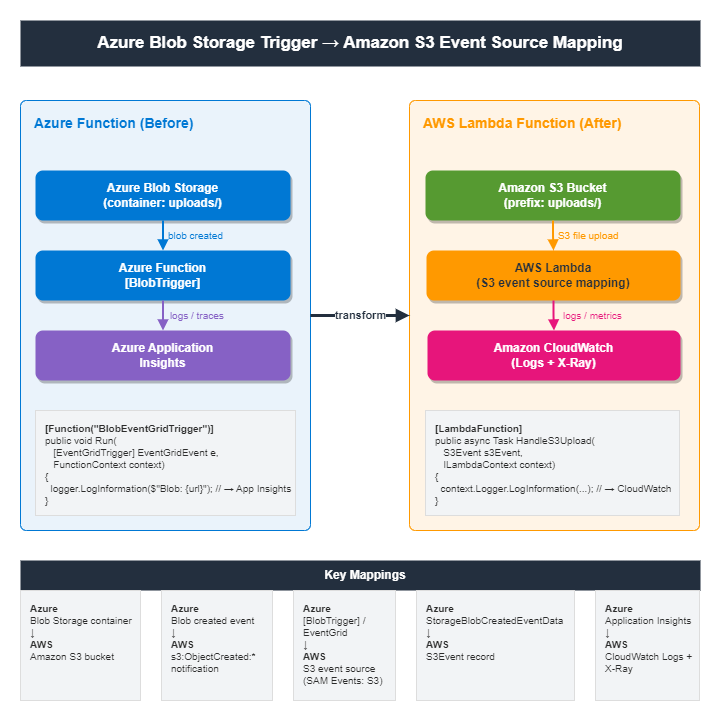
Figure 2. Before/after architecture for Blob Storage triggered Azure Function
Azure Function
[Function("BlobStorageTrigger")]
public void Run(
        [BlobTrigger("mycontainer/{name}", Connection = "AzureWebJobsStorage")]
        string myBlobContent,
        string name,
        FunctionContext context)
{
        var logger = context.GetLogger("BlobStorageTrigger");
        logger.LogInformation($"Processing blob: {name}");
        logger.LogInformation($"Blob content length: {myBlobContent.Length} characters");
}
AWS Lambda
using Amazon.Lambda.Annotations;
using Amazon.Lambda.Core;
using Amazon.Lambda.S3Events;

public class Functions
{
    [LambdaFunction]
    public async Task HandleS3Upload(
        S3Event s3Event,
        [FromServices] IFileProcessor processor,
        ILambdaContext context)
    {
        foreach (var record in s3Event.Records)
        {
            var bucket = record.S3.Bucket.Name;
            var key = record.S3.Object.Key;
            context.Logger.LogInformation($"Object created: s3://{bucket}/{key}");
            await processor.ProcessAsync(bucket, key);
        }
    }
}
Migration steps
- Replace
[BlobTrigger]with an S3 event notification configured in your SAM template; handle S3Event in the Lambda function. - Use AmazonS3Client to read object content — S3 events deliver metadata only, not the blob body.
- Configure S3 event notifications with prefix/suffix filters to replicate your container path logic.
- Route failed invocations to a DLQ via the Lambda event source mapping’s error handling configuration.
3.4 Timer Trigger to Amazon EventBridge Scheduler
Timer-triggered functions are common in Azure Functions. On AWS, a schedule expression drives the Lambda through Amazon EventBridge Scheduler (or an EventBridge rule). With Lambda Annotations you handle a CloudWatchEvent (scheduled event) payload; the schedule itself is defined in your IaC template.
Azure Function
[Function("TimerExample")]
public void Run(
    [TimerTrigger("0 */5 * * * *")] TimerInfo timer,  // every 5 minutes
    FunctionContext context)
{
    var logger = context.GetLogger("TimerExample");
    logger.LogInformation($"Timer fired at: {DateTime.UtcNow}");
}
AWS Lambda
using Amazon.Lambda.Annotations;
using Amazon.Lambda.Core;
using Amazon.Lambda.CloudWatchEvents;

namespace MyApp;

public class Functions
{
    [LambdaFunction]
    public void RunOnSchedule(
        CloudWatchEvent<object> scheduledEvent,
        [FromServices] IReportService reports,
        ILambdaContext context)
    {
        context.Logger.LogInformation($"Scheduled run at: {DateTime.UtcNow}");
        reports.GenerateAsync();
    }
}
template.yaml
Resources:
  ScheduledFunction:
    Type: AWS::Serverless::Function
    Properties:
      Handler: MyApp::MyApp.Functions_RunOnSchedule_Generated::RunOnSchedule
      Runtime: dotnet10
      Architectures: [arm64]
      Events:
        EveryFiveMinutes:
          Type: ScheduleV2                 # EventBridge Scheduler
          Properties:
            ScheduleExpression: rate(5 minutes)   # or cron(0/5 * * * ? *)
Migration steps
- Replace [TimerTrigger] with a SAM ScheduleV2 event; translate the 6-field NCRONTAB (seconds first) to an EventBridge rate() or cron() expression.
- Accept CloudWatchEvent<object> instead of TimerInfo; track missed runs via CloudWatch alarms if needed.
3.5 Updating .csproj Dependencies
Replace the Azure Functions and WebJobs extension packages with the AWS Lambda and AWS SDK packages your handlers use, and target Net 10.0. The Lambda Annotations package ships a Roslyn source generator that runs at build time, reference it like any other package, as shown in the following code snippets.
Before — Azure Function (.csproj)
After — AWS Lambda on .NET 10 with Lambda Annotations (.csproj)
3.6 Managed Identity to IAM Roles
Azure Functions authenticate to other Azure services with a Managed Identity — the platform injects credentials into the runtime environment, and the SDK resolves them without explicit credential code. AWS Lambda has a direct analogue: attach an IAM execution role to the function and let the AWS SDK for .NET resolve those credentials via the default credential provider chain.
Azure Function (C#) — Managed Identity
using Azure.Identity;
using Azure.Storage.Blobs;

// DefaultAzureCredential resolves the Function App's Managed Identity
var credential = new DefaultAzureCredential();
var client = new BlobServiceClient(
    new Uri("https://myaccount.blob.core.windows.net"), credential);
AWS Lambda (C#/.NET 10) — IAM execution role + default credentials
using Amazon.S3;

// No credential object needed: the AWS SDK resolves the Lambda
// execution role via the default credential chain.
var client = new AmazonS3Client();   // uses the function's IAM role

// Register once in the [LambdaStartup] class so it is reused:
services.AddSingleton<IAmazonS3, AmazonS3Client>();
template.yaml (AWS SAM — least-privilege execution role)
Resources:
  ProcessorFunction:
    Type: AWS::Serverless::Function
    Properties:
      Handler: MyApp::MyApp.Functions_HandleS3Upload_Generated::HandleS3Upload
      Runtime: dotnet10
      Policies:                         # generates a scoped IAM role
        - S3ReadPolicy:
            BucketName: my-upload-bucket
Migration steps
- Replace DefaultAzureCredential with parameterless constructors — the Lambda execution role resolves automatically. Locally, the SDK falls back to your AWS CLI profile.
- Grant permissions using SAM policy templates (e.g. S3ReadPolicy, SQSPollerPolicy) scoped to specific resources.
- Map Managed Identity role-based access control (RBAC) assignments to equivalent IAM policy statements on the execution role.
3.7 Configuration and Secrets
Azure Functions read settings from local.settings.json in development and from appsettings.json [AS23] [RK24] (with optional Key Vault references) in production, bound through IConfiguration. On AWS, plain-text and non-sensitive configuration are stored in Lambda environment variables, while secrets and sensitive parameters are managed securely in AWS Secrets Manager or Parameter Store. The plain-text/non-sensitive configuration can still be bound through IConfiguration using the environment-variables provider.
Before — Azure (local.settings.json + Key Vault reference)
{
  "Values": {
    "AzureWebJobsStorage": "UseDevelopmentStorage=true",
    "OrderQueueName": "orders",
    "DbConnection": "@Microsoft.KeyVault(SecretUri=https://kv.vault.azure.net/secrets/db)"
  }
}
After — AWS SAM (environment variables + Secrets Manager / Parameter Store)
AWS Lambda (C#/.NET 10) — IConfiguration + Secrets Manager
using Microsoft.Extensions.Configuration;
using Amazon.SecretsManager;
using Amazon.SecretsManager.Model;

// Non-secret config: bind environment variables through IConfiguration
var config = new ConfigurationBuilder()
    .AddEnvironmentVariables()
    .Build();
var queueName = config["ORDER_QUEUE_NAME"];

// Secret value from Secrets Manager (cache across invocations)
var sm = new AmazonSecretsManagerClient();
var secret = await sm.GetSecretValueAsync(
    new GetSecretValueRequest { SecretId = config["DB_SECRET_ID"] });
var dbConnection = secret.SecretString;
Migration steps
- Move plain-text and non-sensitive configurations to Lambda environment variables; bind via IConfiguration using the environment-variables provider.
- Move Key Vault references to Secrets Manager (rotating secrets) or Parameter Store SecureString (static config). Store only the secret name in the environment.
- Cache secrets across warm invocations — use the AWS Parameters and Secrets Lambda Extension for automatic caching.
- Scope IAM read access (AWSSecretsManagerGetSecretValuePolicy) to the specific secret.
Phase 4: Infrastructure as Code
Define your Lambda functions, event sources, and permissions declaratively using AWS SAM or Terraform.
Provision the migrated workload declaratively. The Lambda Annotations source generator emits SAM resources at build time (serverless.template), so your IaC stays in sync with your code.
The companion repository contains sample templates.
AWS SAM (infra/aws/template.yaml) – defines all Lambda functions, event sources (e.g. API Gateway, SQS, S3), IAM policies, and supporting resources in a single deployable template.
Deploy with sam build && sam deploy.
Terraform — the same resources translate directly to aws_lambda_function, aws_sqs_queue, and aws_lambda_event_source_mapping resources. For details, see AWS Lambda Terraform module.
Phase 5: Testing and Validation
Validate your migrated functions locally and in the cloud before routing production traffic.
5.1 Local Testing with the SAM CLI
Build and invoke your .NET functions locally before deploying, so you can validate handler wiring and event shapes. For details, see SAM CLI for local testing.
AWS SAM CLI — local testing
5.2 Unit / Integration Tests (xUnit, C#)
Because Lambda Annotations handlers are plain methods, you can unit-test them directly — construct the class, pass a test ILambdaContext, and assert on the returned IHttpResult.
FunctionsTests.cs (xUnit + Amazon.Lambda.TestUtilities)
5.3 Validation Checklist
☐ Triggers fire and handlers receive the expected event.
☐ IAM role grants least privilege access only.
☐ Secrets resolve from Secrets Manager / Parameter Store.
☐ Cold-start and warm latency meet service-level objectives(SLOs) (measure with/without SnapStart).
☐ CloudWatch logs, metrics, and X-Ray traces appear as expected.
☐ Dead-letter queues (DLQs) receive failed messages after configured retries.
☐ Load test at peak concurrency — no throttling.
Phase 6: Deployment and Cutover
Set up CI/CD, shift traffic incrementally from Azure to AWS, and establish a rollback plan.
6.1 CI/CD with GitHub Actions
name: deploy
on:
  push: { branches: [main] }
jobs:
  build-deploy:
    runs-on: ubuntu-latest
    steps:
      - uses: actions/checkout@v4
      - uses: actions/setup-dotnet@v4
        with: { dotnet-version: "10.0.x" }
      - uses: aws-actions/setup-sam@v2
      - uses: aws-actions/configure-aws-credentials@v4
        with:
          role-to-assume: ${{ secrets.AWS_DEPLOY_ROLE }}
          aws-region: us-east-1
      - run: sam build
      - run: sam deploy --no-confirm-changeset --no-fail-on-empty-changeset
6.2 Cutover Strategy
Migrate incrementally to keep risk low. A parallel run followed by a weighted cutover is the safest pattern for production traffic.
- Parallel run: deploy Lambda alongside Azure Functions; mirror traffic and compare outputs.
- Weighted routing: shift traffic gradually (10% → 50% → 100%) via Lambda alias traffic shifting and API Gateway canary release.
- Canary deployments: use SAM/AWS CodeDeploy AutoPublishAlias with CloudWatch alarm-triggered rollback. For details, see Gradual deployments with AWS SAM.
- Decommission: retire the Azure Function App after a full business cycle at 100% on AWS.
6.3 Rollback Plan
- Keep the Azure Function App deployed but idle until the cutover is proven.
- Use Lambda aliases/versions so you can repoint the previous version instantly.
- Wire CloudWatch alarms (error rate, p99 latency, DLQ depth) to trigger automatic CodeDeploy rollback.
Phase 7: Post-Migration Optimization
Tune cost, latency, and observability now that your workload is running on Lambda.
7.1 Cost
- Run on Graviton2 (arm64) for up to 34% better price-performance (default in the IaC templates).
- Right-size memory with AWS Lambda Power Tuning; higher memory often improves .NET throughput while reducing total cost.
- Adopt a Compute Savings Plan for steady-state workloads.
- Cache SDK clients across invocations to minimize initialization and maximize per-ms billing savings.
Total Cost of Ownership (TCO): Two factors drive savings: Lambda bills per-millisecond with no per-execution minimum block, and Graviton2 (arm64) duration pricing is 20% lower than equivalent x86_64 Lambda configurations. When you combine this lower rate with Graviton2’s up to 19% faster execution for compute-intensive workloads, the total net price-performance improvement reaches up to 34%. Use the AWS Pricing Calculator to model your specific traffic.
7.2 Performance
- Enable SnapStart for sub-second cold starts with no code changes.
- Use Provisioned Concurrency for paths that cannot tolerate any cold start.
- Register SDK clients as singleton in
[LambdaStartup]for reuse across invocations. - Consider Native AOT for .NET where startup and memory footprint are paramount.
7.3 Operational Excellence
- Instrument with Powertools for AWS Lambda (.NET) (structured logging, tracing, metrics, idempotency).
- Set Amazon CloudWatch alarms on errors, throttles, duration, and DLQ depth; route to EventBridge for automated response.
- Use AWS Transform to keep runtimes current across the fleet as new .NET versions ship.
Cleanup
Remove all provisioned resources when you’re done to avoid unnecessary charges.
AWS SAM
sam delete --stack-name <your-stack-name>
Terraform
terraform destroy -auto-approve
Azure (decommission after full cutover)
# Delete the Function App
az functionapp delete --name <function-app-name> --resource-group <rg-name>
# Or delete the entire resource group and all its contents
az group delete --name <rg-name> --yes --no-wait
Note: If your S3 buckets contain objects, empty them before deletion:
aws s3 rm s3://<bucket-name> --recursive
Conclusion
Migrating Azure Functions to AWS Lambda is a well-trodden path for .NET teams. By working through the seven phases — discovery, feature mapping, code migration, infrastructure as code, testing, cutover, and optimization — you convert a large, ambiguous migration into a sequence of concrete, low-risk steps.
The Lambda Annotations framework keeps the developer experience close to the Azure Functions model— attribute-driven handlers, built-in dependency injection, and IaC generated from your code — while the .NET 10 managed runtime, SnapStart, Graviton2, and Powertools for AWS Lambda (.NET) mean you rarely trade functionality for the move. Start with a low-complexity function to validate your pipeline end to end, then apply the same patterns to your medium and high-complexity workloads.
Call to Action
Ready to migrate your first Azure Function to AWS Lambda? Here’s how to get started:
- Clone the companion repo — sample-azure-functions-to-aws-lambda
- Start small — pick a low-complexity function (HTTP or Timer trigger) and validate your pipeline end to end.
- Run locally — use AWS SAM;
sam build && sam local invoketo test before deploying to AWS. - Optimize — enable Lambda SnapStart, switch to AWS Graviton2 (arm64), and right-size memory with AWS Lambda Power Tuning.