IBM & Red Hat on AWS
Prepare enterprise documents for AI with Docling for IBM watsonx on AWS
Generative AI applications depend on high-quality, structured data. For many organizations, however, unstructured enterprise documents contain valuable business knowledge such as PDFs, technical manuals, financial reports, contracts, and presentations. Organizations designed these documents for people to read, not for AI systems to retrieve and reason over.
To make this knowledge accessible for AI, organizations adopt architectures such as retrieval-augmented generation (RAG), enterprise search, and AI agents that connect foundation models to enterprise content. These approaches retrieve information from existing documents instead of relying on a model’s pre-trained knowledge. Their effectiveness, however, depends on the quality of the information they retrieve. Poor document preparation leads to incomplete retrieval, inaccurate responses, and reduced trust in AI-powered applications.
In this post, you learn how Docling for IBM watsonx (Docling), available on AWS Marketplace, transforms unstructured enterprise documents into structured, AI-ready data. You explore a reference architecture and integration patterns that improve retrieval quality for enterprise search, AI agents, and generative AI applications on AWS.
Why document preparation matters for AI
Most enterprise AI architectures follow a familiar pattern:
- You store documents in cloud storage such as Amazon Simple Storage Service (Amazon S3).
- A search engine or vector database then indexes the content.
- Large language models retrieve relevant information to answer questions.
While RAG is a common architecture, its effectiveness depends on the quality of the indexed content.
Consider a technical manual containing nested headings, engineering diagrams, multi-page tables, and cross-references. Extracting text from these documents often strips away the context that makes them meaningful. Document hierarchy, tables, reading order, images, captions, and page layouts often disappears during processing. Retrieval pipelines then return incomplete context, and AI agents generate inaccurate responses.
Introducing Docling for IBM watsonx
Traditionally, employees searched for documents by using keywords, opened the source file, and manually read through pages to find information. AI agents have changed this experience. You can now ask natural language questions and receive direct answers or summaries, reducing the time spent searching.
The quality of those answers depends on the quality of the data provided to AI. Many document processing pipelines flatten PDFs into plain text, losing headings, tables, reading order, figures, captions, and multi-column layouts. Without this context, retrieval systems may surface incomplete or inaccurate information.
Docling addresses this challenge by transforming enterprise documents into structured, AI-ready data while preserving the semantic structure and layout of the original document. Instead of treating every document as plain text, the service understands and retains:
- Document hierarchy and headings
- Reading order
- Complex tables
- Figures and captions
- Lists and sections
- Multi-column layouts
- Scanned documents through optical character recognition (OCR) when required
The result is structured content that helps retrieval systems and AI applications return more relevant context and generate more reliable responses. Because Docling for IBM watsonx is a fully managed software as a service (SaaS), developers can focus on building AI applications rather than managing document processing infrastructure.
How Docling for IBM watsonx works
Docling combines multiple document understanding capabilities into a single offering.
During processing, it:
- Parses native and scanned documents
- Detects document layout
- Identifies headings and section hierarchy
- Reconstructs reading order
- Extracts complex tables
- Associates figures with captions
- Performs OCR when necessary
- Generates structured outputs in Markdown, JSON, or HTML
Rather than producing a flat stream of text, Docling preserves the relationships that help AI systems interpret enterprise documents accurately.
Benefits of the Docling for IBM watsonx SaaS
The open-source Docling toolkit provides a powerful foundation for experimentation, custom workflows, and self-hosted deployments.
As AI applications move into production, document processing requirements change. Teams need to process larger document volumes, maintain consistent performance, scale with fluctuating workloads, and keep infrastructure secure and up to date.
Operating these capabilities in-house means provisioning compute resources, managing inference services, monitoring availability, handling software updates, and tuning performance over time.
The SaaS offering removes that operational overhead by delivering document intelligence as a SaaS. Developers can continue to use the same document intelligence capabilities through REST APIs while IBM manages the underlying infrastructure, scaling, service updates, and operational reliability.
IBM reports that the SaaS offering optimizes production workloads and is designed to deliver faster document conversion than self-hosted deployments. Combined with predictable, usage-based pricing, organizations can process large document collections cost-effectively.
With the SaaS offering, engineering teams can:
- Process documents through REST APIs without deploying or maintaining infrastructure
- Scale document processing automatically as workloads grow
- Benefit from optimized runtime performance for production workloads
- Receive continuous improvements to document understanding capabilities without manual upgrades
- Connect document processing outputs to Amazon S3 for storage, AWS Lambda for orchestration, Amazon OpenSearch Service for indexing, and IBM watsonx Orchestrate for AI agents
Building AI agents with Docling for IBM watsonx on AWS
Consider a manufacturing organization that stores thousands of equipment manuals in Amazon S3. The company wants to build AI agents that help field engineers troubleshoot machinery, schedule maintenance, and retrieve safety procedures from the factory floor.
To make these manuals available to AI agents, architects choose how to provide document content to the model. One option sends full documents into the model’s context window at query time. This works for small document sets but increases inference costs at scale because the model interprets document layout with every request.
The more scalable option extracts content from documents, splits it into chunks, converts each chunk into a vector with an embedding model, and indexes those vectors into a knowledge base for retrieval. When the extraction process flattens documents to plain text, however, structural context such as table relationships, section hierarchy, and figure associations does not carry into the index.
Docling for IBM watsonx improves the extraction-and-indexing approach. By preserving document structure during extraction, the content indexed into the knowledge base retains its original hierarchy. Maintenance tables keep their formatting, warning notes stay associated with procedures, and engineering diagrams remain linked to their surrounding content. Agents then retrieve accurate, complete answers grounded in that structured context.
The following diagram shows how this architecture works on AWS:
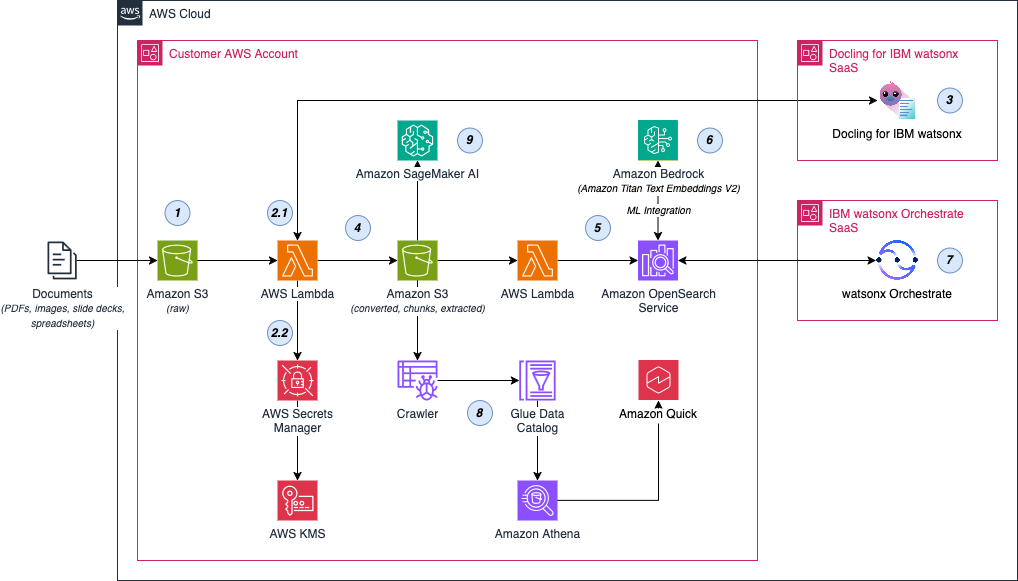
Figure 1. Enterprise document processing architecture with Docling for IBM watsonx on AWS.
Documents flow from Amazon S3 through AWS Lambda to Docling, which produces structured, pre-chunked outputs. Those chunks are indexed in Amazon OpenSearch Service. OpenSearch generates the embeddings through an Amazon Bedrock integration, and AI agents built on IBM watsonx Orchestrate retrieve relevant content at runtime.
The same structured output also feeds business intelligence, cataloged with AWS Glue, queried with Amazon Athena, and visualized in Amazon Quick through its Amazon Quick Sight capability, and custom machine learning with Amazon SageMaker AI.
Preparing and indexing enterprise documents
The following numbered steps correspond to the labels seen in Figure 1:
- Equipment manuals reside in Amazon S3, which serves as the enterprise document repository. New files arrive under a
raw/prefix. - An Amazon S3 event notification on the
raw/prefix invokes an AWS Lambda function. The function calls the Docling for IBM watsonx REST API using an asynchronous submit-poll-retrieve flow. It submits the document, polls for completion, and retrieves the result. The Docling API key and connection endpoint information are stored in AWS Secrets Manager and encrypted with AWS Key Management Service (AWS KMS). For larger or multi-stage workloads such as validation, indexing, and monitoring, AWS Step Functions can orchestrate the pipeline instead of a single function. - Docling converts each document into structured Markdown, JSON, or HTML, preserving headings, tables, figures, reading order, and document hierarchy, and it produces structure-aware chunks that keep tables whole and section context intact.
- The Lambda function writes these outputs back to Amazon S3 under processed prefixes (for example,
converted/for the full documents andchunks/for the retrieval-ready chunks). - A second AWS Lambda function (the ingestion step) reads the chunk files from the S3
chunks/prefix and bulk-indexes their text into an Amazon OpenSearch Service managed domain. - OpenSearch generates the vector embeddings through an ingest pipeline that calls Amazon Titan Text Embeddings v2 via an Amazon Bedrock connector. The same model embeds each chunk at index time and the user’s query at search time, so both sides share one embedding space. OpenSearch supports vector, lexical, and hybrid search, and because Docling preserved structure before chunking, the indexed segments keep their context and retrieval accuracy improves.
Powering AI agents with structured knowledge
With enterprise documents chunked, embedded, and indexed in Amazon OpenSearch Service, AI agents query that knowledge base at runtime to retrieve relevant, grounded content for each request.
- AI agents on IBM watsonx Orchestrate. In watsonx Orchestrate, you create a knowledge base using the Agent Development Kit (ADK) and configure it to connect to the OpenSearch index that holds the Docling chunks. The knowledge base runs hybrid search over the index. You then create an AI agent and attach the knowledge base to it. Because OpenSearch handles embedding on both sides, no separate embedding model is needed in watsonx Orchestrate. When a field engineer asks how to replace a hydraulic pump, the agent retrieves the specific procedure, table specifications, and safety warnings from the indexed manuals. The agent can also orchestrate follow-on actions such as scheduling maintenance or escalating an issue.
Extending the architecture
The same structured outputs support additional workflows beyond agent retrieval:
- Business intelligence and discovery.An AWS Glue crawler scans the Docling JSON in the S3 processed location (for example,
converted/) and registers its schema as tables in the AWS Glue Data Catalog. Amazon Athena then runs SQL directly against those Docling outputs in S3 using the catalog. Amazon Quick is an AI-powered service for analytics, automation, research, and application building. Through its Amazon Quick Sight business intelligence capability, it connects to the Athena tables to build dashboards and visualizations over the document data. This cataloged data is not limited to dashboards. The same source can feed other Amazon Quick capabilities, such as grounding Amazon Quick agents and research through Amazon Quick Index. - Custom machine learning. Because Docling’s outputs sit in Amazon S3 as structured files, Amazon SageMaker AI can read them directly from S3. For example, a SageMaker training job or Studio notebook pulls the converted JSON files and uses them as training data for document classification, fine-tuning, and other Natural Language Processing (NLP) tasks. The preserved document hierarchy, metadata, and semantic structure make feature engineering simpler and the training labels more reliable.
Pricing
Docling for IBM watsonx is priced at USD $4 per 1,000 pages processed, with no minimum commitment required.
Getting started
Docling for IBM watsonx is available through AWS Marketplace.
To get started:
- Subscribe to Docling for IBM watsonx from AWS Marketplace.
- Connect your Amazon S3 document repository.
- Process enterprise documents through the managed API.
- Feed the structured outputs into Amazon OpenSearch Service, Amazon S3 Vectors, or your preferred AI pipeline.
Conclusion
In this post, you learn how Docling for IBM watsonx converts unstructured enterprise documents into structured, AI-ready data. By preserving document structure, tables, and metadata during conversion, you can build RAG pipelines with richer context, and support AI agent workflows on AWS.
To get started with Docling, subscribe through AWS Marketplace. You can process your first documents within minutes and connect the output to your existing AWS data and AI pipelines.
Additional resources
AWS Marketplace:
Related blog posts:
- Build AI agents with IBM watsonx Orchestrate ADK and Kiro on AWS
- Integrating Kiro with IBM MCP Servers: watsonx Orchestrate, Instana, and Beyond