AWS for Industries
Deploy diagnostic-quality imaging globally with MedDream and AWS HealthImaging
When you need to review a complex breast tomosynthesis study containing hundreds of medical images, every second counts. Traditional PACS infrastructure often struggles with storing petabyte-scale imaging data while delivering instant access across distributed care teams. If your organization faces mounting pressure to modernize imaging infrastructure as study volumes grow, you know that legacy systems require significant capital investment, complex maintenance, and often fail to deliver consistent performance across multiple locations.
MedDream and Amazon Web Services (AWS) have collaborated to address these challenges with a cloud-native solution. By combining MedDream’s FDA-cleared diagnostic viewer with AWS HealthImaging and automated AWS Cloud Development Kit (AWS CDK) deployment, you can deploy a complete, production-ready medical imaging solution in under an hour—achieving sub-second loading times and reducing storage costs by up to 40% compared to on-premises infrastructure.
Solution components
The MedDream-AWS HealthImaging integration delivers a complete medical imaging workflow through several interconnected components:
- AWS HealthImaging: Petabyte-scale DICOM storage with HTJ2K (High-Throughput JPEG 2000) optimization, reducing storage requirements by 20–40% while enabling faster image retrieval
- Amazon CloudFront: Global content delivery network providing sub-second image delivery through 410+ edge locations worldwide
- MedDream HTML5 Viewer: Zero-footprint diagnostic viewer with FDA clearance for diagnostic use and CE Class IIb certification
- MedDream Proxy Service: Secure authentication layer ensuring only authorized users can access imaging data from AWS HealthImaging without exposing AWS credentials to the browser
- Custom DICOM Uploader: React-based interface enabling validated file uploads directly to AWS HealthImaging
- AWS CDK Deployment: Infrastructure as code approach automating the provisioning of approximately 40 AWS resources with consistent, repeatable configuration
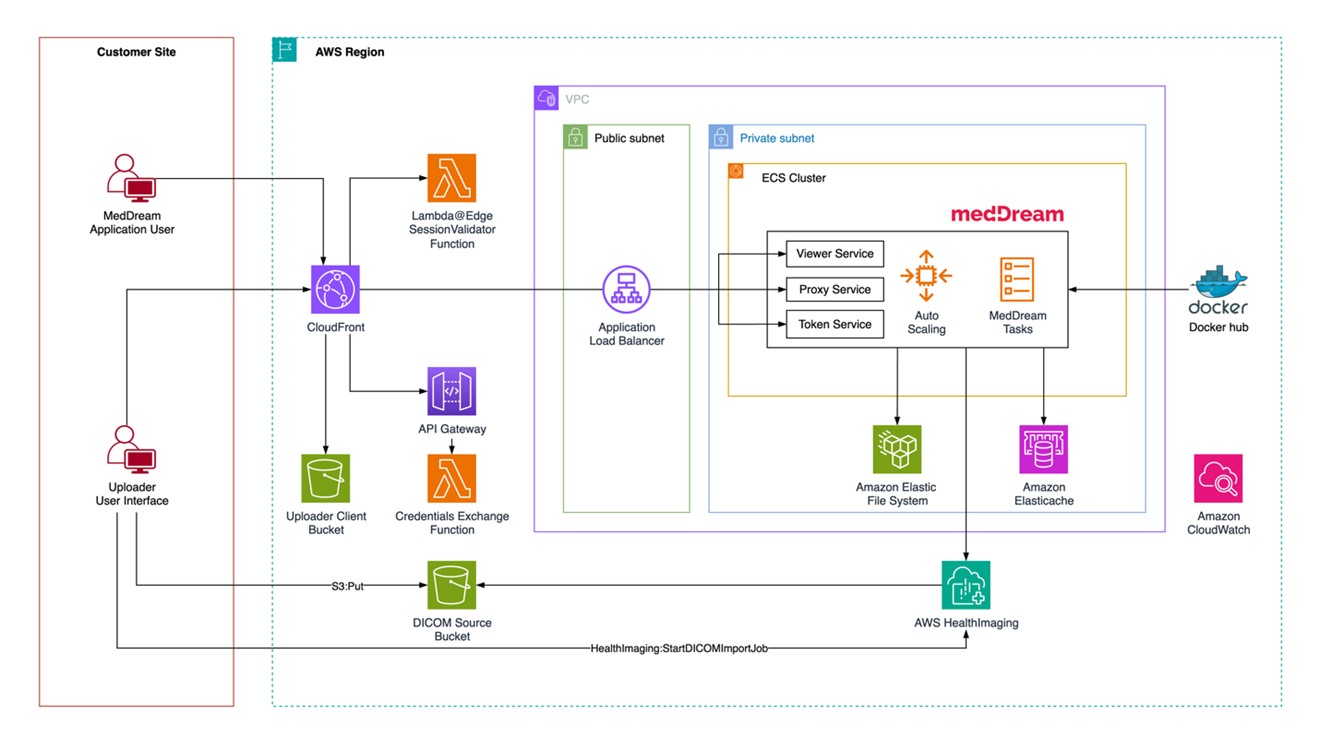
Figure 1: MedDream solution implementation diagram
Architecture innovation: Direct HTJ2K streaming
A key architectural advancement in this integration is the elimination of traditional image pre-processing. Many DICOM viewers rely on caching layers that pre-process images into web-friendly formats, or use protocols not optimized for progressive loading over the internet. MedDream takes a different approach—streaming HTJ2K-encoded frames directly from AWS HealthImaging to the browser.
AWS HealthImaging stores DICOM images natively in HTJ2K format, which is inherently optimized for web streaming. When you open a study, the MedDream viewer makes multiple parallel API calls to AWS HealthImaging, requesting specific image frames. These frames arrive directly in the browser without intermediate processing, enabling:
- Sub-second initial image display through progressive loading
- Efficient bandwidth utilization by transferring only requested frames
- Parallel frame retrieval maximizing throughput for large studies
- Consistent performance without dependency on cache state
Multiple viewer instances can stream from AWS HealthImaging independently without competing for shared resources. Every image request delivers consistent performance, whether the study was last accessed seconds or months ago. For complex studies like breast tomosynthesis with hundreds of frames, this parallel streaming architecture enables smooth, responsive viewing with initial frames displaying in under a second—performance that matches or exceeds traditional PACS systems.
Intelligent storage management
AWS HealthImaging provides automatic data lifecycle management through intelligent tiering, delivering cost optimization without operational overhead. After import, image sets begin in the Frequent Access Tier. After 30 consecutive days without access, they automatically transition to the Archive Instant Access Tier.
Critically, there is no performance difference between these tiers—both provide the same sub-second latency for image retrieval. This eliminates the traditional trade-off between cost optimization and clinical accessibility. You get instant access to all imaging data regardless of age or access patterns, while benefiting from automatic cost reduction on infrequently accessed studies.
This intelligent tiering operates transparently based on API usage patterns, requiring no manual intervention, capacity planning, or lifecycle policy management.
Solution architecture
The architecture combines serverless components, container orchestration, and global content delivery to provide diagnostic-quality image viewing with enterprise-grade security and high availability.
Core architecture components
User-facing layer — The solution delivers the MedDream HTML5 viewer through Amazon CloudFront, providing low-latency access from any location. A custom React-based DICOM uploader interface enables secure file validation and direct upload to AWS HealthImaging. AWS Lambda@Edge validates user sessions before serving content, ensuring security without compromising performance.
Application services — Amazon Elastic Container Service (Amazon ECS) orchestrates three containerized MedDream services across multiple availability zones: the Viewer Service (HTML5 diagnostic interface), the Proxy Service (communication with AWS HealthImaging APIs), and the Token Service (authentication and authorization). An Application Load Balancer distributes traffic with health checking, while Amazon ElastiCache for Valkey maintains centralized session state.
Storage and image management — AWS HealthImaging serves as the core service for storing and serving DICOM images as optimized image sets. Amazon Simple Storage Service (Amazon S3) buckets support data import functions, including event-based integration with AWS Lambda to trigger import jobs. Amazon Elastic File System (Amazon EFS) provides shared file storage for the MedDream application running on ECS, enabling concurrent access across all container instances.
Security architecture — The solution implements security at multiple layers: an Amazon VPC isolates services across public, private, and isolated subnets; security groups control traffic with least-privilege access; AWS Secrets Manager stores credentials securely; and AWS Identity and Access Management (IAM) roles enforce least-privilege permissions for each component. All data is encrypted in transit (TLS 1.2+) and at rest using AWS-managed encryption keys.
Data flow
Image viewing — You access the application through the CloudFront distribution URL. Lambda@Edge validates your session, then CloudFront routes requests to the Application Load Balancer. The MedDream Proxy Service communicates with AWS HealthImaging APIs to retrieve image metadata and frames, delivering optimized HTJ2K-encoded frames through the viewer. The MedDream Viewer renders diagnostic-quality images in the browser with full DICOM compliance.
Image upload — After authenticating through the MedDream viewer interface, you access the uploader and select DICOM files or folders. Files are validated client-side and uploaded to S3 via pre-signed URLs. A Lambda function triggers an AWS HealthImaging import job, which processes and optimizes DICOM data into image sets. Imported studies become immediately available in the viewer without additional indexing or cache warming.
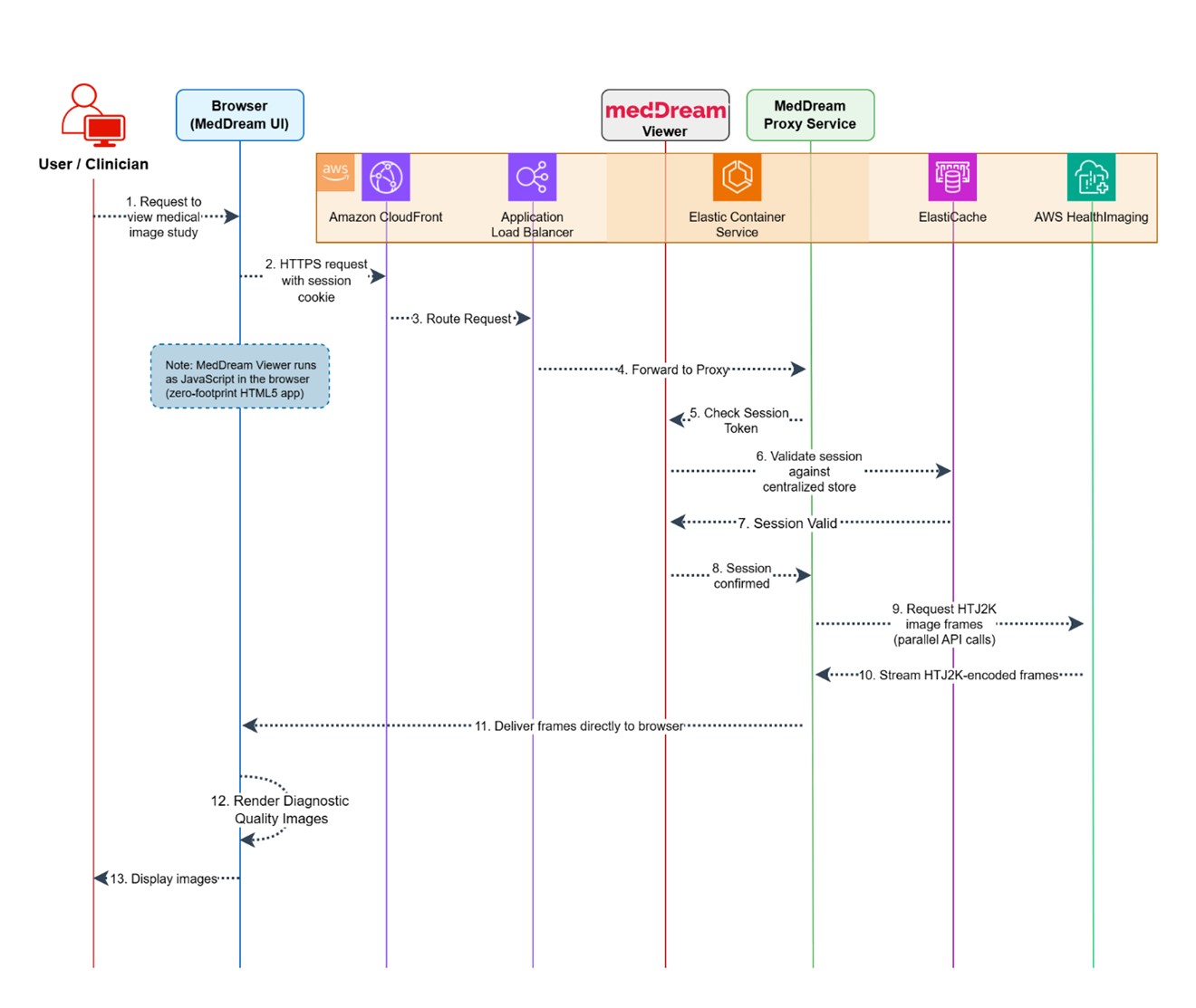
Figure 2: Web access to medical images
High availability configuration
The solution supports both single-AZ deployment (for development and testing) and multi-AZ deployment (for production). The multi-AZ configuration distributes 6 ECS tasks across availability zones (2 per service), configures an ElastiCache Valkey cluster with automatic failover, enables EFS with automatic backups, and provides fault tolerance against zone failures with automatic recovery.
ECS services scale horizontally based on CPU and memory utilization, CloudFront absorbs traffic spikes globally, AWS HealthImaging scales automatically to petabyte capacity, and Amazon API Gateway with Lambda functions scale elastically for authentication traffic.
Implementation walkthrough
Deploying the MedDream-AWS HealthImaging integration is streamlined through AWS CDK, enabling you to implement the solution with minimal effort.
Prerequisites
Before deployment, your environment should meet these requirements:
AWS account access
- Administrator or PowerUser access to an AWS account
- AWS CLI installed and configured with appropriate credentials
- AWS CDK CLI installed (v2.x):
npm install -g aws-cdk - Node.js 18.x or later
CDK bootstrap — Your AWS account must be bootstrapped for CDK in both your target region AND us-east-1 (required for Lambda@Edge):
# Bootstrap your target region
cdk bootstrap aws://ACCOUNT-NUMBER/us-east-1

# If deploying to a different region, also bootstrap that region
cdk bootstrap aws://ACCOUNT-NUMBER/your-target-region
Region selection — AWS HealthImaging is available in US East (N. Virginia), US West (Oregon), Asia Pacific (Sydney), Europe (Ireland), and Europe (London). Choose a supported region for your deployment.
Deployment steps
Step 1: Clone and setup
git clone https://github.com/meddream/aws-healthimaging-dicom-viewer
cd aws-healthimaging-dicom-viewer

# Install root dependencies
npm install

# Install infrastructure dependencies
cd infrastructure
npm install
Step 2: Configure deployment
Edit infrastructure/bin/cdk.ts to set your deployment parameters:
const STACK_NAME = "meddream89";          // Unique name, under 47 characters
const ENABLE_MULTI_AZ = false;             // Set to true for production
const IMPORT_SAMPLE_DATA = false;          // Set to true to import sample DICOM data
const DEPLOY_UPLOADER = true;              // Deploy the uploader interface
Step 3: Deploy
Run the following commands in the infrastructure/ directory:
# Preview what will be deployed (optional)
cdk diff --all

# Deploy all stacks
cdk deploy --all
Expected deployment time: 25–35 minutes.
Step 4: Verify and access
After deployment, the CDK outputs provide your CloudFront URL (application endpoint) and Admin Secret ARN (retrieve the admin password from AWS Secrets Manager). Navigate to the CloudFront URL and log in with the admin credentials to access the MedDream viewer.
Production considerations
For production deployments, we recommend:
- Enable multi-AZ: Set
ENABLE_MULTI_AZ = truefor high availability - Configure HTTPS: Set up TLS between CloudFront and the Application Load Balancer using your own domain and certificate
- Update environment tags: Change the Environment tag from “Development” to “Production”
- Enable VPC Flow Logs: Set
ENABLE_VPC_FLOW_LOGS = truefor network monitoring
Performance and benefits
The MedDream-AWS HealthImaging integration delivers measurable improvements across key operational dimensions:
- Sub-second image loading for standard studies through parallel HTJ2K streaming and CloudFront edge delivery
- Up to 40% storage cost reduction through HTJ2K compression and HealthImaging automatic tiering
- Under 35 minutes to deploy a complete production-ready environment via CDK automation
- Zero infrastructure management — AWS HealthImaging scales automatically from gigabytes to petabytes
- Global accessibility — CloudFront’s 410+ edge locations provide consistent performance worldwide
Security and compliance
The solution addresses healthcare security requirements through multiple layers: network isolation via VPC, least-privilege IAM policies, encryption at rest and in transit, and session validation at the edge. MedDream’s FDA clearance and CE Class IIb certification support regulatory compliance for diagnostic use.
Use cases and applications
This integration supports several clinical and operational scenarios:
Multi-site radiology — Distributed imaging networks benefit from centralized cloud storage with edge-delivered viewing. Radiologists at any location get consistent sub-second performance without maintaining local PACS infrastructure at each site.
Teleradiology — Remote reading workflows benefit from the zero-footprint HTML5 viewer and CloudFront’s global delivery. Studies load quickly regardless of the reader’s location relative to the data center.
Research and AI pipelines — AWS HealthImaging’s API-native architecture enables direct integration with research workflows and AI/ML pipelines, providing programmatic access to imaging data without complex DICOM networking configurations.
Digital pathology — Beyond radiology, MedDream viewer and AWS HealthImaging also support digital pathology workflows, storing whole slide images with sub-second access and enabling AI-powered analysis pipelines. To learn more, see Revolutionizing healthcare with AI-driven digital pathology.
Cleaning up
To avoid incurring future charges, delete the deployed resources when you no longer need them:
cd infrastructure
cdk destroy --all
This removes all AWS resources created by the CDK stack, including the HealthImaging datastore and all stored images. Make sure to export any data you want to keep before running this command.
Conclusion and next steps
In this post, we showed how MedDream and AWS HealthImaging together deliver a cloud-native medical imaging solution that you can deploy in under an hour. The combination of FDA-cleared diagnostic viewing, automated CDK deployment, and intelligent cloud storage addresses the core challenges of modern medical imaging infrastructure.
To get started:
- Deploy the solution from the GitHub repository
- Review the AWS HealthImaging documentation
- Learn more about AWS healthcare solutions
- Contact the MedDream team for integration support and licensing
We’d love to hear about your experience. If you have questions or feedback, leave a comment on this post.